Free Twitter Analytics — A Working Setup at $0/month
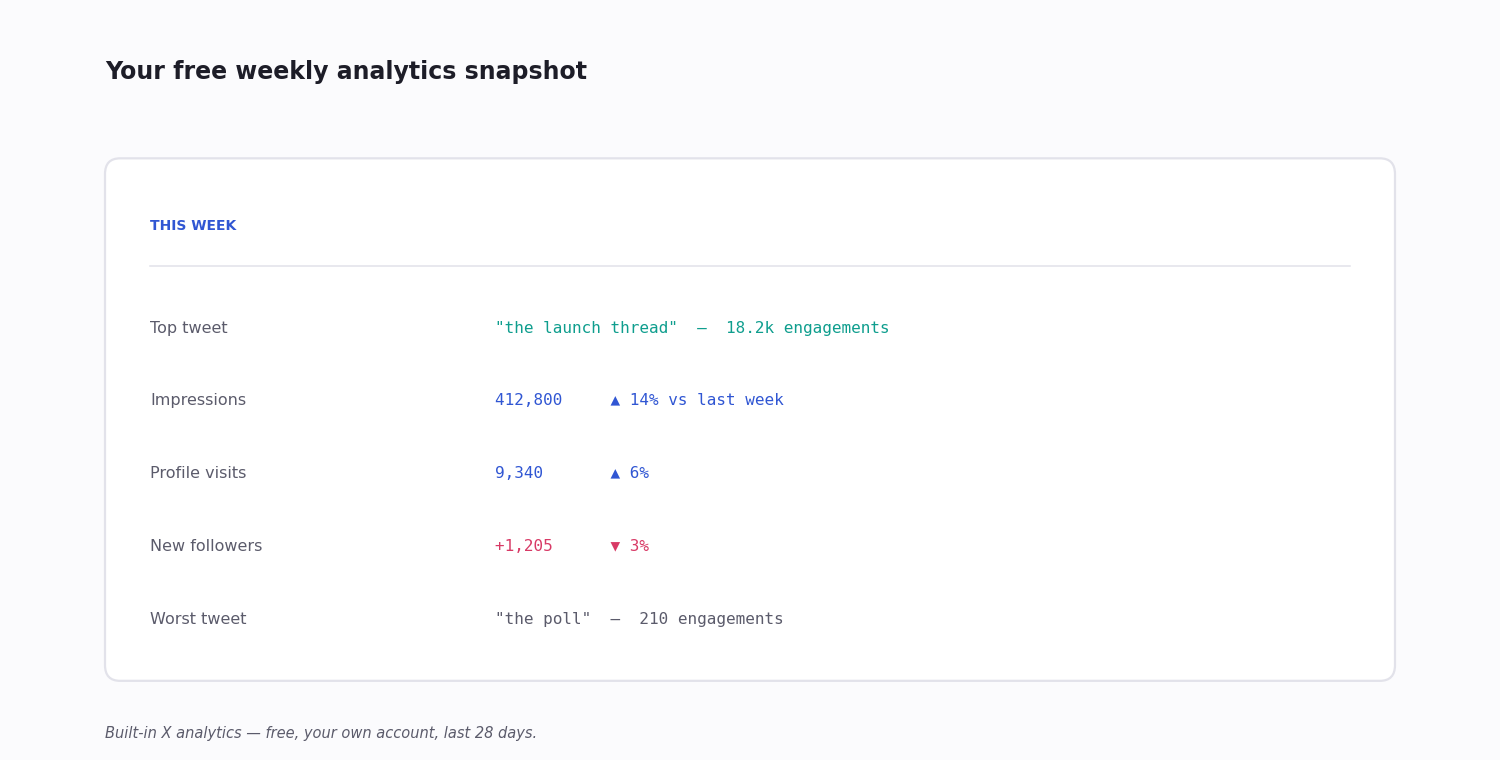
Twitter (X) analytics does not have to cost anything to be genuinely useful. The dashboard built into your own profile is free, it shows recent performance for every post you publish, and for the everyday question of which posts are landing it is honestly enough. Beyond that, a handful of free third-party tools and a few manual techniques stretch the picture further than most people expect — with no card on file.
This page is a working zero-dollar Twitter analytics setup: what the built-in dashboard covers, which free third-party tools are worth your time and why so many of them keep shutting down, how to do real competitor analysis at $0 using only public pages, a weekly routine to tie it together, and an honest account of where the free path runs out.
What 'Free' Actually Covers
Free Twitter analytics is really three different things, and it helps to keep them separate.
Your own account — fully covered, free, by the built-in dashboard. No tool needed.
The public conversation — partly free: X's own advanced search lets you query top-performing posts on any topic at no cost, and a competitor's public profile can be read directly.
Automation and scale — not free. The moment you want to track many accounts on a schedule, keep unlimited history, or monitor mentions in real time, you are into paid territory — and that is where the API comes in.
The rest of this page works through each, starting with the one that costs nothing and needs no setup.
The Built-In X Analytics (Free)
Open your profile, tap the bar-chart icon on any of your posts, or go to the analytics tab. For free, on your own account, you get:
Per-post metrics — impressions and engagements (likes, reposts, replies, profile clicks, link clicks, hashtag clicks) for each post, across a recent window of roughly the last month.
Account summary — total impressions, profile visits and new followers for the period, plus a top-post pick.
Audience snapshot — rough, sampled breakdowns of follower interests, gender and location.
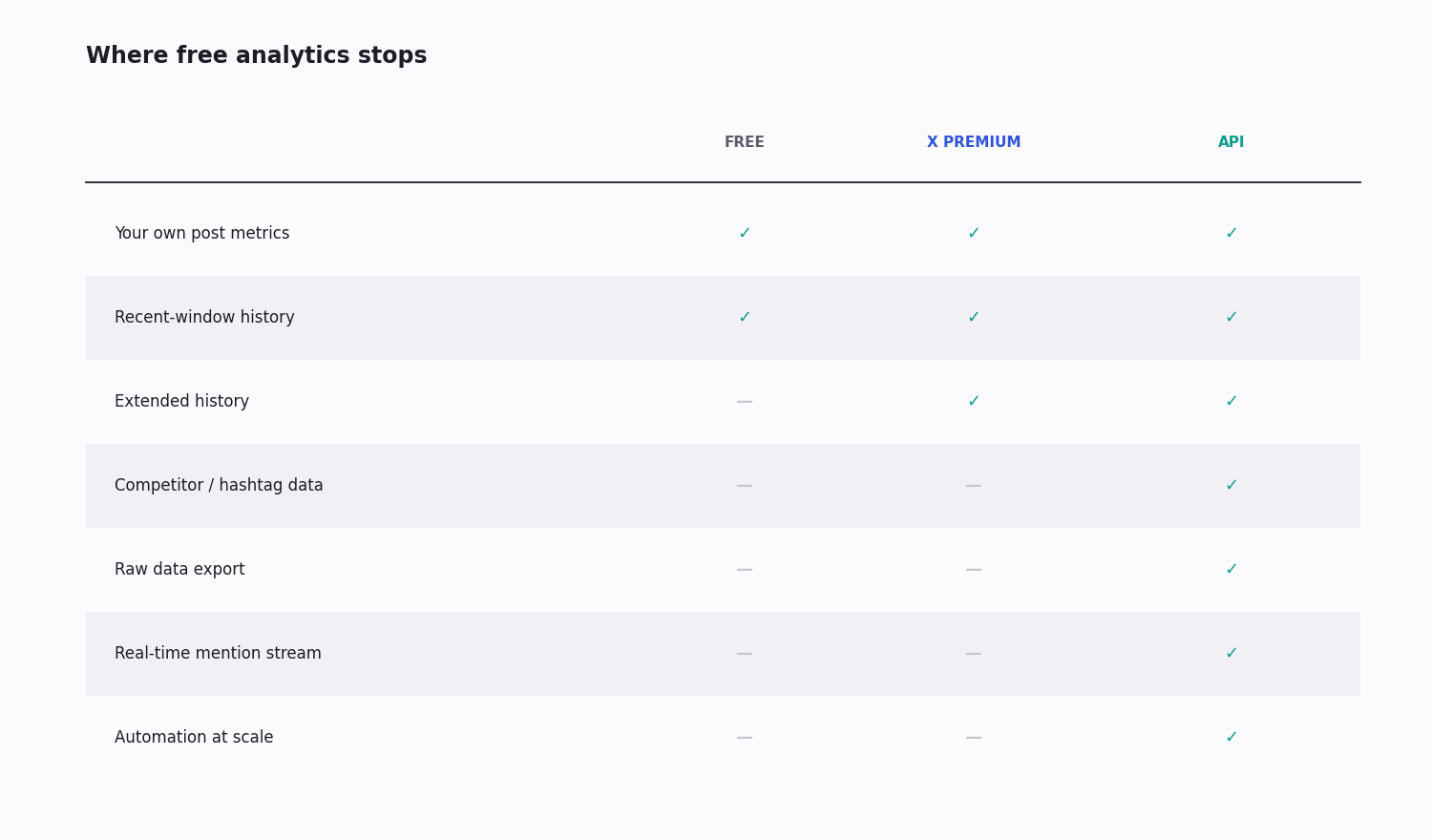
What it does not give you: long history, any data on accounts you do not own, raw data export, or precise audience detail. A paid X Premium subscription extends the history somewhat; everything else on that list needs the API. For your own account, kept casually, the free dashboard is genuinely sufficient.
Free Third-Party Tools — and Why They Keep Disappearing
There is a category of free third-party Twitter-analytics tools, but it is unusually unstable, and that instability is worth understanding before you build a routine on any single one.
Why they churn: when X restructured its API and raised costs, the tools that depended on cheap data access could not absorb the bill. TweetReach, a long-running free reach-report tool, shut down for exactly this reason — and it was not the only one. Any free analytics tool is, in effect, absorbing an API cost on your behalf, and that is a fragile business model.
What currently survives: Followerwonk (now part of the Fedica platform) keeps a free tier for follower-list analysis — bio search, comparing two accounts' followers, activity and location breakdowns. General scheduling tools such as Buffer include a free tier with basic post analytics. Newer follower-tracking tools (Unfollr and similar) cover follows and unfollows.
How to evaluate one before you depend on it: check when it was last updated, whether it still mentions current X/API terminology, and whether its free tier is described in specifics rather than vague promises. And never make a free third-party tool the only place a number lives — if it vanishes, your history vanishes with it.
X Advanced Search — Free, and It Doesn't Churn
The single most durable free analytics tool is one X gives you directly: advanced search, at the search bar or x.com/search-advanced.
It is not labelled "analytics," but it does the job. Filter by min_faves: and min_retweets: to surface the top-performing posts on any topic or from any account; add since: and until: for a date window; add from: to scope to one account.
from:competitor min_faves:200 -filter:replies is, in effect, a free "their best posts" report. "your brand" -filter:retweets min_faves:5 is a free brand-mention monitor. It costs nothing, it is not going to be acquired or shut down, and it works on any public account — which makes it the backbone of a free analytics routine.
Free Competitor Analysis Without Any Tool
Competitor analytics looks like it has to be paid. A surprising amount can be done from public web pages alone:
1. Read the profile. Follower count, following count, and posting frequency are all visible on a competitor's public profile. The ratio of followers to following, and how often they post, already tells you something.
2. Score their recent posts. Scroll their last roughly thirty posts and count how many cleared a real engagement bar — say fifty engagements. That "hit rate" is a rough but honest read on whether their audience is genuinely engaged or just large.
3. Read who engages them. Likes and reposts are public. Skim the bios of the accounts engaging a competitor's top posts — it tells you what audience their content actually pulls, which is often not the audience they think they are reaching.
4. Find their inbound. Advanced search for posts that @-mention them or share their links — that is their effective word-of-mouth.
Run for three to five competitors weekly, this is more useful than most paid dashboards, and it costs nothing but time.
A $0/month Weekly Routine
A concrete routine that ties the free pieces together:
Your account — open the built-in dashboard; note last week's best post, worst post, and total impressions versus the week before.
Your audience — run a free follower-analysis tool on yourself; note whether the makeup of your top followers has shifted.
Competitors — a manual walk-through of three competitors, a few minutes each: their top posts this week, rough total engagement, any new themes.
Your mentions — advanced search for replies and mentions of your handle in the last week; see who is discussing you.
A topic — optionally, an advanced-search pass on a hashtag or topic you care about, ranked by engagement.
Total time is roughly an hour a week, the cost is zero, and it is enough to make data-informed decisions for most accounts below the scale where automation becomes necessary.
Where Free Runs Out
Free has predictable walls:
Volume — running the manual competitor routine on twenty-plus accounts every week takes hours. Past a handful of accounts, you need automation, and automation needs the API.
History — the built-in dashboard's window is short. Anything older needs an X Premium subscription, or your own stored data via the API.
Real-time — free tools refresh once or twice a day at best. Monitoring mentions or a hashtag as posts happen needs an API filter rule.
Export and joins — the moment you need the raw numbers in a spreadsheet or joined against your own data, the free dashboards (which have no export) stop being enough.
Hit any of these and the next step is a paid one — but a modest one.
The First Paid Step
When free runs out, the upgrade is small — this is not a jump to an enterprise contract.
For more history on your own account, an X Premium subscription extends the built-in dashboard's window. If your need is only "see further back on my own posts," that is the cheapest fix.
For automation, competitor tracking at scale, or real-time monitoring, a third-party pay-per-call API is the step up. At about $0.15 per 1,000 tweets and no subscription, a small monthly budget covers a serious tracking routine — a $5 credit alone is roughly 33,000 tweet reads.
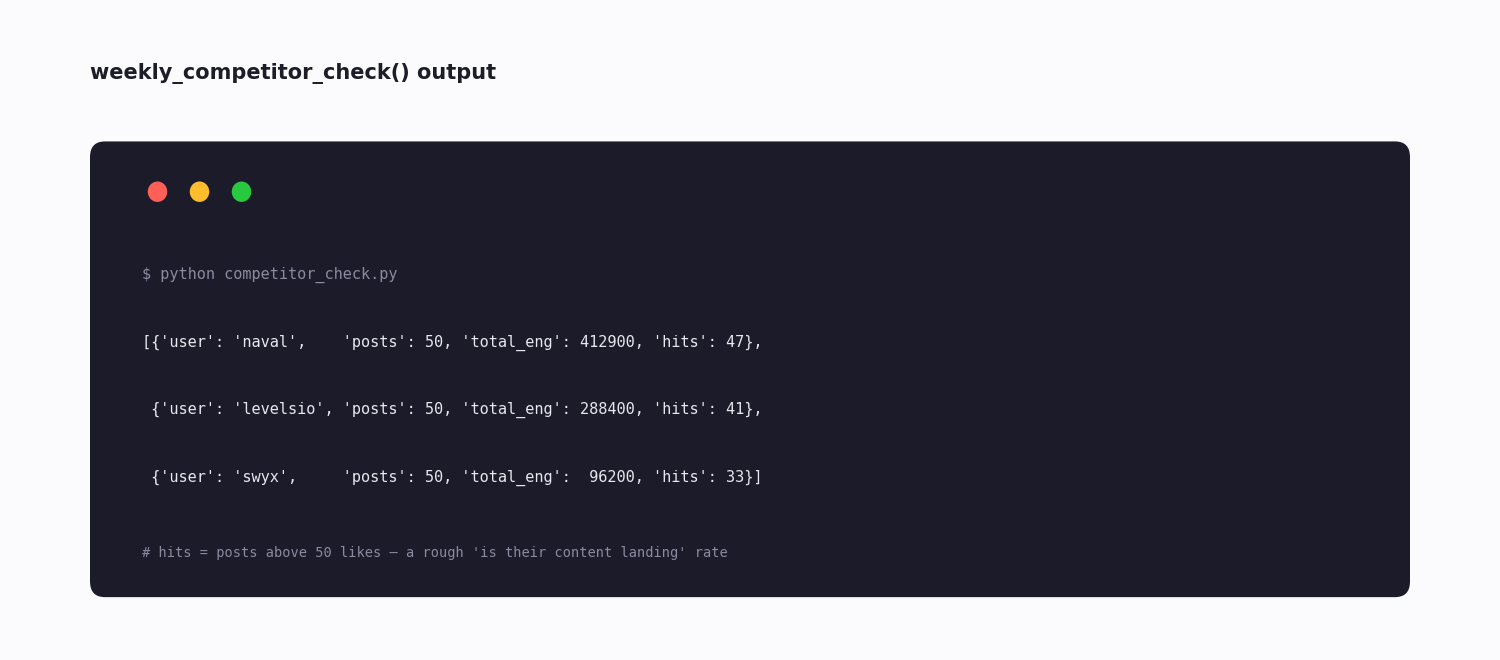
The code snippet below is the bridge: when the manual weekly routine outgrows free, it is the same competitor check, automated. Most individual creators never need to cross this line; agencies and brand teams cross it quickly.
# When you outgrow free: the manual competitor routine, automated.
import requests

API_KEY = "your_twitterapi_io_key"
HEADERS = {"X-API-Key": API_KEY}

def recent_tweets(username, max_count=50):
    """Pull a user's most recent posts, paginating until max_count."""
    out, cursor = [], ""
    while len(out) < max_count:
        params = {"userName": username}
        if cursor:
            params["cursor"] = cursor
        r = requests.get(
            "https://api.twitterapi.io/twitter/user/last_tweets",
            params=params,
            headers=HEADERS,
            timeout=15,
        )
        r.raise_for_status()
        body = r.json()
        out.extend(body["data"]["tweets"])
        if not body["has_next_page"]:
            break
        cursor = body["next_cursor"]
    return out[:max_count]

def weekly_competitor_check(usernames):
    rows = []
    for u in usernames:
        tweets = recent_tweets(u, max_count=50)
        eng = sum(t["likeCount"] + 2 * t["retweetCount"] for t in tweets)
        hits = sum(1 for t in tweets if t["likeCount"] > 50)
        rows.append({"user": u, "posts": len(tweets), "total_eng": eng, "hits": hits})
    return rows

print(weekly_competitor_check(["naval", "levelsio", "swyx"]))
Questions readers ask
Is Twitter analytics free for your own account?
Yes. Anyone with a Twitter/X account can see analytics for their own posts in the analytics tab — a recent window of impressions and engagement, at no cost. The data is real and reasonably complete for personal use; what it lacks is long history, export, and any data on accounts you do not own.
What's the best free Twitter analytics tool?
X's own built-in dashboard for your account, and X advanced search for the public conversation — both are free, and both are part of X itself rather than a third party that might vanish. Among free third-party tools, follower-analysis tools (Followerwonk, now part of Fedica) and the free tiers of scheduling tools are the most useful, but treat any third-party tool as something that may disappear.
Why do free Twitter analytics tools keep shutting down?
Because a free analytics tool absorbs an API data cost on your behalf. When X restructured its API and raised data prices, tools built on cheap access could not cover the bill — TweetReach is one well-known example that closed. Build your routine on things that do not churn (the built-in dashboard, advanced search, manual analysis) and treat third-party tools as a bonus.
Can I get free analytics on competitor accounts?
Yes, manually. A competitor's follower count, posting frequency, recent post engagement and the bios of who engages them are all public. Doing this for three to five competitors weekly takes fifteen to twenty minutes and costs nothing — no tool required. Automating it for many accounts is what needs a paid API.
How far back does free Twitter analytics go?
The built-in dashboard shows only a short recent window. A paid X Premium subscription extends it. For history beyond that — or a trend line of any length — you collect and store the data yourself through an API from the day you start; the free dashboards keep no archive you can reach.
When should I upgrade from free Twitter analytics?
Upgrade when you need one of: more history on your own account (an X Premium subscription), automation or tracking beyond a handful of accounts (a third-party API, a small pay-per-call budget), or real-time mention monitoring (an API filter rule). Most individual creators can run permanently on the free tier; agencies and brand teams outgrow it quickly.
Is X advanced search really a free analytics tool?
Effectively, yes. It is not labelled analytics, but from:account min_faves:200 surfaces an account's best posts, and a brand term with an engagement floor surfaces real mentions — both for free, on any public account, with nothing a third party can take away. It is the most durable free option there is.
Do I need to log in to see a competitor's public analytics?
Most public profile data — follower counts, post frequency, recent engagement numbers — is visible without logging in. Some views and advanced-search features work better while signed in to a normal free account. Either way, no payment and no special access is required to read what is public.
Continue
- /twitter-scraper
- /blog/twitter-analytics
- /blog/twitter-api-cost
- /blog/twitter-api-with-python
- /blog/search-a-tweet
- /pricing
Stop reading. Start building.
Starter credits cover real testing on real data. Google sign-in, no card, no application queue.
Get an API key