ScraperAPI Pricing in 2026: Plans, Credit Costs, and What It Means for Twitter (X) Data
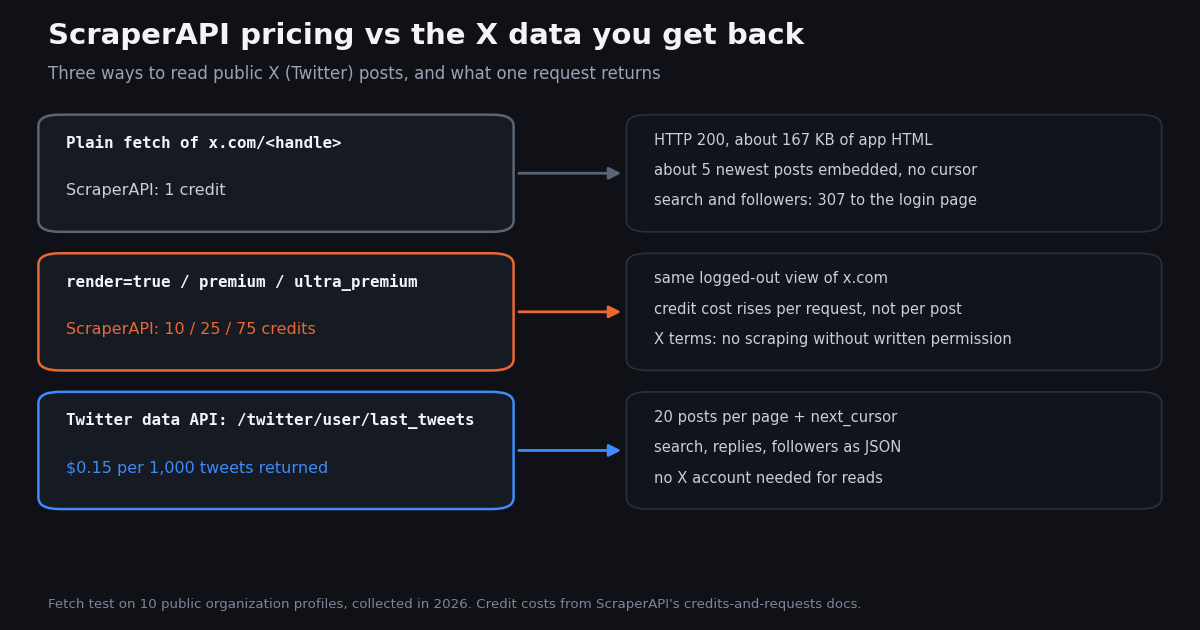
- ScraperAPI plans: Hobby $49/month (100K credits), Startup $149 (1M), Business $299 (3M), Scaling $475 (5M), Professional $975 (10.5M), Advanced $1,975 (21.5M), Enterprise custom. Annual billing saves 10%.
- Credit multipliers decide the bill: 1 credit plain, 10 for
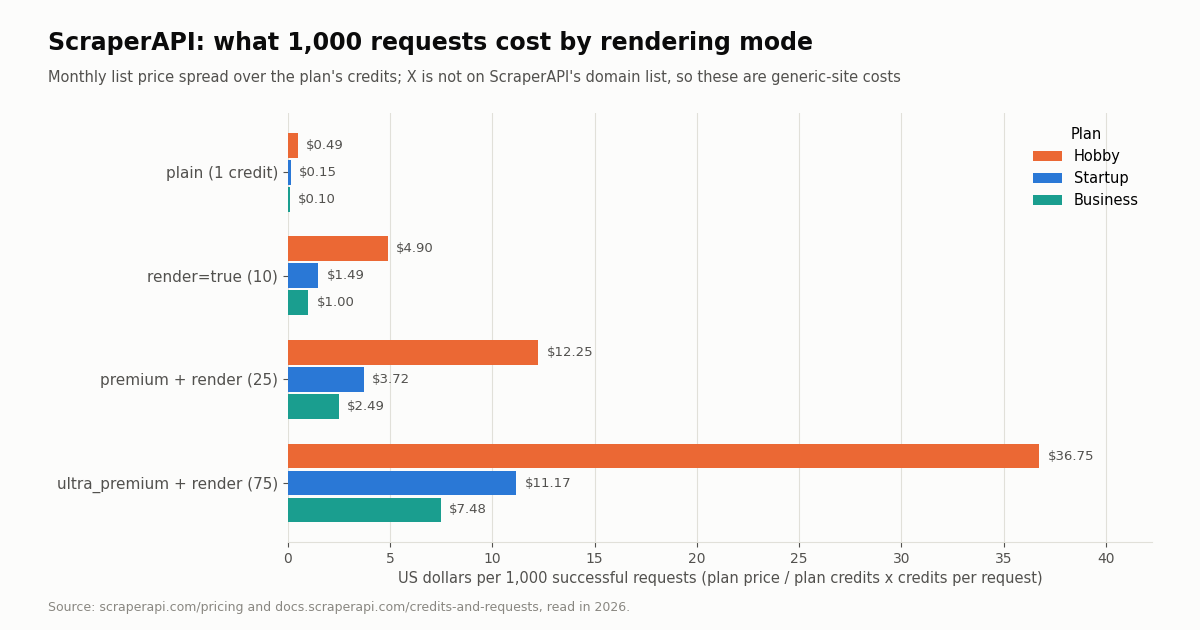
render=trueorpremium=true, 25 for both, 75 forultra_premium=truewith rendering. Google/Bing 25, LinkedIn 30, Amazon/Walmart/eBay 5. - On the Hobby plan that is $0.49 per 1,000 plain requests and $36.75 per 1,000
ultra_premium+ render requests, worked out from the list price; the Business plan brings the same two to $0.10 and $7.48. - ZenRows, Scrapfly, Decodo and Oxylabs use the same idea with different multipliers: ZenRows 5 credits for JS and 25 for JS plus premium proxies, Scrapfly 5+ for JS and 25+ for residential, Decodo includes rendering in a per-request price from $0.14 to $0.15 per 1,000, Oxylabs bills per 1,000 results.
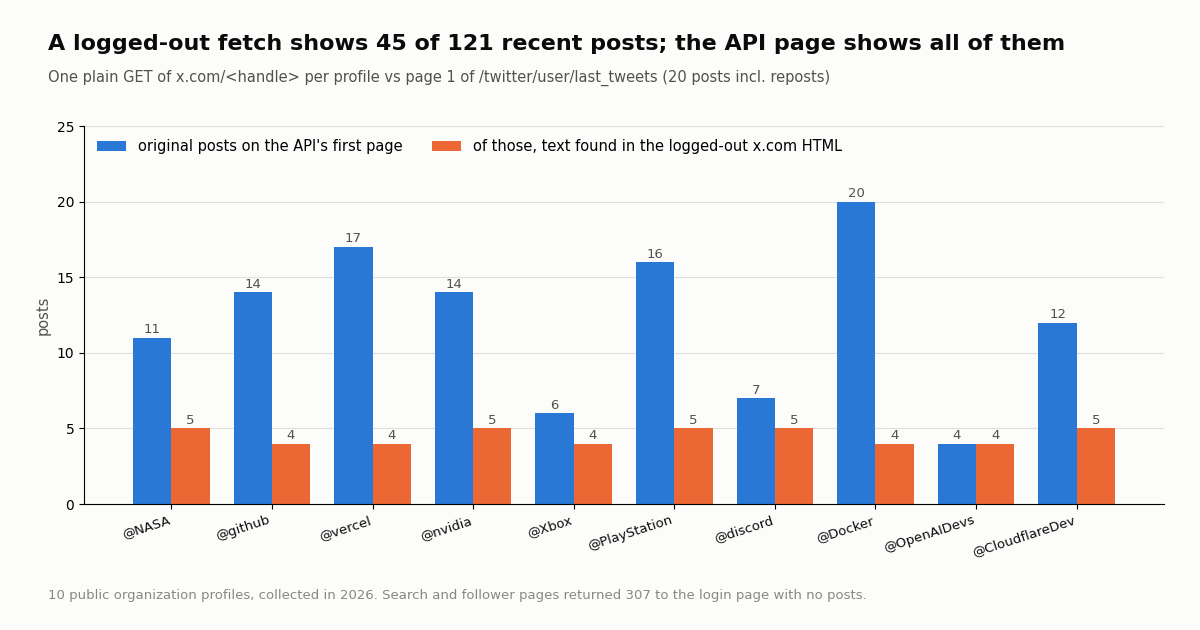
- For X (Twitter) data, a generic scraper buys you the logged-out page: in our fetch test of 10 organization profiles, the HTML held 45 of the 121 recent original posts the API returned, and search and follower URLs answered 307 to the login page.
- The API route bills per result: TwitterAPI.io charges $0.15 per 1,000 tweets returned against $5 per 1,000 post reads on X's pay-per-usage rate card, about 33x less. Our 960-tweet study cost $0.14 in tweets; the same reads on X's rate card would be $4.80.
ScraperAPI sells web scraping as a single HTTP endpoint: you pass it a URL, it fetches the page through its proxy pool (optionally in a headless browser) and returns the HTML. You pay for that with API credits bundled into monthly plans. The plans are easy to read; the credit multipliers are where most of the cost hides, because one request can cost 1 credit or 75 depending on the flags you set and the site you hit.
This page reads ScraperAPI's current pricing page and credit docs line by line, turns the multipliers into dollars per 1,000 requests for each plan, and puts ZenRows, Scrapfly, Decodo and Oxylabs next to it in compact sections (ScrapingBee gets one row). It does not cover general scraping-versus-API trade-offs (see our web scraping vs API guide) or a full list of Firecrawl-style tools (see our Firecrawl alternatives page). The last part is about one target in particular: X (Twitter). We fetched public x.com pages the way a 1-credit request would, counted what came back, and priced the API route next to it.
45 of 121 recent original posts across 10 organization profiles (about 5 per profile, no next page), collected in 2026. Search and follower pages redirected to login. The API returned all of them at $0.15 per 1,000 tweets.
ScraperAPI plans and prices in 2026
ScraperAPI lists six self-serve plans and an Enterprise tier on scraperapi.com/pricing. Prices are in US dollars. The annual price is the monthly equivalent when you pay for a year up front, which is 10% below the monthly price on every plan; on annual plans ScraperAPI hands you the whole year's credits at the start.
Geotargeting. Hobby and Startup are limited to US and EU exit locations; Business and above get country-level targeting. If your target serves different content per country, that alone can push you up two tiers.
Bonus credits. When we read the page, Professional carried a "+250K bonus credits" limited offer and Advanced "+500K". Treat those as promotions rather than part of the plan.
Trial and free plan. The pricing page offers a 7-day trial with 5,000 API credits and no credit card. After the trial, ScraperAPI's billing FAQ describes a free plan of 1,000 API credits a month with at most 5 concurrent connections. 1,000 credits is 1,000 plain requests, or 100 rendered ones.
Running out. By default scraping pauses until your credits renew. Hobby, Startup and Business can turn on auto-upgrade to the next plan; Scaling and Professional can choose auto-upgrade or pay-as-you-go at a fixed per-credit rate up to a monthly cap; Advanced and Enterprise use pay-as-you-go. ScraperAPI states a 7-day, no-questions-asked refund policy and lets you cancel from the dashboard.
How ScraperAPI credits work: the multipliers
Every request starts at 1 credit and goes up with each feature you switch on and with the domain you hit. The numbers below come from ScraperAPI's credits-and-requests documentation (docs.scraperapi.com/credits-and-requests). They are per request, and ScraperAPI says it only charges for successful requests, meaning HTTP 200 and 404 responses.
Domain categories. The docs list fixed per-request costs for some sites: e-commerce (Amazon, Walmart, eBay) 5 credits, search engines (Google and Bing, all subdomains) 25, and social media (LinkedIn) 30. X (Twitter) is not on that list. screenshot=true is 10 credits, and the five site-protection add-ons the docs list are 10 credits per scrape each.
Free parameters. country_code, session_number, device_type, wait_for_selector, output_format, keep_headers and autoparse add nothing.
Two billing details worth knowing. First, a request you cancel before ScraperAPI's 70-second window is up is still charged, because the service treats that window as the time it needs to finish. Second, discounted custom contracts carry a higher credit cost per request on ultra-premium domains, according to the same page. Every response carries an sa-credit-cost header, and the dashboard's domain multiplier tool (plus an account/urlcost endpoint) tells you the cost of a URL before you scale up.
The practical rule. Run 50 test requests against your real target with the flags you will need, read the sa-credit-cost header, then pick the plan. Sizing a plan on plain-request counts and then discovering the target needs render=true cuts your request budget by 10x.
What 1,000 ScraperAPI requests really cost
Divide the monthly list price by the plan's credits and multiply by the credits per request, and you get a dollar price per 1,000 successful requests. The chart and table show it for the three plans most teams start on. Higher plans lower the per-credit price further, but the ratio between modes stays fixed: an ultra_premium rendered request is always 75 plain ones.
These are best cases: they assume you use every credit in the month. Credits on monthly plans renew rather than roll over, so a Startup plan that only uses 400,000 of its 1,000,000 credits pays two and a half times the per-request price in the table.
When the jump matters. A team scraping a static catalog with plain requests on Startup spends about $0.15 per 1,000 pages. Point the same plan at a site that needs a headless browser and premium proxies and the same 1,000 pages cost $3.72. Nothing about the plan changed; the target did.
# ScraperAPI cost estimator: list prices and credit costs as published on
# scraperapi.com/pricing and docs.scraperapi.com/credits-and-requests.
PLANS = {  # name: (USD per month, credits per month)
    "Hobby": (49, 100_000),
    "Startup": (149, 1_000_000),
    "Business": (299, 3_000_000),
    "Scaling": (475, 5_000_000),
    "Professional": (975, 10_500_000),
    "Advanced": (1975, 21_500_000),
}
CREDITS = {"plain": 1, "render": 10, "premium": 10, "premium+render": 25,
           "ultra_premium": 30, "ultra_premium+render": 75}


def monthly_bill(pages: int, mode: str, plan: str) -> dict:
    usd, credits = PLANS[plan]
    needed = pages * CREDITS[mode]
    return {
        "credits_needed": needed,
        "fits_plan": needed <= credits,
        "usd_per_1000_pages": round(usd / credits * CREDITS[mode] * 1000, 2),
    }


for plan in ("Hobby", "Startup", "Business"):
    print(plan, monthly_bill(50_000, "premium+render", plan))
ZenRows, Scrapfly, Decodo and Oxylabs pricing side by side
The four vendors people compare with ScraperAPI all sell the same thing, a URL in and a page out, but each prices the expensive part (a browser, a residential IP) differently. We read each vendor's own pricing page in this session. None of them is linked here; the URLs are given as text.
ZenRows (zenrows.com/pricing). Plans are Free ($0, 5,000 credits, 5 concurrent), Build ($16/month, 45,000 credits), Launch ($58/month, 250,000), Growth ($166/month, 1.2 million) and Scale ($458/month, 5 million, 200 to 400 concurrent), plus custom Enterprise. A standard page is 1 credit, JavaScript rendering 5, premium proxies 10, both together 25; residential bandwidth is 25,000 credits per GB and browser sessions 5 credits a minute. Annual billing advertises "Save 17%" (two months free). Only successful requests use credits, and 404 and 410 count as successes. Note that the plan slider at the top of the page showed different credit numbers from the plan cards when we read it, so check the card you are buying.
Scrapfly (scrapfly.io/pricing). Discovery $30/month (200,000 credits, 5 concurrent, no overage), Pro $100/month (1,000,000 credits, 20 concurrent, overage $3.50 per 10,000), Startup $250/month (2,500,000, 50 concurrent, $2.00 per 10,000) and Enterprise $500/month (5,500,000, 100 concurrent, $1.20 per 10,000). An HTTP scrape on a datacenter IP is 1 credit, JS rendering or the Unblocker 5 credits and up, residential proxies 25 and up. Scrapfly states that failed requests are never charged. The free tier is 1,000 credits at sign-up, not monthly.
Decodo (decodo.com/scraping/web). The page prices the Web Scraping API per request, "from $0.15/1K" in one place and "$0.14/1K" in another, and shows eight monthly tiers from $0 (10 requests per second, up to 5K crawls or 10K pages) through $19, $49, $99, $249, $499 and $999 to $1,499 (200 requests per second, up to 2.9M crawls or 9.9M pages). JavaScript rendering is included and switched on per request. It says you only pay for successful requests and offers a 14-day money-back option. The page did not use the older Core and Advanced plan names when we read it.
Oxylabs (oxylabs.io/products/scraper-api/web/pricing). The Web Scraper API page shows Starter at $15/month, a $100/month middle tier, Flexible at $500/month and Enterprise "starting at $2,500/month", plus volume rates per 1,000 results that fall from $0.50 to $0.25 at 10 million results and more. Custom-domain scraping is listed at $1.50 per 1,000 results with JavaScript and $1.00 without. New accounts get a $5 welcome credit; self-service purchases are non-refundable and unused credits expire at the end of the billing cycle. The page does not say whether failed results are billed.
How to compare them honestly. List prices are not comparable until you fix the request type. Pick the mode your target needs (plain, rendered, rendered with residential IPs), convert each vendor's multiplier into dollars per 1,000 successful pages at the plan you would actually buy, and run a free-tier test against your real URLs. The vendor that is lowest on plain HTML is often not the lowest once a browser is involved, because the multipliers differ: 5x for rendering at ZenRows and Scrapfly against 10x at ScraperAPI.
Scraping X (Twitter) through a scraper API: what one request returns
A common reason to buy a scraper API is to read public social posts. X is not on ScraperAPI's domain cost list, so a request to x.com costs the base credits plus whatever flags you add. The useful question is not the credit price but what comes back. We tested the lowest-credit case, a plain HTTP GET with a desktop browser User-Agent and no cookies, which is what a 1-credit request without rendering sends.
What that means. A logged-out profile fetch does carry real data: in all 10 profiles the newest post's text was in the HTML. But it is the same handful of posts every time, about 5, with no cursor to ask for the sixth. Search results and follower lists are behind the login page, and a post page shows the post and a few objects, not its replies. Turning on render=true (10 credits) runs a browser, but it is still a logged-out browser seeing the same view; residential or ultra-premium proxies change the exit IP, not what X shows a visitor who is not signed in.
Where the volume would have to come from. Getting past those 5 posts means signing in, and X's Terms of Service say users "cannot scrape the Services without X's express written permission" or "try to work around any technical limitations" X imposes. The same terms set liquidated damages of $15,000 per 1,000,000 posts for requesting, viewing or accessing more than 1,000,000 posts in any 24-hour period in violation of the terms. That is a legal question for your counsel, but it is part of the price of the scraping route.
Upkeep. The HTML you get is the web app's own markup, roughly 167 KB per profile in our test, with post data embedded in the app's internal structure. Any change to that structure breaks your parser; an API returns documented JSON fields (text, createdAt, likeCount, viewCount, author.followers) that do not move when the web app ships a redesign.
Getting X data the API way, and the X data bill
If the pages you were going to scrape are X profiles, searches, replies or follower lists, a Twitter data API returns them as JSON with pagination. TwitterAPI.io bills per result: 15 credits per tweet returned, which is $0.15 per 1,000 tweets, with a 15-credit minimum per request (an empty search costs $0.00015). A full 20-tweet page costs $0.003. Profiles are $0.18 per 1,000, and follower or following lists cost 1 to 3 credits per user returned. No X account is needed for reads.
Against the official rate card. X's pay-per-usage pricing (docs.x.com/x-api/getting-started/pricing) charges $0.005 per post read, $0.010 per user read and $0.010 per follower or following read, with post reads capped at 3 million per monthly billing cycle and Enterprise above that. $5 against $0.15 per 1,000 tweets is about 33x. Our own study is a concrete case: 960 tweets returned cost $0.14 in tweet charges on TwitterAPI.io; at $0.005 per post read the same reads would be $4.80.
Monitoring cost. If you poll an account or a search instead of fetching once, the floor is the empty check: $0.00015 when nothing new is found. Checking every 60 seconds for a month is 43,200 checks, or $6.48 if every one came back empty; every 5 minutes is $1.30.
Plans and limits. Pay-as-you-go needs no plan; purchased credits never expire. Optional subscriptions are Starter $29, Builder $99, Pro $199, Scale $499 and Business $1,499 a month (see the pricing page for what each adds). Rate limits are 0.2 requests per second before the first payment, 20 once paid, 50 on Scale, 500 on Business and up to 1,000 on request. New accounts that pass the automatic bot check get up to $1 of free credits (at most 100,000 credits, no card, one per person or network, expiring after 31 days).
When a scraper API is still the right tool. For the rest of the web, the sites without an API, a scraper API is exactly what it says. Many teams keep both: a scraper API for product pages, news sites and search engines, and a data API for X. The point of this section is only that X is the one target in a typical list where the logged-out page is a poor proxy for the data.
import os
import requests

BASE = "https://api.twitterapi.io"
HEADERS = {"X-API-Key": os.environ["TWITTERAPI_IO_API_KEY"]}

# Latest posts from one public account, 20 per page, following next_cursor.
tweets, cursor = [], ""
for _ in range(5):  # 5 pages, about 100 posts, about $0.015
    r = requests.get(f"{BASE}/twitter/user/last_tweets",
                     headers=HEADERS, params={"userName": "NASA", "cursor": cursor}, timeout=30)
    r.raise_for_status()
    body = r.json()
    tweets += body["data"]["tweets"]
    if not body.get("has_next_page"):
        break
    cursor = body["next_cursor"]

for t in tweets[:5]:
    print(t["createdAt"], t["likeCount"], t["viewCount"], t["text"][:80])
print(len(tweets), "posts, about $%.4f" % (len(tweets) * 0.00015))
What people on X say about these scraping APIs
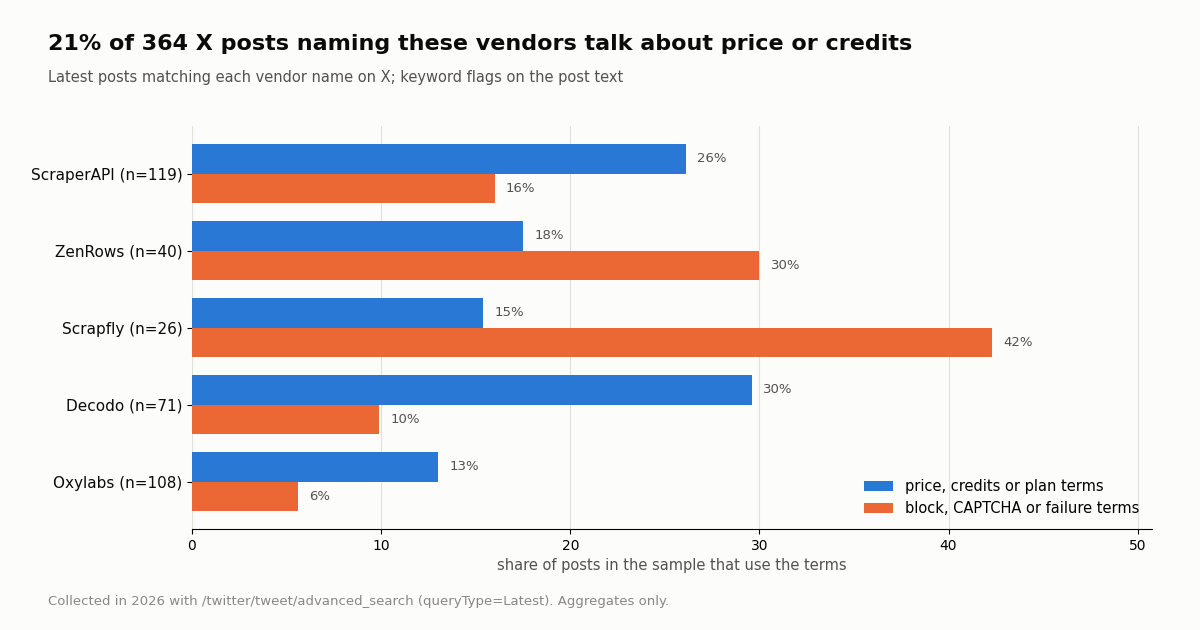
We also searched X for each vendor's name and flagged the posts by keyword. It is a small sample, because these vendors are not large on X: ScraperAPI's official account had 568 followers when we collected, ZenRows 584, Oxylabs 1,227 and ScrapingBee 5,818. A post that mentions price or credits is the closest thing to a buyer's question the platform offers.
Price is the most common topic. Across 364 posts, 21% used price, cost, credit or plan terms and 15% used block, CAPTCHA or failure terms. Scrapfly's 26 posts reached back several years, so its shares rest on very few posts; Oxylabs was the only name mentioned many times a day, about 10 posts a day over 11 days.
Almost nobody talks about scraping X with them. Only 0.8% of the posts (3 of 364) mentioned Twitter, tweets or x.com at all, and none of the four official vendor timelines we read (about 100 posts each) mentioned X as a scraping target. That matches the fetch test: X is not a target these tools are built around.
ZenRows talks about itself most. 62% of the posts naming ZenRows came from ZenRows' own account, against 7% for ScraperAPI and 11% for Oxylabs. For Decodo the official handle we found had no followers or posts, so none of its mentions came from the brand.
Which scraping API to pick, by workload
Plain HTML at volume. If your targets return content without a browser, the per-credit price at your plan size is what matters, and the 1-credit tier of every vendor above is the comparison to run. Make sure the plan's concurrency matches the pace you need: ScraperAPI's Hobby gives 20 threads, ZenRows' Build 20 concurrent requests, Scrapfly's Discovery 5.
JavaScript-heavy sites. Rendering is where the multipliers diverge most: 10 credits at ScraperAPI, 5 at ZenRows and Scrapfly, included in the per-request price at Decodo, a separate per-1,000 rate at Oxylabs. Price the rendered mode, not the plain one.
Search engine results. ScraperAPI charges 25 credits for Google and Bing. If SERPs are the whole job, compare dedicated SERP APIs too, which price per search rather than per credit.
X (Twitter) posts, profiles, searches or followers. Use an API that returns X data as JSON. The logged-out page holds about 5 posts and no cursor in our test, searches and followers sit behind the login page, and X's terms forbid scraping without permission. At $0.15 per 1,000 tweets returned you also skip the multiplier arithmetic.
Mixed workloads. Many teams run a scraper API for the open web and route X through a data API. That split keeps the scraper plan sized for the sites that need it.
How we collected this
Question. What does X data cost through a generic scraping API compared with a Twitter data API, and what do people on X say about the scraping-API vendors?
Pricing. We read ScraperAPI's pricing page, its credits-and-requests docs and its billing FAQ, and the pricing pages of ZenRows, Scrapfly, Decodo, Oxylabs and ScrapingBee, in this session. The dollars per 1,000 requests are our arithmetic on those list prices (price divided by credits, times credits per request).
Fetch test. One plain HTTP GET of x.com/<handle> for 10 public organization accounts (NASA, GitHub, Vercel, NVIDIA, Xbox, PlayStation, Discord, Docker, OpenAI Developers, Cloudflare Developers) with a desktop browser User-Agent and no cookies, plus one live-search URL, one followers URL and one post URL. We compared each profile's HTML with page 1 of /twitter/user/last_tweets for the same account, matching the first five words of each original post. We did not send these requests through ScraperAPI or any other vendor, so we did not measure their success rates; a plain request through a scraper API reaches the same logged-out page.
Mention study. /twitter/tweet/advanced_search with queryType=Latest for scraperapi OR "scraper api", zenrows, scrapfly, decodo and oxylabs, up to 6 pages each, giving 364 posts; keyword flags on the post text for price, block and Twitter terms. Plus up to 5 timeline pages of the official accounts of ScraperAPI, ZenRows, Oxylabs and ScrapingBee. Window: the most recent posts at collection time, collected in 2026.
Size and cost. 65 API requests returned 960 tweets, $0.14 in tweet charges at $0.15 per 1,000.
What this sample cannot show. Keyword flags are crude: a post with "plan" may not be about pricing, and a vendor's name can be used for unrelated things. Four vendors have small X audiences, so their shares rest on few posts. The fetch test reflects what x.com served a logged-out visitor from our network at collection time; X can change it at any time, and a scraper vendor's IPs could get a different response. We did not test any vendor's rendering or proxy modes.
Privacy. Aggregates only. Search posts are mostly by private individuals, so their raw pages were not kept; the study files keep de-identified flags with no IDs, URLs, text or handles. Only organization accounts are named.
"""Price the same X data job three ways: TwitterAPI.io, the official X API rate
card, and the ScraperAPI credits a logged-out page fetch would use.

    pip install requests
    export TWITTERAPI_IO_API_KEY=...
"""
import os
import requests

BASE = "https://api.twitterapi.io"
HEADERS = {"X-API-Key": os.environ["TWITTERAPI_IO_API_KEY"]}


def search_latest(query: str, pages: int = 3) -> list:
    """Latest posts matching a query; each page returns up to 20 tweets."""
    out, cursor = [], ""
    for _ in range(pages):
        r = requests.get(f"{BASE}/twitter/tweet/advanced_search", headers=HEADERS,
                         params={"query": query, "queryType": "Latest", "cursor": cursor}, timeout=30)
        r.raise_for_status()
        body = r.json()
        out += body.get("tweets", [])
        if not body.get("has_next_page"):
            break
        cursor = body["next_cursor"]
    return out


def user_profile(user_name: str) -> dict:
    r = requests.get(f"{BASE}/twitter/user/info", headers=HEADERS,
                     params={"userName": user_name}, timeout=30)
    r.raise_for_status()
    body = r.json()
    if body.get("status") != "success":
        raise ValueError(body.get("msg"))
    return body["data"]


if __name__ == "__main__":
    posts = search_latest('"web scraping" -filter:retweets lang:en')
    n = len(posts)
    print(f"{n} posts returned")
    for t in posts[:3]:
        print(t["createdAt"], t["author"]["userName"], t["likeCount"], t["text"][:70])
    print(user_profile("NASA")["followers"], "followers on @NASA")

    # The bill for these posts on each route (list prices):
    print(f"TwitterAPI.io: ${max(n, 1) * 0.00015:.4f} (15 credits per tweet, 15 minimum per request)")
    print(f"X API pay-per-usage: ${n * 0.005:.4f} ($0.005 per post read)")
    # A logged-out search URL on x.com redirects to the login page, so no number of
    # ScraperAPI credits (1 plain, 10 render, 75 ultra_premium + render) returns these posts.
Researching this?Free starter credits cover end-to-end testing — Google sign-in, no card. Get a key.
Questions readers ask
How much does ScraperAPI cost per month?
Hobby is $49/month for 100,000 API credits, Startup $149/month for 1,000,000, Business $299/month for 3,000,000, Scaling $475/month for 5,000,000, Professional $975/month for 10,500,000 and Advanced $1,975/month for 21,500,000. Enterprise is custom. Paying annually takes 10% off, for example $44.10/month for Hobby.
How many credits does a ScraperAPI request use?
1 credit for a plain request, 10 with render=true or premium=true, 25 with both, 30 with ultra_premium=true and 75 with ultra_premium=true plus rendering. Some domains have fixed costs: 5 for Amazon, Walmart and eBay, 25 for Google and Bing, 30 for LinkedIn. The sa-credit-cost response header shows the cost of each request.
Does ScraperAPI charge for failed requests?
ScraperAPI says it only charges for successful requests, which it defines as HTTP 200 and 404 responses. Requests you cancel before its 70-second window ends are still charged.
Is there a free ScraperAPI plan?
Yes. New accounts get a 7-day trial with 5,000 API credits and no credit card; after that the free plan gives 1,000 API credits a month with at most 5 concurrent connections.
Is ScraperAPI cheaper than ZenRows or Scrapfly?
It depends on the request type. Entry plans start lower at ZenRows ($16/month) and Scrapfly ($30/month) than ScraperAPI ($49/month), and both charge 5 credits for JavaScript rendering against ScraperAPI's 10. Convert each vendor's multiplier into dollars per 1,000 successful pages for the mode your target needs, at the plan size you would buy, before comparing.
Can I scrape Twitter (X) with ScraperAPI?
A request to x.com costs the base credits plus any flags, but it reaches the logged-out page. In our test a profile page held about 5 recent posts with no next page, and search and follower pages redirected to login. X's terms also forbid scraping without written permission. For X posts, profiles and followers, a data API returns JSON with pagination at $0.15 per 1,000 tweets on TwitterAPI.io.
What does X's official API cost compared with a scraper?
X's pay-per-usage rate card charges $0.005 per post read and $0.010 per user or follower read, capped at 3 million post reads a month. TwitterAPI.io charges $0.15 per 1,000 tweets returned, about 33x less per post than the $5 per 1,000 on that rate card.
Continue
- X API pay-per-usage pricing ($0.005 per post read, 3M monthly cap), the official and pricier route
- X Terms of Service: scraping needs X's written permission; liquidated damages above 1,000,000 posts in 24 hours
- twitterapi.io API reference: last_tweets, advanced_search and user info response fields
- MDN: HTTP 307 Temporary Redirect (what x.com search and follower URLs returned logged out)
- RFC 9110 HTTP Semantics: status codes such as 200, 404 and 307 that scraper billing rules refer to
- X (Twitter) API overview: endpoints, pricing and limits
- Web scraping vs API: when to use each
- Firecrawl alternatives tested on x.com
- Twitter scraping guide for 2026
- Get Twitter data without the official API
- Twitter scraper comparison 2026
- TwitterAPI.io pay-per-use pricing
- 01Pipedream Pricing in 2026: Connect Plans, Credits and the Workflows Shutdown
- 02Cloudflare Pay per Crawl: How the HTTP 402 Handshake Works, and What It Means for Twitter (X) Data
- 03ScrapingBee Pricing in 2026: Plans, Credit Costs and Alternatives
- 04Firecrawl Pricing: Plans, Credit Costs and What an X (Twitter) URL Costs
- 05LunarCrush API: What It Returns, What It Costs, and When Raw Twitter (X) Data Is the Better Input
- 06Gumloop Pricing in 2026: Pro Plan, Credits, and Lindy and Relevance AI Compared
- 07Twitter (X) Firehose Pricing — Enterprise vs API Comparison
- 08Kiro Pricing in 2026: Plans, Credits, Model Multipliers and Worked Monthly Bills
Writing about something you built with TwitterAPI.io? Our community rewards program pays API credits for honest tutorials, build logs and videos.
Stop reading. Start building.
Starter credits cover real testing on real data. Google sign-in, no card, no application queue.
Get an API keyAlready building with TwitterAPI.io? Publish an honest tutorial or build log about it and earn up to $200 a month in API credits.