Gumloop Pricing in 2026: Pro Plan, Credits, and Lindy and Relevance AI Compared
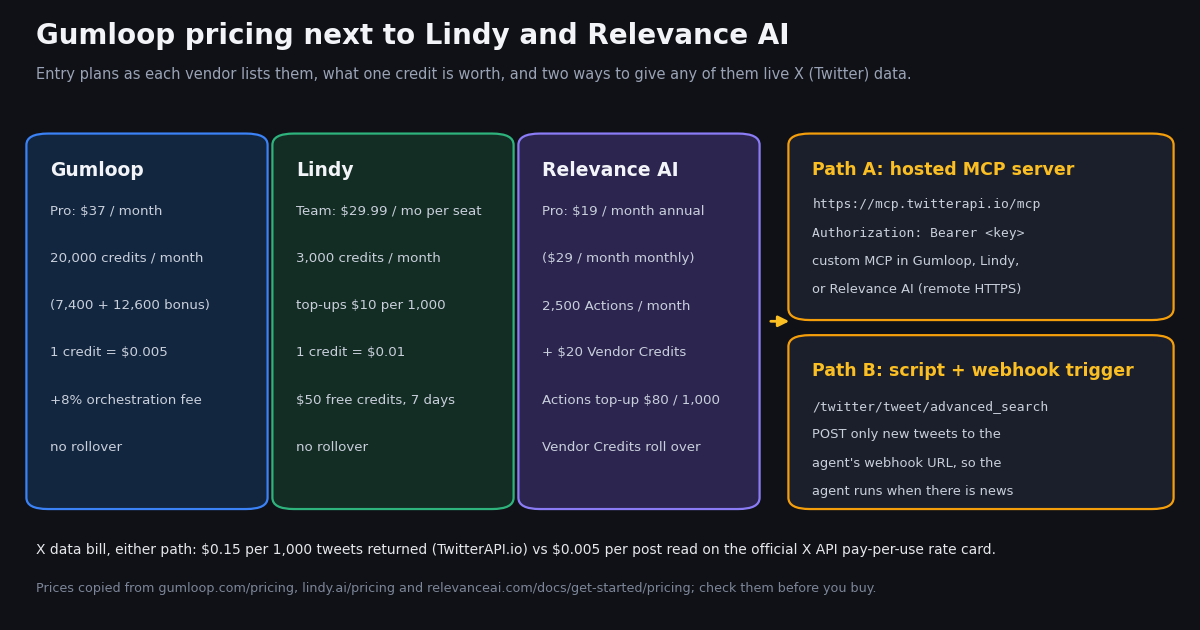
- Gumloop Pro: from $37/month, 20,000 credits a month (7,400 + 12,600 bonus), unlimited agents, seats and teams; Enterprise is custom.
- One credit = $0.005. A run pays model tokens at list price + 1 credit per successful tool call + 5 credits per active minute + an 8% orchestration fee (16% with your own model key).
- No rollover on Pro: the 20,000 credits reset every billing period; overage is off by default and bills at $0.005 per credit once enabled.
- Lindy: Team from $29.99/month per seat for 3,000 credits ($0.01 each), top-ups $10 per 1,000. Relevance AI: Pro $19/month annual or $29 monthly for 2,500 Actions + $20 Vendor Credits; its Free plan is retired.
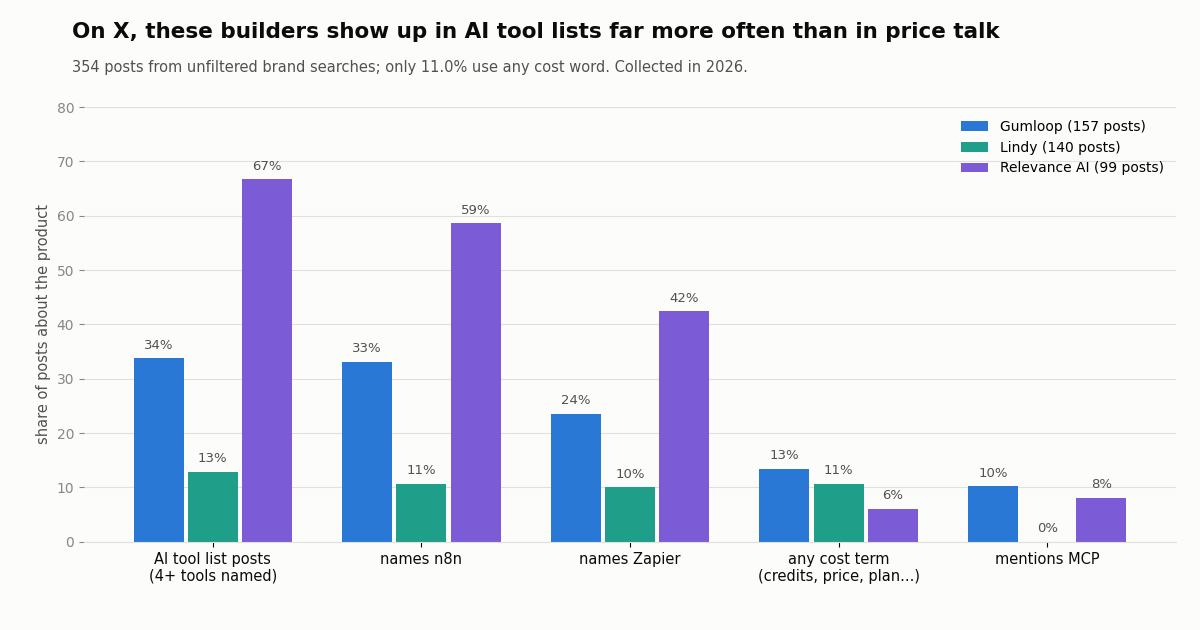
- X study: 0 of 444 X posts about the three builders quoted a current list price; only 11.0% of 354 brand posts used any cost word (collected in 2026).
- X data for any of them: add the hosted MCP server
https://mcp.twitterapi.io/mcpas a custom MCP, or run a script that starts the agent through a webhook only when new posts appear. Tweets cost $0.15 per 1,000 vs $0.005 per post read on X's pay-per-usage rate card.
Gumloop is an AI agent platform: you build agents that use connectors (Slack, Gmail, Sheets, CRMs, custom MCP servers), then run them from chat, Slack, the API, schedules or webhooks. Its pricing page is short, but the bill behind it has four moving parts, and the published numbers on third-party sites disagree with each other. Everything below was copied from Gumloop's own pricing page and docs this session, and the per-run examples use Gumloop's published rates.
This page is about what Gumloop charges, with Lindy and Relevance AI, the two agent builders most often priced against it, in one compact comparison. Workflow automation tools have their own pages: see our n8n, Zapier and Make.com pricing guides (linked at the end) rather than repeating them here. The last part covers one job many Gumloop agents are built for, watching X (Twitter), and what that X data costs on each route, measured on a real collection.
0 of 444 (collected in 2026). Only 11.0% of 354 brand-search posts used any cost word; tool lists and n8n comparisons dominate.
Gumloop pricing at a glance: Pro and Enterprise
Gumloop's pricing page lists two plans. Pro is the self-serve plan, sold from $37/month after a 14-day free trial; Enterprise is quoted by sales. The page shows no free plan: the structured data on the page lists a $0 offer, but its description is "Free 14-day trial available", and Gumloop's credits doc says the trial requires a card, is one-time per customer, and rolls into a paid Pro subscription when it ends unless you cancel first.
What Pro includes beyond credits. 35+ models, bring-your-own API keys, Company Brain (a company knowledge base agents can search), GitHub skill sync, shared credentials, email support, agent-scoped connector policies, MCP server proxying, and the Gumloop MCP and CLI. Enterprise adds custom model proxy support, dedicated Slack support, an optional embedded Gumloop expert, an optional virtual private cloud, org-wide connector policies, AI spend insights, role-based access control, SCIM/SAML, an admin dashboard, audit logs, custom data retention, data exports and workflow queuing.
The "starts at" wording. $37 is the entry price for 20,000 monthly credits. Spending beyond that is pay-as-you-go at the credit list price, not a jump to a bigger tier, because there is no tier between Pro and Enterprise on the pricing page.
How Gumloop credits work: the four charges on every run
Gumloop's docs call agent credit costs variable: the same agent might use 2 credits for a quick question and 200 for a deep research task. A run's total is the sum of four lines, and the chat header shows the running cost live, with a per-type breakdown one click away.
Model tokens are passed through at list price. Divide the model cost by $0.005: a $0.03 model call is 6 credits. Longer conversations cost more per message because every message carries the earlier context, and one message can trigger several model steps (pick a tool, read the result, answer), each billed separately.
Tool calls cost at least 1 credit. Reading and writing to apps like Slack, Google Sheets and Gmail costs exactly that 1 credit. Tools that enrich or fetch outside data add their own charge on top, listed on each connector's catalog page. Failed calls are not charged.
Compute only counts while the agent works. Waiting for your reply is free. The Code Sandbox and the agent browser have no per-call charge; their running time is billed as compute.
The orchestration fee applies to everything. Gumloop's own example: a chat that spends 400 credits on chat and reasoning, 10 on compute and 15 on tool calls pays a 34-credit fee (8% of 425, rounded up), for 459 credits in total, which is $2.30 at the list price.
Bring your own key changes the split, not the meter. With your own model API key (Anthropic, OpenAI and so on), token credits drop to zero but the orchestration fee rises from 8% to 16%, calculated on the full list cost the task would have had without your key. With your own key for MCP tool calls, the tool charge falls to a minimum of 1 credit per call.
What Gumloop actually costs per month: trial, overage and the cap
What $37 buys at list price. 20,000 credits at $0.005 is $100 of list-priced usage; the 12,600 bonus credits are where the gap comes from. At Gumloop's own 459-credit example, Pro covers about 43 such chats a month before overage.
Credits do not roll over. The 20,000 credits are a monthly grant that resets each billing period; you get the full amount again and do not bank what you did not use. Only Enterprise plans roll unused credits over.
Running out mid-month. Agents stop and you are prompted to turn on pay-as-you-go, which is off by default. Once enabled, usage bills at $0.005 per credit. Pro overage is always capped: the default ceiling is 1,000,000 overage credits per billing period ($5,000), you can set a lower cap on the Usage and Limits page, and agents stop when the cap is reached.
Concurrency is part of the price. Pro allows 25 agent interactions running at once across the organization. At the limit, Pro rejects new runs: the API returns HTTP 429, Slack users see an error, and a scheduled or event trigger that fires at the limit is skipped. Enterprise queues them instead. Plan for this if one agent fans out into many subagents (Gumloop caps those at 10 per task).
Cancelling. An admin opens Manage Subscription on the Usage and Limits page, which goes to a Stripe billing portal. The plan stays active to the end of the paid period and credits remain usable until then; cancelling during the trial stops the card from being charged.
Where the bill grows. Three habits drive Gumloop spend more than the plan price: frontier models on long chats (token credits), agents that poll on a short schedule (compute and tool credits on every run, even when nothing changed), and paid data connectors whose own charge is added to the 1-credit base. The X section below puts numbers on the second one.
Gumloop vs Lindy vs Relevance AI pricing
All three sell a credit-style meter on top of a monthly plan, but the unit means something different on each. Prices below are copied from each vendor's own pricing page or pricing doc, in US dollars, as each one shows them.
Lindy. Lindy's pricing page sells one Team plan with a credit slider, from 3,000 credits for $29.99/month up to 1,750,000 credits for $9,999.50/month, and every active user in the workspace is billed, from $29.99/month for 3,000 credits each, with all seats feeding one shared pool. Lindy sizes work in credits: everyday asks use 2 to 250, deep work 250 to 1,000, and big builds 1,000 to 2,500. When the pool runs low, Lindy pauses credit-using actions until the next cycle instead of billing overage; admins can top up at $10 per 1,000 credits. Lindy's docs describe the plans as Plus, Pro and Max with current prices in Settings, so the slider on the pricing page is the figure to trust.
Relevance AI. The public pricing page now shows only an Enterprise card with a Talk to sales button. Self-serve prices are in Relevance AI's pricing doc: Pro is $19/month billed annually or $29 billed monthly, with 2,500 Actions a month, $20 of Vendor Credits a month (the feature table states it as 10,000 Vendor Credits), 2 build users and 1 project; Team is $234/month annually or $349 monthly, with 7,000 Actions, $70 of Vendor Credits, 5 build users, 45 end users and rollover. An Action is counted each time an agent runs a tool. Vendor Credits cover model and tool usage passed through at wholesale with no markup, roll over while you stay subscribed, and are not used when you bring your own keys. The Free plan is retired for new signups and existing accounts.
Reading the units side by side. Gumloop meters everything, model tokens included, in one currency. Relevance AI splits the bill: Actions price the agent's tool steps, and Vendor Credits price the models underneath, which is why a tool-heavy agent can run out of Actions while Vendor Credits pile up. Lindy prices finished work, so a single credit does not map to a token or a tool call.
Which plan fits which workload
A few agents in chat, light use. Lindy's $50 of free credits (no card, 7 days) and Gumloop's 14-day trial (card required) are enough to measure a real week. Relevance AI has no free start, so test on Pro monthly at $29 before committing to the annual $19 rate.
Tool-heavy agents (many connector calls, short answers). On Gumloop a plain connector call is 1 credit ($0.005). On Relevance AI each tool run is an Action: 2,500 are included on Pro, and extra Actions are $80 per 1,000 ($0.08 each). Count your agent's tool steps per run before choosing.
Model-heavy agents (long research, big context). The token cost is passed through on all three in some form. Gumloop and Relevance AI both let you bring your own model keys; on Gumloop that doubles the orchestration fee to 16%, while on Relevance AI it removes the Vendor Credits charge.
A team that shares one budget. Lindy and Relevance AI both pool usage across the workspace or organization; Gumloop's Pro also shares one pool of credits across teammates and teams. Lindy bills per active seat, Gumloop lists unlimited seats on Pro, and Relevance AI caps build users per plan (2 on Pro, 5 on Team).
Agents that run on a schedule all day. This is where the meters diverge most, and it is the usual shape of an X monitoring agent. The next two sections measure it.
What X (Twitter) says about Gumloop, Lindy and Relevance AI
We read 919 posts from X: the three official accounts' timelines and four keyword searches (one per product, plus one combining the three names with cost words). After removing the official accounts' own posts and 72 copy-pasted duplicates, 444 posts named at least one of the products, 354 of them from the unfiltered brand searches.
Hardly anyone on X talks about the price. Only 11.0% of the 354 brand-search posts used any cost word (credits, price, plan, cost, expensive, subscription or a dollar sign): 13.4% for Gumloop, 10.7% for Lindy and 6.1% for Relevance AI. Across all 444 posts, 14 placed a dollar figure right after a product's name, 7 of those were salaries or funding amounts in thousands or millions, and none quoted a current list price ($37 for Gumloop, $29.99 for Lindy, $19, $29, $234 or $349 for Relevance AI). Price research for these tools has to start at the vendor's page, which is why this page leads with it.
Relevance AI lives in tool lists. 66.7% of posts naming it were lists of four or more AI tools, and 58.6% also named n8n. Gumloop is discussed more on its own, but a third of its posts still name n8n (33.1%), and it has the highest share of MCP mentions (10.2%). Lindy's conversation is the most self-contained: 12.9% tool lists and no MCP mentions in the sample.
The official accounts rarely post about price either. @gumloop's last 100 posts spanned 514 days (45 reposts) and 4 of 55 original posts used a cost word; @getlindy's 100 spanned 380 days with 6 of 65. @RelevanceAI_ returned only 40 posts across 321 days, and its newest was 230 days old at collection, so its X account is not where its pricing changes are announced.
Giving Gumloop (or Lindy, or Relevance AI) live X data, and the bill
A common agent on all three platforms watches X: brand mentions, a competitor's launches, replies that need an answer. There are three ways to wire it, and they cost very different amounts because two meters run at once, the agent platform's and the X data source's.
Option 1, Gumloop's own X connector. Gumloop lists an X (Twitter) MCP connector that signs in with your X account (no X developer account needed) and can search posts, read timelines, look up users and post. Its connector page says each action uses credits, "typically 5 per item for read operations, 10 for posting", and does not define an item. If an item is one post, reading 3,000 posts a month is 15,000 credits, $75 at the $0.005 list price and 75% of Pro's monthly credits, before the 1-credit call base and the 8% fee.
Option 2, a custom MCP server. Gumloop connects any remote MCP server over HTTPS (streamable HTTP or SSE): Customize, Connectors, Add Custom MCP, paste the URL, then choose API Key / Credentials and paste a key, which Gumloop sends as Authorization: Bearer <key>. Use https://mcp.twitterapi.io/mcp with your TwitterAPI.io key, then add the connector to your agent. Lindy (Integrations, Add, MCP, with the key under Advanced as a bearer token) and Relevance AI (agent Tools tab, Add MCP, Connect my own) take the same URL. The server's 12 tools search posts and read profiles, timelines, replies, followers and trends; each call is billed like the endpoint behind it, per tweet or profile returned. Gumloop adds at least 1 credit per successful tool call plus the model tokens to read the results.
Option 3, a script plus a webhook trigger. Gumloop agents can have a webhook trigger: a unique URL that starts the agent with the POSTed JSON as its input, accepts up to 100 requests per minute, and replies 200 at once while the agent runs in the background. The script below checks X on a schedule and POSTs only when there are new posts, so the agent never runs on an empty check. Lindy and Relevance AI have their own trigger options (Relevance AI's plans include building your own triggers); check their trigger docs for an inbound webhook before reusing the script there.
Why Option 3 matters for scheduled agents. Gumloop's scheduled triggers can fire every minute, and every run pays at least 1 compute credit and 1 credit for the X tool call before any model tokens or the 8% fee. A month of minute-by-minute checks is 43,200 runs:
The X data bill. TwitterAPI.io charges per result returned: tweets are $0.15 per 1,000 (15 credits per tweet, with a 15-credit minimum when a request returns nothing), profiles $0.18 per 1,000. X's own pay-per-usage rate card on docs.x.com/x-api/getting-started/pricing charges $0.005 per post read and $0.010 per user read, which is $5.00 per 1,000 posts, about 33 times more per 1,000 tweets, and caps pay-per-usage at 3 million post reads a month. Reads need no X account.
Sign-up gives up to $1 of free credits (at most 100,000 credits, no card, one per person or network, expiring after 31 days) for new accounts that pass the automatic bot check; that covers about 6,600 tweets. Purchased credits never expire, and paid plans are listed on the pricing page.
If the agent should post, not just read. Writes run through an authenticated session: one /twitter/user_login_v2 login ($0.10, with a proxy you supply) returns login_cookies, and each post, like, retweet or follow through /twitter/create_tweet_v2 and its siblings is 60 credits ($0.0006), billed per HTTP 200 call. The call acts as that account, so X can rate-limit, lock or suspend it; keep a human pace, and expect to log in again when the session expires.
Gumloop > Customize > Connectors > Add Custom MCP

MCP Server URL:          https://mcp.twitterapi.io/mcp
Authentication:          API Key / Credentials
Access Token / API Key:  <your TwitterAPI.io key>
                         (Gumloop sends it as Authorization: Bearer <key>)

Then open the agent > Connectors > + Add > search the server > + > Save.
Example prompt: "Search X for posts about <product> from the last 24 hours,
group the complaints, and post a summary to #product-feedback in Slack."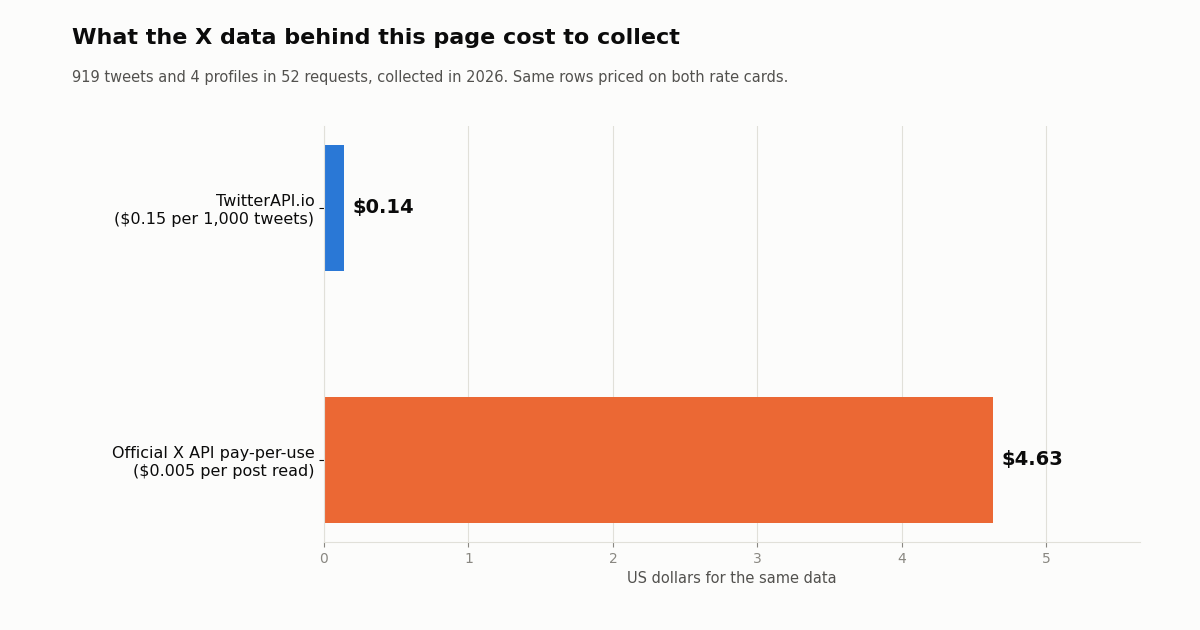
How we collected this
Question. When people on X talk about Gumloop, Lindy and Relevance AI, how often is it about cost, which other tools come up, and how often is MCP mentioned? And what did the data cost on each X rate card?
Accounts and queries. The official accounts @gumloop, @getlindy and @RelevanceAI_ (each confirmed with /twitter/user/info) were read with /twitter/user/last_tweets. Four searches ran on /twitter/tweet/advanced_search with queryType Latest: gumloop -is:retweet; ("lindy ai" OR "lindy.ai" OR @getlindy) -is:retweet; ("relevance ai" OR relevanceai OR @RelevanceAI_) -is:retweet; and the three names combined with cost words.
Window and sample. The most recent matching posts at collection time, collected in 2026: 919 tweets in 52 requests. Posts were deduplicated by id and by copy-pasted text, the official accounts' own posts were excluded from the search analysis, and each post was assigned to the products named in it. Topic shares use only the three unfiltered brand searches, so the cost-word search cannot inflate them. Brand searches covered 118 days for Gumloop, 76 for Lindy and 117 for Relevance AI.
What it cannot show. Keyword rules miss sarcasm, other languages and prices written as words; "lindy" and "relevance ai" were matched as phrases, which drops some genuine mentions. A recent-posts sample reflects the current conversation, not a year. It says nothing about what customers actually spend, and the per-run costs above use published minimums, not measured runs.
Privacy. Aggregates only. Search results come from private individuals, so raw pages were not kept in the repository and no individual is named; only the three organization accounts are.
"""x_to_gumloop.py - watch X (Twitter) for posts about your product and start a Gumloop agent
only when something new appears. The script does the cheap, frequent part (checking X); the
agent does the expensive part (reading and acting) once per batch of new posts.

    pip install requests
    export TWITTERAPI_IO_API_KEY=...        # twitterapi.io dashboard
    export GUMLOOP_WEBHOOK_URL=https://api.gumloop.com/trigger_incoming_webhook/<trigger_id>/<secret>
    python x_to_gumloop.py                  # one pass: run it from cron every 1-5 minutes
    python x_to_gumloop.py --loop 300       # or keep it running and check every 300 s

X data cost: 15 credits ($0.00015) per tweet returned, with a 15-credit minimum when a check
finds nothing. Checking every 5 minutes for a month is a $1.30 floor; every 60 s, $6.48.
Gumloop credits are spent only on passes that found new posts.
"""
import argparse
import json
import os
import time

import requests

API = "https://api.twitterapi.io"
X_KEY = os.environ["TWITTERAPI_IO_API_KEY"]
GUMLOOP_URL = os.environ["GUMLOOP_WEBHOOK_URL"]   # the URL is the credential: keep it secret
QUERY = os.environ.get("X_QUERY", '("your product" OR @yourhandle) lang:en -is:retweet')
STATE_FILE = "x-to-gumloop-state.json"
OVERLAP = 120     # seconds re-read on each pass; the seen-ids set drops the repeats
MAX_PAGES = 5     # safety cap per pass: one page is up to 20 tweets ($0.003)


def load_state():
    if os.path.exists(STATE_FILE):
        with open(STATE_FILE) as f:
            return json.load(f)
    return {"since_time": int(time.time()) - 3600, "seen": []}   # first run: the last hour


def save_state(state):
    state["seen"] = state["seen"][-2000:]
    with open(STATE_FILE, "w") as f:
        json.dump(state, f)


def fetch_new(since_time):
    """Posts newer than since_time; an idle pass returns an empty list (billed at the minimum)."""
    tweets, cursor = [], None
    for _ in range(MAX_PAGES):
        params = {"query": f"{QUERY} since_time:{since_time}", "queryType": "Latest"}
        if cursor:
            params["cursor"] = cursor
        r = requests.get(f"{API}/twitter/tweet/advanced_search",
                         headers={"X-API-Key": X_KEY}, params=params, timeout=30)
        r.raise_for_status()
        body = r.json()
        page = body.get("tweets") or []
        tweets.extend(page)
        if not page or not body.get("has_next_page") or not body.get("next_cursor"):
            break
        cursor = body["next_cursor"]
    return tweets


def slim(t):
    """Only the fields the agent needs, so the prompt (and the token bill) stays small."""
    a = t.get("author") or {}
    return {
        "url": t.get("url") or t.get("twitterUrl"),
        "createdAt": t.get("createdAt"),
        "text": t.get("text"),
        "likes": t.get("likeCount", 0),
        "reposts": t.get("retweetCount", 0),
        "replies": t.get("replyCount", 0),
        "views": t.get("viewCount", 0),
        "author": a.get("userName"),
        "author_followers": a.get("followers", 0),
    }


def start_agent(tweets):
    """One POST per batch. Gumloop answers 200 {"success": true} and runs the agent in the background."""
    payload = {"source": "x-search", "query": QUERY, "count": len(tweets), "tweets": tweets}
    for _ in range(5):
        r = requests.post(GUMLOOP_URL, json=payload, timeout=30)
        if r.status_code == 429:                       # 100 requests per minute per trigger
            time.sleep(float(r.headers.get("Retry-After", "5")))
            continue
        if r.status_code == 404:
            raise SystemExit("Gumloop returned 404: trigger deleted, paused or URL wrong")
        r.raise_for_status()
        return
    raise RuntimeError("Gumloop kept returning 429")


def run_once(state):
    started = int(time.time())
    seen = set(state["seen"])
    new = [t for t in fetch_new(state["since_time"]) if t.get("id") and t["id"] not in seen]
    if new:
        start_agent([slim(t) for t in reversed(new)])  # oldest first
        state["seen"].extend(t["id"] for t in new)
    state["since_time"] = started - OVERLAP
    save_state(state)
    print(f"{len(new)} new post(s)" + (" sent to Gumloop" if new else ", agent not started"))


if __name__ == "__main__":
    ap = argparse.ArgumentParser()
    ap.add_argument("--loop", type=int, default=0, help="seconds between passes (0 = one pass)")
    args = ap.parse_args()
    state = load_state()
    while True:
        run_once(state)
        if not args.loop:
            break
        time.sleep(args.loop)
Researching this?Free starter credits cover end-to-end testing — Google sign-in, no card. Get a key.
Questions readers ask
How much does Gumloop cost?
Gumloop Pro starts at $37/month and includes 20,000 credits a month (7,400 at the $0.005 list price plus 12,600 bonus credits), unlimited agents, seats and teams. Enterprise is custom-priced through sales. Usage beyond the included credits bills at $0.005 per credit once you turn on overage.
Does Gumloop have a free plan?
Not on the current pricing page. New accounts get a 14-day free trial of Pro, which requires a card, is one-time per customer, and becomes a paid Pro subscription when it ends unless you cancel first from Manage Subscription.
What is a Gumloop credit worth?
One credit is indexed at $0.005, so $1 buys 200 credits. Model tokens are converted at that rate (a $0.03 model call is 6 credits), each successful connector tool call costs at least 1 credit, compute is 5 credits per active minute, and an 8% orchestration fee is added to the total.
Do unused Gumloop credits roll over?
No on Pro: the 20,000 credits are a monthly grant that resets every billing period. Enterprise plans are the exception; unused credits roll over there.
What happens when I run out of Gumloop credits?
Agents stop and you are prompted to enable pay-as-you-go, which is off by default. Once enabled, extra usage bills at $0.005 per credit, capped by default at 1,000,000 overage credits ($5,000) per billing period; you can set a lower cap on the Usage and Limits page.
Does bringing my own API key make Gumloop cheaper?
It changes the split. With your own model key, token credits drop to zero but the orchestration fee rises from 8% to 16% of the full list cost. With your own key for MCP tool calls, the tool charge falls to a minimum of 1 credit per call.
How much do Lindy and Relevance AI cost compared with Gumloop?
Lindy's Team plan is $29.99/month per active seat for 3,000 credits ($0.01 each), with top-ups at $10 per 1,000 and $50 of free credits for 7 days to start. Relevance AI's Pro plan is $19/month billed annually or $29 monthly for 2,500 Actions and $20 of Vendor Credits; Team is $234/month annually or $349 monthly. Relevance AI retired its Free plan, and its public pricing page now shows only Enterprise.
Can a Gumloop agent read Twitter (X) data, and what does it cost?
Yes. Gumloop has its own X connector (its page says read actions typically use 5 credits per item), or you can add a custom MCP server such as https://mcp.twitterapi.io/mcp with your key as a bearer token. On TwitterAPI.io tweets cost $0.15 per 1,000 returned, against $0.005 per post read on X's pay-per-usage rate card; Gumloop adds at least 1 credit per tool call plus model tokens.
Continue
- Gumloop: Pricing (plans, credits, orchestration fee, FAQ)
- Gumloop docs: Credits (charges per run, trial, overage cap)
- Gumloop docs: Custom MCP servers (transport and authentication)
- Lindy: Pricing (Team plan credit tiers, top-ups, FAQ)
- Relevance AI docs: Pricing (Pro, Team, Actions, Vendor Credits)
- X API pricing (pay-per-usage rate card)
- X (Twitter) API guide: endpoints, pricing and access
- n8n pricing: cloud plans vs self-hosted costs
- Zapier pricing: plans, tasks and overage
- Make.com pricing: plans, credits and tiers
- Manus pricing and how its credits are spent
- How to build an AI agent that reads X data
- TwitterAPI.io MCP server setup for AI agents
- TwitterAPI.io pricing: pay per tweet returned
- 01Pipedream Pricing in 2026: Connect Plans, Credits and the Workflows Shutdown
- 02Cloudflare Pay per Crawl: How the HTTP 402 Handshake Works, and What It Means for Twitter (X) Data
- 03ScrapingBee Pricing in 2026: Plans, Credit Costs and Alternatives
- 04Firecrawl Pricing: Plans, Credit Costs and What an X (Twitter) URL Costs
- 05LunarCrush API: What It Returns, What It Costs, and When Raw Twitter (X) Data Is the Better Input
- 06Twitter (X) Firehose Pricing — Enterprise vs API Comparison
- 07ScraperAPI Pricing in 2026: Plans, Credit Costs, and What It Means for Twitter (X) Data
- 08Qwen API Pricing in 2026: Every Tier, Kimi, GLM and MiniMax Compared
Writing about something you built with TwitterAPI.io? Our community rewards program pays API credits for honest tutorials, build logs and videos.
Stop reading. Start building.
Starter credits cover real testing on real data. Google sign-in, no card, no application queue.
Get an API keyAlready building with TwitterAPI.io? Publish an honest tutorial or build log about it and earn up to $200 a month in API credits.