How to Get a Tweet Notification Whenever an Account Posts
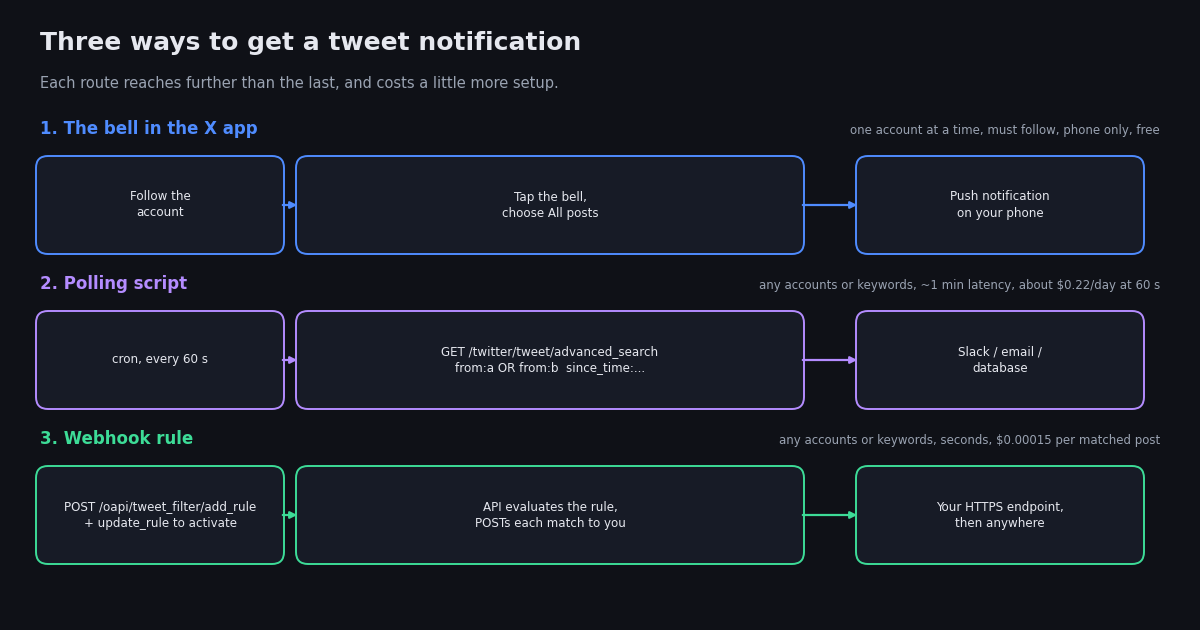
"Tweet notification" covers a spread of needs. At one end, you want your phone to buzz when one account posts. At the other, you need a Slack channel or a trading system to react within seconds whenever any of fifty accounts says something. X's built-in bell handles the first and nothing beyond it, and most guides stop there. This page covers the bell properly, then gets to the part people actually search for after it lets them down.
Everything beyond the bell here is built on read-only API calls: no automation on your own X account, no extension that asks for your password, nothing that can get your account locked. You need an API key from the twitterapi.io dashboard and a place to receive the alerts (a Slack webhook URL is the easiest). Each endpoint named below is a real path, and the scripts run as written.
One boundary: this page is about being notified when someone else posts. If you want to monitor mentions of a brand or a keyword across all of X, the structure is identical, but the alerts-for-keywords guide linked at the end goes deeper on query design.
Turn on tweet notifications in the X app (the bell)
This is the built-in feature, called account notifications in X's help pages. It works on iOS and Android, and on the web if you allow browser notifications.
1. Follow the account. The bell only appears on profiles you follow.
2. Open the profile and tap the bell next to the Follow button (on the web it is the bell to the left of the Following button).
3. Choose All posts or Only posts with live video. The bell fills in to show it is active.
4. Check push is on. Tap your avatar, Settings and privacy, Notifications, Preferences, Push notifications, and make sure notifications are enabled, including the option for posts from accounts you have turned on notifications for. On the phone itself, the X app must be allowed to send notifications.
On the web: Settings and privacy, Notifications, Preferences, Push notifications, then allow x.com in the browser's permission prompt. Browser notifications only arrive while that browser is open.
To turn it off: tap the bell again and choose Off, or manage all of them under Settings, Notifications, Preferences.
Notifications for a single account are reliable in our experience, but X batches and prioritises pushes, so during a burst of posts you may receive one combined notification rather than one per post, and there is sometimes a delay of a few minutes. If that matters, the next sections are for you.
What the bell cannot do
Before building anything, be clear about why the built-in feature is not enough. These are the limits as the feature works in 2026.
If your need is in the right column with a "no", skip to the comparison table and pick a route.
Three ways to get tweet notifications, compared
The honest comparison, with cost taken from the twitterapi.io pricing page (checked in 2026): $0.15 per 1,000 posts returned, a $0.00015 minimum per call, and $0.00015 per matched post delivered by a webhook rule.
The polling cost is dominated by the minimum charge on empty checks (1,440 calls a day at 60 seconds), not by the posts, which is why the webhook route is so much cheaper for a watch list that posts rarely. Polling wins when you already have a scheduler and want zero infrastructure of your own; the webhook wins for latency and for scale.
Route 2: a polling script that sends tweet notifications to Slack
This is the route most monitoring customers converge on. One search call with the accounts joined by OR and a since_time operator returns only posts newer than the last run, so most runs return nothing and cost the minimum charge. Among TwitterAPI.io customers monitoring accounts, about two thirds of filter rules are plain account lists, and a 60-second interval is the most common choice (API logs, aggregated), so the defaults below are not arbitrary.
You need a Slack incoming webhook URL (Slack app settings, Incoming Webhooks) in the SLACK_WEBHOOK_URL environment variable, and TWITTERAPI_IO_KEY from the dashboard. Run the script every minute with cron (* * * * * python3 notify.py) or as a scheduled GitHub Actions workflow.
Two details that save a support ticket later. Keep the query under 512 characters; a long watch list must be split into two queries. And store the start time of the last successful run, not the current time, as the next since_time, so that a failed run is caught up by the next one instead of dropping posts.
"""Tweet notifications to Slack: new posts from a watch list since the last run.

Run every minute. Needs TWITTERAPI_IO_KEY and SLACK_WEBHOOK_URL in the environment.
"""
import json
import os
import time

import requests

HEADERS = {"X-API-Key": os.environ["TWITTERAPI_IO_KEY"]}
SLACK = os.environ["SLACK_WEBHOOK_URL"]
WATCH = ["NASA", "nasawebb", "SpaceX", "ESA", "JAXA_en"]   # public handles; keep the query under 512 chars
STATE_FILE = "notify-state.json"


def load_since():
    if os.path.exists(STATE_FILE):
        with open(STATE_FILE) as f:
            return json.load(f)["since_time"]
    return int(time.time()) - 600  # first run: last 10 minutes


def new_posts(since_time):
    query = "(" + " OR ".join(f"from:{h}" for h in WATCH) + f") since_time:{since_time}"
    r = requests.get(
        "https://api.twitterapi.io/twitter/tweet/advanced_search",
        params={"query": query, "queryType": "Latest"},
        headers=HEADERS,
        timeout=30,
    )
    r.raise_for_status()
    return r.json().get("tweets") or []


def notify(post):
    author = (post.get("author") or {}).get("userName", "?")
    text = (post.get("text") or "").replace("\n", " ")
    msg = f"*@{author}* posted: {text[:200]}\n{post.get('url')}"
    requests.post(SLACK, json={"text": msg}, timeout=15).raise_for_status()


if __name__ == "__main__":
    since = load_since()
    started = int(time.time())
    posts = new_posts(since)
    for p in sorted(posts, key=lambda t: t.get("id", "")):
        if p.get("isReply"):
            continue  # drop replies; remove this line to keep them
        notify(p)
    with open(STATE_FILE, "w") as f:
        json.dump({"since_time": started}, f)
    print(f"{len(posts)} new posts checked")
Route 3: let the API push tweet notifications to you (webhook rule)
Instead of asking every minute, you register a rule once and the API calls you. On twitterapi.io the rule lives in the tweet filter: POST /oapi/tweet_filter/add_rule with a tag (your label), a value (the same search syntax as above, for example from:NASA OR from:SpaceX), and an interval_seconds that sets how often the rule is evaluated. A new rule is created inactive; activate it with POST /oapi/tweet_filter/update_rule, and set the HTTPS callback URL for your rules in the dashboard. From then on, each post that matches is sent to your endpoint as a JSON POST, priced at $0.00015 per matched post delivered (pricing page checked in 2026). There is also a dedicated account monitor, POST /oapi/x_user_stream/add_user_to_monitor_tweet with an x_user_name body field, that watches an account's posts, quotes, replies, and reposts; the docs for both are in the sources.
The part people get stuck on is the receiving end, not the rule: among TwitterAPI.io users who have set a webhook, over a third still point it at a test address such as a webhook.site URL or an ngrok tunnel (API logs, aggregated). The receiver below is a complete, deployable endpoint in about 25 lines of Flask. Deploy it anywhere that gives you a public HTTPS URL (a small VPS, Railway, Render, or a serverless function), put that URL in the dashboard, and forward each post to Slack.
Three rules for a receiver that stays healthy. Return 200 within a few seconds and do slow work after responding, or the delivery will be retried and you will get duplicates. De-duplicate on the post ID, because delivery is at-least-once. And log the raw body for the first day, so you can see the exact payload shape before you depend on any field.
"""Step 1: register and activate a filter rule (run once)."""
import os
import requests

HEADERS = {"X-API-Key": os.environ["TWITTERAPI_IO_KEY"]}
BASE = "https://api.twitterapi.io"

# Create the rule: same search syntax as advanced search
r = requests.post(
    f"{BASE}/oapi/tweet_filter/add_rule",
    headers=HEADERS,
    json={"tag": "space-agencies", "value": "from:NASA OR from:SpaceX OR from:ESA", "interval_seconds": 60},
    timeout=30,
)
r.raise_for_status()
rule_id = r.json().get("rule_id")
print("rule created:", rule_id)

# Rules start inactive: activate it
r = requests.post(
    f"{BASE}/oapi/tweet_filter/update_rule",
    headers=HEADERS,
    json={"rule_id": rule_id, "tag": "space-agencies", "value": "from:NASA OR from:SpaceX OR from:ESA", "interval_seconds": 60, "is_effect": 1},
    timeout=30,
)
r.raise_for_status()
print("activated:", r.json())

# Set the HTTPS callback URL for your rules in the twitterapi.io dashboard (Webhook settings).


"""Step 2: the receiver (deploy as app.py; pip install flask requests)."""
# import os, requests
# from flask import Flask, request
#
# app = Flask(__name__)
# SLACK = os.environ["SLACK_WEBHOOK_URL"]
# seen = set()  # swap for Redis or a DB table in production
#
# @app.post("/x-webhook")
# def x_webhook():
#     body = request.get_json(silent=True) or {}
#     posts = body.get("tweets") or ([body] if body.get("id") else [])
#     for p in posts:
#         if p.get("id") in seen:
#             continue
#         seen.add(p.get("id"))
#         author = (p.get("author") or {}).get("userName", "?")
#         requests.post(SLACK, json={"text": f"@{author}: {(p.get('text') or '')[:200]} {p.get('url')}"}, timeout=10)
#     return "ok", 200   # respond fast; do slow work after the response
#
# if __name__ == "__main__":
#     app.run(host="0.0.0.0", port=int(os.environ.get("PORT", 8000)))
What tweet notifications cost per day
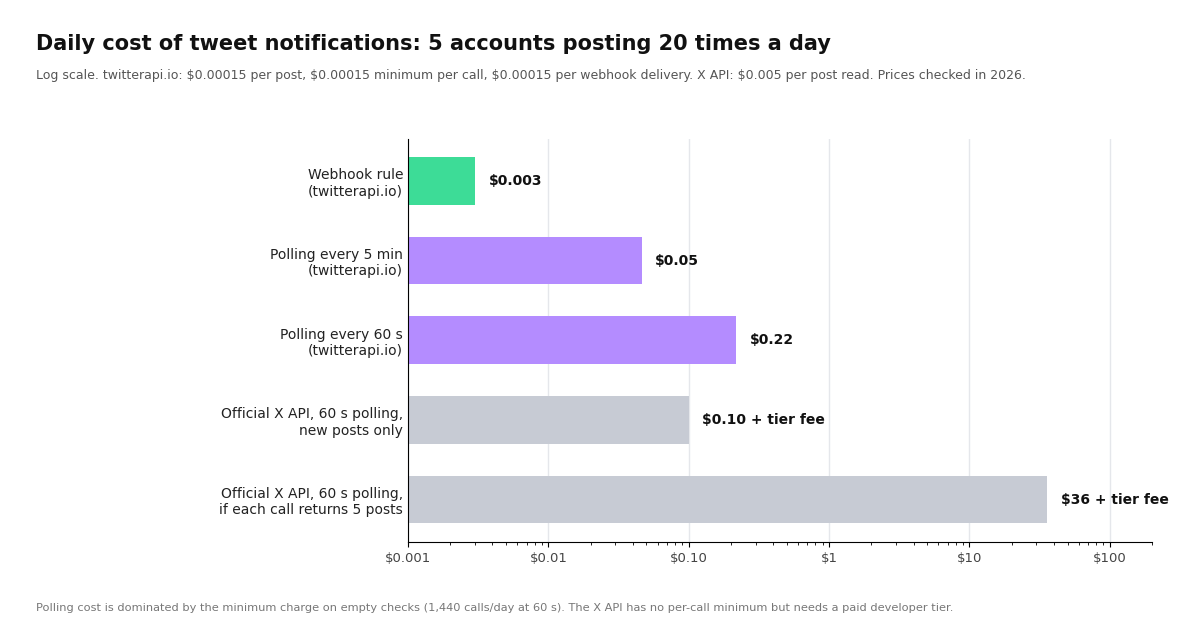
Here is the arithmetic behind the chart above, for a watch list of five accounts that together post 20 times a day. Prices: twitterapi.io $0.15 per 1,000 posts returned ($0.00015 each), $0.00015 minimum per call, $0.00015 per webhook delivery; official X API pay-per-use $0.005 per post read (docs.x.com, checked in 2026).
The official-API rows span a wide range because its search endpoint charges per post returned and does not have a per-call minimum; with a tight since_id you pay for new posts only, but you still need a paid developer tier before the first call. On the third-party side, the minimum charge is the cost of asking, and the webhook route removes the asking entirely. For most teams the deciding number is not the dollars, which are small either way, but the latency and the ten minutes of setup.
Which route should you use?
You follow the account and your phone is where you want the alert. Use the bell. Nothing else is simpler.
You want alerts for 2 to 50 accounts in a Slack channel, and a minute of delay is fine. Run the polling script from cron or GitHub Actions. No servers, no endpoint, pennies a day.
You need keywords, cashtags, or accounts you do not follow. Polling or webhook; the bell cannot do it. Start with polling to tune the query, then move the same value into a rule.
You need seconds, not minutes, or you have a system that must react automatically. Webhook rule. It is also the cheapest per day once the watch list is quiet.
You are tracking a single high-stakes account (a regulator, a company you hold, a news desk). Use both: the bell for the human, the webhook for the system, and compare them for a week; the API route will usually be ahead.
You want to notify a whole team. Anything but the bell; the bell is personal to each account and device.
"""Tweet notifications by email: new posts from a watch list since the last run, sent via SMTP.

Run every minute (cron) or every 5 minutes (GitHub Actions schedule).
Needs TWITTERAPI_IO_KEY, SMTP_HOST, SMTP_USER, SMTP_PASS, MAIL_TO in the environment.
"""
import json
import os
import smtplib
import time
from email.message import EmailMessage

import requests

HEADERS = {"X-API-Key": os.environ["TWITTERAPI_IO_KEY"]}
WATCH = ["NASA", "SpaceX"]
STATE_FILE = "notify-email-state.json"


def since_time():
    if os.path.exists(STATE_FILE):
        with open(STATE_FILE) as f:
            return json.load(f)["since_time"]
    return int(time.time()) - 600


def fetch(since):
    query = "(" + " OR ".join(f"from:{h}" for h in WATCH) + f") since_time:{since}"
    r = requests.get(
        "https://api.twitterapi.io/twitter/tweet/advanced_search",
        params={"query": query, "queryType": "Latest"},
        headers=HEADERS,
        timeout=30,
    )
    r.raise_for_status()
    return [t for t in (r.json().get("tweets") or []) if not t.get("isReply")]


def send_email(posts):
    msg = EmailMessage()
    msg["Subject"] = f"{len(posts)} new post(s) from your X watch list"
    msg["From"] = os.environ["SMTP_USER"]
    msg["To"] = os.environ["MAIL_TO"]
    lines = []
    for p in posts:
        author = (p.get("author") or {}).get("userName", "?")
        lines.append(f"@{author} ({p.get('createdAt')})\n{p.get('text')}\n{p.get('url')}\n")
    msg.set_content("\n".join(lines))
    with smtplib.SMTP_SSL(os.environ["SMTP_HOST"], 465) as s:
        s.login(os.environ["SMTP_USER"], os.environ["SMTP_PASS"])
        s.send_message(msg)


if __name__ == "__main__":
    started = int(time.time())
    posts = fetch(since_time())
    if posts:
        send_email(posts)
    with open(STATE_FILE, "w") as f:
        json.dump({"since_time": started}, f)
    print(f"{len(posts)} new posts")
Questions readers ask
How do I turn on notifications for a specific account on X?
Follow the account, open its profile, tap the bell icon next to the Follow button, and choose All posts or Only posts with live video. Then make sure push notifications are enabled under Settings and privacy, Notifications, Preferences, and that your phone allows the X app to send notifications.
Why am I not getting tweet notifications even though the bell is on?
Usually push is off somewhere along the chain: the phone's notification permission for X, the app's Push notifications preference, or a Do Not Disturb or focus mode. Also check that you still follow the account; unfollowing clears the bell. X sometimes batches a burst of posts into one notification and can delay pushes by a few minutes.
Can I get notified when someone tweets without following them?
Not with the bell. You can with a read-only API: a polling script that searches from:handle with a since_time every minute, or a webhook rule that pushes each new post to your endpoint. Neither needs you to follow the account or to use your own X account at all.
Can I get tweet notifications for a keyword or hashtag?
The X app has no keyword alerts. Use the same two API routes with a keyword query instead of from: operators, for example a phrase in quotes with lang:en and min_faves: to cut noise. The alerts-for-keywords guide linked on this page covers query design.
How do I get tweet notifications in Slack or by email?
Run the polling script on this page every minute; it posts new matches to a Slack incoming webhook, and the end-to-end example at the bottom sends them by email instead. For faster delivery, register a webhook rule and forward each delivered post to Slack from your endpoint.
How much does it cost to monitor a Twitter account with the API?
On twitterapi.io, polling a watch list every 60 seconds costs about $0.22 a day, mostly the $0.00015 minimum per call on empty checks; every 5 minutes about $0.05 a day; a webhook rule about $0.00015 per matched post, so around $0.003 a day for 20 posts. The official X API charges $0.005 per post read and requires a paid developer tier.
How fast are API tweet notifications compared with the bell?
A polling script is as fresh as its interval, typically 60 seconds. A webhook rule evaluates on the interval you set and delivers within seconds of a match. The bell is usually fast but can be batched or delayed by a few minutes, and gives no guarantee.
Continue
- X Help Center: notifications on mobile devices, including account notifications (the bell)
- X Help Center: enabling web and browser notifications
- twitterapi.io docs: Add User to Monitor Tweets (x_user_stream)
- twitterapi.io pricing: per-post, per-call minimum, and webhook delivery prices
- X API pay-per-usage pricing (docs.x.com), the official and more expensive route
- X API: recent search endpoint, the official polling route (paid tier required)
- Twitter (X) API overview: the hub for reading X data
- Monitor X accounts for new tweets in real time
- Twitter (X) alerts for keywords: query design and delivery
- Twitter (X) webhooks: receiving pushed posts
- Monitoring Twitter (X) via API: polling vs stream vs webhook
- Build a post tracker on the API
- Twitter Stream: hosted account and keyword monitoring
- twitterapi.io pay-per-call pricing
Stop reading. Start building.
Starter credits cover real testing on real data. Google sign-in, no card, no application queue.
Get an API key