Twitter (X) API in Pydantic AI: A Typed Search Tool for Your Agent
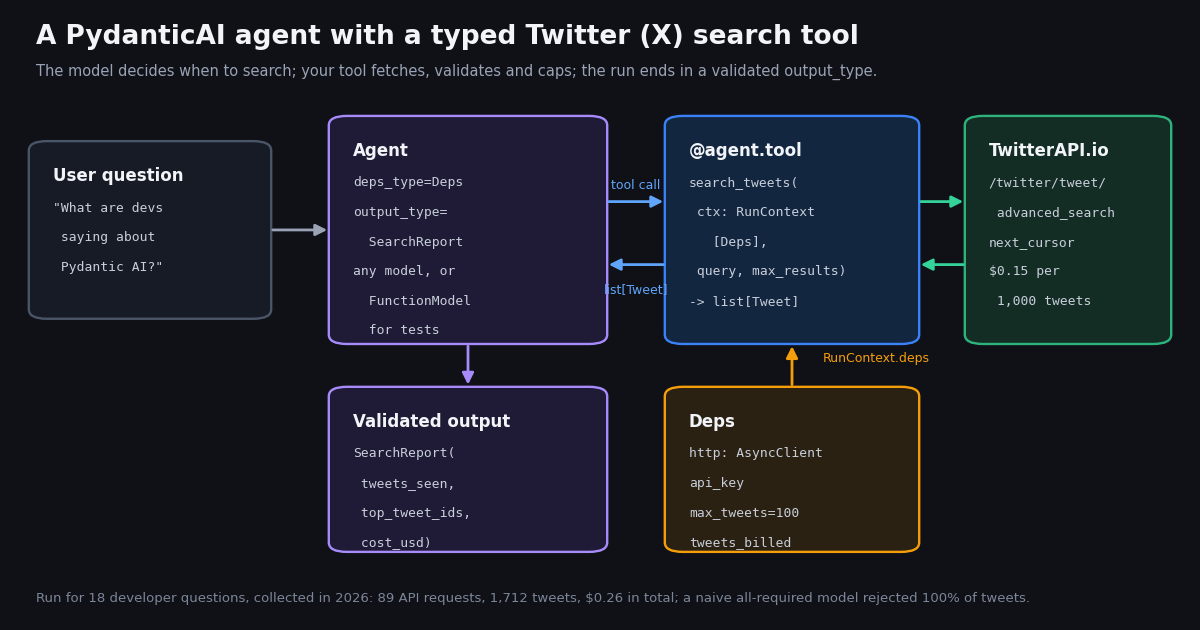
- The tool is a plain async function.
@agent.toolgives itRunContext[Deps](yourhttpx.AsyncClient, API key, budget);@agent.tool_plainis for tools that need no context. output_type, notresult_type. In pydantic-ai-slim 2.71.0 theAgenttakesoutput_type=SearchReport,deps_type=Depsandinstructions=;result.outputis the validated model.- Model the nulls. In 1,712 tweets the agent fetched,
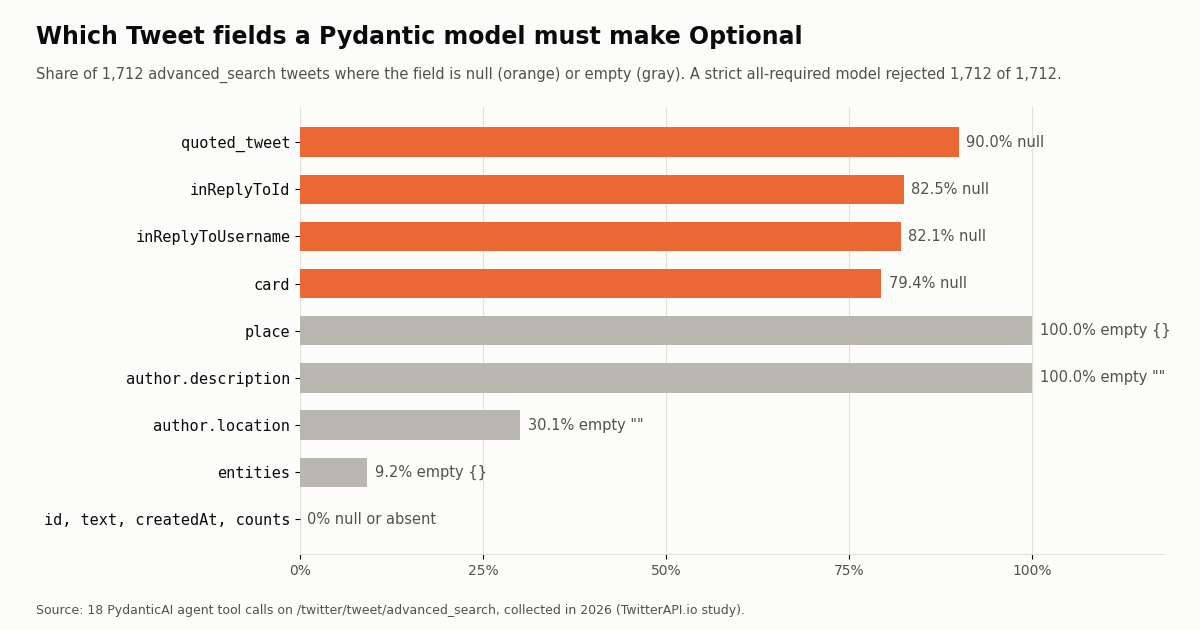
quoted_tweetwas null on 90.0%,inReplyToIdon 82.5%,cardon 79.4%. A strict all-required model rejected 100%; the page's model rejected 0. - Return a slim model, not raw JSON. A raw tweet object had a median of 4,944 characters; the same tweet as the 10-field
Tweetmodel, 528. That is the context your model pays for. - A tweet budget caps cost, not time. 100 Latest tweets spanned 1.2 days for
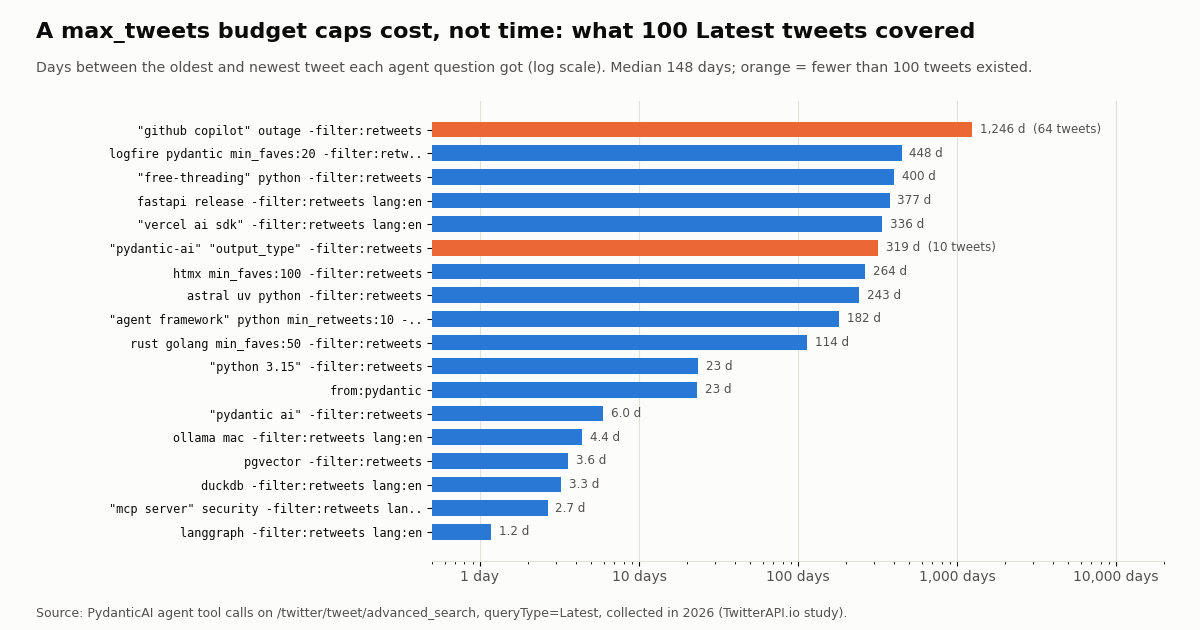
langgraphand over 1,200 days for a narrow outage query. Addsince_time:when recency matters. - Cost per run = tweets returned x $0.15 / 1,000. Our 18 questions used 89 requests and 25,710 credits: $0.26 in total, $0.015 for a typical 100-tweet question.
Pydantic AI is the agent framework from the team behind Pydantic. Its pitch is type safety: tools declare typed arguments, dependencies arrive through a typed RunContext, and every run ends in an output the library validates for you. Twitter (X) data is a natural fit for that, because a search result is a large, loosely shaped JSON object and an agent only needs a few fields of it. This page builds that integration end to end: a search_tweets tool on top of the TwitterAPI.io REST API, a dependency object that carries the HTTP client and a tweet budget, a structured output_type, and an offline test that needs neither a model key nor network access.
This is an integration guide, not a framework comparison. If you are still choosing between Pydantic AI and a graph framework, the Pydantic AI vs LangGraph guide covers that decision; if you already use LangGraph, the LangGraph version of this tool is linked below. Everything here was checked against pydantic-ai-slim 2.71.0 on Python 3.12, the current release on PyPI when we wrote it.
We also ran the agent for real. A deterministic FunctionModel played the LLM and asked 18 developer questions; the tool made 89 live requests and fetched 1,712 tweets. The numbers below (which fields come back null, how much a tweet budget buys, what each question cost) come from that run.
1,712 of 1,712 (100%) in a Pydantic AI agent's search results, collected in 2026: quoted_tweet is null on 90.0% of tweets and inReplyToId on 82.5%. With those fields Optional, 0 failed.
What you need: versions, packages and the API key
Python 3.11 or newer. The current pydantic-ai release on PyPI is 2.71.0 and declares requires_python >=3.11. On Python 3.9, pip silently resolves to the old 0.8 line, whose API differs; we hit exactly that on the first install. Use a 3.11+ interpreter (we used 3.12.13) and pin the version: pip install "pydantic-ai-slim[openai]==2.71.0" httpx, swapping the extra for your model vendor.
pydantic-ai-slim or pydantic-ai. The slim package installs only the core plus the extras you name; the full package pulls every provider. Both expose the same Agent, RunContext and ModelRetry imports. Add the mcp extra only if you want the MCP route described later.
A TwitterAPI.io key. Sign in at the dashboard, copy the key and send it as the X-API-Key header. No X developer account, OAuth app or X login is needed for reads. New accounts that pass the automatic bot check get up to $1 of free credits (up to 100,000 credits, no card, one per person or network, expiring after 31 days), which is enough for this whole page several times over.
Mind the free-tier rate. Before the first payment the limit is 0.2 requests per second, so a tool call that pages five times takes about 25 seconds; after a first payment it is 20 requests per second (50 on Scale, 500 on Business). An agent that issues parallel tool calls will hit 429s on a free account, which is why the tool below waits and retries on 429.
Step 1: model the tweet, with Optional where the data says so
The tool's return type is what the model sees, and it is also what Pydantic validates on every page. Get it wrong and the tool raises inside the agent run. We measured the fields directly: for every tweet the agent fetched, we recorded whether each key was present, null, empty, or set.
A model that requires every field fails on every tweet. We validated all 1,712 tweets against a naive strict model (19 tweet fields plus 9 author fields, all required, strict types). It rejected 1,712 of 1,712. The failures came from four fields that are null by design: quoted_tweet (1,541 tweets), inReplyToId (1,412), inReplyToUsername (1,405) and card (1,359). No tweet is a reply, a quote and a link card at once, so no tweet passed.
Two surprises worth knowing. First, author.description was an empty string on every search result, while the bio text sat in author.profile_bio.description (97.9% of tweets). A model that reads description validates fine and silently gives the agent nothing. Second, place was always present as an empty object, never null, so a strict dict passes while the data is useless. Validation success is not the same as useful data: check the values too.
Types that held in every case. id was a string on 100.0% of tweets (keep it str: X ids exceed 2^53, the largest integer a JSON number carries exactly in JavaScript), viewCount was an integer on all 1,712, and createdAt parsed on 100.0% with the format %a %b %d %H:%M:%S %z %Y. The largest viewCount in the sample was 9,084,237, comfortably inside a Python int.
Set model_config = ConfigDict(extra="ignore") so the 30-odd keys you do not declare are dropped instead of rejected, and the model is only as strict as the fields you chose.
from pydantic import BaseModel, ConfigDict

class Tweet(BaseModel):
    model_config = ConfigDict(extra="ignore")  # 30+ keys arrive; keep what the model needs
    id: str                       # 100% strings in the sample; never int
    text: str
    createdAt: str                # parses 100% with "%a %b %d %H:%M:%S %z %Y"
    likeCount: int = 0
    retweetCount: int = 0
    replyCount: int = 0
    viewCount: int | None = None
    lang: str | None = None
    isReply: bool = False
    inReplyToId: str | None = None        # null on 82.5%
    inReplyToUsername: str | None = None  # null on 82.1%
    quoted_tweet: dict | None = None      # null on 90.0%
    card: dict | None = None              # null on 79.4%
    author: Author                        # bio: author.profile_bio.description
Step 2: put the HTTP client, key and budget in deps
Pydantic AI's dependency injection is a single object: you declare its type with deps_type=Deps on the Agent, pass an instance to agent.run(..., deps=deps), and every tool that takes ctx: RunContext[Deps] reads it as ctx.deps. The documentation's own example uses a string; for an API tool, a dataclass is the useful shape.
The httpx.AsyncClient. Create one client per process and pass it in, rather than opening a client inside the tool. Tool calls then reuse connections, and tests can swap the client for one with a mock transport without touching the tool.
The API key. Keeping it in deps rather than a module global means a multi-tenant service can run the same agent with a different key per user, and the key never appears in the tool schema the model sees. Pydantic AI builds that schema from every parameter except RunContext.
The budget and the meter. max_tweets is the cap on what this run may fetch; tweets_billed and credits count what it actually fetched. Because deps are a mutable object shared across the run, every tool call sees what earlier calls spent. This is the piece that keeps an agent that decides to search five times from turning one question into 500 tweets.
Why @agent.tool and not @agent.tool_plain. The docs describe @agent.tool as the decorator for tools that need the agent context and @agent.tool_plain for tools that do not. A search tool needs the client, the key and the budget, so it is @agent.tool. A pure helper, such as one that converts a date to a since_time: Unix timestamp, can be tool_plain.
Step 3: the search tool, with cursor paging and a budget
The tool is an async function whose docstring and argument names become the tool description the model reads, so write them for the model: say that query accepts X search operators and give two examples in the agent's instructions.
Paging. /twitter/tweet/advanced_search returns a top-level tweets array, has_next_page and next_cursor. Send cursor empty on the first request, then the previous next_cursor, and stop when has_next_page is false or a page comes back empty. In our run 83 of 89 pages held exactly 20 tweets, 4 held fewer (4, 10, 19 and 19) and 2 were empty even though the previous page had said has_next_page: true. Treat an empty page as the end, not as an error.
The budget can overshoot by up to one page. You only learn how many tweets a page holds after paying for it. Our tool stopped at 100 kept tweets, but two questions hit a 19-tweet page and needed a sixth request, so they were billed for 119 and kept 100. Across the run, 38 of 1,712 billed tweets (2.2%) were fetched and then cut by the cap. Count tweets_billed from the page, not from what you return, and size the budget with that slack in mind.
Errors the model can fix vs errors it cannot. Raise ModelRetry with a short message when the model's query is the problem: a missing or invalid parameter comes back as HTTP 400 with the reason in detail, and Pydantic AI sends your message back to the model and lets it try again, within the tool's retry budget. For a 429, wait and retry inside the tool; the model cannot fix a rate limit. For anything else let the exception propagate, so a broken key fails the run loudly instead of being paraphrased into an answer.
When the budget is spent, raise ModelRetry("Tweet budget for this run is spent. Answer with what you have.") rather than returning an empty list. An empty list reads to the model like "nobody posted about this", which is a different and wrong conclusion.
@agent.tool
async def search_tweets(ctx: RunContext[Deps], query: str, max_results: int = 40) -> list[Tweet]:
    """Search recent public X posts, newest first. `query` takes X search operators."""
    remaining = ctx.deps.max_tweets - ctx.deps.tweets_billed
    if remaining <= 0:
        raise ModelRetry("Tweet budget for this run is spent. Answer with what you have.")
    limit = min(max_results, remaining)
    tweets, cursor = [], ""
    while len(tweets) < limit:
        r = await ctx.deps.http.get(
            f"https://api.twitterapi.io/twitter/tweet/advanced_search",
            params={"query": query, "queryType": "Latest", "cursor": cursor},
            headers={"X-API-Key": ctx.deps.api_key},
        )
        if r.status_code == 429:
            await asyncio.sleep(5)
            continue
        if r.status_code == 400:   # bad parameter; the body explains which
            raise ModelRetry(f"Search rejected (HTTP 400): {r.text[:200]}. Fix the query.")
        r.raise_for_status()
        body = r.json()
        page = body.get("tweets") or []
        ctx.deps.tweets_billed += len(page)
        ctx.deps.credits += max(15, 15 * len(page))   # 15 credits per tweet, 15 minimum
        tweets += [Tweet.model_validate(t) for t in page]
        if not page or not body.get("has_next_page"):
            break
        cursor = body["next_cursor"]
    return tweets[:limit]
Step 4: a structured output_type, and what a run returns
In current Pydantic AI the parameter is output_type (the docs describe it as taking "one or more types or output functions"), and the validated value is result.output. Older tutorials and the 0.0.x releases used result_type and result.data; if a snippet uses those names, it predates the current API.
Design the output for the caller, not the model. SearchReport carries the answer text, the exact query the agent used, how many tweets it saw, the tweet ids it relied on and a list of caveats. The ids make the answer checkable: your code can fetch those tweets again with /twitter/tweets and show them as citations. The query makes the run reproducible.
Validation retries. If the model returns output that fails validation, Pydantic AI tells it what was wrong and asks again. The output retry budget defaults to 1 and can be raised with Agent(retries={'output': N}) or per run. Keep the output model small and the field names self-explanatory; every required field is one more thing the model can get wrong.
Cap the loop, not just the tweets. usage_limits=UsageLimits(tool_calls_limit=4, request_limit=8) stops a run that keeps searching. The tweet budget in deps protects your TwitterAPI.io bill; the usage limits protect your model bill. They are different meters.
A run of the study harness printed one line per question; the first four looked like this (requests, tweets billed, cost, question):
Each run took two model requests (one that asked for the tool, one that returned the SearchReport) and one tool call, so result.usage reported requests=2, tool_calls=1 for every question.
Step 5: test the agent offline with FunctionModel
Pydantic AI ships two test models. TestModel calls every tool with arguments generated from the schema, which proves the wiring but sends nonsense queries. FunctionModel lets you write the model's turns yourself: return a ToolCallPart for search_tweets on the first turn and the output tool call on the second. Pair it with an httpx.MockTransport that replays a saved API response, and the whole agent runs in CI with no model key and no network.
This is also how we ran the study. The same search_tweets tool and Tweet model ran under a scripted FunctionModel for 18 questions; the only change was the HTTP transport, which forwarded each request to our rate-limited study client instead of opening its own connection. The tool code did not change between test and live use, which is the point of putting the client in deps.
Save one real page as a fixture. Call the endpoint once, store the JSON body, and replay it. A hand-written fixture will have every field set and will pass a model that real data breaks; the real page carries the nulls from Step 1.
Assert on the meter too. The test below checks the output, but deps.credits after the run is the number that tells you whether a refactor changed what a question costs.
"""test_agent.py - run the agent offline: no model key, no API calls.

FunctionModel plays the LLM; httpx.MockTransport replays a saved search page.
"""
import asyncio, json

import httpx
from pydantic_ai.messages import ModelResponse, ToolCallPart, ToolReturnPart
from pydantic_ai.models.function import AgentInfo, FunctionModel

from agent import Deps, agent

PAGE = json.load(open("fixtures/advanced_search_page.json"))  # one real response body


async def replay(request: httpx.Request) -> httpx.Response:
    assert request.url.path == "/twitter/tweet/advanced_search"
    return httpx.Response(200, json=PAGE)


def scripted(messages, info: AgentInfo) -> ModelResponse:
    returns = [p for m in messages for p in m.parts if isinstance(p, ToolReturnPart)]
    if not returns:  # first turn: ask for a search
        return ModelResponse(parts=[ToolCallPart("search_tweets", {"query": "pgvector -filter:retweets", "max_results": 20})])
    tweets = returns[-1].content
    return ModelResponse(parts=[ToolCallPart(info.output_tools[0].name, {
        "answer": "scripted", "query_used": "pgvector -filter:retweets",
        "tweets_seen": len(tweets), "top_tweet_ids": [], "caveats": [],
    })])


async def main():
    async with httpx.AsyncClient(transport=httpx.MockTransport(replay)) as http:
        deps = Deps(http=http, api_key="test", max_tweets=100)
        result = await agent.run("q", deps=deps, model=FunctionModel(scripted))
    assert result.output.tweets_seen == len(PAGE["tweets"])
    print(result.output, deps.credits)

asyncio.run(main())
What a tweet budget buys: cost, context and time window
Every number in this section is from the 18-question run. Tweet endpoints bill 15 credits per tweet returned, $0.15 per 1,000 tweets, with a 15-credit minimum per request, so an empty page costs $0.00015. The whole run used 89 requests and 25,710 credits: $0.26. A typical question (5 requests, 100 tweets) cost $0.015; the priciest, $0.01785.
The official X API figure is the post-read price on X's pay-per-usage rate card (docs.x.com/x-api/getting-started/pricing): $0.005 per post read against $0.15 per 1,000 tweets here, about 33x per 1,000 tweets. Pay-per-usage on X is capped at 3 million post reads a month, with Enterprise above that.
Context is the hidden cost. The tool's return value is serialized into the model's context. A raw tweet object had a median of 4,944 characters of JSON; the same tweet as the slim Tweet model, 528. Across the run the slim models were 17.6% of the raw size. Returning the raw dict instead of list[Tweet] would multiply the input tokens of every follow-up model request by roughly that factor, and those tokens are billed by your model vendor, not by us.
A budget caps cost, not time. Every broad question filled its 100-tweet budget, and none of the 18 tool calls came back with zero tweets. But the window those 100 tweets covered ranged from 1.2 days (langgraph) to 1,246 days (a narrow outage query that only had 64 matches in total), with a median of 148 days. An agent asked "what are people saying now" about a quiet topic will happily summarize posts from last year. Put since_time: with a Unix timestamp in the query, or tell the model to, and ask for the date range as a caveat in the output.
The other two routes: the MCP server and XSearch
MCP instead of your own tool. Pydantic AI can mount a remote MCP server as a toolset: MCPToolset(url, headers=...) from pydantic_ai.mcp, passed as Agent(..., toolsets=[...]), with the mcp extra installed. We pointed it at the TwitterAPI.io MCP server (https://mcp.twitterapi.io/mcp) on 2.71.0 and it listed 12 read tools, including search_tweets, get_user_info, get_user_last_tweets and get_tweet_replies. The trade-off: you write no tool code, but you give up the typed Tweet model, the budget in deps and the slim return value, because the server decides what the tool returns. The MCP server guide explains how the protocol itself works.
Pydantic AI's built-in XSearch capability. The library also has XSearch in pydantic_ai.capabilities. Its docs say X search runs natively only on xAI models; on any other model you set fallback_subagent_model to an xAI model and the search is delegated to it as a subagent. That route is billed and shaped by xAI, and the docs we read do not describe a typed post object with counts and ids. Use it when you want a model-side search summary; use your own tool when you need the tweets themselves as data.
Pick by what the caller needs. If downstream code consumes tweet ids, counts and timestamps, write the tool on this page. If a person reads the answer and the tool set should grow without code, mount the MCP server. Both can live in one agent: a typed search_tweets for the data you validate and the MCP toolset for everything else.
# pip install "pydantic-ai-slim[mcp]==2.71.0"
import os
from pydantic_ai import Agent
from pydantic_ai.mcp import MCPToolset

twitter = MCPToolset(
    "https://mcp.twitterapi.io/mcp",
    headers={"X-API-Key": os.environ["TWITTERAPI_IO_KEY"]},
)
agent = Agent(os.environ["PAI_MODEL"], toolsets=[twitter])

async def main():
    async with twitter:                      # opens the MCP session
        tools = await twitter.list_tools()   # 12 read tools: search_tweets, get_user_info, ...
        result = await agent.run("Summarize what @pydantic posted this week.")
        print(result.output)
Should the agent post? Write tools and their caveats
Reads need no X account. Writes are a separate product and act as a real account: one /twitter/user_login_v2 login ($0.10, with a proxy you supply) returns login_cookies, and each post, reply, like, retweet or follow through endpoints such as /twitter/create_tweet_v2 then costs 60 credits, $0.0006, billed per HTTP 200 call.
Keep a human in the loop. The call acts as that account, so X can rate-limit, lock or suspend it, and the session can need a fresh login. Use only your own account, at a normal human pace; X's automation rules apply, and this is not a way around any limit. For an agent that means the model drafts, and a person or a deterministic rule approves before a write tool runs. Pydantic AI's tool layer makes that boundary easy to keep: register the write tool on a separate agent, or have the read agent return a draft in its output_type and post it from your own code.
How we collected this
Question. When a Pydantic AI agent's typed search tool runs realistic developer questions, what does validation see: tweets per call, empty calls, which fields are null, how many tweets a strict model rejects, and what each question costs?
Setup. pydantic-ai-slim 2.71.0, pydantic 2.14.4, httpx 0.28.1, Python 3.12.13. One Agent with deps_type, output_type and the @agent.tool search_tweets from this page. A deterministic FunctionModel mapped each of 18 questions to one /twitter/tweet/advanced_search query (queryType=Latest) about public developer topics: Pydantic AI, FastAPI, uv, MCP server security, Python free-threading, Rust vs Go, LangGraph, Ollama, pgvector, Logfire, the Vercel AI SDK, htmx, Python 3.15, a GitHub Copilot outage, agent frameworks, DuckDB, one deliberately narrow query, and the organization account @pydantic. Budget: 100 tweets per question.
Sample. 89 requests, 1,712 tweets (1,418 in English), collected in 2026. The window per question is the oldest to newest tweet returned, from 1.2 days to 1,246 days.
What it cannot show. Eighteen questions are not every query an agent will send: a query on a busy topic or with lang: and min_faves: filters will return different field shares (for example more replies and fewer cards). The model was scripted, so the run shows the tool's behavior, not how well any LLM writes queries. Field shares describe search results; timeline and mention endpoints return the same tweet shape but were not measured here.
Privacy. Search authors are mostly private individuals. Raw pages were kept in a temporary folder and not published; we publish aggregates and de-identified per-tweet rows (counts and flags only, no ids, URLs, text or handles). Only the organization account @pydantic is named.
"""PydanticAI agent with a typed Twitter (X) search tool on TwitterAPI.io.

    pip install "pydantic-ai-slim[openai]==2.71.0" httpx   # or the extra for your model vendor
    export TWITTERAPI_IO_KEY=...        # from twitterapi.io/dashboard
    export PAI_MODEL=provider:model-name  # any model string PydanticAI supports
    python agent.py "What are developers saying about pgvector?"
"""
from __future__ import annotations

import asyncio
import os
import sys
from dataclasses import dataclass

import httpx
from pydantic import BaseModel, ConfigDict
from pydantic_ai import Agent, ModelRetry, RunContext
from pydantic_ai.usage import UsageLimits

BASE = "https://api.twitterapi.io"
CREDITS_PER_TWEET = 15          # $0.15 per 1,000 tweets returned
MIN_CREDITS_PER_REQUEST = 15    # an empty page still costs the minimum


class Author(BaseModel):
    model_config = ConfigDict(extra="ignore")
    userName: str
    name: str | None = None
    followers: int | None = None
    isBlueVerified: bool | None = None


class Tweet(BaseModel):
    model_config = ConfigDict(extra="ignore")
    id: str                      # a string: ids exceed 2**53
    text: str
    createdAt: str               # "Thu Oct 16 12:34:56 +0000 2026"
    likeCount: int = 0
    retweetCount: int = 0
    replyCount: int = 0
    viewCount: int | None = None
    lang: str | None = None
    isReply: bool = False
    inReplyToId: str | None = None   # usually null
    author: Author


class SearchReport(BaseModel):
    """What the agent must hand back. Validated by Pydantic before run() returns."""
    answer: str
    query_used: str
    tweets_seen: int
    top_tweet_ids: list[str]
    caveats: list[str]


@dataclass
class Deps:
    http: httpx.AsyncClient
    api_key: str
    max_tweets: int = 100        # budget for the whole run
    tweets_billed: int = 0
    credits: int = 0


agent = Agent(
    deps_type=Deps,
    output_type=SearchReport,
    instructions=(
        "You answer questions about public posts on X. Call search_tweets with X search "
        "operators (from:, lang:en, min_faves:20, -filter:retweets, since_time:<unix>). "
        "Cite tweet ids you relied on. Say so when the sample is small or old."
    ),
)


@agent.tool
async def search_tweets(ctx: RunContext[Deps], query: str, max_results: int = 40) -> list[Tweet]:
    """Search recent public X posts, newest first. `query` takes X search operators."""
    remaining = ctx.deps.max_tweets - ctx.deps.tweets_billed
    if remaining <= 0:
        raise ModelRetry("Tweet budget for this run is spent. Answer with what you have.")
    limit = min(max_results, remaining)
    tweets: list[Tweet] = []
    cursor = ""
    while len(tweets) < limit:
        r = await ctx.deps.http.get(
            f"{BASE}/twitter/tweet/advanced_search",
            params={"query": query, "queryType": "Latest", "cursor": cursor},
            headers={"X-API-Key": ctx.deps.api_key},
        )
        if r.status_code == 429:
            await asyncio.sleep(5)
            continue
        if r.status_code == 400:   # bad parameter; the body explains which
            raise ModelRetry(f"Search rejected (HTTP 400): {r.text[:200]}. Fix the query.")
        r.raise_for_status()
        body = r.json()
        page = body.get("tweets") or []
        ctx.deps.tweets_billed += len(page)
        ctx.deps.credits += max(MIN_CREDITS_PER_REQUEST, CREDITS_PER_TWEET * len(page))
        tweets += [Tweet.model_validate(t) for t in page]
        if not page or not body.get("has_next_page"):
            break
        cursor = body["next_cursor"]
    return tweets[:limit]


async def main(question: str) -> None:
    async with httpx.AsyncClient(timeout=30) as http:
        deps = Deps(http=http, api_key=os.environ["TWITTERAPI_IO_KEY"], max_tweets=100)
        result = await agent.run(
            question,
            deps=deps,
            model=os.environ["PAI_MODEL"],
            usage_limits=UsageLimits(tool_calls_limit=4, request_limit=8),
        )
    report = result.output                       # a validated SearchReport
    print(report.model_dump_json(indent=2))
    print(f"tweets billed: {deps.tweets_billed}  cost: ${deps.credits / 100_000:.5f}")
    print(result.usage)                          # model tokens: billed by your model vendor


if __name__ == "__main__":
    asyncio.run(main(" ".join(sys.argv[1:]) or "What are developers saying about pgvector?"))
Researching this?Free starter credits cover end-to-end testing — Google sign-in, no card. Get a key.
Questions readers ask
Does Pydantic AI have a built-in Twitter (X) tool?
It has the XSearch capability, which its docs say runs natively only on xAI models and otherwise delegates to an xAI model as a subagent. It does not ship a typed tweet search tool against a data API. For tweet ids, counts and timestamps you can validate, register your own @agent.tool that calls /twitter/tweet/advanced_search, as on this page, or mount the TwitterAPI.io MCP server with MCPToolset.
Should I use @agent.tool or @agent.tool_plain for an API call?
Use @agent.tool when the function needs the run context, such as an HTTP client, API key or budget in ctx.deps. Use @agent.tool_plain for self-contained helpers. An API search tool almost always needs deps, so it is @agent.tool with a first parameter ctx: RunContext[Deps].
Is it output_type or result_type in Pydantic AI?
output_type. The current release (2.71.0 when we checked) takes Agent(..., output_type=SearchReport) and returns the validated value as result.output. result_type and result.data belong to early 0.0.x releases; on Python 3.9 pip still installs an old line, so check pydantic_ai.__version__.
Why does my Tweet model raise a ValidationError inside the agent?
Usually a field you declared as required is null. In our sample quoted_tweet was null on 90.0% of search results, inReplyToId on 82.5%, inReplyToUsername on 82.1% and card on 79.4%, and a model that required all fields rejected every tweet. Declare those as X | None = None, keep id as str, and set extra="ignore".
How much does one agent run cost?
Two meters. Tweets: $0.15 per 1,000 returned, with a 15-credit minimum per request, so a 100-tweet tool call is $0.015 and an empty page $0.00015. Model tokens: billed by your model vendor. Cap the first with a max_tweets budget in deps and the second with UsageLimits(tool_calls_limit=..., request_limit=...).
Can I test a Pydantic AI agent without an LLM key?
Yes. TestModel calls every tool with schema-generated arguments; FunctionModel lets you script each model turn. Combine FunctionModel with an httpx.AsyncClient built on httpx.MockTransport that replays a saved API response, and the agent runs offline.
Can a Pydantic AI agent post tweets?
Technically yes, with a write tool on /twitter/create_tweet_v2 after a /twitter/user_login_v2 login, at 60 credits ($0.0006) for each post, billed per HTTP 200 call. It acts as that account, so X can rate-limit, lock or suspend it; keep a human approving drafts, use only your own account at a normal human pace, and expect occasional re-login.
Continue
- PyPI: pydantic-ai (release 2.71.0, requires Python 3.11 or newer)
- Pydantic AI docs: Function tools (@agent.tool vs @agent.tool_plain, RunContext, deps)
- Pydantic AI docs: Output (output_type, output retries)
- Pydantic AI docs: MCP client (MCPToolset, toolsets=[...], mcp extra)
- Pydantic AI docs: XSearch capability (native on xAI models, fallback_subagent_model)
- X developer docs: pay-per-usage pricing ($0.005 per post read)
- X API guide hub: endpoints, pricing and access
- Pydantic AI vs LangGraph: how to choose a framework
- The same Twitter (X) search tool as a LangGraph agent
- LangChain + Twitter (X) API: document loader and tools
- How an AI agent loop works, built from scratch in Python
- What an MCP server is and how clients use it
- TwitterAPI.io pricing per 1,000 tweets and plans
- 01Twitter (X) Account Suspended: Why It Happened and How to Get It Back
- 02How to DM on Twitter (X): send a message on web, iPhone and Android
- 03Twitter (X) API in Java: a typed client with HttpClient and Jackson
- 04Unofficial Twitter (X) API: Access Without a Developer Account
- 05Twitter (X) Verification in 2026: What the Blue, Gold and Grey Checkmarks Mean and How to Get One
- 06Pydantic AI vs LangGraph: Typed Agents or State Graphs, and When Each Wins
- 07X (Twitter) Bookmarks + AI: Export Them, Then Let a Model Sort and Search Them
- 08How to Build an AI Twitter (X) Bot with an LLM in 2026
Writing about something you built with TwitterAPI.io? Our community rewards program pays API credits for honest tutorials, build logs and videos.
Stop reading. Start building.
Starter credits cover real testing on real data. Google sign-in, no card, no application queue.
Get an API keyAlready building with TwitterAPI.io? Publish an honest tutorial or build log about it and earn up to $200 a month in API credits.