How to DM on Twitter (X): send a message on web, iPhone and Android
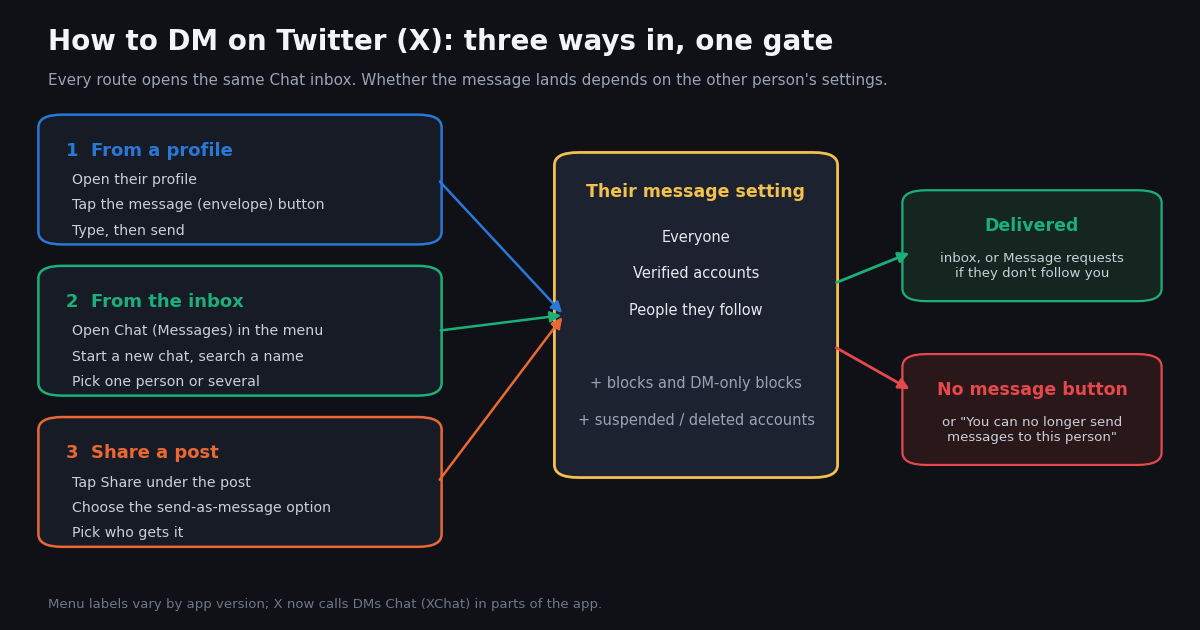
- From a profile: open the person's profile, tap the message (envelope) button, type, send. Or open Chat (the old Messages inbox), start a new chat and search their @handle.
- Send a post by DM: tap Share under the post and pick the send-as-message option, then choose one person or a group.
- Chat passcode: the first time you open Chat, X asks for a 4-digit passcode that unlocks your encrypted messages on new devices. Lose it with no logged-in device and the history cannot be recovered.
- No message button? The person allows messages only from verified accounts or people they follow, has blocked you, or the account is gone. X's settings API lists exactly three options:
all,verified,following. - Not a follower? Your message goes to their Message requests until they accept it. In our sample, 19.3% of public posts about message requests were people telling someone to check theirs.
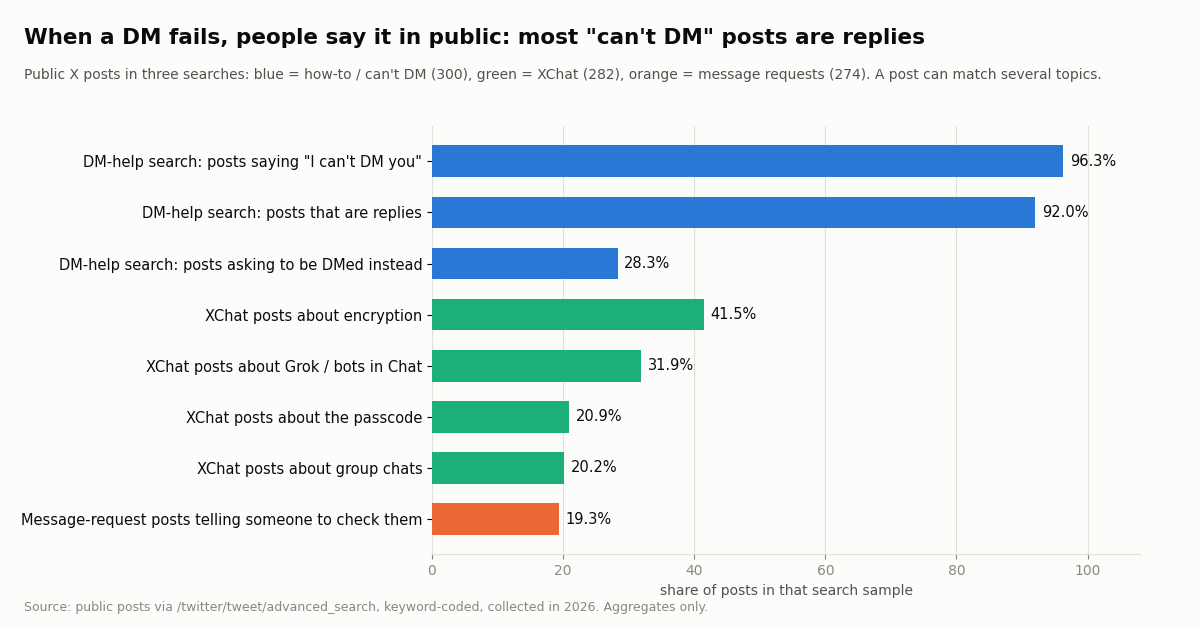
- Study, collected in 2026: 1,116 public posts about DMs. 96.3% of the DM-help search was people saying "I can't DM you"; 41.5% of XChat posts were about encryption and 20.9% about the passcode.
Sending a direct message on Twitter (X) takes three taps once you know where the button is, but the app has changed underneath the old instructions. Since November 2025 X has been moving DMs into Chat (also called XChat), an encrypted messaging system with its own passcode, and in 2026 it shipped a separate XChat app for iPhone and Android. Older guides still describe an envelope tab called Messages that, depending on your app version, may now say Chat.
This guide is for the person holding the phone. It covers the three ways to start a DM on the web, on iPhone and on Android, what the Chat passcode is, who you are allowed to message, where your message goes when the other person does not follow you, group chats, sending a post by DM, reactions, edits, deletions and read receipts. If your DM is failing with "You can no longer send messages to this person", or you want X's daily sending caps, those have their own guides linked at the end; this page does not repeat them.
We also looked at what people actually post when DMs go wrong: 1,116 public posts collected in 2026 through four X searches. The short version is that very few people ask how to send a DM; the majority can already find the button and are telling someone, in public, that the other side's settings stop them.
96.3% of 300 recent public posts from the X search for DM help (collected in 2026) were people saying they could not DM someone, and 92.0% of them were replies: the button is easy to find, the recipient's setting is what stops people.
How to DM on Twitter (X): the steps for web, iPhone and Android
There are three entry points and they work the same way on every platform: from the person's profile, from the inbox, and from a post. The table below lists them side by side. X changes labels between app versions, and since late 2025 the inbox is called Chat in current builds, so if a label on your screen differs slightly, look for the envelope or speech-bubble icon in the same place.
Step 1: find the person. From the inbox, type part of their name or @handle into the search box of the new-message screen. You can add more than one person; doing so creates a group chat instead of a one-to-one conversation.
Step 2: write and send. Type in the box at the bottom of the conversation and press the send arrow (or Enter on the web). You can attach photos, videos, GIFs, voice notes and files; @chat announced voice notes in April 2026 and file sharing with the November 2025 launch.
Step 3: check where it went. If the person follows you, the message arrives in their main inbox. If they do not but accept messages from you, it lands in their Message requests (see below). If there is no message button at all, their settings or a block stop you, and no workaround in the app changes that.
The XChat app. X announced the standalone XChat app for iOS on April 24, 2026 and for Android at the end of June 2026 (posts by @chat and @X). It uses the same account and the same conversations as the chat inbox inside the X app, so you do not need it to send a DM; it is an alternative home-screen app for messaging only.
Twitter DMs are now Chat (XChat): what changed and the 4-digit passcode
On November 14, 2025 the official @chat account announced "Chat", described as "all-new secure messaging on X" with end-to-end encrypted chats and file sharing, the ability to edit, delete or make messages disappear, screenshot blocking with a notice of attempts, and "no ads. no tracking." Over the following year X folded the old DM inbox into it: the left-menu entry and the bottom-bar icon now open Chat in current app versions.
The passcode. When you first open Chat, X asks you to create a 4-digit passcode (TechCrunch described the same "four-digit code to protect your messages" during the 2025 rollout). The passcode protects the key that decrypts your messages. Enter it on a new phone or browser and your history comes back; log out and that device forgets the key until you enter the passcode again.
If you forget it. On a device where you are still signed in and Chat is unlocked, open the chat settings and choose the option to change the passcode; your history is kept. If no device is still unlocked, the encrypted history cannot be restored and is lost. Store the passcode in a password manager and stay signed in on at least one device.
Encryption covers the content, not everything. X's own help page on Chat (help.x.com/en/using-x/encrypted-direct-messages) says encryption applies to conversations where both people use Chat, and covers the message content including links, media and files; metadata such as who talked to whom and when is not encrypted, and anything you share with Grok is not either.
Legacy conversations are being converted. On November 18, 2026 @chat said support for legacy groups on XChat would end that Friday: "All unencrypted conversations will become encrypted, and group members not on XChat by Friday will need to sign up for XChat to be reincluded in those conversations." Elon Musk posted the next day that X is "moving all text conversations to be encrypted". If a friend has never opened Chat, they may need to do so (and set their passcode) before your messages reach them.
In our study, the XChat sample shows what this change costs people in attention: 41.5% of 282 recent public posts about XChat mentioned encryption and 20.9% mentioned the passcode or a PIN, many of them asking why X suddenly wants a code they never set.
Who can you DM on Twitter? The three message settings
Whether you can message someone is decided by their settings, not yours. X's developer documentation for chat settings (docs.x.com/x-api/chat/update-chat-settings) lists exactly three values for who may send a direct message: all (everyone), verified (verified accounts only) and following (only accounts the person follows). There is also a switch to always allow messages from people who pay for a subscription to that account, a quality filter for low-quality requests, a read-receipt switch and separate settings for audio and video calls.
To change your own setting: open Settings and privacy, then the privacy section for direct messages or Chat, and pick who can message you. The exact menu wording has changed several times; X's help page on direct messages (help.x.com/en/using-x/direct-messages) is the reference for the current path.
X Numbers. In September 2026 @chat introduced X Numbers: an optional number you can share with anyone you want to contact you, "even if you don't follow them", without accepting a request first. It is a way around your own setting for people you choose, not a way into someone else's.
In our DM-help sample, this is the wall people hit: of 300 recent public posts matching phrases like "how do I DM" and "can't DM", 96.3% were people saying they could not DM someone, 92.0% were replies, and 28.3% asked the other person to DM them instead. The fix is usually exactly that: ask the person to follow you or message you first, which opens the conversation from their side.
Message requests: where DMs from people you don't follow go
When someone you do not follow sends you a message, X keeps it out of your main inbox and puts it in Message requests. Accepting moves the conversation into your inbox; you can also delete the request, or block or report the sender from the same screen.
Where to find them. Open Chat (or Messages) and look for the Message requests entry in the inbox. X also has a quality filter for message requests (it appears as dm_quality_filter in X's settings documentation), so a request you expected may be filtered; if a message never showed up, look through every section of requests.
If you sent a request. You cannot tell whether a request was read. If it matters, reply to one of their posts and tell them a request is waiting, which is what many people do: in our sample of 274 recent public posts that mention message requests, 19.3% were people telling someone to check their requests.
Design changes are ongoing. In July 2026 Nikita Bier, then head of product at X, replied publicly that an "updated design for Message Requests is in testing". The location of requests inside the inbox may therefore look different on your app version.
Daily caps on how many requests and DMs an account can send, including the lower caps for unverified accounts, are covered in our separate guide to the Twitter direct message limit.
How to send a tweet (post) by DM, and how to start a group chat
Send a post. Under any post, tap the Share icon (the arrow or the share symbol, depending on the app) and choose the option to send it in a message. Pick one or more recipients, optionally add a comment, and send. The recipient sees a card with the post inside the conversation. If the post comes from a protected account, only people allowed to see that account's posts can open it.
Start a group chat. In the new-message screen, add more than one person before you write. Everyone you add must accept messages from you under their own setting. You can name the group and add or remove people from the conversation's info screen.
Groups are getting bigger. In April 2026 Nikita Bier announced joinable links for group chats, "with support for 350 members per chat (and growing)". Group size limits are covered in the DM limit guide.
Legacy groups. If a group you were in has disappeared or asks you to sign up for XChat, that is the November 2026 conversion of legacy groups described above: 20.2% of the XChat posts in our sample mentioned group chats, mostly about that switch.
Read receipts, reactions, editing and deleting a DM
Read receipts. X lets you turn read receipts on or off for all conversations (the developer settings field is a single on/off switch for everyone, all_enabled or all_disabled). When they are on, the sender can see that you have read the message. Turning them off is widely reported by guides to hide other people's receipts from you as well, so test it with a friend if it matters.
Reactions. You can react to a single message with an emoji from that message's options; the other person sees the reaction under the message. Where the options open (a long press on mobile, a hover menu on the web) has varied between app versions.
Editing and deleting. Chat supports editing and deleting your own messages; the @chat launch post lists "edit, delete, or make messages disappear". Look for edit and delete in the options of a message you sent. Deleting a whole conversation from your inbox is not the same as deleting your messages inside it: guides consistently report that the other person keeps their copy of the conversation.
Disappearing messages and screenshots. Chat can set messages to disappear after a time, and it can block screenshots and tell you when someone tries, per the launch announcement. Neither stops someone from photographing a screen with a second device.
Archive. In October 2026 @chat added Archive: "Hide conversations from your inbox without deleting them." Use it when you want a clean inbox without losing a thread.
Read receipts are a quiet topic in public: of 260 recent posts matching "read receipt" or "seen" together with DM terms, only 1.2% actually discussed read receipts; the rest used the word "seen" in other ways. People ask about them in search, not in posts.
What 1,116 public posts say about DMs on X
To see what goes wrong in practice, we pulled the latest public posts from four X searches: DM help ("how do I DM", "how to DM", "can't DM"), XChat, message requests, and read receipts. Each post was coded with keyword rules; a post can carry several topics. The chart shows the main shares within each search.
"I can't DM you" is a high-volume public message. The DM-help search filled 300 posts in 6.5 hours, about 46.5 posts an hour, with a median of 0.8 minutes between posts. Very few (3.0%) asked how to send a DM in the first place. People find the button; the recipient's setting stops them, and they move the conversation into public replies.
XChat confusion is about encryption, not sending. In the XChat search, encryption and the passcode dominated, followed by Grok and bots inside Chat (31.9%), which X has been promoting since October 2026.
Message requests are mostly a pointer. In the message-requests search, 19.3% of posts told someone to look in their requests, and 3.6% said a request could not be found or was hidden. Spam or unwanted requests came up in 3.3%.
The practical reading: if your DM matters, check the person's message button before you write, and if it is missing, ask them in a reply to message you first.
For developers: check whether an account accepts DMs before you write
If you build a support tool or a bot that answers people who contacted you, you can read whether an account accepts DMs before trying. The /twitter/user/info endpoint returns a canDm field for any public username, with no X account needed for reads. Profiles cost 18 credits each, or $0.18 per 1,000 profiles; X's pay-per-usage rate card on docs.x.com lists $0.010 per user read, which is $10 per 1,000. Tweet reads cost $0.15 per 1,000 tweets returned versus $0.005 per post read ($5 per 1,000) on the same X rate card, about 33x.
Sending a DM through the API is possible with /twitter/send_dm_to_user, but it runs through an authenticated session of your own X account: one /twitter/user_login_v2 login ($0.10, with a proxy you supply) returns login_cookies, and each message is then 60 credits, or $0.0006, billed per HTTP 200 call. The call acts as that account, so X can rate-limit, lock or suspend it; keep a normal human pace, answer only people who contacted you, and expect the session to need a re-login now and then. It is not a tool for unsolicited messages and it is not a way around anyone's message setting: the recipient must accept DMs from you.
New accounts that pass the automatic bot check get up to $1 of free credits (up to 100,000 credits, no card, one per person or network, expiring after 31 days); purchased credits never expire. See the pricing page for plans and rate limits.
import requests

API_KEY = "YOUR_TWITTERAPI_IO_KEY"
BASE = "https://api.twitterapi.io"

# Reply to one person who messaged your own account (not for bulk sending).
resp = requests.post(
    f"{BASE}/twitter/send_dm_to_user",
    headers={"X-API-Key": API_KEY},
    json={
        "login_cookies": "FROM_user_login_v2",
        "user_id": "44196397",
        "text": "Thanks for reaching out, we have fixed your order.",
        "proxy": "http://user:pass@host:port",
    },
    timeout=30,
)
body = resp.json()
print(resp.status_code, body.get("status"), body.get("message_id"), body.get("message"))How we collected this
Question: when people post publicly on X about DMs or the new Chat, what are they trying to do and what trips them up?
Searches: four /twitter/tweet/advanced_search queries, Latest, English, reposts excluded: DM help ("how do i dm", "how to dm", "how do you dm", "how do i message", "can't dm"); XChat or "X Chat" with passcode, PIN, encryption, inbox or messages; "message requests" or "DM requests"; "read receipt" or "seen" with DM terms.
Sample: 59 requests, 1,118 posts fetched, 1,116 unique posts after removing duplicates across searches, collected in 2026. Each search covers the latest matching posts at collection time, from 6.5 hours (DM help) to several months (XChat). Fact checks on X's own announcements used a few extra requests to the public @chat, @X, @elonmusk and @nikitabier posts.
Method: keyword rules on lowercased text with leading @mentions removed; a post can match several topics; a question is a post containing a question mark or starting with how, why, where, can, does, is, do or what. Shares are of the posts in each search. The rules are in data/studies/how-to-dm-on-twitter/analyze.py.
What the sample cannot show: keyword coding misses sarcasm and posts in other languages, and the read-receipt search was dominated by unrelated uses of "seen". Public posts over-represent people who move a failed DM into public replies; people who quietly give up are invisible. The sample says nothing about how many DMs X delivers or blocks.
Privacy: aggregates only. The authors of search results are mostly private individuals, so raw pages were not kept; the published sample holds de-identified rows (search, topics, question and reply flags, text length, hour offset) with no post ID, URL, text, author ID or handle. Accounts named on this page are organization or public-figure accounts.
import requests

API_KEY = "YOUR_TWITTERAPI_IO_KEY"
BASE = "https://api.twitterapi.io"


def accepts_dms(username: str):
    """Return True/False from the profile's canDm field, or None if the user is not found."""
    resp = requests.get(
        f"{BASE}/twitter/user/info",
        headers={"X-API-Key": API_KEY},
        params={"userName": username},
        timeout=30,
    )
    resp.raise_for_status()
    body = resp.json()
    if body.get("status") != "success" or not body.get("data"):
        print(username, "->", body.get("msg"))
        return None
    data = body["data"]
    print(f"@{data['userName']}: canDm={data.get('canDm')} followers={data.get('followers')}")
    return data.get("canDm")


for handle in ["XDevelopers", "chat", "NASA"]:
    accepts_dms(handle)
Researching this?Free starter credits cover end-to-end testing — Google sign-in, no card. Get a key.
Questions readers ask
How do I DM someone on Twitter (X)?
Open their profile and tap the message (envelope) button next to Follow, then type and send. Or open the inbox (Chat, formerly Messages), start a new chat, search their name or @handle and write from there. If there is no message button, they do not accept messages from you.
Why is there no message button on someone's profile?
They allow messages only from verified accounts or only from people they follow, they blocked you or put a DM-only block on you, or the account is suspended or deleted. You cannot change that from your side; ask them in a reply to follow you or message you first.
What is the X Chat passcode?
A 4-digit code you set the first time you open Chat. It protects the key that decrypts your encrypted messages, so you need it on new devices. You can change it from the chat settings on a device that is still unlocked; if no device is unlocked and you forget it, the encrypted history is lost.
Can I DM someone who doesn't follow me on Twitter?
Yes, if their setting is Everyone, or Verified accounts and your account is verified. Your message goes to their Message requests until they accept it. If they allow only people they follow, you cannot message them.
Where are message requests on Twitter (X)?
Inside the Chat (Messages) inbox, in a Message requests entry. X also filters low-quality requests, so look through every section of requests if an expected message is missing; X has been testing a new requests design, so the layout may differ.
How do I send a tweet in a DM?
Tap the Share icon under the post, choose the option to send it as a message, pick one or more people and send. The recipient sees the post as a card in the conversation.
Can I tell if someone read my Twitter DM?
Only if they have read receipts turned on. X offers one switch for read receipts across all conversations; if it is off on their side, you will not see that they read it.
Can I unsend a DM on X?
Chat supports editing and deleting your own messages, and disappearing messages, according to X's launch announcement. Deleting a whole conversation from your inbox is reported to remove it only for you.
Continue
- X Help Center: How to use direct messages
- X Help Center: About Chat (encryption scope, passcode)
- X API docs: chat settings (allow_dms_from, read receipts, calls)
- @chat: "Say hello to Chat" launch post (November 2025)
- @chat: legacy groups move to encrypted XChat (November 2026)
- TwitterAPI.io docs: send_dm_to_user
- X (Twitter) API guide: data access without the official tiers
- "You can no longer send messages to this person": causes and fixes
- Twitter direct message limit: daily caps and group sizes
- X Chat API: encrypted DMs for developers
- How to build a Twitter (X) chatbot
- Check whether someone follows you on X
- TwitterAPI.io pricing for profile and tweet reads
- 01Twitter (X) Account Suspended: Why It Happened and How to Get It Back
- 02Twitter (X) API in Pydantic AI: A Typed Search Tool for Your Agent
- 03Twitter (X) API in Java: a typed client with HttpClient and Jackson
- 04Unofficial Twitter (X) API: Access Without a Developer Account
- 05Twitter (X) Verification in 2026: What the Blue, Gold and Grey Checkmarks Mean and How to Get One
- 06Twitter "This Request Looks Like It Might Be Automated" — Error 226, and How to Fix It
- 07Twitter (X) Ads Library: What the X Ads Repository Shows, and What It Misses
- 08Twitter (X) Templates — Bulk Post via API
Writing about something you built with TwitterAPI.io? Our community rewards program pays API credits for honest tutorials, build logs and videos.
Stop reading. Start building.
Starter credits cover real testing on real data. Google sign-in, no card, no application queue.
Get an API keyAlready building with TwitterAPI.io? Publish an honest tutorial or build log about it and earn up to $200 a month in API credits.