n8n Twitter (X) API Workflow: Post New Tweets to Slack in 2026
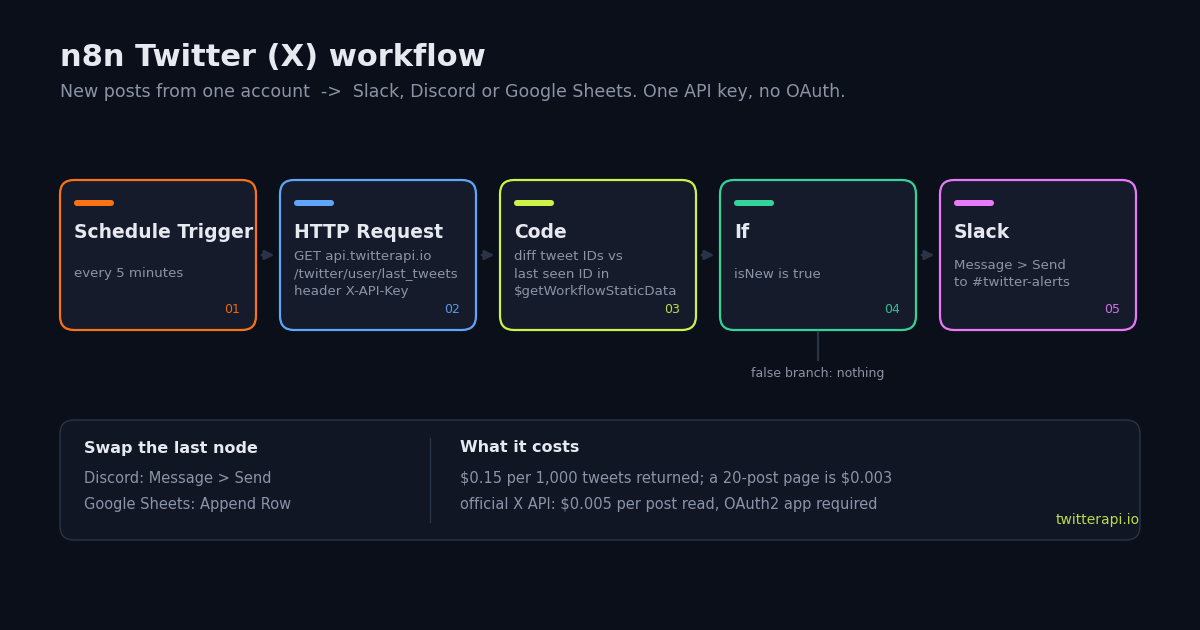
n8n ships one Twitter integration, the X (formerly Twitter) node. It can post, delete, like, retweet, search, fetch one user and add a list member, and every one of those operations runs through OAuth2 credentials from an X developer app and the official API's per-read billing. What it cannot do is the thing most people building an n8n Twitter workflow actually want: watch an account and do something when a new post appears. There is no trigger and no timeline operation.
This guide builds that workflow with n8n's generic HTTP Request node and TwitterAPI.io instead. The chain is Schedule Trigger -> HTTP Request -> Code -> If -> Slack, the only credential is an API key in a header, and the whole thing imports from a JSON block you can copy. Every node name, field name and transport option below was checked against n8n's documentation and source for this guide, so you can match the labels you see on screen.
Two more routes are covered because they come up in the same search: swapping Slack for Discord or Google Sheets (one node), and letting an n8n AI Agent query Twitter itself through the MCP Client Tool node and TwitterAPI.io's hosted MCP server. If you don't use n8n, the Python version at the end does the same job as a script.
Why not n8n's own X (Twitter) node?
Because it is built for the official X API, and the official X API is the expensive, slow-to-set-up way to read tweets. n8n's X credentials page (docs.n8n.io/integrations/builtin/credentials/twitter/) is explicit: only OAuth2 is supported since n8n 0.236.0 and V2 of the node; you create an app in the X developer portal, copy n8n's OAuth Redirect URL into the app's Callback URI, supply a website URL, and paste the app's Client ID and Client Secret into n8n. Rate limits are time-based per endpoint and depend on your access level.
The node's operation list (docs.n8n.io/integrations/builtin/app-nodes/n8n-nodes-base.twitter/) is short: Direct Message create; Tweet create or reply, delete, search, like, retweet; User get; List add member. There is no operation for an account's timeline, so a monitor has to use Tweet > Search, and every post that search returns is billed by X at $0.005 per post read ($0.010 per user read, $0.015 per post created), with pay-per-usage capped at 3 million post reads per monthly billing cycle (docs.x.com/x-api/getting-started/pricing).
The HTTP Request node sidesteps all of that. It calls any REST endpoint, supports a generic Header Auth credential, and TwitterAPI.io reads public tweets with that one header: no X account, no OAuth consent screen, 15 credits per tweet returned ($0.15 per 1,000 tweets). The table compares the three ways to get Twitter data into n8n.
The ratio in the middle column is the one to remember: $5.00 against $0.15 per 1,000 tweets, about 33x, before counting the developer-app setup the official route needs before its first call.
What you need before you import the workflow
An n8n instance. n8n Cloud or self-hosted both work; the workflow JSON uses HTTP Request node version 4.2, Code node version 2, If node version 2 and Slack node version 2.2, all of which current n8n releases load. The optional MCP section needs an n8n recent enough to ship the MCP Client Tool node with a Server Transport setting (node version 1.1 and later, see the last section).
A TwitterAPI.io API key. Sign in with Google at twitterapi.io and copy the key from the dashboard. New accounts that pass the automatic bot check get $1 in free credits (100,000 credits), no card needed, one per person and network, expiring after 31 days; that covers several hundred 20-tweet pages while you test.
A Header Auth credential in n8n. Open Credentials, create a Header Auth credential, set Name to X-API-Key and Value to your key. The HTTP Request node will reference it through Authentication = Generic Credential Type, Generic Auth Type = Header Auth, so the key never sits inside the workflow JSON.
A Slack credential (Access Token or OAuth2, per n8n's Slack node docs) with permission to post in the target channel, or a Discord or Google Sheets credential if you prefer one of those destinations.
One decision about state. The workflow remembers the last tweet ID in workflow static data. n8n's documentation notes that static data is not saved during manual test runs and may behave unreliably under very high-frequency executions, and suggests data tables as an alternative. For a 5-minute schedule static data is fine; if you want to see the diff work while clicking Test, store the ID in a data table instead.
Step 1: Schedule Trigger and the HTTP Request node
Add a Schedule Trigger node and set Trigger Interval to Minutes with Minutes Between Triggers = 5. n8n's docs point out that a schedule only fires once the workflow is published, so expect nothing from the trigger while you are editing; use the node's manual run to test the rest of the chain.
Connect an HTTP Request node with Method GET and URL https://api.twitterapi.io/twitter/user/last_tweets. Set Authentication to Generic Credential Type, Generic Auth Type to Header Auth, and select the credential from the previous section. Turn on Send Query Parameters and add one Name/Value pair: userName = the handle without the @ (the JSON uses nasa). Leave Response Format on Autodetect; the API returns JSON.
The endpoint returns the account's newest page of posts sorted by creation time. The list sits under data.tweets; pagination fields has_next_page and next_cursor are top-level, and a monitor never needs them because it only cares about the first page. The fields the later nodes use are id, text, createdAt, url, author.userName, likeCount and retweetCount:
{
  "status": "success",
  "code": 0,
  "msg": "success",
  "data": {
    "pin_tweet": null,
    "tweets": [
      {
        "id": "1975000000000000000",
        "url": "https://x.com/NASA/status/1975000000000000000",
        "text": "...",
        "createdAt": "...",
        "likeCount": 0,
        "retweetCount": 0,
        "replyCount": 0,
        "viewCount": 0,
        "author": { "userName": "NASA", "name": "NASA" }
      }
    ]
  },
  "has_next_page": true,
  "next_cursor": "..."
}Step 2: the Code node diffs against the last seen tweet ID
Add a Code node in Run Once for All Items mode with the JavaScript below. It reads $getWorkflowStaticData('global'), a key-value object n8n persists between executions of the published workflow, takes the newest tweet ID out of the response, and returns one item per tweet whose ID is newer than the stored one. Then it updates the stored ID.
Three details are deliberate. Tweet IDs are snowflakes, so a longer ID is always newer and equal-length IDs compare as strings; that avoids BigInt. On the very first run there is no stored ID, so the node records the newest one and returns no items, otherwise the account's last 20 posts would land in Slack as a batch. And the diff reads body.data.tweets or body.tweets, so the same node works unchanged with the advanced_search variant in the cost section.
The caveat from n8n's cookbook page applies here: $getWorkflowStaticData only persists when the workflow is published and runs from its trigger. If you click Test on the workflow, the stored ID resets between runs and every run looks like the first one. That is expected, not a bug in the diff.
// Code node, mode "Run Once for All Items", language JavaScript.
// Input: the JSON returned by the HTTP Request node.
const store = $getWorkflowStaticData('global');
const body = $input.first().json;

// /twitter/user/last_tweets nests the list under data.tweets;
// /twitter/tweet/advanced_search puts it top-level as tweets.
const tweets = (body.data && body.data.tweets) || body.tweets || [];

// Tweet IDs are snowflakes: a longer ID is newer, same length -> compare as strings.
const newer = (a, b) => (a.length !== b.length ? a.length > b.length : a > b);

const lastSeen = store.lastTweetId || null;
let newest = lastSeen;
for (const t of tweets) {
  if (!newest || newer(t.id, newest)) newest = t.id;
}
store.lastTweetId = newest;

// First run: remember the newest ID and post nothing,
// so Slack is not flooded with the account's last 20 posts.
if (!lastSeen) return [];

return tweets
  .filter((t) => newer(t.id, lastSeen))
  .sort((a, b) => (newer(a.id, b.id) ? 1 : -1)) // oldest first
  .map((t) => ({
    json: {
      isNew: true,
      id: t.id,
      text: t.text,
      createdAt: t.createdAt,
      author: t.author.userName,
      url: t.url,
      likeCount: t.likeCount,
      retweetCount: t.retweetCount,
    },
  }));
Step 3: the If node and the Slack node (or Discord, or Google Sheets)
Add an If node with one condition of data type Boolean: left value {{ $json.isNew }}, operation is true. The Code node already returns only new tweets, so this condition is a guard; its real job is to be the place you add filters. A second condition of type String, operation contains, on {{ $json.text }} turns the workflow into a keyword alert for that account, and the false branch stays unconnected.
Connect the true branch to a Slack node: Resource Message, Operation Send, Send Message To = Channel, pick the channel by name, Message Type = Simple Text Message, and a Message Text expression such as New post from @{{ $json.author }}: {{ $json.text }} {{ $json.url }}. Each new tweet is its own item, so the node posts once per tweet, oldest first.
Discord instead of Slack: replace the last node with n8n's Discord node, Message > Send, and the same text expression. Google Sheets instead of Slack: use the Google Sheets node, Sheet Within Document > Append Row, mapping id, createdAt, author, text, url, likeCount and retweetCount to columns; one row per new post gives you a running log you can chart. All three: connect the If node's true branch to all of them; n8n fans out the items.
The importable n8n workflow JSON
Copy the block below, then in n8n open the Workflow menu and choose Import from File (save it as a .json first) or simply paste it into the editor canvas with Ctrl+V / Cmd+V; n8n's export/import docs describe both routes. After import, open Fetch last tweets and select your Header Auth credential, open Post to Slack and select your Slack credential and channel, then publish the workflow.
Credential IDs are intentionally absent from the JSON so nothing sensitive is in the file and it imports on any instance. The connections object links the five nodes in order; the If node's second (false) output is left empty.
{
  "name": "X account -> Slack (TwitterAPI.io)",
  "nodes": [
    {
      "parameters": {
        "rule": {
          "interval": [
            {
              "field": "minutes",
              "minutesInterval": 5
            }
          ]
        }
      },
      "name": "Every 5 minutes",
      "type": "n8n-nodes-base.scheduleTrigger",
      "typeVersion": 1.2,
      "position": [
        200,
        300
      ]
    },
    {
      "parameters": {
        "method": "GET",
        "url": "https://api.twitterapi.io/twitter/user/last_tweets",
        "authentication": "genericCredentialType",
        "genericAuthType": "httpHeaderAuth",
        "sendQuery": true,
        "queryParameters": {
          "parameters": [
            {
              "name": "userName",
              "value": "nasa"
            }
          ]
        },
        "options": {}
      },
      "name": "Fetch last tweets",
      "type": "n8n-nodes-base.httpRequest",
      "typeVersion": 4.2,
      "position": [
        440,
        300
      ]
    },
    {
      "parameters": {
        "mode": "runOnceForAllItems",
        "language": "javaScript",
        "jsCode": "// Code node, mode \"Run Once for All Items\", language JavaScript.\n// Input: the JSON returned by the HTTP Request node.\nconst store = $getWorkflowStaticData('global');\nconst body = $input.first().json;\n\n// /twitter/user/last_tweets nests the list under data.tweets;\n// /twitter/tweet/advanced_search puts it top-level as tweets.\nconst tweets = (body.data && body.data.tweets) || body.tweets || [];\n\n// Tweet IDs are snowflakes: a longer ID is newer, same length -> compare as strings.\nconst newer = (a, b) => (a.length !== b.length ? a.length > b.length : a > b);\n\nconst lastSeen = store.lastTweetId || null;\nlet newest = lastSeen;\nfor (const t of tweets) {\n  if (!newest || newer(t.id, newest)) newest = t.id;\n}\nstore.lastTweetId = newest;\n\n// First run: remember the newest ID and post nothing,\n// so Slack is not flooded with the account's last 20 posts.\nif (!lastSeen) return [];\n\nreturn tweets\n  .filter((t) => newer(t.id, lastSeen))\n  .sort((a, b) => (newer(a.id, b.id) ? 1 : -1)) // oldest first\n  .map((t) => ({\n    json: {\n      isNew: true,\n      id: t.id,\n      text: t.text,\n      createdAt: t.createdAt,\n      author: t.author.userName,\n      url: t.url,\n      likeCount: t.likeCount,\n      retweetCount: t.retweetCount,\n    },\n  }));\n"
      },
      "name": "Diff against last seen ID",
      "type": "n8n-nodes-base.code",
      "typeVersion": 2,
      "position": [
        680,
        300
      ]
    },
    {
      "parameters": {
        "conditions": {
          "options": {
            "caseSensitive": true,
            "leftValue": "",
            "typeValidation": "strict"
          },
          "conditions": [
            {
              "id": "is-new",
              "leftValue": "={{ $json.isNew }}",
              "rightValue": "",
              "operator": {
                "type": "boolean",
                "operation": "true",
                "singleValue": true
              }
            }
          ],
          "combinator": "and"
        },
        "options": {}
      },
      "name": "Is new?",
      "type": "n8n-nodes-base.if",
      "typeVersion": 2,
      "position": [
        920,
        300
      ]
    },
    {
      "parameters": {
        "resource": "message",
        "operation": "post",
        "select": "channel",
        "channelId": {
          "__rl": true,
          "mode": "name",
          "value": "#twitter-alerts"
        },
        "messageType": "text",
        "text": "=New post from @{{ $json.author }}:\n{{ $json.text }}\n{{ $json.url }}",
        "otherOptions": {}
      },
      "name": "Post to Slack",
      "type": "n8n-nodes-base.slack",
      "typeVersion": 2.2,
      "position": [
        1160,
        280
      ]
    }
  ],
  "connections": {
    "Every 5 minutes": {
      "main": [
        [
          {
            "node": "Fetch last tweets",
            "type": "main",
            "index": 0
          }
        ]
      ]
    },
    "Fetch last tweets": {
      "main": [
        [
          {
            "node": "Diff against last seen ID",
            "type": "main",
            "index": 0
          }
        ]
      ]
    },
    "Diff against last seen ID": {
      "main": [
        [
          {
            "node": "Is new?",
            "type": "main",
            "index": 0
          }
        ]
      ]
    },
    "Is new?": {
      "main": [
        [
          {
            "node": "Post to Slack",
            "type": "main",
            "index": 0
          }
        ],
        []
      ]
    }
  },
  "settings": {
    "executionOrder": "v1"
  }
}What polling costs per month, and the $1.30 variant
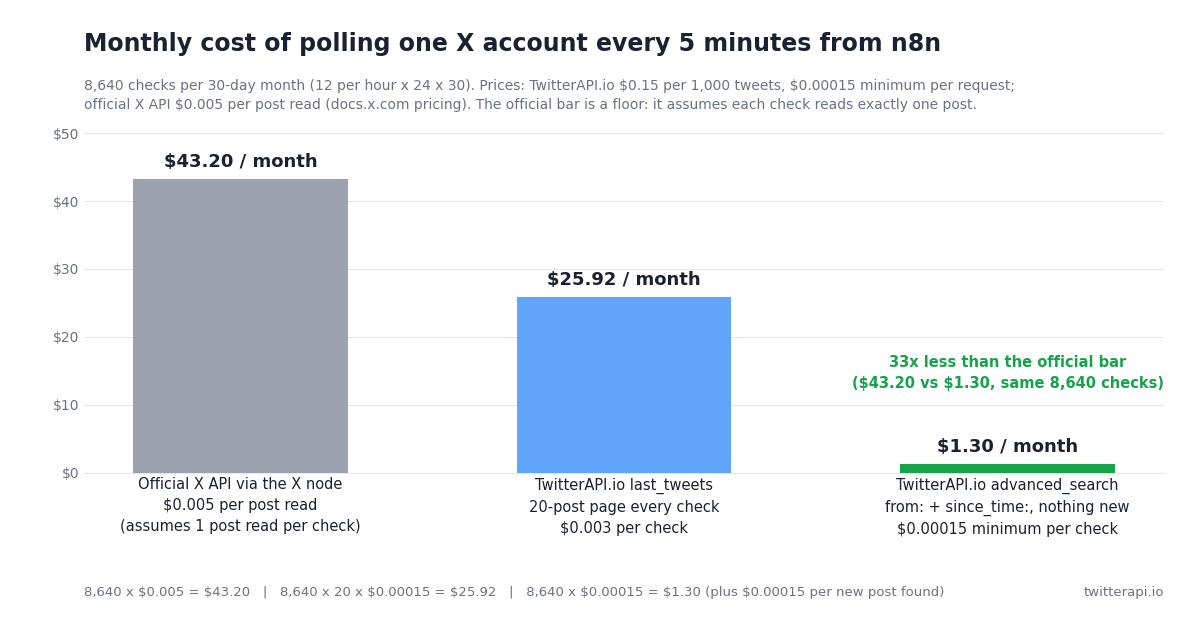
Pricing basis: TwitterAPI.io charges 15 credits per tweet returned on timeline and search endpoints, $0.15 per 1,000 tweets, with a 15-credit ($0.00015) minimum per request and no per-request cap; $1 is 100,000 credits. The official X API charges $0.005 per post read (docs.x.com/x-api/getting-started/pricing). A 5-minute schedule runs 12 times an hour, 288 times a day, 8,640 times in a 30-day month.
The chart below plots the same three numbers. The official-API bar is a floor built on the labelled assumption that one post is read per check; the real bill depends on how many posts the official search endpoint returns per call, because it bills every post read.
The middle row is the honest cost of the workflow exactly as imported: last_tweets always returns the newest page, and you pay for the 20 posts whether or not any of them are new. To get to the bottom row, swap the HTTP Request node's parameters for the search variant below. from:nasa since_time:<unix seconds> returns only posts newer than the timestamp, so a quiet check returns nothing and costs the minimum. Store the start time of the last successful run in static data (store.sinceTime), read it in a small Code node that runs before the HTTP Request and outputs { sinceTime }, and write it back in the diff node after a successful run. The diff node already handles the top-level tweets list this endpoint returns.
Two practical notes. Store the start time of the run, not its end time, so that a run which fails is caught up by the next one instead of dropping posts in between. And if you watch several accounts, join them in one query, from:nasa OR from:esa, and keep the query under 512 characters; one call for five accounts costs the same minimum as one call for one.
{
  "parameters": {
    "method": "GET",
    "url": "https://api.twitterapi.io/twitter/tweet/advanced_search",
    "authentication": "genericCredentialType",
    "genericAuthType": "httpHeaderAuth",
    "sendQuery": true,
    "queryParameters": {
      "parameters": [
        { "name": "query", "value": "=from:nasa since_time:{{ $json.sinceTime }}" },
        { "name": "queryType", "value": "Latest" }
      ]
    },
    "options": {}
  },
  "name": "Search new tweets since last run",
  "type": "n8n-nodes-base.httpRequest",
  "typeVersion": 4.2,
  "position": [440, 300]
}
Let an n8n AI Agent query Twitter through MCP
If the question is not 'did this account post' but 'what are people saying about X this week', hard-wiring endpoints stops making sense. n8n's AI Agent node accepts tool sub-nodes, and the MCP Client Tool node turns any MCP server into a set of tools the agent can call. TwitterAPI.io hosts one at https://mcp.twitterapi.io/mcp.
Configure the MCP Client Tool node like this. Endpoint: https://mcp.twitterapi.io/mcp. Server Transport: HTTP Streamable (the node's source lists HTTP Streamable and Server Sent Events (Deprecated); node versions 1.1 and later expose the setting, and 1.2 and later default to HTTP Streamable). Authentication: Header Auth, reusing the X-API-Key credential from the workflow above. Tools to Include: All, or Selected if you want to restrict the agent to, say, search_tweets and get_user_last_tweets. Attach the node to the AI Agent's Tool connector, add a chat model, and the agent can answer prompts such as 'Summarize what @nasa posted this week and list the three most-liked posts' by calling the tools itself.
One documentation wrinkle to expect: n8n's MCP Client Tool docs page still lists an 'SSE Endpoint' parameter from node version 1.0, while the current node source (McpClientTool.node.ts on GitHub) uses endpointUrl plus serverTransport for versions 1.1 and up. If your node shows only SSE Endpoint, upgrade n8n; TwitterAPI.io's server speaks Streamable HTTP.
The server exposes 12 tools: search_tweets, get_user_info, get_user_about, get_user_followers, get_user_followings, get_user_last_tweets, get_user_mentions, get_tweets_by_ids, get_tweet_replies, get_tweet_quotes, get_tweet_retweeters and a trends tool. Data they fetch is billed at the same rates as the REST endpoints; your LLM tokens come on top. The two-node fragment below shows the parameters and the ai_tool connection to an AI Agent node named AI Agent; paste it next to an existing agent and select the credential.
{
  "nodes": [
    {
      "parameters": {
        "endpointUrl": "https://mcp.twitterapi.io/mcp",
        "serverTransport": "httpStreamable",
        "authentication": "headerAuth",
        "include": "all"
      },
      "name": "TwitterAPI.io MCP",
      "type": "@n8n/n8n-nodes-langchain.mcpClientTool",
      "typeVersion": 1.2,
      "position": [700, 520]
    }
  ],
  "connections": {
    "TwitterAPI.io MCP": {
      "ai_tool": [[{ "node": "AI Agent", "type": "ai_tool", "index": 0 }]]
    }
  }
}"""Poll one X account with TwitterAPI.io and post new tweets to Slack.
Same logic as the n8n workflow on this page, without n8n.
pip install requests
export TWITTERAPI_IO_KEY=... # twitterapi.io dashboard
export SLACK_WEBHOOK_URL=... # Slack app > Incoming Webhooks
"""
import json
import os
import pathlib
import time
import requests
HANDLE = "nasa" # account to watch, without the @
INTERVAL_SECONDS = 300 # 5 minutes = 8,640 checks a month
STATE = pathlib.Path(f"last_seen_{HANDLE}.json")
HEADERS = {"X-API-Key": os.environ["TWITTERAPI_IO_KEY"]}
def newer(a: str, b: str) -> bool:
"""Tweet IDs are snowflakes: longer is newer, same length -> compare as strings."""
return (len(a), a) > (len(b), b)
def fetch_last_tweets(handle: str) -> list[dict]:
r = requests.get(
"https://api.twitterapi.io/twitter/user/last_tweets",
headers=HEADERS,
params={"userName": handle},
timeout=30,
)
r.raise_for_status()
body = r.json()
if body.get("status") != "success":
raise RuntimeError(body.get("msg"))
# Newest page first. has_next_page / next_cursor sit top-level for older pages;
# a monitor only ever needs the first page.
return body["data"]["tweets"]
def post_to_slack(tweet: dict) -> None:
text = (
f"New post from @{tweet['author']['userName']}:\n"
f"{tweet['text']}\n{tweet['url']}"
)
requests.post(os.environ["SLACK_WEBHOOK_URL"], json={"text": text}, timeout=15).raise_for_status()
def run_once() -> None:
last_seen = json.loads(STATE.read_text())["id"] if STATE.exists() else None
tweets = fetch_last_tweets(HANDLE)
if not tweets:
return
newest = max((t["id"] for t in tweets), key=lambda i: (len(i), i))
if last_seen is None:
print(f"first run: remembering {newest}, posting nothing")
else:
fresh = [t for t in tweets if newer(t["id"], last_seen)]
for t in sorted(fresh, key=lambda t: (len(t["id"]), t["id"])): # oldest first
post_to_slack(t)
print("posted", t["id"], t["createdAt"], t["likeCount"], "likes")
STATE.write_text(json.dumps({"id": newest}))
if __name__ == "__main__":
while True:
try:
run_once()
except Exception as exc: # keep polling; the next run catches up
print("error:", exc)
time.sleep(INTERVAL_SECONDS)
Questions readers ask
Does n8n have a trigger for new tweets?
No. n8n's X (formerly Twitter) node has no trigger and no timeline-read operation; its operations are tweet create, delete, search, like and retweet, user get, direct message create and list add member. The standard pattern is the one on this page: a Schedule Trigger, an HTTP Request node against a timeline endpoint, and a Code node that diffs against the last seen tweet ID.
Why does the workflow post nothing the first time it runs?
By design. On the first execution there is no stored tweet ID, so the Code node records the newest ID it sees and returns no items. Without that rule the account's last 20 posts would arrive in Slack as one batch. From the second run on, only posts with an ID newer than the stored one are returned.
The last seen ID resets every time I click Test. Is the diff broken?
No. n8n's documentation for $getWorkflowStaticData states that static data is not available when testing workflows; it is saved only when the published workflow runs from its trigger. Publish the workflow and let the schedule run it, or move the stored ID into an n8n data table if you want the diff to work during manual tests.
Can I watch several accounts in one workflow?
Yes. With the last_tweets endpoint, add one HTTP Request node per account (each costs a 20-post page per check). Cheaper: use the advanced_search variant and join the handles in one query, from:nasa OR from:esa, keeping the query under 512 characters; one call that finds nothing new costs the $0.00015 minimum regardless of how many accounts it covers.
How much does this workflow cost to run?
At a 5-minute interval, 8,640 checks a month. As imported (last_tweets, 20 posts per check at $0.00015 each) that is $25.92. With the advanced_search + since_time variant a check that finds nothing is billed the $0.00015 minimum, so the month is about $1.30 plus $0.00015 per new post. The same 8,640 checks on the official X API cost at least $43.20 if each reads just one post, at $0.005 per post read.
Can the workflow post tweets as well as read them?
Yes, through an authenticated session rather than the read endpoints. One call to /twitter/user_login_v2 ($0.10, with a proxy you supply) returns login_cookies; each /twitter/create_tweet_v2, like, retweet or follow call is then $0.002, billed per HTTP 200 response. The call acts as that account, so X can rate-limit, lock or suspend it; keep a human pace, and expect the session to need a re-login from time to time. Reads, as on this page, need no X account at all.
Does the MCP Client Tool node support Streamable HTTP?
Yes. The node's source on GitHub lists a Server Transport setting with HTTP Streamable and Server Sent Events (Deprecated); versions 1.1 and later expose it, and 1.2 and later default to HTTP Streamable. The docs page still describes the older SSE Endpoint field. TwitterAPI.io's MCP server at https://mcp.twitterapi.io/mcp uses Streamable HTTP, so set the transport to HTTP Streamable.
Do I need an X developer account for this?
Not for reading. The HTTP Request and MCP routes authenticate with a TwitterAPI.io API key only. An X developer app with OAuth2 Client ID and Secret is required only if you use n8n's native X (formerly Twitter) node, which routes through the official API and its $0.005 per post read pricing.
Continue
- n8n docs: HTTP Request node (authentication, headers, query parameters)
- n8n docs: X (formerly Twitter) node operations and OAuth2 credentials
- n8n docs: $getWorkflowStaticData and its test-run caveat
- n8n docs: MCP Client Tool node
- n8n source: MCP Client Tool node (Server Transport: HTTP Streamable)
- X API pricing: $0.005 per post read, 3 million post cap (official, for comparison)
- TwitterAPI.io MCP server: tools, setup and the hosted endpoint
- Use Claude with the Twitter (X) API through MCP
- Tweet notifications: polling, webhook rules and Twitter Stream compared
- Twitter to RSS: build your own feed from the same endpoints
- Connect ChatGPT to the Twitter (X) API
- Pay-per-call pricing: $0.15 per 1,000 tweets
- Get your API key from the dashboard
- 01What Is a Twitter (X) Chatbot, and How Do You Build One in 2026?
- 02How to Use Google Gemini with the Twitter (X) API
- 03OSINT on Twitter (X): What Public Data You Can Pull, and How
- 04How to Use Cursor with the Twitter (X) API
- 05How Do You Turn On Twitter (X) Dark Mode, and What Are Its Exact Colors?
- 06Searching Twitter by Date
- 07How Many Twitter (X) Users Are There in 2026?
- 08How to Quote Retweet via Twitter (X) API — Programmatic Guide
Stop reading. Start building.
Starter credits cover real testing on real data. Google sign-in, no card, no application queue.
Get an API key