Twitter API for Trending Topics
Twitter trending topics is one of the most-requested data signals on the platform. Marketers watch it to catch a wave while it is still rising. Newsrooms treat it as an early-warning system, and analysts read it for sentiment that moves ahead of the headlines. The list itself is small — a ranked set of surging topics — but getting it in code, reliably and without overpaying, takes a little more thought.
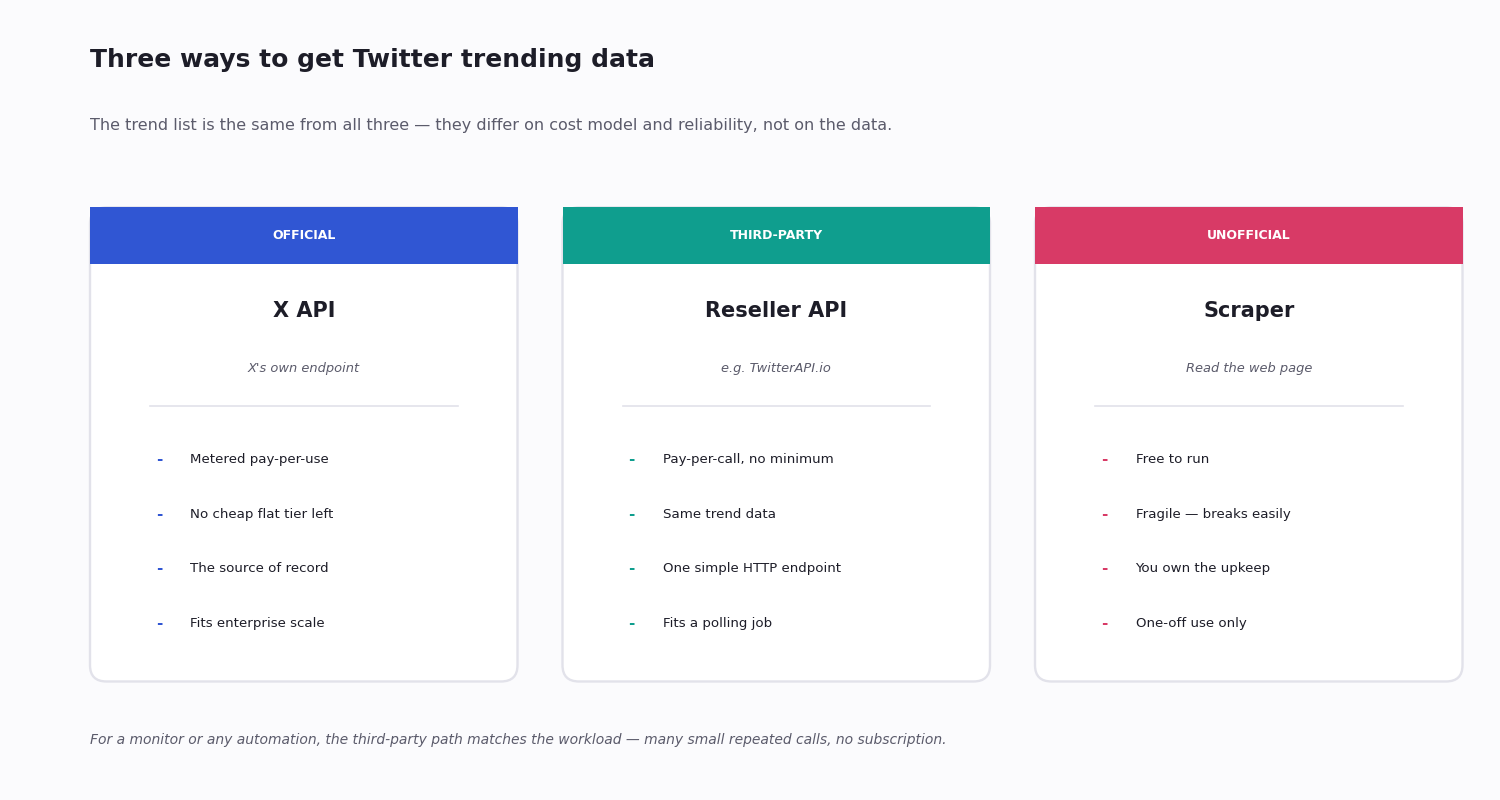
There are three paths to trending data in code: the official X API, a third-party API, and unofficial scraping. They return the same underlying list; what differs is the cost model, the setup, and how likely the thing is to break.
This page walks all three, the trending endpoint and what it returns, the WOEID location system, a complete trend-monitor in Python, how to build trend history the API will not give you, and how to choose a path. If you only want a passive look, the Explore view on the web shows trends with no API at all — the API path is for automation, multi-region tracking, and history.
Three Ways to Get Trending Data
The official X API. X's own trending endpoint, keyed on a location. It is the source of record, but for a new developer account it sits behind the official API's metered pay-per-use pricing — billed per request; X no longer sells the old flat hobby tiers. For a small, steady polling job that metered model is awkward and expensive.
A third-party API. A reseller such as TwitterAPI.io exposes the same trend list over a simple HTTP endpoint, billed pay-per-call with no subscription required. Trend polling is a stream of many small repeated calls, which is exactly what pay-per-call suits.
Unofficial scraping. Reading trends off the web page yourself. It is free, and it is fragile — a layout change breaks it, and you carry the maintenance. Fine for a throwaway experiment, a poor foundation for anything that needs to keep running.
The data is identical across all three — a ranked list of surging topics for a place. The decision is purely cost, reliability and setup, which the next sections take in turn.
The Official X API for Trending
Trends used to be a free, open endpoint on the standard Twitter API — any developer account could hit it. The Musk-era API restructure ended that, and trending data now sits behind the official API's paid access.
The trends endpoint is keyed on a WOEID (a numeric location code, covered below) and returns the ranked list for that place. The wrinkle is access: a new developer account is on metered pay-per-use, billed for every request, and X no longer sells the familiar flat low-cost tiers. Above pay-per-use, the only official option is an Enterprise contract, which has no public price.
For a high-volume operation already inside an enterprise agreement, the official API is the natural home. For a developer who just needs the trend list polled every few minutes, paying a metered per-request rate — with no cheap flat tier to fall back on — is hard to justify. That is the gap third-party APIs fill.
The Third-Party API Path
Several third-party Twitter APIs expose a trending endpoint, and for a polling workload they are usually both simpler and cheaper than the official route.
TwitterAPI.io — pay-as-you-go, billed per call with no monthly minimum. A light trend-polling workload — a handful of regions refreshed each hour — comes to a small monthly bill rather than a subscription, and a quiet month costs almost nothing.
Subscription-based providers — some resellers charge a flat monthly fee (commonly in the tens of dollars) that bundles trending with other endpoints. Worth it only if you will use the rest of the bundle.
Marketplace providers — aggregator marketplaces list several Twitter trend providers at a range of monthly prices; quality varies, because some are scrapers and some are authenticated against Twitter's own infrastructure.
How to choose: prefer a provider that is transparent about its source. A provider authenticated against Twitter's own infrastructure returns data identical to the official list; a thin scraper-behind-an-API returns whatever its scraper managed to get, which is less consistent. For a polling job, pay-per-call with no minimum is the model that matches the workload.
The WOEID Location System
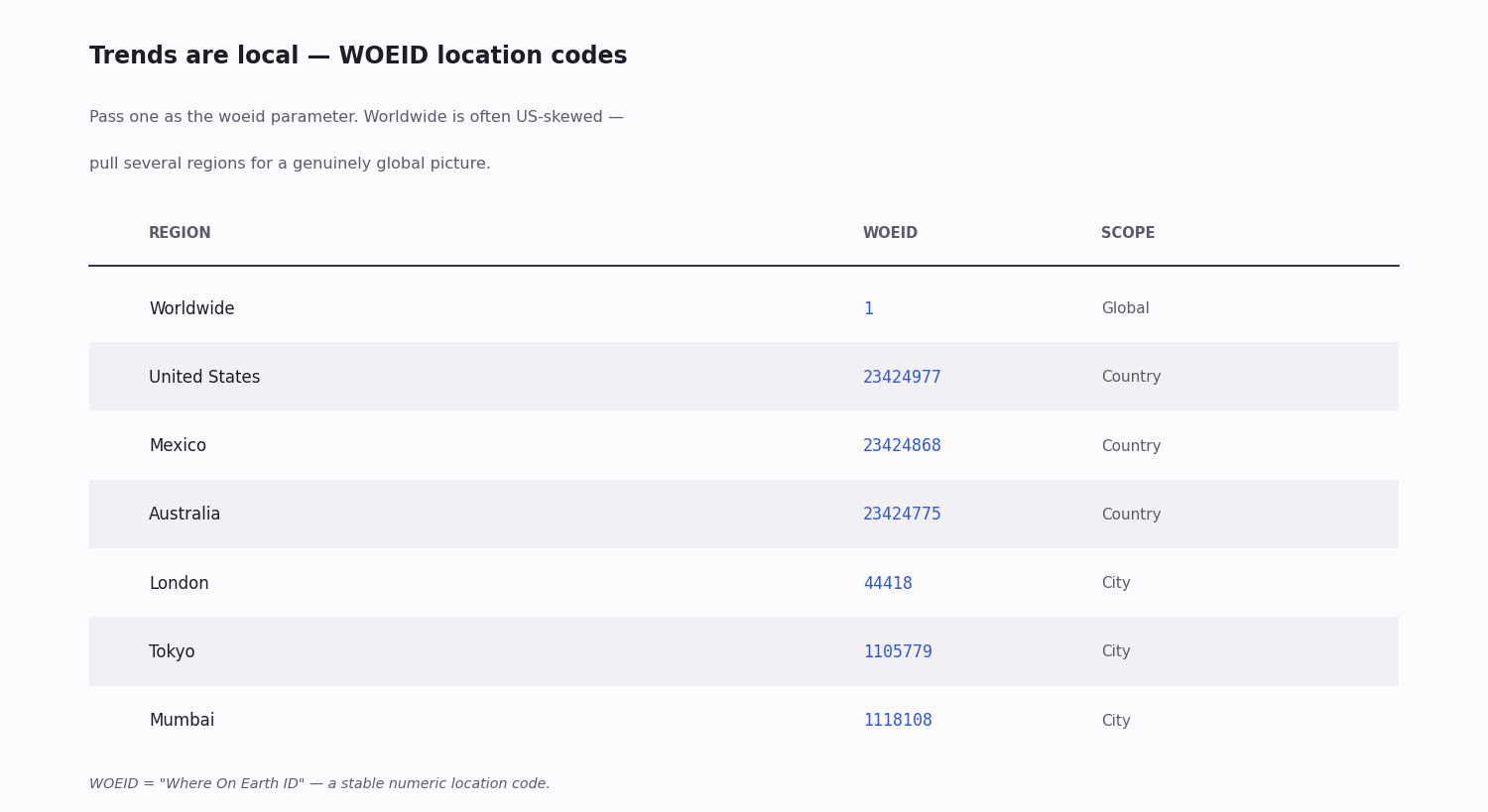
Trends are addressed by WOEID — "Where On Earth ID" — a stable numeric code for a location. You pass one to the trends endpoint to choose whose list you get.
Worldwide is 1. It is the global list, though it skews toward whichever regions are loudest at that moment — often the US.
Countries and cities have their own codes. A few hundred locations are addressable: the United States (23424977), the UK / London (44418), Mexico (23424868), Australia (23424775), Tokyo (1105779), Mumbai (1118108), and many more.
For a true global picture, pull several. Because worldwide is volume-weighted, a brand or newsroom tracking genuinely global trends polls a set of country and city WOEIDs and compares them rather than trusting 1 alone. The WOEIDs are stable, so you hard-code the handful you need once.
What the Trends Endpoint Returns
The response is a ranked list. For each trend you get its name (the hashtag or phrase), its rank position, and a pre-built search query you can hand to a search call.
Rank, not volume. The reliable signal is the rank position. The official API additionally exposes a heuristic tweet_volume estimate, but it is approximate and can be well off — treat it as rough ordering, never a precise count.
Not the posts. The trend list tells you what is trending, not the content behind it. To read the actual posts, take the trend's pre-built search query and make a separate search call.
No history. Every call is a snapshot of the current list. There is no historical-trends endpoint — history is something you build, covered below.
Working Code — a Trend Monitor in Python
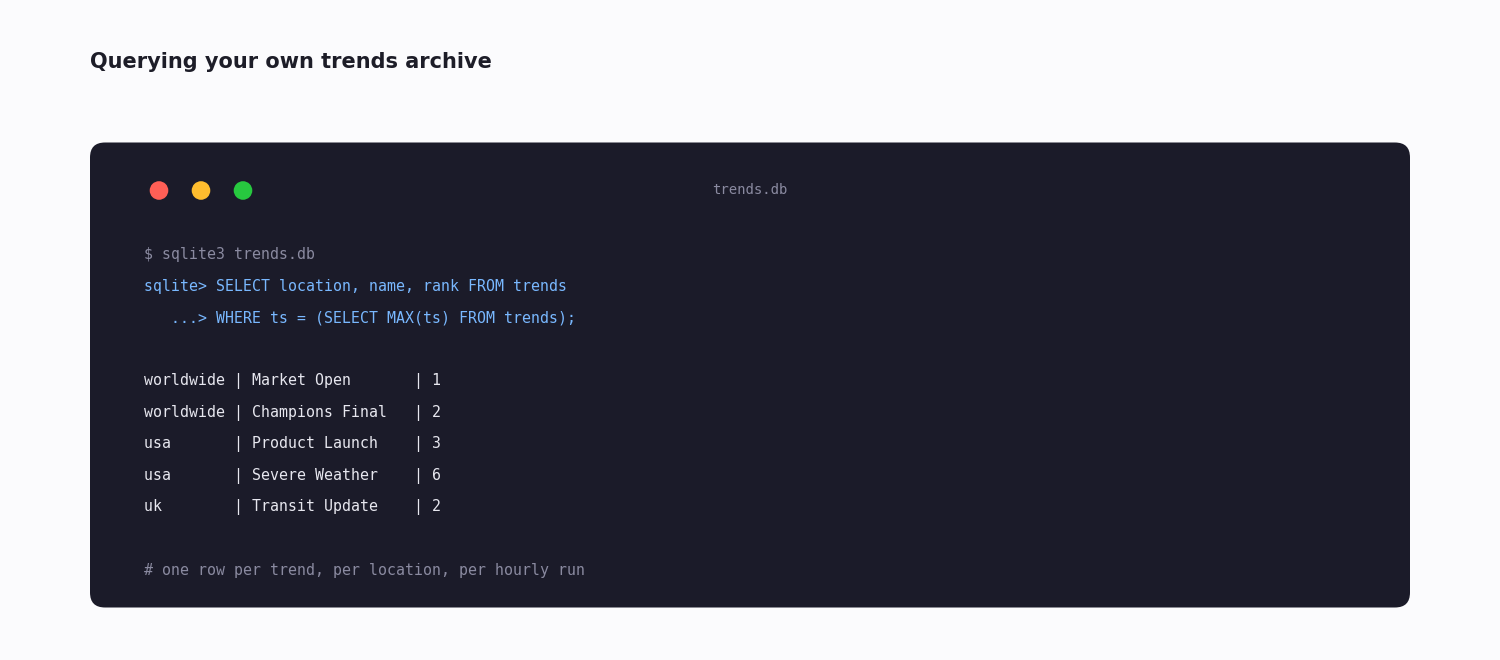
The snippet below is a complete, runnable trend monitor. It defines a LOCATIONS map of WOEIDs, fetches each one's current trend list, and writes every trend as a row — timestamp, location, name, rank — into a SQLite table.
Two details in the code matter. CREATE TABLE IF NOT EXISTS makes the script safe to run repeatedly: the first run creates the table, every run after just appends. And the timestamp is stored as a UTC ISO string, so rows from different runs sort and compare cleanly however the schedule fires.
Scheduled hourly it does two jobs at once — a live trend feed, and (because it stores every poll) the trend history the API itself does not provide. To make it an alerting system, add a diff step: compare each poll's trends against the previous poll and fire a notification on anything new or fast-climbing. Setup is about fifteen minutes; the ongoing cost is a small per-call bill, far below any subscription.
Building Trend History
Twitter's API does not offer trend history — there is no "what was trending on a given past day" call. If you need history, you build the archive by polling and storing, exactly as the monitor above does.
The storage is trivial. An hourly poll of, say, fifty trends per location, kept for a year, is on the order of a few hundred thousand small rows — nothing for SQLite or PostgreSQL. Each row is a timestamp, a location, a trend name, and a rank; that is the whole schema.
Some third-party services sell ready-made searchable trend archives for a monthly fee, which can be worth it if you need deep history immediately. But most teams find their own archive simpler in the end — they want the data in their own database to join against everything else anyway, and a monitor they were going to run regardless produces that archive for free.
Picking Your Path
A short decision guide:
Choose the official API if you are already inside an enterprise agreement, or you specifically need the official tweet_volume estimate and the official promoted-trend flag.
Choose a third-party API for essentially every other automation case — a monitor, an alerting system, multi-region tracking, research. Pay-per-call with no minimum matches a polling workload, and the data is the same.
Choose scraping only for a one-off, throwaway experiment where you do not mind it breaking. Never build something that has to keep running on a scraper.
For most readers of this page — someone who wants trending data in code, reliably, without a subscription commitment — the third-party path is the answer, and the monitor above is the starting point.
import requests
import sqlite3
from datetime import datetime, timezone

API_KEY = "your_twitterapi_io_key"
HEADERS = {"X-API-Key": API_KEY}

# WOEID = "Where On Earth ID" — the location code for trends.
LOCATIONS = {
    "worldwide": 1,
    "usa": 23424977,
    "uk": 44418,
}

def fetch_trends(woeid):
    r = requests.get(
        "https://api.twitterapi.io/twitter/trends",
        params={"woeid": woeid},
        headers=HEADERS,
        timeout=15,
    )
    r.raise_for_status()
    return [item["trend"] for item in r.json()["trends"]]

def run_once(db_path="trends.db"):
    conn = sqlite3.connect(db_path)
    conn.execute("""CREATE TABLE IF NOT EXISTS trends
        (ts TEXT, location TEXT, name TEXT, rank INT)""")
    ts = datetime.now(timezone.utc).isoformat()
    for loc, woeid in LOCATIONS.items():
        for t in fetch_trends(woeid):
            conn.execute(
                "INSERT INTO trends VALUES (?,?,?,?)",
                (ts, loc, t["name"], t["rank"]),
            )
    conn.commit()

# Schedule hourly, e.g. cron:  0 * * * * python trend_monitor.py
run_once()
Questions readers ask
Is the Twitter trending API still available?
Yes. The official X API still has a trending endpoint, but it now sits behind paid access — metered pay-per-use for new developer accounts, and the old free and flat tiers are gone. For most developers the affordable path is a third-party Twitter API such as TwitterAPI.io, which exposes the same trend list pay-per-call with no subscription required.
How much does it cost to access Twitter trending data via API?
On a third-party pay-per-call API it is inexpensive — polling a few regions hourly comes to a small monthly bill, often just a few dollars, with no subscription required. The official X API is metered per request for new accounts and has no cheap flat tier, so the same polling job costs more there. Unofficial scraping is free but fragile.
What is a WOEID and where do I find one?
WOEID is "Where On Earth ID" — a stable numeric code for a location that you pass to the trends endpoint. Worldwide is 1; countries and a few hundred cities each have their own (the US is 23424977, London 44418). Because the codes are stable, you can hard-code the handful of locations you track.
Can I get worldwide trending topics or only US?
Both. Worldwide trends come from woeid=1, and country- and city-level WOEIDs cover a few hundred regions. Note that worldwide is volume-weighted and can skew toward the loudest regions, so for a genuinely global view, pull several regional WOEIDs and compare rather than relying on woeid=1 alone.
Does the Twitter API show historical trending topics?
No — every call returns the current list, and there is no historical-trends endpoint. To get history you poll the trends endpoint on a schedule and store each result with a timestamp. A trend monitor does this anyway, so its stored polls become your trend archive; some third parties also sell ready-made trend archives.
How often does Twitter trending data update?
Trending topics refresh every few minutes on Twitter's backend — in practice the list rotates within roughly five-to-ten-minute windows. The API returns the latest snapshot at the time of your call; there is no streaming endpoint specifically for trend changes, so polling every five to thirty minutes is the common cadence.
Does the trends endpoint return tweet volume per trend?
The reliable field is each trend's rank position. The official API also exposes a heuristic tweet_volume estimate, but it is approximate — fine for rough ordering, not for precise reporting. For an accurate count behind a trend, run a search on the trend's term and paginate the results.
Should I scrape trends instead of using an API?
Only for a one-off experiment. Scraping the trends off the web page is free but fragile — a layout change breaks it and you own the maintenance. For anything that needs to keep running, a pay-per-call third-party API is cheap enough that the reliability is well worth it.
Continue
- /twitter-scraper
- /blog/twitter-api-with-python
- /blog/twitter-api-pricing
- /blog/twitter-analytics
- /blog/twitter-trends
- /blog/twitter-api-cost
- 01GetXBot: What the Twitter (X) Video Bot Is, Whether It Is Safe, and Alternatives
- 02The Best Twitter (X) Accounts to Follow, by Topic
- 03What Is xcancel (X Cancel)? The Twitter (X) Nitter Front End, Explained
- 04Twitter (X) Media Viewer: How to Browse an Account's Photos and Videos
- 05AllMyTweets: What It Did, Its Limits, and How to See Every Tweet on Twitter (X)
- 06Twitter (X) Webhooks — A Real-Time API Guide
- 07Twitter (X) profiler: how to profile an account in 2026
- 08TweetDeck (X Pro) Alternatives in 2026: Columns, Monitoring and Scheduling for Twitter (X)
Stop reading. Start building.
Starter credits cover real testing on real data. Google sign-in, no card, no application queue.
Get an API keyAlready building with TwitterAPI.io? Publish an honest tutorial or build log about it and earn up to $200 a month in API credits.