Twitter (X) Search Not Working? The October 2026 list: Search Outage, Other Causes and Fixes
Twitter (X) search breaks in two ways: X changes or breaks something on its side, or a setting or query on your side hides the results. This page starts with what is broken on X right now, then covers the common causes on your side.
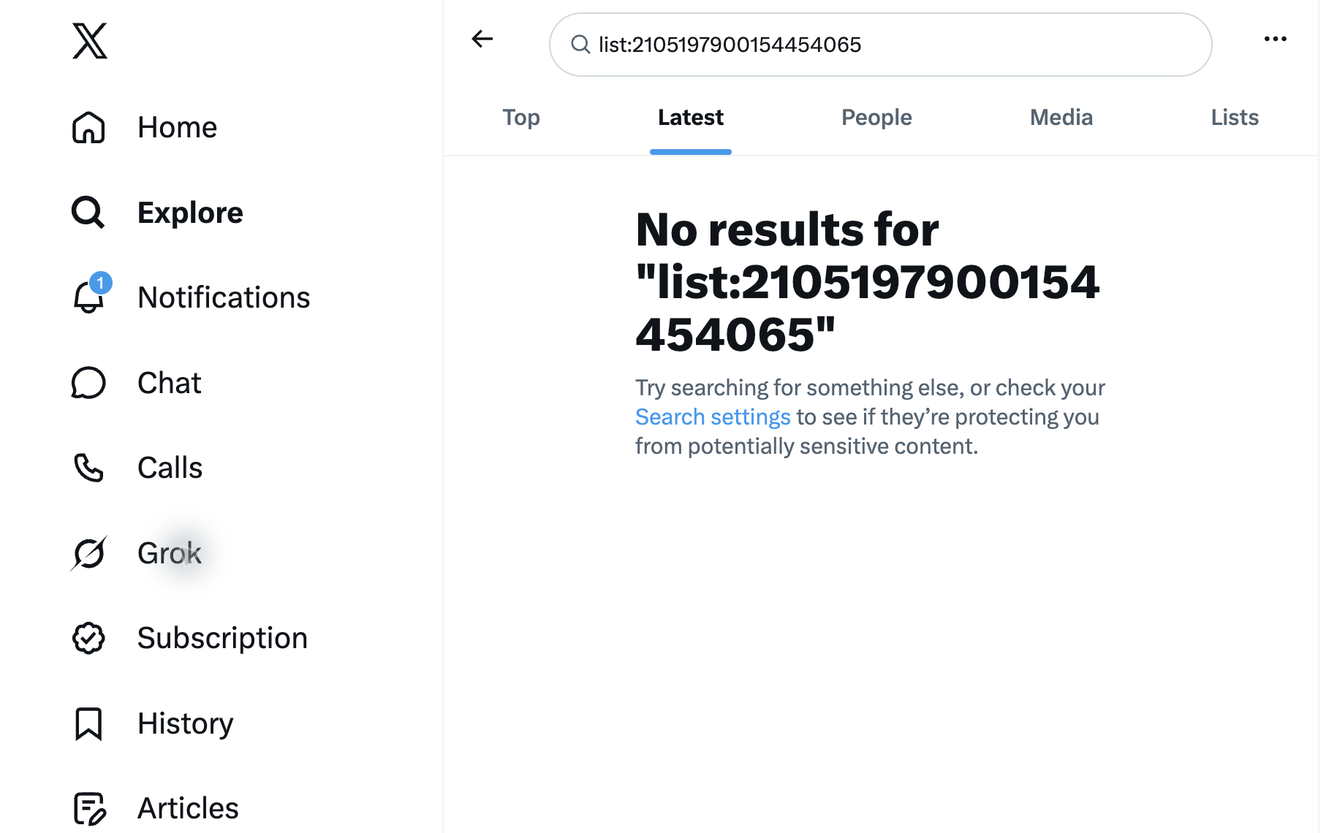
Right now: from about 23:00 UTC on October 16, 2026 (07:00 on October 17 in UTC+8), X search stopped returning tweets for the list: operator, and every attempt has been empty since 23:26 UTC. A public list with active members now shows "No results" on both the Latest and Top tabs. We noticed because list: queries sent to our Advanced Search endpoint started coming back empty at the same time. We will update this page when it recovers.
Is X search down right now? What we tested on October 17, 2026
Only one part of search is broken: queries that use list: with a list ID. We tested the list in the screenshot (2105197900154454065, a public list with 20 members who post every few minutes) through X's web search and through our own API on October 17, 2026. Each row below is one live call.
Older date ranges fail too, so this is not just a delay in indexing new tweets: X search no longer resolves the list to its members at all. Adding other operators to a list: query does not help, but the same accounts are fully searchable with from:.
When did it start, and is X aware?
Start: around 23:00 UTC on October 16, 2026 (07:00 on October 17, UTC+8). The first fully empty list: result we saw was at 23:26 UTC, and every list: query since then has been empty.
Scope: every list: query we tested, on x.com (logged in) and through API search. Searches without list: are unaffected.
Status: X has not posted an incident note or changed its search operator documentation as of this writing. Users have started asking @Support about it on X, and the official X search operators reference still lists list:. We are treating it as an outage, not a removal, until X says otherwise.
list: has failed before: an X Developers forum thread from earlier years describes the slug form list:user/slug stopping. A fix may come quickly or not at all, so the workarounds below do not depend on it.
Other reasons Twitter (X) search shows no results
If your search does not use list:, the cause is usually on your side. Work through these in order; each one takes a few seconds to check.
1. You are logged out. X only shows search results to logged-in accounts. Signing in again fixes most "search not working" reports on the web.
2. Search settings hide the results. The empty-results page itself suggests checking Search settings. "Hide sensitive content" and "Remove blocked and muted accounts" can remove most results for some topics. Turn them off, search again, then turn them back on if you want.
3. Top vs Latest. Top shows a ranked selection and can be empty for small or new topics. Switch to Latest before concluding there are no tweets.
4. A broken operator in the query. One unsupported or broken operator (like list: today) empties the whole query. Remove operators one at a time, starting with the last one you added, until results come back.
5. The account is protected or limited. Tweets from protected accounts never appear in search, and an account with a search restriction is missing from other people's results. Our free Twitter shadowban checker tests a specific handle.
6. The app is stale. On iOS or Android, update the app, or try x.com in a browser. If search works there, the problem is the app, not your query.
What this means for the TwitterAPI.io Advanced Search endpoint
The Advanced Search endpoint (GET /twitter/tweet/advanced_search) runs your query on X search. While X returns nothing for list:, the endpoint returns HTTP 200 with an empty tweets array and has_next_page: false. It is not an error and not a problem with your key, so retrying the same query will not help.
Not affected in our tests: from:, since:/until:, -filter:replies and OR groups all returned results as usual. The problem is limited to list:.
If you alert on empty results: a monitor built on list: will look like the list went silent. Switch it to one of the two methods below rather than lowering your alert thresholds.
Fix 1: read the latest list tweets with the List Timeline endpoint
If you used list:<id> to follow what a list is posting right now, which is how most monitoring setups use it, read the list's own timeline instead. List Timeline (GET /twitter/list/tweets_timeline) takes the list ID and returns the list feed newest first, with next_cursor for older pages. It does not use X search, so this outage does not affect it: on the test list it returned 84 tweets while list: returned 0.
When to use it: polling a list for new posts, feeding a dashboard, or replacing a list:<id> column. Store the newest tweet ID you have seen and stop paging when you reach it.
What it cannot do: filter by keyword or date range on the server. For that, use Fix 2.
# Latest tweets from a list (replaces: list:2105197900154454065, Latest)
curl -s "https://api.twitterapi.io/twitter/list/tweets_timeline?listId=2105197900154454065" \
  -H "x-api-key: $TWITTERAPI_IO_API_KEY"

# Next page: pass next_cursor from the previous response
curl -s "https://api.twitterapi.io/twitter/list/tweets_timeline?listId=2105197900154454065&cursor=NEXT_CURSOR" \
-H "x-api-key: $TWITTERAPI_IO_API_KEY"Fix 2: search inside a list by keyword or date with members plus from:
A list: query is shorthand for "tweets from any member of this list". You can write that out yourself: fetch the members with GET /twitter/list/members, then search (from:member1 OR from:member2 …) plus your keywords and dates. This uses parts of X search that still work, and it reaches older tweets: on the test list, the same from: group with since:2026-10-01 until:2026-10-10 returned a full page of October 9 tweets, where list: returned none.
Batch the members. Long OR groups make long queries, so split big lists into batches (10 to 15 handles each works well) and merge the results by tweet ID.
Refresh the member list. List membership changes, and list: always used the current members. Re-fetch the members daily, or before each historical backfill.
Cost. Each batch is a separate search call, so a 60-member list in batches of 15 costs four searches per page instead of one. For live monitoring, Fix 1 is cheaper. Use Fix 2 when you need keywords or dates.
"""list_search.py - search a list's tweets by keyword and date without the list: operator.

pip install requests
export TWITTERAPI_IO_API_KEY=...
"""
import os
import requests

H = {"x-api-key": os.environ["TWITTERAPI_IO_API_KEY"]}
LIST_ID = "2105197900154454065"
BATCH = 12


def list_members(list_id):
    handles, cursor = [], ""
    while True:
        r = requests.get("https://api.twitterapi.io/twitter/list/members",
                         params={"list_id": list_id, "cursor": cursor}, headers=H, timeout=30).json()
        handles += [u["userName"] for u in r.get("members", [])]
        if not r.get("has_next_page"):
            return handles
        cursor = r["next_cursor"]


def search_list(list_id, extra=""):
    """extra: keywords and operators, e.g. 'earnings since:2026-10-01_00:00:00_UTC'"""
    members, seen = list_members(list_id), {}
    for i in range(0, len(members), BATCH):
        group = " OR ".join(f"from:{h}" for h in members[i:i + BATCH])
        r = requests.get("https://api.twitterapi.io/twitter/tweet/advanced_search",
                         params={"query": f"({group}) {extra}".strip(), "queryType": "Latest"},
                         headers=H, timeout=30).json()
        for t in r.get("tweets", []):
            seen[t["id"]] = t
    return sorted(seen.values(), key=lambda t: int(t["id"]), reverse=True)


if __name__ == "__main__":
    for t in search_list(LIST_ID, "since:2026-10-01_00:00:00_UTC until:2026-10-10_00:00:00_UTC")[:10]:
print(t["createdAt"], "@" + t["author"]["userName"], t["text"][:80].replace("\n", " "))Which replacement should you use?
Both methods work with a standard TwitterAPI.io API key and pay-as-you-go credits, with no developer app or OAuth setup; see pricing for current rates.
How we will know it is fixed
We re-run the list:2105197900154454065 query against X search regularly. When it returns tweets again, we will update this page with the recovery time in UTC. If you rely on list:, keep your code on Fix 1 or Fix 2 even after it recovers, because both keep working if list: breaks again.
# Before (returns 0 tweets since 2026-10-16 23:26 UTC)
curl -s -G "https://api.twitterapi.io/twitter/tweet/advanced_search" \
  --data-urlencode "query=list:2105197900154454065" \
  --data-urlencode "queryType=Latest" \
  -H "x-api-key: $TWITTERAPI_IO_API_KEY"

# After: the list's own timeline (latest posts)
curl -s "https://api.twitterapi.io/twitter/list/tweets_timeline?listId=2105197900154454065" \
-H "x-api-key: $TWITTERAPI_IO_API_KEY"Questions readers ask
Why is Twitter (X) search not working today?
If your query uses list:, it is a known X outage: since about 23:00 UTC on October 16, 2026, X search returns no results for any list: query. Other searches work. If your query does not use list:, check that you are logged in, check Search settings, try the Latest tab, and remove operators one at a time.
Is the list: operator removed or just broken?
X has not announced a removal, and its search operator reference still lists list:, so we treat it as an outage. It has failed before (an older forum thread describes the slug form list:user/slug breaking). We will update this page when it returns.
Why does X advanced search say "No results" when the account has tweets?
Usually one part of the query empties it: a broken operator such as list: right now, a date range with no tweets, Search settings hiding sensitive content or muted accounts, or a protected account. Remove operators one at a time until results appear.
Why does the TwitterAPI.io Advanced Search endpoint return an empty tweets array for list: queries?
The endpoint runs your query on X search, and X search currently returns nothing for list:. The call succeeds with HTTP 200 and an empty tweets array; it is not an error with your key or quota. Other operators work normally.
How do I get the latest tweets from a Twitter list with the API now?
Call GET /twitter/list/tweets_timeline with listId set to your list ID. It returns the list feed newest first and pages back with next_cursor. It does not depend on X search, so this outage does not affect it.
How do I search a list's tweets by keyword or date range without list:?
Fetch the members with GET /twitter/list/members, then search (from:member1 OR from:member2 ...) with your keywords and since:/until: on the Advanced Search endpoint, in batches of 10 to 15 handles. Merge the results by tweet ID. This reaches older tweets, which the list timeline cannot filter by date.
Continue
- TwitterAPI.io docs: Advanced Search endpoint (GET /twitter/tweet/advanced_search)
- TwitterAPI.io docs: List Timeline endpoint (GET /twitter/list/tweets_timeline)
- X developer docs: search operators reference (still lists list:)
- X Developers forum: an earlier report of the list:username/slug operator failing
- Twitter search operators: the full list and how to use them
- Twitter Lists API: read list members, followers and tweets
- Twitter advanced search API guide
- Search tweets by date range
- Free Twitter shadowban checker
- TwitterAPI.io pay-as-you-go pricing
- 01X Communities API: How Do You Read Community Posts and Post to a Community?
- 02How Will You Use the Twitter (X) API or Twitter Data? Answering the Developer Sign-Up Question
- 03Twitter (X) Welcome Message: Is the API Still Alive, and How to Send One in 2026
- 04xurl: the X API CLI for Twitter (X) — Install, Auth, Commands and What Each Read Costs
- 05twscrape for Twitter (X): what the account pool costs you, and how to migrate to an API with no accounts
- 06Twitter (X) Search Filters — Programmatic API Guide
- 07Twitter (X) Reverse Image Search — 3 Programmatic Paths
- 08Twitter (X) API — Search Hashtags Tutorial
Stop reading. Start building.
Starter credits cover real testing on real data. Google sign-in, no card, no application queue.
Get an API key