xurl: the X API CLI for Twitter (X) — Install, Auth, Commands and What Each Read Costs
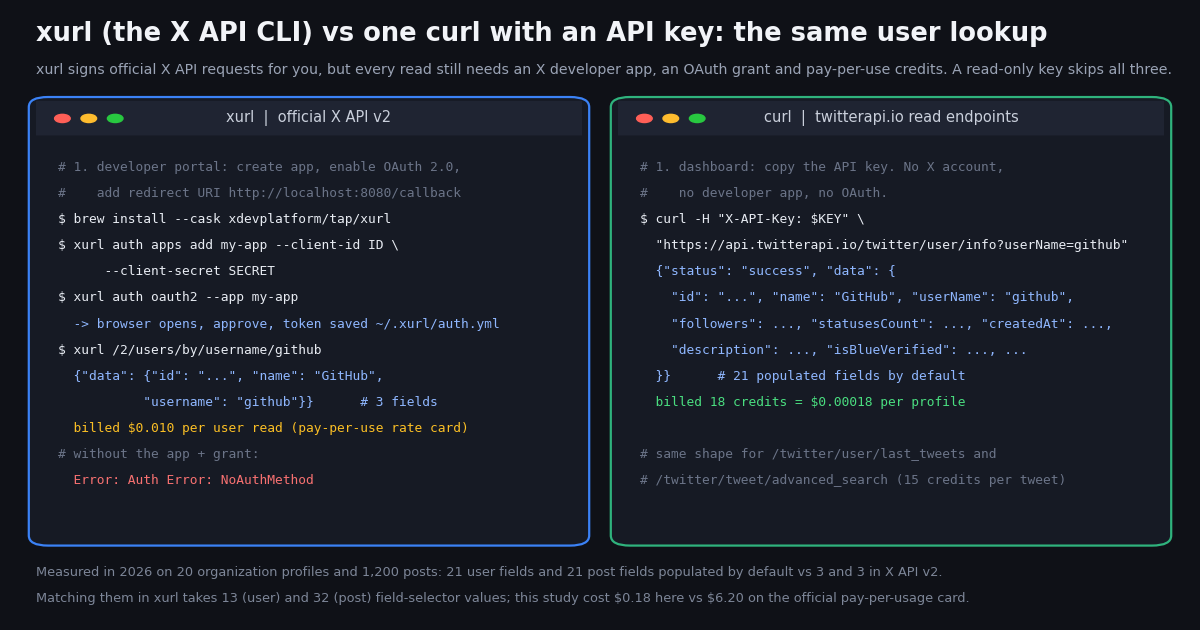
This page is about xurl, the X API CLI: the command-line tool the X developer platform publishes at github.com/xdevplatform/xurl so you can call the X API the way you would with curl, without hand-rolling OAuth signatures. If you came here for the CTAN LaTeX package xurl (version 0.10, "allow URL breaks at any alphanumerical character"), that is a different project; everything below is about the X API tool. It is also the natural replacement for twurl, Twitter's old Ruby "OAuth-enabled curl", whose last gem release (0.9.7) dates from April 2023.
We cover what the tool does and does not do, the four install methods and the exact xurl auth commands as they appear in the v1.3.4 binary we downloaded and ran (help text and error strings are quoted, not paraphrased), the raw and shortcut commands, streaming, media upload and the MCP bridge, and the two facts the official docs page skips: what every xurl read costs on X's pay-per-usage rate card, and how little a bare v2 call returns until you add tweet.fields, user.fields and expansions.
Then the part no other page has: we ran the three reads developers most often prototype with xurl (a user lookup, a user's recent posts, a recent search) through twitterapi.io's read endpoints in 2026, on 20 organization accounts, 1,000 timeline posts and 200 search results, and measured fields populated per object, bytes per object, seconds per request, and what the whole study cost at both rate cards. If you only need to read X data, that comparison is the point of the page; if you need to post, like or follow from the terminal, xurl is the right tool and we say so.
What xurl is, where it came from, and what it is not
The README describes xurl in one line: "A curl-like CLI Tool for the X API". The docs page at docs.x.com/tools/xurl adds the pitch: it "handles OAuth authentication automatically so you can make API requests without manually managing tokens or signing requests." In practice you register an X app's client ID and secret once, run one browser-based authorization, and from then on xurl /2/users/me behaves like curl with the right Authorization header already attached. The tool is written in Go, published by the xdevplatform GitHub organization (the X developer platform team), and at the time of writing the latest release is v1.3.4, with prebuilt binaries for macOS (arm64 and x86_64), Linux (arm64, i386, x86_64) and Windows (arm64, i386, x86_64) plus a checksums file on every release.
twurl, the predecessor. Before xurl there was twurl, Twitter's Ruby gem ("Twurl is like curl, but tailored specifically for the Twitter API"), installed with gem install twurl. It still installs, but its last release, 0.9.7, was published in April 2023, before the v1.1 endpoints it targets were largely retired, and the repository has not been marked archived. xurl's changelog mentions importing a .twurlrc file, which is as explicit as the lineage gets: if you are searching for a twurl replacement, xurl is the officially maintained answer, and it speaks v2 only (/2/... paths).
The AI-agent angle. The repository ships a SKILL.md describing the tool for coding agents, and xurl has become the X tool in several agent ecosystems: the hermes-agent framework bundles a social-media-xurl skill whose docs call xurl "the X developer platform's official CLI for the X API" and require the human to run xurl auth oauth2 --app my-app outside the agent session; the skills.sh registry lists xdevplatform/xurl (644 installs when we checked); the tessl registry carries an agent-scripts/xurl entry; and the OpenClaw / birdclaw-style skill catalogs mirror the same skill file. The reason is simple: an agent that can shell out gets posting, searching, DMs and media upload through one binary, with the OAuth dance already done by a human.
What it is not. It is not a scraper, it does not work without an X developer account and an app, and it does not make the X API cheaper or more generous: every call it signs is billed and rate-limited exactly like a call from your own code. It is also not the LaTeX package, and it is not twsh or any of the third-party "tweet from the CLI" tools you will see in the same search results.
Install xurl: four methods, one binary
The README lists four install paths, all producing the same single binary. Homebrew is a cask on X's own tap; npm wraps the binary in @xdevplatform/xurl (package created in 2026, latest 1.3.4); the shell script downloads the right release archive into ~/.local/bin and tells you what to add to PATH if needed; and go install builds from source. Release archives can also be downloaded by hand from the GitHub releases page.
How we tested. We pulled the xurl_Darwin_arm64.tar.gz asset of v1.3.4 from the GitHub releases API, extracted it (a 21 MB binary plus README, CHANGELOG and LICENSE) and ran it on an Apple-silicon Mac. xurl --version printed xurl version 1.3.4. xurl --help printed the quick start and the command groups quoted in the next sections. With no configuration, xurl auth status printed No apps registered. Use 'xurl auth apps add' to register one. and both xurl /2/users/by/username/github and xurl user github exited 1 with Error: Auth Error: NoAuthMethod (cause: no authentication method available), without making a network request. We do not have an X developer app, so every authenticated example on this page comes from the README, the docs page and the binary's own --help output, not from a live call; we say so again in the method section.
The changelog is worth a skim before you install: v1.3.0 turned ~/.xurl from a single file into a directory (auth.yml for tokens and app credentials, keys.yml for XChat keys) and added xurl chat, an end-to-end encrypted XChat client; v1.3.1 shipped the chat client in the macOS and Linux x86_64 release binaries; v1.3.2 to v1.3.4 are fixes. Older xurl binaries cannot read the new layout, so upgrade every machine that shares a config.
# Homebrew (macOS) - X's own tap
brew install --cask xdevplatform/tap/xurl

# npm
npm install -g @xdevplatform/xurl

# Shell script (no sudo): installs to ~/.local/bin
curl -fsSL https://raw.githubusercontent.com/xdevplatform/xurl/main/install.sh | bash

# Go toolchain
go install github.com/xdevplatform/xurl@latest

# Or a release archive by hand (what we did), then:
xurl --version        # xurl version 1.3.4
xurl auth status      # No apps registered. Use 'xurl auth apps add' to register one.
xurl /2/users/me # Error: Auth Error: NoAuthMethod (cause: no authentication method available)Authentication: every xurl auth mode, with the exact commands
You need a developer account and an app at the X developer portal before any of this works; the README says so in its first line under Usage. The portal gives you an OAuth 2.0 client ID and secret (and, if you enable it, OAuth 1.0a consumer keys and an app-only bearer token). xurl then supports three ways to authenticate a request, selected per call with --auth oauth2, --auth oauth1 or --auth app, and a small set of management commands around them. The table is the binary's xurl auth --help output mapped to what each mode is for.
The redirect URI is the usual failure. For OAuth 2.0 you must register the same redirect URI in the portal that xurl will listen on. The default is http://localhost:8080/callback; xurl resolves it from the REDIRECT_URI environment variable, then the app's stored redirect_uri, then that default, and when the host is localhost it listens on both 127.0.0.1 and ::1. The docs page's one troubleshooting note is exactly this: if the browser shows "Something went wrong", check that the credentials are exported in the current shell and the redirect URI is registered. On a remote machine without a browser use --headless; the callback page failing to load is expected, the code is in the URL you paste back.
The enrollment failure. The README has a section for the case where OAuth succeeds but xurl whoami and other /2/* reads fail with an error body containing client-forbidden or client-not-enrolled. The fix it gives is in the developer console: open the app, use "Move to package", choose "Pay-per-use", and move the app to the "Production" environment. In other words, a valid token is not enough; the app must be enrolled in a paid package, which is the subject of the pricing section below.
Where tokens live. ~/.xurl/auth.yml holds, per app, the client ID and secret, the redirect URI, a default user, one OAuth 2.0 token set per username (access token, refresh token, expiration time) and the bearer token. xurl token prints a valid OAuth 2.0 access token to stdout, refreshing it first if it has expired and never opening a browser, which is how you hand the token to plain curl or another program: TOKEN=$(xurl token) && curl -H "Authorization: Bearer $TOKEN" https://api.x.com/2/users/me.
Scopes come from the portal's app settings, not from xurl: the user-lookup and recent-search references list users.read or tweet.read for OAuth 2.0 user tokens, and each endpoint page lists which of OAuth2UserToken, UserToken (1.0a) and BearerToken (app-only) it accepts. If you want the PKCE flow itself explained, with the code_verifier, code_challenge and refresh calls, that is our OAuth 2.0 user-context guide.
# 1. Developer portal: create an app, enable OAuth 2.0, add the redirect URI
#    http://localhost:8080/callback, copy the client ID and secret.

# 2. Register the app (credentials go to ~/.xurl/auth.yml)
xurl auth apps add my-app --client-id YOUR_CLIENT_ID --client-secret YOUR_CLIENT_SECRET

# 3. OAuth 2.0 user context (PKCE): opens a browser, waits for the callback
xurl auth oauth2 --app my-app
xurl auth oauth2 --app my-app --headless        # server without a browser: paste the code back
xurl auth oauth2 --app my-app YOUR_USERNAME     # pin the token to a handle if /2/users/me is flaky

# App-only bearer token (reads only), kept out of shell history via stdin
cat token.txt | xurl auth app-only -
xurl --auth app /2/tweets/search/recent?query=golang

# OAuth 1.0a (for endpoints that still require it)
xurl auth oauth1 --consumer-key KEY --consumer-secret SECRET --access-token TOKEN --token-secret SECRET

# Status, default app, cleanup
xurl auth status
xurl auth default my-app
xurl auth clear --allCommands: raw requests, shortcuts, streaming, media, MCP
xurl has two faces. The raw face is xurl [flags] URL: give it a /2/... path and it sends an authenticated GET; add -d and the method becomes POST unless -X says otherwise; -H adds headers, -F uploads a file as multipart, -s forces streaming, -u picks which OAuth 2.0 user to act as, --app picks the registered app, -v prints the request and response, -t adds a trace header. The shortcut face is a set of verbs that build the right v2 call for you and print JSON to stdout. This is xurl --help from v1.3.4, grouped as the binary groups it.
The shortcuts have limits baked in. xurl search "QUERY" -n N accepts 10 to 100 results (default 10); xurl posts USERNAME -n N accepts 5 to 100 (default 10); xurl user USERNAME looks up one profile. Those bounds are the v2 endpoints' max_results bounds: recent search is documented at a default of 10 and a maximum of 100, and it only covers the last 7 days. Anything beyond a shortcut is a raw call, for example xurl "/2/tweets/search/recent?query=from:xdevelopers&max_results=10" from the docs page.
Streaming. Paths under /2/tweets/search/stream, /2/tweets/sample/stream, /2/tweets/sample10/stream and /2/tweets/firehose/stream/lang/{en,ja,ko,pt} are detected automatically and streamed line by line; -s forces that mode for any endpoint. The quick start shows xurl --auth app /2/tweets/search/stream, since the filtered stream is an app-only endpoint.
Media. xurl media upload photo.jpg uploads a file with the type auto-detected, and xurl media status checks processing; the README also documents the raw chunked upload sequence (INIT, APPEND with -F, FINALIZE) for when you need control over it.
MCP and webhooks. xurl mcp bridges a stdio MCP client to a remote Streamable HTTP MCP server, forwarding JSON-RPC with an Authorization: Bearer header and keeping the session id; this is how an MCP-speaking editor or agent gets an authenticated X session without seeing the token. xurl webhook start runs a local webhook server behind an ngrok tunnel to answer the X API's CRC checks while you develop. xurl completion generates shell completions.
# Raw requests: like curl, with the Authorization header handled for you
xurl /2/users/me
xurl /2/users/by/username/xdevelopers
xurl "/2/tweets/search/recent?query=from:xdevelopers&max_results=10"
xurl -X POST /2/tweets -d '{"text": "Hello from xurl!"}'      # -d implies POST
xurl -H "Content-Type: application/json" /2/tweets
xurl --auth app /2/users/by/username/xdevelopers               # force app-only bearer
xurl --username johndoe /2/users/me                             # pick an OAuth 2.0 account
xurl -v /2/users/me                                             # print request + response

# Shortcuts (JSON to stdout)
xurl user xdevelopers
xurl posts xdevelopers -n 50          # 5-100
xurl search "X API" -n 20             # 10-100, last 7 days
xurl post "Hello from xurl!"
xurl reply <post_id> "thanks"
xurl whoami

# Streaming and media
xurl --auth app /2/tweets/search/stream
xurl -s /2/users/me                   # force streaming mode
xurl media upload photo.jpg

# Hand the token to something else
TOKEN=$(xurl token) && curl -H "Authorization: Bearer $TOKEN" https://api.x.com/2/users/meThe paid-tier wall: what every xurl read costs, and the rate limits behind it
xurl does not change the bill; it just makes the calls easy to send. Since the X API moved to pay-per-usage, the rate card at docs.x.com/x-api/getting-started/pricing prices reads per resource returned and writes per request. The README's enrollment note (move the app to the "Pay-per-use" package) is the operational side of the same fact: an app that is not enrolled gets client-not-enrolled, and an enrolled app pays for each object it reads. When the balance is gone, the pricing page says "API requests will be blocked until you add credits" to cover any negative balance; it does not name an HTTP status for that state, so we do not either.
Rate limits are per endpoint and per auth mode. From docs.x.com/x-api/fundamentals/rate-limits: GET /2/users/by/username/:username allows 300 requests per 15 minutes per app and 900 per user; GET /2/tweets/search/recent 450 per app and 300 per user; GET /2/users/:id/tweets 10,000 per app and 900 per user; GET /2/users/me 75 per user; POST /2/tweets 100 per user per 15 minutes and 10,000 per app per 24 hours. Exceeding one returns HTTP 429 with "Rate limit exceeded", and every response carries x-rate-limit-limit, x-rate-limit-remaining and x-rate-limit-reset so you can see how close you are. Because xurl is just a client, --auth app and --auth oauth2 draw from different buckets; that is the one trick the tool gives you for free.
For comparison. On twitterapi.io tweet endpoints bill 15 credits per tweet returned ($0.15 per 1,000) and profiles 18 credits each ($0.18 per 1,000), with $1 = 100,000 credits and a 15-credit minimum per request. Per 1,000 posts read that is $0.15 against the official card's $5, about 33x, and no developer app, scope or enrollment step stands between the key and the first call. The two models are not interchangeable (one is X's own API with write access as a first-class citizen; the other is a read-first data API with writes through an authenticated session, covered below), but when the job is reading, the arithmetic is one-sided. Plans with bonus credits are on the pricing page.
The default-field trap: what one read returns, side by side
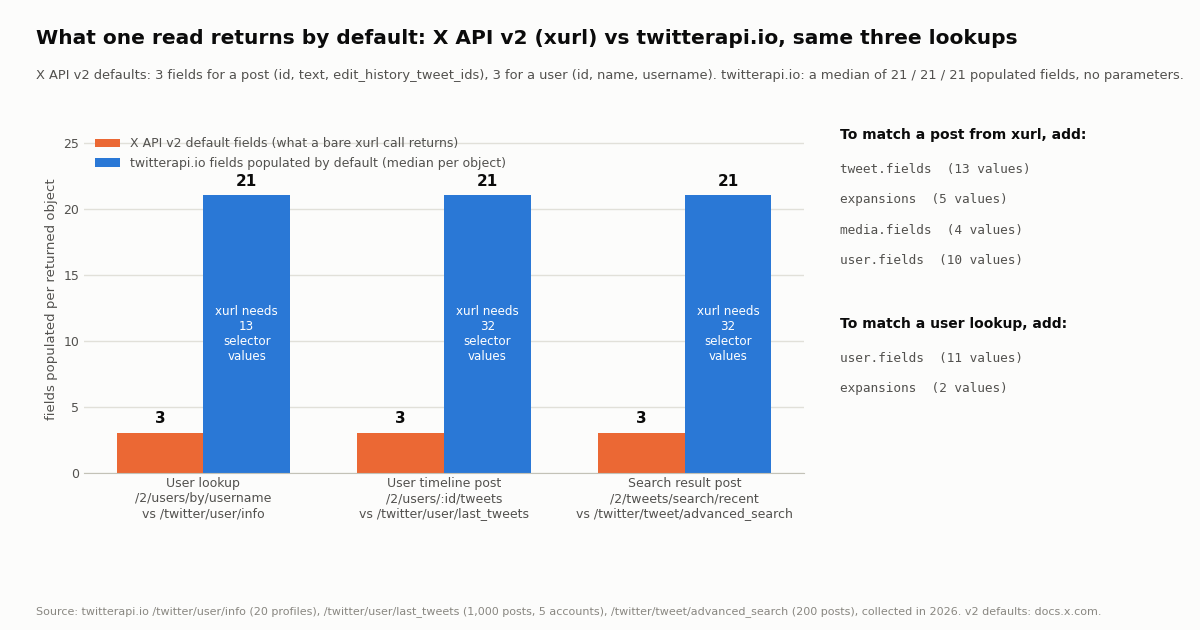
The X API v2 data dictionary states the default fields: a post object comes back with id, text and edit_history_tweet_ids; a user object with id, name and username. Everything else, from created_at and public_metrics to the author of a post, has to be requested through tweet.fields (the reference pages now label the parameter post.fields), user.fields, media.fields, poll.fields, place.fields and expansions, which pull related objects into an includes block. So the first thing a new xurl user learns is that xurl /2/users/by/username/github prints three fields, and xurl search "golang" prints ids and text and nothing about who posted or how it did.
To put a number on the gap we ran the equivalent reads through twitterapi.io, which returns a fixed, fully populated object with no field selectors at all, and counted the fields that actually carried a value (not null, not empty). The three pairs are the ones developers prototype most: xurl /2/users/by/username/:name against /twitter/user/info?userName=, xurl /2/users/:id/tweets (or xurl posts) against /twitter/user/last_tweets?userName=, and xurl /2/tweets/search/recent?query= (or xurl search) against /twitter/tweet/advanced_search?query=&queryType=Latest. Sample: 20 organization accounts for the lookup, 10 pages of 20 posts for five of them (1,000 posts), and 10 pages of a neutral English search (200 posts), all collected in 2026.
How we counted the selectors. We mapped each populated twitterapi.io field to the v2 name that carries the same information, using the enums on the user-lookup and recent-search reference pages: for a user, user.fields=created_at,description,entities,location,profile_banner_url,profile_image_url,protected,public_metrics,url,verified,verified_type and expansions=affiliation,pinned_post_id; for a post, tweet.fields=article,attachments,card_uri,community_id,conversation_id,created_at,display_text_range,entities,geo,lang,public_metrics,reply_settings,source, expansions=attachments.media_keys,author_id,geo.place_id,in_reply_to_user_id,referenced_posts, media.fields=type,url,preview_image_url,variants, and ten user.fields for the author in includes.users. A few fields have no v2 counterpart (canDm, isAutomated, the ready-made url of a post), and public_metrics on v2 bundles six counts into one value, which is why 21 populated fields need 32 selector values and not 21.
Why it matters beyond typing. On the official rate card the author_id expansion is a user read: adding it to a 100-post search bills up to 100 extra user reads at $0.010 each on top of the 100 post reads, so "posts with their authors" costs $1.50 per page, not $0.50. On twitterapi.io the author object is part of every post at no extra charge; the author sub-object alone carried a median of 27 populated fields in the timeline sample.
Which fields come back populated, how big each object is, and what the study cost
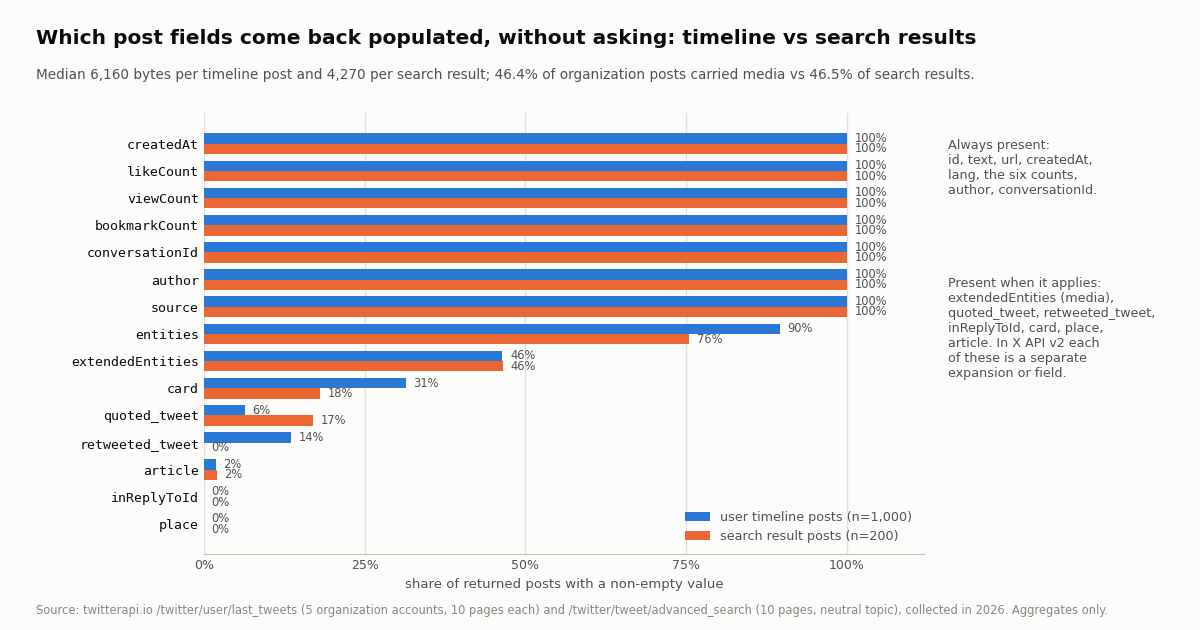
Twenty-one populated fields is the median, not the whole story, because some fields are only filled when they apply. The table below lists coverage for the fields that matter to most scripts, as the share of returned posts with a non-empty value, for the 1,000 organization timeline posts and the 200 search results separately. Identity, timing, language, the six engagement counts, conversationId, source and the embedded author were present on 100% of posts in both samples; entities (hashtags, URLs, mentions) on 89.6% and 75.5%; media (extendedEntities) on 46.4% and 46.5%; card (link previews) on 31.4% and 18.0%; quoted_tweet on 6.3% and 17.0%; retweeted_tweet on 13.5% of timeline posts and none of the search results, because the search returned no reposts; article on 1.8% and 2.0%; place and inReplyToId on 0%, the latter because last_tweets excludes replies by default and the query carried -filter:replies.
Size and speed. A profile from /twitter/user/info was a median 998 bytes of JSON (915 to 1,470); a timeline post 6,160 bytes (2,028 to 25,902; Cloudflare's media-heavy posts pushed its median to 9,557) and a search result 4,270 bytes (1,845 to 23,955). Each 20-post page was about 110 to 123 KB. Median wall-clock per request from our client, with the client's own rate spacing removed, was 1.04 s for a profile lookup (p90 1.35 s), 2.30 s for a timeline page (p90 2.76 s, one outlier at 8.71 s) and 2.20 s for a search page (p90 2.57 s). A v2 response with 32 selector values would carry comparable information in a different layout (includes.users, includes.media instead of nested objects); we did not measure v2 bytes because we have no enrolled app.
What the study cost. 80 requests: 20 profiles at 18 credits and 1,200 posts at 15 credits is 18,360 credits, $0.18. The same reads on the official pay-per-usage card, 20 user reads at $0.010 and 1,200 post reads at $0.005, come to $6.20, before the author expansions a v2 call would need to reach the same information; that is a 33.8x ratio on this sample. Every number in this section comes from results.json in the study folder.
The read-only alternative: one key, the same three reads as plain curl
If what you want from xurl is to read X data from a terminal or a script, the shortest path does not involve a developer app at all. twitterapi.io's read endpoints take one X-API-Key header, need no X account, no OAuth and no scopes, and return the full objects measured above. The pairs below are the exact calls from the study; $KEY is the key from the dashboard. Rate limit: 0.2 requests per second before the first payment, 20 per second once paid (50 on Scale, 500 on Business, up to 1,000 on request), with HTTP 429 on excess, so a loop should sleep between pages.
Reading the responses. /twitter/user/info returns {status, msg, data{...}}; an unknown handle is HTTP 200 with status: "error", msg: "user not found" and data: null, never a 404, so check status. /twitter/user/last_tweets returns data.tweets[] (20 per page, newest first, replies excluded unless includeReplies=true) with has_next_page and next_cursor at the top level; /twitter/tweet/advanced_search returns tweets[], has_next_page and next_cursor at the top level. Tweet fields are camelCase (likeCount, viewCount, createdAt in the Thu Oct 16 12:34:56 +0000 2026 format, author.userName), never public_metrics.
Writes are a separate product, not a gap. xurl's write verbs (post, reply, like, follow, dm) run on your own X account through your developer app. twitterapi.io supports write actions too, through an authenticated session: one /twitter/user_login_v2 login ($0.10, with a proxy you supply) returns login_cookies, and each subsequent action is $0.002 per call (/twitter/create_tweet_v2, /twitter/follow_user_v2, and so on). Those calls act as that account, so X can rate-limit, lock or suspend it; keep a human pace, expect the session to need a re-login now and then, and note that each HTTP 200 call is billed. For posting from your own account with full OAuth semantics, xurl is the cleaner tool; for reading at volume, the key is.
The Python program at the end of this page runs all three reads with requests, follows has_next_page and next_cursor for the timeline, and prints the populated-field count per object, which is how the numbers above were produced.
export KEY="your twitterapi.io key"   # dashboard > API key; no X account or developer app needed

# 1. User lookup   (xurl: xurl /2/users/by/username/github?user.fields=...)
curl -s -H "X-API-Key: $KEY" \
  "https://api.twitterapi.io/twitter/user/info?userName=github" | jq '.data | {userName, followers, statusesCount, createdAt, isBlueVerified}'

# 2. A user's recent posts   (xurl: xurl posts github -n 20, or /2/users/<id>/tweets)
curl -s -H "X-API-Key: $KEY" \
  "https://api.twitterapi.io/twitter/user/last_tweets?userName=github" | jq '{n: (.data.tweets | length), next: .has_next_page, first: .data.tweets[0] | {id, createdAt, likeCount, viewCount, author: .author.userName}}'

# next page: append &cursor=<next_cursor> from the previous response

# 3. Recent search   (xurl: xurl search "golang" -n 20, or /2/tweets/search/recent?query=...)
curl -s -H "X-API-Key: $KEY" --data-urlencode 'query="open source" lang:en -filter:replies' --data-urlencode 'queryType=Latest' -G \
"https://api.twitterapi.io/twitter/tweet/advanced_search" | jq '{n: (.tweets | length), fields: (.tweets[0] | to_entries | map(select(.value != null and .value != "" and .value != [] and .value != {})) | length)}'How we collected this
Question: what does one read return by default through the X API v2 (as a bare xurl call sends it) versus through twitterapi.io's equivalent endpoint, for the three reads developers prototype most: a user lookup, a user's recent posts, a recent keyword search? Measured as fields populated per object, the number of v2 field-selector values needed to match, bytes per object, wall-clock per request, and the cost of the whole study on both rate cards.
Accounts and query: 20 public organization accounts for the lookup (@github, @vercel, @Docker, @NASA, @nvidia, @ThePSF, @rustlang, @kubernetesio, @awscloud, @googledevs, @Microsoft, @stripe, @Shopify, @figma, @NotionHQ, @SlackHQ, @Zoom, @Dropbox, @twilio, @Cloudflare; all 20 resolved); timelines for five of them (@github, @vercel, @NASA, @nvidia, @Cloudflare); and one neutral English search, "open source" lang:en -filter:replies, newest first.
Method: a rate-limited, read-only client against /twitter/user/info (20 requests), /twitter/user/last_tweets with the default includeReplies (10 pages of 20 per account, 50 requests, 1,000 posts) and /twitter/tweet/advanced_search with queryType=Latest (10 pages, 10 requests, 200 posts): 80 requests in total, collected in 2026. A field counts as populated when its value is not null, not an empty string, not an empty array and not an empty object. Bytes are the UTF-8 length of each object re-serialized as JSON. Seconds are measured around the HTTP call with the client's own request spacing subtracted. The v2 default fields and the selector enums come from docs.x.com (data dictionary, fields fundamentals, user-lookup and recent-search references); the mapping from twitterapi.io field names to v2 selectors is a table in analyze.py and is reproduced in the text above.
The xurl side: we downloaded the v1.3.4 macOS arm64 release, ran --version, --help, auth --help, auth status and two unauthenticated requests, and quote that output verbatim. We do not hold an X developer app, so we did not make authenticated xurl calls and did not measure v2 response sizes or latencies; every statement about what an authenticated call returns or costs comes from X's documentation, cited inline.
What the sample cannot show: 20 organization accounts have complete profiles (descriptions, URLs, pinned posts) more often than individuals would, so the 21-field median for users is an upper-middle estimate; the five timelines are organization accounts that rarely reply, which is why inReplyToId is 0%; one English search on one topic says nothing about media or quote rates on other topics; and wall-clock figures are from one client on one network in one session. Populated-field counts and selector mappings do not depend on the accounts chosen.
Aggregates only. The named accounts are organizations; the search results come from individuals, so their raw pages were kept outside the repository and only aggregates and de-identified rows (field counts, bytes, media and quote flags; no ids, text or authors) are stored with the study, alongside the protocol, the analysis script, the chart script and the gzip-compressed raw pages for the organization accounts.
"""xurl_reads.py - the three reads people prototype with xurl, done with one API key and no OAuth.

    pip install requests
    export TWITTERAPI_IO_API_KEY=...        # twitterapi.io dashboard; no X developer app needed
    python xurl_reads.py github "golang lang:en -filter:replies"

Prices: 18 credits per profile, 15 credits per tweet returned, 15-credit minimum per request,
$1 = 100,000 credits. A 20-post page is $0.003; a profile is $0.00018.
"""
import os
import sys
import time

import requests

BASE = "https://api.twitterapi.io"
HEADERS = {"X-API-Key": os.environ["TWITTERAPI_IO_API_KEY"]}


def populated(obj):
    """Fields that carry a value: not None, not '', not [], not {}."""
    return [k for k, v in obj.items() if v not in (None, "", [], {})]


def user_info(username):
    # xurl equivalent: xurl /2/users/by/username/<username>?user.fields=created_at,description,public_metrics,...
    r = requests.get(f"{BASE}/twitter/user/info", headers=HEADERS, params={"userName": username}, timeout=30)
    r.raise_for_status()
    body = r.json()
    if body.get("status") != "success" or not body.get("data"):
        raise LookupError(body.get("msg"))          # unknown handle: HTTP 200, status "error", msg "user not found"
    return body["data"]


def last_tweets(username, pages=3):
    # xurl equivalent: xurl posts <username> -n 100, or /2/users/<id>/tweets?tweet.fields=...&expansions=author_id
    out, cursor = [], None
    for _ in range(pages):
        params = {"userName": username}
        if cursor:
            params["cursor"] = cursor
        r = requests.get(f"{BASE}/twitter/user/last_tweets", headers=HEADERS, params=params, timeout=30)
        r.raise_for_status()
        body = r.json()
        tweets = (body.get("data") or {}).get("tweets") or []     # 20 per page, newest first, replies excluded
        out.extend(tweets)
        if not tweets or not body.get("has_next_page") or not body.get("next_cursor"):
            break
        cursor = body["next_cursor"]
        time.sleep(0.3)                                             # 20 req/s once paid; 0.2 req/s before the first payment
    return out


def search(query, pages=2):
    # xurl equivalent: xurl search "<query>" -n 100, or /2/tweets/search/recent?query=...&tweet.fields=...
    out, cursor = [], None
    for _ in range(pages):
        params = {"query": query, "queryType": "Latest"}
        if cursor:
            params["cursor"] = cursor
        r = requests.get(f"{BASE}/twitter/tweet/advanced_search", headers=HEADERS, params=params, timeout=30)
        r.raise_for_status()
        body = r.json()
        tweets = body.get("tweets") or []
        out.extend(tweets)
        if not tweets or not body.get("has_next_page") or not body.get("next_cursor"):
            break
        cursor = body["next_cursor"]
        time.sleep(0.3)
    return out


if __name__ == "__main__":
    handle = sys.argv[1] if len(sys.argv) > 1 else "github"
    query = sys.argv[2] if len(sys.argv) > 2 else 'golang lang:en -filter:replies'

    u = user_info(handle)
    print(f"@{u['userName']}: {u['followers']:,} followers, {u['statusesCount']:,} posts, since {u['createdAt']}")
    print(f"  {len(populated(u))} populated fields (X API v2 default: 3)")

    tl = last_tweets(handle)
    print(f"{len(tl)} recent posts; median populated fields: {sorted(len(populated(t)) for t in tl)[len(tl) // 2]} (X API v2 default: 3)")
    for t in tl[:3]:
        print(f"  {t['createdAt']}  likes={t['likeCount']} views={t['viewCount']}  {t['url']}")

    hits = search(query)
    print(f"{len(hits)} search results; {sum(1 for t in hits if (t.get('extendedEntities') or {}).get('media'))} with media")
    cost = (18 + 15 * (len(tl) + len(hits))) / 100000
    print(f"cost of this run: ${cost:.4f} (official rate card: ${0.010 + 0.005 * (len(tl) + len(hits)):.3f})")
Questions readers ask
What is xurl?
xurl is the X developer platform's official command-line client for the X API, published at github.com/xdevplatform/xurl and documented at docs.x.com/tools/xurl. It works like curl but stores your X app credentials, runs OAuth 2.0 (PKCE), OAuth 1.0a or app-only bearer authentication for you, signs each request, and offers shortcut commands (xurl user, xurl search, xurl post) on top of raw /2/... calls. The latest release when we checked was v1.3.4. It is not the CTAN LaTeX package of the same name.
Is xurl free to use?
The tool is open source and free to install, but every request it sends goes to the X API, which bills on the pay-per-usage rate card: $0.005 per post read, $0.010 per user read, $0.015 per post created ($0.200 with a URL), capped at 3 million post reads a month. The README's troubleshooting note says an app must be moved to the Pay-per-use package and Production environment before /2/* reads work. New developers get $20 in credits with their first eligible card and purchase, and their first auto-recharge matched up to $50.
Does xurl work without an X developer account?
No. With nothing configured, the v1.3.4 binary prints Error: Auth Error: NoAuthMethod (cause: no authentication method available) and exits 1 before making any network call. You need a developer account, an app with a client ID and secret (or a bearer token), and for OAuth 2.0 a registered redirect URI, by default http://localhost:8080/callback. If you only need to read public data, twitterapi.io's endpoints take one X-API-Key header and need no X account at all.
How do I authenticate xurl with OAuth 2.0?
Register the app once with xurl auth apps add my-app --client-id ID --client-secret SECRET, then run xurl auth oauth2 --app my-app. It opens a browser, you approve, and the access and refresh tokens are saved in ~/.xurl/auth.yml. On a server without a browser add --headless and paste the code back. For app-only reads use xurl auth app-only TOKEN and call endpoints with --auth app; for OAuth 1.0a use xurl auth oauth1 with the consumer and access keys.
Why does xurl only return id and text?
Because that is the X API v2 default. The data dictionary states a post comes back with id, text and edit_history_tweet_ids and a user with id, name and username unless you add tweet.fields (labeled post.fields on the newer reference pages), user.fields, media.fields and expansions. In our study, matching what twitterapi.io returns by default for a post took 32 selector values across four parameters, and 13 for a user lookup; the expansions that fetch authors are also billed as user reads.
Is xurl a replacement for twurl?
Yes, in practice. twurl was Twitter's Ruby curl-for-the-Twitter-API gem; its last release, 0.9.7, was in April 2023 and it targets the v1.1 API. xurl is maintained by the X developer platform team, speaks the v2 API, supports OAuth 2.0 PKCE with refresh, and its changelog mentions importing an existing .twurlrc. The twurl repository has not been marked archived, but it has not shipped since 2023.
Can AI agents use xurl?
Yes, that is one of its main uses now. The repository ships a SKILL.md, the hermes-agent framework bundles a social-media-xurl skill, the skills.sh registry lists xdevplatform/xurl, and xurl mcp bridges a stdio MCP client to a remote MCP server with the bearer token attached. The pattern in every one of these is that a human runs xurl auth oauth2 once on the machine and the agent then shells out to xurl; credentials never pass through the model.
How do I read X data from the terminal without OAuth?
Use a read API that takes a key. With twitterapi.io: curl -H "X-API-Key: $KEY" "https://api.twitterapi.io/twitter/user/info?userName=github" for a profile, /twitter/user/last_tweets?userName=github for recent posts (20 per page, follow next_cursor), and /twitter/tweet/advanced_search?query=...&queryType=Latest for search. Profiles cost 18 credits and posts 15 credits each ($0.18 and $0.15 per 1,000; $1 = 100,000 credits), with a 15-credit minimum per request. New accounts that pass the bot check get $1 in credits for 31 days, one per person or network.
Continue
- xdevplatform/xurl on GitHub: README (install methods, xurl auth commands, token storage, enrollment troubleshooting), CHANGELOG and v1.3.4 release assets
- docs.x.com: xurl, curl-style command line client for the X API (setup steps, example commands)
- docs.x.com: X API pay-per-usage pricing ($0.005 per post read, $0.010 per user read, 3M post-read cap, credits)
- docs.x.com: data dictionary (default Post fields id, text, edit_history_tweet_ids; default User fields id, name, username)
- docs.x.com: rate limits per endpoint and the x-rate-limit-* headers
- twitterapi.io API reference: /twitter/user/info, /twitter/user/last_tweets, /twitter/tweet/advanced_search and response fields
- X API docs: a documentation index for the official endpoints
- Twitter (X) API OAuth 2.0 user context: the PKCE flow xurl automates
- What the X (Twitter) API costs: the pay-per-usage rate card in detail
- Can you use the X (Twitter) API for free?
- Tweet metadata fields: what each field in a post object means
- Twitter (X) API with Python: practical examples
- Rate limit exceeded (429) on the Twitter (X) API: causes and fixes
- twitterapi.io API reference
- Pay-per-call pricing and plans
- 01X Communities API: How Do You Read Community Posts and Post to a Community?
- 02Twitter (X) Search Not Working? The October 2026 list: Search Outage, Other Causes and Fixes
- 03How Will You Use the Twitter (X) API or Twitter Data? Answering the Developer Sign-Up Question
- 04Twitter (X) Welcome Message: Is the API Still Alive, and How to Send One in 2026
- 05twscrape for Twitter (X): what the account pool costs you, and how to migrate to an API with no accounts
- 06How to Use Cursor with the Twitter (X) API
- 07How to Search Tweets by Date via API — A Developer's Guide
- 08Twint (Twitter scraper): why it stopped working and how to migrate
Stop reading. Start building.
Starter credits cover real testing on real data. Google sign-in, no card, no application queue.
Get an API key