X Communities API: How Do You Read Community Posts and Post to a Community?
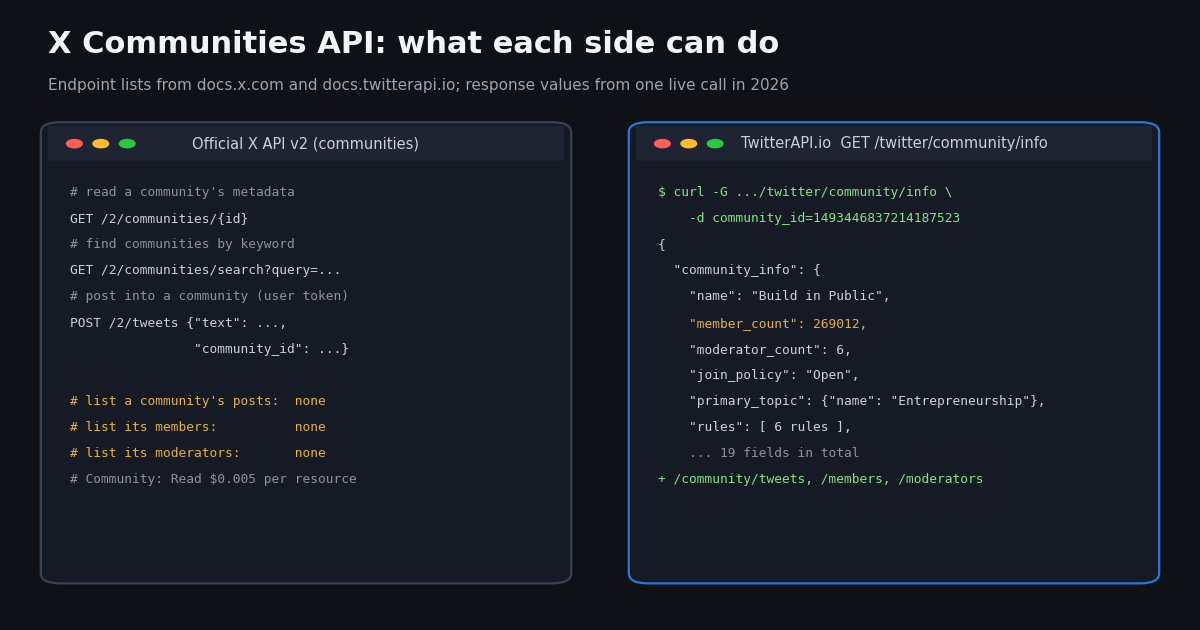
X Communities are topic groups inside X: anyone can read a community's posts, but only members can post and reply there. For developers that raises two questions: how do you read what a community is saying, and how do you post into one from code? The official X API answers the second question well and the first one only partly.
This guide checks the official X API v2 reference for every community endpoint, then reads a large public community through TwitterAPI.io and shows the real responses: community metadata, three pages of posts, members and moderators. It ends with both ways to post into a community, with their prices side by side.
What does the official X API v2 offer for communities?
We read the X API v2 reference and its OpenAPI file (docs.x.com/openapi.json) for anything that touches communities. Community Notes are a separate product and are left out. This is the complete list:
What is missing matters more than what is there. The v2 reference has no endpoint that returns a community's posts, its members or its moderators, and the search operators reference lists no community operator. So with the official API you can describe a community and post into it, but you cannot read its feed or its member list. That is the gap this page fills.
Two details from the docs are worth knowing before you code. First, the Communities Search introduction shows an app-only Bearer token in its example, while the OpenAPI file lists only user-context auth for that endpoint, so test with a user token if app-only fails. Second, the share_with_followers field description in the API reference talks about super-follower posts, while the July 2025 changelog entry says it broadcasts a community post to your followers' timelines, matching the "Also share with followers" checkbox on x.com. The changelog is the more specific source.
Official X API vs TwitterAPI.io for communities
The same tasks, side by side. Official prices are from X's pricing page (pay-per-usage); TwitterAPI.io prices are from our pricing page and each endpoint's reference page.
For metadata the ratio is $0.005 / $0.0002 = 25x per community. For a post the ratio is $0.015 / $0.002 = 7.5x per post, before the one-time $0.10 login. For a community's posts, members and moderators there is no official price to compare, because there is no official endpoint.
Step 1: find the community ID
Every community endpoint takes a numeric community_id. The easiest place to get it is the community's own URL: open the community on x.com and copy the number from x.com/i/communities/1493446837214187523. That ID belongs to Build in Public, the community used in every example below.
If you only have a topic, the official GET /2/communities/search?query= endpoint returns matching communities with their IDs. TwitterAPI.io's get_tweets_from_all_community searches posts, not communities, and in our test its posts did not carry a community ID (communityInfo was null on every post), so use it to watch topics, not to discover IDs.
Step 2: get community metadata with /twitter/community/info
GET /twitter/community/info takes one parameter, community_id, and costs 20 credits per call. Its reference page notes that it is slower than most endpoints; ours answered in 1.4 seconds. The response below is real, trimmed where marked: rules and profiles are shortened, nothing else is changed.
Compared with the official lookup, the extra fields are the useful ones for moderation and research tools: rules (each with a name and description), question (the prompt new members answer), moderator_count, invites_policy, primary_topic, creator, admin as full profiles, and members_preview. role is the calling account's role, so for an API-key read it is always NonMember.
curl -s -G "https://api.twitterapi.io/twitter/community/info" \
  --data-urlencode "community_id=1493446837214187523" \
  -H "X-API-Key: $TWITTERAPI_IO_API_KEY"

# Response (real, trimmed)
{
  "community_info": {
    "id": "1493446837214187523",
    "name": "Build in Public",
    "description": "Share what you're working on. Get feedback. Help each other move forward. – Sponsored by bolt.new ⚡",
    "question": "What are you working on?",
    "member_count": 269012,
    "moderator_count": 6,
    "created_at": "Tue Feb 15 04:47:27 +0000 2022",
    "join_policy": "Open",
    "invites_policy": "MemberInvitesAllowed",
    "is_nsfw": false,
    "is_pinned": false,
    "role": "NonMember",
    "primary_topic": { "id": "603", "name": "Entrepreneurship" },
    "banner_url": "https://pbs.twimg.com/community_banner_img/1915033378811772928/KdaKUaRP?format=png&name=orig",
    "search_tags": [],
    "rules": [
      { "id": "1493447542045958144", "name": "Share what you're working on", "description": "Don't be scared to share unfinished work" },
      { "id": "1493448150169755648", "name": "Screenshots, screencasts, drafts, etc", "description": "Visual tweets tend to grab people's attention" }
      /* ... 4 more rules */
    ],
    "creator": { "id": "641633", "name": "Marc Köhlbrugge", "screen_name": "marckohlbrugge", "followers_count": 89337 /* ... full profile */ },
    "admin": { "screen_name": "marckohlbrugge" /* ... same profile */ },
    "members_preview": [ /* 5 member profiles */ ]
  },
  "status": "success",
  "msg": "success"
}Step 3: read a community's posts with /twitter/community/tweets
GET /twitter/community/tweets returns the community's posts newest first, 20 per page. Pass next_cursor back as cursor to get the next page, and stop when has_next_page is false. Each post has the same tweet object as our search and timeline endpoints, with the full author profile embedded, so one call gives you text, counts, media, links and who posted.
A full page of 20 posts costs 20 × 15 = 300 credits, $0.003. The three pages in our test, 60 posts, cost 900 credits, $0.009. Before your first payment the rate limit is 0.2 requests per second, which is why the script waits between pages; once you have paid it is 20 requests per second.
The sample post below is a real response with the post ID, URL, text, handle and date redacted, because community posts are mostly written by private individuals. Everything else is as returned. The post object does not repeat the community_id; you already know it from the request.
{
  "tweets": [
    {
      "type": "tweet",
      "id": "<redacted>",
      "url": "<redacted>",
      "text": "<redacted: a member's daily progress post with 5 hashtags>",
      "source": "Twitter for iPhone",
      "retweetCount": 0,
      "replyCount": 0,
      "likeCount": 1,
      "quoteCount": 0,
      "viewCount": 6,
      "bookmarkCount": 0,
      "createdAt": "<redacted> 2026",
      "lang": "en",
      "isReply": false,
      "inReplyToId": null,
      "conversationId": "<same as id>",
      "author": { "type": "user", "userName": "<redacted>", "followers": 19 /* ... 25 more profile fields */ },
      "extendedEntities": {},
      "card": null,
      "place": {},
      "entities": { /* hashtags, urls, user_mentions */ }
    }
    /* ... 19 more posts, newest first */
  ],
  "has_next": true,
  "has_next_page": true,
  "next_cursor": "DAABCgABHU1rn9r__-kKAAIdTWbDh1ugBwgAAwAAAAIAAA",
  "status": "success",
  "msg": "success"
}Step 4: list members and moderators
GET /twitter/community/members and GET /twitter/community/moderators each take community_id and an optional cursor, and return 20 full user profiles per page (snake_case fields such as screen_name, followers_count, statuses_count, created_at, can_dm). For Build in Public the moderators call returned all 6 moderators in one page (has_next_page: false), matching moderator_count in the metadata. The members call returned 20 profiles with has_next_page: true; with 269,012 members, a full export would take roughly 13,451 pages, so plan members reads as a sample or a slow background job, not a single request.
Moderators of this community are public project and founder accounts listed on its page, so the response below is shown with their real handles. Member profiles are not shown, for the same privacy reason as the posts.
# Members and moderators: 20 full profiles per page, cursor pagination.
import os
import time
import requests

API = "https://api.twitterapi.io"
H = {"X-API-Key": os.environ["TWITTERAPI_IO_API_KEY"]}


def moderators(community_id):
    r = requests.get(f"{API}/twitter/community/moderators", headers=H,
                     params={"community_id": community_id}, timeout=60)
    r.raise_for_status()
    return r.json().get("moderators") or []


def members(community_id, max_pages=5):
    cursor = ""
    for _ in range(max_pages):
        params = {"community_id": community_id}
        if cursor:
            params["cursor"] = cursor
        r = requests.get(f"{API}/twitter/community/members", headers=H, params=params, timeout=60)
        r.raise_for_status()
        page = r.json()
        yield from page.get("members") or []
        if not page.get("has_next_page") or not page.get("next_cursor"):
            break
        cursor = page["next_cursor"]
        time.sleep(1)


for m in moderators("1493446837214187523"):
    print(m["screen_name"], m["followers_count"])

# Response from /twitter/community/moderators (real, trimmed)
'''
{
  "moderators": [
    {
      "id": "641633",
      "name": "Marc Köhlbrugge",
      "screen_name": "marckohlbrugge",
      "followers_count": 89337,
      "following_count": 974,
      "statuses_count": 50153,
      "isBlueVerified": true,
      "created_at": "Mon Jan 15 23:55:33 +0000 2007"
      /* ... 12 more profile fields */
    },
    { "id": "2729705040", "name": "Build in Public", "screen_name": "buildinpublic", "followers_count": 73398 /* ... */ }
    /* ... 4 more: wip, fajarsiddiqFS, bdlowery, watchdog_chat */
  ],
  "has_next_page": false,
  "status": "success",
  "msg": "success"
}
'''Search posts across all communities
GET /twitter/community/get_tweets_from_all_community takes query (keywords only, per its reference page) and queryType (Latest or Top), and returns posts from any community that match. It is the endpoint for monitoring a topic inside communities when you do not know which communities discuss it. Our python query with Top returned a full first page with has_next_page: true.
Use it for discovery and topic tracking; once you know which community matters, switch to /twitter/community/tweets for that community's complete feed in order.
# Posts that mention a keyword, across all communities (about 20 per page, varies)
curl -s -G "https://api.twitterapi.io/twitter/community/get_tweets_from_all_community" \
  --data-urlencode "query=python" \
  --data-urlencode "queryType=Latest" \
-H "X-API-Key: $TWITTERAPI_IO_API_KEY"What a live community feed looks like: 60 posts from Build in Public
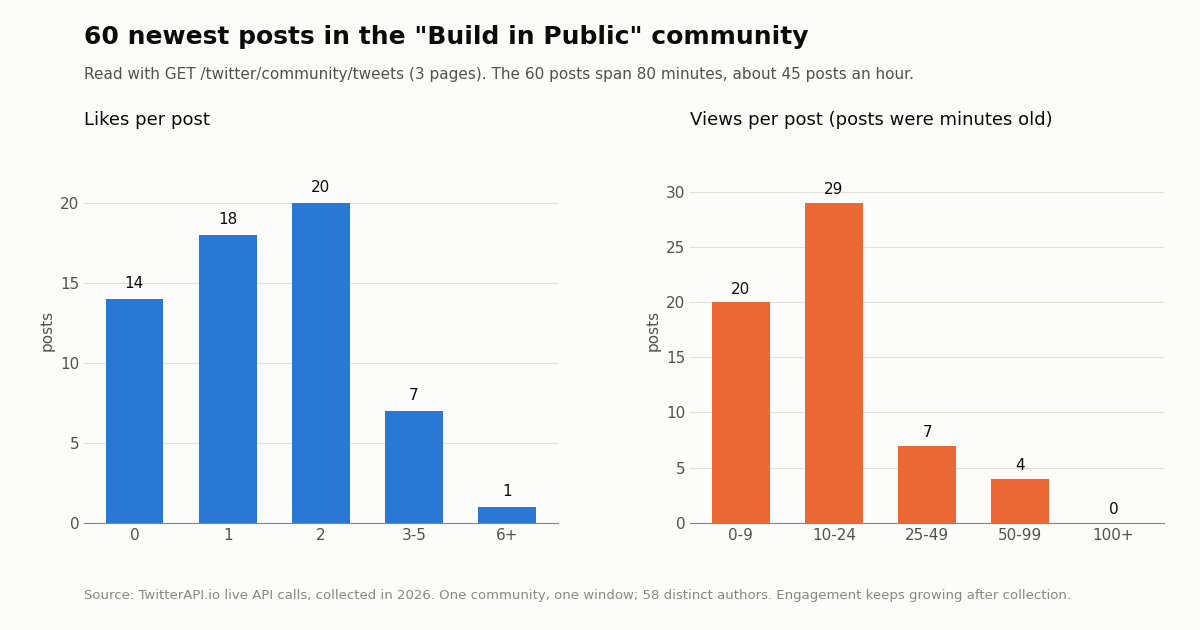
To give the endpoints a realistic shape, we read the 60 newest posts of Build in Public (269,012 members, primary topic Entrepreneurship, open join policy) in three pages, collected in 2026. The question: how fast does a large community move, and what do its posts look like when you read them through the API?
What it means for a build: at about 45 posts an hour, polling this community every 15 to 20 minutes catches every new post in one page, and a full page costs $0.003. A community this size produces about 1,080 posts a day if the pace holds, which is about $0.16 a day to read every post at 15 credits each. The 40% media share is high because the community's own rules ask members to share screenshots and screencasts. Engagement is low at read time because most posts were minutes old; if you study engagement, re-read posts by ID a day later.
How do you post to an X community through the API?
The official way. Call POST /2/tweets with your text and community_id, signed with a user-context token (OAuth 2.0 with the tweet.write scope, or OAuth 1.0a user context). The reference defines community_id as "Community to post the tweet to", a numeric string. Add share_with_followers: true to also put the post on your followers' timelines. X's data dictionary notes that only members of a community can engage and participate in it, so the account must have joined the community first. On the pay-per-usage rate card each post is Post: Create, $0.015 per request.
# Official X API v2: post into a community as the authenticated user.
# Needs a user-context token (OAuth 2.0 with tweet.write, or OAuth 1.0a user context).
curl -s -X POST "https://api.x.com/2/tweets" \
  -H "Authorization: Bearer $X_USER_ACCESS_TOKEN" \
  -H "Content-Type: application/json" \
  -d '{
        "text": "Shipped dark mode today. Screenshots below.",
        "community_id": "1493446837214187523",
        "share_with_followers": true
      }'
# Official rate card: Post: Create $0.015 per request.Posting to a community with TwitterAPI.io
TwitterAPI.io posts as your own X account through a logged-in session. POST /twitter/user_login_v2 takes user_name, email, password, the optional but recommended totp_secret and a required proxy, and returns login_cookies for $0.10. POST /twitter/create_tweet_v2 then takes login_cookies, tweet_text, proxy and the optional community_id, and returns tweet_id; it costs $0.002 per HTTP 200 call, whether or not X ends up showing the post. If the account is not yet a member, POST /twitter/join_community_v2 with the same cookies and community_id joins it ($0.002).
Read before you automate. Every write acts as that account, and X can rate-limit, lock or suspend it. Communities have their own rules on top of X's: Build in Public, for example, lists "No self-promotion", "No engagement farming" and "Use a personal account". Keep a human pace, have a person write or approve each post, and never post the same text into several communities. Sessions can expire; when a post comes back with a non-success status, log in again once and stop if it fails again.
Pricing side by side for one post: $0.015 on X's Post: Create line versus $0.002 per call here, 7.5x, plus the $0.10 login, which is reused until the session expires.
# TwitterAPI.io: post into a community as YOUR OWN account (the account must be a member).
# One login ($0.10) returns login_cookies; each post is $0.002 per HTTP 200 call.
import os
import requests

API = "https://api.twitterapi.io"
H = {"X-API-Key": os.environ["TWITTERAPI_IO_API_KEY"]}
PROXY = os.environ["X_PROXY"]          # a residential proxy you supply; keep it the same for every call


def login():
    r = requests.post(f"{API}/twitter/user_login_v2", headers=H, json={
        "user_name": os.environ["X_USER"],
        "email": os.environ["X_EMAIL"],
        "password": os.environ["X_PASSWORD"],
        "totp_secret": os.environ.get("X_TOTP_SECRET", ""),   # base32 2FA seed, recommended
        "proxy": PROXY}, timeout=120)
    r.raise_for_status()
    body = r.json()
    if body.get("status") != "success":
        raise RuntimeError(body.get("message"))
    return body["login_cookies"]


def post_to_community(login_cookies, community_id, text):
    r = requests.post(f"{API}/twitter/create_tweet_v2", headers=H, json={
        "login_cookies": login_cookies,
        "tweet_text": text,
        "community_id": community_id,
        "proxy": PROXY}, timeout=60)
    r.raise_for_status()
    body = r.json()                    # {"tweet_id": "...", "status": "...", "message": "..."}
    if body.get("status") != "success":
        raise RuntimeError(body.get("message"))
    return body["tweet_id"]


# One post, written and reviewed by a person. Not a loop.
# cookies = login()
# print(post_to_community(cookies, "1493446837214187523", "Shipped dark mode today. Screenshots below."))What it costs to read and post in communities
TwitterAPI.io is pay-as-you-go: 100,000 credits = $1, purchased credits never expire, and you pay for the data returned. New accounts that pass the automatic bot check get up to $1 of free credits (at most 100,000 credits, no card, one per person or network, expiring after 31 days). Full rates and subscription plans are on the pricing page.
How we collected this
Question: what do the community read endpoints return for one large public community, and how does that community's feed look over a short window?
Calls: 8 read calls in one run in 2026, at most one per second: community/info, three pages of community/tweets, one page each of community/members and community/moderators, one get_tweets_from_all_community query (python, Top) to check the response shape, and one keyword search to look for community links. No write endpoint was called.
Sample: 60 posts from 58 authors in Build in Public, 20 members, 6 moderators. Raw responses are not published; we keep only per-post numbers (no IDs, text or handles) and the community's public metadata.
What it cannot show: one community over 80 minutes is not all communities or a full day. Activity varies by hour and topic, and engagement counts were read minutes after posting.
Official API facts come from the X API v2 reference, its OpenAPI file, the data dictionary, the changelog and the pricing page, all read in 2026.
# Read an X Community: metadata, then its newest posts page by page.
# pip install requests ; export TWITTERAPI_IO_API_KEY=...
import os
import time
import requests

API = "https://api.twitterapi.io"
H = {"X-API-Key": os.environ["TWITTERAPI_IO_API_KEY"]}
COMMUNITY_ID = "1493446837214187523"   # from x.com/i/communities/<id>


def community_info(community_id):
    r = requests.get(f"{API}/twitter/community/info", headers=H,
                     params={"community_id": community_id}, timeout=60)
    r.raise_for_status()
    body = r.json()
    if body.get("status") != "success":
        raise RuntimeError(body.get("msg"))
    return body["community_info"]


def community_posts(community_id, max_pages=3):
    """Yield posts newest first, 20 per page, following next_cursor."""
    cursor = ""
    for _ in range(max_pages):
        params = {"community_id": community_id}
        if cursor:
            params["cursor"] = cursor
        r = requests.get(f"{API}/twitter/community/tweets", headers=H, params=params, timeout=60)
        r.raise_for_status()
        page = r.json()
        if page.get("status") != "success":
            raise RuntimeError(page.get("msg"))
        yield from page.get("tweets") or []
        if not page.get("has_next_page") or not page.get("next_cursor"):
            break
        cursor = page["next_cursor"]
        time.sleep(1)   # stay well under your rate limit


info = community_info(COMMUNITY_ID)
print(info["name"], info["member_count"], "members,", info["join_policy"])

posts = list(community_posts(COMMUNITY_ID, max_pages=3))
with_media = sum(1 for t in posts if (t.get("extendedEntities") or {}).get("media"))
print(len(posts), "posts;", with_media, "with media")
for t in posts[:5]:
print(t["createdAt"], t["likeCount"], "likes", t["viewCount"], "views", t["url"])Questions readers ask
Does the X API v2 let you post to a community?
Yes. POST /2/tweets accepts a community_id field ("Community to post the tweet to") and, since July 2025, share_with_followers to also show the post to your followers. It needs a user-context token with tweet.write, the account must be a member of the community, and each post is $0.015 on X's pay-per-usage rate card.
Can I get a community's posts or members with the official X API?
Not in X API v2 as documented: the Communities section has only GET /2/communities/{id} and GET /2/communities/search, and posts carry a community_id field when you read them by other means. TwitterAPI.io has GET /twitter/community/tweets, /members and /moderators, 20 per page with cursor pagination.
Where do I find a community_id?
In the community's URL on x.com, for example x.com/i/communities/1493446837214187523 for Build in Public. The official GET /2/communities/search endpoint also returns IDs for a keyword.
Do I need an X account to read communities through TwitterAPI.io?
No. Reads need only an API key in the X-API-Key header. An X account is needed only to post, join or leave, through /twitter/user_login_v2 and the _v2 write endpoints.
Continue
- X API docs: Communities Lookup (GET /2/communities/{id})
- X API docs: Communities Search (GET /2/communities/search)
- X API docs: Create Post (POST /2/tweets, community_id field)
- X API changelog: community_id post field (Nov 2024), share_with_followers (Jul 2025)
- X API data dictionary: Community object and community_id post field
- X API pricing: Community: Read, Posts: Read, Post: Create
- TwitterAPI.io docs: Get Community Tweets
- TwitterAPI.io docs: Get Community Info By Id
- TwitterAPI.io docs: Create/Reply tweet v2 (community_id)
- Twitter (X) API: the cluster hub for every endpoint guide
- Twitter search operators API guide
- Twitter Lists API: read list members and tweets
- Build an AI Twitter bot that posts at a human pace
- Monitoring Twitter via API
- TwitterAPI.io pay-as-you-go pricing
- 01Twitter (X) Search Not Working? The October 2026 list: Search Outage, Other Causes and Fixes
- 02How Will You Use the Twitter (X) API or Twitter Data? Answering the Developer Sign-Up Question
- 03Twitter (X) Welcome Message: Is the API Still Alive, and How to Send One in 2026
- 04xurl: the X API CLI for Twitter (X) — Install, Auth, Commands and What Each Read Costs
- 05twscrape for Twitter (X): what the account pool costs you, and how to migrate to an API with no accounts
- 06What Was Twitter (X) Circle, and What Can You Use Instead?
- 07Twitter (X) Tweet Metadata — API Fields Reference
- 08Twitter Monitoring — A Practical Guide
Stop reading. Start building.
Starter credits cover real testing on real data. Google sign-in, no card, no application queue.
Get an API key