x-rate-limit-reset and the Other Twitter (X) API Rate-Limit Headers, Decoded
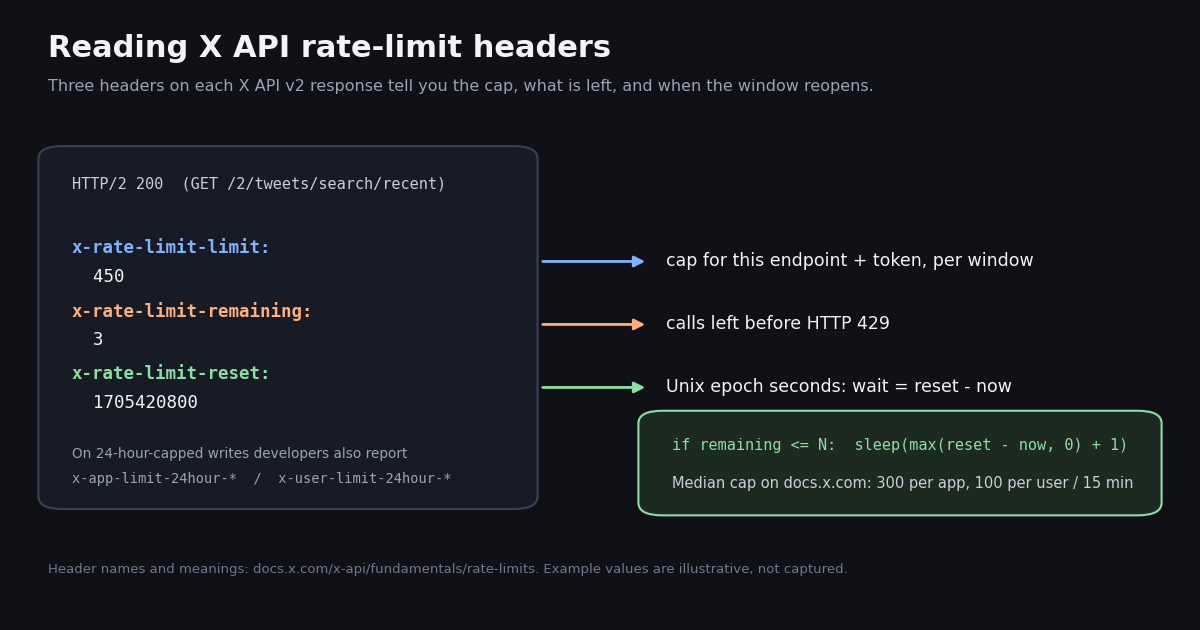
x-rate-limit-reset= Unix epoch seconds when the window reopens. Wait time isreset - now, not the raw number (and not milliseconds).x-rate-limit-limitis the window's cap;x-rate-limit-remainingis what is left. X sends them in lowercase (since the May 8, 2017 header change).- Windows: in all 110 rows on docs.x.com's table, 110 use a 15-minute window and 18 add a 24-hour cap; only 2 add a per-second cap.
- Typical caps: median 300 requests per 15 min per app (0.33 req/s) and 100 per user (0.11 req/s). Recent search: 450/15min per app.
- 429 with calls remaining? A 24-hour cap ran out. Look for
x-app-limit-24hour-remaining/x-user-limit-24hour-remaining(reported by developers, not on X's rate-limit page). - TwitterAPI.io limits per second per key (0.2 req/s before the first payment, 20 once paid, 50 Scale, 500 Business, up to 1,000 on request) and documents no
x-rate-limit-*headers: pace yourself and back off on 429.
If you searched for x-rate-limit-reset, you probably have a number like 1705420800 in a log line and a script that just received HTTP 429. This page explains every rate-limit header the official X API sends, what each value means, how to turn the reset timestamp into a wait, and how to write a client in Python or Node that slows down before the wall instead of after it.
We also did two pieces of first-hand work. We parsed every endpoint row (110 of them) on X's official rate-limit page into a dataset, so the window and cap numbers below are counted, not guessed. And we read 317 public posts about X API rate limits and 429 errors to see which problems developers actually hit. If you need the general error playbook (which statuses to retry, which to stop on), the sibling guide on Twitter API error handling covers that decision tree; this page stays on the headers.
300 requests (0.33 req/s)
The three x-rate-limit headers, one by one
X's rate-limit page (docs.x.com/x-api/fundamentals/rate-limits) lists exactly three response headers for the X API v2. Here is what each one holds, with the type you should parse it as:
The values are per endpoint and per token. X's page says each endpoint has its own limits, and that per-user limits apply with OAuth 1.0a or OAuth 2.0 user tokens while per-app limits apply with a Bearer token (app-only). The same app can therefore see x-rate-limit-remaining: 2 on recent search and 899 on a user lookup at the same moment.
Header names are lowercase. X's changelog records that on May 8, 2017 all HTTP headers were forced into lowercase (x-rate-limit-remaining, content-type, ...). Python's requests and the Fetch API look headers up case-insensitively, but if you parse raw header text or use a plain dict, match the lowercase names. Older tutorials print X-Rate-Limit-Reset; it is the same header.
Seconds, not milliseconds. x-rate-limit-reset is in epoch seconds. In JavaScript, Date.now() returns milliseconds, so compare against Number(reset) * 1000. Forgetting this either makes your code wait about 50 years or not at all.
One documentation wrinkle. X's streaming guide (docs.x.com/x-api/fundamentals/handling-disconnections) describes x-rate-limit-remaining as "Requests made so far in the 15-minute window", while the main rate-limit page and the error page say "Requests remaining". Code against the main page's meaning (it counts down), and log the value for a day if you rely on it for a stream reconnect loop.
Turning x-rate-limit-reset into a wait time
The arithmetic is one line, but three details decide whether it works in production:
Subtract, then clamp at zero. max(int(reset) - time.time(), 0). If your clock is slightly ahead of X's, the difference can go negative; clamping avoids a negative sleep() error in Python.
Add a small margin. One extra second covers rounding (the header has no fractions) and modest clock drift. X's own sample on the rate-limit page goes further and never waits less than 60 seconds after a 429: wait_time = max(reset_time - time.time(), 60).
Correct for clock skew if your host's clock is unreliable. Every HTTP response carries a standard Date header (RFC 9110, section 6.6.1). The difference between your clock and that header is your skew; subtract it before comparing with x-rate-limit-reset. On a server with NTP this is rarely needed, but containers and serverless sandboxes can drift.
Convert for humans when logging. In Python, datetime.fromtimestamp(int(reset), tz=timezone.utc) prints the reset in UTC; in a shell, date -u -r 1705420800 (macOS) or date -u -d @1705420800 (Linux). For one-off conversions, our Twitter timestamp tool turns epoch values into readable dates.
import time
from email.utils import parsedate_to_datetime


def server_skew_seconds(headers):
    """Local clock minus the server clock, from the standard HTTP Date header."""
    server = parsedate_to_datetime(headers["date"]).timestamp()
    return time.time() - server

# wait = int(headers["x-rate-limit-reset"]) - (time.time() - server_skew_seconds(headers)) + 1
A header-aware client in Python and Node
The pattern below is what X's docs recommend in prose (check x-rate-limit-reset, wait until that time, use exponential backoff if needed), plus one improvement the docs list as a best practice: track remaining on every response and stop before the 429, not after it. Python first; the Node version follows in the next section.
What it does. Each response's x-rate-limit-limit and x-rate-limit-remaining are read. A 429 sleeps until x-rate-limit-reset (or backs off 60, 120, 180 seconds if the header is missing). A success with five or fewer calls left also sleeps until the reset, so a long job glides through the window boundary instead of hitting the wall.
What it logs. On a 429 it prints both limit and remaining. That single line separates the two kinds of 429 you will meet: remaining=0 (the 15-minute window is used up, wait for reset) and remaining above zero (a different cap, usually a 24-hour one, ran out; see the section on 24-hour caps).
import time
import requests

LOW_WATER = 5  # start pacing when this many calls are left in the window


def wait_seconds(headers, now=None):
    """Seconds until the X API window reopens, from x-rate-limit-reset (Unix epoch seconds)."""
    reset = headers.get("x-rate-limit-reset")
    if reset is None:
        return None
    now = time.time() if now is None else now
    return max(int(reset) - now, 0) + 1  # +1 s guards against clock skew and rounding


def x_get(url, bearer, params=None, max_attempts=4):
    for attempt in range(max_attempts):
        r = requests.get(url, params=params, timeout=30,
                         headers={"Authorization": f"Bearer {bearer}"})
        limit = r.headers.get("x-rate-limit-limit")
        remaining = r.headers.get("x-rate-limit-remaining")
        if r.status_code == 429:
            wait = wait_seconds(r.headers) or 60 * (attempt + 1)
            # A 429 with remaining > 0 usually means a second cap (24-hour) ran out
            print(f"429: limit={limit} remaining={remaining}; sleeping {wait:.0f}s")
            time.sleep(wait)
            continue
        r.raise_for_status()
        if remaining is not None and int(remaining) <= LOW_WATER:
            wait = wait_seconds(r.headers)
            print(f"{remaining}/{limit} left; pausing {wait:.0f}s until reset")
            time.sleep(wait)
        return r.json()
    raise RuntimeError("still rate limited after retries")


# Example (official X API v2, Bearer token from the X Developer Console):
# data = x_get("https://api.x.com/2/tweets/search/recent", "YOUR_BEARER",
#              params={"query": "from:XDevelopers", "max_results": 10})
The same decoder in Node.js
Node 18 and later ship fetch, and res.headers.get() is case-insensitive, so the lowercase names work as written. The only trap is units: Date.now() is in milliseconds and x-rate-limit-reset is in seconds.
Concurrency note. If several workers share one token, they share one window. Either route all calls through one queue that owns the remaining counter, or divide your low-water mark by the number of workers. Two workers each waiting for remaining <= 5 will still overrun the cap together.
// Node 18+ (global fetch). Reads X's x-rate-limit-* headers and waits for the reset.
const LOW_WATER = 5;
const sleep = (ms) => new Promise((r) => setTimeout(r, ms));

function waitMs(headers) {
  const reset = headers.get("x-rate-limit-reset"); // Unix epoch SECONDS, not ms
  if (!reset) return null;
  return Math.max(Number(reset) * 1000 - Date.now(), 0) + 1000;
}

async function xGet(url, bearer, maxAttempts = 4) {
  for (let attempt = 0; attempt < maxAttempts; attempt++) {
    const res = await fetch(url, { headers: { Authorization: `Bearer ${bearer}` } });
    const limit = res.headers.get("x-rate-limit-limit");
    const remaining = res.headers.get("x-rate-limit-remaining");
    if (res.status === 429) {
      const ms = waitMs(res.headers) ?? 60000 * (attempt + 1);
      console.log(`429 (limit ${limit}, remaining ${remaining}); waiting ${Math.round(ms / 1000)}s`);
      await sleep(ms);
      continue;
    }
    if (!res.ok) throw new Error(`HTTP ${res.status}: ${await res.text()}`);
    if (remaining !== null && Number(remaining) <= LOW_WATER) {
      await sleep(waitMs(res.headers));
    }
    return res.json();
  }
  throw new Error("still rate limited after retries");
}

// xGet("https://api.x.com/2/tweets/search/recent?query=from%3AXDevelopers", process.env.X_BEARER)
//   .then((d) => console.log(d.meta));
Per-endpoint windows: what X's rate-limit table actually says
We parsed every table row on docs.x.com/x-api/fundamentals/rate-limits (110 endpoint rows across 14 sections) and normalized each cell to requests per window and requests per second. The headers tell you the live state; this table tells you what to plan for. Common endpoints:
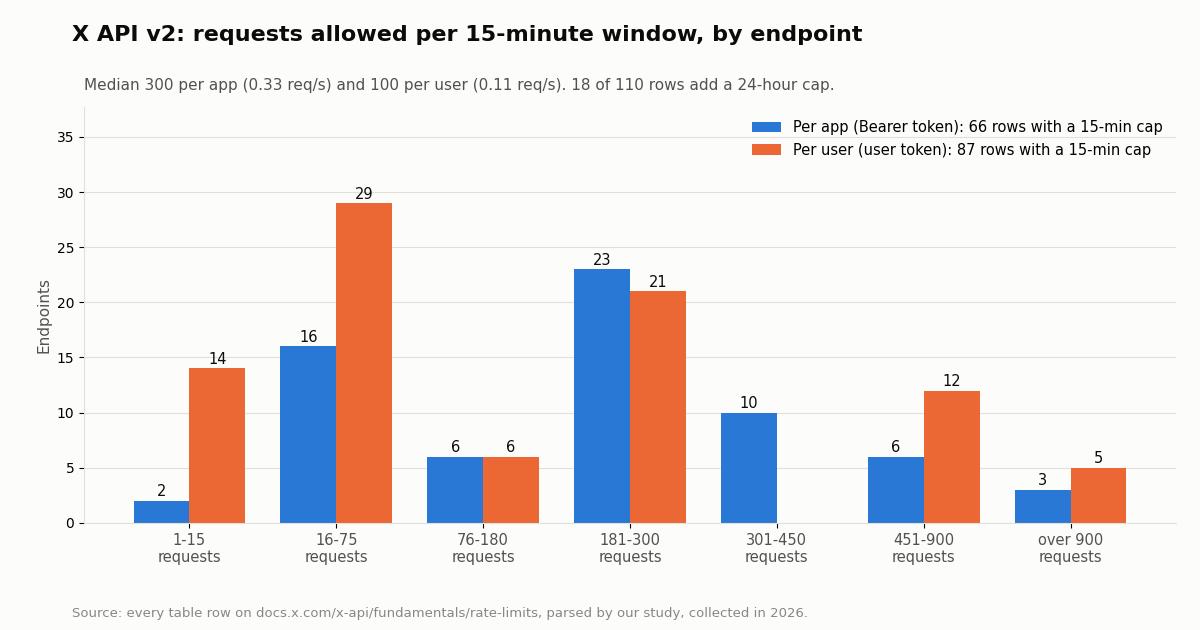
Across all 110 rows: 79 carry a per-app limit and 88 a per-user limit; 57 have both, 22 are app-only and 31 are user-only. Among the 66 rows with a 15-minute per-app cap, the median is 300 (0.33 requests per second) and the range runs from 15 to 10,000. Among the 87 rows with a 15-minute per-user cap, the median is 100 (0.11 req/s), from 10 to 5,000.
The common values repeat. 300 per 15 minutes is the single commonest cap on both sides (20 per-app rows, 20 per-user rows). Per-user write and manage actions cluster at 50 (18 rows) and 15 (11 rows) per 15 minutes.
Second caps. 18 rows add a 24-hour cap (for example /2/tweets, /2/users/:id/likes, /2/users/:id/likes/:tweet_id, /2/dm_conversations, Direct Message sends, media upload steps). Only 2 add a per-second cap: full-archive search (1 per second) and Spaces lookup by creator. A per-second cap is invisible in a 15-minute counter, so a burst on full-archive search can 429 with plenty of remaining.
Small doc inconsistencies. The section headings say Posts has 25 endpoints and Lists 14; the tables under them list 24 and 15 rows. We counted rows. X also notes the Developer Console shows the limits for your own app, which is the authority if the two ever disagree.
24-hour caps and the 429 that arrives with calls remaining
X's rate-limit page documents only the three x-rate-limit-* headers, yet 18 of its 110 endpoint rows carry a 24-hour cap as well. POST /2/tweets, for example, is listed at 100/15min per user and 10,000/24hrs per app. The 15-minute headers cannot describe a daily budget, so when the daily one runs out you can receive a 429 while x-rate-limit-remaining still shows plenty.
What developers report seeing. In our sample of public posts, developers pasted 429 responses that carried x-app-limit-24hour-limit and x-app-limit-24hour-remaining alongside the usual trio; in one, x-rate-limit-remaining was 39999 of 40000 while the 24-hour app cap was nearly used, and the poster asked why the post was refused under the limit. We found no page on docs.x.com that documents these 24-hour header names this session, so treat their exact names as reported, not guaranteed, and read them defensively.
How to handle it. On every 429, log all headers whose names contain limit. If any *-24hour-remaining value is 0, the matching *-24hour-reset (when present) is the time to wait for; otherwise back off in long steps (15 minutes, then an hour) rather than hammering a closed daily budget. For writes, keep a local counter per account per UTC day as a second line of defense; the counter does not depend on any header being present.
Ads API is different. The X Ads API adds x-account-rate-limit-limit, x-account-rate-limit-remaining and x-account-rate-limit-reset for ad-account-level limits, and X's Ads analytics guide says to honor retry-after on a 503. If you work with both APIs, do not reuse one parser blindly.
What developers actually struggle with (study of public posts)
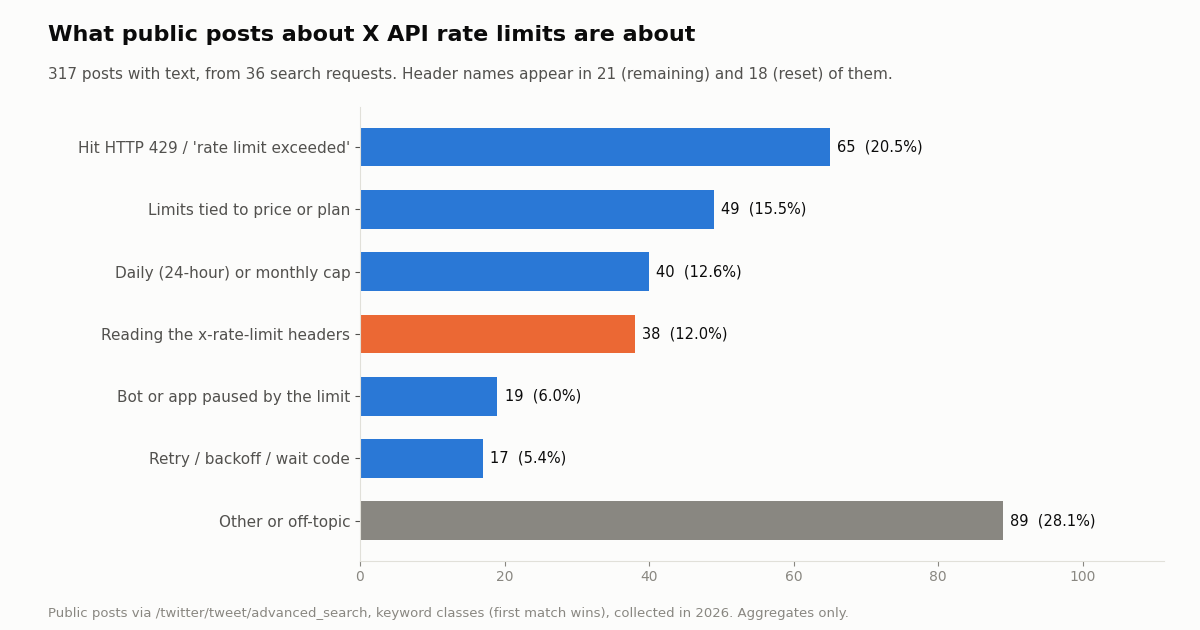
To see which rate-limit problems are common, we searched public posts with /twitter/tweet/advanced_search for the header names, for "rate limit" and "429" alongside "x api" or "twitter api", and for "too many requests" (36 requests, Latest and Top). After removing duplicates we had 370 posts; 53 contained only a link, leaving 317 with text. We sorted each into one class by keyword rules (first match wins):
Reading: the largest on-topic group is simply hitting the wall (20.5%), and daily or monthly caps (12.6%) are almost as common as questions about the headers themselves (12.0%). That matches the section above: the 15-minute headers explain only part of the 429s people see. Header names appear in few posts at all: x-rate-limit-remaining in 21, x-rate-limit-reset in 18, x-rate-limit-limit in 10, and a 24-hour header name in 2.
When people talk about it. The sample spans 2012 to 2026; 58 posts (18.3%) are from 2023, the year of the paid API tiers and the July 2023 reading limits on the X app, and 155 are from 2025 and 2026. English dominates (248 posts), followed by Japanese (42).
X's 15-minute windows vs per-second limits on TwitterAPI.io
TwitterAPI.io, a third-party API for X data, counts limits differently: per API key, per second, with no 15-minute or 24-hour windows (docs.twitterapi.io/rate-limits). Its documentation lists no x-rate-limit-* headers, so a header-driven client has nothing to read there; the client in the code example below paces itself and backs off on 429 instead.
Side by side with X. X's recent search allows 450/15min per app (0.5 req/s); a paid TwitterAPI.io key allows 20 requests per second on /twitter/tweet/advanced_search. The units differ, so compare like with like: X's figure is a budget you spend down over 15 minutes and wait out, ours is a speed limit that resets every second.
What a 429 looks like on TwitterAPI.io. The body is {"error": "Too Many Requests", "message": "Too Many Requests.your qps is 20 requests per second."} (docs.twitterapi.io/errors). Because the window is one second long, a short exponential backoff (1 s, 2 s, 4 s) is enough. A 402 means the account is out of credits: stop retrying.
Rate limits are not billing, on either side. X's own page makes the point: you can be within rate limits and still incur usage costs. On X's pay-per-usage rate card (docs.x.com/x-api/getting-started/pricing) a post read costs $0.005, which is $5 per 1,000 posts, with pay-per-usage capped at 3 million post reads a month. TwitterAPI.io charges $0.15 per 1,000 tweets returned (15 credits per tweet), so the same 1,000 tweets cost about 33 times less on its list price. You pay only for the data returned; a search that finds nothing is billed the 15-credit minimum ($0.00015).
How we collected this
Question. How are the windows and caps distributed across X API v2 endpoints, and what problems do public posts about X rate-limit headers and 429s describe?
Part 1, documentation. We downloaded the Markdown version of docs.x.com/x-api/fundamentals/rate-limits and parsed every table row (110 rows: method, endpoint, per-app cell, per-user cell). Cells with two limits (for example 1/sec, 300/15min) were split, thousands separators removed, and each limit normalized to a window (15 minutes, 24 hours, one second) and to requests per second (a 15-minute cap divided by 900). We cross-checked header names and wording against X's error page, streaming guide, Ads API rate-limit page and changelog.
Part 2, public posts. Eight /twitter/tweet/advanced_search queries (Latest and Top) over the header names, "rate limit" or "429" with "x api" or "twitter api", and "too many requests": 36 requests, 370 unique posts, 317 with text. Classes come from keyword rules, first match wins, so a post that mentions both a 429 and a price lands in one class only.
Collected in 2026. The documentation reflects the page as published at collection time; X can change limits without notice, and the Developer Console shows the limits that apply to your app.
What it cannot show. We could not capture live X API response headers in this study (the study client returns response bodies only), so header semantics come from X's documentation plus developer reports. The posts sample is what search returned, not a census, and keyword classes are approximate.
Privacy. Post authors are mostly private individuals: raw search results were not stored with this page; we publish aggregates and de-identified rows only (year, class, language, like bucket).
"""Paced search client for TwitterAPI.io, plus a header-aware path for the official X API.

TwitterAPI.io limits requests per second per key and does not document x-rate-limit-* headers,
so the client paces itself and backs off on HTTP 429. If x-rate-limit-* headers are present
(official X API), it waits for x-rate-limit-reset instead.
"""
import os
import time
import requests

BASE = "https://api.twitterapi.io"
API_KEY = os.environ["TWITTERAPI_IO_KEY"]
QPS = float(os.environ.get("QPS", "0.2"))  # 0.2 before your first top-up, 20 after
_last = 0.0


def pace():
    global _last
    gap = 1.0 / QPS - (time.time() - _last)
    if gap > 0:
        time.sleep(gap)
    _last = time.time()


def get(url, params, attempts=5):
    for i in range(attempts):
        pace()
        r = requests.get(url, params=params, headers={"X-API-Key": API_KEY}, timeout=30)
        if r.status_code == 429:
            reset = r.headers.get("x-rate-limit-reset")
            wait = max(int(reset) - time.time(), 0) + 1 if reset else min(2 ** i, 30)
            print(f"429 -> waiting {wait:.1f}s ({r.text[:80]})")
            time.sleep(wait)
            continue
        if r.status_code == 402:
            raise SystemExit("Out of credits: top up, retrying will not help")
        r.raise_for_status()
        return r.json()
    raise RuntimeError("gave up after retries")


def search(query, max_pages=3):
    cursor, tweets = "", []
    for _ in range(max_pages):
        data = get(f"{BASE}/twitter/tweet/advanced_search",
                   {"query": query, "queryType": "Latest", "cursor": cursor})
        tweets += data.get("tweets", [])
        if not data.get("has_next_page"):
            break
        cursor = data.get("next_cursor", "")
    return tweets


if __name__ == "__main__":
    rows = search('"rate limit" ("x api" OR "twitter api")', max_pages=3)
    for t in rows[:5]:
        print(t["createdAt"], t["likeCount"], t["text"][:80].replace("\n", " "))
    print(len(rows), "tweets; cost at $0.15 per 1,000 tweets returned:", round(len(rows) * 0.00015, 4))
Researching this?Free starter credits cover end-to-end testing — Google sign-in, no card. Get a key.
Questions readers ask
What is the x-rate-limit-reset header?
It is an X API response header holding the Unix timestamp, in epoch seconds, when the current rate-limit window for that endpoint and token resets (docs.x.com/x-api/fundamentals/rate-limits). Subtract the current time to get the seconds to wait.
How do I convert x-rate-limit-reset to a time?
Treat it as epoch seconds. In Python: datetime.fromtimestamp(int(reset), tz=timezone.utc). In JavaScript: new Date(Number(reset) * 1000). For a wait, compute max(int(reset) - time.time(), 0) + 1.
Is x-rate-limit-remaining the calls left or the calls used?
X's rate-limit and error pages define it as requests remaining in the window, counting down to 0. One streaming guide on docs.x.com words it as requests made so far; code against the main definition and verify with your own logs.
Why do I get a 429 when x-rate-limit-remaining is above zero?
Another cap ran out. 18 of the 110 endpoint rows on X's rate-limit page add a 24-hour cap, and full-archive search adds 1 request per second. Developers report x-app-limit-24hour-* and x-user-limit-24hour-* headers on such responses; check them, then wait for the daily reset.
How long is the X API rate-limit window?
Usually 15 minutes, sometimes 24 hours, per X's docs. In our parse, 110 of 110 endpoint rows have a 15-minute cap, 18 also have a 24-hour cap, and 2 have a per-second cap.
Are X API rate limits per app or per user?
Both exist. Per-app limits apply with a Bearer token (app-only); per-user limits apply with OAuth 1.0a or OAuth 2.0 user tokens. Each endpoint has its own counter, and the headers reflect whichever limit applies to the call.
Does TwitterAPI.io send x-rate-limit headers?
Its documentation lists no rate-limit headers. Limits are per key per second: 0.2 requests per second before the first payment, 20 once paid, 50 on Scale, 500 on Business, up to 1,000 on request. A 429 body states your limit; back off a second or two and retry.
What does error code 88 mean on the X API?
Code 88 with the message "Rate limit exceeded" is the JSON body X returns with HTTP 429, per its rate-limit page. Wait for x-rate-limit-reset before retrying the same endpoint.
Continue
- X API docs: Rate limits (headers, per-endpoint tables, 429 body, recovery sample)
- X API docs: Response codes and errors (rate limit headers section)
- X API docs: Handling disconnections (streaming rate-limit headers)
- X Ads API docs: Rate limiting (x-account-rate-limit-* headers)
- X API docs: Pricing (pay-per-usage rate card)
- TwitterAPI.io docs: Rate limits (requests per second by plan)
- X API guide hub: endpoints, pricing and limits
- Twitter API error handling: retry decision tree
- Fixing Twitter (X) error 429 rate limit exceeded
- Understanding Twitter API rate limits
- Twitter rate limit calculator
- Twitter timestamp converter for epoch values
- TwitterAPI.io requests-per-second limits by plan
- TwitterAPI.io pricing per 1,000 tweets
- 01Soft Block on Twitter (X): What It Is, What They See, and When to Use Remove Follower Instead
- 02Twitter (X) 2FA: How to Turn On Two-Factor Authentication
- 03Twitter (X) API + Streamlit: Build a Live Hashtag Dashboard
- 04X API 402 Payment Required: What It Means on Twitter (X) Pay-Per-Use and How to Fix It
- 05Twitter (X) JSON: What a Real Tweet Payload Looks Like
- 06Rate Limit Exceeded on Twitter (X) API — Causes & Fixes
- 07Twitter (X) Video Length Limit in 2026: How Long a Video Can Be, by Account
- 08Twitter (X) Direct Message Limit: the Daily DM Cap, Who Can Message You, and Why DMs Fail to Send
Writing about something you built with TwitterAPI.io? Our community rewards program pays API credits for honest tutorials, build logs and videos.
Stop reading. Start building.
Starter credits cover real testing on real data. Google sign-in, no card, no application queue.
Get an API keyAlready building with TwitterAPI.io? Publish an honest tutorial or build log about it and earn up to $200 a month in API credits.