Twitter (X) JSON: What a Real Tweet Payload Looks Like
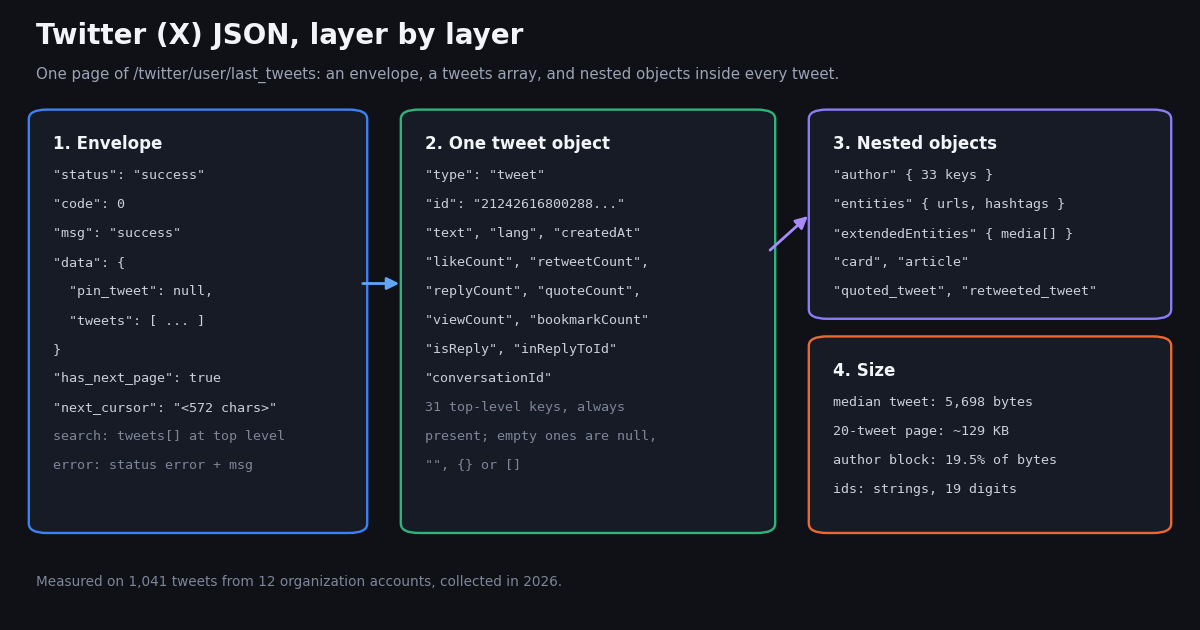
- Envelope first: timeline pages wrap tweets in
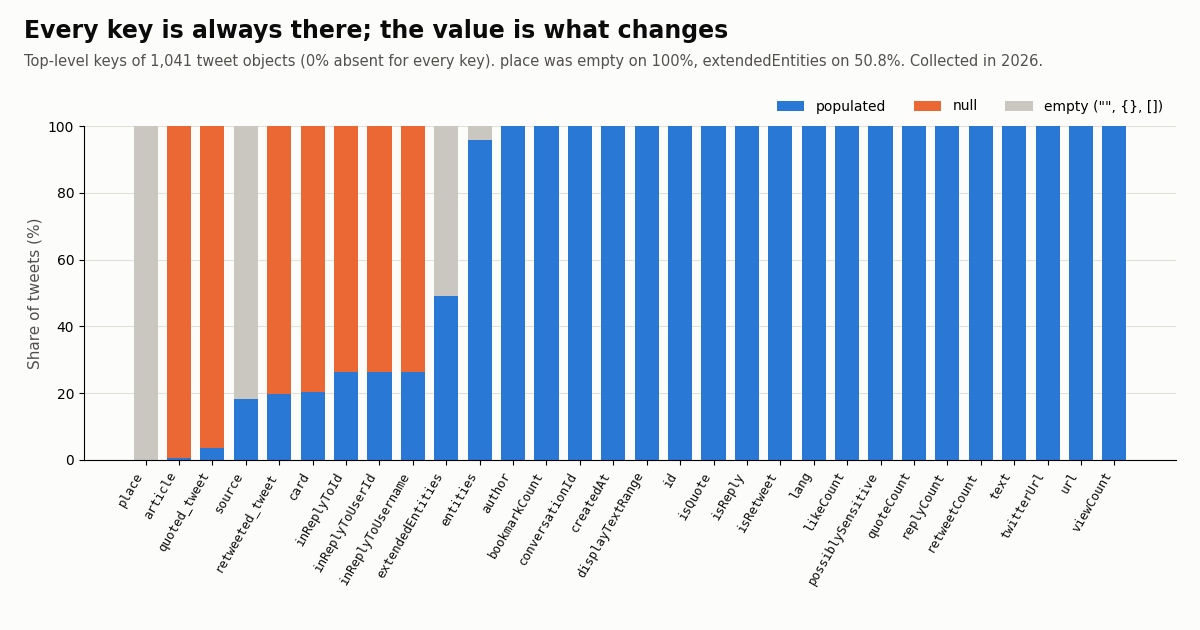
data.tweets[]withstatus,code,msg,has_next_pageandnext_cursor; search pages puttweets[]at the top level. An HTTP 200 can still be an error ("status": "error","msg": "user not found"). - Every key, every time: all 31 top-level tweet keys were present on 100% of 1,041 sampled tweets;
placewas empty on 100% andextendedEntitieson 50.8%. Test for truthiness, not for key existence. - Size by type: median 2.2 KB for a plain tweet, 4.6 KB with a photo, 5.4 KB with a video, 7.9 KB for a repost; a 20-tweet page is about 129 KB.
- Repost trap: 85.4% of reposts had a
text("RT @user: ...") shorter than the original; readretweeted_tweet.text. The repost'slikeCountequaled the original's on 100%. - Ids are strings, dates are not ISO: 19-digit ids exceed JavaScript's 2^53 safe integer, so never parse them as numbers;
createdAtisSat Nov 21 22:00:26 +0000 2026-style, parse with%a %b %d %H:%M:%S %z %Y. - Export: write the raw objects to JSONL (lossless) and a flattened CSV (24 columns) with the runnable script below; reading tweets costs $0.15 per 1,000 tweets returned, versus $0.005 per post read ($5 per 1,000) on X's pay-per-usage rate card.
Search for "twitter json" and the top results are a decade-old v1.1 data dictionary, a few snippets of a single status object, and course exercises. None of them show what a tweet looks like in JSON today, how the payload around it is shaped, how big it is, or which fields are empty in practice. This page does, with real responses.
We pulled 1,041 tweets from 12 organization accounts (NASA, SpaceX, GitHub, Vercel, OpenAI, NVIDIA, Google, Microsoft, Docker, PlayStation, NASA Webb and X Developers) through the API, then measured every object: the envelope, the tweet types, the bytes, the null rates, the id types and the error bodies. Every number below comes from that study, collected in 2026.
Scope: this page owns the raw format, the envelope and how to handle the JSON (parse, classify, export). For what each field means, one field at a time, use our tweet metadata fields reference (linked below); its field tables are not repeated here.
5,698 bytes, from 2.2 KB for a plain text tweet to 7.9 KB for a repost (1,041 tweets from 12 organization accounts, collected in 2026). A 20-tweet page is about 129 KB.
The response envelope: what wraps the tweets
A Twitter JSON response is never just a tweet. It is an envelope with status fields, the tweets array, and a pagination cursor. The envelope differs by endpoint, and the difference matters because your parser has to find the array before it can read a single tweet.
The cursor is opaque. next_cursor is a long string (median 572 characters in our sample). Store it, send it back as cursor, and stop when has_next_page is false or the cursor is empty. Never build or edit it yourself. Our pagination guide covers resuming and deduplication in depth.
Empty is not an error. A search that matched nothing returned {"tweets": [], "has_next_page": false, "next_cursor": null} with HTTP 200. On the timeline endpoint data.pin_tweet was null on 100% of pages we pulled, so do not assume a pinned tweet is there.
HTTP 200 can carry an error. An unknown user on /twitter/user/info returned HTTP 200 with {"status": "error", "msg": "user not found", "data": null}, not a 404. Check status before you read data.
# 1) Timeline page: GET /twitter/user/last_tweets?userName=SpaceX&includeReplies=true
{
  "status": "success",
  "code": 0,
  "msg": "success",
  "data": {
    "pin_tweet": null,
    "tweets": [ { ...tweet... }, { ...tweet... } ]
  },
  "has_next_page": true,
  "next_cursor": "DAABCgABG..."
}

# 2) Search page: GET /twitter/tweet/advanced_search  (tweets[] at the top level)
{ "tweets": [ { ...tweet... } ], "has_next_page": true, "next_cursor": "DAADDAAB..." }

# 3) Search that matched nothing (real body, HTTP 200)
{"tweets": [], "has_next_page": false, "next_cursor": null}

# 4) Hydrate by id: GET /twitter/tweets?tweet_ids=<up to 50 ids>
{ "tweets": [ ... ], "status": "success", "msg": "success", "code": 0 }

# 5) Unknown user on /twitter/user/info (real body, HTTP 200, not 404)
{"status": "error", "msg": "user not found", "data": null}One real tweet, annotated
This is a complete tweet object from the study (a SpaceX post during a Dragon return), with the author block removed for space. At 2,240 bytes, the plain text type is the smallest in the sample; the author object adds about 1,169 bytes on its own.
id, url, twitterUrl. The id is a 19-digit string. url points at x.com, twitterUrl at twitter.com; both open the same post.
Counters. likeCount, retweetCount, replyCount, quoteCount, viewCount and bookmarkCount are plain integers at the top level of the tweet. There is no public_metrics wrapper here; that is the official X API v2 shape, covered further down.
createdAt. Twitter's classic timestamp format with a +0000 offset, not ISO 8601. Parse it explicitly (code below).
isReply, inReplyToId, inReplyToUserId, inReplyToUsername, conversationId. For a top-level post the reply fields are null and conversationId equals id. For a reply in a thread, conversationId is the id of the first post of the thread.
displayTextRange. The slice of text to show. On 51.2% of sampled tweets it ended before the end of text, usually because a trailing t.co media link is not meant to be displayed.
Empty containers. extendedEntities, place and entities are {} here, card, quoted_tweet, retweeted_tweet and article are null, and source is an empty string. The keys are still present.
The reply fields of a self-reply from the same SpaceX thread show how threads chain: the parent id, the parent author, and a conversationId that points at the thread's first post.
{
  "type": "tweet",
  "id": "2124261680028807397",
  "url": "https://x.com/SpaceX/status/2124261680028807397",
  "twitterUrl": "https://twitter.com/SpaceX/status/2124261680028807397",
  "text": "Drogues deployed",
  "source": "",
  "retweetCount": 364,
  "replyCount": 113,
  "likeCount": 3767,
  "quoteCount": 27,
  "viewCount": 1334325,
  "createdAt": "Sat Nov 21 22:00:26 +0000 2026",
  "lang": "en",
  "bookmarkCount": 71,
  "isReply": false,
  "possiblySensitive": false,
  "inReplyToId": null,
  "conversationId": "2124261680028807397",
  "displayTextRange": [
    0,
    16
  ],
  "inReplyToUserId": null,
  "inReplyToUsername": null,
  "extendedEntities": {},
  "card": null,
  "place": {},
  "entities": {},
  "isRetweet": false,
  "isQuote": false,
  "quoted_tweet": null,
  "retweeted_tweet": null,
  "article": null
}

// a reply in the same thread (reply fields only)
{
  "id": "2124172739833414113",
  "isReply": true,
  "inReplyToId": "2124172655779614909",
  "inReplyToUserId": "34743251",
  "inReplyToUsername": "SpaceX",
  "conversationId": "2124172655779614909"
}Tweet types in JSON: how to tell them apart, and what each weighs
There is a type field on every tweet, but it said "tweet" on all 1,041 objects in our sample, so it does not tell a repost from a reply. The type lives in which nested objects are filled. The checks below run in order (a repost of a video is a repost first), and the table shows how often each type showed up in organization timelines and how big it is.
Why reposts and quotes are heavy. A repost embeds the full original tweet, author block included, inside retweeted_tweet, so its median (7.9 KB) is 3.5x a plain tweet. Quotes do the same with quoted_tweet. If you store raw JSON, reposts are where the disk goes.
Plain text is rare in brand timelines. Only 1.6% of sampled tweets had no media, card, quote, repost, article or reply. Organization accounts post media and links; a classifier that assumes plain text by default will be wrong on the large majority of rows.
Long posts arrive whole. 21.2% of tweets had a text longer than 280 characters (trailing links count), the longest at 1,571 characters, and none of the non-repost long texts ended in an ellipsis. There is no separate long-text object to fetch on this API.
def tweet_type(t: dict) -> str:
    """Classify one tweet object from TwitterAPI.io JSON. Order matters."""
    if t.get("retweeted_tweet"):
        return "repost"          # text starts with "RT @"; read the original instead
    if t.get("quoted_tweet"):
        return "quote"
    if t.get("isReply"):
        return "reply"           # inReplyToId / inReplyToUsername are set
    media = (t.get("extendedEntities") or {}).get("media") or []
    kinds = {m.get("type") for m in media}
    if kinds & {"video", "animated_gif"}:
        return "video"
    if "photo" in kinds:
        return "photo"
    if t.get("article"):
        return "article"         # X Article: title / preview_text / cover_media_img_url
    if t.get("card"):
        name = t["card"].get("name") or ""
        return "poll" if name.startswith("poll") else "card"
    return "plain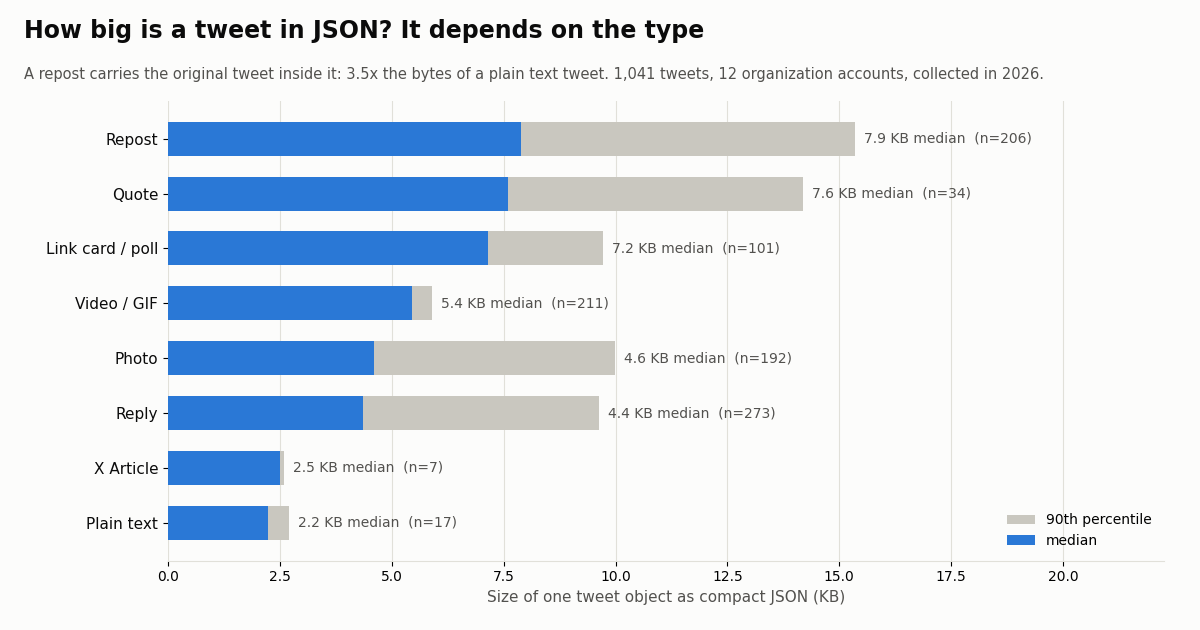
Nested objects: media, polls, cards, articles, reposts
The bulk of the parsing work, and the bugs, sit in five nested objects. Here is what each looked like in the sample.
Media (extendedEntities.media[]). We counted 397 photo, 269 video and 1 animated GIF objects; 58 tweets carried more than one media item. Each item has type, media_url_https (for a video this is the poster image) and, for video, video_info.variants[]: an HLS playlist plus MP4 files at several bitrates (median 5 variants). Pick the MP4 with the highest bitrate to download the highest-quality file.
Polls (card with a poll... name). A poll is a card, not a separate object. Its choices and counts sit in card.binding_values[] as key/value pairs (choice1_label, choice1_count, ...), and every count came back as a string ("type": "STRING"). Convert with int() before you sum. We found 8 polls, all from Docker.
Link cards. The same card object with names such as summary_large_image, summary, player or unified_card. Card names counted: summary_large_image 172, player 7, summary 4, unified_card 4.
X Articles (article). Long-form X Articles appear as a tweet whose text is just a t.co link, with an article object holding cover_media_img_url, preview_text, title. The article body is not in the tweet JSON; store the title and preview.
Reposts (retweeted_tweet). All 206 reposts had a text starting with RT @, and 85.4% were shorter than RT @user: plus the original text, so the repost's own text is a cut-down copy. The counters on a repost are the original's: likeCount matched retweeted_tweet.likeCount on 100% and viewCount on 100%. Summing likes across a timeline that includes reposts double-counts other accounts' engagement.
The author block. 33 keys per author, about 19.5% of all tweet bytes. One trap: author.description was an empty string on 86.6% of tweets while author.profile_bio.description held the bio on 100%. Read the bio from profile_bio and fall back to description.
// Docker poll: card.binding_values (choice and count keys)
{
  "text": "What matters more for your agent env?",
  "card": {
    "name": "poll4choice_text_only",
    "binding_values": [
      {
        "key": "choice1_label",
        "value": {
          "string_value": "Isolation guarantees",
          "type": "STRING"
        }
      },
      {
        "key": "choice2_label",
        "value": {
          "string_value": "Startup speed",
          "type": "STRING"
        }
      },
      {
        "key": "counts_are_final",
        "value": {
          "boolean_value": false,
          "type": "BOOLEAN"
        }
      },
      {
        "key": "choice2_count",
        "value": {
          "string_value": "18",
          "type": "STRING"
        }
      },
      {
        "key": "choice1_count",
        "value": {
          "string_value": "92",
          "type": "STRING"
        }
      },
      {
        "key": "choice4_label",
        "value": {
          "string_value": "Simplicity",
          "type": "STRING"
        }
      },
      {
        "key": "duration_minutes",
        "value": {
          "string_value": "8640",
          "type": "STRING"
        }
      },
      {
        "key": "choice3_count",
        "value": {
          "string_value": "72",
          "type": "STRING"
        }
      },
      {
        "key": "choice4_count",
        "value": {
          "string_value": "51",
          "type": "STRING"
        }
      },
      {
        "key": "choice3_label",
        "value": {
          "string_value": "Full dev environment",
          "type": "STRING"
        }
      }
    ]
  }
}

// Microsoft video: extendedEntities.media[0] (variant URLs removed)
{
  "type": "video",
  "media_url_https": "https://pbs.twimg.com/media/HXWJFlCWAAAeikN.jpg",
  "original_info": {
    "focus_rects": [],
    "height": 405,
    "width": 720
  },
  "video_info": {
    "duration_millis": 59259,
    "variants": [
      {
        "content_type": "application/x-mpegURL"
      },
      {
        "bitrate": 288000,
        "content_type": "video/mp4"
      },
      {
        "bitrate": 832000,
        "content_type": "video/mp4"
      },
      {
        "bitrate": 2176000,
        "content_type": "video/mp4"
      },
      {
        "bitrate": 10368000,
        "content_type": "video/mp4"
      }
    ]
  }
}Null, empty or missing: which fields you can count on
The rule that prevents a whole class of parser bugs: on this API a tweet key is always present, and an empty value is expressed in one of four ways depending on the field. We checked every top-level key of every sampled tweet.
What to write instead of if "key" in tweet. Use tweet.get("quoted_tweet") (truthy check) for objects, (tweet.get("extendedEntities") or {}).get("media") or [] for media, and treat "" as missing for strings such as source. A key-existence test passes on 100% of tweets and tells you nothing.
Always populated. id, text, createdAt, lang, the six counters, conversationId, displayTextRange, author and the booleans isReply, isQuote, isRetweet and possiblySensitive were filled on 100% of tweets. viewCount was a non-zero integer on every one of them in this sample (0 zero or null).
Inside entities. Share of tweets with each key present: user_mentions 62.0%, urls 57.5%, media 37.4%, hashtags 31.1%, symbols 26.3%. Present does not mean non-empty: the arrays are often [].
Hydration adds a few keys. Re-fetching 50 of the same tweets by id through /twitter/tweets returned all 50 with 9 extra keys (communityInfo, editControl, grokAnalysisButton, hasBirdwatchNotes, isConversationControlled and others) and without article. If you mix timeline and hydrated rows in one table, normalize the column set.
Ids, dates and numbers: parse them safely
Ids are strings: keep them that way. id, conversationId, inReplyToId, inReplyToUserId and author.id were strings on 100% of the tweets that had them, and 100% of tweet ids were larger than 9,007,199,254,740,991 (2^53 - 1). RFC 8259, the JSON standard, says integers are interoperable only in the range [-(2^53)+1, (2^53)-1] because many parsers use IEEE 754 doubles. A 19-digit tweet id parsed into a JavaScript number is silently rounded, and the rounded id points at a different post or none.
In practice. Python's int is arbitrary precision, so json.loads is safe, but keep ids as strings anyway for CSV, spreadsheets that may turn a long digit string into a rounded number and JavaScript consumers. In a database use BIGINT or TEXT; in JavaScript use the string, or BigInt(id) when you must compare two ids numerically.
createdAt is not ISO 8601. It is Sat Nov 21 22:00:26 +0000 2026-style (weekday, month, day, time, offset, year). Parse with %a %b %d %H:%M:%S %z %Y in Python, then store ISO 8601 UTC. author.createdAt uses the same format.
Counts in cards are strings. Poll choiceN_count values and duration_minutes are string values inside binding_values. Everything at the top level of the tweet (likeCount, viewCount, ...) is already an integer.
import json
from datetime import datetime

raw = '{"id": "2124261680028807397", "createdAt": "Sat Nov 21 22:00:26 +0000 2026"}'
t = json.loads(raw)

# 1) ids are strings: keep them strings (dict keys, CSV cells, database TEXT/BIGINT via str)
tweet_id = t["id"]                      # "2124261680028807397"
print(int(tweet_id) > 2**53 - 1)        # True: a JS number would round this id

# 2) createdAt is Twitter's classic format, not ISO 8601
created = datetime.strptime(t["createdAt"], "%a %b %d %H:%M:%S %z %Y")
print(created.isoformat())              # ISO 8601 with a +00:00 offset

# 3) poll counts arrive as strings inside card.binding_values
def poll_results(card: dict) -> dict:
    vals = {b["key"]: b["value"] for b in card.get("binding_values", [])}
    out = {}
    for i in range(1, 5):
        label = vals.get(f"choice{i}_label", {}).get("string_value")
        if label is not None:
            out[label] = int(vals.get(f"choice{i}_count", {}).get("string_value", "0"))
    return out

# JavaScript: never JSON.parse ids into numbers.
#   JSON.parse('{"id": 2124261680028807397}').id  -> 2124261680028807400 (wrong)
#   JSON.parse('{"id": "2124261680028807397"}').id -> "2124261680028807397" (safe)
# BigInt(t.id) when you must do arithmetic, e.g. compare two ids.Error bodies and empty results
Errors come in two shapes on this API, and the HTTP status decides which one you get. These are the bodies we saw or that are recorded in our response-shape checks.
A missing tweet is an empty array, not an error. Asking /twitter/tweets for an id that does not exist returned "status": "success" and an empty tweets list. When you hydrate a list of ids, match results by id (the array does not keep input order) and treat the ids that did not come back as deleted, protected or invalid.
Billing follows results. Tweet endpoints are billed per tweet returned (15 credits, $0.00015 each), with a 15-credit minimum per request, so a search that returns nothing is billed the $0.00015 minimum. Profiles are 18 credits each. The error-handling guide linked below has the full retry decision tree; it is not repeated here.
import requests

BASE = "https://api.twitterapi.io"

def get_json(url: str, params: dict, api_key: str) -> dict:
    r = requests.get(url, params=params, headers={"X-API-Key": api_key}, timeout=30)
    if r.status_code == 400:
        # missing / invalid parameter: the text is in "detail"
        raise ValueError(r.json().get("detail"))
    if r.status_code in (429, 500, 502, 503, 504):
        raise RuntimeError(f"retry later: HTTP {r.status_code}")
    r.raise_for_status()
    body = r.json()
    # HTTP 200 can still be an error: check status / msg
    if body.get("status") == "error":
        raise LookupError(body.get("msg"))   # e.g. "user not found"
    return body

body = get_json(f"{BASE}/twitter/user/info", {"userName": "XDevelopers"}, "YOUR_API_KEY")
print(body["data"]["userName"], body["data"]["followers"])Twitter JSON vs the official X API v2 JSON
If you have read X's own documentation, the shape above will look different. The official X API v2 returns a post as a sparse object: by default a post lookup returns only id, text and edit_history_tweet_ids, and you opt into everything else with tweet.fields, expansions and user.fields (docs.x.com/x-api/fundamentals/fields). Related objects such as the author do not sit inside the post; they come back in a separate includes object that you join by id.
Partial errors on X. X documents that a 200 response can contain both data and errors, with entries like resource_id, resource_type and detail ("Could not find tweet with id") (docs.x.com/x-api/fundamentals/response-codes-and-errors). Our /twitter/tweets simply leaves missing ids out of tweets[].
Ids are strings on both. X's data dictionary examples quote every id ("id": "1260294888811347969"), the same rule as above.
What the JSON costs. On X's pay-per-usage rate card a post read is $0.005, so 1,000 tweets cost $5 (docs.x.com/x-api/getting-started/pricing), with pay-per-usage capped at 3 million post reads a month and Enterprise above. On TwitterAPI.io the same 1,000 tweets returned cost $0.15, about 33x less per 1,000 tweets, with every field above included and no X account needed. Code written for X's shape needs a small adapter: read likeCount where you read public_metrics.like_count, and author where you joined includes.users.
How we collected this
Question. What does a tweet look like as raw JSON today, how does its size and field population change by tweet type, and what do the envelope, empty and error bodies look like?
Accounts. @NASA, @github, @vercel, @OpenAI, @nvidia, @SpaceX, @XDevelopers, @Google, @Microsoft, @NASAWebb, @Docker, @PlayStation. Public organization accounts only.
Method and window. /twitter/user/last_tweets with includeReplies=true, up to 5 pages per account, the latest posts at collection time; plus one /twitter/tweets call hydrating 50 of the sampled ids, one search built to match nothing, one /twitter/user/info call for a real account and one for a non-existent user, and one /twitter/tweets call for an invalid id. 61 requests in total, 1,041 tweets, collected in 2026.
Measures. Bytes are the compact UTF-8 JSON of one tweet object (separators=(",", ":")), so pretty-printed files are larger. Types are classified in the order shown above. Null, empty and absent were counted for every top-level key.
What the sample cannot show. Organization timelines skew toward media and links, so shares by type differ for personal accounts or keyword searches. Polls came from a single account. Fields can change as X changes its product; recheck shapes before you rely on a field that is rarely populated.
Privacy. Aggregates only. Raw pages stayed out of the published dataset because replies, reposts and quotes reference private individuals; the published sample has one de-identified row per tweet (type, bytes, flags) with no id, URL, text or handle. The annotated examples are organization posts.
Data and code. Protocol, analysis script, results and charts: data/studies/twitter-json/ in our site repository.
"""twitter_json_export.py - pull raw Twitter (X) JSON for one account and write it
two ways: JSONL (one raw tweet object per line, nothing lost) and a flat CSV.

    pip install requests
    export TWITTERAPI_IO_API_KEY=...   # from your twitterapi.io dashboard
    python twitter_json_export.py NASA 5
"""
import csv
import json
import os
import sys
import time

import requests

BASE = "https://api.twitterapi.io"
HEADERS = {"X-API-Key": os.environ["TWITTERAPI_IO_API_KEY"]}


def fetch_pages(user: str, max_pages: int):
    """Yield tweet objects from /twitter/user/last_tweets, following next_cursor."""
    cursor = ""
    for _ in range(max_pages):
        params = {"userName": user, "includeReplies": "true", "cursor": cursor}
        r = requests.get(f"{BASE}/twitter/user/last_tweets", params=params, headers=HEADERS, timeout=30)
        if r.status_code == 429:
            time.sleep(5)
            continue
        r.raise_for_status()
        body = r.json()
        if body.get("status") == "error":          # HTTP 200 with an error body
            raise SystemExit(f"API error: {body.get('msg')}")
        tweets = (body.get("data") or {}).get("tweets") or []
        yield from tweets
        if not body.get("has_next_page") or not body.get("next_cursor"):
            break
        cursor = body["next_cursor"]


def tweet_type(t: dict) -> str:
    if t.get("retweeted_tweet"):
        return "repost"
    if t.get("quoted_tweet"):
        return "quote"
    if t.get("isReply"):
        return "reply"
    kinds = {m.get("type") for m in ((t.get("extendedEntities") or {}).get("media") or [])}
    if kinds & {"video", "animated_gif"}:
        return "video"
    if "photo" in kinds:
        return "photo"
    if t.get("article"):
        return "article"
    if t.get("card"):
        return "poll" if (t["card"].get("name") or "").startswith("poll") else "card"
    return "plain"


def flatten(t: dict) -> dict:
    """One CSV row per tweet. ids stay strings; nested objects become short columns."""
    author = t.get("author") or {}
    ent = t.get("entities") or {}
    media = (t.get("extendedEntities") or {}).get("media") or []
    original = t.get("retweeted_tweet") or {}
    return {
        "id": str(t["id"]),
        "type": tweet_type(t),
        "created_at": t.get("createdAt"),
        "author_username": author.get("userName"),
        "author_followers": author.get("followers"),
        # a repost's own text is "RT @user: ..." and often cut short: keep the original's text too
        "text": t.get("text"),
        "original_text": original.get("text"),
        "lang": t.get("lang"),
        "like_count": t.get("likeCount"),
        "retweet_count": t.get("retweetCount"),
        "reply_count": t.get("replyCount"),
        "quote_count": t.get("quoteCount"),
        "view_count": t.get("viewCount"),
        "bookmark_count": t.get("bookmarkCount"),
        "in_reply_to_id": t.get("inReplyToId"),
        "conversation_id": t.get("conversationId"),
        "quoted_id": (t.get("quoted_tweet") or {}).get("id"),
        "hashtags": " ".join(h.get("text", "") for h in ent.get("hashtags") or []),
        "urls": " ".join(u.get("expanded_url", "") for u in ent.get("urls") or []),
        "media_types": " ".join(m.get("type", "") for m in media),
        "media_urls": " ".join(m.get("media_url_https", "") for m in media),
        "card_name": (t.get("card") or {}).get("name"),
        "article_title": (t.get("article") or {}).get("title"),
        "url": t.get("url"),
    }


def main():
    user = sys.argv[1] if len(sys.argv) > 1 else "NASA"
    pages = int(sys.argv[2]) if len(sys.argv) > 2 else 5
    rows = []
    with open(f"{user}.jsonl", "w", encoding="utf-8") as jl:
        for t in fetch_pages(user, pages):
            jl.write(json.dumps(t, ensure_ascii=False) + "\n")   # raw, lossless
            rows.append(flatten(t))
    if not rows:
        print("no tweets returned")
        return
    with open(f"{user}.csv", "w", newline="", encoding="utf-8-sig") as f:
        w = csv.DictWriter(f, fieldnames=list(rows[0].keys()))
        w.writeheader()
        w.writerows(rows)
    print(f"{len(rows)} tweets -> {user}.jsonl and {user}.csv")


if __name__ == "__main__":
    main()
Researching this?Free starter credits cover end-to-end testing — Google sign-in, no card. Get a key.
Questions readers ask
What is Twitter JSON?
It is the JSON (JavaScript Object Notation) format that Twitter (X) APIs use to return tweets, users and errors. Each tweet is one JSON object with its text, timestamps, counters, author and nested objects for media, polls, quotes and reposts, wrapped in a response envelope with status and pagination fields. On TwitterAPI.io a tweet object has 31 top-level keys.
What does a tweet look like in JSON?
A flat set of keys such as id, url, text, createdAt, lang, likeCount, retweetCount, replyCount, quoteCount, viewCount, bookmarkCount, isReply, conversationId and author, plus nested entities, extendedEntities (media), card (link cards and polls), article, quoted_tweet and retweeted_tweet. The annotated SpaceX example on this page shows a complete one.
Why are tweet ids strings in the JSON?
Tweet ids are 19-digit numbers, larger than 2^53 - 1, the largest integer a double-precision JSON parser represents exactly (RFC 8259 section 6). In JavaScript such a number is silently rounded. All tweet ids in our sample were strings and 100% were above that limit, so store and compare them as strings or BigInt.
How do I convert Twitter JSON to CSV?
Write the raw objects to JSONL first (one tweet per line, lossless), then flatten each tweet into a row: keep the id as a string, lift the counters, join hashtags, URLs and media types into space-separated cells, and store the repost's original text from retweeted_tweet.text. The script on this page does both and writes a UTF-8 CSV with a BOM so Excel opens it correctly.
How big is one tweet in JSON?
In our sample the median was 5,698 bytes of compact JSON, from about 2.2 KB for a plain text tweet to 7.9 KB for a repost, with the largest at 23.8 KB. A full 20-tweet page was about 129 KB. At the median that is about 5.7 MB of raw JSON per 1,000 tweets.
How is this JSON different from the official X API v2 response?
X API v2 returns sparse posts (id, text and edit_history_tweet_ids by default), engagement under public_metrics when requested, authors in a separate includes object, and pagination in meta.next_token. TwitterAPI.io returns every field on every tweet, counters at the top level, the author inside each tweet, and a next_cursor for pagination.
How do I tell a reply, quote, repost or poll apart in the JSON?
Check nested objects in order: retweeted_tweet set means a repost, quoted_tweet set means a quote, isReply true means a reply, extendedEntities.media holds photos and videos, a card whose name starts with poll is a poll, and an article object is an X Article. The top-level type field said tweet on every object we sampled, so it does not distinguish them.
Do I need an X account to get tweet JSON?
Not for reads on TwitterAPI.io: you call the HTTP endpoints with an API key in the X-API-Key header and pay $0.15 per 1,000 tweets returned. New accounts get free starter credits (no card, one per person or network, expiring after 31 days); see the pricing page for the amount.
Continue
- X API docs: Fields (default post fields, tweet.fields, expansions, public_metrics)
- X API docs: Pagination (meta.next_token, pagination_token)
- X API docs: Response codes and errors (error fields, partial errors)
- X API docs: Pay-per-usage pricing ($0.005 per post read)
- RFC 8259, The JSON Data Interchange Format, section 6: Numbers
- TwitterAPI.io docs: Advanced Search response schema
- Twitter (X) API hub: endpoints, pricing and guides
- Tweet metadata fields reference: what each field means
- Twitter API pagination with next_cursor, explained
- Hydrate tweet ids into full tweet objects
- Exporting a Twitter dataset for research
- Twitter API error handling and retry decision tree
- TwitterAPI.io API reference and response schemas
- 01Soft Block on Twitter (X): What It Is, What They See, and When to Use Remove Follower Instead
- 02Twitter (X) 2FA: How to Turn On Two-Factor Authentication
- 03Twitter (X) API + Streamlit: Build a Live Hashtag Dashboard
- 04X API 402 Payment Required: What It Means on Twitter (X) Pay-Per-Use and How to Fix It
- 05x-rate-limit-reset and the Other Twitter (X) API Rate-Limit Headers, Decoded
- 06Talkwalker Pricing: Plans, What a Quote Covers, and Twitter (X) Alternatives
- 07Grok Tasks: Schedule Grok to Monitor Twitter (X), and What It Cannot Do
- 08ssstwitter: What the Twitter (X) Video Downloader Does, and Whether It Is Safe
Writing about something you built with TwitterAPI.io? Our community rewards program pays API credits for honest tutorials, build logs and videos.
Stop reading. Start building.
Starter credits cover real testing on real data. Google sign-in, no card, no application queue.
Get an API keyAlready building with TwitterAPI.io? Publish an honest tutorial or build log about it and earn up to $200 a month in API credits.