Twitter (X) 2FA: How to Turn On Two-Factor Authentication
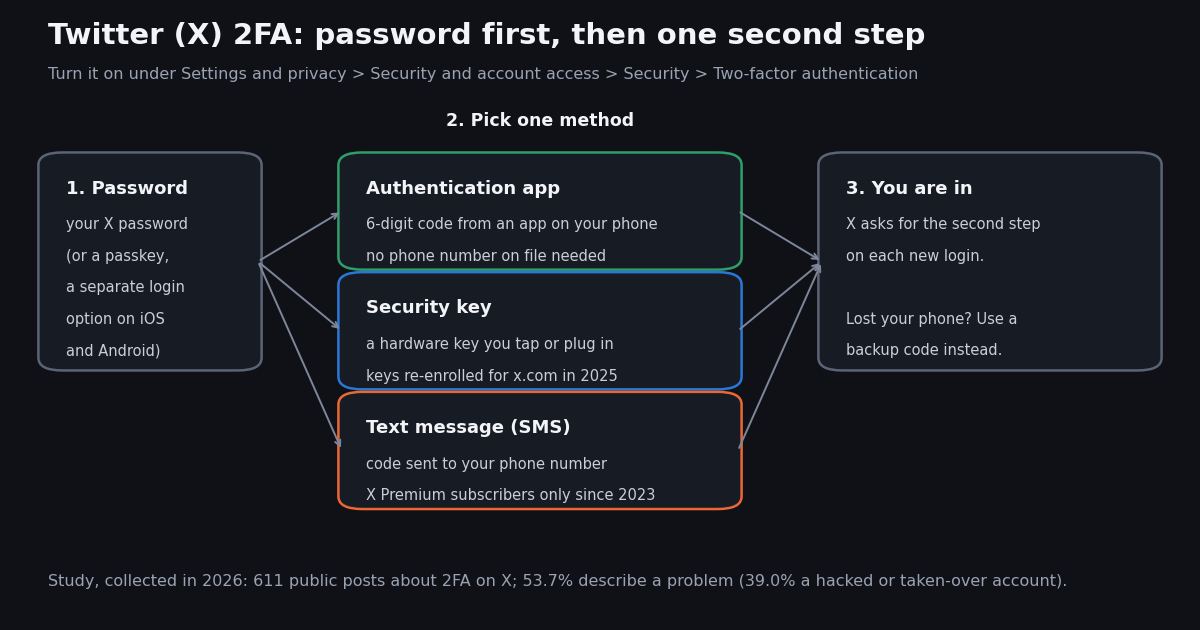
- Where: Settings and privacy > Security and account access > Security > Two-factor authentication, on the web and in the iOS and Android apps. Menu names move; search Settings for "two-factor" if the path differs.
- Three methods: authentication app, security key, text message. Text message has been limited to paying subscribers (Twitter Blue, now X Premium) since March 20, 2023.
- No phone number needed: an authentication app or a security key works without a phone number on the account, and both are free.
- Backup code first: save it on paper or in a password manager the moment you turn 2FA on. Lost phone + no backup code is the hardest case to recover from.
- What goes wrong, per 611 public posts collected in 2026: 39.0% hacked or taken over, 9.7% locked out, 4.9% lost phone, number or codes; 20.0% are how-to advice.
- X's own announcements: passkeys rolled out from January 2024 (US iOS) to Android in August 2024, and in October 2025 X asked every security-key user to re-enroll the key for x.com by November 10, 2025.
Two-factor authentication means X asks for a second proof after your password: a code from an app, a tap on a hardware key, or a code sent by text. A stolen or guessed password alone then stops being enough to take your account. This guide covers how to turn it on in each app, which method to choose (including the one that needs no phone number), what the backup code is for, and what to do when 2FA itself locks you out.
Two neighbors are easy to confuse with this topic. The message "Please use the official X app to sign in" is a device and app integrity check, not 2FA, and it has its own guide. Logging out of other sessions after a suspected break-in is covered in our guide to logging out of X. Both are in the related links below.
Two pieces of our own research sit inside the steps: every post about 2FA and login security that X's @Safety account has published and that search returns (13 posts from 2023 to 2025, the source for the dated facts below), and 611 public posts about 2FA on X accounts, collected in 2026 and classified by problem. The second set is why the recovery section is as long as the setup section.
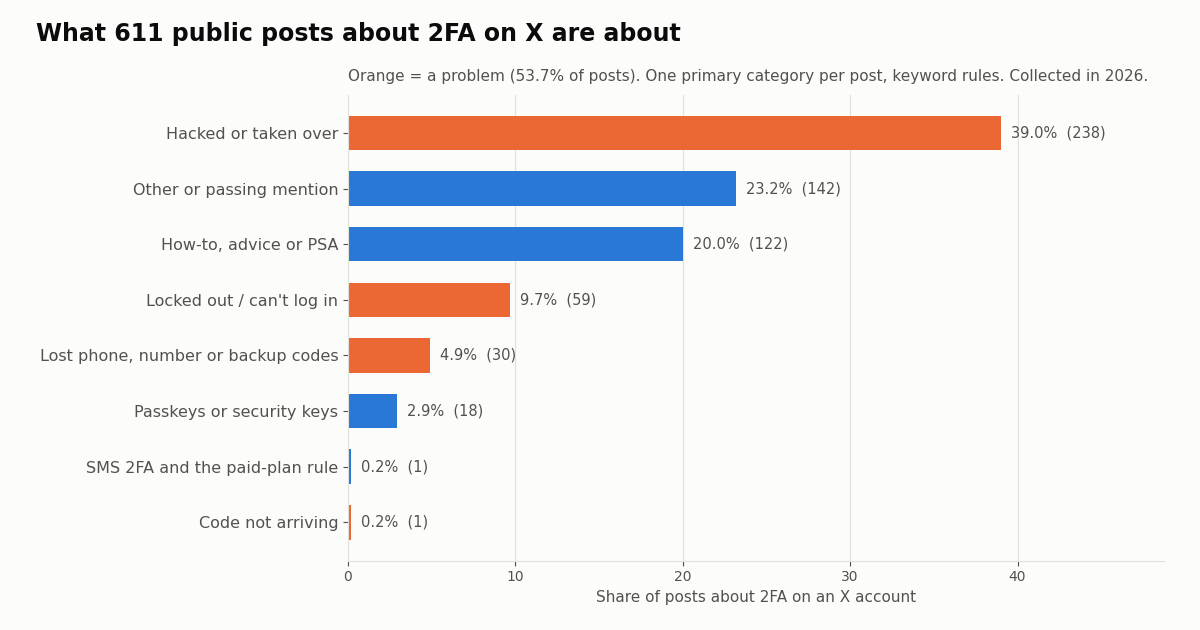
53.7% of 611 posts collected in 2026: 39.0% a hacked or taken-over account, 9.7% locked out, 4.9% a lost phone, number or backup codes.
How to turn on 2FA on Twitter (X): web, iPhone and Android
The setting lives in the same place on all three platforms. The path below is the one X uses in its help center and that password-manager guides (Bitwarden's, for example) repeat; X renames menus from time to time, so if a label differs, search Settings for "two-factor".
On the web (x.com). Click More (the three-dot item in the left menu), then Settings and privacy, Security and account access, Security, and Two-factor authentication. Choose Authentication app, Security key or Text message, enter your password when asked, and follow the prompts.
In the X app on iPhone or Android. Tap your profile picture, open Settings and privacy, then Security and account access, Security, and Two-factor authentication. The three methods are the same. Setting up an authentication app on the same phone works: the app shows a setup key you can copy into the authenticator instead of scanning the QR code.
Authentication app, step by step. Choose Authentication app, confirm your password, scan the QR code with your authenticator (Google Authenticator, Microsoft Authenticator, Authy, 2FAS, or the one built into a password manager), type the 6-digit code it shows back into X, and confirm. The codes are time-based one-time passwords (TOTP, the RFC 6238 standard) and are generated on the phone, so they work without signal.
Security key, step by step. Choose Security key, confirm your password, and insert or tap the key when your browser or phone asks. X's own security-key page sits at x.com/settings/account/login_verification/security_keys, which X's @Safety account linked in October 2025. Register a second key as a spare while you are there.
Text message, step by step. Choose Text message, confirm the phone number on your account, and type the code X texts you. This option appears only for paying subscribers; without a subscription it is grayed out or missing (see the next section).
Then save the backup code. When setup finishes, X shows a backup code. Write it down or store it in a password manager, not only in a screenshot on the same phone. It is the one thing that gets you in if the phone with your authenticator is gone.
The three methods compared, and which one to pick
Authentication app is the default choice for the majority of people: free, no phone number on file, works offline, and supported on web and mobile. Its weakness is the phone itself: if you lose it without a backup code or a synced authenticator, recovery is slow.
Security key is the strongest against phishing, because the key checks which site is asking and will not answer a fake login page. It costs money (a hardware key) and needs a spare, so register two.
Text message is the familiar one and the weakest: codes can be intercepted through SIM swaps or rerouted texts, and since 2023 it requires a paid subscription.
In the public posts we read, people mentioned text message or SMS in 9.7% of posts about 2FA on X, an authentication app in 8.5%, a security key in 4.9%, a passkey in 4.6% and a backup code in 4.7%. SMS is still the method people talk about, even though it is the one X restricted.
Why text-message 2FA needs X Premium, and 2FA without a phone number
In February 2023 Twitter announced, in a company blog post titled "An update on two-factor authentication using SMS on Twitter" (blog.twitter.com/en_us/topics/product/2023/an-update-on-two-factor-authentication-using-sms-on-twitter), that only Twitter Blue subscribers could keep using text messages for 2FA. Non-subscribers had until March 20, 2023 to switch methods; after that date SMS 2FA would be turned off on their accounts, which then had no second factor unless the owner had picked another method. Twitter Blue has since become X Premium, sold to new buyers as part of The X Subscription.
The day after the news spread, Elon Musk posted: "Use of free authentication apps for 2FA will remain free and are much more secure than SMS" (February 18, 2023, x.com/elonmusk/status/1627059645293670401). That is still the practical answer. The authentication app and the security key were never paywalled.
Does the rule still stand? We found no X post reversing it, current setup guides such as Bitwarden's still label text message "available only for X Premium subscribers", and X's help center page on two-factor authentication (help.x.com/en/managing-your-account/two-factor-authentication) is where X states the current rule; it blocks automated reading, so check it in a browser before you rely on SMS.
2FA without a phone number. Choose the authentication app or a security key. Neither sends anything to a phone number, and neither requires one on the account. If your phone number is the reason you want 2FA off SMS (a shared number, a number you might lose, or a country where texts arrive late), switch to the app before you change or drop the number, not after.
Expect the SMS rule to confuse people. In the 611-post sample only 1 post was mainly about the paid-plan rule today, but text message remained the method mentioned in the largest share of posts (9.7%). Many people still expect a text and do not get one.
Backup codes, lost phones and getting locked out
Recovery is where 2FA costs people their accounts, so do the preparation before you need it.
Keep the backup code where the phone is not. X shows one when you turn 2FA on, and you can view or generate a new one later on the same Two-factor authentication screen. Paper in a drawer or a password manager both work. A backup code is used instead of the app or text code on the login screen.
Make the authenticator survive a lost phone. Use an authenticator that backs up or syncs its secrets (several do, including the password-manager ones), or scan the same QR code into a second device during setup. A security-key user should register two keys.
Lost phone, backup code saved. Log in with your password, choose the option to use a backup code, enter it, then go straight to Two-factor authentication and set up the method again on the new phone.
Lost phone, no backup code. If you are still logged in anywhere (a laptop browser, a tablet), go to Two-factor authentication there, generate a new backup code and re-enroll the method. If you are logged in nowhere, use X's help page on login and authentication issues (help.x.com/en/managing-your-account/issues-with-login-authentication) and its account access form. Expect identity checks and a wait; public posts from people in this situation describe days to weeks.
Changed your phone number. Text-message 2FA codes go to the number on file. Add the new number (or switch to the app) before the old one stops working.
Security key stopped working in late 2025. On October 24, 2025 @Safety asked every account that uses a security key for 2FA to re-enroll it by November 10, 2025, and said that afterwards an account that had not re-enrolled "will be locked until you: re-enroll; choose a different 2FA method; or elect not to use 2FA". Two days later it explained why: keys were tied to the twitter.com domain, and re-enrolling associates them with x.com so the old domain can be retired; it was "not related to any security concern" and only affected Yubikeys and passkeys, not authenticator apps. If your key fails today, re-enrolling it is the first fix. Note @Safety's warning: enrolling a new key makes your other keys stop working unless you re-enroll them too.
Someone else turned on 2FA on your account. This is how account takeovers lock owners out: the intruder changes the email, sets their own 2FA, and the real owner cannot pass the second step. Use the help page above and say the account was compromised; X's @Safety thread for compromised accounts starts with a password reset if you can still reach the email.
What people post about Twitter 2FA: 611 public posts classified
We collected 1,012 public posts (reposts excluded) from two X searches for 2FA terms, kept the 900 that mention 2FA, two-factor, authentication, passkeys, security keys or backup codes, and of those the 611 that are about an X account rather than a crypto exchange, a wallet or another service. Each post got one primary category by keyword rules, problems first.
Hacked accounts dominate. 39.0% of posts (238) are about an X account that was hacked, phished or taken over, very often in the form "turn on 2FA, X accounts are being hijacked" after a high-profile takeover. Another 9.7% describe being locked out, and 4.9% a lost phone, a changed number or missing backup codes. Together, 53.7% of posts describe a problem.
Advice is the second voice. 20.0% are how-to posts, tips and PSAs, and 23.2% mention 2FA in passing. Posts about passkeys or security keys were 2.9%, and posts about codes not arriving were rare in this sample (1 post).
People tag support. 20.0% of lost-phone posts and 18.6% of locked-out posts mention a support account such as @Support or @Premium, against 7.2% across all posts. That is a sign of how little self-service there is once the second factor is gone.
Shares are of the 611 posts about 2FA on an X account. Median likes describe a typical post in each category, not reach.
What X itself has announced about 2FA and login security
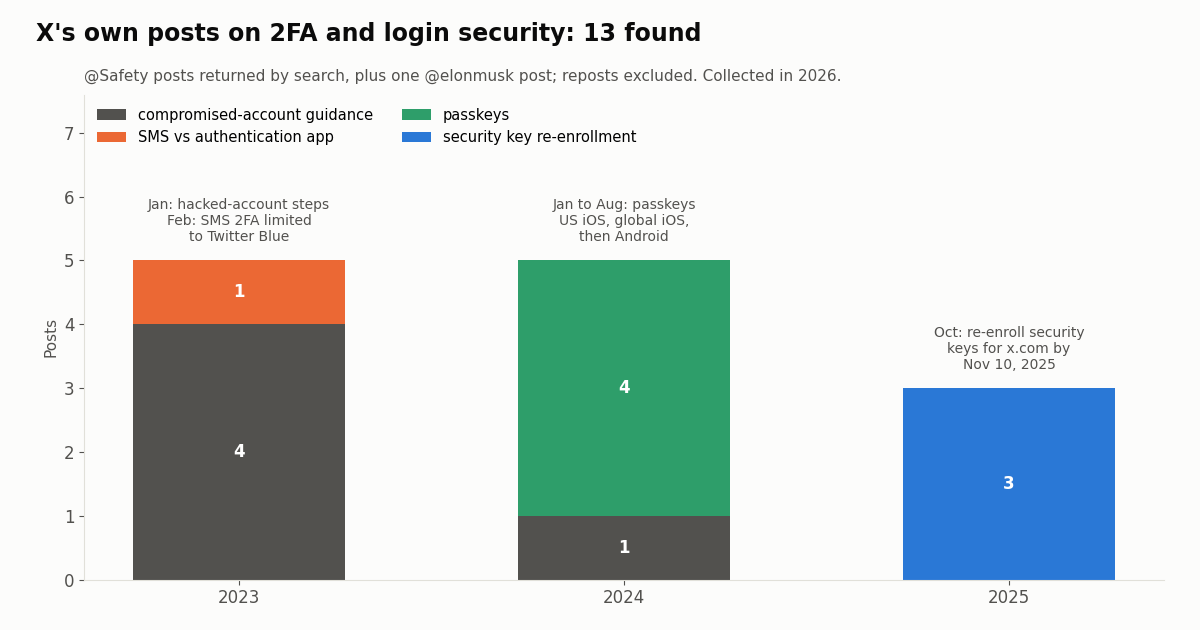
X's support-style announcements come from @Safety (formerly @TwitterSafety) and @Support. Search returned 13 @Safety posts and one post by Elon Musk on the topic; @Support's posts did not come back from search for any 2FA query we tried, so this is @Safety's record, not X's complete one.
January 2023: what to do if your account is compromised. A five-post @Safety thread: if you can still log in, change your password, secure your email, review third-party apps and "consider using 2FA"; if you cannot, request a password reset, then contact support.
February 2023: SMS 2FA moves behind the subscription. The blog announcement above, and Musk's post that authentication apps stay free.
January 2024: an account compromise without 2FA. @Safety confirmed the @SECGov account was compromised through "an unidentified individual obtaining control over a phone number associated with the @SECGov account through a third party", and that the account did not have 2FA enabled at the time. It is the clearest public example of why SMS-only or no-2FA accounts are exposed.
January to August 2024: passkeys. "Today we're excited to launch Passkeys as a login option for our US-based users on iOS" (January 23, 2024); all US iOS users on February 27, 2024; "everyone globally on iOS" on April 8, 2024; and "We've started rolling out Passkeys as a login option on Android" on August 14, 2024. A passkey replaces the password at login; it is not one of the three 2FA methods.
October 2025: security keys re-enrolled for x.com. The re-enrollment deadline of November 10, 2025 described above.
Troubleshooting Twitter 2FA
The authentication app code is rejected. The phone's clock is off. TOTP codes depend on time; turn on automatic date and time on the phone and try a fresh code.
The Text message option is missing or grayed out. It is reserved for paying subscribers. Use the authentication app instead.
No text message arrives. You may not be on a plan that includes SMS 2FA, the number on file may be old, or your carrier may be blocking short-code messages. Use the backup code, then switch to the app.
X keeps asking for a 2FA code you never set up. Someone else may have enabled it after taking over the account. Treat it as a compromise and go through X's login-issues help page.
The security key is not accepted. Re-enroll it for x.com (the 2025 change above), and make sure the browser supports security keys.
"Please use the official X app to continue". That is X's app integrity check on the phone, not 2FA. Signing in on the web at x.com is not part of that check.
You turned off 2FA by accident, or want to switch methods. Go back to Two-factor authentication, add the new method first, then remove the old one, so the account is never without a second factor.
For developers: 2FA on the X developer account, and reading data without one
The X Developer Console at console.x.com is signed into with your X account (docs.x.com's getting-access page says "sign in with your X account"), so whatever 2FA the account has applies there too. Use the authentication app or a security key on any account that owns API keys and billing: a takeover of that account is a takeover of your apps.
Reading public X data through TwitterAPI.io needs no X account at all: requests carry an API key in an X-API-Key header, so no X login, 2FA prompt or session is involved. Prices are per result: $0.15 per 1,000 tweets returned, against $0.005 per post read on the official X API pay-per-use rate card (docs.x.com), about 33x more per 1,000 posts ($5 vs $0.15). New accounts that pass the automatic bot check get free starter credits (no card, one per person or network, expiring after 31 days); the dashboard shows the key. The code at the end of this page uses that key to watch @Safety for new 2FA and login-security announcements.
How we collected this
Question: what have X's own accounts announced about 2FA and login security, and what problems do people post about when they talk about 2FA on X?
Official posts: /twitter/tweet/advanced_search with from:Safety, from:Support, from:X and from:XDevelopers combined with 2FA, two-factor, login verification, security key, passkey, authentication app and backup-code terms, plus login and password terms for @Safety, and a lookup by ID of the announcement posts. Only @Safety returned topical posts (plus one @elonmusk post found through the February 2023 news coverage); @Support returned none for any query, so its posts are missing.
Public posts: two Latest searches, "2fa" (twitter OR x) lang:en -filter:retweets and a narrower one requiring a phrase such as "twitter account", "x account" or "on x", collected in 2026: 1,012 unique posts, 900 mentioning a 2FA term, 611 about an X account. 59.6% of those are from 2026; the narrower search reached back to 2021. Categories were assigned by keyword rules in a fixed order (locked out, lost phone or codes, code not arriving, hacked, passkeys or keys, SMS rule, how-to, other).
Size and cost: about 89 requests and about 1,262 tweets returned, roughly $0.19 at $0.15 per 1,000 tweets.
What the sample cannot show: keyword rules misfile some posts (a post about a crypto wallet hack that also mentions an X account counts as an X post), search coverage thins for older years, and the sample over-represents people who post publicly about problems. It cannot tell how many X users have 2FA on, or how many SMS codes fail. X's help center blocks automated reading, so its current wording was not quoted.
Aggregates only. The accounts named are X's own accounts and a public figure; posts by private individuals were classified, not quoted, and no handles, IDs or texts from them are kept.
"""watch_x_security_posts.py - print new posts from X's @Safety account about 2FA and login security.

    pip install requests
    export TWITTERAPI_IO_API_KEY=...   # from the twitterapi.io dashboard; no X account or 2FA involved
    python watch_x_security_posts.py   # run daily from cron; it remembers what it already printed
"""
import json
import os
from datetime import datetime

import requests

API = "https://api.twitterapi.io"
KEY = os.environ["TWITTERAPI_IO_API_KEY"]
STATE = "x-security-seen.json"
QUERY = ('from:Safety (2FA OR "two-factor" OR "two factor" OR passkey OR passkeys '
         'OR "security key" OR "authentication app" OR "backup code" OR compromised)')


def search(query, max_pages=5):
    tweets, cursor = [], None
    for _ in range(max_pages):
        params = {"query": query, "queryType": "Latest"}
        if cursor:
            params["cursor"] = cursor
        r = requests.get(f"{API}/twitter/tweet/advanced_search",
                         headers={"X-API-Key": KEY}, params=params, timeout=30)
        r.raise_for_status()
        body = r.json()
        page = body.get("tweets") or []
        tweets.extend(page)
        if not page or not body.get("has_next_page") or not body.get("next_cursor"):
            break
        cursor = body["next_cursor"]
    return tweets


def main():
    seen = set(json.load(open(STATE))) if os.path.exists(STATE) else set()
    new = [t for t in search(QUERY) if t["id"] not in seen and not (t.get("text") or "").startswith("RT @")]
    # createdAt looks like "Fri Oct 24 16:47:31 +0000 2025"
    new.sort(key=lambda t: datetime.strptime(t["createdAt"], "%a %b %d %H:%M:%S %z %Y"))
    for t in new:
        day = datetime.strptime(t["createdAt"], "%a %b %d %H:%M:%S %z %Y").date()
        print(f"{day}  {t.get('url') or t.get('twitterUrl')}")
        print("   ", (t.get("text") or "").replace("\n", " ")[:280])
        seen.add(t["id"])
    json.dump(sorted(seen), open(STATE, "w"))
    print(f"{len(new)} new post(s); each tweet returned costs $0.00015, an empty search the same minimum")


if __name__ == "__main__":
    main()
Researching this?Free starter credits cover end-to-end testing — Google sign-in, no card. Get a key.
Questions readers ask
How do I turn on 2FA on Twitter (X)?
Go to Settings and privacy, Security and account access, Security, Two-factor authentication. Choose Authentication app, Security key or Text message, confirm your password and follow the prompts. The path is the same on the web and in the iPhone and Android apps; if a label differs, search Settings for two-factor. Save the backup code X shows at the end.
Can I use Twitter 2FA without a phone number?
Yes. The authentication app and the security key both work without a phone number on the account. Only the text-message method needs one, and it is limited to paying subscribers.
Why can't I choose text message for 2FA on X?
Since March 20, 2023, text-message 2FA has been available only to paying subscribers (Twitter Blue at the time, X Premium now). Twitter announced the change in February 2023 and said non-subscribers would have SMS 2FA turned off. Use a free authentication app instead; X's owner called it much more secure than SMS when the change was announced.
What is the Twitter backup code and where do I find it?
It is a one-time code X shows when you turn 2FA on, used on the login screen instead of the app or text code when your phone is not available. You can view or generate a new one on the Two-factor authentication screen while you are logged in. Store it away from your phone, on paper or in a password manager.
I lost my phone and my backup code. How do I get back into X?
If you are still logged in on another device, generate a new backup code there and re-enroll 2FA. If you are logged in nowhere, use X's login and authentication help page (help.x.com/en/managing-your-account/issues-with-login-authentication) and its account access form. Expect identity checks and a wait.
Is a passkey the same as 2FA on X?
No. A passkey is a login option that replaces the password, generated by your device; X launched it for US iOS users on January 23, 2024, for iOS users globally in April 2024, and began the Android rollout on August 14, 2024. 2FA is a second step after the password, with an authentication app, security key or text message.
Why did my security key stop working on X?
In October 2025 X asked every account using a security key for 2FA to re-enroll it by November 10, 2025, because keys were tied to twitter.com and needed to be associated with x.com. Accounts that did not re-enroll were locked until they re-enrolled, chose another method or turned 2FA off. Re-enroll the key from the Security key settings.
Do I need 2FA or an X account to use an X data API?
For the official X API you sign in to console.x.com with your X account, so its 2FA applies, and you should keep it on. Reading public data through TwitterAPI.io needs only an API key in the X-API-Key header, with no X account, login or 2FA involved.
Continue
- X Help Center: How to use two-factor authentication (methods, backup codes)
- X Help Center: Help with two-factor authentication and login issues
- X blog: An update on two-factor authentication using SMS on Twitter (February 2023)
- @Safety: security-key users must re-enroll by November 10, 2025
- @Safety: passkeys launch as a login option on iOS (January 2024)
- X API docs: getting access, sign in to console.x.com with your X account
- X API guide: data access, pricing and endpoints
- "Please use the official X app to sign in": the app integrity check explained
- How to log out of Twitter (X), including all other sessions
- Twitter account suspended: what to do and how to appeal
- X Premium tiers and prices in The X Subscription
- Get an API key to read X data without an X account
- 01Soft Block on Twitter (X): What It Is, What They See, and When to Use Remove Follower Instead
- 02Twitter (X) API + Streamlit: Build a Live Hashtag Dashboard
- 03X API 402 Payment Required: What It Means on Twitter (X) Pay-Per-Use and How to Fix It
- 04x-rate-limit-reset and the Other Twitter (X) API Rate-Limit Headers, Decoded
- 05Twitter (X) JSON: What a Real Tweet Payload Looks Like
- 06Most-Liked Tweets — Build Your Own Leaderboard via API
- 07Free LLM API options in 2026: what is still free, the real limits, and how to feed it Twitter (X) data
- 08Twitter (X) Video Not Playing? Here Is How to Fix It
Writing about something you built with TwitterAPI.io? Our community rewards program pays API credits for honest tutorials, build logs and videos.
Stop reading. Start building.
Starter credits cover real testing on real data. Google sign-in, no card, no application queue.
Get an API keyAlready building with TwitterAPI.io? Publish an honest tutorial or build log about it and earn up to $200 a month in API credits.