Twitter (X) Video Length Limit in 2026: How Long a Video Can Be, by Account
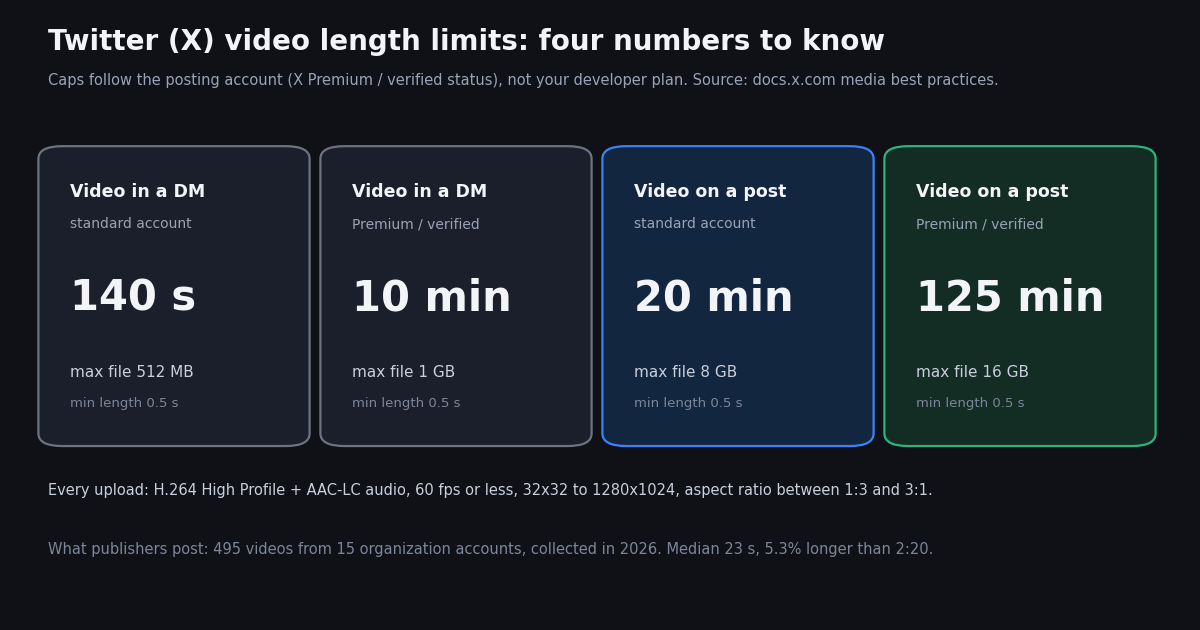
- Video on a post: 0.5 seconds to 20 minutes and 8 GB on a standard account; up to 125 minutes and 16 GB for X Premium / verified accounts (docs.x.com).
- Video in a DM: 140 seconds and 512 MB standard; 10 minutes and 1 GB with Premium. The old 2:20 number lives on here.
- Format that just works: MP4, H.264 High Profile, AAC-LC audio (not HE-AAC), mono or stereo, 30 or 60 fps, YUV 4:2:0, progressive scan, aspect ratio between 1:3 and 3:1.
- What publishers post: median 23.4 s, p90 89.7 s; only 5.3% of 495 videos ran past 2:20 (collected in 2026).
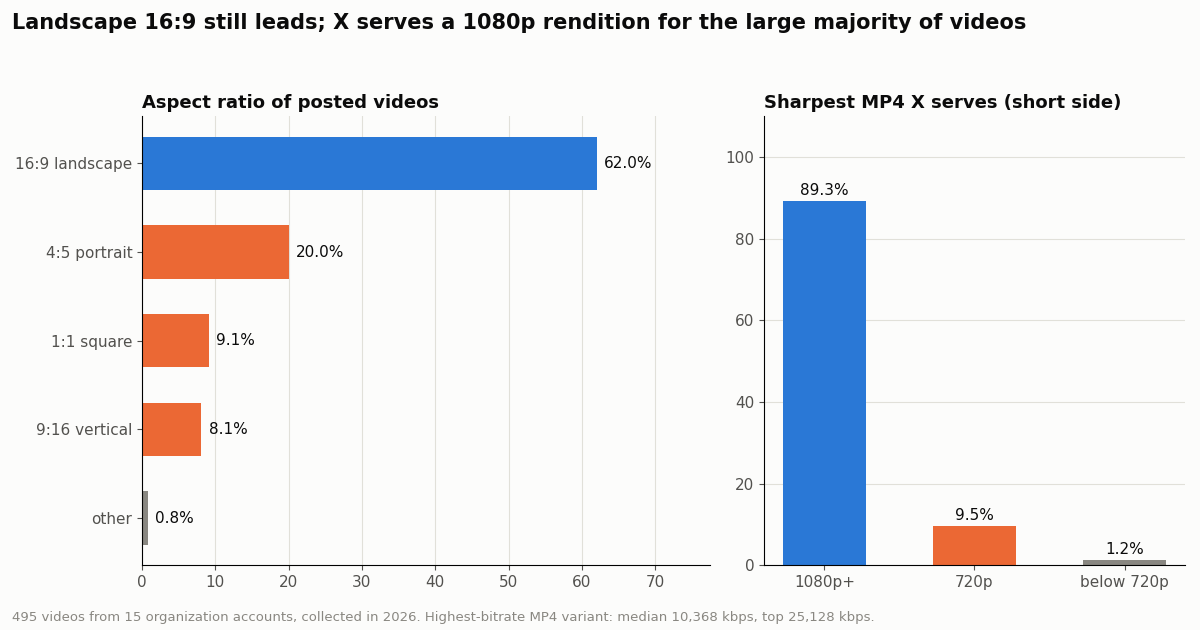
- Shape mix in our sample: 16:9 landscape 62.0%, 4:5 portrait 20.0%, square 9.1%, 9:16 vertical 8.1%.
- Upload fails? Check, in order: duration vs your cap, file size, codec (HEVC, HE-AAC and 5.1 audio are the usual culprits), frame rate above 60, aspect ratio, then where you are posting (post vs DM).
Search for the Twitter video length limit and you get a pile of answers that disagree: 2 minutes 20 seconds, 10 minutes, 2 hours, 3 hours, 4 hours. Part of that is history (X raised its limits several times), part is that the numbers differ by where the video goes (a post or a Direct Message) and by who posts it (a standard account or an X Premium / verified one). This page puts the current written caps in one table, sourced to X's own documentation, and marks plainly what we could not confirm.
Then it goes past the numbers. We read the actual videos that 15 large public organization accounts posted (sports leagues, news outlets, space agencies, gaming and streaming brands) and measured how long they run, what shape they are, and what quality X serves back. That tells you what a working video on X looks like in practice, which is more useful than a cap you will rarely touch. The last sections cover how to post a video step by step, why uploads fail, and how to get a video's duration and file URL from a post if you work with X data.
Three neighbors cover what this page does not: embedding someone else's clip in your post (the how-to-embed-video-on-twitter guide), fixing a video that will not play (the twitter-video-not-playing guide), and uploading media from code on the official API (the X API media upload v2 guide). The links are at the end of the page.
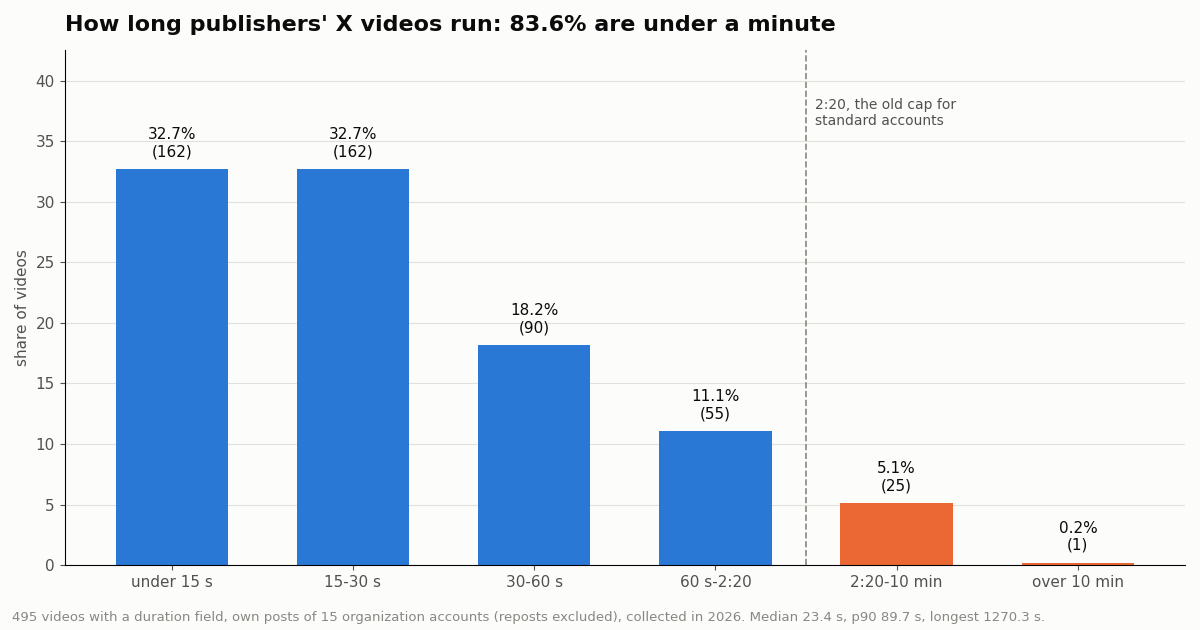
23.4 seconds across 495 videos (collected in 2026); 83.6% ran under a minute and only 5.3% ran past 2:20.
Twitter video length limit by account and destination (the current numbers)
X publishes its media caps in the developer documentation, in a page called media best practices (docs.x.com/x-api/media/quickstart/best-practices). Two rules sit above the table. First, the limits follow the posting account's X Premium / verified status, not any developer plan. Second, the docs state that the post-video caps match the X app, so the same numbers apply whether you upload in the app or through the API.
When this changed. X's developer changelog (docs.x.com/changelog) carries an entry dated September 1, 2026 titled "Media upload and Post-create size and duration limits" that lists exactly these figures and notes that Direct Message video is unchanged at 140 seconds / 512 MB default and 10 minutes / 1 GB Premium.
What we could not confirm. X's consumer help page on longer videos (help.x.com/en/using-x/premium-longer-videos) blocks automated reading, so we could not check its current wording this session. Many third-party guides still repeat older consumer figures (2:20 for free accounts, multi-hour uploads for subscribers on web and iOS). If the app shows you a lower cap than the table above, the app is the final word for your account; tell us and we will recheck.
Premium naming. X's developer docs still say "X Premium / verified". In October 2026 press reports described X folding its paid tiers into a single "X Subscription" that rolls out by region; the name on your account screen may differ, but the cap follows whether your account has the paid or verified status.
Twitter video format, size and dimensions: the spec that uploads cleanly
Length is only one of the checks. X processes every upload, and a file that is short enough can still be rejected for its encoding. These are the requirements and recommendations from the same best-practices page.
About resolution. The 1280x1024 ceiling is the developer API's advanced list. It does not describe what X shows viewers: in our sample X served a 1080p or sharper MP4 for the large majority of publisher videos (numbers below), which means higher-resolution masters reach X through the app and publishing tools. If you upload in the app, a 1080p H.264 file is a safe master; if you upload through the API, stay inside the documented dimensions.
Bitrate. The docs list a minimum video bitrate of 5,000 kbps and a minimum audio bitrate of 128 kbps in the advanced section. A very low bitrate file is a common reason for blocky playback after X re-encodes it.
Photos and GIFs in the same post. For API uploads the docs say a post carries up to 4 photos, or 1 animated GIF, or 1 video. Press reports in November 2026 described X letting app users attach up to 20 photos and videos in one post; we could not confirm that in X's own documentation this session, so treat it as app-side and possibly still rolling out.
# Re-encode any phone or camera file into the format X documents (H.264 High, AAC-LC stereo, <= 60 fps, 4:2:0)
ffmpeg -i input.mov \
  -c:v libx264 -profile:v high -pix_fmt yuv420p -r 30 -b:v 6M -maxrate 8M -bufsize 12M \
  -vf "scale='min(1920,iw)':-2" \
  -c:a aac -b:a 128k -ac 2 \
  -movflags +faststart output.mp4

# Trim to the 140-second DM cap (or any length) without re-encoding
ffmpeg -ss 0 -t 140 -i output.mp4 -c copy output-140s.mp4

# Check duration, codec, size and frame rate before you upload
ffprobe -v error -show_entries format=duration,size:stream=codec_name,profile,width,height,r_frame_rate,pix_fmt -of compact output.mp4How long are the videos people actually post on X? Our measurement
The caps tell you what is allowed. To see what a working video looks like, we read the latest posts of 15 public organization accounts through the API and pulled every video's duration from the video_info.duration_millis field. Reposts were dropped, so each video counts for the account that posted it. That left 1,358 original posts and 495 videos with a duration value.
The result is short. The median video ran 23.4 seconds, the middle half sat between 11.8 and 38.5 seconds, and the 90th percentile was 89.7 seconds. 83.6% of videos were under one minute. Only 26 videos (5.3%) ran past 2 minutes 20 seconds, 1 ran past 10 minutes, and the longest (1270.3 seconds, about 21 minutes) was a long-form feature from @SpaceX that sits above the 20-minute standard cap, posted by an account with a blue verified badge.
What this means for you. If your clip fits in two minutes twenty, it will post anywhere, including a DM, on any account. If it runs longer, a post on a standard account still takes it up to 20 minutes on the documented caps; only DMs and very long uploads push you toward Premium. And if you are cutting a clip for reach, the publishers in this sample cut short: a third of their videos ran under 15 seconds.
Which accounts post long video, and what that does and does not tell you
Long video was concentrated. 6 of the 15 accounts posted at least one video longer than 2:20; the rest stayed under it for every video in the window. The per-account view shows how different publishers use the format.
Accounts that posted no video in the window: @CNN, @Reuters, @nytimes, @WWE. News wires like these often post links and photos with a story card instead of native video, so a zero here is about their recent posting style, not about any limit.
Do not read subscription status from this table. Every account here is a large organization, and organizations can hold verified status that unlocks longer uploads. A video longer than 2:20 on a post does not prove the account pays for anything: under the current documented caps any account can post up to 20 minutes. Only the one video over 20 minutes needs the Premium / verified cap, and it came from an account showing a blue verified badge (isBlueVerified: true in the API).
Sports leagues post short and often. @MLB put video on about four in five of its original posts and never went past about a minute; @ChampionsLeague's median clip was under ten seconds. Brands with trailers (@netflix) and space accounts with mission features (@NASA, @SpaceX) carried the long tail.
Aspect ratio and quality: what shape works on X
Landscape is still the default on X. 62.0% of the videos in our sample were 16:9, 20.0% were 4:5 portrait, 9.1% were square and 8.1% were full 9:16 vertical. The 4:5 share is worth noticing: it is the shape that fills more of a phone timeline without being cropped the way a full-height 9:16 clip can be, and the sports accounts leaned on it.
Quality X serves back. X re-encodes every upload into a ladder of MP4 files plus an HLS playlist; all 495 videos in our sample had an HLS playlist. The sharpest MP4 X offered was 1080p or higher on the short side for 89.3% of videos, 720p for 9.5%, and lower for 1.2%. The highest-bitrate MP4 had a median of 10,368 kbps and topped out at 25,128 kbps. A clean, high-bitrate H.264 master gives the encoder more to work with than a file that was already squeezed by a messaging app.
How to post a video on Twitter (X), step by step
X moves buttons around between app versions, so the steps below describe the controls rather than exact menu paths. The flow is the same on the web, iPhone and Android.
Step 1. Check the file first. Make sure it is MP4 (or MOV) with H.264 video and AAC audio, under your account's duration and size cap. On a phone, video recorded by the built-in camera app usually qualifies as is; files from editing apps can come out in HEVC or with 5.1 audio, which X can refuse.
Step 2. Open the composer. On the web, click the post box at the top of your Home timeline or the Post button. In the app, tap the compose (plus or pen) button.
Step 3. Attach the video. Tap or click the media (photo) icon in the composer toolbar and pick the file from your library or computer. One video per post is the documented rule for API uploads.
Step 4. Wait for the upload and processing bar. A large file takes time on a slow connection. Do not post until the preview shows the video; posting while it is still uploading is the usual cause of a post that shows a gray box.
Step 5. Optional edits. The app can offer trimming, a thumbnail choice and captions. Subtitles help when viewers watch muted; the API side supports a separate subtitles upload category.
Step 6. Add text and post. Write the text, add alt text where the app offers it, and post. To share someone else's clip instead of uploading your own, use the /video/1 link method covered in the embed guide rather than re-uploading their file.
Sending a video in a DM or Chat. X has been relabeling Direct Messages as Chat in parts of the app. A video there is capped at 140 seconds (10 minutes with Premium), so a clip that posts fine can still fail in a message.
Why your Twitter video upload fails: a checklist in the order that finds it
Failed uploads usually come down to a handful of causes. Check them in this order; each step rules out a cause cheaply.
API uploads have one more trap. X enforces caps twice: once when the upload finishes and again when the media is attached to a post. The docs say a post with a too-long video returns HTTP 403 with "This user is not allowed to post a video longer than N minutes", even after a successful upload. Using a DM media category for a post video is another documented reason an upload succeeds and posting then fails.
Still stuck? If the video uploads but will not play for viewers, that is a playback problem rather than a limit; the twitter-video-not-playing guide walks through it.
For developers: read a video's duration and MP4 links from any post
Every video on X carries its metadata in the post. Through TwitterAPI.io you read it with an API key (no X account needed): /twitter/tweets with tweet_ids returns extendedEntities.media[], where a video has type: "video", video_info.duration_millis, video_info.aspect_ratio, and video_info.variants[] (MP4 files with a bitrate, plus an HLS .m3u8 playlist). That is how this study was built, and the code block below is the runnable version.
Cost of reading. Tweet endpoints are 15 credits per tweet returned, which is $0.15 per 1,000 tweets, with a minimum of 15 credits per request. A full 20-tweet timeline page costs $0.003. On X's official pay-per-usage rate card (docs.x.com/x-api/getting-started/pricing) a post read is $0.005, which is $5 per 1,000, about 33 times more per 1,000 posts. For this study, 1,629 posts came to about $0.24 on TwitterAPI.io versus about $8.14 on the official rate card. New accounts that pass the automatic bot check get up to $1 of free credits (up to 100,000 credits, no card, one per person or network, expiring after 31 days).
Uploading video from code. TwitterAPI.io's /twitter/upload_media_v2 takes the file plus login_cookies from /twitter/user_login_v2 (one login is $0.10, with a proxy you supply), and each upload or post is 60 credits = $0.0006. Its is_long_video flag is documented as needed for videos longer than 2:20 and requires a Premium account. Every write call acts as that X account: keep a human pace, X can rate-limit, lock or suspend the account, the session can need a fresh login, and billing is per HTTP 200 call. The X API media upload v2 guide covers both the official chunked flow and this route in depth.
Just want the file? The free Twitter video downloader tool on this site takes a post URL and lists the MP4 renditions, no code needed.
How we collected this
Question. How long are the videos that large public organization accounts post on X, what shape are they, and what quality does X serve back?
Accounts. 15 public organization accounts across sports, news, science and entertainment: @NBA, @NFL, @espn, @MLB, @ChampionsLeague, @CNN, @Reuters, @BBCWorld, @nytimes, @NASA, @SpaceX, @PlayStation, @Xbox, @netflix and @WWE. No private individuals.
Method and window. We called /twitter/user/last_tweets for each account (newest first, replies excluded, up to 6 pages) and kept the latest posts at collection time, collected in 2026. That gave 1,629 posts, 1,358 of them original (reposts excluded). From extendedEntities.media[] we counted 564 video objects, 580 photos and 4 GIFs; 495 videos carried duration_millis and form the duration sample (69 video objects had no duration value and were left out). Resolution is read from the highest-bitrate MP4 variant's URL.
What the sample cannot show. These are large publishers, many with verified status, so the sample shows what they choose to post, not what a free account is allowed to upload. It covers recent posts only, a few dozen to about a hundred per account. It does not see videos that failed to upload, and it says nothing about how video length affects reach.
Privacy. Aggregates only, organization accounts only; reposted and quoted authors were not analyzed. The study files (protocol, analysis script, results and a de-identified per-video sample) are kept with the page source.
import os
import statistics
import requests

BASE = "https://api.twitterapi.io"
HEADERS = {"X-API-Key": os.environ["TWITTERAPI_IO_KEY"]}
POST_CAP_S = 20 * 60      # standard account, video on a post (docs.x.com)
DM_CAP_S = 140            # standard account, video in a DM


def videos_in(tweets):
    """Yield (tweet_url, seconds, aspect_ratio, best_mp4_url) for every video in a list of tweets."""
    for t in tweets:
        for m in (t.get("extendedEntities") or {}).get("media") or []:
            if m.get("type") != "video":
                continue
            info = m.get("video_info") or {}
            ms = info.get("duration_millis")
            mp4 = [v for v in info.get("variants", []) if v.get("content_type") == "video/mp4"]
            best = max(mp4, key=lambda v: v.get("bitrate", 0))["url"] if mp4 else None
            yield t["url"], (ms or 0) / 1000, info.get("aspect_ratio"), best


def account_videos(user, max_pages=3):
    """Read an account's latest posts (20 per page) and return its videos."""
    found, cursor = [], ""
    for _ in range(max_pages):
        r = requests.get(f"{BASE}/twitter/user/last_tweets",
                         params={"userName": user, "cursor": cursor}, headers=HEADERS, timeout=30)
        r.raise_for_status()
        body = r.json()
        data = body.get("data") or {}
        found.extend(videos_in(data.get("tweets", [])))
        if not body.get("has_next_page"):
            break
        cursor = body.get("next_cursor", "")
    return found


def one_post(tweet_id):
    """Read a single post by ID and return its videos."""
    r = requests.get(f"{BASE}/twitter/tweets", params={"tweet_ids": tweet_id}, headers=HEADERS, timeout=30)
    r.raise_for_status()
    return list(videos_in(r.json().get("tweets", [])))


if __name__ == "__main__":
    vids = account_videos("NASA")
    secs = [s for _, s, _, _ in vids if s]
    if secs:
        print(f"{len(secs)} videos, median {statistics.median(secs):.1f} s, longest {max(secs):.1f} s")
        print("over the DM cap:", sum(s > DM_CAP_S for s in secs), "| over the post cap:", sum(s > POST_CAP_S for s in secs))
    for url, s, ar, mp4 in vids[:5]:
        print(f"{s:7.1f} s  {ar}  {url}\n          {mp4}")
Researching this?Free starter credits cover end-to-end testing — Google sign-in, no card. Get a key.
Questions readers ask
How long can a video be on Twitter (X)?
On a post, up to 20 minutes and 8 GB for a standard account and up to 125 minutes and 16 GB for an X Premium or verified account, per X's developer documentation, which states these caps match the X app. In a Direct Message the cap is 140 seconds (512 MB), or 10 minutes (1 GB) with Premium.
Is the Twitter video limit still 2 minutes 20 seconds?
Not for posts on the current documented caps. 2:20 (140 seconds) is still the standard-account limit for video sent in a Direct Message. Older guides and some third-party tools still treat 2:20 as the post limit, and if your app shows a lower cap for your account, follow what the app shows.
Which video format works well on Twitter?
MP4 with H.264 High Profile video and AAC-LC audio in mono or stereo, at 30 or 60 frames per second, YUV 4:2:0, progressive scan. X recommends 1280x720 for landscape, 720x1280 for portrait and 720x720 for square on API uploads. HE-AAC audio, 5.1 surround and frame rates above 60 fps are not supported.
What are the Twitter video dimensions and aspect ratio limits?
The aspect ratio must be between 1:3 and 3:1, and the developer docs list dimensions between 32x32 and 1280x1024 for API uploads. In our sample of publisher videos, 62% were 16:9 landscape and 20% were 4:5 portrait, and X served a 1080p or sharper rendition for about nine in ten videos.
What is the maximum video file size on Twitter?
8 GB for a video on a post from a standard account and 16 GB with Premium or verified status. For a DM the cap is 512 MB (1 GB with Premium). Animated GIFs are limited to 15 MB and images to 5 MB.
Why does my video upload fail on Twitter even though it is short?
The usual causes are encoding, not length: HEVC (H.265) video, HE-AAC or 5.1 audio, frame rates above 60 fps, an extreme aspect ratio, or a file that is still uploading when you press Post. Re-encode to H.264 High with AAC-LC stereo at 30 or 60 fps and try again.
Can I send a long video in a Twitter DM?
Only up to 140 seconds on a standard account, or 10 minutes with Premium. For anything longer, post the video (or post it privately to a protected account) and send the link in the message instead.
How do I find out how long a video on X is without playing it?
Each video's metadata carries video_info.duration_millis. Reading the post through an API such as TwitterAPI.io's /twitter/tweets endpoint returns the duration in milliseconds along with the aspect ratio and every MP4 rendition; the free video downloader tool on this site lists the files for a single post.
Continue
- X developer docs: media best practices (size and duration limits by account, video codec, frame rate, aspect ratio, dimensions)
- X developer changelog: September 1, 2026 entry on media upload and Post-create size and duration limits
- X developer docs: chunked media upload (initialize, append, finalize; 5 MB recommended segment)
- X API pricing: pay-per-usage rate card ($0.005 per post read)
- X Help Center: about longer videos for X Premium subscribers (could not be read automatically this session)
- TwitterAPI.io docs: upload_media_v2 (file, login_cookies, proxy, is_long_video)
- Twitter (X) API hub: endpoints, pricing and guides
- How to embed someone else's video in your X post with /video/1
- Twitter (X) video not playing: fixes by cause
- X API media upload v2: chunked upload, limits and code
- Download Twitter (X) photos and videos in bulk with the API
- Free Twitter (X) video downloader tool
- TwitterAPI.io pricing per tweet and per profile
- 01How to Clear Bookmarks on X (Twitter): One Post, All of Them, or a Folder
- 02Twitter (X) API on AWS Lambda: an EventBridge poller with SQS fan-out
- 03Twitter (X) API Examples: 11 Requests With Real Responses, Sizes and Latency
- 04How to Clear Twitter (X) Cache on iPhone, Android and Desktop
- 05How the X (Twitter) Algorithm Works, and How to Reset Your Feed
- 06Twitter (X) Direct Message Limit: the Daily DM Cap, Who Can Message You, and Why DMs Fail to Send
- 07Rate Limit Exceeded on Twitter (X) API — Causes & Fixes
- 08Twitter (X) Video Not Playing? Here Is How to Fix It
Writing about something you built with TwitterAPI.io? Our community rewards program pays API credits for honest tutorials, build logs and videos.
Stop reading. Start building.
Starter credits cover real testing on real data. Google sign-in, no card, no application queue.
Get an API keyAlready building with TwitterAPI.io? Publish an honest tutorial or build log about it and earn up to $200 a month in API credits.