How to Use LangChain with the Twitter (X) API
Most "LangChain Twitter" tutorials were written in 2023 around TwitterTweetLoader, a tweepy bearer token and the free X API tier that no longer exists. This guide is the version that works with LangChain 1.x in 2026: what the built-in loader actually does today, a replacement loader you can paste into a project, agent tools for create_agent, a RAG example over one account's posts, and the MCP route through langchain.mcp.
It also answers a question the old tutorials skip: what does a corpus built from an X timeline look like once it is in your vector store? We pulled 1,600 recent posts from 10 well-known organization accounts (LangChain, OpenAI, Anthropic, Hugging Face, Google DeepMind and others) through the twitterapi.io MCP server in October 2026 and measured tokens per post, the share of threads, replies, reposts and quotes, and how many posts fit a context window. Those numbers drive the design choices in the code: threads stitched into one Document, replies to other accounts and reposts filtered out, quotes kept with the post they quote, and no text splitter.
Everything here is read-only and needs no X developer account. All code was run against LangChain 1.4.6, langchain-core 1.6, langchain-community 0.4.2 and fastmcp 4.1; the loader, tools and agent were exercised end to end with recorded response shapes, and the MCP adapter was run against the live server up to tool discovery.
Does LangChain's built-in TwitterTweetLoader still work?
Short answer: the class still exists, but it is built on an API route most developers can no longer use, so treat it as legacy. Here is what we found by reading its source and running it.
It still ships. TwitterTweetLoader lives in langchain_community.document_loaders.twitter, and pip install langchain-community (0.4.2 at the time of writing) still installs and imports it. LangChain's current document-loader index on docs.langchain.com no longer lists a Twitter or X loader; the old integration page survives only in the versioned v0.2 docs and the API reference.
It calls v1.1 endpoints through tweepy. load() builds tweepy.API(auth) and, for each handle, calls api.user_timeline(screen_name=..., count=...) and api.get_user(screen_name=...). Those are the v1.1 statuses/user_timeline and users/show endpoints. X's own endpoint map lists statuses/user_timeline as replaced by the v2 user Posts timeline (/2/users/:id/tweets), and X's migration guide says the legacy v1.1 APIs will be deprecated. Threads on X's developer forum report the response 453 - You currently have access to a subset of X API V2 endpoints and limited v1.1 endpoints (e.g. media post, oauth) only when calling user_timeline.
You need your own X developer app. Both factory methods (from_bearer_token, from_secrets) take X credentials. With an invalid bearer token the loader fails on the first request with 401 Unauthorized and X error 89 - Invalid or expired token, which is what we got when we ran it. We could not test it with a paid X key, so we cannot say which current X plans still serve v1.1 reads; if you rely on it, run loader.load() once against your own key before building on it.
Even when it runs, the documents are thin. The loader does not pass tweet_mode="extended", so v1.1 answers in its default compatibility mode, where text is cut at 140 characters for longer posts and truncated is set. In our sample, 66% of posts were longer than 140 characters. page_content is that text only; metadata is created_at plus the full profile object of the author repeated on every document. There is no post URL, no post ID, no reply or repost flag, no quoted post and no engagement count, which are the fields you need to cite sources and filter a RAG index.
What about tweepy on its own? tweepy 4.17 supports the v2 endpoints through tweepy.Client, so you could rewrite the loader on Client.get_users_tweets. That works on the official X API pay-per-use plan at $0.005 per post read, with an X developer account, an app and OAuth set up first. Our Tweepy vs TwitterAPI.io migration guide maps each tweepy call to its twitterapi.io equivalent if you go the other way.
# What the built-in loader does (langchain-community 0.4.2, abridged):
from langchain_community.document_loaders import TwitterTweetLoader

loader = TwitterTweetLoader.from_bearer_token(
    oauth2_bearer_token="X_BEARER_TOKEN",   # from an X developer app
    twitter_users=["LangChain"],
    number_tweets=50,
)
docs = loader.load()
# Internally: tweepy.API(auth).user_timeline(screen_name=..., count=...)   -> v1.1 statuses/user_timeline
#             tweepy.API(auth).get_user(screen_name=...)                    -> v1.1 users/show
# page_content = tweet["text"]  (no tweet_mode="extended", so long posts arrive cut at 140 chars)
# metadata     = {"created_at": ..., "user_info": <the whole profile object>}

# The same job through twitterapi.io, using the loader from this guide:
from langchain_twitter import TwitterAPIIOLoader
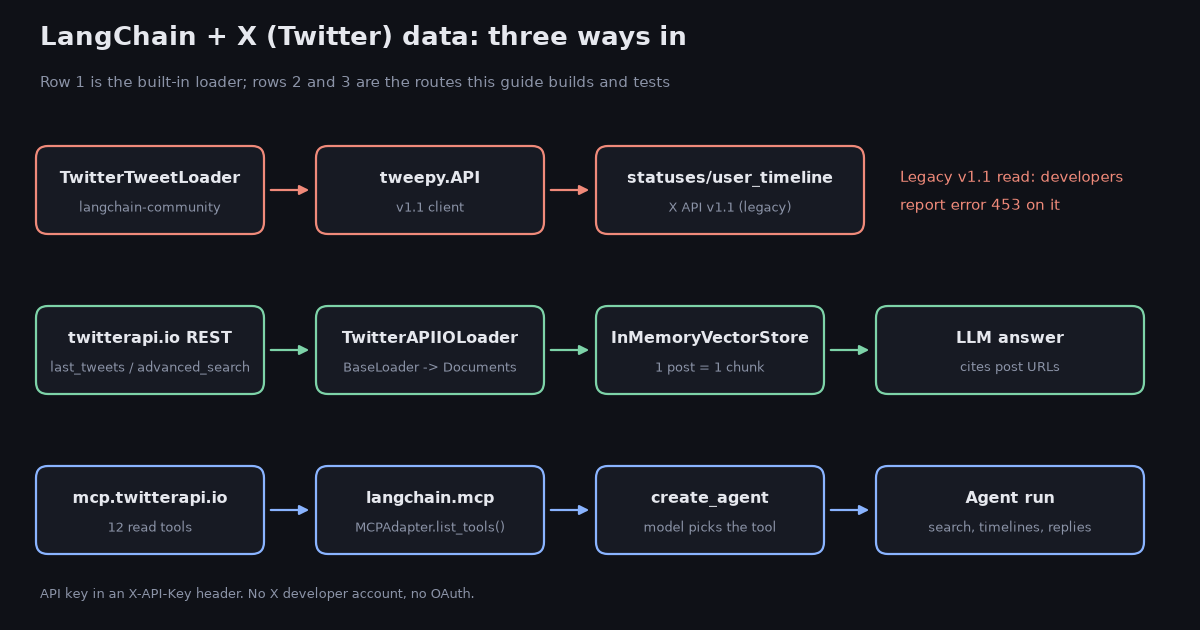
docs = TwitterAPIIOLoader(user_name="LangChain", max_tweets=50).load()Three ways to get X data into LangChain, compared
Pick the route by who decides what to fetch. If your code decides (nightly index of a few accounts, a fixed search), use a loader. If the model decides mid-conversation, give it tools. If you want those tools without writing them, use MCP.
The rest of the guide builds the middle column first, because it is the one you control end to end, then shows the MCP route.
Build a LangChain document loader for X posts
A LangChain document loader is a class with a lazy_load() generator that yields Document(page_content=..., metadata=...). BaseLoader gives you load() and the async variants for free. The full file is in the code block at the end of this page (langchain_twitter.py); these are the decisions inside it and why.
Two sources, one class. Pass user_name= to read an account's timeline from /twitter/user/last_tweets (posts are under data.tweets), or query= to run /twitter/tweet/advanced_search (posts are top-level under tweets). Both return about 20 posts per page and paginate with has_next_page and next_cursor, so the loop is the same.
Reposts are skipped by default, and repaired when kept. A repost's own text is RT @handle: ... cut at about 140 characters. In our sample, 90% of reposts ended in a truncation ellipsis. If you set include_retweets=True, the loader indexes retweeted_tweet.text (the full original) instead of the stub.
Quotes keep the post they quote. A quote post like "this is the part people miss" means nothing in a vector store without its target, so the loader appends [quoting @handle] <quoted text> from quoted_tweet. That one change is the difference between a retrievable chunk and noise.
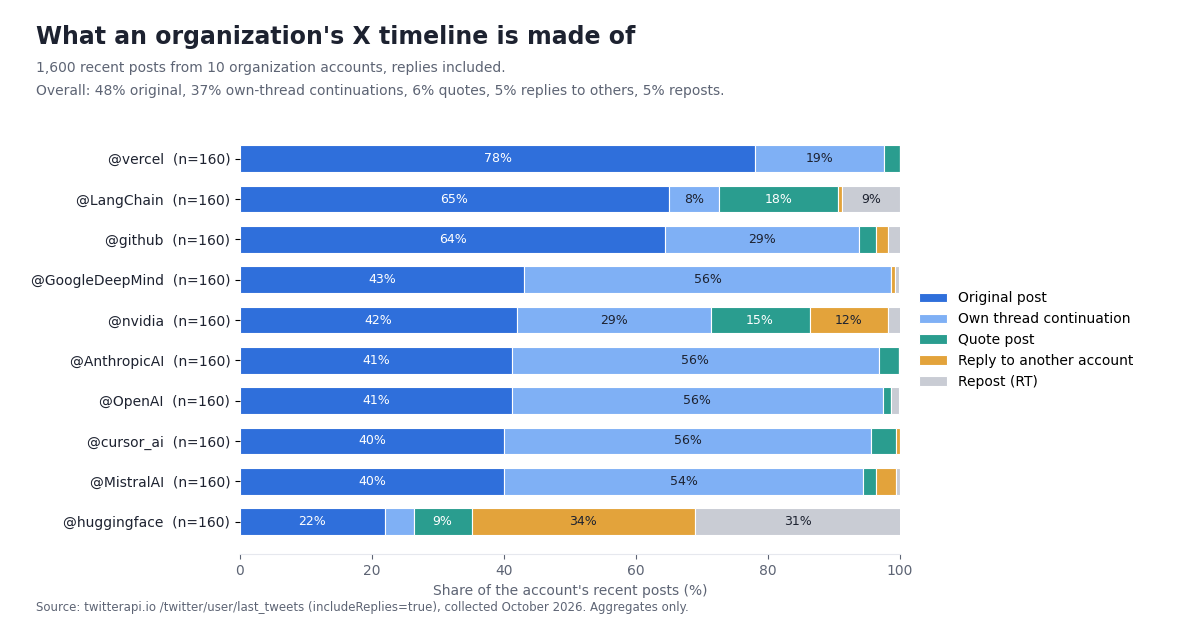
Threads are kept and stitched; replies to others are dropped. This is the decision the data changed most. X flags every thread continuation as a reply, and 88% of the posts flagged as replies in our sample answered the account's own earlier post. Asking the API for top-level posts only (includeReplies=false) would throw away the second half of every announcement thread. So the loader always requests replies, keeps a reply only when inReplyToUsername is the author (replies="threads", the default), and merges the parts of each thread by conversationId into one Document whose URL is the first post. Replies to other accounts (median 15 tokens, usually a thank-you or a link) are dropped unless you pass replies="all".
Metadata you will actually filter on. url (for citations), created_at, author, conversation_id, thread_length and thread_ids on stitched threads, is_reply, is_retweet, is_quote, like_count, retweet_count, reply_count, view_count, lang. Field names follow the recorded response shape (likeCount, createdAt, author.userName), not the official v2 public_metrics object.
Billing follows what the API returns, not what you keep. max_tweets counts every post fetched, including the replies and reposts the loader filters out, so the number of Documents is usually lower than max_tweets. That keeps the bill predictable: max_tweets=200 is 200 posts, $0.03.
429 handling. Accounts that have never paid run at 0.2 requests per second (20 once paid), so the helper backs off on HTTP 429 instead of failing. Errors come back with status: "error" and a msg field, which the helper raises as an exception so a bad handle does not silently produce an empty index.
Usage is one line per source: TwitterAPIIOLoader(user_name="LangChain", max_tweets=200).load() for a timeline, TwitterAPIIOLoader(query="langgraph lang:en min_faves:20", replies="all", stitch_threads=False, max_tweets=300).load() for a topic, where replies from other people are often the point. For more operators see the Twitter search operators guide.
What a timeline corpus actually looks like: 1,600 posts measured
Before choosing chunk sizes, embedding batch sizes or whether you need retrieval at all, it helps to know what you are indexing. We measured it on ten organization accounts that builders commonly index: AI labs, developer platforms and LangChain itself.
Threads are the hidden half of a timeline. Of 1,600 recent posts, 48% were original top-level posts and 42% carried X's reply flag. But 88% of those "replies" answered the account's own earlier post: they are parts 2, 3 and 4 of announcement threads, not conversations. Only 5% of all posts were replies to other accounts, 6% were quotes and 5% reposts. 5 of the 10 accounts posted more than half of their recent posts as thread continuations (up to 56% for @OpenAI).
Stitching changes the corpus. Leaving reposts aside, 1,526 posts collapse into 938 Documents once each thread is merged: 296 threads of two or more posts held 58% of those posts. The median stitched thread was 2 posts and 124 tokens, the 90th percentile 288 tokens, and the longest thread (12 posts) was 639 tokens. A thread part like "6/6: Coming soon to NVIDIA, Snowflake, and Databricks." (a real @MistralAI post) is meaningless on its own and obvious inside its thread.
Posts are tiny. The median post was 50 tokens (tiktoken o200k_base), the 90th percentile 86 and the longest 376; 93% were under 100 tokens. Even the longest stitched thread is far below the input limit of common embedding models, so skip the text splitter and treat each post or thread as one chunk.
A lot of posts carry little text. 72% contain a t.co link and 44% have an image or video. 14% have fewer than 10 tokens once links and leading @-mentions are removed ("Model weights are here: <link>" from @huggingface is a typical one). The retriever has nothing to match on those, which is another reason to merge them into their thread.
More than half of posts need context. 54% of posts were thread parts, replies, quotes, truncated reposts, or link and media posts with under 10 tokens of text. Those are the posts that TwitterTweetLoader-style page_content (the text alone) cannot make sense of, and why the loader above stitches threads and folds quoted text into the chunk.
Reposts are stubs. 90% of reposts in the sample ended in a truncation ellipsis ("RT @someone: ...…"). The account behavior varies: @huggingface had 31% reposts, most others under 2%.
Most of an account's recent history fits in a prompt. With a one-line header per post (date, handle, URL), a Document averaged 91 tokens. That is about 350 posts in 32k tokens, 1,403 in 128k, 2,193 in 200k and 10,967 in 1M. Note the header itself added 72% on top of the post text; keep it short. For a single account's last few hundred posts, putting the whole timeline in the prompt is simpler than vector retrieval; use a vector store when you index many accounts or months of search results.
Time covered varies by posting rate. The same 160 posts covered 23 days for @LangChain and 622 days for @MistralAI. If your question is about "the last month", fetch by date with search (from:handle since:YYYY-MM-DD) rather than a fixed post count.
Read the table as a sizing guide, not a ranking. "Own threads" are replies to the account's own post in the sample; "Days covered" is the time between the newest and oldest post in each account's sample; "Posts per 128k" divides 128,000 by that account's mean Document size.
RAG over an account's posts: stuff the timeline or retrieve
With posts this small, the first question is not which vector store but whether you need one. The data above says a 128k-token model can read about 1,403 posts at once. The example below loads an account's posts (original posts, stitched threads and quotes), puts them all in the prompt when they fit, and falls back to InMemoryVectorStore similarity search when they do not.
Embed one post or thread per vector. Each Document is already a single post or a whole thread; splitting it further only separates a claim from its link. Batch them through init_embeddings("openai:text-embedding-3-small") or any embedding provider LangChain supports.
Make the model cite. Every chunk carries its post URL in the prompt, and the instruction asks for the URL after each claim. That gives you a cheap hallucination check: an answer without URLs did not come from the posts.
Filter before you embed. Drop reposts (another account's words, and a stub at that), keep threads, and decide on replies to others per use case. For "what did they announce", originals, threads and quotes are the signal; for "how do they handle support", replies are the signal, so load with replies="all".
Refresh incrementally. Store the newest post ID you indexed; on the next run, read the first page of /twitter/user/last_tweets (about 20 posts, $0.003) and embed only posts newer than that ID. Ten accounts refreshed once a day is about $0.03 a day in API reads.
Mind the date window. A fixed max_tweets covers a different span per account (from weeks to over a year in our sample). For time-bounded questions, load with query="from:handle since:YYYY-MM-DD" instead.
If you need the same posts outside LangChain (a CSV for a notebook, a dataset for evaluation), the Twitter data in Python tutorial covers export and pagination on the same endpoints.
# RAG over one account, built on the loader above.
from langchain.chat_models import init_chat_model
from langchain.embeddings import init_embeddings
from langchain_core.vectorstores import InMemoryVectorStore
from langchain_twitter import TwitterAPIIOLoader

docs = TwitterAPIIOLoader(user_name="LangChain", max_tweets=300).load()  # originals, threads, quotes

# Small corpus? Skip retrieval and put the whole timeline in the prompt.
total_chars = sum(len(d.page_content) for d in docs)
llm = init_chat_model("openai:gpt-4.1-mini")
question = "Which LangSmith features did LangChain announce, and when?"

if total_chars < 200_000:  # roughly 50k tokens; posts are short
    context = "\n\n".join(f"[{d.metadata['created_at']}] {d.metadata['url']}\n{d.page_content}" for d in docs)
else:
    store = InMemoryVectorStore.from_documents(docs, init_embeddings("openai:text-embedding-3-small"))
    hits = store.similarity_search(question, k=12)
    context = "\n\n".join(f"[{d.metadata['created_at']}] {d.metadata['url']}\n{d.page_content}" for d in hits)

print(llm.invoke(
    "Answer only from these X posts. Cite the post URL after each claim. "
    "If the posts do not say, answer 'not in the posts'.\n\n"
    f"{context}\n\nQuestion: {question}"
).content)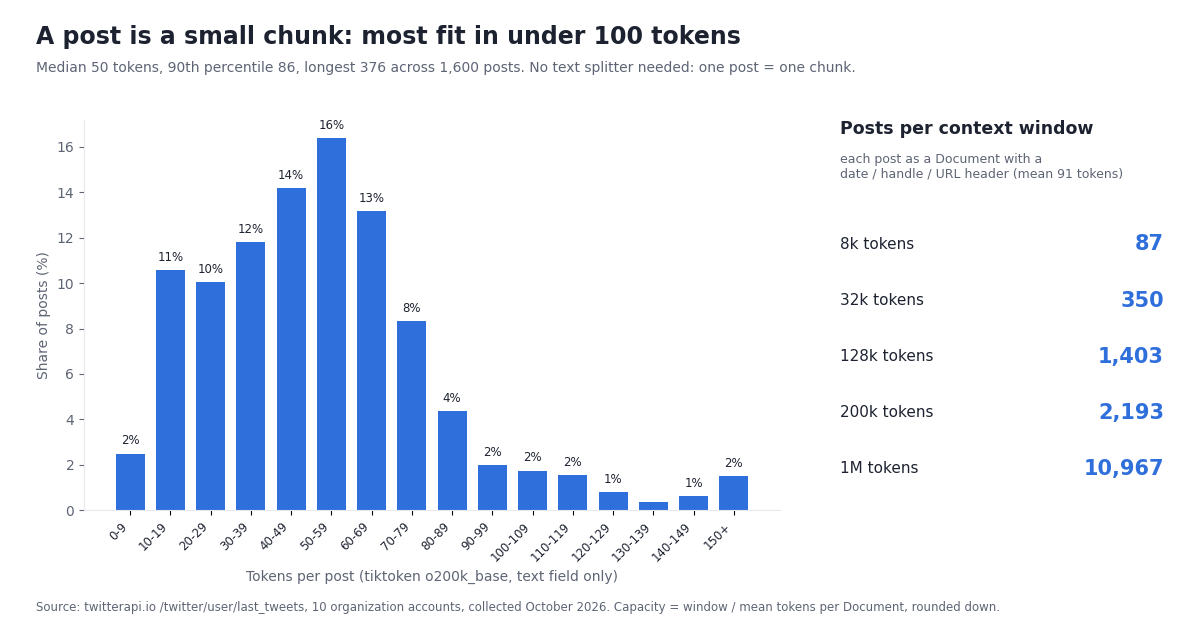
Give a LangChain agent X tools with @tool and create_agent
When the model should decide what to fetch ("what are people saying about LangGraph this week?"), wrap the loader in tools. The two tools in langchain_twitter.py return plain text the model can read: one line of metadata (time, handle, likes, URL) and the post text, per post.
search_x_posts(query, max_results) runs /twitter/tweet/advanced_search. The docstring lists the operators (from:, lang:, since:, until:, min_faves:, -filter:replies) because the model only knows what the docstring tells it. A clear docstring is the simplest way to get better tool calls.
get_x_user_posts(user_name, max_results) runs /twitter/user/last_tweets for one handle.
In LangChain 1.x the agent is langchain.agents.create_agent(model, tools=[...], system_prompt=...), which replaces the older initialize_agent / AgentExecutor pattern most 2023 tutorials show. It returns a LangGraph graph, so agent.invoke({"messages": [...]}) runs the tool loop and result["messages"][-1].content is the final answer.
Cap results in the tool, not the prompt. Each tool clamps max_results to 100. A model asked for "everything" will otherwise page through thousands of posts, and you pay for each one returned. Ask the model to narrow the query (date range, min_faves:) instead.
Handles change. During our collection, get_user_last_tweets returned an empty list for LangChainAI and posts for LangChain, the account's current handle. If a tool returns nothing for a known brand, look the handle up with /twitter/user/info before concluding the account is quiet.
Write actions (posting a summary, replying) are separate REST endpoints on twitterapi.io: one /twitter/user_login_v2 login ($0.10, with a proxy you supply) returns login_cookies, and each post, like or follow is then $0.002, billed per HTTP 200 call. The call acts as that X account, so keep a human pace, expect that X can rate-limit, lock or suspend an account that posts too fast, and expect to log in again when the session expires. Keep write tools out of an autonomous agent unless a person approves each action.
Use the twitterapi.io MCP server from LangChain (langchain.mcp)
If you would rather not maintain tool code, the twitterapi.io MCP server exposes 12 read tools (search_tweets, get_user_info, get_user_about, get_user_followers, get_user_followings, get_user_last_tweets, get_user_mentions, get_tweets_by_ids, get_tweet_replies, get_tweet_quotes, get_tweet_retweeters, get_trends). LangChain can load them as ordinary tools.
Use langchain.mcp, not langchain-mcp-adapters, for new code. The langchain-mcp-adapters README now says the repository is no longer actively maintained and that MCP support moved into LangChain as langchain.mcp (pip install "langchain[mcp]"). LangChain's migration guide maps MultiServerMCPClient to MCPAdapter and get_tools() to list_tools(). The new module is marked beta and prints a LangChainBetaWarning on import.
Config format. MCPAdapter takes a standard mcpServers dictionary. A remote server needs url and, for auth, headers; a local server needs command, args and env. The transport is inferred, so there is no transport key.
What we verified. With LangChain 1.4.6 and fastmcp 4.1, MCPAdapter connected to https://mcp.twitterapi.io/mcp, listed all 12 tools, and passed the X-API-Key header through to the server (a deliberately invalid key came back as the server's own API key is invalid error, not a transport error). The server also accepts Authorization: Bearer <key>. The stdio route worked too: npx -y @twitterapi_io/mcp-server with TWITTERAPI_IO_API_KEY in env started the server and listed the same 12 tools. The older package name @kaitoinfra/twitterapi-io-mcp-server still runs but npm marks it deprecated in favor of @twitterapi_io/mcp-server.
Do not install both adapters in one environment. langchain[mcp] pulls mcp 2.x; langchain-mcp-adapters 0.3.x needs mcp 1.x. In our test, installing langchain-mcp-adapters 0.3.2 next to langchain[mcp] downgraded mcp to 1.30 and broke langchain.mcp (FastMCP client support is not installed), while 0.3.1 against mcp 2.3 failed on ImportError: cannot import name 'RequestContext'. Pick one per virtualenv.
If you are still on the legacy adapter, the equivalent config is MultiServerMCPClient({"twitterapi": {"transport": "http", "url": "https://mcp.twitterapi.io/mcp", "headers": {"X-API-Key": key}}}) followed by await client.get_tools(); that also listed the 12 tools in a clean environment. The Twitter MCP server page has the per-client setup for Claude, Cursor and others, and How to use Claude with the Twitter (X) API covers the same server from Claude Code.
MCP or custom tools? MCP gives the model more tools for zero code, which is great for exploration. Custom tools give you control over what reaches the model (filtering reposts, folding in quoted text, capping results), which matters in production. Many teams prototype on MCP and move hot paths to @tool functions.
"""LangChain agent on the twitterapi.io MCP server (langchain.mcp, LangChain 1.x).

    pip install -U "langchain[mcp,openai]"
    export TWITTERAPI_IO_KEY=...  OPENAI_API_KEY=...
"""
import asyncio
import os

from langchain.agents import create_agent
from langchain.mcp import MCPAdapter

config = {
    "mcpServers": {
        "twitterapi": {
            "url": "https://mcp.twitterapi.io/mcp",
            "headers": {"X-API-Key": os.environ["TWITTERAPI_IO_KEY"]},
        }
    }
}


async def main() -> None:
    async with MCPAdapter(config) as adapter:
        tools = await adapter.list_tools()  # 12 read tools: search_tweets, get_user_last_tweets, ...
        print([t.name for t in tools])
        agent = create_agent(
            "openai:gpt-4.1-mini",
            tools,
            system_prompt="You research X (Twitter). Cite post URLs.",
        )
        result = await agent.ainvoke({"messages": [{"role": "user", "content":
            "Summarize what @LangChain posted this week and the top replies to its most-viewed post."}]})
        print(result["messages"][-1].content)


asyncio.run(main())
What it costs: X data for a LangChain app
Prices below are the published rates: twitterapi.io charges 15 credits per post returned ($0.15 per 1,000 posts, with a 15-credit minimum per request, so an empty search costs $0.00015) and profiles at $0.18 per 1,000. The official X API pay-per-use plan charges $0.005 per post read and $0.010 per user read, capped at 3 million post reads a month before Enterprise. The ratios are arithmetic, not a benchmark.
Per 1,000 posts that is $0.15 against $5.00: about 33x cheaper per read than the official X API pay-per-use rate. LLM tokens usually cost more than the X data: at the mean Document size measured above, 1,000 posts are tens of thousands of tokens of prompt.
Up to $1 in free credits for new accounts that pass the bot check; expires after 31 days; see /pricing. That is about 6,600 posts, enough to build and test every example on this page. For the full official price list, see how much the X API costs in 2026.
Troubleshooting LangChain + X
453 - You currently have access to a subset of X API V2 endpoints... from TwitterTweetLoader. The loader is calling v1.1 statuses/user_timeline. Switch to a v2 client or to the loader on this page.
89 - Invalid or expired token / 401 from TwitterTweetLoader. The bearer token is wrong or revoked. Regenerate it in the X developer portal; note that a valid token does not fix a 453.
401 from twitterapi.io or API key is invalid from the MCP server. The key is missing or mistyped. REST calls send it as X-API-Key; the MCP server takes X-API-Key or Authorization: Bearer.
429 Too Many Requests. Accounts that have never paid are limited to 0.2 requests per second (one call every 5 seconds); paid accounts get 20. The _get helper backs off; for bulk loads add a short sleep between pages.
Empty result for an account you know is active. Check the handle: renamed accounts return nothing under the old name (we saw this with LangChainAI vs LangChain). Look it up with /twitter/user/info.
Reposts in the index read "RT @someone: ...…". You indexed the repost stub. Use retweeted_tweet.text, or skip reposts.
ImportError: cannot import name 'RequestContext' or FastMCP client support is not installed. langchain-mcp-adapters and langchain[mcp] are fighting over the mcp package version. Use one per environment.
ValueError: MCP target ... is not a valid URL. MCPAdapter refuses a bare string that is not an http(s) URL so a string cannot silently launch a local script. Pass an mcpServers dict or a Path for local servers.
The agent pages through thousands of posts. Clamp max_results inside the tool and tell the model in the docstring to narrow with dates and min_faves: instead.
More error codes and their fixes are in Twitter rate limit exceeded.
How we collected this
Question. What does a retrieval corpus built from an organization's X timeline look like: tokens per post, the share of replies, reposts, quotes and link or media posts, truncated repost text, and how many posts fit a context window?
Accounts. 10 public organization accounts chosen before collection: @LangChain, @OpenAI, @AnthropicAI, @huggingface, @GoogleDeepMind, @github, @vercel, @nvidia, @MistralAI and @cursor_ai.
Method. The twitterapi.io MCP tool get_user_last_tweets (backed by /twitter/user/last_tweets) with includeReplies=true, newest first, up to 8 pages per account. Posts were de-duplicated by ID. Collected October 2026.
Sample. 1,600 posts. The window is each account's most recent posts at collection time, so it covers different lengths of time per account (see "Days covered" in the table).
Measures. Tokens counted with tiktoken o200k_base on the post text as returned (the cl100k_base mean was 54.0 tokens, close to the o200k mean of 52.9). A post is a repost if it has a reposted-post ID; a thread continuation if isReply is true and the parent is one of the same account's posts in the sample; a reply to another account if isReply is true otherwise (a thread whose first post falls outside the sample window also lands here, so the thread share is a lower bound); a quote if it has a quoted-post ID. Threads were stitched by following each continuation's parent within the account's sample. "Thin" means fewer than 10 tokens after removing t.co links and leading @-mentions.
Check. 30 randomly chosen records (3 per account) were fetched again by ID with get_tweets_by_ids; text, reply, repost, quote and media flags matched the stored sample.
What this sample cannot show. It covers organization accounts in AI and developer tools, which post more announcements and fewer personal threads than individuals; personal accounts will look different. Recent posts only, so seasonal events (like a conference week) can skew one account's mix. Token counts are for the post text; images, videos and linked pages are not counted. We report aggregates only and did not analyze the accounts behind reposted or replied-to posts.
The raw sample, the analysis script and the results file are kept with the page source for re-checking.
"""LangChain + Twitter (X) data through twitterapi.io.

A document loader, two agent tools, and a small RAG over one account's posts.

    pip install -U "langchain[openai]" langchain-core requests
    export TWITTERAPI_IO_KEY=...   # API key from the twitterapi.io dashboard
    export OPENAI_API_KEY=...      # or any provider init_chat_model supports

Reads only: no X developer account, no OAuth, no tweepy.
"""
import os
import time
from typing import Iterator, Optional

import requests
from langchain_core.document_loaders import BaseLoader
from langchain_core.documents import Document
from langchain_core.tools import tool

API_KEY = os.environ["TWITTERAPI_IO_KEY"]
HEADERS = {"X-API-Key": API_KEY}


def _get(url: str, params: dict) -> dict:
    """GET with a small retry on 429 (0.2 requests/s until the first payment)."""
    for attempt in range(5):
        r = requests.get(url, headers=HEADERS, params=params, timeout=30)
        if r.status_code == 429:
            time.sleep(5 * (attempt + 1))
            continue
        r.raise_for_status()
        body = r.json()
        if body.get("status") == "error":
            raise RuntimeError(body.get("msg") or "twitterapi.io error")
        return body
    r.raise_for_status()
    return {}


def _to_document(t: dict) -> Document:
    """One post -> one Document. Metadata keeps what text-only loaders drop."""
    author = t.get("author") or {}
    retweeted = t.get("retweeted_tweet")
    quoted = t.get("quoted_tweet")
    text = t.get("text") or ""
    if retweeted:
        # A repost's own text is cut at about 140 characters ("RT @x: ...").
        # Index the full original instead.
        text = retweeted.get("text") or text
    if quoted:
        # Keep the quoted post with the comment, or "this is huge" means nothing.
        text += "\n\n[quoting @%s] %s" % (
            (quoted.get("author") or {}).get("userName", "?"),
            quoted.get("text") or "",
        )
    return Document(
        page_content=text,
        metadata={
            "id": t.get("id"),
            "url": t.get("url"),
            "created_at": t.get("createdAt"),
            "author": author.get("userName"),
            "conversation_id": t.get("conversationId"),
            "is_reply": bool(t.get("isReply")),
            "is_retweet": retweeted is not None,
            "is_quote": quoted is not None,
            "like_count": t.get("likeCount", 0),
            "retweet_count": t.get("retweetCount", 0),
            "reply_count": t.get("replyCount", 0),
            "view_count": t.get("viewCount", 0),
            "lang": t.get("lang"),
        },
    )


def _is_self_reply(t: dict) -> bool:
    """A reply to the author's own post: the next part of a thread."""
    author = ((t.get("author") or {}).get("userName") or "").lower()
    return bool(t.get("isReply")) and (t.get("inReplyToUsername") or "").lower() == author


def _stitch_threads(docs: list) -> list:
    """Merge the parts of each thread (same author + conversation) into one Document."""
    groups: dict = {}
    order = []
    for d in docs:
        key = (d.metadata["author"], d.metadata["conversation_id"] or d.metadata["id"])
        if key not in groups:
            groups[key] = []
            order.append(key)
        groups[key].append(d)
    out = []
    for key in order:
        parts = sorted(groups[key], key=lambda d: int(d.metadata["id"]))
        if len(parts) == 1:
            out.append(parts[0])
            continue
        meta = dict(parts[0].metadata)  # root post: its URL, date and counts
        meta["thread_ids"] = [p.metadata["id"] for p in parts]
        meta["thread_length"] = len(parts)
        out.append(Document(page_content="\n\n".join(p.page_content for p in parts), metadata=meta))
    return out


class TwitterAPIIOLoader(BaseLoader):
    """Load X posts as LangChain Documents.

    Pass user_name for an account's timeline (/twitter/user/last_tweets)
    or query for a search (/twitter/tweet/advanced_search, full operator syntax).

    replies: "threads" keeps the author's own thread continuations and drops
             replies to other accounts (default); "all" keeps every reply;
             "none" keeps only top-level posts.
    stitch_threads: merge the parts of a thread into one Document.
    """

    def __init__(
        self,
        user_name: Optional[str] = None,
        query: Optional[str] = None,
        query_type: str = "Latest",
        max_tweets: int = 100,
        replies: str = "threads",
        include_retweets: bool = False,
        stitch_threads: bool = True,
    ):
        if not (user_name or query):
            raise ValueError("pass user_name or query")
        if replies not in ("threads", "all", "none"):
            raise ValueError('replies must be "threads", "all" or "none"')
        self.user_name = user_name
        self.query = query
        self.query_type = query_type
        self.max_tweets = max_tweets
        self.replies = replies
        self.include_retweets = include_retweets
        self.stitch_threads = stitch_threads

    def _search_page(self, cursor: str) -> tuple:
        url = "https://api.twitterapi.io/twitter/tweet/advanced_search"
        params = {"query": self.query, "queryType": self.query_type}
        if cursor:
            params["cursor"] = cursor
        body = _get(url, params)
        return body.get("tweets") or [], body

    def _timeline_page(self, cursor: str) -> tuple:
        url = "https://api.twitterapi.io/twitter/user/last_tweets"
        params = {
            "userName": self.user_name,
            # Thread continuations are replies, so ask for replies and filter locally.
            "includeReplies": "false" if self.replies == "none" else "true",
        }
        if cursor:
            params["cursor"] = cursor
        body = _get(url, params)
        return (body.get("data") or {}).get("tweets") or [], body

    def _page(self, cursor: str) -> tuple:
        return self._timeline_page(cursor) if self.user_name else self._search_page(cursor)

    def _keep(self, t: dict) -> bool:
        if t.get("retweeted_tweet"):
            return self.include_retweets
        if t.get("isReply"):
            if self.replies == "all":
                return True
            if self.replies == "threads":
                return _is_self_reply(t)
            return False
        return True

    def _posts(self) -> Iterator[Document]:
        cursor, fetched, seen = "", 0, set()
        while fetched < self.max_tweets:
            tweets, body = self._page(cursor)
            for t in tweets:
                if t.get("id") in seen:
                    continue
                seen.add(t.get("id"))
                fetched += 1  # every post returned is billed, kept or not
                if self._keep(t):
                    yield _to_document(t)
                if fetched >= self.max_tweets:
                    return
            if not tweets or not body.get("has_next_page") or not body.get("next_cursor"):
                return
            cursor = body["next_cursor"]

    def lazy_load(self) -> Iterator[Document]:
        if not self.stitch_threads:
            yield from self._posts()
            return
        yield from _stitch_threads(list(self._posts()))


def _format(docs: list) -> str:
    if not docs:
        return "No posts found."
    return "\n\n".join(
        "[%s] @%s, %s likes, %s\n%s"
        % (d.metadata["created_at"], d.metadata["author"], d.metadata["like_count"],
           d.metadata["url"], d.page_content)
        for d in docs
    )


@tool
def search_x_posts(query: str, max_results: int = 40) -> str:
    """Search recent X (Twitter) posts. Supports operators such as from:user,
    lang:en, since:YYYY-MM-DD, until:YYYY-MM-DD, min_faves:100, -filter:replies."""
    loader = TwitterAPIIOLoader(query=query, max_tweets=min(max_results, 100),
                                replies="all", stitch_threads=False)
    return _format(loader.load())


@tool
def get_x_user_posts(user_name: str, max_results: int = 40) -> str:
    """Get the most recent posts of one X (Twitter) account, newest first, with its
    own threads merged. Replies to other accounts are left out. user_name is the
    handle without @."""
    return _format(TwitterAPIIOLoader(user_name=user_name, max_tweets=min(max_results, 100)).load())


if __name__ == "__main__":
    from langchain.agents import create_agent
    from langchain.chat_models import init_chat_model
    from langchain.embeddings import init_embeddings
    from langchain_core.vectorstores import InMemoryVectorStore

    # 1) Loader: the last 200 posts of one account; threads stitched into one Document.
    docs = TwitterAPIIOLoader(user_name="LangChain", max_tweets=200).load()
    print(f"loaded {len(docs)} documents")

    # 2) RAG: posts and threads are short, so embed each one whole (no text splitter).
    store = InMemoryVectorStore.from_documents(
        docs, init_embeddings("openai:text-embedding-3-small")
    )
    question = "What did LangChain announce about LangSmith recently?"
    hits = store.similarity_search(question, k=8)
    context = "\n\n".join(f"{d.metadata['url']}\n{d.page_content}" for d in hits)
    llm = init_chat_model("openai:gpt-4.1-mini")
    answer = llm.invoke(
        "Answer from these X posts only and cite the post URLs.\n\n"
        f"{context}\n\nQuestion: {question}"
    )
    print(answer.content)

    # 3) Agent: the model decides when to search or read a timeline.
    agent = create_agent(
        "openai:gpt-4.1-mini",
        tools=[search_x_posts, get_x_user_posts],
        system_prompt="You research X (Twitter). Cite post URLs for every claim.",
    )
    result = agent.invoke({"messages": [{"role": "user", "content":
        "What are developers saying about LangGraph this week? Group by theme."}]})
    print(result["messages"][-1].content)
Questions readers ask
Is TwitterTweetLoader deprecated?
It is not formally marked deprecated in code, and langchain-community 0.4.2 still ships it. But it calls X API v1.1 endpoints (statuses/user_timeline and users/show) through tweepy, LangChain's current document-loader index no longer lists it, X maps that endpoint to v2, and developers report error 453 when calling it. Treat it as legacy and test it against your own X key before relying on it.
Do I need an X developer account to use Twitter data in LangChain?
Not with the approach on this page. The custom loader, the @tool functions and the MCP server all use a twitterapi.io API key; reads need no X account, no app and no OAuth. You need an X developer account only for TwitterTweetLoader or a tweepy-based loader.
Should I use langchain-mcp-adapters or langchain.mcp?
For new code, langchain.mcp (pip install "langchain[mcp]", then MCPAdapter and list_tools()). The langchain-mcp-adapters README says the repository is no longer actively maintained. Keep them in separate environments: they require different major versions of the mcp package, and installing one next to the other broke the other in our test.
Do I need a text splitter for tweets?
No. In our sample of 1,600 posts the median post was 50 tokens and the 90th percentile 86; even stitched threads had a median of 124 tokens and a maximum of 639. Index one post or one stitched thread per chunk and put the post URL and date in metadata so answers can cite it.
Should I include replies when loading an account's posts?
Include the account's own thread continuations and stitch them; leave out replies to other accounts unless you are studying conversations. X flags every thread part as a reply: in our sample, 88% of posts flagged as replies continued the account's own thread, so requesting top-level posts only loses most of each announcement thread.
Can a LangChain agent post to X?
The MCP server and the tools on this page are read-only. Posting is a separate twitterapi.io REST endpoint that acts as a logged-in X account: one /twitter/user_login_v2 login ($0.10) and $0.002 per post, like or follow, billed per HTTP 200 call. X can rate-limit, lock or suspend an account that posts too fast, so keep a human pace and keep a person approving each write.
Does this work with LangChain.js?
The REST endpoints are plain HTTPS with an X-API-Key header, so the same loader and tools port directly to a LangChain.js DocumentLoader and tool(). The MCP server works with any MCP client; LangChain.js has its own MCP adapters package. The code on this page is Python and was tested with LangChain 1.4.6.
How much does it cost to index an account?
200 posts from one account is 10 pages of 20 posts: $0.03 on twitterapi.io at $0.15 per 1,000 posts, versus $1.00 at the official X API pay-per-use rate of $0.005 per post read. Embedding and LLM tokens are billed separately by your model provider.
Continue
- langchain-community source: TwitterTweetLoader (tweepy.API user_timeline and get_user, page_content = tweet text)
- LangChain docs: migrating from langchain-mcp-adapters to langchain.mcp (MCPAdapter, list_tools)
- langchain-mcp-adapters README: no longer actively maintained, MCP support moved to langchain.mcp
- X API endpoint map: v1.1 statuses/user_timeline and its v2 replacement (the official, pricier route)
- X API pay-per-usage pricing: $0.005 per post read, $0.010 per user read, 3M post reads a month cap
- X Developers forum: error 453 when getting a user's timeline (v1.1)
- twitterapi.io API reference: last_tweets, advanced_search, response fields
- How to use Claude with the Twitter (X) API
- Twitter (X) MCP server: 12 read tools for AI agents
- Tweepy vs TwitterAPI.io: Python migration guide
- Connect ChatGPT to the Twitter (X) API
- Twitter search operators for the API
- Twitter data in Python: export and pagination
- How much the X API costs in 2026
- Pay-per-call pricing
- 01TweetBeaver is gone: every TweetBeaver function and how to get the same data today
- 02Twint (Twitter scraper): why it stopped working and how to migrate
- 03Twitter (X) profiler: how to profile an account in 2026
- 04Birdclaw (X/Twitter archive tool): what it stores and how to feed it any account
- 05What Is a Twitter (X) Chatbot, and How Do You Build One in 2026?
- 06Can You Edit a Tweet? How Editing Works on X
- 07Twitter (X) Automation — Complete Guide to API-Driven Workflows
- 08Bill Ackman on Twitter — A Tracking Guide for Financial Analysts
Stop reading. Start building.
Starter credits cover real testing on real data. Google sign-in, no card, no application queue.
Get an API key