How to Download Pictures from Twitter at Full Quality
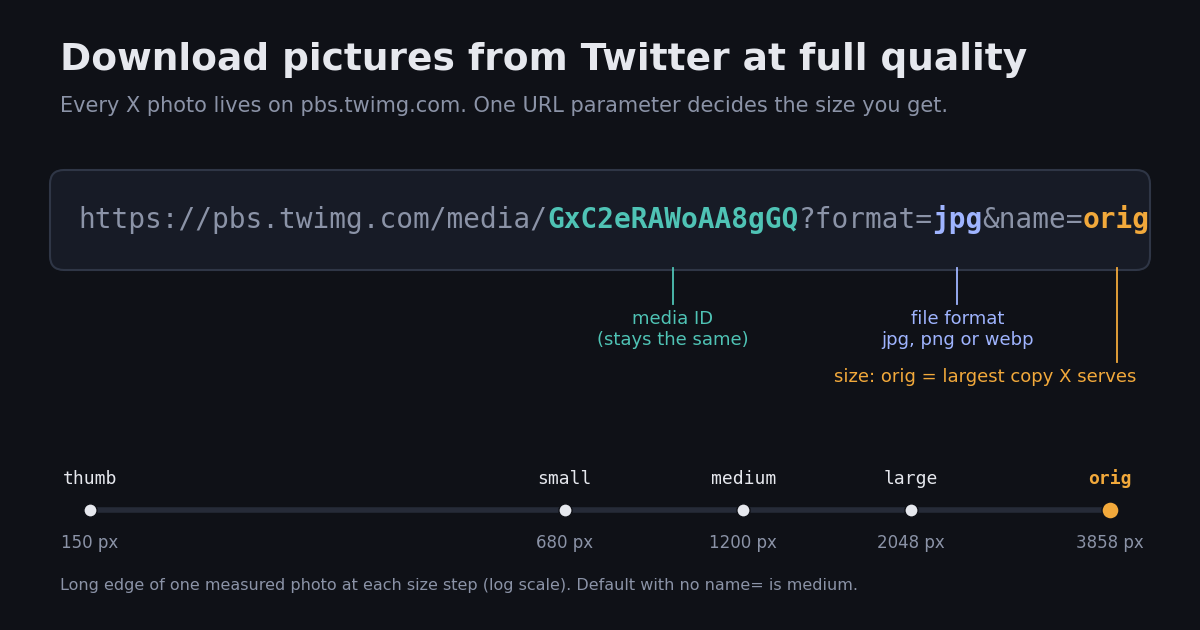
Saving a picture from Twitter looks like a one-click job, and for a phone wallpaper or a meme it is. The catch shows up when you zoom in: X stores every photo at several sizes, and the copy your browser or app hands you is often a resized one. If you need the sharpest version of a photo, for printing, editing or archiving your own posts, you have to ask the image server for it by name.
This guide covers the quick ways first (desktop, iPhone, Android), then the name=orig trick that gets the largest file X serves, with real sizes we measured by downloading the same photos at every size option. The last part is for people with a lot of images to save: a free script for single links and an API route for whole accounts. If you are a developer looking for media-object details or video downloads, the dedicated API guides linked at the end go deeper.
How to download pictures from Twitter on a computer
This works in Chrome, Edge, Firefox and Safari on x.com. Menu labels differ slightly between browsers, but the steps are the same.
1. Open the photo. Click the picture in the post so it opens in the full-screen viewer. Saving from the timeline thumbnail tends to give you a smaller copy.
2. Open the image on its own. Right-click the photo and choose Open image in new tab (Firefox and Safari label it Open Image in New Tab). The new tab's address starts with https://pbs.twimg.com/media/.
3. Ask for the original. In the address bar, replace whatever follows name= with orig. A link ending in ?format=jpg&name=large becomes ?format=jpg&name=orig. Older-style links that end in .jpg:large also work if you change them to .jpg:orig; we confirmed both forms return the same file.
4. Save it. Press Enter, then right-click the image and choose Save image as. The file is a normal JPG (sometimes PNG) that opens in any photo app.
If a post has up to four photos (the limit X documents for a single post), repeat the steps for each one. Every photo has its own media ID in the link, so you can't fetch all four from a single address.
How to save Twitter photos on iPhone and Android
In the X app (iPhone and Android): tap the photo to open it full screen, then tap the share icon or the three-dot menu and pick the save option. The photo goes to Photos on iPhone or to the gallery on Android. X moves these buttons around between app versions, so if you don't see them, long-pressing the open photo is the other common route.
What the app saves: the app stores the copy it was displaying, and X doesn't document which size that is. If the saved picture looks soft when you zoom, it was probably a display-size copy rather than the original.
Full quality on a phone: open the post in Safari or Chrome instead of the app (copy the post link and paste it into the browser). Tap and hold the photo, choose Open in New Tab or Open Image in New Tab, edit the address so it ends in name=orig, then tap and hold the image again and choose Save to Photos or Download image.
Screenshots are the worst option. A screenshot captures your screen's pixels, not the photo, so you lose resolution and add the interface around it. Use it only when nothing else is available.
Get the original quality: what name=orig actually changes
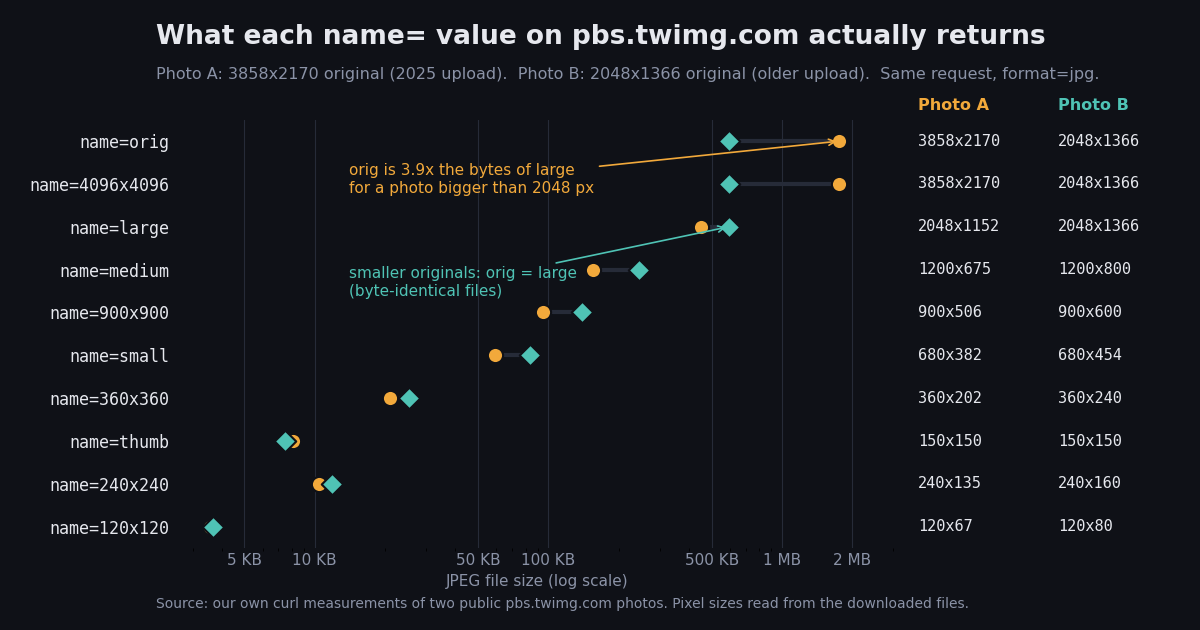
Every picture on X sits on the image server pbs.twimg.com under a media ID, and the name= value in the link picks which stored size you get back. We downloaded two public photos at every size option with format=jpg and read the pixel dimensions from the files themselves. Photo A is a 3858x2170 image uploaded in 2025; photo B is an older 2048x1366 upload.
Large is not the largest. For photo A, name=large stopped at 2048 pixels on the long edge. name=orig returned all 3858x2170 pixels, which is 3.5x the pixel count (8,371,860 vs 2,359,296) and 3.9x the bytes (1,802,322 / 461,811).
For smaller originals it makes no difference. Photo B was already 2048 pixels wide, so orig, 4096x4096 and large returned byte-identical files (same MD5 hash). You can't tell which case you have until you check, so asking for orig is the safe default.
4096x4096 is an alias, not an upscale. For photo A it returned the exact same file as orig. The 900x900, 360x360, 240x240 and 120x120 names fit the image inside that box and keep its shape; thumb crops to a 150-pixel square.
Names that don't exist fail. name=1080x1080 and a made-up value both returned HTTP 404, so you can't request arbitrary sizes. A link with no name= at all returned the medium copy, 1200 pixels wide.
The metadata X publishes for each photo agrees with what we downloaded: the embed data for photo A lists an original size of 3858x2170 and a large size of 2048x1152 with resize mode fit.
JPG, PNG or WEBP: which format to ask for
The format= value is the other half of the link. The server will convert a resized copy into another format on request, but it can't add detail that the stored file doesn't have. Here is photo A at the same pixel size in each format:
PNG is 8 to 9 times heavier for the same pixels. Converting a JPEG to PNG preserves the JPEG's compression artifacts in a lossless container, so you pay for size without gaining sharpness.
WEBP isn't automatically smaller. For photo A it came out larger than JPG at both sizes; for the older photo B it was about 6% smaller at large (568,566 vs 605,635 bytes). Don't assume a saving.
orig only answers in the stored format. Both test photos were stored as JPG, and asking for format=png&name=orig or format=webp&name=orig returned a 404. If you get an error on orig, set format= back to what the original link used (usually jpg).
Save one picture at full size with a short script
If you save Twitter images often, editing links by hand gets old. This script takes any pbs.twimg.com/media link in either style, rewrites it to name=orig, falls back to JPG if another format was requested, and saves the file. It needs only Python and the requests package, and no account or API key, because the image server is public for public posts.
We ran it against three real links: a name=small link (saved 1,802,322 bytes at 3858x2170), a legacy .jpg:large link and a format=webp&name=medium link (both fell back to the JPG original correctly).
import re, sys, requests

def orig_url(url):
    """Turn any pbs.twimg.com/media link into its name=orig version."""
    m = re.search(r"pbs\.twimg\.com/media/([A-Za-z0-9_-]+)(?:\.(jpg|jpeg|png|webp))?", url)
    if not m:
        raise ValueError("not a pbs.twimg.com/media URL")
    media_id, ext = m.group(1), m.group(2)
    fmt = re.search(r"format=(\w+)", url)
    fmt = (fmt.group(1) if fmt else ext) or "jpg"
    return f"https://pbs.twimg.com/media/{media_id}?format={fmt}&name=orig", media_id, fmt

def download(url):
    src, media_id, fmt = orig_url(url)
    r = requests.get(src, timeout=30)
    if r.status_code == 404 and fmt != "jpg":
        # orig only answers in the stored format; fall back to the jpg original
        src = src.replace(f"format={fmt}", "format=jpg")
        fmt = "jpg"
        r = requests.get(src, timeout=30)
    r.raise_for_status()
    path = f"{media_id}_orig.{fmt}"
    with open(path, "wb") as f:
        f.write(r.content)
    print(f"saved {path} ({len(r.content):,} bytes) from {src}")

# Usage: python save_orig.py "https://pbs.twimg.com/media/<id>?format=jpg&name=small"
if __name__ == "__main__":
    for link in sys.argv[1:]:
        download(link)
Download many Twitter images: from post links with the API
Copying image links one by one stops working once you have a list of posts. The twitterapi.io /twitter/tweets endpoint takes a comma-separated list of tweet IDs and returns each post as JSON. For posts with photos, the response includes an extendedEntities.media list where each photo has a type of photo, a media_url_https link and an original_info block with its width and height. That media block isn't spelled out in the published reference schema yet, which is why the code below reads it with fallbacks instead of assuming it is always there.
The script turns each media_url_https (for example https://pbs.twimg.com/media/<id>.jpg) into the ?format=jpg&name=orig form and saves the file. Reads are billed at $0.15 per 1,000 tweets according to the twitterapi.io docs, so 50 post links cost about $0.0075; the image downloads themselves come from X's CDN and aren't billed by the API.
Developers who need the full media object, video variants or concurrency patterns should read the two API guides linked below; this page stays with photos.
# Usage: python save_by_link.py https://x.com/<user>/status/<id> [more links...]
import os, re, sys, requests

API_KEY = os.environ["TWITTERAPI_IO_KEY"]
ids = [re.search(r"/status/(\d+)", u).group(1) for u in sys.argv[1:]]

r = requests.get(
    "https://api.twitterapi.io/twitter/tweets",
    headers={"X-API-Key": API_KEY},
    params={"tweet_ids": ",".join(ids)},
    timeout=30,
)
r.raise_for_status()

for tweet in r.json().get("tweets", []):
    media = (tweet.get("extendedEntities") or {}).get("media") or []
    for i, m in enumerate(media):
        if m.get("type") != "photo":
            continue  # videos and GIFs live on video.twimg.com, not covered here
        base, _, ext = m["media_url_https"].rpartition(".")
        url = f"{base}?format={ext}&name=orig"
        img = requests.get(url, timeout=30)
        img.raise_for_status()
        name = f"{tweet['id']}_{i}.{ext}"
        with open(name, "wb") as f:
            f.write(img.content)
        size = m.get("original_info", {})
        print(name, size.get("width"), "x", size.get("height"), len(img.content), "bytes")
Which method should you use?
The right tool depends on how many pictures you need and how much the quality matters. Costs in the last two rows come from the published price lists: the X API charges $0.005 per post read (docs.x.com pricing), twitterapi.io charges $0.15 per 1,000 tweets, which is $0.00015 per tweet.
For an account archive, the per-post price difference is about 33x ($0.005 / $0.00015 = 33.3). Both APIs return the same image links, so the quality of the saved files is identical; the gap is only in what you pay to find the links.
Open-source tools such as gallery-dl also exist for people comfortable with the command line. Its own test suite expects ?format=jpg&name=orig URLs for Twitter photos, which matches what we measured: the original is the version worth saving.
Browser extensions that add a download button work too, but check what URL they fetch. If the saved file is 1200 pixels wide, the extension is grabbing the medium default instead of orig.
Copyright: saving is not the same as reusing
X's Terms of Service say users keep their rights to the content they post, and they spell out that photos and videos count as part of that content. The license users grant goes to X so it can show and distribute posts; it doesn't give everyone else permission to republish the pictures.
Your own posts: download freely. You own them, and full-quality copies are worth keeping before you delete a post or an account.
Someone else's photo for personal use: keeping a copy to look at later is how most people use these steps. Re-posting it, selling it or using it in marketing is a different matter and generally needs the creator's permission.
Reuse with permission: ask the creator, credit them by handle, and link to the original post. Many photographers and artists post on X precisely because they want to be found; a credit and a link respects that.
Don't strip context: cropping out a watermark or re-uploading someone's art as your own is the behavior that gets accounts reported. X lists a copyright contact (copyright@x.com) in its terms for rights holders who want content taken down.
This is general information, not legal advice. Rules on personal copies and fair use differ by country.
# Save every photo a public account posted, at original quality.
# Cost: /twitter/user/last_tweets returns up to 20 tweets per call,
# billed at $0.15 per 1,000 tweets -> about $0.003 per page.
import os, time, pathlib, requests

API_KEY = os.environ["TWITTERAPI_IO_KEY"]
HANDLE = os.environ.get("X_HANDLE", "XDevelopers")  # an account whose images you may keep
MAX_PAGES = 10  # 10 pages = up to 200 tweets, roughly $0.03
OUT = pathlib.Path(f"{HANDLE}_photos")
OUT.mkdir(exist_ok=True)

def page_of_tweets(cursor):
    r = requests.get(
        "https://api.twitterapi.io/twitter/user/last_tweets",
        headers={"X-API-Key": API_KEY},
        params={"userName": HANDLE, "cursor": cursor},
        timeout=30,
    )
    r.raise_for_status()
    body = r.json()
    # some responses nest the page under "data"; handle both shapes
    page = body["data"] if isinstance(body.get("data"), dict) else body
    return page.get("tweets", []), page.get("has_next_page"), page.get("next_cursor", "")

def photo_urls(tweet):
    media = (tweet.get("extendedEntities") or {}).get("media") or []
    for m in media:
        if m.get("type") == "photo" and m.get("media_url_https"):
            base, _, ext = m["media_url_https"].rpartition(".")
            yield f"{base}?format={ext}&name=orig", ext

saved, cursor = 0, ""
for _ in range(MAX_PAGES):
    tweets, more, cursor = page_of_tweets(cursor)
    for t in tweets:
        if t.get("retweeted_tweet"):
            continue  # a retweet carries someone else's photo; skip it
        for i, (url, ext) in enumerate(photo_urls(t)):
            dest = OUT / f"{t['id']}_{i}.{ext}"
            if dest.exists():
                continue
            img = requests.get(url, timeout=30)
            if img.status_code == 404:
                continue  # deleted media
            img.raise_for_status()
            dest.write_bytes(img.content)
            saved += 1
            time.sleep(0.3)  # be gentle with the image CDN
    if not more or not cursor:
        break

print(f"saved {saved} photos to {OUT}/")
Questions readers ask
Why do pictures I download from Twitter look blurry?
You probably saved a resized copy. Links ending in name=small, name=medium or with no name= value return 680 or 1200 pixel versions. Open the image on its own, change name= to orig and save again; in our test that turned a 680x382 file into the full 3858x2170 photo.
What is the difference between name=large and name=orig?
large caps the long edge at 2048 pixels. orig returns the largest copy X stores. For photos uploaded at 2048 pixels or less they are the same file; for bigger uploads orig is larger, 3858x2170 versus 2048x1152 in the photo we measured.
Why does name=orig give me an error?
Usually the format doesn't match. orig only returns the stored file type, and our tests got a 404 when asking for png or webp with name=orig on a JPG original. Set format=jpg (or whatever the original link used). A 404 can also mean the post or photo was deleted.
Can I download all pictures from a Twitter account at once?
Not from the X app. You need a script: list the account's posts with an API such as twitterapi.io's /twitter/user/last_tweets (20 tweets per call, $0.15 per 1,000 tweets), collect each photo's media_url_https, add ?format=jpg&name=orig and download. The full script is on this page.
Is name=orig the exact file the person uploaded?
Not necessarily. It is the largest copy X serves, and X may process images when they are uploaded, so metadata or encoding can differ from the file on the poster's device. For anything where the original file matters, ask the creator for it.
How do I download GIFs and videos from Twitter?
They don't live on pbs.twimg.com as images. Videos and GIFs are served as MP4 files from video.twimg.com, with several bitrate options per video. Our media download API guide covers picking the best variant and handling streaming playlists.
Is it legal to download pictures from Twitter?
Saving a copy for personal viewing is common, but the poster keeps the rights to their photos under X's terms. Republishing, selling or using someone's images commercially generally requires their permission. Laws differ by country, so check local rules for anything beyond personal use.
Do I need a Twitter account to download pictures?
For public posts, the image links on pbs.twimg.com open without logging in, and the single-link script on this page needs no account or key. Viewing posts on x.com may prompt you to sign in, and the bulk API route needs a twitterapi.io API key.
Continue
- X developer docs: media best practices (up to 4 photos per post, 5 MB image limit, JPG/PNG/GIF/WEBP)
- X API pay-per-usage pricing ($0.005 per post read)
- X Terms of Service: users retain rights to their content, including photos
- twitterapi.io docs: pricing ($0.15 per 1,000 tweets)
- twitterapi.io docs: Get User Last Tweets (20 tweets per page, cursor pagination)
- gallery-dl: open-source downloader whose Twitter tests expect name=orig URLs
- Twitter (X) API overview and guides
- Twitter images API: extract media URLs from tweets
- Bulk Twitter media download API guide (photos, videos, GIFs)
- How to download tweets with an API
- Search Twitter videos with the API
- Tweet ID to timestamp converter
- twitterapi.io pay-per-call pricing
Stop reading. Start building.
Starter credits cover real testing on real data. Google sign-in, no card, no application queue.
Get an API key