Twitter (X) Media Viewer: How to Browse an Account's Photos and Videos
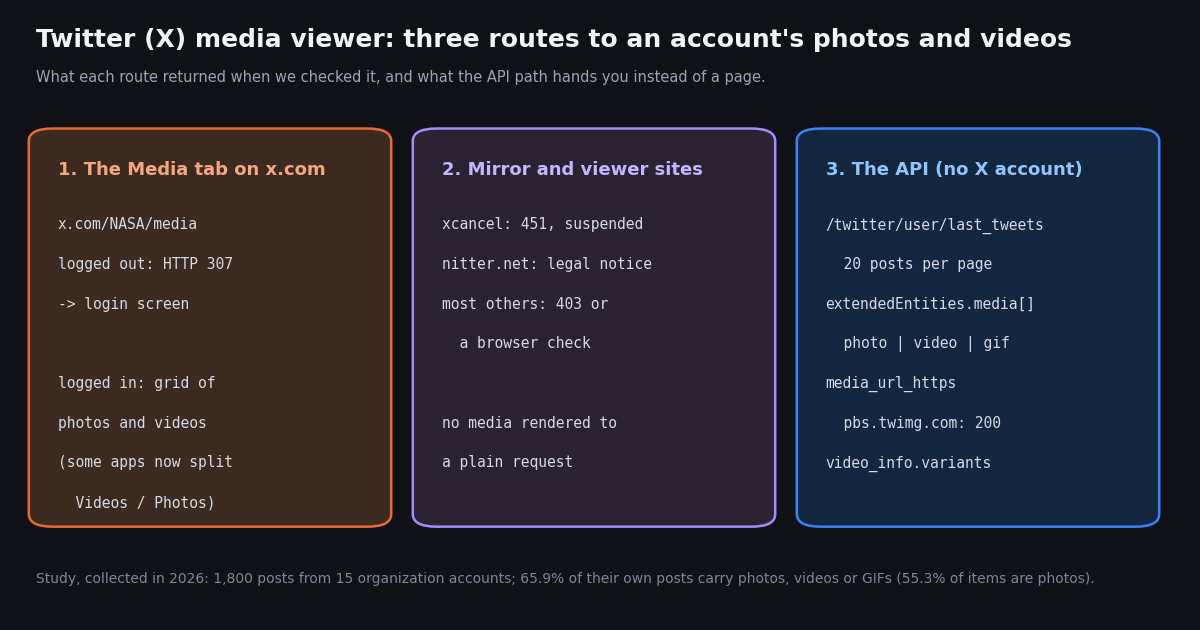
This page is about browsing: you want to scroll through the photos, videos and GIFs one X (Twitter) account has posted, the way the profile Media tab shows them, ideally without logging in. If you want to save hundreds of files to disk, our bulk Twitter media download guide is the better fit, and if you want to read X in general (posts, replies, profiles) without an account, see the Twitter web viewer guide. Here we cover the Media tab itself, what happens to it when you are logged out, which viewer sites still render media, and a short script that builds your own media gallery for any public account.
Everything below was checked in 2026 with plain requests: status codes, redirects and what each page actually contained. The short version for mirror sites: xcancel is suspended (see what happened to xcancel and the alternatives) and public Nitter instances are mostly down or gated (our Nitter instance status check tracks them). We also measured, for 15 well-known organization accounts, how much of their timeline is media at all and how many timeline pages it takes to collect 100 media items.
What is a Twitter media viewer, and where is the Media tab?
On X, every public profile has a Media tab at x.com/<username>/media. It shows the account's posts that carry photos, videos or animated GIFs as a grid, newest first, so you can skim an account's visual output without the text posts in between. When people search for a "Twitter media viewer", "Twitter gallery viewer" or "Twitter photo viewer", they usually mean one of three things: that tab, a third-party site that reproduces it without a login, or a tool that pulls the media out so you can view or save it elsewhere.
On the web. Open the profile and click Media, or type /media after the profile URL. The grid needs you to be signed in on x.com (see the next section).
In the X apps. The tab sits in the row under the bio. In May 2026, users reported that an app update replaced Media with a Videos tab on some devices, with Photos moved into a dropdown (tap Videos again, then choose Photos), and that iOS showed separate Videos and Photos tabs for some people. X has not announced or explained the change, so treat it as a rollout that differs by device and app version.
Through search. X's search operators let you filter one account's posts to media with from:<username> filter:media, or narrower filter:images and filter:videos. On x.com this also requires a login, as the table in the next section shows. The operators are documented in X's search help (help.x.com/en/using-x/x-search).
Can you view Twitter media without logging in? What we saw
We requested the official Media tab, the media search and a set of viewer sites in 2026 and recorded exactly what came back. A browser that runs JavaScript may get a little further on the sites that show a browser check, but none of them returned media to us.
The Media tab is behind the login wall. x.com/NASA/media did not render a grid for a logged-out visitor; it redirected to sign-in, and so did the filter:media search. The profile page and a single post link returned HTTP 200 instead of a redirect, so a photo or video someone sends you as a post link is usually viewable; browsing the whole gallery is not.
The media files themselves are public. The image and video URLs that X serves for a public post (on pbs.twimg.com and video-s.twimg.com) loaded for us with no cookies at all. That is why the API route later on this page works: you get the list of files from the API and your browser loads them directly.
Protected accounts are different. Posts from a protected account are only visible to approved followers (help.x.com/en/safety-and-security/public-and-protected-posts). No viewer site and no API route on this page shows them, and any site that claims it can is worth avoiding.
Do Twitter media viewer sites still work?
For years the usual answer was a Nitter instance or a viewer site such as xcancel, sotwe or twstalker: you swapped the domain in an x.com link and got the same profile, Media tab included, without an account. Those sites depended on X's internal guest access or on pools of logged-in sessions, and both have been closed off or contested.
xcancel. xcancel.com returned HTTP 451 to every path we tried, with a page that says "XCancel service is suspended." Our xcancel alternatives page covers the background.
Nitter. nitter.net answered with a notice instead of NASA's media. The notice says X Corp. sent cease and desist letters on 24 August 2026 and again on 8 September 2026 demanding a takedown of Nitter instances and the project's repository, and, in its October update, that "Nitter currently has no legal counsel." Of the other public instances we tried, two did not respond, two returned 403 and one served a proof-of-work check page.
Other viewers. sotwe.com, twstalker.com, twitterwebviewer.com and twiiit.com (which redirected to lightbrd.com) all returned a 403 browser-check page. That does not prove they are broken for every visitor, but we could not confirm that any of them renders an account's media.
What to watch for. If you do find a viewer site that loads, be wary of any that ask you to install an extension or sign in with your X password, and of any that claim to show private or protected accounts: that claim is never true. Downloading a file you can already see is a different, narrower job: our Twitter video downloader tool takes one post link at a time.
How much media do accounts actually post? Our 15-account study
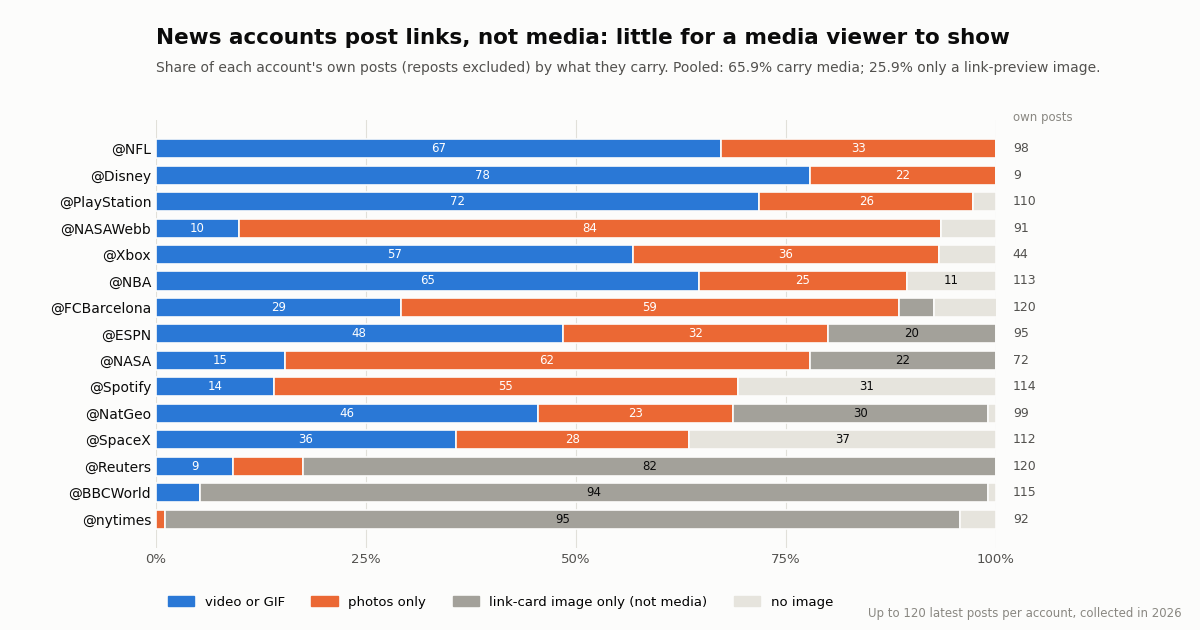
Before building or picking a media viewer, it helps to know what it will show. We pulled the latest posts of 15 organization and media accounts (1,800 posts, 1,404 of them the accounts' own posts after removing 396 reposts) and counted the media attached to each post. Collected in 2026.
65.9% of own posts carried media. Across all accounts, 925 of 1,404 own posts had at least one photo, video or GIF, for 1,069 media items in total: 55.3% photos, 44.4% videos and 0.3% animated GIFs. A media post carried 1.16 items on average, and only 7.2% had more than one.
News accounts barely use media. @nytimes (1.1%), @BBCWorld (5.2%) and @Reuters (17.5%) post links whose preview image comes from the article's link card, not from an uploaded photo. Those preview images do not appear in extendedEntities.media, and a gallery of their media would be almost empty. Across the whole sample, 25.9% of own posts had only a link-card image.
Sports, gaming and space accounts are media-first. @NFL (100.0%), @PlayStation (97.3%) and @NASAWebb (93.4%) attached media to nearly every post, with video dominating for sports and gaming and photos for @NASAWebb.
How many pages does it take to browse 100 photos and videos?
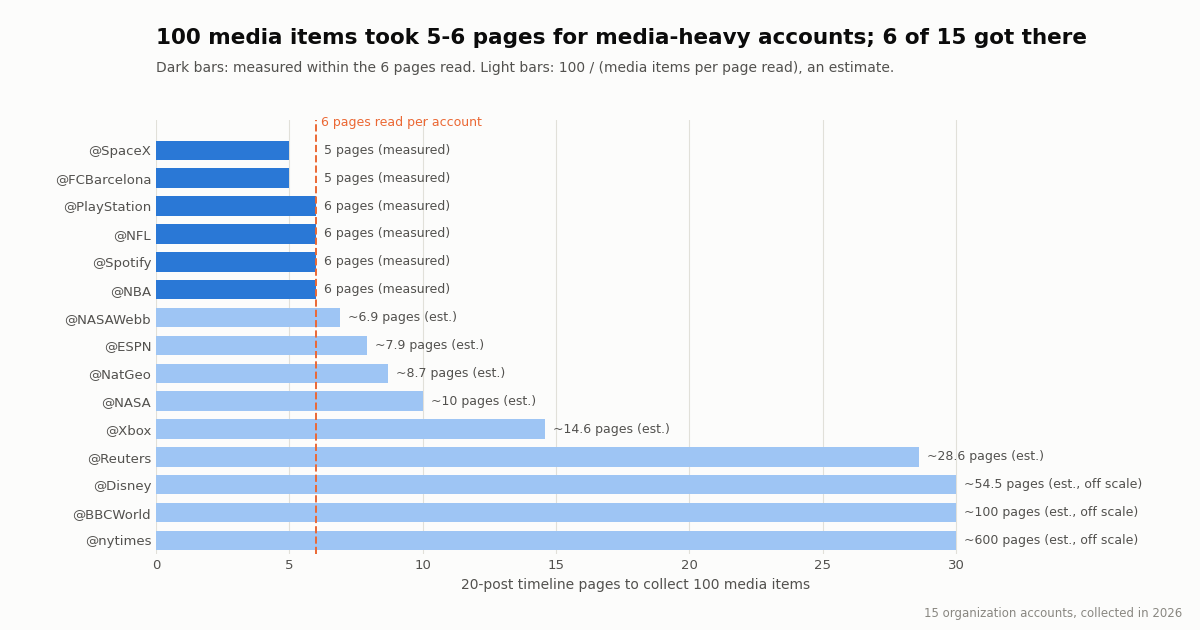
A media viewer built on a user timeline reads 20 posts per page, so the number of pages is the cost and the wait. We read 6 pages per account and recorded when the 100th media item arrived. 6 of 15 accounts got there within 6 pages; for the rest, the table shows an estimate from their media per page (100 divided by media items per page read).
Read the last column as a budget. For a media-heavy account, 100 media items cost 5 or 6 pages: 100 to 120 posts, or $0.015 to $0.018 at $0.15 per 1,000 tweets. For a link-first news account the same 100 items could take dozens of pages, which is why the script below stops at a page limit as well as a media count.
Reposts dilute the timeline. 396 of the 1,800 posts were reposts, which carry another account's media. @Disney is the extreme case: only 9 of its 120 latest posts were its own, so its media per page is low even though every own post had media. The script skips reposts by default; pass --include-reposts to keep them.
Alt text is rare. Only 13.9% of media items carried alt text, almost all from @NASAWebb (92.0%), @NASA (80.0%) and @Xbox (39.0%). If you build a viewer, show it when it exists: it is the only description of the image you get.
Build your own Twitter media viewer with the API, and what it costs
If you need to browse media from an account regularly, or the viewer sites will not load, the dependable route is to ask for the data and render it yourself. TwitterAPI.io's /twitter/user/last_tweets endpoint returns an account's latest posts, 20 per page, newest first, with has_next_page and next_cursor for paging (documented at docs.twitterapi.io/api-reference/endpoint/get_user_last_tweets). You do not need an X account, only an API key; new accounts that pass the automatic bot check get up to $1 of free credits (at most 100,000 credits, no card, one per person or network, expiring after 31 days), which covers roughly 6,600 posts.
Each post's media sits in extendedEntities.media[]. Every item has a type of photo, video or animated_gif and a media_url_https. For a photo, that URL is the image; append ?name=orig to get the original size, which we confirmed loads directly from pbs.twimg.com. For a video or GIF it is the poster frame, and the playable files are in video_info.variants: an HLS playlist plus several MP4 files with a bitrate field. Pick the highest-bitrate MP4 for the best quality.
What it costs compared with the official X API.
On TwitterAPI.io you pay only for the data returned: a full 20-post page costs $0.003, and every request has a 15-credit minimum ($0.00015) even if it returns nothing. X's own rate card (docs.x.com/x-api/getting-started/pricing) lists $0.005 per post read and $0.010 per user read, with pay-per-usage capped at 3 million post reads a month. Per 1,000 posts that is $5 against $0.15, about 33x. Our whole study, 1,800 posts plus 15 profile lookups, cost about $0.27. Subscription plans and rate limits are on our pricing page.
The ten lines below list the media in one page of an account's timeline. The full script at the end of this page follows next_cursor, stops at a media count, skips reposts, and writes an HTML gallery you can open in any browser.
import os, requests

BASE = "https://api.twitterapi.io"
r = requests.get(f"{BASE}/twitter/user/last_tweets",
                 headers={"X-API-Key": os.environ["TWITTERAPI_IO_API_KEY"]},
                 params={"userName": "NASA"}, timeout=30)
for t in r.json()["data"]["tweets"]:
    for m in (t.get("extendedEntities") or {}).get("media", []):
print(m["type"], m["media_url_https"], t["url"])The media object: fields a viewer needs
A trimmed media item from one of the posts in our sample looks like this. Field names are exactly as the API returns them.
type decides how to render: an img tag for photo, a video tag for video and animated_gif (a GIF on X is a short looping MP4).
media_url_https is the image for photos and the poster frame for videos. Size suffixes such as ?name=small and ?name=orig select the rendition.
video_info.duration_millis gives the length. In our sample the median video was 24.9 seconds; @NASAWebb's were far longer at a median of 159.0 seconds.
ext_alt_text carries the poster's image description when there is one. X's own developer docs describe the same fields for the official API's media object as type (animated_gif, photo, video), url, preview_image_url, variants, duration_ms and alt_text, requested with expansions=attachments.media_keys.
"extendedEntities": {
  "media": [
    {
      "type": "video",                      // photo | video | animated_gif
      "media_url_https": "https://pbs.twimg.com/amplify_video_thumb/.../img/....jpg",
      "ext_alt_text": null,                 // alt text, when the poster wrote one
      "video_info": {
        "aspect_ratio": [9, 16],
        "duration_millis": 8775,
        "variants": [
          {"content_type": "application/x-mpegURL", "url": "https://video-s.twimg.com/.../pl/....m3u8"},
          {"content_type": "video/mp4", "bitrate": 632000,  "url": "https://video-s.twimg.com/.../320x568/....mp4"},
          {"content_type": "video/mp4", "bitrate": 2176000, "url": "https://video-s.twimg.com/.../720x1280/....mp4"}
        ]
      }
    }
  ]
}Which Twitter media viewer route should you use?
You just want to see one post's photo or video. Open the post link directly; single posts usually load without an account. To keep a copy, use our Twitter video downloader tool or our guide to downloading pictures at full quality.
You want to scroll an account's whole gallery once. Sign in to X and use the Media tab (or Videos and Photos in apps that have split it). It is the only route that shows everything in X's own layout.
You do not have, or do not want, an X account. Viewer sites were the old answer, but none returned media to us in 2026. The script on this page gives you the same gallery for any public account for a few tenths of a cent per page.
You want to archive or analyze media at scale. Use the API, follow next_cursor to the end of the timeline, and download the files with retries; the bulk download guide walks through storage and HLS video.
You want someone's likes. That is a different question: likes became private on X in June 2024, so neither the Media tab nor any API returns another account's likes. Our page on why likes disappeared explains the change.
How we collected this
Question. How much of an organization account's timeline is media (photo, video, animated GIF), how many media items a media post carries, and how many 20-post timeline pages it takes to collect 100 media items.
Accounts. 15 public organization and media accounts: @NASA, @NASAWebb, @SpaceX, @NatGeo, @Reuters, @BBCWorld, @nytimes, @NBA, @NFL, @ESPN, @FCBarcelona, @PlayStation, @Xbox, @Disney and @Spotify.
Method and window. /twitter/user/last_tweets with replies excluded (the default), 6 pages per account, newest first: the most recent posts at collection time, collected in 2026. Media was read from extendedEntities.media[]; reposts were counted but excluded from media counts. One /twitter/user/info call per account added the profile totals. 105 requests, 1,800 posts, about $0.27.
Site checks. Plain HTTP requests with a desktop browser user agent, with and without a proxy (status codes matched), plus a page fetch to read what each site displayed. A browser running JavaScript may get past checks that a plain request does not.
What the sample cannot show. 120 recent posts per account is a snapshot, not a history; a burst of video before a launch or a game can swing an account's mix. Organization accounts are not typical users. Pages-to-100 for accounts that did not reach 100 media items within 6 pages is an extrapolation.
Privacy. Aggregates only, organization accounts only; we did not analyze reposted or quoted authors. The study files (protocol, analysis script, results) are kept with the page source.
"""twitter_media_viewer.py - list every photo, video and GIF an X (Twitter) account posted,
newest first, without an X account. Writes a simple HTML gallery you can open in a browser.

    pip install requests
    export TWITTERAPI_IO_API_KEY=...        # from the twitterapi.io dashboard
    python3 twitter_media_viewer.py NASA --max-media 100

Cost: 15 credits per tweet returned ($0.15 per 1,000 tweets), so one 20-post page is $0.003.
Only public accounts: protected accounts' posts are not returned.
"""
import argparse
import html
import os
import sys
import time

import requests

BASE = "https://api.twitterapi.io"
HEADERS = {"X-API-Key": os.environ["TWITTERAPI_IO_API_KEY"]}


def best_mp4(video_info):
    """Highest-bitrate MP4 variant (the m3u8 playlist has no bitrate)."""
    mp4s = [v for v in video_info.get("variants", []) if v.get("content_type") == "video/mp4"]
    return max(mp4s, key=lambda v: v.get("bitrate", 0))["url"] if mp4s else None


def iter_media(user, max_pages, include_reposts=False):
    cursor = ""
    for page in range(1, max_pages + 1):
        r = requests.get(
            f"{BASE}/twitter/user/last_tweets",
            headers=HEADERS,
            params={"userName": user, "cursor": cursor},
            timeout=30,
        )
        if r.status_code == 429:  # slow down and retry the same page
            time.sleep(5)
            continue
        r.raise_for_status()
        body = r.json()
        if body.get("status") != "success":
            sys.exit(f"API error: {body.get('msg')}")
        for t in (body.get("data") or {}).get("tweets", []):
            if t.get("retweeted_tweet") and not include_reposts:
                continue  # a repost carries someone else's media
            for m in (t.get("extendedEntities") or {}).get("media", []):
                item = {
                    "page": page,
                    "post_url": t["url"],
                    "created_at": t["createdAt"],
                    "type": m["type"],  # photo | video | animated_gif
                    "alt": m.get("ext_alt_text") or "",
                }
                if m["type"] == "photo":
                    item["file"] = m["media_url_https"] + "?name=orig"  # original size
                    item["thumb"] = m["media_url_https"] + "?name=small"
                else:
                    item["file"] = best_mp4(m.get("video_info") or {})
                    item["thumb"] = m["media_url_https"]  # poster frame
                yield item
        if not body.get("has_next_page"):
            break
        cursor = body["next_cursor"]


def main():
    ap = argparse.ArgumentParser()
    ap.add_argument("user", help="screen name without @, e.g. NASA")
    ap.add_argument("--max-media", type=int, default=100)
    ap.add_argument("--max-pages", type=int, default=10, help="20 posts per page")
    ap.add_argument("--include-reposts", action="store_true")
    a = ap.parse_args()

    items = []
    for item in iter_media(a.user, a.max_pages, a.include_reposts):
        items.append(item)
        print(f"{item['type']:<13} {item['file']}")
        if len(items) >= a.max_media:
            break
    pages = items[-1]["page"] if items else 0
    print(f"\n{len(items)} media items from {pages} page(s), about ${pages * 0.003:.3f} at full pages")

    cells = "".join(
        f'<a href="{html.escape(i["post_url"])}" title="{html.escape(i["alt"][:200])}">'
        f'<img src="{html.escape(i["thumb"])}" loading="lazy" alt="{html.escape(i["type"])}"></a>'
        for i in items
    )
    with open(f"{a.user}-media.html", "w") as f:
        f.write(
            "<!doctype html><meta charset=utf-8><title>@" + html.escape(a.user) + " media</title>"
            "<style>body{background:#111;margin:0;display:grid;grid-template-columns:repeat(auto-fill,minmax(180px,1fr));gap:4px}"
            "img{width:100%;aspect-ratio:1;object-fit:cover;display:block}</style>" + cells
        )
    print(f"gallery written to {a.user}-media.html")


if __name__ == "__main__":
    main()
Questions readers ask
How do I view all photos and videos from an X (Twitter) account?
Open the profile and select the Media tab, or go to x.com/<username>/media. On x.com this requires being signed in: logged out, the request redirected us to the login flow. Some X apps now show Videos and Photos tabs instead of Media; tap Videos and choose Photos to see images. Without an account, an API call to a user timeline returns each post's media URLs.
Can I see someone's Twitter media without an account?
Only partly. Single post links usually open logged out, and the image and video files on pbs.twimg.com and video-s.twimg.com load without login. The full Media tab and the filter:media search redirected us to the login screen, and the mirror sites we tried (xcancel, nitter.net, sotwe, twstalker) did not return media. An API such as TwitterAPI.io's /twitter/user/last_tweets lists media for public accounts without an X account.
Where did the Media tab go on X?
In May 2026 users reported that an X app update replaced the profile Media tab with a Videos tab on some devices, with Photos available from a dropdown when you tap Videos again; iOS showed separate Videos and Photos tabs for some users. X has not commented on whether this is permanent. The web version at x.com/<username>/media still exists for signed-in users.
Is there a Twitter media viewer for private (protected) accounts?
No. Posts from protected accounts, including their photos and videos, are visible only to approved followers. Viewer sites cannot show them and the API does not return them. Sites that claim otherwise are not telling the truth.
Do Nitter or xcancel still work as a Twitter media viewer?
Not when we checked in 2026. xcancel.com returned HTTP 451 with a page saying the service is suspended, and nitter.net showed a notice about X Corp.'s cease and desist letters instead of posts. Other public Nitter instances either did not respond, returned 403, or showed a check page.
How do I get the full-size image from a tweet?
Take the photo's media_url_https (for example pbs.twimg.com/media/<id>.jpg) and add ?name=orig. That returns the original upload size; we confirmed such a URL loads directly without login.
Why does a news account's Media tab look empty?
Many news accounts post links rather than uploaded media. The preview image you see comes from the article's link card, which is not media attached to the post. In our sample, 94.6% of @nytimes's own posts and 93.9% of @BBCWorld's had only a link-card image.
How much does it cost to list an account's media with an API?
On TwitterAPI.io, user timelines cost $0.15 per 1,000 tweets returned, so one 20-post page is $0.003 and 100 media items from a media-heavy account (5-6 pages) is about $0.015-$0.018. The official X API lists $0.005 per post read, about 33x more per 1,000 posts.
Continue
- TwitterAPI.io docs: Get User Last Tweets (/twitter/user/last_tweets, 20 per page, cursor, includeReplies)
- X developer docs: data dictionary, Media object (type animated_gif, photo, video; variants; alt_text)
- X developer docs: pay-per-usage pricing ($0.005 per post read, 3M post reads a month cap)
- X Help Center: About public and protected posts
- X Help Center: How to use advanced search
- Nitter project repository (GitHub)
- Twitter (X) API overview: endpoints, pricing and limits
- Bulk-download Twitter (X) photos and videos with the API
- Twitter (X) web viewer: read X without an account
- Nitter instances status check
- xcancel not working: the alternatives that still work
- Free Twitter (X) video downloader
- Download pictures from Twitter at full quality
- Why you cannot see likes on Twitter (X) anymore
- TwitterAPI.io pricing and plans
- 01GetXBot: What the Twitter (X) Video Bot Is, Whether It Is Safe, and Alternatives
- 02The Best Twitter (X) Accounts to Follow, by Topic
- 03What Is xcancel (X Cancel)? The Twitter (X) Nitter Front End, Explained
- 04AllMyTweets: What It Did, Its Limits, and How to See Every Tweet on Twitter (X)
- 05Twitter (X) Private Profile Viewer: Can You See Protected Tweets?
- 06Social Media API Explained: Four Kinds, and What the Twitter (X) Data Costs
- 07Twillot Twitter (X) Viewer: What It Is, Whether It Works, and Is It Safe?
- 08Snaplytics Twitter (X) Viewer: What It Is, Whether It Works, and Safer Options
Stop reading. Start building.
Starter credits cover real testing on real data. Google sign-in, no card, no application queue.
Get an API key