Exa vs Tavily: Which Search API Should Your AI Agent Use (and What Both Miss on Twitter (X))
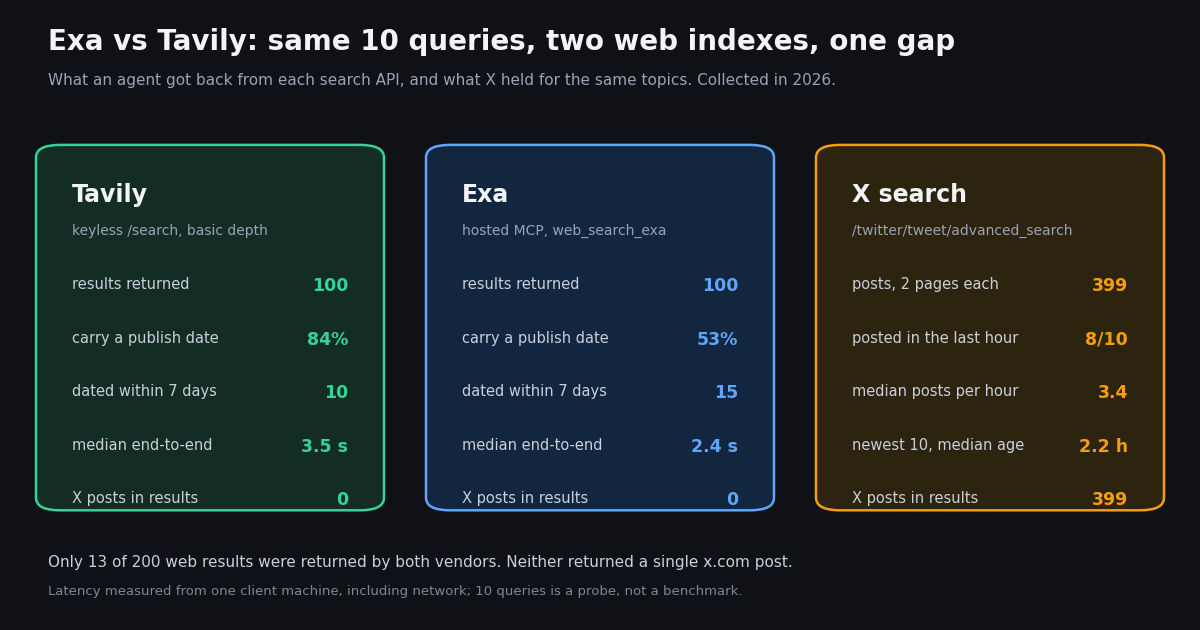
- Low overlap. On the same 10 queries, only 13 of 200 results were returned by both Exa and Tavily, so they are not interchangeable indexes.
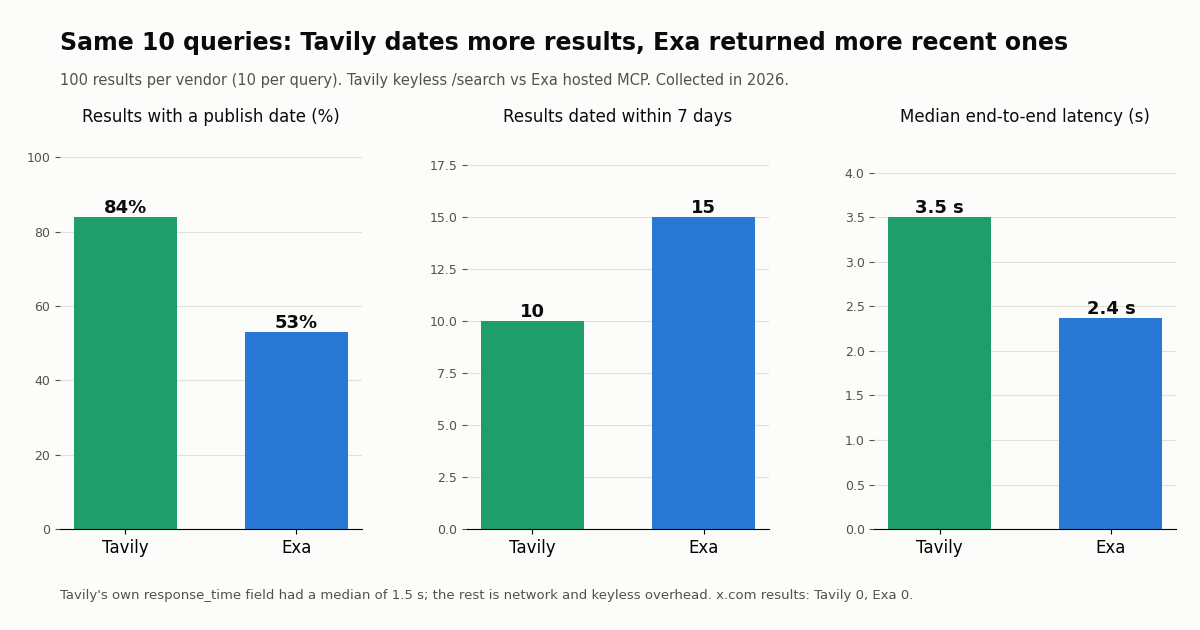
- Dates vs recency. Tavily dated 84% of results, Exa 53%; Exa returned 15 results from the last 7 days, Tavily 10.
- Latency from one client. Median end to end: Exa 2.4 s (hosted MCP), Tavily 3.5 s (keyless), though Tavily's own
response_timefield had a median of 1.5 s. - Pricing models differ. Exa: $4 (Lite) or $7 (Auto) per 1,000 searches with up to 10 results. Tavily: 1 credit per basic search at $0.008 per credit pay-as-you-go, $30/month for 4,000 credits on Project.
- The gap is X. Neither API returned an x.com post in 200 results; X held 399 recent posts on the same 10 topics, a median 3.4 posts per hour.
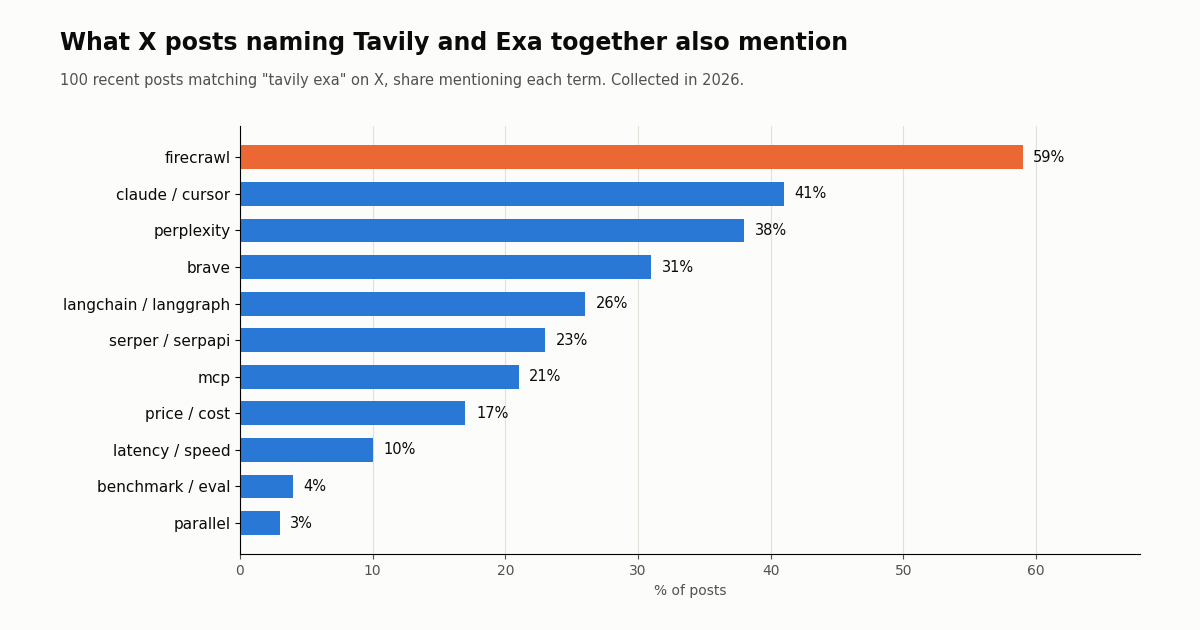
- On X, Tavily gets compared more. 33% of recent posts naming Tavily also named Exa; posts naming both most often also named Firecrawl (59%).
Exa and Tavily come up in the same breath whenever someone wires web search into an agent: both expose a search endpoint that returns LLM-ready results, both ship an MCP server, both have LangChain integrations, and both price below a classic SERP scraper. The vendor comparison pages for each side argue their own case, and most third-party roundups quote those vendor benchmarks back. We did something narrower and more useful for a build decision: we sent the same 10 queries to both and measured what came back.
This page is the head-to-head decision. For Tavily's endpoints, keys and full plan list, our separate Tavily API guide goes deeper, and we keep Exa's endpoint-by-endpoint price list out of scope here; the table below summarizes each vendor in one row. The last third of the page covers the one thing neither index returned in our test, live posts from Twitter (X), and how to add that as a third tool with a measured cost.
13 of 200
Exa vs Tavily at a glance
Both are search APIs designed to be called by models rather than people, but they come from different starting points. Exa describes itself as an AI search engine and lists its own web, people, company and scholarly-works indexes, reachable through a category parameter. Tavily describes itself as the web access layer for AI agents, with five endpoints (Search, Extract, Research, Crawl, Map) and results that already carry extracted content chunks.
Prices and limits above were read from exa.ai/pricing, docs.exa.ai (Billing and Rate Limits), tavily.com/pricing and docs.tavily.com (Credits and Pricing, Rate Limits) this session. Exa's free tier figure is a dollar balance, Tavily's is a credit count, so the two are not directly comparable: at Exa's Auto price, $10 covers about 1,400 searches; Tavily's 1,000 credits cover 1,000 basic searches.
The test: the same 10 queries through both APIs
We wrote 10 queries a developer's agent might plausibly send: six time-sensitive (a Claude Code release, an OpenAI model announcement, Cursor pricing reactions, the MCP specification, Nvidia earnings, a Starship launch) and four evergreen (LangGraph release notes, vector databases for RAG, Exa vs Tavily itself, Python 3.14 features). Each went once to Tavily's search endpoint in its documented keyless mode (basic depth, 10 results, publish dates requested) and once to Exa's hosted MCP server tool web_search_exa (10 results), which wraps Exa search. We did not quote either vendor's benchmark.
Read across the rows and the pattern is consistent. Tavily attached a publish date to 84 of its 100 results; Exa's MCP output carried one for 53. But when dates were present, Exa leaned newer: the median of each query's median result age was 60.8 days for Exa and 148.8 days for Tavily, and on the six time-sensitive queries Exa returned 13 results from the past week against Tavily's 10.
The overlap number matters most for architecture. Across all 10 queries, the two vendors returned the same URL only 13 times out of 200 results (a median of 1 shared URL per query). If you are deciding whether to call both for recall, that is the evidence for it: each surfaces pages the other does not.
Latency, and what it does not show. From one client machine, Exa's hosted MCP tool answered in a median 2.4 s (range 2.2 to 2.6 s) and Tavily's keyless search in a median 3.5 s (range 2.0 to 4.5 s). Those are wall-clock times including the network path, TLS and the keyless or MCP layer, so treat them as relative, not absolute.
Tavily returns its own response_time field in each response, and that server-side median was 1.5 s, which says most of the end-to-end gap was outside Tavily's search itself. Exa's documentation describes Lite search as serving content straight from its index without fetching pages at query time, and its pricing page advertises configurable latency of 450 ms to 1 s for Search. Tavily's search reference positions ultra-fast as the lowest-latency depth. If latency sets your agent's timeout budget, test the paid endpoint with the mode you will actually ship, from the region you will run in.
Rate limits shape latency under load. Exa's default is 10 queries per second on /search for the whole team (5 QPS for the deep modes), rising to 25 QPS automatically for 90 days after you buy $1,000 of credits in any 30-day window. Tavily counts requests per minute: 100 on the free Researcher plan, 1,000 with pay-as-you-go or Project, Bootstrap and Startup, 1,500 on Growth, with separate caps of 100 RPM for Crawl and Map and 20 RPM for Research. Both return 429; Tavily includes a Retry-After header.
Pricing: what 1,000 searches cost on each
Exa prices per 1,000 requests. Lite search is $4 and Auto search is $7, each covering up to 10 results; every result above 10 adds $1 per 1,000, and AI page summaries add $1 per 1,000 pages. Deep search modes are $12 (deep-lite, deep) and $15 (deep-reasoning) per 1,000. The separate Contents endpoint is $1 per 1,000 pages per content type, and Answer is $5 per 1,000 requests. Exa's Agent endpoint is priced per run from $0.012 (minimal effort) to $1.00 (x-high).
Tavily prices in credits. A basic, fast or ultra-fast search is 1 credit and an advanced search is 2. Extract costs 1 credit per 5 successful URLs (2 for advanced), Map 1 credit per 10 pages, Crawl is mapping plus extraction, and Research costs 4 to 110 credits per request on mini and 15 to 250 on pro. Credits cost $0.008 each pay-as-you-go, $0.0075 on Project ($30/month, 4,000 credits), $0.0067 on Bootstrap ($100/month, 15,000), $0.0058 on Startup ($220/month, 38,000) and $0.005 on Growth ($500/month, 100,000).
Two things change the math in practice. First, Tavily's search result already includes content chunks (about 500 characters each at basic depth, 3 per source by default), while with Exa you choose what content to request, and the Contents line item is billed per page per content type, so read Exa's pricing for the exact contents you ask for. Second, Tavily resets credits on the first of each month and stops requests when a plan runs out unless pay-as-you-go is enabled; Exa is prepaid credits with optional auto-recharge.
Features that decide it: indexes, filters, extraction and integrations
Specialized indexes. Exa's category parameter routes to people and company indexes and to publication for research papers with authors, venue and citations. That has no direct Tavily equivalent; Tavily's topic switches between general, news and finance.
Filters. Both take domain filters: Exa includeDomains (up to 1,200 entries, including path prefixes and wildcard subdomains) and Tavily include_domains (up to 300) with an include_domains_mode of restrict or prefer. Both take date filters: Exa startPublishedDate and endPublishedDate, Tavily time_range or start_date and end_date. Both expose a cache-age control, maxAgeHours on Exa contents and max_age_hours on Tavily search, each up to 720 hours.
Extraction and crawling. Tavily has first-class Extract, Crawl and Map endpoints for turning sites into LLM context. Exa has a Contents endpoint (text, highlights, summaries) and Monitors that rerun a search on a schedule and push new results to a webhook.
Deep research. Exa offers deep search modes and an asynchronous Agent endpoint; Tavily has a Research endpoint with mini and pro models.
Agent integrations. Both run hosted MCP servers (Exa at mcp.exa.ai/mcp, Tavily at mcp.tavily.com/mcp/), both have Python and JavaScript SDKs, and Tavily maintains the official langchain-tavily package. In our test Exa's hosted MCP server and Tavily's REST search (with its documented keyless header) both answered without a key, which makes a side-by-side trial cheap; Tavily's MCP server returned 401 without credentials and, per its docs, signs you in from the client.
Twitter (X) coverage. Exa's current search reference lists no tweet category among its options, and neither API returned an x.com URL in the 200 results we collected. For agents that need what people are saying right now, this is the structural gap covered below.
import os, requests

TAVILY = os.environ["TAVILY_API_KEY"]
EXA = os.environ["EXA_API_KEY"]

def tavily_search(q, n=10):
    r = requests.post("https://api.tavily.com/search",
                      headers={"Authorization": f"Bearer {TAVILY}"},
                      json={"query": q, "max_results": n, "search_depth": "basic",
                            "include_published_date": True}, timeout=30)
    r.raise_for_status()
    return [(x["url"], x.get("published_date")) for x in r.json()["results"]]

def exa_search(q, n=10):
    r = requests.post("https://api.exa.ai/search",
                      headers={"x-api-key": EXA},
                      json={"query": q, "numResults": n, "type": "auto"}, timeout=30)
    r.raise_for_status()
    return [(x["url"], x.get("publishedDate")) for x in r.json()["results"]]

q = "SpaceX Starship latest launch"
t, e = tavily_search(q), exa_search(q)
shared = {u for u, _ in t} & {u for u, _ in e}
print(len(t), "Tavily results,", len(e), "Exa results,", len(shared), "shared URLs")What X says about Exa vs Tavily
We also searched X for each product. Over the most recent window, posts matching our Tavily query arrived at 19.6 per day (14.5 excluding replies), and posts matching our Exa query at 51.3 per day, but 81% of those were replies, many in threads under Exa's own posts, leaving 9.7 non-reply posts per day. The comparison runs mostly one way: 33% of posts naming Tavily also named Exa, against 2% of posts naming Exa that also named Tavily.
Posts that named both (100 recent posts, 6.5 per day) read like stack lists. Firecrawl appeared in 59% of them, Claude or Cursor in 41%, Perplexity in 38%, Brave in 31%, LangChain or LangGraph in 26%, and MCP in 21%. Only 4% mentioned a benchmark or eval. In other words, developers on X mostly list Exa and Tavily side by side as interchangeable building blocks rather than arguing results.
Exa posts less often (1.4 a week across its last 100 posts) but with much larger reach per post; Tavily posts more often and links out more (78% of its own posts carry a link, against 24% for Exa). Medians exclude reposts.
The gap neither covers: live posts from Twitter (X)
For each of the 10 topics we also ran an X keyword search (latest posts, retweets excluded, two pages). It returned 399 posts. For 8 of the 10 topics the newest post was less than an hour old, the median topic produced 3.4 posts per hour, and the median age of the newest 10 posts per topic was 2.2 hours. The Nvidia earnings query alone ran at more than 100 posts per hour. Both web indexes returned zero of those posts.
That is not a flaw in either product; most X content sits behind a login wall and neither vendor offers it as a product. But it matters for a class of agent tasks: reaction to a launch, a pricing change, an outage, a market move, or what a specific founder or company account just said. A web index can tell the agent what the press release or changelog says; only X tells it how developers responded in the last hour.
What to use for that. TwitterAPI.io's /twitter/tweet/advanced_search takes the same search operators as X search (from:, since_time:, min_faves:, -filter:retweets, lang:) and returns 20 posts per page with has_next_page and next_cursor, each post carrying its text, createdAt, author and engagement counts. Reads need no X account. Add it as a third tool next to Exa or Tavily, and let the model call it when the question is about reaction, sentiment or a specific account.
Wire Exa, Tavily and X into one agent
The simplest setup for an MCP client (Claude Code, Cursor, VS Code, Cline) is three remote servers in one config. Tavily's docs give the plain URL and have the client sign you in to Tavily when it connects; Exa's hosted server answered without a key in our test. For production, authenticate each vendor as its docs describe. TwitterAPI.io's hosted server is mcp.twitterapi.io/mcp with your key sent as a Bearer token, the same form our MCP quick start shows.
For a code-first agent, the end-to-end Python example at the bottom of this page calls Tavily and Exa for web context, merges and dedupes URLs, then calls /twitter/tweet/advanced_search for live posts with cursor paging. Keep the X call bounded (two pages is 40 posts) so the tool stays cheap and fast in a loop.
The X data bill. TwitterAPI.io charges 15 credits per tweet returned, $0.15 per 1,000 tweets, with a 15-credit minimum per request ($0.00015 for a search that finds nothing), so you pay only for the data returned. Our 399 topic posts cost about $0.06; on the official X API pay-per-usage rate card ($0.005 per post read) the same reads would be about $2.00. Per 1,000 tweets that is $0.15 versus $5, about 33x. Profiles are $0.18 per 1,000. New accounts that pass the automatic bot check get up to $1 of free credits (at most 100,000 credits, no card, one per person or network, expiring after 31 days); purchased credits never expire. Rate limits are 0.2 requests per second before the first payment and 20 once paid.
{
  "mcpServers": {
    "tavily": { "url": "https://mcp.tavily.com/mcp/" },
    "exa": { "url": "https://mcp.exa.ai/mcp" },
    "twitterapi-io": {
      "url": "https://mcp.twitterapi.io/mcp",
      "headers": { "Authorization": "Bearer your_key_here" }
    }
  }
}Which should you pick?
Pick Exa if your agent needs people, company or research-paper retrieval; you want semantic queries (describe the ideal page) rather than keyword queries; you care about tail latency in a tight loop and will use Lite search; you want more than 20 results per call; or you plan scheduled monitoring through Monitors.
Pick Tavily if you want every result to arrive with extracted content snippets at 1 credit; you are on LangChain and want the official langchain-tavily package; you need Extract, Crawl and Map alongside search; you prefer a fixed 1,000-credit free allowance or a predictable monthly plan; or you want publish dates on nearly every result for filtering.
Use both if recall matters more than cost. With 13 shared URLs in 200 results, calling both and deduping nearly doubles the distinct pages an agent sees, for about $7 plus $8 per 1,000 paired searches at the list rates above.
Add X if the questions are about what is happening now, what people think of a launch, or what a named account said. Neither web index returned X posts in our test, and that is where a dedicated X search tool fills the gap.
How we collected this
Question. Given the same 10 queries, how do Exa and Tavily differ in results, publish dates, recency, overlap and end-to-end latency, and what does X hold on the same topics that neither returns? Second, how are the two products discussed on X?
Queries and accounts. 10 queries (listed in the table above), each sent once to Tavily keyless /search (basic depth, 10 results) and once to Exa's hosted MCP tool web_search_exa (10 results), 10 calls per vendor. On X: a Latest keyword search per topic (2 pages), mention searches for each product and for both together, and the last 100 posts plus profile of the two official organization accounts, @ExaAILabs and @tavilyai.
Sample and window. 200 web results and 1,299 X posts, collected in 2026. X windows are the most recent posts at collection time. The study used 67 TwitterAPI.io requests, about $0.20 at our rates (about $6.51 at the official X API pay-per-usage rates).
What the sample cannot show. Ten queries is a probe, not a benchmark, and we did not judge answer quality or relevance. Keyless Tavily is documented to return identical responses to keyed calls, but Exa's MCP tool may format and select results differently from the paid /search endpoint, and it omits a publish date when none is shown. Latency comes from one client and includes network time. Mention counts depend on our query wording and include replies.
Privacy. Aggregates only. The two official organization accounts are named; authors of searched posts are private individuals and are not named or profiled.
import os, requests

BASE = "https://api.twitterapi.io"
HEADERS = {"X-API-Key": os.environ["TWITTERAPI_IO_KEY"]}
TAVILY = os.environ["TAVILY_API_KEY"]
EXA = os.environ["EXA_API_KEY"]


def web_tavily(query, n=10):
    r = requests.post("https://api.tavily.com/search",
                      headers={"Authorization": f"Bearer {TAVILY}"},
                      json={"query": query, "max_results": n, "search_depth": "basic",
                            "include_published_date": True}, timeout=30)
    r.raise_for_status()
    return [{"source": "tavily", "url": x["url"], "title": x["title"],
             "date": x.get("published_date")} for x in r.json()["results"]]


def web_exa(query, n=10):
    r = requests.post("https://api.exa.ai/search", headers={"x-api-key": EXA},
                      json={"query": query, "numResults": n, "type": "auto"}, timeout=30)
    r.raise_for_status()
    return [{"source": "exa", "url": x["url"], "title": x.get("title"),
             "date": x.get("publishedDate")} for x in r.json()["results"]]


def x_posts(query, max_pages=2):
    """Latest X posts for a keyword query, paged with next_cursor."""
    posts, cursor = [], ""
    for _ in range(max_pages):
        r = requests.get(f"{BASE}/twitter/tweet/advanced_search", headers=HEADERS,
                         params={"query": query, "queryType": "Latest", "cursor": cursor},
                         timeout=30)
        r.raise_for_status()
        body = r.json()
        for t in body.get("tweets", []):
            posts.append({"source": "x", "url": t["url"], "text": t["text"],
                          "date": t["createdAt"], "likes": t.get("likeCount", 0),
                          "views": t.get("viewCount", 0)})
        if not body.get("has_next_page"):
            break
        cursor = body.get("next_cursor", "")
    return posts


def research(topic, x_query):
    web = web_tavily(topic) + web_exa(topic)
    seen, merged = set(), []
    for item in web:
        key = item["url"].rstrip("/")
        if key not in seen:
            seen.add(key)
            merged.append(item)
    chatter = x_posts(f"{x_query} -filter:retweets")
    return {"web": merged, "x": chatter}


if __name__ == "__main__":
    out = research("SpaceX Starship latest launch", "Starship launch")
    print(len(out["web"]), "unique web results,", len(out["x"]), "X posts")
    for p in out["x"][:5]:
        print(p["date"], p["likes"], p["text"][:100].replace("\n", " "))
Researching this?Free starter credits cover end-to-end testing — Google sign-in, no card. Get a key.
Questions readers ask
Is Exa or Tavily better for AI agents?
Neither wins on every axis. In our 10-query test Exa answered faster end to end (2.4 s vs 3.5 s median) and returned more results from the past week, while Tavily dated far more of its results (84% vs 53%) and includes content snippets in every result. Exa suits semantic, people, company and paper search; Tavily suits snippet-ready general search and LangChain stacks.
Which is less expensive, Exa or Tavily?
At list prices for 1,000 searches with 10 results, Exa costs $4 (Lite) or $7 (Auto) and Tavily costs $8 for basic search pay-as-you-go, or $5 on the $500/month Growth plan. Content retrieval can change that: Tavily's basic search already includes content chunks, while Exa bills its Contents line per page per content type.
Do Exa and Tavily return the same results?
Mostly not. Across our 10 queries only 13 of 200 result URLs appeared in both, a median of 1 per query, so calling both raises recall.
What free tier do Exa and Tavily offer?
Exa gives $10 in credits every month plus a one-time $10 onboarding bonus, no payment method required. Tavily's Researcher plan gives 1,000 API credits a month, no credit card required, resetting on the first of each month. Tavily also documents a keyless, rate-limited access mode.
What are Exa's and Tavily's rate limits?
Exa defaults to 10 queries per second on /search for the whole team, 25 QPS after you buy $1,000 of credits within 30 days. Tavily allows 100 requests per minute on the free plan, 1,000 with pay-as-you-go or entry paid plans, and 1,500 on Growth, with lower caps for Crawl, Map and Research.
Can Exa or Tavily search Twitter (X) posts?
Not in our test: neither returned an x.com post in 200 results across 10 queries, and Exa's current search reference lists no tweet category. An X search on the same topics returned 399 posts. For live X posts, add an X search tool such as TwitterAPI.io's /twitter/tweet/advanced_search, billed at $0.15 per 1,000 tweets returned.
Do Exa and Tavily have MCP servers?
Yes. Exa hosts one at mcp.exa.ai/mcp (it answered without a key in our test) and Tavily at mcp.tavily.com/mcp/ (clients sign in to Tavily on connect; it returned 401 to an unauthenticated call). You can add TwitterAPI.io's hosted server (mcp.twitterapi.io/mcp, key as a Bearer token) in the same client config for X data.
Which works better with LangChain?
Tavily maintains the official langchain-tavily package (published on PyPI from the tavily-ai GitHub organization); in our X sample, 26% of posts naming both products also mentioned LangChain or LangGraph. Exa also publishes integrations, so either works; the difference is mostly defaults and documentation.
Continue
- Exa docs: Billing and Rate Limits (plans, free credits, QPS per endpoint)
- Exa docs: Search endpoint reference (type, numResults, category, filters)
- Tavily docs: Credits and Pricing (plans, credit costs per endpoint)
- Tavily docs: Rate Limits (RPM by plan, endpoint caps, 429 handling)
- Tavily docs: Search endpoint reference (search_depth, max_results, topic, filters)
- X API docs: pay-per-usage pricing
- PyPI: langchain-tavily (official Tavily LangChain package)
- Twitter (X) API overview: endpoints, pricing and access
- Tavily API guide: endpoints, keys, credits and X search
- Perplexity API for developers and how it handles X
- Firecrawl alternatives for agent web data
- How to build an AI agent with tools and live data
- TwitterAPI.io hosted MCP server setup
- Add Twitter (X) search to a LangChain agent
- TwitterAPI.io pricing: $0.15 per 1,000 tweets returned
- 01Pipedream Pricing in 2026: Connect Plans, Credits and the Workflows Shutdown
- 02Cloudflare Pay per Crawl: How the HTTP 402 Handshake Works, and What It Means for Twitter (X) Data
- 03ScrapingBee Pricing in 2026: Plans, Credit Costs and Alternatives
- 04Firecrawl Pricing: Plans, Credit Costs and What an X (Twitter) URL Costs
- 05LunarCrush API: What It Returns, What It Costs, and When Raw Twitter (X) Data Is the Better Input
- 06Tavily API: Key, Credits, Pricing and What It Finds on Twitter (X)
- 07Exa Pricing: What Exa's Search API Costs per Endpoint, With Worked Examples
- 08How to Use ZCode with the Twitter (X) API: MCP Server and Skills Setup
Writing about something you built with TwitterAPI.io? Our community rewards program pays API credits for honest tutorials, build logs and videos.
Stop reading. Start building.
Starter credits cover real testing on real data. Google sign-in, no card, no application queue.
Get an API keyAlready building with TwitterAPI.io? Publish an honest tutorial or build log about it and earn up to $200 a month in API credits.