Tavily API: Key, Credits, Pricing and What It Finds on Twitter (X)
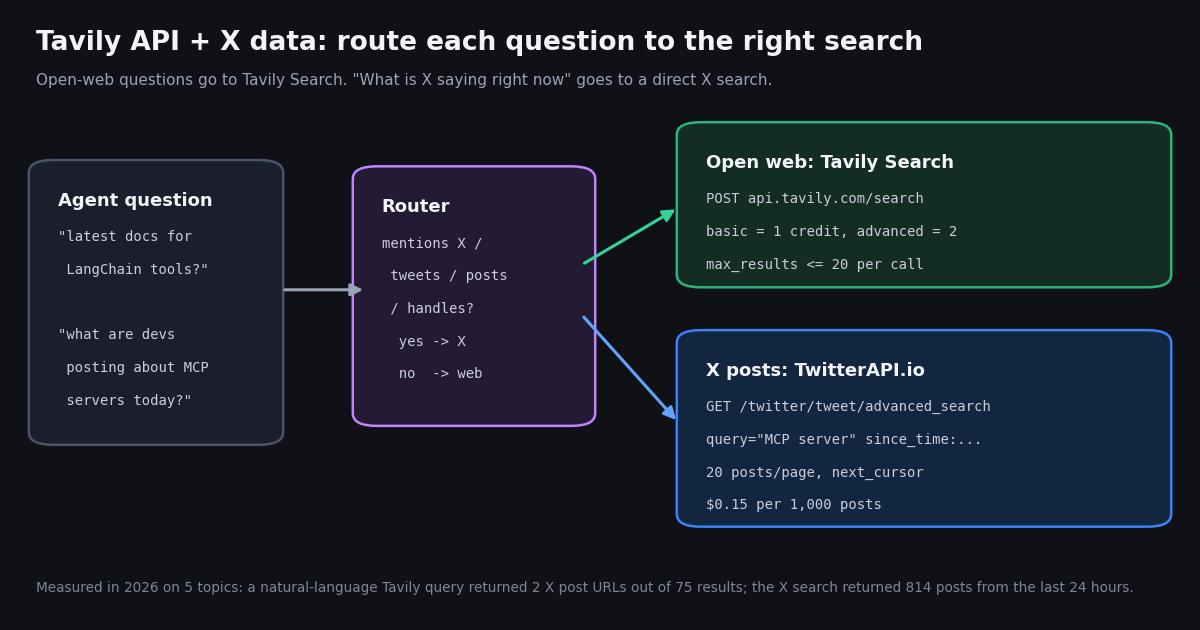
This page is about the Tavily API specifically: what its endpoints do, how keys and credits work, what each plan costs, and where it stops being the right tool. Our Perplexity API guide covers a different product (an answer engine with its own Sonar models); Tavily returns ranked search results for your own model to read, which is why it shows up as the default web tool in so many agent frameworks.
Every price, limit and parameter below was read from Tavily's own documentation and pricing page this year, and each one is listed in the sources at the end. We also ran a small measured test with Tavily's documented keyless mode: the same five topics, the same 24-hour question, sent to Tavily and to a direct X search a few minutes apart. That test is the part you will not find on Tavily's site, and it decides when an agent should call Tavily and when it should call something else.
What the Tavily API is and which endpoints it has
Tavily describes itself as a search engine optimized for agent consumption: instead of raw HTML or a page of links, each result comes back with a title, URL, relevance score and a content field made of short snippets (chunks) pulled from the page. Your agent spends fewer tokens parsing, and you choose how much text you want per source.
Search parameters that matter most. search_depth trades latency for relevance (ultra-fast, fast, basic, advanced). topic is general, news or finance. time_range accepts day, week, month or year. max_results runs from 0 to 20. include_domains (up to 300) and exclude_domains (up to 150) filter sources, and include_domains_mode switches between a hard restrict filter and a softer prefer. include_answer adds an LLM-written answer and include_raw_content adds the full cleaned page.
Freshness controls. include_published_date adds Tavily's best estimate of when each page was published or last updated (the docs flag it as beta, and note the date can be later than the original publish date). filter_by_published_date drops results outside your window, including those with no detectable date. max_age_hours controls how old Tavily's cached copy may be; 0 forces a live fetch, which adds latency but costs no extra credits.
How to get a Tavily API key (and the keyless option)
Sign up at app.tavily.com and the dashboard issues a key that starts with tvly-. The Researcher plan includes 1,000 API credits every month and needs no card. Send the key as a Bearer token: Authorization: Bearer tvly-YOUR_API_KEY. The official Python SDK is tavily-python (from tavily import TavilyClient), and the LangChain integration now lives in its own package, langchain-tavily; Tavily's docs mark the older langchain_community Tavily tool as deprecated.
Development vs production keys. Tavily's rate-limit page lists 100 requests per minute for development keys and 1,000 for production keys. Production keys require an active paid plan or pay-as-you-go enabled. The crawl endpoint is capped at 100 requests per minute on both, research task creation at 20, and the usage endpoint at 10 requests per 10 minutes. Over the limit, the API answers 429 Too Many Requests with a Retry-After header.
Keyless mode. Tavily also documents a free, rate-limited keyless mode for Search and Extract: send the header X-Tavily-Access-Mode: keyless and no key. The docs state keyless responses are identical to keyed ones, and the same header works with Tavily's remote MCP server at mcp.tavily.com/mcp/. That is the mode we used for the test below, which is why it needed no account.
Monthly reset. Tavily's pricing FAQ says monthly credits reset on the first day of each month regardless of billing date, and when credits run out requests stop until the reset or an upgrade.
# Keyed request (Researcher plan key from app.tavily.com)
curl -X POST https://api.tavily.com/search \
  -H "Authorization: Bearer $TAVILY_API_KEY" \
  -H "Content-Type: application/json" \
  -d '{"query": "LangChain tool calling docs", "search_depth": "basic", "max_results": 5}'

# Keyless request (free, rate-limited, documented by Tavily)
curl -X POST https://api.tavily.com/search \
  -H "X-Tavily-Access-Mode: keyless" \
  -H "Content-Type: application/json" \
-d '{"query": "LangChain tool calling docs", "max_results": 5}'Tavily pricing: plans, credits and what a search really costs
Tavily bills in API credits. The docs page Credits & Pricing lists these plans; the per-credit price falls as the plan grows.
Per-search math. A basic search is 1 credit, so on pay-as-you-go it costs $0.008 and returns at most 20 results; an advanced search is 2 credits, $0.016. On the Growth plan the same basic search works out to $0.005. Enterprise pricing is custom. Tavily also advertises a startup program (100k free credits) and free access for students.
What the price buys. A credit buys a ranked set of results for one query, not a volume of items. There is no cursor to page past the top 20, so spending more credits on the same query does not return more posts; you change the query, the window or the domains instead. That shapes the X comparison below.
We asked Tavily for live X posts: what came back
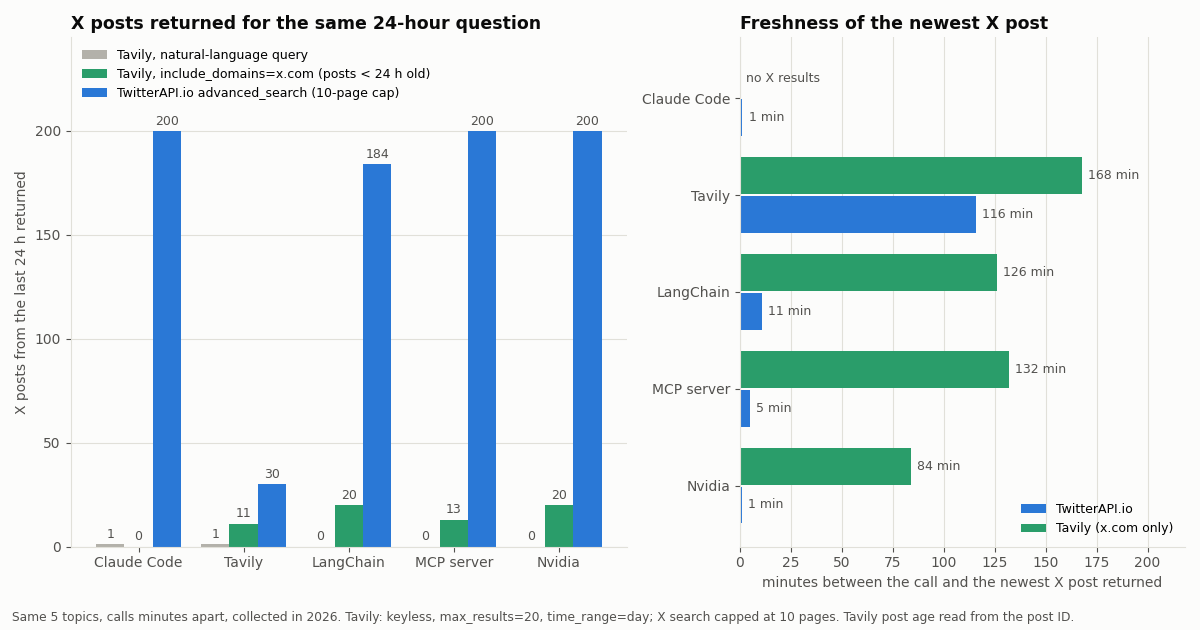
The question many agents get is some form of 'what are people on X saying about this right now'. To see how Tavily handles it, we sent two Tavily keyless queries per topic for five topics (Claude Code, Tavily, LangChain, MCP server, Nvidia), and at the same time ran /twitter/tweet/advanced_search for the same topics with since_time set to 24 hours earlier. Variant A was the natural-language request an agent would send ('posts on X about <topic> in the last 24 hours', time_range=day). Variant B was the expert version: the topic alone, include_domains set to x.com and twitter.com, time_range=day, max_results=20. Post ages for Tavily results were read from the post ID itself, so they do not depend on Tavily's published-date estimate.
Variant A barely touches X. The natural-language queries returned 75 results, of which 2 were X post URLs (2.7%). The rest were articles, videos, social pages on other networks and vendor pages that happened to mention the topic. None of the 75 carried a published date, because include_published_date was off by default.
Variant B finds posts, with a lag and a ceiling. Restricted to x.com, Tavily returned 79 results, 77 of them post URLs, and 64 of those were under 24 hours old. Only 21 carried a published_date, so filter_by_published_date would have dropped the rest. The newest X post Tavily returned was 84 to 168 minutes old; the X search's newest post was 1 to 11 minutes old on the four busier topics. For the 'Claude Code' query, variant B returned no results at all.
One call, 20 results. Each Tavily call is capped at 20 results with no next page. The X search kept paging: four of the five topics hit our 10-page (200-post) cap before reaching the 24-hour boundary.
How much X conversation a 20-result cap misses
The ceiling matters because busy topics move fast. These are the X search numbers for the same 24-hour window; where the 200-post cap was hit, the window covered is shorter than 24 hours and posts per hour is the rate over that shorter span.
Read it as a rate. 'Claude Code' produced about 306 posts an hour and 'Nvidia' about 194, so 200 posts covered under an hour of conversation. A 20-result web search is a sample of a sample on topics like these. On a quiet topic ('Tavily', 30 posts in the full day) the gap is small and either tool gives a fair picture.
What the sample cannot show. Five topics and one moment are a snapshot, not a benchmark of Tavily's index; results for other queries, search_depth=advanced, topic=news or a paid key may differ, and Tavily's ranking is not designed to be a complete feed. The test shows the shape of the gap, not a fixed ratio.
The X-data route: one endpoint, paged, priced per post
When the question is about X itself (posts, replies, accounts, a hashtag in the last hour), call an X search directly. TwitterAPI.io's GET /twitter/tweet/advanced_search takes the same operators X search supports (from:, quoted phrases, OR, since_time: and until_time: as Unix timestamps), returns up to 20 posts per page in tweets[], and pages with has_next_page and next_cursor. Each post carries createdAt, lang, engagement counts, entities and the author object. Reads need no X account.
Cost of our test on this side. 814 posts across 43 requests came to $0.1222. Tweet endpoints are billed 15 credits per post returned, $0.15 per 1,000 posts, with a 15-credit minimum per request (an empty page costs $0.00015; a full 20-post page costs $0.003). Plans and credit packs are on the pricing page.
Against the official X API. X's pay-per-usage rate card at docs.x.com/x-api/getting-started/pricing lists $0.005 per post read, which is $5 per 1,000 posts against $0.15 here, about 33x, and caps pay-per-usage at 3 million post reads a month. X also offers $20 of credits on a first card purchase and a match of the first auto-recharge up to $50.
Getting started. New accounts that pass the automatic bot check get up to $1 of free credits (at most 100,000 credits, no card, one per person or network, expiring after 31 days). Before the first payment the rate limit is 0.2 requests per second; it rises to 20 once paid.
import os, time, requests

BASE = "https://api.twitterapi.io"
HEADERS = {"X-API-Key": os.environ["TWITTERAPI_IO_API_KEY"]}

def x_posts_last_24h(topic: str, max_pages: int = 10) -> list[dict]:
    since = int(time.time()) - 86400
    params = {"query": f"{topic} since_time:{since}", "queryType": "Latest", "cursor": ""}
    posts = []
    for _ in range(max_pages):
        r = requests.get(f"{BASE}/twitter/tweet/advanced_search", headers=HEADERS, params=params, timeout=30)
        r.raise_for_status()
        body = r.json()
        posts += body.get("tweets", [])
        if not body.get("has_next_page"):
            break
        params["cursor"] = body["next_cursor"]
    return posts

posts = x_posts_last_24h('"MCP server"')
print(len(posts), "posts; newest:", posts[0]["createdAt"] if posts else None)Wire both into an agent: LangChain tools and MCP
Agents pick tools by description, so the cleanest fix is two tools with sharp descriptions: one for the open web, one for X. The LangChain version uses Tavily's official langchain-tavily package for the web side and a small custom tool for X. Our LangChain Twitter guide goes deeper on the X tool itself.
MCP clients. If your agent runs in Claude Code, Cursor or another MCP client, add both servers. Tavily documents its remote server at mcp.tavily.com/mcp/ (sign-in, an API key, or the keyless header). TwitterAPI.io's hosted server is mcp.twitterapi.io/mcp; paste your TwitterAPI.io key as the Bearer token. The model then sees Tavily's search tools and the X read tools side by side and can choose per question.
Description wording that routes well. Say what each tool cannot do as well as what it can: 'web pages, docs, news articles; not a live X feed' for Tavily, and 'posts, replies and accounts on X (Twitter), newest first, last 24 hours or any window' for the X tool. Models follow negative hints more reliably than they infer them.
# pip install -U langchain-tavily requests
import os, time, requests
from langchain_core.tools import tool
from langchain_tavily import TavilySearch

web_search = TavilySearch(max_results=5, topic="general")  # reads TAVILY_API_KEY

@tool
def x_search(query: str) -> list[dict]:
    """Search recent posts on X (Twitter), newest first, last 24 hours.
    Use for: what people are posting, reactions, launches announced on X.
    Not for: documentation or general web pages."""
    since = int(time.time()) - 86400
    r = requests.get(
        "https://api.twitterapi.io/twitter/tweet/advanced_search",
        headers={"X-API-Key": os.environ["TWITTERAPI_IO_API_KEY"]},
        params={"query": f"{query} since_time:{since}", "queryType": "Latest"},
        timeout=30,
    )
    r.raise_for_status()
    return [
        {"text": t["text"], "createdAt": t["createdAt"], "likes": t["likeCount"], "url": t["url"]}
        for t in r.json().get("tweets", [])
    ]

tools = [web_search, x_search]  # hand both to create_agent(...) or bind_tools(...)

# MCP clients: the same split as two servers (Cursor ~/.cursor/mcp.json shown)
# {
#   "mcpServers": {
#     "tavily": { "url": "https://mcp.tavily.com/mcp/" },
#     "twitterapi-io": {
#       "url": "https://mcp.twitterapi.io/mcp",
#       "headers": { "Authorization": "Bearer ${env:TWITTERAPI_IO_API_KEY}" }
#     }
#   }
# }When to use Tavily, when to use an X search, and when to use both
Cost side by side. A basic Tavily search costs $0.008 on pay-as-you-go and returns up to 20 results. Pulling 1,000 X posts costs $0.15 through TwitterAPI.io and $5 on X's own pay-per-usage rate card. For a mixed agent, the bill is usually dominated by whichever tool it calls in a loop, so route carefully and cache.
Build it. Grab a TwitterAPI.io key from the dashboard, check the request and response fields in the docs at docs.twitterapi.io, and drop the router from the code example into your agent next to your Tavily key.
"""Route agent questions: X questions -> TwitterAPI.io, everything else -> Tavily.

pip install requests
export TAVILY_API_KEY=tvly-...            # from app.tavily.com
export TWITTERAPI_IO_API_KEY=...          # from twitterapi.io/dashboard
"""
import os
import re
import time

import requests

BASE = "https://api.twitterapi.io"
X_HINTS = re.compile(r"\b(on x|twitter|tweets?|posts on x|@\w+|hashtag|#\w+)\b", re.I)


def tavily_search(query: str, max_results: int = 5) -> list[dict]:
    r = requests.post(
        "https://api.tavily.com/search",
        headers={"Authorization": f"Bearer {os.environ['TAVILY_API_KEY']}"},
        json={"query": query, "search_depth": "basic", "max_results": max_results},
        timeout=30,
    )
    r.raise_for_status()
    body = r.json()
    print("tavily credits used:", body.get("usage", {}).get("credits"))
    return [{"title": x["title"], "url": x["url"], "snippet": x["content"][:300]} for x in body["results"]]


def x_search(topic: str, hours: int = 24, max_pages: int = 5) -> list[dict]:
    since = int(time.time()) - hours * 3600
    params = {"query": f"{topic} since_time:{since}", "queryType": "Latest", "cursor": ""}
    out = []
    for _ in range(max_pages):
        r = requests.get(
            f"{BASE}/twitter/tweet/advanced_search",
            headers={"X-API-Key": os.environ["TWITTERAPI_IO_API_KEY"]},
            params=params,
            timeout=30,
        )
        r.raise_for_status()
        body = r.json()
        for t in body.get("tweets", []):
            out.append({
                "createdAt": t["createdAt"],
                "author": t["author"]["userName"],
                "likes": t["likeCount"],
                "views": t.get("viewCount"),
                "text": t["text"],
                "url": t["url"],
            })
        if not body.get("has_next_page"):
            break
        params["cursor"] = body["next_cursor"]
    return out


def answer_sources(question: str, topic: str) -> dict:
    if X_HINTS.search(question):
        posts = x_search(f'"{topic}"')
        return {"route": "x", "count": len(posts), "items": posts}
    results = tavily_search(question)
    return {"route": "web", "count": len(results), "items": results}


if __name__ == "__main__":
    for q, topic in [
        ("What are developers posting on X about MCP servers today?", "MCP server"),
        ("Where are the LangChain docs for tool calling?", "LangChain"),
    ]:
        res = answer_sources(q, topic)
        print(res["route"], res["count"], res["items"][:1])
Questions readers ask
Is the Tavily API free?
Partly. The Researcher plan gives 1,000 API credits a month with no credit card, and Tavily documents a free, rate-limited keyless mode for Search and Extract. Beyond that, plans start at $30 a month for 4,000 credits, or $0.008 per credit on pay-as-you-go.
How do I get a Tavily API key?
Create an account at app.tavily.com; the dashboard shows a key starting with tvly-. Send it as Authorization: Bearer tvly-... on every request, or pass it to TavilyClient(api_key=...) in the tavily-python SDK. Production keys require a paid plan or pay-as-you-go.
How many credits does a Tavily search cost?
A basic, fast or ultra-fast search costs 1 credit and an advanced search costs 2, per request, regardless of how many results come back (up to 20). Extract costs 1 credit per 5 successful URLs at basic depth; Research costs 4 to 250 credits depending on model and work done.
What are the Tavily API rate limits?
Tavily lists 100 requests per minute for development keys and 1,000 for production keys. Crawl is limited to 100 per minute and research task creation to 20 per minute on both. Exceeding a limit returns 429 with a Retry-After header.
Can Tavily search Twitter (X) posts?
Sometimes. In our 2026 test, natural-language queries returned 2 X post URLs out of 75 results. With include_domains set to x.com it returned 77 post URLs across five calls, at most 20 per call and the newest one to three hours old. For complete, recent X results, use an X search endpoint such as /twitter/tweet/advanced_search.
Does Tavily have an MCP server?
Yes. Tavily documents a remote MCP server at mcp.tavily.com/mcp/ that works with Claude Code, Cursor, VS Code and Codex, using sign-in, an API key, or the keyless header. You can run it next to TwitterAPI.io's hosted MCP server at mcp.twitterapi.io/mcp so the agent has both web and X tools.
Tavily vs Perplexity API: what is the difference?
Tavily returns ranked search results with cleaned snippets for your own model to read and reason over. Perplexity's API returns generated answers from its own models with citations. Our Perplexity API guide covers its pricing and endpoints.
Do Tavily credits roll over?
Tavily's pricing FAQ says monthly API credits reset on the first day of each month regardless of your billing date, and requests stop when credits run out until the reset or an upgrade.
Continue
- Tavily Docs: Credits & Pricing
- Tavily Docs: Search endpoint reference
- Tavily Docs: Rate limits
- Tavily Docs: Try Tavily without an API key
- X API pricing (official rate card)
- TwitterAPI.io: Advanced search endpoint
- X (Twitter) API hub: endpoints, pricing and guides
- What an MCP server is and how to connect one
- LangChain Twitter tool: build an X search tool for agents
- CrewAI with the Twitter API: agents that read X
- Perplexity API guide: Sonar models, pricing and limits
- TwitterAPI.io hosted MCP server for X data
- Get a TwitterAPI.io API key in the dashboard
- TwitterAPI.io API reference and response fields
- 01Google AI Studio Free Tier Limits: What the Gemini API Allows in 2026
- 02Best Claude Model for Coding in 2026: Opus vs Sonnet vs Haiku vs Fable, Priced on Real Twitter (X) Data
- 03Zapier Alternatives in 2026: Prices, Self-Hosting and Which Ones Still Connect to Twitter (X)
- 04Antigravity vs Cursor: Plans, Models and a Twitter (X) MCP Setup in Both
- 05Claude Code Alternatives: Seven Coding Agents Checked for License, Free Use and MCP (Twitter/X Data Included)
- 06Twitter (X) Academic Research API — A Practical Guide
- 07Twitter (X) Advanced Search API — Operators, Code, Cost
- 08Grok Bot Marketplace: the templates, which ones read Twitter (X), and how to build on them
Stop reading. Start building.
Starter credits cover real testing on real data. Google sign-in, no card, no application queue.
Get an API keyAlready building with TwitterAPI.io? Publish an honest tutorial or build log about it and earn up to $200 a month in API credits.