How to Translate Tweets on Twitter (X): Auto-Translate, the Gear Icon and Language Settings
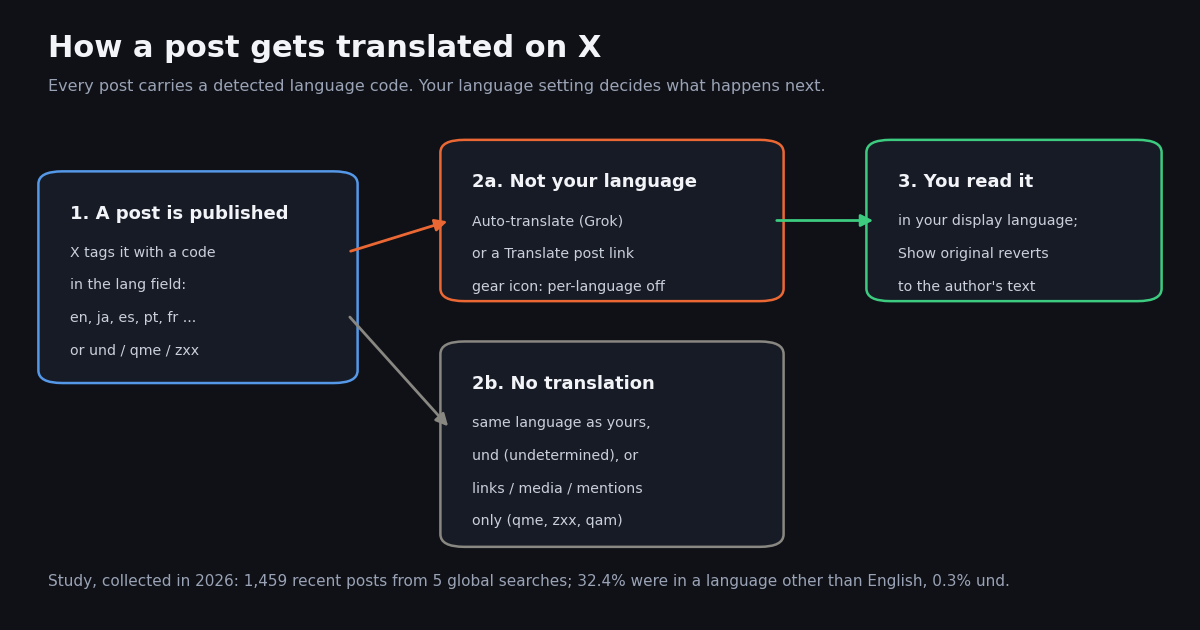
- Auto-translate is the default. X translates posts in other languages into your display language; Bier's April 2026 post says the translations are powered by Grok.
- The gear icon on a translated post turns auto-translate off for that one language, so you can read it in the original.
- Change what counts as foreign by changing your display language in Settings and privacy (on iPhone, the X app's language also follows iOS per-app language settings).
- No translate option? The post is in your language, or X tagged it
und/qme/zxx. In our sample only 0.3% wereundand 1.7% carried no-language codes. - How much gets translated: 32.4% of 1,459 recent posts were non-English; the share ranged from 9.7% (Bitcoin) to 66.4% (iPhone, driven by Japanese posts).
- Developers: every post in the API JSON carries the same
langcode; filter with thelang:search operator and translate with any model you choose.
Searches for "twitter translate" come from two kinds of people: readers who see a post in a language they do not speak and want it in their own, and readers who are suddenly seeing everything translated and want the original back. Both are answered by the same machinery. X detects a language for every post, compares it with your language setting, and translates the gap, now with Grok, xAI's model, rather than the third-party translator older guides describe.
This guide covers the current behavior from X's own announcement, the steps on iPhone, Android and the web, the settings that decide what gets translated, and the reasons a translate option sometimes never shows up. To put a number on how often translation matters, we pulled the language code of recent public posts for five global topics and counted how many an English-language reader would need translated. The last section is for developers who want the same language data, and a translation step, in their own code.
32.4% of 1,459 posts
Who translates posts on X now: Google, then Grok
Older guides describe translation on Twitter as an outside machine translation service. That changed in 2025: a June 2025 report, reposted by Elon Musk on X, said that X had "replaced Google Translate with Grok for translating foreign posts" and that the new system was live on the web first. That is a third-party report, not an X announcement, so treat the exact rollout order as reported rather than confirmed.
The primary-source statement came on April 7, 2026 (UTC), from Nikita Bier, X's head of product: "We're rolling out auto-translate worldwide to give posts in any language global reach on X. The translations are powered by Grok and have improved substantially over the last couple months. If you prefer to read in the original language, you can always turn off auto-translate by tapping the gear icon." TechCrunch's report the next day added the detail that the gear toggle works for "that particular language".
What that means in practice. Translation is no longer only a button you press. Posts in other languages can arrive already translated in your timeline, search results and replies, with a control on the post to go back to the original or to stop translating that language. X has not published which languages Grok covers or how it decides when to translate automatically, so this guide describes the visible behavior and labels anything else as an estimate.
Why it matters for reach. Bier framed the rollout as giving "posts in any language global reach". Translation changes who reads a post, not only how one reader sees it: a Japanese post about a new iPhone can now land in an English feed already readable. Our study below shows how large that pool is for common topics.
How to translate a tweet on iPhone, Android and the web
The steps are the same idea on every platform, but X changes labels and menus often, and we could not fetch X's help center this session (it refuses automated requests). Use these as a map rather than a click-by-click script.
If the post is already translated. You will see the text in your language with a note that it was translated, and a gear icon. Tap the note or the show-original option to read the author's words. Tap the gear to turn off automatic translation for that language.
If the post is not translated. Look directly under the post text for a translate option and tap it; the translation replaces or appears under the original. This is the classic "Translate post" behavior, and it is what you see for a language you switched off or where auto-translate has not reached your account or app version.
On iPhone and iPad. Update the X app first, since X ships features by app version. The app's own interface language follows iOS: X's help center describes opening the device Settings, choosing the X app and picking a language there.
On Android. Update the app from Google Play, then use the in-app language settings described in the next section.
On the web (x.com). Translation appears inline on post pages and in the timeline. The display language is an account setting on the web, so changing it there also changes what counts as foreign.
Outside X. You can always copy a post's text into any translator, or ask an AI assistant. That is also the fix for text inside images, which post translation does not cover because it translates the post text, not the pixels of an image.
Turn auto-translate off (or back on) with the gear icon
The gear icon is the only control X has described publicly for auto-translate. Bier's announcement says you "can always turn off auto-translate by tapping the gear icon", and TechCrunch reports that the toggle applies per language. So the switch lives on a translated post, not deep in settings.
To read one language in the original. Find any post in that language that X translated, tap the gear icon, and switch automatic translation off for that language. New posts in that language then show in the original with a manual translate option.
To turn it back on. Open a post in that language, use the manual translate option, and look for the same gear control; or check the language area of Settings and privacy, where X keeps language preferences. If you do not see either, update the app: X rolls features out in stages and by app version.
When bilingual readers should switch it off. If you read both languages, the original is usually better: machine translation can miss tone, slang, jokes and names. Switching the language off keeps the original wording and still lets you translate one post on demand.
Change your display language (it decides what gets translated)
Translation is relative: X translates a post when its detected language differs from yours. Your language for this purpose is the display language on your account (and, on iPhone, the language iOS assigns to the X app). Change it, and a different set of posts becomes foreign.
X's help center article on language settings (help.x.com/en/managing-your-account/how-to-change-language-settings, cited only because the site blocks automated fetches) describes two separate settings, as indexed by search engines this session:
Display language. The language of X's menus and buttons, and the target of translation. It sits in the languages area of Settings and privacy (the path is listed as Settings and privacy, then Accessibility, display, and languages, then Languages). Menu names change, so if the path differs, search settings for "language".
Languages for recommendations. A separate list of languages you read, which X uses to recommend posts, people and trends. Adding a language here changes what X shows you, not whether it translates it.
iPhone specifics. On iOS the app follows the per-app language chosen in the device Settings app under X. If the app shows one language and the web another, that is the reason.
A tip for learners. If you are learning a language, set your display language to it. Posts in your native language then become the foreign ones, and the translate control helps you check your reading instead of replacing it.
Why the translate option sometimes does not appear
Every post on X carries a language code chosen by X's language detection; the official X data dictionary at docs.x.com/x-api/fundamentals/data-dictionary describes the field simply as the "language of the Tweet, if detected". The codes explain nearly every missing translate option. These are the codes we saw in our sample:
The post is already in your language. If your display language is English and X tagged the post en, there is nothing to translate, even when the post mixes in other words.
X could not detect a language. Posts tagged und are short or ambiguous: emoji, a single word, numbers. In our sample the median und post was 5 characters long once links and mentions were removed, against 103 for posts with a detected language, and 80.0% of und posts were under 20 characters.
There is no language to translate. A post that is only a link, only media, only mentions or only hashtags gets a no-language code (zxx, qme, qam, qht).
The detection is wrong. Short posts in closely related languages, or English posts full of slang, can be tagged with the wrong language. Then X either offers a translation you do not need or none at all. Copying the text into a translator is the workaround.
The text is in an image or video. Post translation works on the post text. Captions burned into a video or text in a screenshot are not translated.
Your app is out of date, or you turned the language off. Auto-translate rolled out in stages; update the app, and check the gear control for that language.
How much of X would you need translated? A 1,459-post study
To size the question, we ran five searches for topics people discuss in every language: Bitcoin, Champions League, Netflix, iPhone and Grok. For each we collected the latest public posts, about 300 per topic, 1,459 after removing duplicates, and counted the lang code X attached to each one. No language filter was applied, so the mix is what the search returned.
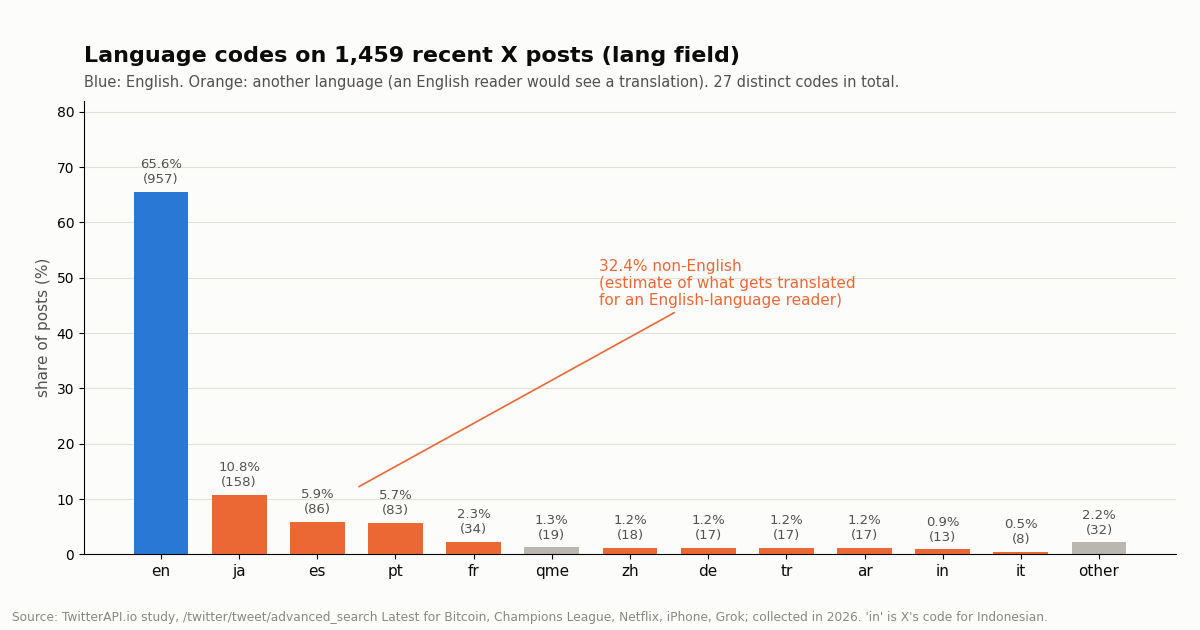
English was the largest group at 65.6%. The remaining posts split across 27 codes in total, led by Japanese (10.8%), Spanish (5.9%), Portuguese (5.7%) and French (2.3%).
The translation estimate. Counting every post with a real language code other than English, 32.4% of the sample is what an English-language reader would see translated (or with a translate option). That is an estimate: X does not publish its exact rule, and the share depends heavily on the topic.
Undetermined is rare. Only 0.3% of posts (5 of 1,459) were und, and 1.7% carried a no-language code (qme 19, qam 3, zxx 2, qht 1). So when a translate option is missing, the usual reason is that the post is in your language, not that X failed to detect one.
Translation need depends on the topic
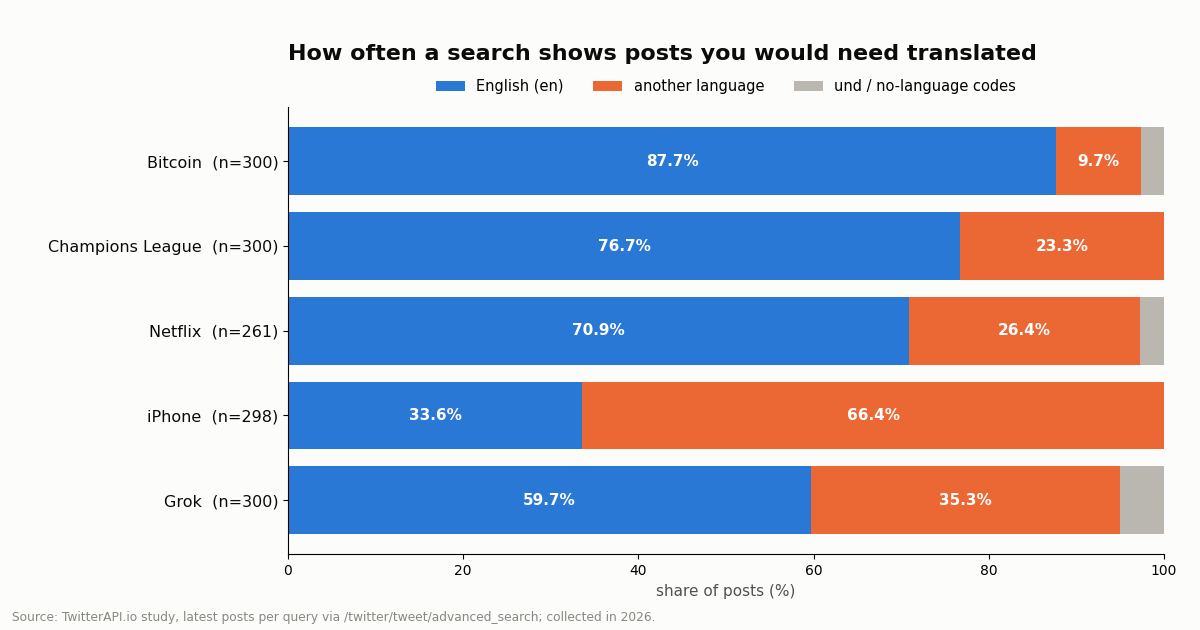
The same estimate per search shows why one reader barely notices translation while another sees it constantly:
iPhone is the outlier. 66.4% of the latest iPhone posts were in another language. Japanese alone accounted for 129 of 298 posts, more than English (100). An English reader following phone news would see two of every three posts translated.
Bitcoin stays English-heavy. Only 9.7% of Bitcoin posts were in another language, though the search still returned 13 different codes.
Grok had the widest mix. The Grok search returned 19 codes, with Spanish, Arabic and Portuguese leading the non-English posts, and it had the highest no-language share (4.0%).
Short posts are translated less reliably. Splitting the sample by text length shows where detection struggles:
Posts under 20 characters were the only group with a visible und share (3.3%). Longer posts were more often English; shorter ones skewed to other languages in this sample, which is partly the topic mix (many short Japanese and Portuguese replies).
For developers: the lang field, the lang: operator and a translation step
The language code X uses to decide on translation is in the data. TwitterAPI.io returns it as lang on every post object (the same field is documented as lang in X's own data dictionary), next to text, createdAt and the engagement counts. Reading posts needs no X account; you call the API with an X-API-Key header.
Filter by language at the source. The search operator lang: works in /twitter/tweet/advanced_search: our check of Netflix lang:ja returned 20 of 20 posts tagged ja. Combine it with any query, for example "Champions League" lang:es, or exclude a language with -lang:en.
Translate after you fetch. The API returns the original text, not X's Grok translation, so add your own step: send the text of posts whose lang differs from your target to any translation model or service and store both versions. Skip und, zxx, qme, qam and qht posts; there is nothing to translate.
What it costs. Tweet endpoints cost 15 credits per tweet returned, $0.15 per 1,000 tweets; you pay only for the data returned. A search that finds nothing is billed the 15-credit minimum ($0.00015). For comparison, X's official pay-per-use rate card at docs.x.com/x-api/getting-started/pricing lists $0.005 per post read, which is $5 per 1,000, about 33x more per 1,000 posts. New accounts that pass the automatic bot check get free starter credits (no card, one per person or network, expiring after 31 days); see the pricing page for the amount. Purchased credits never expire.
What this study cost. The 75 search pages behind the charts returned about 1,500 posts, roughly $0.22 at that rate, plus 11 one-page searches used to check X's own announcements and the lang: operator.
The full example below collects the latest posts for a query, counts the language codes, and marks which posts an English reader would need translated. The translate function is a placeholder for whichever model you use.
# Bucket posts (from latest_posts() in the full example) the way the study did
from collections import Counter

NO_LANGUAGE = {"und", "zxx", "qme", "qam", "qht", "qct", "art"}
posts = latest_posts("Netflix")

for_en_reader = Counter()
for t in posts:
    code = t.get("lang") or "missing"
    if code == "en":
        for_en_reader["english"] += 1
    elif code in NO_LANGUAGE:
        for_en_reader["no language"] += 1
    else:
        for_en_reader["would be translated"] += 1
print(for_en_reader)How we collected this
Question. How multilingual is a typical stream of recent public posts on X, and how often would an English-language reader see a post in another language, the case where X offers a translation?
Queries. Five language-neutral names that are discussed worldwide: Bitcoin, Champions League, Netflix, iPhone and Grok, searched with /twitter/tweet/advanced_search and queryType=Latest, no language filter.
Window and sample. The latest posts matching each query at collection time, up to 15 pages per query; 1,459 posts after removing duplicates, collected in 2026. Separately, one-page searches of X's official and staff accounts for the word translate, used to confirm the announcement quoted above.
Method. We counted the lang value of each post, grouped no-language codes (und, zxx, qme, qam, qht), and treated every other non-English code as a post an English-language reader would see translated.
What the sample cannot show. It measures X's language tags, not X's translation decisions; X does not publish when it auto-translates. Five topics are not all of X, the window is a snapshot of minutes to hours, and the results depend on what X's search ranks as latest. Language detection itself can be wrong on short posts.
Privacy. Search results are written by private individuals, so we report aggregates only. Raw pages were not stored in the repository; the de-identified sample keeps only the query, language code, text length and media flag, with no ids, text or handles.
import os
import time
from collections import Counter

import requests

BASE = "https://api.twitterapi.io"
HEADERS = {"X-API-Key": os.environ["TWITTERAPI_IO_KEY"]}
NO_LANGUAGE = {"und", "zxx", "qme", "qam", "qht", "qct", "art"}


def latest_posts(query, pages=5):
    """Collect the latest posts for a search, following next_cursor."""
    posts, cursor = [], ""
    for _ in range(pages):
        params = {"query": query, "queryType": "Latest"}
        if cursor:
            params["cursor"] = cursor
        r = requests.get(f"{BASE}/twitter/tweet/advanced_search", headers=HEADERS, params=params, timeout=30)
        r.raise_for_status()
        data = r.json()
        posts.extend(data.get("tweets", []))
        if not data.get("has_next_page"):
            break
        cursor = data.get("next_cursor", "")
        time.sleep(1)
    return posts


def translate(text, target="en"):
    """Placeholder: call the translation model or service you use."""
    return text


posts = latest_posts("iPhone")
codes = Counter(t.get("lang") or "missing" for t in posts)
print(len(posts), "posts", codes.most_common(8))

for t in posts:
    code = t.get("lang")
    if code in (None, "en") or code in NO_LANGUAGE:
        continue
    print(code, t["createdAt"], t["url"])
    print("  original:  ", t["text"][:120])
    print("  translated:", translate(t["text"])[:120])

# Narrow the search to one language with the lang: operator
spanish = latest_posts('"Champions League" lang:es', pages=1)
print(Counter(t.get("lang") for t in spanish))
Researching this?Free starter credits cover end-to-end testing — Google sign-in, no card. Get a key.
Questions readers ask
How do I translate a tweet on X?
In many cases X already did it: posts in other languages are auto-translated into your display language, with translations powered by Grok since the worldwide rollout announced in April 2026. If a post is not translated, tap the translate option under the post text. If you see no option, the post is in your language or X tagged it with no language.
How do I turn off auto-translate on X?
Tap the gear icon on a translated post and switch automatic translation off for that language. It is per language, so other languages keep translating. X's head of product described the gear icon as the way to read posts in the original language.
Does X still use Google Translate?
Not as the main provider, by X's own account. The April 2026 announcement says X's translations are powered by Grok, and a June 2025 report reposted by Elon Musk said Grok had replaced Google Translate for translating foreign posts.
Why is there no Translate post button on some tweets?
Because X thinks the post is in your language, or it found no language: posts tagged und (undetermined) or with codes for links, media, mentions or hashtags only have nothing to translate. In our 1,459-post sample, 0.3% were und and 1.7% had no-language codes, so the usual reason is simply that the post matches your language.
How do I change the language X translates into?
Change your display language in the languages area of Settings and privacy. On iPhone the app also follows the language set for X in the iOS Settings app. X translates into that language.
Can X translate text inside images or videos?
Post translation works on the post text. Text inside a screenshot or captions burned into a video are not part of the text, so copy or describe them into a separate translator if you need them.
Is Grok translation accurate?
X says the translations improved substantially in the months before the April 2026 rollout, but machine translation can still miss tone, slang and jokes. If you read both languages, turn auto-translate off for that language and translate single posts on demand.
Can I get the language of tweets through an API?
Yes. Each post object from TwitterAPI.io includes lang, and /twitter/tweet/advanced_search accepts the lang: operator (for example lang:ja). Reading costs $0.15 per 1,000 tweets returned, and no X account is needed. The API returns the original text; translation is a step you add.
Continue
- Nikita Bier (X head of product): auto-translate rolling out worldwide, powered by Grok, gear icon to turn off
- X API data dictionary: the Post lang field
- X Help Center: how to change language settings
- X API pricing (pay-per-usage rate card)
- TechCrunch: X rolls out automatic translation powered by Grok (per-language gear toggle)
- TwitterAPI.io documentation: advanced search and the tweet object
- Twitter (X) API overview: posts, profiles and search data
- How to change the font and text size on Twitter (X)
- Grok Bot on X: what xAI's assistant does
- Tweet metadata fields reference, including lang
- Twitter advanced search API guide with operators like lang:
- Free Twitter advanced search builder
- TwitterAPI.io pricing: pay per tweet returned
- 01How to Turn Off Autoplay on Twitter (X): App, Web and Auto-Advance
- 02Twitter (X) and the EU Digital Services Act (DSA): What the Commission Found, and What It Means for X Data
- 03Twitter (X) and Firebase: store posts in Firestore with a scheduled Cloud Function
- 04Twitter (X) Network Analysis with Python and networkx: A Real #reInvent Graph
- 05Analyze Twitter (X) Data with pandas: A Worked Example on 1,800 Real Posts
- 06How to Search Tweets by Date via API — A Developer's Guide
- 07Count Tweets — Twitter (X) API Programmatic Guide
- 08Most Liked Tweets of All Time
Writing about something you built with TwitterAPI.io? Our community rewards program pays API credits for honest tutorials, build logs and videos.
Stop reading. Start building.
Starter credits cover real testing on real data. Google sign-in, no card, no application queue.
Get an API keyAlready building with TwitterAPI.io? Publish an honest tutorial or build log about it and earn up to $200 a month in API credits.