Grok Bot and the Twitter (X) API: what it can read, what it costs, and how to give it cheaper X data
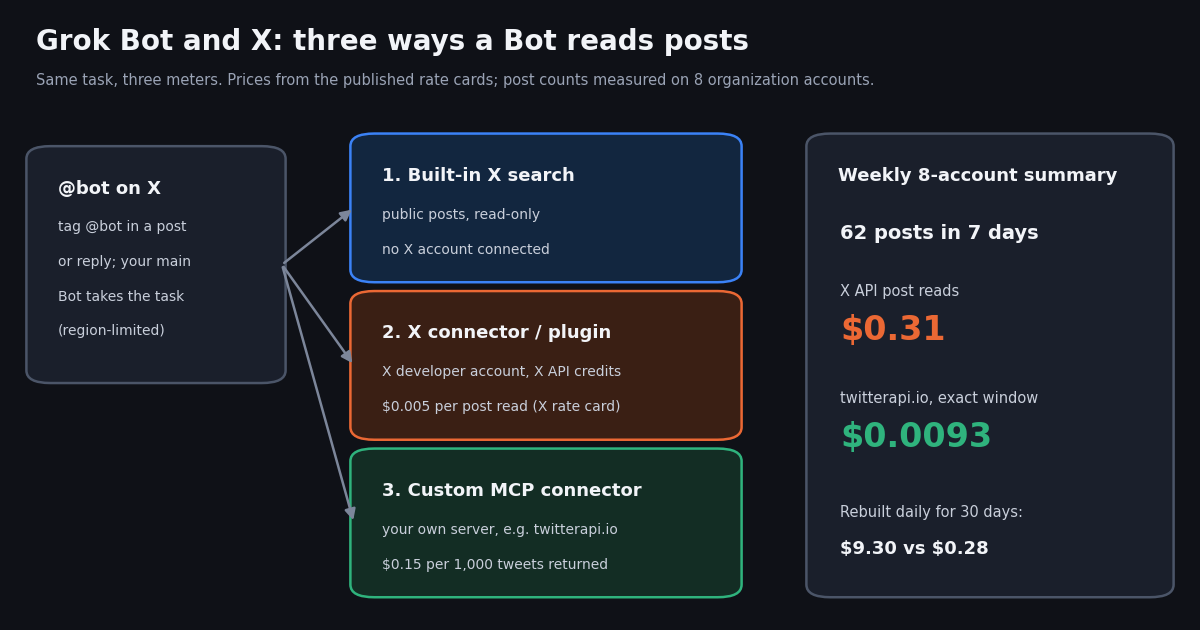
This page is about Grok Bot, the hosted product where SpaceXSI runs Bots for you on its own cloud computer. It is not about building your own agent on the xAI API with function calling; that is a different thing with a different bill, covered in our Grok agent guide. If you searched "grok bot" because a reply from @bot showed up under a post, or because a Bot just asked you to connect X, you are in the right place.
Grok Bot reads X constantly: a Bot asked for "this week on X" searches posts, opens timelines, counts mentions. Which meter those reads run on depends on how the Bot reaches X, and the gap between the meters is large. Below: what Grok Bot is according to xAI's own documentation, what it can read on X with and without your account, what the X connector's reads cost on X's published rate card, a measured cost table for real Bot-style tasks, and the short version of how to hand a Bot cheaper X data.
Every number in the study sections comes from 1,210 posts we read through our own API, collected in 2026, and every price comes from a published rate card that we name next to it.
What Grok Bot is, from xAI's own documentation
xAI's documentation (the site and docs now carry the name SpaceXSI in their page titles) describes Grok Bot as "Bots you can keep around: AI teammates with names, jobs, and context that compounds over time." You message a Bot by typing, dictating or starting a voice chat, give it a task and the tools it needs, and it works across apps and websites, checks back for approvals and keeps you updated in the conversation.
A computer that stays on. The defining feature is the computer. Your Bots run on a persistent cloud computer with a browser, a filesystem (a shared workspace at /workspace) and a terminal, so work continues when your laptop, phone or the app is closed. The FAQ adds that "the computers Bots work on run in Cursor's cloud." Bots can run in parallel, message each other in group chats, hand off tasks, and learn a workflow from a recorded demonstration that becomes a reusable skill or a scheduled routine.
One computer per account, not per Bot. Several launch-week write-ups said each Bot gets its own computer. The documentation is explicit that it does not: every Bot on your account shares one cloud computer, its browser sessions, files and command-line credentials. Each Bot gets its own screen, and one Bot runs one computer-use task at a time, but the docs warn that the screens "are separate work surfaces, not separate security boundaries." This matters as soon as you put an API key on that computer, as we do below.
Where it runs and who gets it. The desktop app runs on macOS (Apple silicon and Intel), Windows and Linux (x64 and Arm64), and the mobile app on iPhone, iPad and Android. Access comes three ways, all per xAI's docs:
What usage means. Grok Bot does not publish a per-task price. Subscriptions include weekly usage, and eligible accounts can add on-demand usage "billed from model and token cost". Under The X Subscription, Bot work draws on the seat's weekly pool, which is shared with Grok and Cursor and grows by tier (the pricing table lists 4x, 15x and 50x included usage for Premium, Super and Ultra against the Plus base). That pool covers the model's work. It is not the same meter as X API credits, which is the point of the rest of this page.
How @bot on X works
You can start work from X itself. Per xAI's "Tag @bot on X" page, you tag @bot in a post or reply (for example "@bot summarize this thread and send the key points to my Slack"), @bot answers publicly with a short line confirming that your Grok Bot has the request, and your main Bot does the work on its cloud computer. Results stay in the Bot's conversation in the app; @bot only posts the confirmation.
What the Bot receives. Your post, the post you replied to, and any post either of them quotes, including still photos. The first time, X sends you a notification that tagged requests start work automatically and use your Grok Bot usage.
What you need. An X account connected to your Grok account (grok.com, Settings, Account, Connect next to the X account), Grok Bot access on that same Grok account, at least one Bot of your own (a Bot someone shared with you cannot take tagged requests), and an X account based in a supported region.
Regions. Tagging is not yet available for accounts based in Australia, the United Kingdom, the European Union, Iceland, Liechtenstein or Norway. @bot goes by the country X has on record for the account, so a VPN or your current location changes nothing, and an account listed only with a broad region such as "South Asia" is also excluded for now.
When @bot stays quiet. The docs list the causes: an unsupported region, a reply inside a thread that already includes @bot when you did not tag it yourself, a post that also tags @grok, a post (or its parent or quoted post) with a video or GIF, a post that fails internal moderation, or Grok Bot not linked or out of weekly usage.
How busy @bot is. We read @bot's own public posts. Its 160 most recent posts were all replies (100.0%), the short confirmations described above, with a median length of 76 characters, and they covered 2.1 hours: about 77 confirmations an hour at that moment. Six 10-minute windows spread across the previous day held between 4 and 13 posts each, about 45 an hour on average. Each confirmation stands for one tagged task that a Bot then worked on. Its main timeline, replies excluded, held only 11 posts in 30 days, so nearly everything @bot says is a receipt.
What Grok Bot can read on X: built-in search vs the X connector
Grok Bot reaches X in two documented ways, and they differ in what they can see and in what they bill against.
Built-in X search (no X account). From xAI's "Use the computer and apps" page: "Bots can search and read what's public on X without you connecting an X account." A Bot can search posts, open a post from its link, read an account's posts and mentions, see who quoted or reposted a post, count recent posts on a topic, and check trends and news. The access is read-only and does not sign in as you.
The X plugin (signs in as you). For your DMs, bookmarks, home timeline or who liked your posts, you add the X plugin from Connect apps and sign in with X. The Tag @bot page describes the same "X for Grok Bot" plugin as optional: it lets a Bot search posts, read timelines, check mentions, and use trends and bookmarks. xAI's announcement of Grok Bot's X integration ("Grok Bot now works with X", August 29, 2026) says: "Connect your X account in Grok Bot and we'll create a developer account for you if you don't have one. Paid Grok Bot users get free X API credits to start."
What is not published. xAI's docs give no per-read limit or quota for built-in X search, and the announcement does not state how many free X API credits paid users get, or whether any Grok-specific rate applies. X's own pricing page lists no Grok Bot rate either. So for anything the connector reads, the honest assumption is X's public pay-per-usage card, which is what we price below. If you hear specific per-minute or per-day read limits for the built-in search, treat them as unconfirmed until xAI documents them.
Computer use is the third, slowest path. A Bot can also open x.com in its browser like a person would. The FAQ is clear that sites can block automation, expire sessions or show a CAPTCHA, and that the Bot should hand those steps to you rather than work around them. For bulk reading, a connector is the documented recommendation: "Use a connector when one is available for a more structured and reliable integration."
What the X connector's reads cost: X's rate card
When a Bot reads through the X plugin, the reads land on an X developer account, and X API usage is billed per resource fetched. These are the lines from X's pay-per-usage pricing page (docs.x.com/x-api/getting-started/pricing) that matter for a Bot's typical X work:
Deduplication. X deduplicates every billable resource within a 24-hour UTC day: reading the same post twice in one day is charged once. The window resets at midnight UTC, so a routine that re-reads "the last 7 days" every morning pays for each post again on each new day. X calls this a soft guarantee.
Owned reads are the cheap case. If your Bot is reading your own mentions or bookmarks through your own developer app, X prices those at $0.001 per resource, a fifth of a normal post read. Reading other accounts and searching the public conversation, which is what most Bot tasks do, is the $0.005 line.
Caps and credits. Pay-per-usage plans are capped at 3 million post reads per monthly billing cycle, with Enterprise above that. New paying accounts get $20 of free X API credits after their first eligible credit purchase and a match of the first auto-recharge up to $50, per X's free-credit page. Paid Grok Bot users also get starter credits through the connector, amount unpublished.
Writes are separate. If a Bot posts through the X API, X lists $0.015 per post created and $0.200 when the post contains a URL. Any write acts as your account, so keep them behind an Ask first rule in the Bot's description, as xAI recommends for sending and publishing.
Measured: what a typical Grok Bot X task actually reads
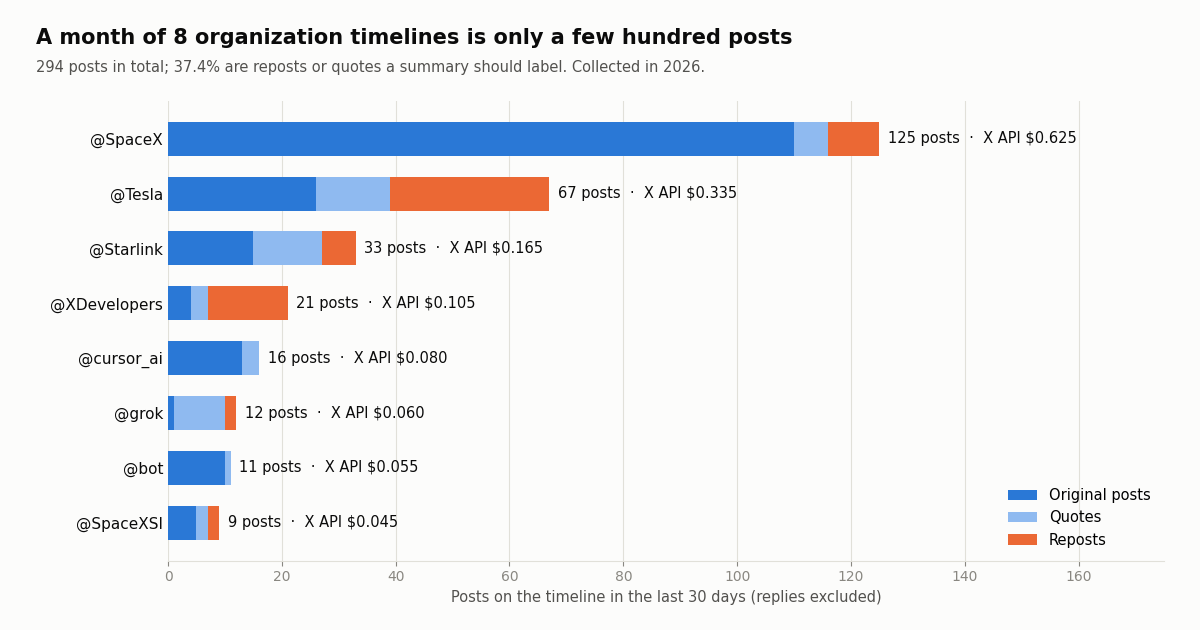
Prices per post mean little until you know how many posts a task touches. We modeled a request shape that xAI's own use-case page builds around (a weekly, source-linked digest): "summarize what these accounts posted this week." We picked eight organization accounts close to the topic (@SpaceXSI, @grok, @bot, @SpaceX, @Tesla, @Starlink, @cursor_ai, @XDevelopers), read their timelines back past 30 days, and counted what a Bot would have to read.
The volume is small, the spread is wide. Eight well-known accounts produced only 62 timeline posts in a week and 294 in a month (replies excluded). @SpaceX alone was 125 of the 30-day total; @SpaceXSI posted 9 times and @grok, whose replies number in the millions, put just 12 posts on its main timeline. A Bot summarizing these accounts is not a big-data job, which is why the per-post price, not the volume, decides the bill.
A third of it is someone else's post. 37.4% of the 30-day posts were reposts or quotes (24.2% of the 7-day ones). @Tesla's month was 28 reposts out of 67, and @XDevelopers' was 14 out of 21. On the X API you pay $0.005 for each of those whether or not the summary uses it; a Bot that reads the raw fields can at least label them instead of crediting the wrong account.
Cost per task: the X API connector vs a twitterapi.io connector
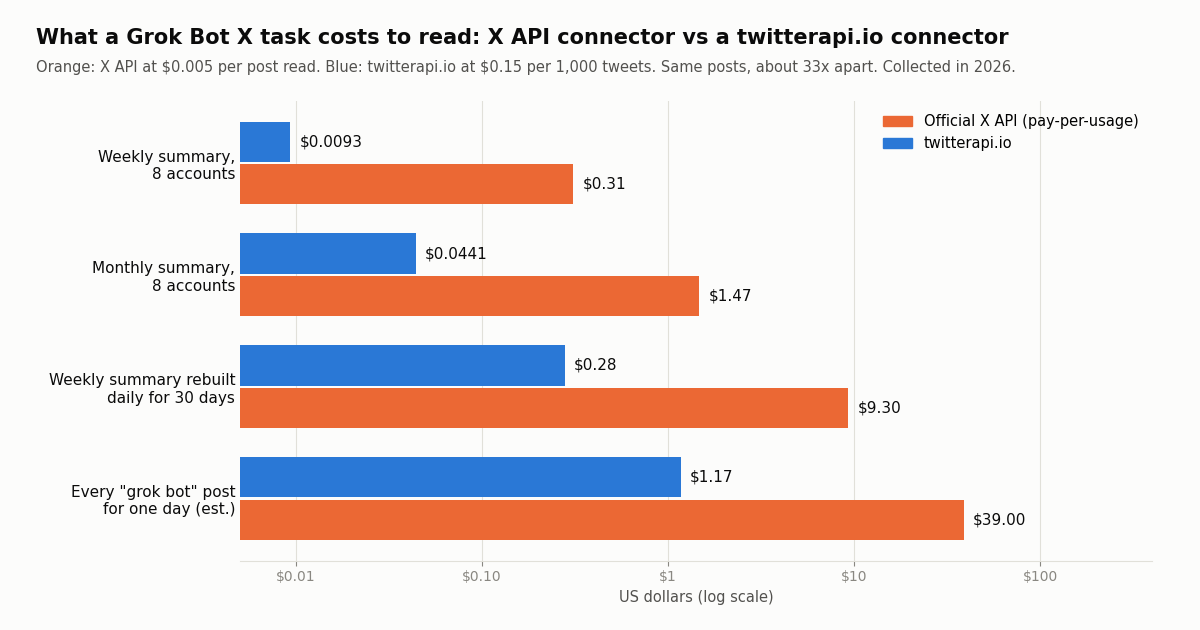
Here are the same measured tasks priced both ways. X API column: X's pay-per-usage card at $0.005 per post read. twitterapi.io column: 15 credits per tweet returned ($0.15 per 1,000 tweets), with a minimum of 15 credits per request, reading each account with one search for its posts since the start of the window. Both read exactly the same posts.
The ratio is about 33x, if you read the window exactly. $0.005 per post against $0.15 per 1,000 tweets is $5 against $0.15 per 1,000 posts. That ratio only holds when every request returns posts you need. If a Bot instead pages each timeline 20 posts at a time until it sees something older than the window, it pays for the overshoot: our 8-account weekly digest took 10 timeline pages, $0.03 instead of $0.0093, and the gap to the X API shrinks to about 10x. The fix is the since_time operator in a from: search, which the code below uses.
Rebuilds are where the X bill grows. A Bot routine that refreshes "this week on X" every morning re-reads six days of posts it already read. X's deduplication only spans one UTC day, so the 30 runs cost $9.30 on the X API. That is still small money for eight accounts, but it scales linearly with accounts and with how often the routine runs. On our side the same routine is $0.28; better still, have the Bot keep the posts it already has in /workspace and only fetch new ones.
Topic tasks are the expensive kind. "Count recent posts about X" and "what are people saying about Y" read the public conversation, not a few accounts. The phrase "grok bot" alone ran at 36 to 74 posts per 10-minute window in our six samples, about 325 an hour. A Bot that read all of them for a day would spend about $39.00 on the X API, or about $1,170 over a month, against $1.17 a day on twitterapi.io. A month of that topic is around 234,000 posts, inside X's 3M monthly post-read cap, but a handful of broad topics would not be.
What this does not include. Neither column counts the Bot's own model usage, which comes out of your Grok Bot weekly allowance either way, or the time a Bot spends in its browser. It also does not price built-in X search, because xAI publishes no per-read price for it.
How to give Grok Bot cheaper X data
There are two practical ways to route a Bot's X reads to twitterapi.io instead of the X connector. Neither needs an X developer account, and neither signs in as your X account.
Option 1: a script on the Bot's computer. The Bot has a terminal and a persistent /workspace. Save the script below there, set TWITTERAPI_IO_API_KEY in the computer's environment, and ask the Bot to run it and summarize the JSON. Once the run looks right, ask the Bot to save it as a skill and attach a weekly routine. The script reads each account with /twitter/tweet/advanced_search and a from:<account> since_time:<unix> query, so it pays only for posts inside the window, follows has_next_page and next_cursor, and prints both cost estimates.
Mind the shared computer. Because every Bot on your account shares that computer and its command-line credentials, any of your Bots can use a key you put there. Use a dedicated key, set a budget you are comfortable with, and do not put it on an account where some Bots should not have it. The docs say exactly this: do not place a credential on the computer if another Bot on your account should not be able to use it.
Option 2: a custom MCP connector. Grok's connector system accepts custom MCP connectors: on grok.com/connectors you choose New Connector, then Custom, and enter the URL of an MCP server reachable over the public internet. Our MCP server (@twitterapi_io/mcp-server on npm, 12 read-only tools such as search_tweets) runs over stdio today, so as a remote connector it needs an HTTP bridge and a tunnel you host. The full step-by-step setup is on our Grok connectors guide, and the server itself is documented on our MCP server page.
When to keep the X plugin. Your own DMs, bookmarks, home timeline and likes are private to your account, and only the signed-in X plugin can read them, at X's $0.001 owned-read rate. Use the plugin for those and route public reading (other accounts, searches, topic counts) to the cheaper connector.
"""weekly_x_digest.py - the X data behind a "what did these accounts post this week" task.
Run it yourself, or save it on Grok Bot's cloud computer and turn it into a skill.

    pip install requests
    export TWITTERAPI_IO_API_KEY=...      # from twitterapi.io/dashboard
    python3 weekly_x_digest.py SpaceX Tesla Starlink cursor_ai --days 7 > digest.json
"""
import argparse, json, os, sys, time
import requests

BASE = "https://api.twitterapi.io"
HEADERS = {"X-API-Key": os.environ["TWITTERAPI_IO_API_KEY"]}


def week_of_posts(account, since_ts, max_pages=10):
    """Every post from one account since since_ts (unix seconds), newest first."""
    params = {"query": f"from:{account} since_time:{since_ts}", "queryType": "Latest"}
    posts = []
    for _ in range(max_pages):
        r = requests.get(f"{BASE}/twitter/tweet/advanced_search", headers=HEADERS, params=params, timeout=30)
        if r.status_code == 429:              # back off and retry the same page
            time.sleep(2)
            continue
        r.raise_for_status()
        body = r.json()
        posts.extend(body.get("tweets") or [])
        if not body.get("has_next_page") or not body.get("next_cursor"):
            break
        params["cursor"] = body["next_cursor"]
    return posts


def kind(t):
    if t.get("retweeted_tweet"):
        return "repost"
    if t.get("quoted_tweet"):
        return "quote"
    return "reply" if t.get("isReply") else "original"


def main():
    ap = argparse.ArgumentParser()
    ap.add_argument("accounts", nargs="+")
    ap.add_argument("--days", type=int, default=7)
    a = ap.parse_args()
    since = int(time.time()) - a.days * 86400
    out, total, credits = [], 0, 0
    for acct in a.accounts:
        posts = week_of_posts(acct, since)
        total += len(posts)
        credits += max(len(posts), 1) * 15     # 15 credits per tweet; 15-credit minimum per request
        for t in posts:
            out.append({
                "account": acct,
                "kind": kind(t),
                "createdAt": t["createdAt"],
                "text": t.get("text", ""),
                "url": t.get("url"),
                "likes": t.get("likeCount", 0),
                "reposts": t.get("retweetCount", 0),
                "views": t.get("viewCount", 0),
                "quoted_text": (t.get("quoted_tweet") or {}).get("text"),
            })
    est = credits / 100_000                 # $1 = 100,000 credits
    print(f"{total} posts from {len(a.accounts)} accounts, about ${est:.4f} on twitterapi.io; "
          f"the same posts at X's $0.005 per post read: ${total * 0.005:.2f}", file=sys.stderr)
    json.dump(out, sys.stdout, indent=1, ensure_ascii=False)


if __name__ == "__main__":
    main()
Grok Bot vs the other Grok agents
"Grok" now covers several agent products, and searches for one often surface another. A short map, from xAI's docs:
The billing split follows the same lines. Grok Bot, Grok and Cursor usage draw on subscription allowances. An agent you build on the xAI API pays per token, and xAI's built-in x_search tool there has its own per-source price. X data that any of them reads through X's API is billed by X. Data read through twitterapi.io is billed per tweet returned, no X account needed, whichever of these products asks for it.
How we collected this
Question. How many X posts does a typical Grok Bot X task read, and what do those reads cost on the official X API rate card versus twitterapi.io?
Accounts and queries. Eight organization accounts: @SpaceXSI, @grok, @bot, @SpaceX, @Tesla, @Starlink, @cursor_ai and @XDevelopers, read with /twitter/user/last_tweets (replies excluded) until each timeline reached past 30 days. @bot's posts including replies (160 posts). The phrase "grok bot" with /twitter/tweet/advanced_search (Latest), read completely in six 10-minute windows spaced four hours apart, plus one burst sample of 300 posts; the same six windows for from:bot.
Window and size. Collected in 2026: the 7 and 30 days before collection for timelines, the preceding day for the windows. 1,210 posts in total from 78 requests plus 9 profile lookups; the whole study cost about $0.18 in credits.
How costs were computed. X API column: posts read multiplied by $0.005 (X's Posts: Read line); it is computed, not billed, and assumes a Bot reads exactly the window. twitterapi.io column: 15 credits per tweet returned with the 15-credit minimum per request. The daily-topic figure scales the mean of six complete 10-minute windows (54.2 posts) to 24 hours, so it is an estimate; volume varies with news. In those windows 63.7% of the "grok bot" posts were replies, 76.6% were in English, and 28.9% tagged @bot.
What the sample cannot show. It does not measure what Grok Bot's built-in X search costs (unpublished), how many free X API credits the connector grants (unpublished), or what any individual Bot actually read. Eight accounts are a sample of a typical digest, not every digest; a list of busy news accounts would read far more.
Privacy. Aggregates only. Organization accounts are named; @bot's replies and the topic-search results were written by private individuals, so only counts were kept and their raw pages were never stored with the study.
"""weekly_x_digest.py - the X data behind a "what did these accounts post this week" task.
Run it yourself, or save it on Grok Bot's cloud computer and turn it into a skill.

    pip install requests
    export TWITTERAPI_IO_API_KEY=...      # from twitterapi.io/dashboard
    python3 weekly_x_digest.py SpaceX Tesla Starlink cursor_ai --days 7 > digest.json
"""
import argparse, json, os, sys, time
import requests

BASE = "https://api.twitterapi.io"
HEADERS = {"X-API-Key": os.environ["TWITTERAPI_IO_API_KEY"]}


def week_of_posts(account, since_ts, max_pages=10):
    """Every post from one account since since_ts (unix seconds), newest first."""
    params = {"query": f"from:{account} since_time:{since_ts}", "queryType": "Latest"}
    posts = []
    for _ in range(max_pages):
        r = requests.get(f"{BASE}/twitter/tweet/advanced_search", headers=HEADERS, params=params, timeout=30)
        if r.status_code == 429:              # back off and retry the same page
            time.sleep(2)
            continue
        r.raise_for_status()
        body = r.json()
        posts.extend(body.get("tweets") or [])
        if not body.get("has_next_page") or not body.get("next_cursor"):
            break
        params["cursor"] = body["next_cursor"]
    return posts


def kind(t):
    if t.get("retweeted_tweet"):
        return "repost"
    if t.get("quoted_tweet"):
        return "quote"
    return "reply" if t.get("isReply") else "original"


def main():
    ap = argparse.ArgumentParser()
    ap.add_argument("accounts", nargs="+")
    ap.add_argument("--days", type=int, default=7)
    a = ap.parse_args()
    since = int(time.time()) - a.days * 86400
    out, total, credits = [], 0, 0
    for acct in a.accounts:
        posts = week_of_posts(acct, since)
        total += len(posts)
        credits += max(len(posts), 1) * 15     # 15 credits per tweet; 15-credit minimum per request
        for t in posts:
            out.append({
                "account": acct,
                "kind": kind(t),
                "createdAt": t["createdAt"],
                "text": t.get("text", ""),
                "url": t.get("url"),
                "likes": t.get("likeCount", 0),
                "reposts": t.get("retweetCount", 0),
                "views": t.get("viewCount", 0),
                "quoted_text": (t.get("quoted_tweet") or {}).get("text"),
            })
    est = credits / 100_000                 # $1 = 100,000 credits
    print(f"{total} posts from {len(a.accounts)} accounts, about ${est:.4f} on twitterapi.io; "
          f"the same posts at X's $0.005 per post read: ${total * 0.005:.2f}", file=sys.stderr)
    json.dump(out, sys.stdout, indent=1, ensure_ascii=False)


if __name__ == "__main__":
    main()
Questions readers ask
What is Grok Bot?
Grok Bot is SpaceXSI's hosted agent product (the company at x.ai behind Grok). You create named Bots that keep memory, files and logins, work on a persistent cloud computer with a browser, filesystem and terminal, coordinate with each other, and keep working when your devices are off. You talk to them in the desktop or mobile app, or start a task from X by tagging @bot.
What is @bot on X?
@bot is the X account that receives Grok Bot tasks. Tag @bot in a post or reply and your main Bot picks up that post, the post you replied to and any quoted post as a task; @bot replies with a short public confirmation and the results stay in the Grok Bot app. You need an X account connected to your Grok account and Grok Bot access, and tagging is not yet available for accounts based in Australia, the UK, the EU, Iceland, Liechtenstein or Norway.
How much does Grok Bot cost?
Grok Bot is included with every paid individual Cursor plan and Cursor Teams, with a linked SuperGrok, SuperGrok Plus or SuperGrok Heavy subscription, or under The X Subscription on Premium ($30 a month), Super ($100) and Ultra ($200); the $8 Plus plan does not include it. Usage resets weekly and eligible accounts can buy on-demand usage. X API reads made through the X connector are a separate meter on your X developer account.
Does Grok Bot use my X API credits?
Built-in X search reads public X without connecting an X account, and xAI publishes no per-read price for it. The X plugin is different: xAI's announcement says connecting your X account creates an X developer account if you don't have one and gives paid Grok Bot users free X API credits to start, so reads through the plugin run on X API credits. X's public rate card is $0.005 per post read and $0.001 for owned reads of your own data.
Can Grok Bot read X without an X account?
Yes. Per xAI's docs, Bots can search posts, open a post from a link, read an account's posts and mentions, see who quoted or reposted a post, count recent posts on a topic, and check trends and news without you connecting an X account. That access is read-only. Your DMs, bookmarks, home timeline and who liked your posts need the X plugin signed in with X.
Why didn't @bot reply to my post?
xAI's docs list the causes: your X account is based in a region where tagging is not available yet; you replied in a thread that already includes @bot without tagging it yourself; the post also tags @grok; the post, its parent or a quoted post has a video or GIF; the post failed internal moderation; or Grok Bot is not linked to your Grok account or your weekly usage is used up. If @bot stays quiet, your Bot did not get the request.
Do all my Bots share one computer?
Yes. Every Bot on your account uses the same persistent cloud computer and shares its files, browser sessions and command-line credentials, though each Bot has its own screen. xAI's docs say not to use separate Bots as a security boundary, so any API key you put on that computer is usable by all your Bots.
How can I give Grok Bot cheaper X data?
Route public reading to twitterapi.io: save a small script on the Bot's computer that calls /twitter/tweet/advanced_search with a from: and since_time: query and turn it into a skill, or add a custom MCP connector that points at an MCP server for twitterapi.io. Reads cost 15 credits per tweet ($0.15 per 1,000), about 33x less than X's $0.005 per post read; our measured weekly 8-account digest was $0.0093 vs $0.31.
Continue
- xAI docs: Grok Bot overview (Bots, shared cloud computer, @bot, plans)
- xAI docs: Use the computer and apps (shared computer, connectors, Search and read X)
- xAI docs: Tag @bot on X (requirements, regions, why @bot stays quiet)
- SpaceXSI news: Grok Bot now works with X (developer account and X API credits)
- X API pay-per-usage pricing (post read, owned reads, dedup, 3M cap)
- xAI docs: Grok connectors (built-in, catalog, custom MCP)
- X (Twitter) API hub: endpoints, pricing and guides
- Grok connectors: add a custom MCP connector step by step
- Build your own Grok agent on the xAI API with X data tools
- Grok Build, xAI's terminal coding agent, with X data
- Grok Tasks: scheduled Grok prompts that watch X
- twitterapi.io MCP server: 12 read-only X data tools
- What the X (Twitter) API costs in 2026, line by line
- twitterapi.io pricing: pay per tweet returned
- 01X Radar Explained: Twitter (X) Keyword Monitoring, Tiers, Limits and an API Alternative
- 02TweetDeck (X Pro) Alternatives in 2026: Columns, Monitoring and Scheduling for Twitter (X)
- 03Twitonomy Review: What the Twitter (X) Analytics Tool Still Does, and an API Alternative
- 04llms.txt for API docs, measured on two Twitter (X) API doc sets
- 05Botometer in 2026: What It Scored, Its Status, and a Live Alternative for Twitter (X)
- 06How to Build a Twitter (X) to Discord Bot in 2026
- 07Build a Polymarket Bot That Tracks Twitter (X) Tweet-Count Markets
- 08How to Get a Grok API Key: Setup, Pricing and Live X Data for the xAI API
Stop reading. Start building.
Starter credits cover real testing on real data. Google sign-in, no card, no application queue.
Get an API key