How to change your Twitter (X) font: text size, Chirp, and Unicode "fancy fonts"
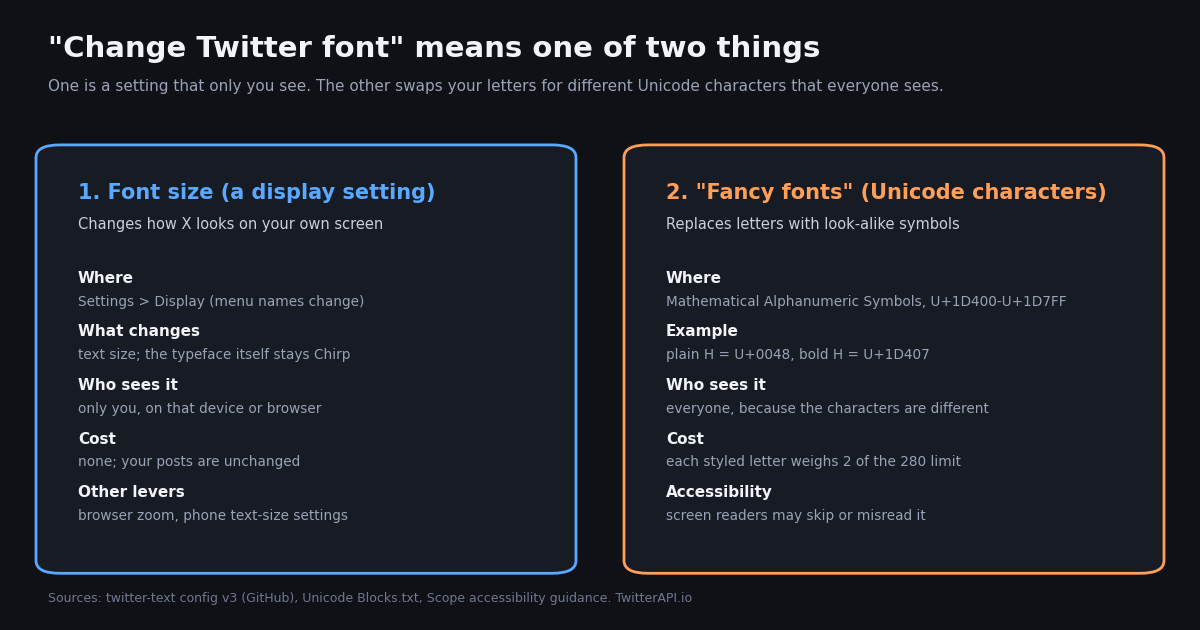
- There is no font picker on X. The typeface is Chirp everywhere; the setting you can change is font size, in the Display section of settings, and it affects only your screen.
- "Twitter fonts" from generators are not fonts. They are Unicode characters from the Mathematical Alphanumeric Symbols block,
U+1D400-U+1D7FF, that happen to look like bold, italic, script or fraktur letters. - Styled letters cost double. In twitter-text's v3 config only code points up to
4351(plus a few punctuation ranges) weigh 1; each styled letter weighs 2, so 140 styled letters fill a 280-character post. - Screen readers struggle. Scope's accessibility guidance says screen readers may skip these characters or announce them by their Unicode names.
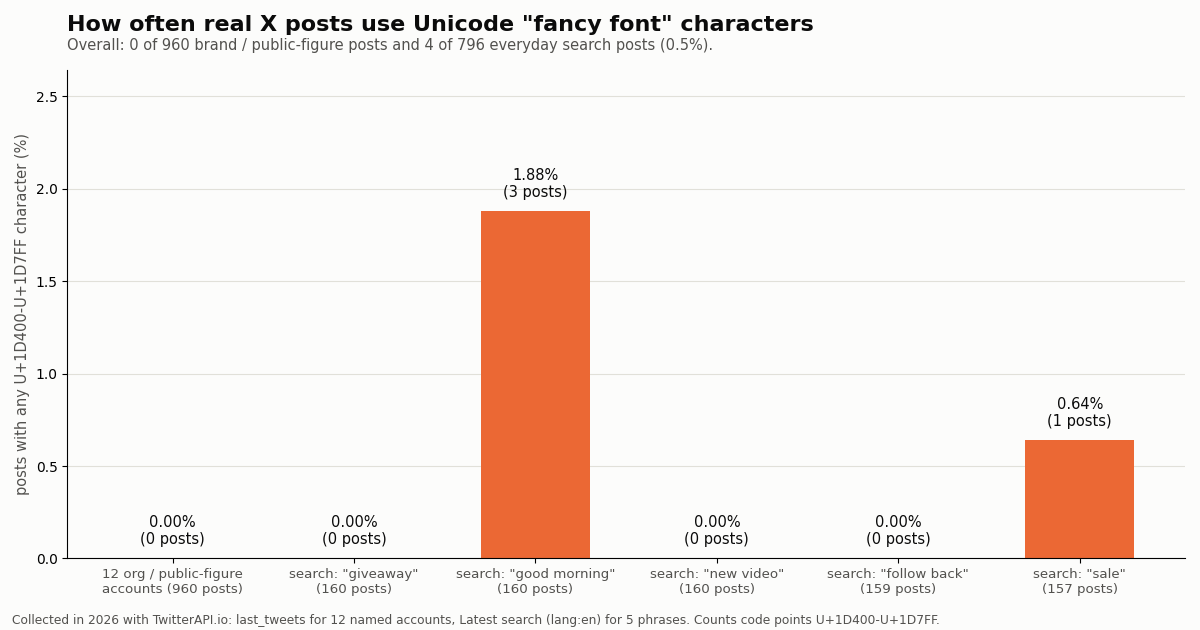
- Brands avoid them. 0 of 960 recent posts from 12 large accounts used a styled letter; 0.5% of 796 everyday posts did (collected in 2026).
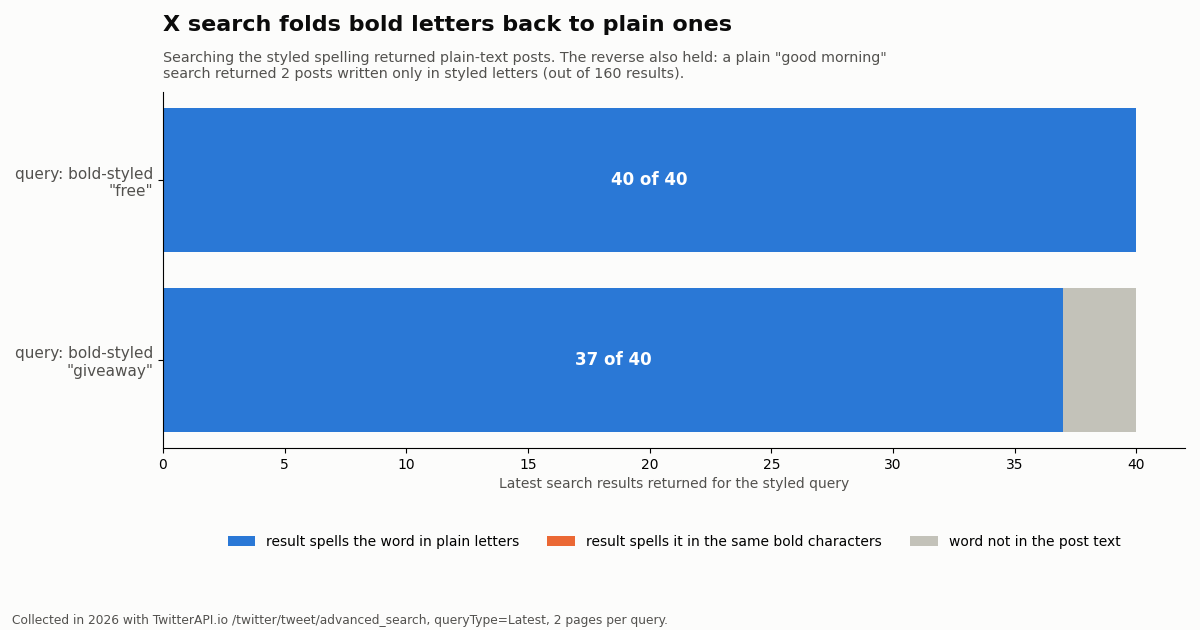
- X search folds styles. Searching a bold-styled word returned posts with the plain word (37 of 40 and 40 of 40); a plain "good morning" search also found posts spelled only in styled letters.
Search for "change Twitter font" and you land in one of two places: a settings walkthrough, or a "font generator" that turns your text into curly script or heavy bold you can paste into a post or bio. Both answer part of the question. Neither explains why the two are completely different things, or what the generator output does to your post once it is published.
This guide covers both. First the setting X actually offers (text size, plus the browser and phone levers around it). Then what "fancy fonts" really are at the character level, with a code-point table you can copy from without any generator, how they count against the 280-character limit, how screen readers and search handle them, and how often real accounts use them, measured on 1,756 posts we collected in 2026.
0 of 960 recent posts from 12 large brand and public-figure accounts, and 4 of 796 everyday English posts (0.5%), collected in 2026.
What font does Twitter (X) use, and can you change it?
X draws its interface and every post in Chirp, its own typeface, which Twitter rolled out across its website and apps in August 2021, as TechCrunch and design press reported at the time. Chirp is a proprietary font: it is not something you can download, and X offers no control for replacing it with another family on x.com, iOS or Android.
That leaves three honest answers to "can I change the Twitter font":
Size, yes. X has a font size control in its Display settings. It makes text larger or smaller on your own device. Nobody else sees the change.
Typeface for yourself, only with outside tools. A browser extension or user stylesheet can force a different font onto x.com in your own browser. That is a local override, the same as zooming: your followers still see Chirp.
Typeface for everyone, no. There is no setting, subscription tier or post formatting that changes the font your followers see. What generators do instead is swap your letters for other Unicode characters, covered in detail below.
This distinction matters because the two routes have opposite trade-offs. The size setting is private and free. The character swap is public, permanent once posted, and changes how your text is counted, read aloud and searched.
How to change font size on X (web, iPhone, Android)
X keeps its text size control in the Display section of settings, next to the color and background (theme) options. On x.com, open the More menu in the left sidebar, choose Settings and privacy, then look under Accessibility, display, and languages for Display, where a size slider with a live preview post sits above the color and background choices. The mobile apps reach the same area from your profile menu under Settings and privacy.
We could not fetch X's own help article on customizing the display (help.x.com/en/managing-your-account/how-to-customize-your-display) while writing this page, because the help center blocks automated requests, so treat the menu names above as a guide rather than an exact path. X renames and regroups settings often; if a label differs in your app, search the settings screen for "Display" or "font".
On the web. The size setting is saved to your account's display preferences for that browser. If you want text larger than the largest step, browser zoom (Ctrl or Cmd with plus) scales the whole page, including Chirp, without touching your X settings.
On iPhone and iPad. If the in-app slider does not go far enough, the system-wide text size in iOS (Settings, Display and Brightness, Text Size, or Accessibility, Display and Text Size, Larger Text) affects apps that support Dynamic Type. Whether a given X app version follows it is up to X, so check the preview after changing it.
On Android. Android's own font size and display size controls (in the Accessibility or Display section of the system settings, depending on the manufacturer) scale apps that respect them. Not every app follows the system setting, so if X does not change, the in-app option or a mobile browser at x.com are the fallbacks.
Theme versus font. Many readers who want a different font really want less glare. The background options in the same Display screen (Default and Lights out) change contrast without changing any text; our guide to Twitter dark mode covers those options in detail.
What "Twitter fonts" from generators really are (with a copy-ready style table)
Fonts are drawing instructions: the same letter "H" (code point U+0048) looks different in Chirp, Arial or Times because each font draws it differently. A post on X stores only the code points, and your follower's device picks the font. That is why you cannot send a font.
Font generators work around this by changing the characters instead. Unicode, the standard that assigns a number to every character, contains a block called Mathematical Alphanumeric Symbols (U+1D400-U+1D7FF, per Unicode's Blocks.txt). It exists so mathematicians can write symbols where bold x and italic x mean different things. Its letters include bold, italic, bold italic, script, bold script, fraktur, double-struck, sans-serif (with bold and italic variants) and monospace versions of A-Z, a-z, and digits.
A generator simply maps each letter you type to the matching symbol. "H" becomes U+1D407 MATHEMATICAL BOLD CAPITAL H, "e" becomes U+1D41E, and so on. A few letters have holes in the block because they were encoded earlier elsewhere, so generators borrow them from the Letterlike Symbols block (U+2100-U+214F): italic small h is U+210E (PLANCK CONSTANT), fraktur capital H is U+210C and double-struck capital H is U+210D.
Because these are real characters, they survive copy and paste into posts, bios, display names and DMs, and they look styled on any device whose fonts include them. Because they are not letters in the ordinary sense, everything that processes text (character counters, screen readers, search engines, translation, your own code) has to decide what to do with them.
Searchers often ask for one generator by name, LingoJam (lingojam.com); any generator produces the same code points, so you can also copy straight from the table in the next section.
The rows below are real Unicode text, not images. Copy a cell and paste it into the X composer to see it render. The code point columns show what is actually stored for the first two letters.
Holes to watch. In italic, fraktur and double-struck, some letters come from the Letterlike Symbols block (here: italic h, fraktur H, double-struck H). They look consistent in most fonts but are different code points from the rest of the word, which matters if you ever search or process the text.
Missing glyphs. Older Android versions and some desktop fonts lack glyphs for parts of this block, and readers on those devices see empty boxes. Bold and sans-serif bold have the widest font coverage in practice; fraktur and script are the most likely to break.
Digits and punctuation. The block includes bold, double-struck, sans-serif and monospace digits (U+1D7CE-U+1D7FF) but no punctuation. Generators leave commas, periods, emoji and hashtags' # sign unchanged.
The character-count cost: each styled letter weighs 2
X counts posts with weighted length, and its rules are public in the open-source twitter-text library on GitHub. The v3 config file sets maxWeightedTweetLength to 280, scale to 100 and defaultWeight to 200, and lists the only ranges that weigh 100 (one character): code points 0-4351 plus three short punctuation ranges (8192-8205, 8208-8223, 8242-8247).
Mathematical Alphanumeric Symbols sit far above 4351 (U+1D400 is 119,808), outside every light range, so each one gets the default weight of 200, which is 2 characters. The library's parseTweet treats each styled letter (stored as a surrogate pair in JavaScript) as a single character with that weight. The Letterlike Symbols holes (U+210C, U+210D, U+210E) are also above 4351 and weigh 2 as well.
In our sample, the posts that used styled letters had a median of 11 styled characters, which adds 11 characters of weight compared with the same post in plain letters (maximum 14). That is modest for a styled headline, but a fully styled post loses half its room.
Accessibility: what screen readers do with fancy fonts
The UK disability charity Scope, in its business accessibility guidance on special characters and Unicode symbols, calls Unicode fancy text "inaccessible to screen reader users" and says screen readers "may skip them entirely or read something irrelevant to the user". Its example is a stylized t announced as "mathematical sans-serif script t".
Scope also lists people with dyslexia, low vision, learning difficulties and lower reading levels as affected, and notes that the characters "make things harder to read for sighted users, too". Exactly what a listener hears depends on the screen reader, its version and its verbosity settings, so test with VoiceOver (iOS, macOS) or TalkBack (Android) if your audience includes screen-reader users.
Practical rules if you still want styled text. Keep it to one or two words (a label or a name), never the whole message. Never put key information (a date, a price, a link description, a call to action) only in styled letters. Do not style hashtags or @handles. In a bio, keep your name and what you do in plain text so both people and assistive technology can read it.
Safer emphasis. Plain capitals for one word, line breaks, a short emoji marker or a clear first line carry emphasis without changing characters. For images, X's alt text field is the accessible place for descriptive text.
How often real posts use fancy fonts: a 1,756-post study
We wanted a number instead of an impression, so we pulled recent posts and counted every code point in the Mathematical Alphanumeric Symbols block.
Brand and public-figure accounts. We read the latest 80 posts from each of 12 large accounts (@NASA, @nytimes, @Nike, @netflix, @Spotify, @NBA, @BBCBreaking, @elonmusk, @binance, @coinbase, @XboX, @Google). Not one of the 960 posts used a styled letter.
Everyday posts. We searched five common English phrases (giveaway, good morning, new video, follow back, sale) in X's Latest view, 796 posts in total, with authors de-identified. 4 posts (0.5%) used styled letters, three of them under "good morning" and one under "sale".
Which styles people pick. Of the 45 styled characters we found, 51.1% were sans-serif bold, 24.4% were bold script, 24.4% were italic. In the styled posts, a median of 33.7% of letters were styled: people style a greeting or a headline, then switch back to plain text.
What it means for you. Styled letters are rare enough to stand out, which is the point, and rare enough that the large accounts we sampled skip them entirely. If you are writing for a brand, that is a useful signal of current practice; if you want a styled display name or one emphasized word, the cost is small as long as the rest stays plain.
Does X search find text written in fancy fonts?
A common warning is that styled words are invisible to search. On X's own search, our test points the other way, at least for the bold and script letters we tried.
Styled query, plain results. Searching the bold-styled spelling of "giveaway" returned 40 recent posts; 37 contained the plain word and none contained the bold spelling. The bold-styled "free" returned 40 posts, all 40 with the plain word. X appears to fold these characters to their plain letters before matching.
Plain query, styled results. The plain "good morning" search returned 2 posts (of 160) where the phrase appeared only in styled letters, one in bold script and one in italic. So X matched them to the plain phrase too.
Where styled text still breaks. That folding is X's choice, not a property of the characters. Ctrl+F in a browser, many site search boxes, spreadsheet filters, and simple code that compares strings treat U+1D420 and g as different characters. If you rely on people finding a word outside X (a product name in a bio someone copies into Google, for example), keep it plain.
What the test cannot show. We ran two styled queries and five plain ones in X's Latest view; Top results, hashtags and other styles (fraktur, double-struck, monospace) may behave differently, and X can change its search normalization at any time.
For developers: styled text in API data, and how to normalize it
If you collect posts for analysis, styled letters arrive exactly as written. TwitterAPI.io returns the post's text field unchanged, so a bold "giveaway" comes back as eight code points from U+1D420 onward, and a keyword filter written as "giveaway" in text misses it.
Python's standard library fixes most of this in one call. unicodedata.normalize("NFKC", text) applies Unicode's compatibility decomposition, which maps every Mathematical Alphanumeric letter and digit, and the Letterlike Symbols holes, back to plain ASCII letters and digits. We used exactly this in our study: every styled "good morning" post normalized to the plain phrase.
Keep the original too. NFKC also rewrites other compatibility characters (superscript 2 becomes 2, the fi ligature becomes f and i, full-width letters become ASCII), so store the raw text and match against a normalized copy rather than overwriting it.
Counting styled characters. A simple range check, 0x1D400 <= ord(ch) <= 0x1D7FF, finds them; unicodedata.name(ch) tells you the style (for example MATHEMATICAL SANS-SERIF BOLD SMALL A). The code below searches recent posts, flags styled ones and prints the normalized text.
Cost of this kind of collection. Reading posts with TwitterAPI.io is pay-per-use at $0.15 per 1,000 tweets returned, no X account needed, so the 1,756 posts in this study cost about $0.26. The official X API's pay-per-usage rate card on docs.x.com lists $0.005 per post read, which is $5 per 1,000 posts, about 33x more for the same reads. New accounts that pass the automatic bot check get up to $1 of free credits (at most 100,000 credits, no card, one per person or network, expiring after 31 days).
import unicodedata

styled = "\U0001D420\U0001D422\U0001D42F\U0001D41E\U0001D41A\U0001D430\U0001D41A\U0001D432"  # bold 'giveaway'
print(styled)                                   # renders as bold letters
print(len(styled), [hex(ord(c)) for c in styled[:2]])
print(unicodedata.name(styled[0]))              # MATHEMATICAL BOLD SMALL G
print(unicodedata.normalize("NFKC", styled))    # giveaway
print("giveaway" in styled, "giveaway" in unicodedata.normalize("NFKC", styled)) # False TrueHow we collected this
Question. How often do X posts use Mathematical Alphanumeric characters, which styles appear, and does X search match styled words to plain ones?
Accounts and queries. Timelines: the latest posts of @NASA, @nytimes, @Nike, @netflix, @Spotify, @NBA, @BBCBreaking, @elonmusk, @binance, @coinbase, @XboX, @Google, via /twitter/user/last_tweets (4 pages each). Search: "giveaway", "good morning", "new video", "follow back" and "sale" with lang:en in Latest mode via /twitter/tweet/advanced_search (8 pages each), plus the bold-styled spellings of "giveaway" and "free" (2 pages each).
Sample. 960 timeline posts and 796 search posts after removing duplicates, plus 80 results for the styled-query test, collected in 2026. A few lookups for X's own posts about display settings returned nothing and are not used.
Method. For each post we counted code points in U+1D400-U+1D7FF, named the style with Python's unicodedata, computed twitter-text v3 weighted length before and after NFKC normalization, and checked whether the query word appeared in the raw or the normalized text.
What the sample cannot show. It is English-only, recent-posts-only and small: five phrases and 12 accounts. Fancy text is likely more common in bios and display names (which we did not sample) and in niches we did not search. Styles from other blocks (circled letters, small capitals from phonetic blocks, combining underlines) were not counted.
Privacy. We report aggregates only. Named accounts are organizations and public figures; search authors are private individuals, so their posts are stored only as de-identified rows (no ID, URL, text or handle).
import os
import unicodedata
import requests

API_KEY = os.environ["TWITTERAPI_IO_KEY"]
BASE = "https://api.twitterapi.io"
HEADERS = {"X-API-Key": API_KEY}


def styled_chars(text):
    """Return the Mathematical Alphanumeric characters (U+1D400-U+1D7FF) in text."""
    return [c for c in text if 0x1D400 <= ord(c) <= 0x1D7FF]


def search(query, pages=2):
    """Yield recent posts for a query, following next_cursor."""
    cursor = ""
    for _ in range(pages):
        r = requests.get(
            f"{BASE}/twitter/tweet/advanced_search",
            headers=HEADERS,
            params={"query": query, "queryType": "Latest", "cursor": cursor},
            timeout=30,
        )
        r.raise_for_status()
        data = r.json()
        for tweet in data.get("tweets", []):
            yield tweet
        if not data.get("has_next_page"):
            break
        cursor = data.get("next_cursor", "")


styled_posts = 0
total = 0
for tweet in search("good morning lang:en"):
    total += 1
    text = tweet.get("text") or ""
    chars = styled_chars(text)
    if not chars:
        continue
    styled_posts += 1
    styles = {unicodedata.name(c).replace("MATHEMATICAL ", "").rsplit(" ", 2)[0] for c in chars}
    plain = unicodedata.normalize("NFKC", text)
    print(tweet["createdAt"], tweet["author"]["userName"], sorted(styles))
    print("  normalized:", plain[:120].replace("\n", " "))

print(f"{styled_posts} of {total} posts used styled letters")
Researching this?Free starter credits cover end-to-end testing — Google sign-in, no card. Get a key.
Questions readers ask
Can I change the font on Twitter (X)?
Not the typeface. X uses its own font, Chirp, on the website and in the apps, and there is no setting to choose another family. You can change the font size in the Display section of settings, and a browser extension can override the font in your own browser only.
How do I make my Twitter text bigger?
Use the font size slider in X's Display settings (Settings and privacy, then Accessibility, display, and languages, then Display, at the time of writing; X renames menus). For more, use browser zoom on x.com or your phone's system text size.
How do people post in bold or italic on Twitter?
They paste Unicode characters from the Mathematical Alphanumeric Symbols block (U+1D400-U+1D7FF), usually produced by a font generator. X has no bold or italic button for regular posts; the styled look comes from different characters, not formatting.
Do Twitter font generators work in bios and display names?
Yes. Because the output is ordinary Unicode text, it pastes into posts, bios and display names. It may show as empty boxes on devices whose fonts lack those characters, and screen readers may skip or misread it.
Do fancy fonts use more characters?
Yes. Under X's open-source twitter-text v3 rules, each styled letter weighs 2 toward the 280 limit, because it lies outside the code point ranges that weigh 1. A fully styled post fits 140 letters.
Can people search for my post if I use fancy fonts?
On X, our 2026 test found search matched bold and script letters to their plain words in both directions. Outside X (browser find, many site searches, simple code), styled letters often do not match plain text, so keep important words plain.
Are Unicode fonts bad for accessibility?
They can be. Scope's accessibility guidance says screen readers may skip them or announce them by Unicode name, and they are harder to read for people with dyslexia or low vision. Limit them to a word or two and never put key information only in styled letters.
What font does Twitter use?
Chirp, a proprietary typeface Twitter rolled out across its website and apps in August 2021 as part of its rebrand. It is not available for download.
Continue
- twitter-text config v3 (GitHub): maxWeightedTweetLength 280, defaultWeight 200, the weight-100 code point ranges
- twitter-text parseTweet.js: surrogate pairs counted as one character with the default weight
- Unicode Character Database, Blocks.txt: 1D400..1D7FF Mathematical Alphanumeric Symbols; 2100..214F Letterlike Symbols
- Unicode code chart for the Mathematical Alphanumeric Symbols block
- Scope for Business: accessibility, screen readers, special characters and Unicode symbols
- Python documentation: unicodedata.normalize and unicodedata.name
- Twitter (X) API overview: reading posts, profiles and search data
- Tweet character count: how X weighs letters, emoji and links
- Twitter (X) dark mode: the Default and Lights out themes
- Usernames for Twitter (X): rules and ideas for your handle
- X post templates for writing clearer posts
- TwitterAPI.io pricing: pay per tweet returned
- TwitterAPI.io API documentation (advanced search and timelines)
- 01How to Make Your Twitter (X) Account Private, and Public Again
- 02Twitter (X) API 1.1 in 2026: What Still Works and Where Each Endpoint Went
- 03Twitter (X) Enterprise API: What It Includes, Who Needs It, and What It Costs
- 04Twitter (X) Account Activity API: What It Was, Its End of Life, and What Replaces It
- 05Sensitive Content Warning on Twitter (X): How to See, Turn Off, or Keep It
- 06Twitter (X) OpenAPI: Which Spec to Use and How to Generate a Typed Client
- 07Sprinklr Pricing: What It Costs Now That Self-Serve Has Ended
- 08OpenClaw Mission Control: Built-in Control UI vs Third-Party Dashboards (and X Data)
Writing about something you built with TwitterAPI.io? Our community rewards program pays API credits for honest tutorials, build logs and videos.
Stop reading. Start building.
Starter credits cover real testing on real data. Google sign-in, no card, no application queue.
Get an API keyAlready building with TwitterAPI.io? Publish an honest tutorial or build log about it and earn up to $200 a month in API credits.