Twitter (X) and Firebase: store posts in Firestore with a scheduled Cloud Function
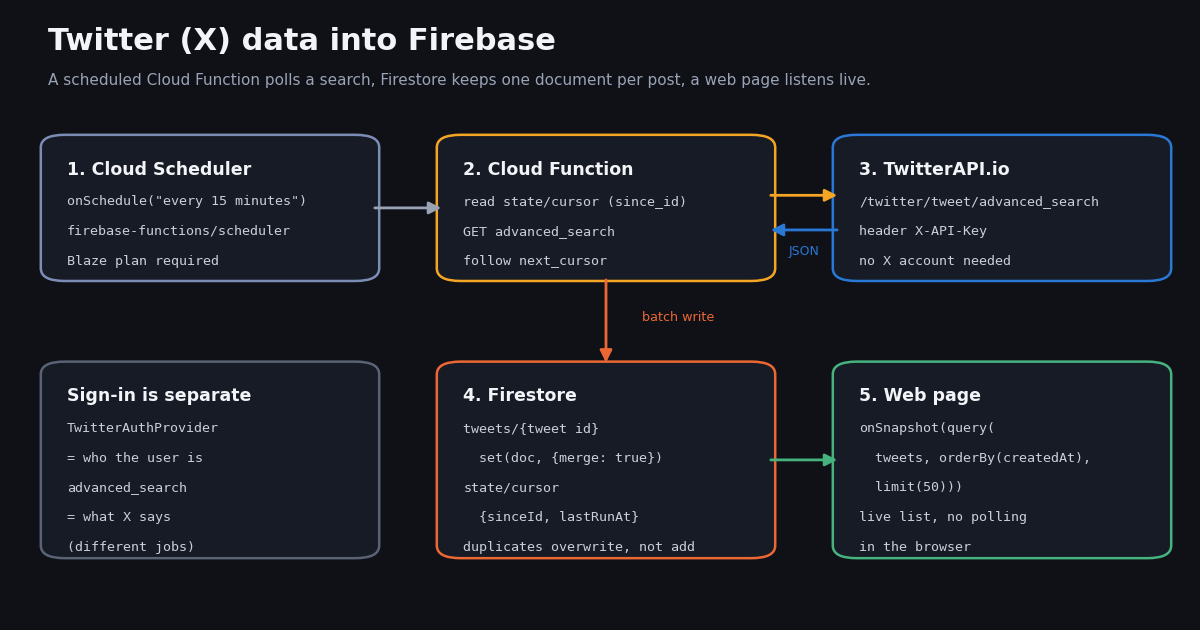
- Shape: Cloud Scheduler ->
onSchedulefunction ->/twitter/tweet/advanced_search-> Firestoretweets/{tweet id}+state/cursor-> a web page withonSnapshot. Full Node.js and Python code below. - Idempotent by design: the tweet id is the document id and every write is
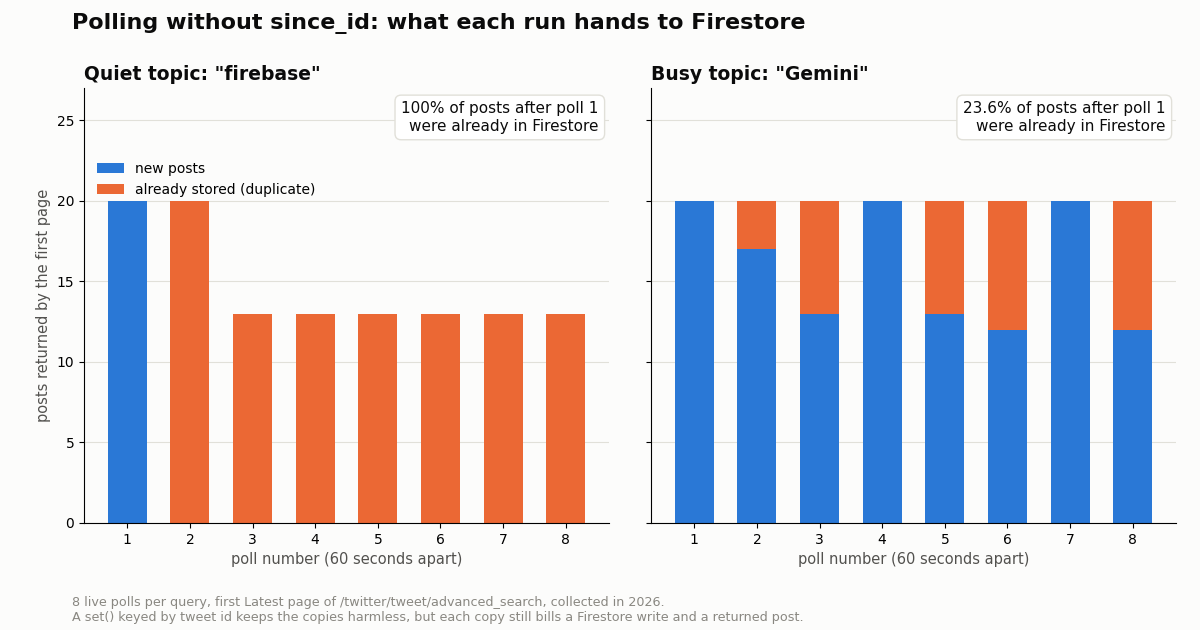
set(..., {merge: true}), so overlapping runs, retries and repeated pages overwrite instead of duplicating. - since_id matters: in 8 live polls 60 seconds apart without it, 100% of the posts after the first poll were already stored on a quiet topic and 23.6% on a busy one. Each copy still costs a Firestore write and a returned post.
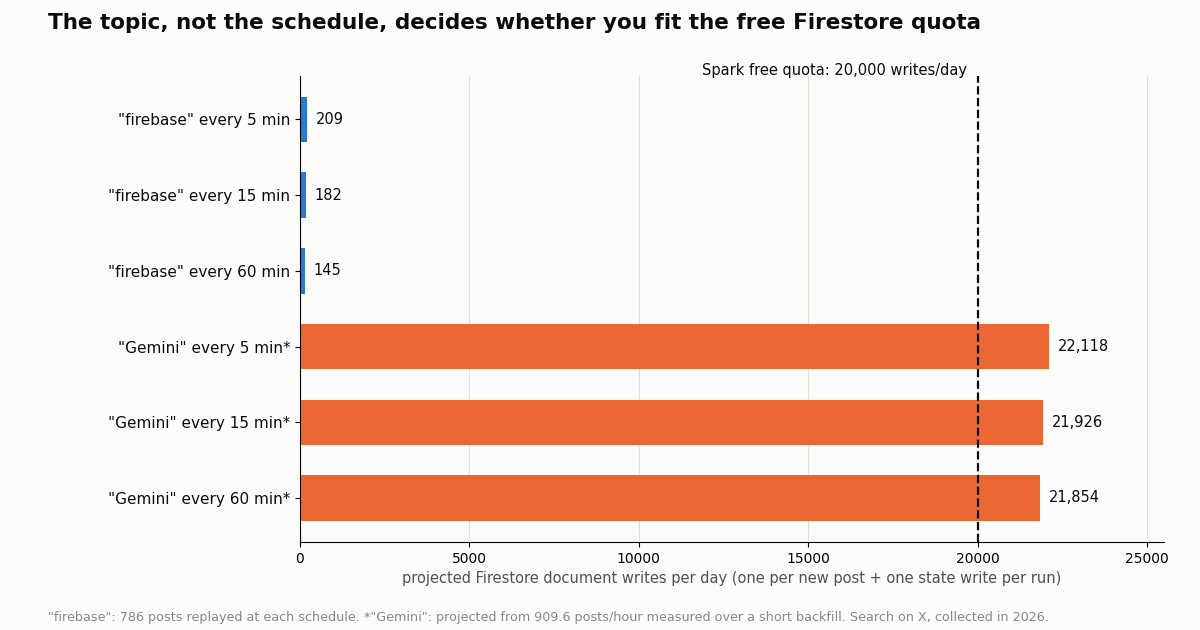
- Quota fit depends on the topic: "firebase" (122 posts/day) uses about 1% of the 20,000 writes/day Spark quota even every 5 minutes; "Gemini" (21,830 posts/day projected) passes it on any schedule.
- Plans: scheduled functions require Blaze; Cloud Scheduler gives three jobs per Google account at no charge, then $0.10 per job a month; Blaze includes 2M function invocations a month at no cost.
- Cost: $0.15 per 1,000 posts returned on TwitterAPI.io vs $0.005 per post read ($5 per 1,000) on the official X API pay-per-usage rate card, about 33x. A run that finds nothing bills the $0.00015 minimum.
People who search "twitter firebase" usually want one of two things: a Firebase app that shows live X (Twitter) posts about a topic, or a "Sign in with Twitter" button on a Firebase app. The two are often confused, and many older tutorials mix them up: they turn on the Twitter provider in Firebase Auth and then wonder why no feed appears, or they store OAuth secrets from the old free X API tiers in functions.config(), which the 2nd-gen SDK replaced with params and Secret Manager.
This guide builds the data side the way current Firebase expects it: a 2nd-gen scheduled function, a secret for the API key, Firestore documents keyed by tweet id so writes are idempotent, a cursor document, security rules that let the browser read but not write, and a live page. Every Firebase fact here (runtimes, scheduler syntax, quotas, plan rules) was checked against firebase.google.com/docs while writing, and every X number comes from a study we ran against the live search: a 786-post backfill replayed at three schedules plus 16 real polls. The function itself was not deployed for the study; its polling logic ran locally against the same endpoint.
If your stack is AWS or Cloudflare instead, the Lambda and Workers guides cover the same pipeline with SQS and KV. The sign-in side is covered at the end of this page and in more depth in the OAuth 2.0 user-context guide.
100%
The architecture: one scheduled function, two collections, one live page
Cloud Scheduler. Deploying an onSchedule function creates a Cloud Scheduler job for you; the Firebase docs accept both App Engine syntax (every 15 minutes, every day 00:00) and Unix crontab (*/15 * * * *). Options include timeZone, retryCount, maxRetrySeconds and backoff settings.
The function. It reads state/cursor, calls /twitter/tweet/advanced_search with queryType=Latest and since_id:<sinceId> appended to the query, follows next_cursor while has_next_page is true (20 posts per page), and writes each post in a batch.
Firestore tweets/{tweet id}. One document per post, written with set(..., {merge: true}). Because the id comes from X, writing the same post twice changes nothing but its fields, which is what makes retries safe.
Firestore state/cursor. One small document with sinceId and lastRunAt. The Firebase docs warn that a scheduled function may be triggered again while the previous instance is still running, so the cursor only moves forward inside a transaction.
The web page. A Firebase Hosting page subscribes to the newest 50 documents with onSnapshot. The browser never calls X or TwitterAPI.io, and your API key never leaves Secret Manager.
Step 1: project setup, runtime and the API key secret
Upgrade the project to Blaze first: the Firebase pricing page lists Cloud Functions as not available on Spark, and the scheduled-functions page notes that scheduled functions are billed. Then run firebase init functions and pick JavaScript or TypeScript.
Runtime. The Firebase docs list Node.js 22, 20 and 18 (18 marked deprecated; 14 and 16 can no longer be deployed). Set it with "engines": {"node": "22"} in package.json or "runtime": "nodejs22" in firebase.json; when both are set, the CLI uses firebase.json. For Python, the supported runtimes are python310 and python311.
The key. Store your TwitterAPI.io key with firebase functions:secrets:set TWITTERAPI_IO_API_KEY, declare it with defineSecret from firebase-functions/params, list it in the function's secrets option and read it with .value() at run time. After changing the value, redeploy the functions that use it. Do not put the key in client code or in a Firestore document.
Node.js 18 and later ship a global fetch, so the function needs no HTTP library. TwitterAPI.io authenticates with a single X-API-Key header: no OAuth signing, no X developer account and no Bearer token for reads.
npm install -g firebase-tools
firebase login
firebase init functions          # JavaScript, Node.js 22
cd functions && npm install firebase-functions@latest firebase-admin@latest && cd ..
firebase functions:secrets:set TWITTERAPI_IO_API_KEY
firebase deploy --only functions:pollX,firestore:rulesStep 2: the scheduled function (Node.js), idempotent by tweet id
The function below is the whole poller. Three details make it safe to run forever: the document id is the tweet id, every write uses merge: true, and the cursor only moves forward inside a transaction so an overlapping or retried run can never move it back.
Tweet ids are 64-bit numbers, larger than JavaScript's safe integer range, so compare them with BigInt, never with Number. The createdAt string in our JSON (Sat Nov 28 23:12:50 +0000 2026 style) parses with new Date() in Node.js and is stored as a Firestore timestamp so the web page can order by it.
MAX_PAGES caps one run at 200 posts. On a quiet topic that is never reached; on a busy one, either shorten the schedule or raise the cap, because posts beyond the cap are skipped once the cursor moves past them.
A Firestore batch holds up to 500 operations, so writing one 20-post page per batch stays well inside it. Store only the fields your page uses; the full post JSON was a median of 3,057 bytes in our study, and trimming it keeps storage and egress down.
// functions/index.js  (Node.js 22 or 20; firebase.json "runtime": "nodejs22")
// npm install firebase-functions firebase-admin
// firebase functions:secrets:set TWITTERAPI_IO_API_KEY
const {onSchedule} = require("firebase-functions/scheduler");
const {defineSecret} = require("firebase-functions/params");
const {logger} = require("firebase-functions");
const {initializeApp} = require("firebase-admin/app");
const {getFirestore, FieldValue} = require("firebase-admin/firestore");

initializeApp();
const db = getFirestore();
const TWITTERAPI_KEY = defineSecret("TWITTERAPI_IO_API_KEY");
const QUERY = "firebase -filter:retweets";   // any X search operators, up to 512 characters
const MAX_PAGES = 10;                          // 20 posts per page, so up to 200 posts per run

exports.pollX = onSchedule(
  {schedule: "every 15 minutes", timeZone: "Etc/UTC", retryCount: 1, secrets: [TWITTERAPI_KEY]},
  async () => {
    const stateRef = db.doc("state/cursor");
    const sinceId = (await stateRef.get()).data()?.sinceId || null;
    const query = sinceId ? `${QUERY} since_id:${sinceId}` : QUERY;

    let cursor = "";
    let newest = sinceId || "0";
    let stored = 0;
    for (let page = 0; page < MAX_PAGES; page++) {
      const url = new URL("https://api.twitterapi.io/twitter/tweet/advanced_search");
      url.search = new URLSearchParams({query, queryType: "Latest", cursor}).toString();
      const res = await fetch(url, {headers: {"X-API-Key": TWITTERAPI_KEY.value()}});
      if (!res.ok) throw new Error(`advanced_search HTTP ${res.status}`);   // retryCount re-runs it
      const body = await res.json();
      const tweets = body.tweets || [];

      const batch = db.batch();
      for (const t of tweets) {
        // doc id = tweet id, so a repeated post overwrites itself instead of adding a copy
        batch.set(db.collection("tweets").doc(t.id), {
          text: t.text,
          url: t.url,
          lang: t.lang ?? null,
          createdAt: new Date(t.createdAt),        // "Sat Nov 28 23:12:50 +0000 2026"
          likeCount: t.likeCount ?? 0,
          retweetCount: t.retweetCount ?? 0,
          replyCount: t.replyCount ?? 0,
          viewCount: t.viewCount ?? 0,
          author: {userName: t.author?.userName ?? null, followers: t.author?.followers ?? 0},
          storedAt: FieldValue.serverTimestamp(),
        }, {merge: true});
        if (BigInt(t.id) > BigInt(newest)) newest = t.id;
      }
      if (tweets.length) await batch.commit();
      stored += tweets.length;
      if (!body.has_next_page || !body.next_cursor) break;
      cursor = body.next_cursor;
    }

    // Runs can overlap, so only ever move the cursor forward.
    await db.runTransaction(async (tx) => {
      const current = (await tx.get(stateRef)).data()?.sinceId || "0";
      if (BigInt(newest) > BigInt(current)) {
        tx.set(stateRef, {sinceId: newest, lastRunAt: FieldValue.serverTimestamp()}, {merge: true});
      }
    });
    logger.info("pollX done", {stored, sinceId: newest});
  },
);
Step 3: the Python version with scheduler_fn
Firebase also supports Python functions. The scheduled trigger is @scheduler_fn.on_schedule from firebase_functions, the secret is a SecretParam from firebase_functions.params, and Firestore comes from firebase_admin. Set "runtime": "python311" in firebase.json.
Python integers have no size limit, so tweet ids compare correctly with int(). The createdAt format string is %a %b %d %H:%M:%S %z %Y. Unlike the Node.js version, this one writes the cursor without a transaction for brevity; add one if your schedule is short enough for runs to overlap.
# functions/main.py  (firebase.json "runtime": "python311")
# requirements.txt: firebase-functions, firebase-admin, requests
from datetime import datetime

import requests
from firebase_admin import firestore, initialize_app
from firebase_functions import scheduler_fn
from firebase_functions.params import SecretParam

initialize_app()
TWITTERAPI_KEY = SecretParam("TWITTERAPI_IO_API_KEY")
QUERY = "firebase -filter:retweets"
FMT = "%a %b %d %H:%M:%S %z %Y"


@scheduler_fn.on_schedule(schedule="every 15 minutes", secrets=[TWITTERAPI_KEY])
def poll_x(event: scheduler_fn.ScheduledEvent) -> None:
    db = firestore.client()
    state_ref = db.document("state/cursor")
    since_id = (state_ref.get().to_dict() or {}).get("sinceId")
    query = f"{QUERY} since_id:{since_id}" if since_id else QUERY
    newest, cursor = int(since_id or 0), ""
    for _ in range(10):
        r = requests.get("https://api.twitterapi.io/twitter/tweet/advanced_search",
                         headers={"X-API-Key": TWITTERAPI_KEY.value},
                         params={"query": query, "queryType": "Latest", "cursor": cursor}, timeout=30)
        r.raise_for_status()
        body = r.json()
        tweets = body.get("tweets") or []
        batch = db.batch()
        for t in tweets:
            batch.set(db.collection("tweets").document(t["id"]), {
                "text": t["text"], "url": t["url"], "lang": t.get("lang"),
                "createdAt": datetime.strptime(t["createdAt"], FMT),
                "likeCount": t.get("likeCount", 0), "viewCount": t.get("viewCount", 0),
                "author": {"userName": (t.get("author") or {}).get("userName")},
            }, merge=True)
            newest = max(newest, int(t["id"]))
        if tweets:
            batch.commit()
        if not body.get("has_next_page") or not body.get("next_cursor"):
            break
        cursor = body["next_cursor"]
    if newest > int(since_id or 0):
        state_ref.set({"sinceId": str(newest)}, merge=True)
Step 4: a live web page and Firestore security rules
The read side is a few lines of the Firebase web SDK: query the tweets collection ordered by createdAt, limit it, and render on every onSnapshot callback. New posts appear in open browsers within seconds of the function's batch commit, without the browser polling anything.
The security rules let anyone read tweets and nobody write it from a client. The scheduled function writes through the Admin SDK, which is not subject to security rules, so allow write: if false blocks browsers without blocking the poller. Keep state closed to clients entirely.
Each listener counts Firestore reads: the initial snapshot reads up to the limit you set, and each changed document after that is another read. With 50 documents per page load, 50,000 free reads a day is about 1,000 page loads before any updates, so for a public page with real traffic, budget reads, not writes.
<!-- index.html, served by Firebase Hosting; main.js is bundled (npm install firebase) -->
<ul id="feed"></ul>
<script type="module" src="./main.js"></script>

// main.js
  import {initializeApp} from "firebase/app";
  import {getFirestore, collection, query, orderBy, limit, onSnapshot} from "firebase/firestore";

  const app = initializeApp({/* your web app config from the Firebase console */});
  const db = getFirestore(app);
  const q = query(collection(db, "tweets"), orderBy("createdAt", "desc"), limit(50));

  onSnapshot(q, (snap) => {
    const ul = document.getElementById("feed");
    ul.replaceChildren(...snap.docs.map((d) => {
      const t = d.data();
      const li = document.createElement("li");
      li.textContent = `${t.author?.userName ?? ""}: ${t.text} (${t.likeCount} likes)`;
      return li;
    }));
  });

// firestore.rules: the browser may read the feed, only the function (Admin SDK) writes
rules_version = '2';
service cloud.firestore {
  match /databases/{database}/documents {
    match /tweets/{tweetId} { allow read: if true; allow write: if false; }
    match /state/{doc}      { allow read, write: if false; }
  }
}
What the study measured: since_id and duplicate writes
We ran 8 real polls of each query 60 seconds apart, fetching only the first Latest page and deliberately leaving out since_id, the way many tutorials poll. On the quiet "firebase" topic, all 98 posts returned after the first poll were ones already stored: a 100% duplicate rate. On the busy "Gemini" topic, 33 of 140 (23.6%) were repeats, and two of the seven later polls came back full at 20 posts with no repeats at all, which means posts arrived faster than one page per minute and some were never seen.
Keying documents by tweet id makes the repeats harmless to your data: the collection holds each post once. It does not make them free. Firestore counts every set as a write, and TwitterAPI.io bills every post returned. Appending since_id:<newest id> to the query fixes both: a run that finds nothing new returns zero posts and bills only the 15-credit minimum.
The opposite failure shows up on the busy topic: with one page per run and a fixed interval, a full page means you are missing posts. The Node.js function above handles this by following next_cursor until has_next_page is false or the page cap is reached.
Choosing the schedule, and what it costs vs the official X API
To compare schedules, we replayed the arrival times of a 786-post backfill of the "firebase" query (about 154 hours of posts, 5.1 an hour) as if a function with since_id had run every 5, 15 and 60 minutes. Writes count one document per new post plus one state/cursor write for each run that found something; reads count one cursor read per run.
For a topic like this, every schedule fits Firebase's no-cost Firestore quota with room to spare (1% of 20,000 writes a day at 5 minutes), and the API side stays at a few cents a day. The 5-minute schedule mostly pays for empty runs (69.6% found nothing), each billed at the $0.00015 minimum; 15 minutes is a sensible default unless you need fresher data. Only 1.3% of hourly runs needed a second page.
The busy topic is a different problem. "Gemini" ran at about 910 posts an hour in our backfill, a projected 21,830 posts a day. That is roughly 21,926 Firestore writes a day on any schedule (109.6% of the free quota), about $3.27 a day in API cost, and about 1.8 GiB of raw post JSON a month against the 1 GiB free storage. The schedule barely changes the write count, because writes follow posts, not runs. For topics like that, narrow the query (-filter:replies, lang:en, min_faves:10) or store only a summary per run.
The Firestore quotas reset around midnight Pacific time, so a burst late in the Pacific day counts against that day's quota.
Firebase side. On Blaze, the pieces this guide uses have no-cost allowances: three Cloud Scheduler jobs per Google account, 2M function invocations a month, the Firestore daily quotas above and six active Secret Manager versions. A 15-minute schedule is 2,880 invocations a month, far inside the free allowance; compute time and outbound networking are billed separately at Google Cloud rates, so check the Blaze calculator for your region.
X data side. TwitterAPI.io bills $0.15 per 1,000 posts returned (15 credits per post), with a 15-credit minimum when a search returns nothing, so an empty run costs $0.00015. A run every 60 seconds for a month that never finds anything is 43,200 checks, $6.48; every 5 minutes it is $1.30. Purchased credits never expire, and new accounts that pass the automatic bot check get free starter credits (no card, one per person or network, expiring after 31 days). Rate limits are 0.2 requests per second before the first payment and 20 once paid, which a scheduled function never comes close to.
Official X API. The X API pay-per-usage rate card on docs.x.com/x-api/getting-started/pricing lists $0.005 per post read ($5 per 1,000) and $0.010 per user read, capped at 3 million post reads a month with Enterprise above that. Per 1,000 posts that is $5 against $0.15, about 33x. The official API also needs a developer account and app, and its search endpoints use a Bearer token rather than a single header.
The table counts posts returned only; add the empty-run minimum on our side for schedules that often find nothing. See the pricing page for credit packs and subscriptions.
Firebase Auth's Twitter provider is sign-in, not a data feed
Firebase Authentication has a Twitter provider (the Firebase docs still call it Twitter). You enable it under Authentication > Sign-in method, paste the API key and API secret of an app you register on the X developer portal, and set <project>.firebaseapp.com/__/auth/handler as that app's callback URL. On the web, signInWithPopup(auth, new TwitterAuthProvider()) signs the user in.
What you get back is an identity plus, from TwitterAuthProvider.credentialFromResult(result), an OAuth 1.0 access token and secret for that user. The Firebase docs note these can be used to call the Twitter API on the user's behalf, which means the official X API, under your developer app and at the official rate card. Signing a user in does not by itself give your app any posts, searches or timelines.
So the two jobs are separate. Use the Auth provider when you need to know which X account a user owns (a profile badge, a "connect your X account" step). Use a scheduled function and a data API when you need posts about a topic or from public accounts, which is what the rest of this page builds. Many apps do both: sign users in with any provider, then show them a feed the function keeps fresh. For acting on a user's behalf through X's own OAuth 2.0 flow (scopes, PKCE, refresh tokens), see the OAuth 2.0 user-context guide linked below.
How we collected this
Question. If a scheduled Cloud Function polls a keyword search on X and writes each post to Firestore keyed by tweet id, how many new documents does a run write at 5, 15 and 60 minute schedules, how often does a poll without since_id re-return stored posts, and what does that add up to against the Firestore free quota and in API cost?
Queries. firebase -filter:retweets (a developer topic) and "Gemini" -filter:retweets (a busy topic), both queryType=Latest on /twitter/tweet/advanced_search, collected in 2026.
Sample. A backfill of 786 "firebase" posts (40 pages) and 300 "Gemini" posts (15 pages), plus 8 live polls per query 60 seconds apart. 71 requests in total, about $0.20 of credits. A handful of posts arrived with much older timestamps inside recent pages; we trimmed the oldest 1% (firebase) and 5% (Gemini) of timestamps before computing rates.
Method. The "firebase" backfill was replayed offline at 5, 15 and 60-minute windows. The "Gemini" backfill covers well under an hour, too short to replay, so its schedule rows are projections from the measured rate. Firestore writes are counted as one per new post plus one cursor write per non-empty run; storage uses raw post JSON size, which only approximates Firestore's own document-size accounting.
What it cannot show. Two topics over one collection window; volume on any topic swings by hour, day and news. No Firebase project was deployed: the scheduled function, security rules and web page were not run in Firebase, and Firebase prices and quotas are quoted from Google's pages, not measured. Run the dry-run script below on your own query before you pick a schedule.
Privacy. Search results are mostly private individuals, so raw pages were not kept in the repository; the study files hold aggregates and de-identified rows only (no ids, text, handles or URLs).
"""dry_run_firebase_poller.py - run the Cloud Function's polling logic locally before you deploy.

It polls one X search on a fixed schedule exactly like the scheduled function does (since_id cursor,
next_cursor pagination), keeps an in-memory dict keyed by tweet id in place of Firestore, and prints
the numbers you need to size the Firebase side: new docs per run, Firestore writes per day and API
cost per day. No Firebase project needed.

    pip install requests
    export TWITTERAPI_IO_API_KEY=...        # from the twitterapi.io dashboard
    python dry_run_firebase_poller.py "firebase -filter:retweets" 60 6
"""
import os
import sys
import time

import requests

BASE = "https://api.twitterapi.io"
HEADERS = {"X-API-Key": os.environ["TWITTERAPI_IO_API_KEY"]}
PRICE_PER_POST = 0.00015       # 15 credits per post returned; an empty search bills the 15-credit minimum
SPARK_WRITES_PER_DAY = 20_000  # Firestore no-cost quota


def poll(query, since_id, max_pages=10):
    q = f"{query} since_id:{since_id}" if since_id else query
    cursor, tweets, pages = "", [], 0
    while pages < max_pages:
        r = requests.get(f"{BASE}/twitter/tweet/advanced_search", headers=HEADERS,
                         params={"query": q, "queryType": "Latest", "cursor": cursor}, timeout=30)
        pages += 1
        if r.status_code == 429:
            time.sleep(5)
            continue
        r.raise_for_status()
        body = r.json()
        tweets.extend(body.get("tweets") or [])
        if not body.get("has_next_page") or not body.get("next_cursor"):
            break
        cursor = body["next_cursor"]
    return tweets, pages


def main():
    query = sys.argv[1] if len(sys.argv) > 1 else "firebase -filter:retweets"
    interval = int(sys.argv[2]) if len(sys.argv) > 2 else 60      # seconds between runs (fixed)
    runs = int(sys.argv[3]) if len(sys.argv) > 3 else 6
    store, since_id, writes, cost = {}, None, 0, 0.0
    for i in range(runs):
        tweets, pages = poll(query, since_id)
        new = 0
        for t in tweets:                     # stands in for batch.set(doc(t["id"]), ..., merge=True)
            if t["id"] not in store:
                new += 1
            store[t["id"]] = {"text": t["text"], "createdAt": t["createdAt"], "likeCount": t.get("likeCount", 0)}
            writes += 1                      # a set() on an existing doc is still a billed write
            since_id = str(max(int(since_id or 0), int(t["id"])))
        if tweets:
            writes += 1                      # the state/cursor document
        cost += max(len(tweets), 1) * PRICE_PER_POST
        print(f"run {i + 1}: {len(tweets)} returned, {new} new docs, {pages} page(s), sinceId={since_id}")
        if i < runs - 1:
            time.sleep(interval)
    per_day = 86_400 / (interval * runs)
    print(f"\n{len(store)} docs stored in {runs} runs")
    print(f"projected Firestore writes/day: {writes * per_day:,.0f} "
          f"({100 * writes * per_day / SPARK_WRITES_PER_DAY:.1f}% of the Spark quota)")
    print(f"projected API cost/day: ${cost * per_day:.4f}")


if __name__ == "__main__":
    main()
Researching this?Free starter credits cover end-to-end testing — Google sign-in, no card. Get a key.
Questions readers ask
Can a Firebase Cloud Function call the Twitter (X) API?
Yes. A 2nd-gen function can call any HTTPS API with the global fetch in Node.js 18 and later. With TwitterAPI.io it is one GET to /twitter/tweet/advanced_search with an X-API-Key header kept in Secret Manager. The project must be on the Blaze plan to deploy functions.
Do scheduled functions work on the free Spark plan?
No. The Firebase pricing page lists Cloud Functions as not available on Spark, so you need Blaze. Blaze still includes 2M invocations a month and three Cloud Scheduler jobs per Google account at no charge, and Firestore keeps its daily free quota.
How do I stop duplicate tweets in Firestore?
Use the tweet id as the document id and write with set(..., {merge: true}), so a repeated post overwrites itself. Then append since_id:<newest stored id> to the search so runs stop returning posts you already have; in our study, polling without it re-returned stored posts 100% of the time on a quiet topic.
Does Firebase Auth Twitter login let me read tweets?
Not by itself. The Twitter provider signs the user in and returns an OAuth 1.0 access token and secret for that user, which work only with the official X API under your developer app and its pricing. To show posts about a topic, use a scheduled function and a data API.
How often should the function run?
Measure first. For a developer topic of about 5 posts an hour, a 15-minute schedule found something on about 63% of runs and used under 1% of the Firestore write quota. For busy topics, shorter schedules do not reduce writes, so narrow the query instead.
Which runtimes does Cloud Functions for Firebase support?
Node.js 22 and 20 (18 is deprecated, 14 and 16 can no longer be deployed) and Python 3.10 and 3.11, per the Firebase manage-functions docs. Set the runtime in firebase.json or the engines field of package.json.
Can the Firebase app post to X as well?
Yes, through write endpoints such as /twitter/create_tweet_v2 after a /twitter/user_login_v2 login ($0.10, with a proxy you supply) that returns login_cookies; each post is then $0.0006 per call, billed per HTTP 200 call. The call acts as that account and X can rate-limit, lock or suspend it, the session can need re-login, and it should run for your own account only, at a normal human pace, under X's automation rules; this is not a way around any limit.
Continue
- Firebase docs: schedule functions (onSchedule, scheduler_fn, schedule syntax, Cloud Scheduler job pricing, overlapping runs)
- Firebase docs: manage functions (supported Node.js and Python runtimes)
- Firebase docs: Cloud Firestore pricing and free quota (reads, writes, deletes, storage, Pacific-time reset)
- Firebase docs: authenticate using Twitter in JavaScript (TwitterAuthProvider, OAuth 1.0 token and secret)
- TwitterAPI.io reference: advanced search (since_id operator, 20 per page, cursor pagination)
- X API pay-per-usage pricing ($0.005 per post read, 3M post reads a month cap)
- X (Twitter) API hub: endpoints, pricing and guides
- Twitter API on AWS Lambda: an EventBridge poller with SQS
- Twitter API on Cloudflare Workers: a Cron Trigger feed with KV
- X API OAuth 2.0 user-context setup guide
- Twitter (X) webhooks: filter rules and the push payload
- TwitterAPI.io pricing: $0.15 per 1,000 tweets returned
- TwitterAPI.io API reference and endpoint docs
- 01How to Translate Tweets on Twitter (X): Auto-Translate, the Gear Icon and Language Settings
- 02How to Turn Off Autoplay on Twitter (X): App, Web and Auto-Advance
- 03Twitter (X) and the EU Digital Services Act (DSA): What the Commission Found, and What It Means for X Data
- 04Twitter (X) Network Analysis with Python and networkx: A Real #reInvent Graph
- 05Analyze Twitter (X) Data with pandas: A Worked Example on 1,800 Real Posts
- 06CrewAI vs LangGraph: Which Multi-Agent Framework to Pick, and Where AutoGen Went
- 07Chrome DevTools MCP Server: What It Is, Setup, Tools and Flags (2026)
- 08Ollama MCP: How to Give a Local Model MCP Tools (with Live Twitter (X) Data)
Writing about something you built with TwitterAPI.io? Our community rewards program pays API credits for honest tutorials, build logs and videos.
Stop reading. Start building.
Starter credits cover real testing on real data. Google sign-in, no card, no application queue.
Get an API keyAlready building with TwitterAPI.io? Publish an honest tutorial or build log about it and earn up to $200 a month in API credits.