How to Mass Block on Twitter (X): Tools, Block Lists and Safer Options
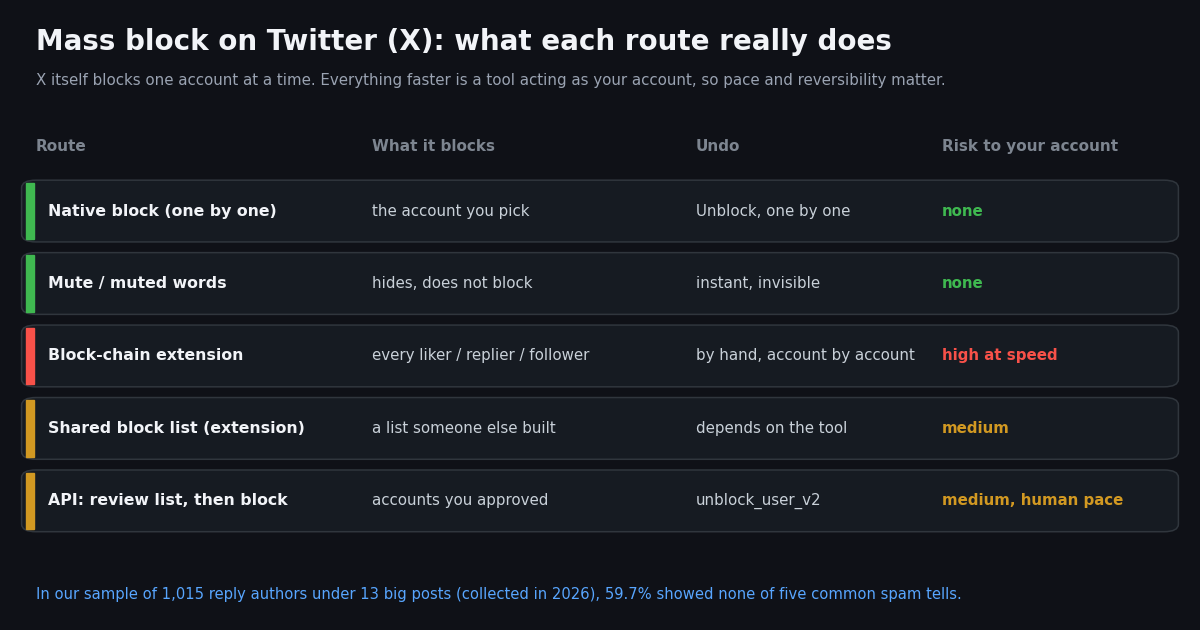
This page is about blocking many other accounts on X (Twitter) at once: during a pile-on, a spam wave in your replies, or a cleanup after a post went viral. It is not about deleting your own posts in bulk (our guide to bulk-deleting tweets covers that) and not about finding out who blocked you (the who-blocked-me guide covers that). Blocking other accounts, deleting your posts and checking your own block status are three different jobs that only share the word "mass".
The short version: X gives you a one-at-a-time block button, mute, muted words and a protected-account switch. Everything faster comes from browser extensions or scripts that act as your logged-in account. We read X's own help pages on blocking and block lists, the developer docs for the official X API's block endpoints, and the source repositories and store pages of the best-known mass-block extensions, then measured who actually replies under large public posts, so you can see what a "block everyone who replied" pass would catch.
If you are a developer, the last third of the page shows how to build a reviewed block list from a thread's replies with TwitterAPI.io and act on it slowly from your own account, with every caveat that comes with automating an account.
Can you mass block on Twitter (X)? What X itself offers
No. X's help page on blocking describes two ways to block: tap the icon at the top of a post and choose Block, or open a profile, tap the more icon and choose Block, then confirm. Each block is one account. There is no select-all, no "block everyone who liked this" and no bulk unblock either: you unblock by visiting each blocked profile and tapping the Blocked button.
X used to have a bulk feature. Its help page on managing your block list now carries this notice: block list, "a feature for people to export and import a CSV file of blocked account lists through x.com, is no longer available." The same page says you can still view your blocked accounts under Settings and privacy, Privacy and safety, Blocked accounts, and that you can view and export a list of accounts you have blocked through Your X Data (the account archive). If you imported lists in the past, X still shows an Imported blocked accounts tab beside All.
So when a guide promises a "mass block Twitter" button, it is describing a third-party tool. That matters for two reasons: the tool works by acting as your logged-in session, and X decides how it treats an account that blocks hundreds of others in a few minutes.
What a block does on X now (and what it no longer does)
Read this before blocking anyone in bulk, because a block is weaker than many people remember. X's help page states that if your posts are public, accounts you have blocked can see your posts, but they cannot engage with them (like, reply, repost). That change went live in November 2024: AP reported at the time that X updated this help page over a weekend, after X's Engineering account had said blocking "can be used by users to share and hide harmful or private information about those they've blocked."
Blocked accounts cannot: engage with your posts, follow you, send you Direct Messages, add your account to their lists, or tag you in a photo (help.x.com, blocking page).
Blocked accounts can: read your public posts, and see that you blocked them if they visit your profile. They are not notified of the block itself. Mute, by contrast, is invisible to the muted account.
Side effects for you: blocking an account you follow unfollows it, and it unfollows you; unblocking does not restore the follow. You stop getting notifications from blocked accounts, but you can still see posts from people you follow that mention a blocked account.
Only protected posts hide you: if your posts are protected, blocked accounts cannot see them, because protected posts are shown only to your followers (help.x.com).
The practical upshot: mass blocking stops those accounts from replying, reposting, following you and sending DMs, but it does not stop a crowd from reading and screenshotting your public posts. If you need people not to see what you post, protecting your account does that; blocking does not.
The tools people use to mass block, and their current status
Mass-block tools fall into three families. We checked each one's own repository or store page this session; extensions on X break often because X changes its web app, so treat any status here as a snapshot and check again before installing.
Block-chain extensions (block everyone on a list page). The original Twitter Block Chain extension blocks all users on a followers or following page you have open; its README says it is for users "likely to be, or currently are being dog-piled" and that stopping it "will not unblock any users you have already blocked." Its GitHub repository (github.com/shiftpsh/twitter-block-chain) was last updated in 2019, and its Chrome Web Store listing returned an error page when we checked.
Liker and reposter blockers. Likers Blocker blocked likers, retweeters and list members and let people share block lists; its README now starts with "THIS REPOSITORY IS DEPRECATED AND WILL NO LONGER BE MAINTAINED." Block Party, a safety app, describes an experimental "block poster and reposters" action on its own blog.
Scan-and-block plus shared lists. Mass Block Twitter by rxliuli is open source (GPL-3.0) and lists smart scan and batch blocking, import and export of block lists, and a shared blocklist based on community reports. Its README now says it "is now in maintenance mode" and points to two successors from the same developer: Twitter Blocker, for background batch blocking (its page says it imports CSV lists or X's own data export file block.js and waits when it hits rate limits), and Twitter Filter, which took over the moderation lists. The README also mentions "the 500-per-day limit MBT hit", a hint that X limits how fast a single account can block.
Commercial social-media dashboards also sell a "block all followers of an account" feature. Whatever the tool, it logs in as you or runs inside your logged-in browser tab, so every block is an action your account took.
Who a block-everyone pass actually hits: our reply-section study
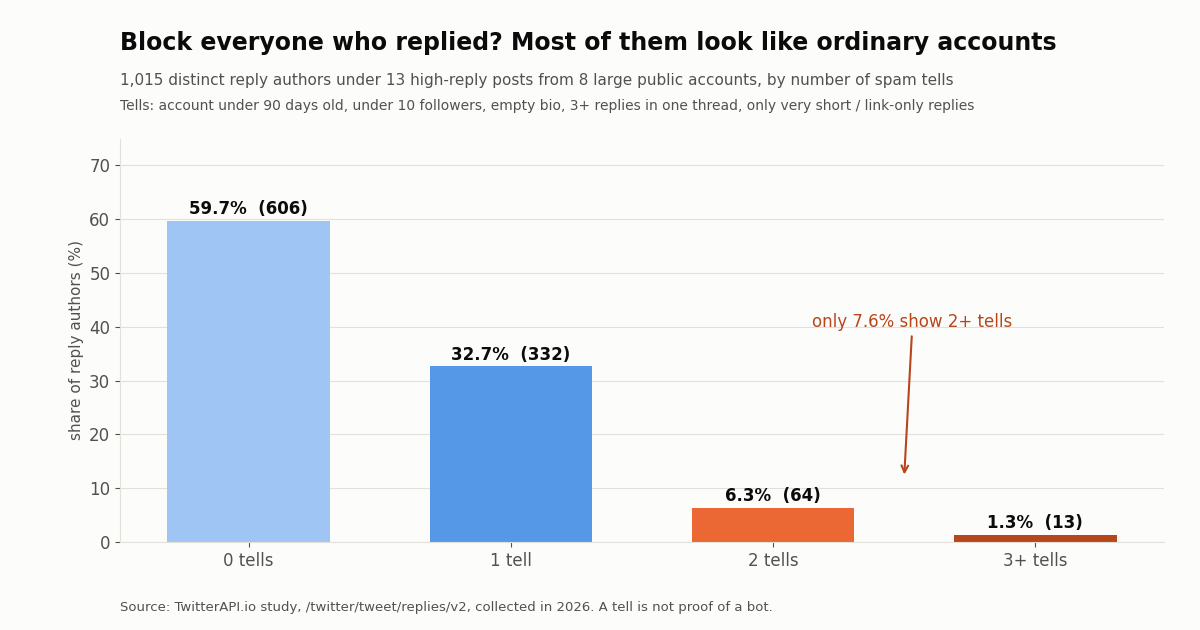
Block-chain tools assume that everyone who replied to, liked or reposted a post is part of the problem. We tested that assumption on reply sections. We took the posts with the most replies from the latest timeline page of eight large public accounts (two posts each for five of them, 13 posts in all), pulled the replies X serves for each post, and checked every distinct reply author for five common tells of spam or throwaway accounts.
The result: 59.7% of the 1,015 reply authors showed none of the five tells, 32.7% showed one, and only 7.6% showed two or more (77 accounts). The median reply author's account was 4.7 years old with 404 followers, and 35.0% were Blue subscribers. A block-everyone pass under these posts would mostly have blocked ordinary accounts.
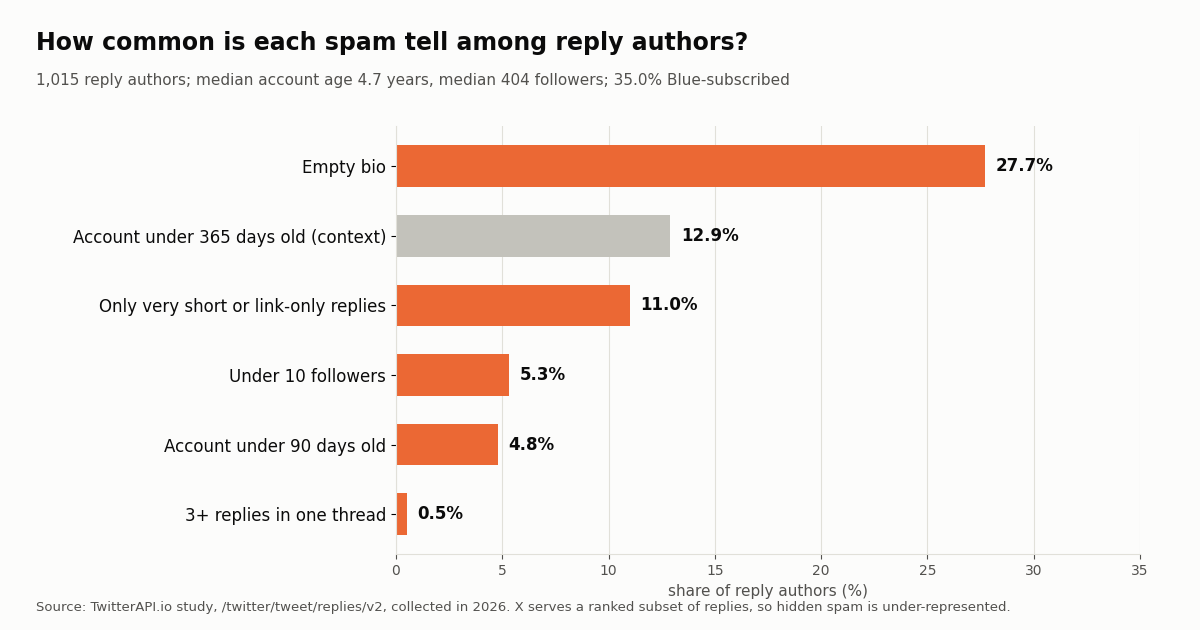
The most common single tell was an empty bio (27.7% of authors), which many real people leave blank. Replies that were only a few characters or only a link came from 11.0% of authors; 5.3% had under 10 followers; 4.8% had accounts under 90 days old; and just 0.5% replied three or more times under the same post. No reply author in the sample carried X's automated-account label.
One tell on its own says very little. Two or more together is a reasonable shortlist to review by hand, which is exactly the opposite of how a one-click block chain works.
Which spam tells show up most in reply sections
Not all tells are equal. The chart below shows how often each one appears among reply authors. Account age under a year is shown for context only and is not counted as a tell.
If you are reviewing a list by hand, a new account with almost no followers that only posted a link is a much stronger candidate than any one of those signals alone. You can check a single account's creation date with our Twitter account age checker before deciding.
Safer alternatives that often beat a mass block
X's help page on controlling your experience lists the tools below alongside block. For a pile-on, they are often faster to apply and carry no risk to your account, because they change what you see rather than performing hundreds of actions on other accounts.
Mute an account. Muted accounts' posts disappear from your timeline, and X says muted accounts "have no way to tell" you muted them. You can mute accounts you do not follow so their posts stay out of your notifications.
Mute words, phrases, hashtags or usernames. One muted word can hide a whole wave of replies that share a slogan or a hashtag, without touching any account (help.x.com, advanced mute options).
Filter notifications. If unwanted replies or mentions come from accounts you do not follow, the notifications timeline lets you filter the types of notifications you receive.
Protect your posts. Protected posts are visible only to followers, and every new follower needs your approval. It is the only setting that stops blocked or unknown accounts from reading what you post.
Report. Abuse, spam and impersonation can be reported to X; you can still report an account that has blocked you.
For developers: build a reviewed block list with the API
If you run a brand or community account and a spam wave lands under one of your posts, the useful job is building a shortlist, not blocking a crowd. Reading the replies needs no X account: /twitter/tweet/replies/v2 with a tweetId returns tweets[] with each reply's author (including id, userName, followers, description and createdAt), plus has_next_page and next_cursor. /twitter/tweet/retweeters and /twitter/tweet/quotes cover the other engagement surfaces.
Reads cost 15 credits per tweet returned, which is $0.15 per 1,000 tweets. Our whole study collected 1,047 replies for about $0.157. The official X API rate card at docs.x.com/x-api/getting-started/pricing lists Posts: Read at $0.005 per resource, which is $5 per 1,000 posts (about 33x more), so the same 1,047 replies would cost about $5.24.
Blocking is a write action, and here the two APIs differ more. X's docs list POST /2/users/:id/blocking (block) and DELETE /2/users/:source_user_id/blocking/:target_user_id (unblock) as available only under the Enterprise plan; the GET list of your blocked users is on pay-per-use at $0.001 per resource. On TwitterAPI.io, /twitter/block_user_v2 and /twitter/unblock_user_v2 take login_cookies, the target user_id and a proxy.
How write actions work. One /twitter/user_login_v2 call ($0.10, with a proxy you supply) logs in to your own account and returns login_cookies. Each block or unblock is then 60 credits ($0.0006), billed per HTTP 200 call, so read the returned status and message rather than assuming the block landed. The call acts as that account: X can rate-limit, lock or suspend it. Keep a human pace (seconds to minutes between blocks, not a burst), cap each session, and expect the session to need a fresh login now and then.
What it costs at study scale. Blocking every one of the 1,015 reply authors would be 1,015 calls ($0.609); blocking only the 77 with two or more tells, after you review them, is $0.0462. The money is trivial either way. The real cost of the first option is blocking hundreds of ordinary people and putting your account through hundreds of rapid actions.
Use this only on your own account, for your own safety or moderation. Do not use it to block on someone else's behalf or to target a group of people.
import os
import requests

BASE = "https://api.twitterapi.io"
HEADERS = {"X-API-Key": os.environ["TWITTERAPI_IO_API_KEY"]}

# One login per session: 10,000 credits ($0.10). The proxy is yours (residential works best).
r = requests.post(f"{BASE}/twitter/user_login_v2", headers=HEADERS, timeout=120, json={
    "user_name": os.environ["X_USER"],
    "email": os.environ["X_EMAIL"],
    "password": os.environ["X_PASSWORD"],
    "totp_secret": os.environ["X_TOTP_SECRET"],   # the 2FA secret of YOUR account
    "proxy": os.environ["X_PROXY"],
})
body = r.json()
print(body.get("status"), body.get("message"))
login_cookies = body.get("login_cookies")      # pass to block_user_v2 / unblock_user_v2

# Undo a block later with the same session:
# requests.post(f"{BASE}/twitter/unblock_user_v2", headers=HEADERS,
#               json={"login_cookies": login_cookies, "user_id": "<id>", "proxy": os.environ["X_PROXY"]})
How we collected this
Question. If you blocked everyone who replied to a big post, how many of those accounts would show common signs of spam or throwaway use?
Accounts and posts. Eight large public accounts: @elonmusk, @NASA, @nytimes, @OpenAI, @NBA, @SpaceX, @CNN and @Google. From each account's latest timeline page (/twitter/user/last_tweets, about 20 posts) we took the original post with the most replies, and the second-highest for five accounts: 13 posts.
Sample. Up to 8 pages of /twitter/tweet/replies/v2 per first post and 6 per second post: 1,047 replies from 1,015 distinct authors, 87 API requests in total, collected in 2026. Replies by the posting account itself were excluded.
Tells. Account created under 90 days before the newest reply in the sample; under 10 followers; empty bio; 3 or more replies under one post; every reply by that author under 10 characters once @mentions and links are removed. Blue status and X's automated-account label were recorded but not counted.
What the sample cannot show. X serves a ranked subset of replies: the 1,047 replies we received are 7.7% of the 13,580 replies X counted on these posts, and lower-ranked or likely-spam replies (the ones behind "show more replies") are under-represented. That likely pushes the spam share up in the full reply sections. Likes and reposts were not sampled. A tell is a hint, not proof that an account is a bot, and 13 posts from 8 accounts are not every reply section on X.
Privacy. Reply authors are private individuals: their raw data was not stored with the study. We publish aggregates and de-identified per-author rows only (no IDs, handles, names or text). Only the eight public accounts are named.
Before you mass block: a short checklist
1. Decide what you need to stop. Seeing them: mute or muted words. Them replying or DMing: block. Them reading your posts: protect your account, because a block alone no longer hides public posts.
2. Download your current block list first. Your X Data includes it, so you have a record if a tool blocks more than you meant.
3. Prefer a list you reviewed over a list someone else built. Shared lists inherit their author's judgment and mistakes, and unblocking hundreds of accounts is manual on X.
4. Keep the pace human. Tools that block hundreds of accounts in minutes put your account at risk; Mass Block Twitter's own README cites a 500-per-day ceiling it ran into.
5. Check a tool's status before installing it. Several well-known block extensions are deprecated or unmaintained, and an extension with access to x.com can act as you.
6. Report the worst offenders. A report reaches X's enforcement, which a block does not.
"""reply_blocklist.py - build a REVIEWED block list from the replies under one of
your own posts, then (optionally) block the accounts you approved, slowly, from
your own X account. Reads need only a TwitterAPI.io key; blocking acts as you.

    pip install requests
    export TWITTERAPI_IO_API_KEY=...        # dashboard key
    python reply_blocklist.py collect 1234567890123456789   # writes review.csv
    # open review.csv, put "y" in the block column for accounts you choose
    export X_LOGIN_COOKIES=...              # from /twitter/user_login_v2 (see section above)
    export X_PROXY=http://user:pass@host:port
    python reply_blocklist.py apply review.csv --max 25
"""
import csv
import os
import random
import sys
import time
from datetime import datetime, timezone

import requests

BASE = "https://api.twitterapi.io"
HEADERS = {"X-API-Key": os.environ["TWITTERAPI_IO_API_KEY"]}
FMT = "%a %b %d %H:%M:%S %z %Y"


def tells(author, replies_by_author, short_by_author):
    """Count the five tells used in our study. A tell is a hint, not proof."""
    uid = author["id"]
    age_days = (datetime.now(timezone.utc) - datetime.strptime(author["createdAt"], FMT)).days
    return sum([
        age_days < 90,
        (author.get("followers") or 0) < 10,
        not (author.get("description") or "").strip(),
        replies_by_author[uid] >= 3,
        short_by_author[uid] == replies_by_author[uid],
    ])


def collect(tweet_id, max_pages=10):
    """Page through /twitter/tweet/replies/v2 (15 credits per reply returned)."""
    authors, replies_by_author, short_by_author = {}, {}, {}
    cursor = ""
    for _ in range(max_pages):
        r = requests.get(f"{BASE}/twitter/tweet/replies/v2",
                         params={"tweetId": tweet_id, "cursor": cursor},
                         headers=HEADERS, timeout=30)
        r.raise_for_status()
        body = r.json()
        for t in body.get("tweets", []):
            if not t.get("isReply"):
                continue  # the first item can be the post itself
            a = t["author"]
            authors[a["id"]] = a
            replies_by_author[a["id"]] = replies_by_author.get(a["id"], 0) + 1
            words = [w for w in (t.get("text") or "").split()
                     if not w.startswith("@") and not w.startswith("http")]
            if len(" ".join(words)) < 10:
                short_by_author[a["id"]] = short_by_author.get(a["id"], 0) + 1
        if not body.get("has_next_page") or not body.get("next_cursor"):
            break
        cursor = body["next_cursor"]
    for uid in authors:
        short_by_author.setdefault(uid, 0)
    with open("review.csv", "w", newline="") as f:
        w = csv.writer(f)
        w.writerow(["user_id", "userName", "followers", "createdAt", "tells", "block"])
        for uid, a in sorted(authors.items(),
                             key=lambda kv: -tells(kv[1], replies_by_author, short_by_author)):
            w.writerow([uid, a["userName"], a.get("followers"), a["createdAt"],
                        tells(a, replies_by_author, short_by_author), ""])
    print(f"{len(authors)} reply authors written to review.csv - mark 'y' to block")


def apply(path, max_blocks):
    """Block only rows marked 'y'. Each call is 60 credits ($0.0006) per HTTP 200,
    acts as YOUR account, and X can rate-limit, lock or suspend it - keep it slow."""
    cookies, proxy = os.environ["X_LOGIN_COOKIES"], os.environ["X_PROXY"]
    with open(path) as f:
        rows = [r for r in csv.DictReader(f) if r["block"].strip().lower() == "y"]
    for n, row in enumerate(rows[:max_blocks], 1):
        r = requests.post(f"{BASE}/twitter/block_user_v2",
                          json={"login_cookies": cookies, "user_id": row["user_id"], "proxy": proxy},
                          headers=HEADERS, timeout=60)
        body = r.json() if r.headers.get("content-type", "").startswith("application/json") else {}
        print(n, row["userName"], r.status_code, body.get("status"), body.get("message"))
        if r.status_code != 200 or body.get("status") != "success":
            print("stopping: check the message (the session may need a fresh login)")
            break
        time.sleep(random.uniform(30, 90))  # human pace, not a burst


if __name__ == "__main__":
    if sys.argv[1] == "collect":
        collect(sys.argv[2])
    elif sys.argv[1] == "apply":
        cap = int(sys.argv[sys.argv.index("--max") + 1]) if "--max" in sys.argv else 25
        apply(sys.argv[2], cap)
Questions readers ask
Is there a way to mass block on Twitter (X) without an extension?
Not inside X. X's help pages describe blocking one account at a time from a post or a profile, and the old CSV block-list import and export is listed as no longer available. Bulk blocking needs a browser extension, an app or a script acting as your account.
Can people I block still see my tweets?
Yes, if your posts are public. Since November 2024 X lets blocked accounts see your public posts, but they cannot like, reply, repost, follow you, DM you, add you to lists or tag you. Protecting your posts is the only way to hide them from blocked accounts.
Does Twitter Block Chain still work?
We could not confirm that it does. Its GitHub repository was last updated in 2019 and its Chrome Web Store listing returned an error page when we checked. Test any block-chain tool on a small list first, and check its store page and repository before installing.
Can I import a block list on X?
Not through X itself any more: X says the block-list CSV export and import feature is no longer available. Some extensions import a CSV or X's own block.js archive file and block the accounts one by one from your session. You can still export your own block list through Your X Data.
Will mass blocking get my account suspended?
It can put it at risk. Fast bulk actions are a common reason for rate limits and locks, and at least one extension author reports hitting a limit around 500 blocks a day. Keep the pace slow, block accounts you reviewed, and prefer mute or muted words for large waves.
Does the person know I blocked them?
They get no notification, but they see that you blocked them if they visit your profile. Mute is the invisible option: muted accounts have no way to tell.
How do I unblock many accounts at once?
X has no bulk unblock. You unblock each account from Privacy and safety, Blocked accounts, or from its profile. Some extensions keep a log of the blocks they made so you can reverse them; for API users, /twitter/unblock_user_v2 undoes a block made from your own session.
Can the official X API block accounts?
X's documentation lists the block and unblock endpoints as available only under the Enterprise plan; reading your own blocked-users list is on pay-per-use at $0.001 per resource.
Continue
- X Help Center: Blocking on X (what blocked accounts can and cannot do)
- X Help Center: How to manage your block list (CSV import/export no longer available)
- X Help Center: How to control your X experience (mute, block, protect, report)
- X API docs: Blocks endpoints (block and unblock are Enterprise-only)
- X API docs: pay-per-usage pricing (Posts: Read $0.005, Block: Read $0.001)
- GitHub: rxliuli/mass-block-twitter README (maintenance mode, features, 500-per-day note)
- X (Twitter) API overview and endpoints
- How to tell who blocked you on Twitter (X)
- What percentage of Twitter (X) is bots: a follower-sample study
- Twitter (X) bots: what they are and how to spot them
- Bulk unfollow on Twitter (X) through the API
- Bulk-delete your own tweets (a different job from blocking)
- Twitter account age checker
- TwitterAPI.io pricing for reads and write actions
- 01Twitter (X) Clients in 2026: Which Ones Still Work, by Platform
- 02Does Twitter (X) Delete Inactive Accounts? The Policy, the Purge, and What Actually Survives
- 03How to View a Suspended Twitter (X) Account, and What Still Survives
- 04Twitter (X) Temporary Label: What "May Impact Its Reach" Means and What to Do
- 05"Please Use the Official X App" When Signing In to Twitter (X): Why It Happens and How to Get Back In
- 06Mass Unfollow on Twitter (X) — A Developer's API Tutorial
- 07X (Twitter) Bookmarks + AI: Export Them, Then Let a Model Sort and Search Them
- 08How to Use CrewAI with the Twitter (X) API
Stop reading. Start building.
Starter credits cover real testing on real data. Google sign-in, no card, no application queue.
Get an API keyAlready building with TwitterAPI.io? Publish an honest tutorial or build log about it and earn up to $200 a month in API credits.