Twitter (X) Clients in 2026: Which Ones Still Work, by Platform
This page is about apps and tools you use to read and post on X (Twitter) instead of the official app: what each one is, whether it still works in 2026, and what it asks of your account. It is not a list of no-login viewer sites, which our Nitter alternatives guide covers, and not a review of a single viewer extension like the Twillot page; those are linked below for when that is what you need.
The short history explains the whole landscape. Until January 2023, third-party clients such as Tweetbot, Twitterrific, Talon and Fenix ran on Twitter's official API. When Twitter cut that access, the apps broke overnight, and the developer agreement gained a clause that bars using the API to build a substitute for X's own apps. Everything that survives today either is X's own software, runs inside your logged-in x.com session, or reads public data some other way. We checked each option on its own site, store listing or repository this year, and measured how much people still talk about each client on X.
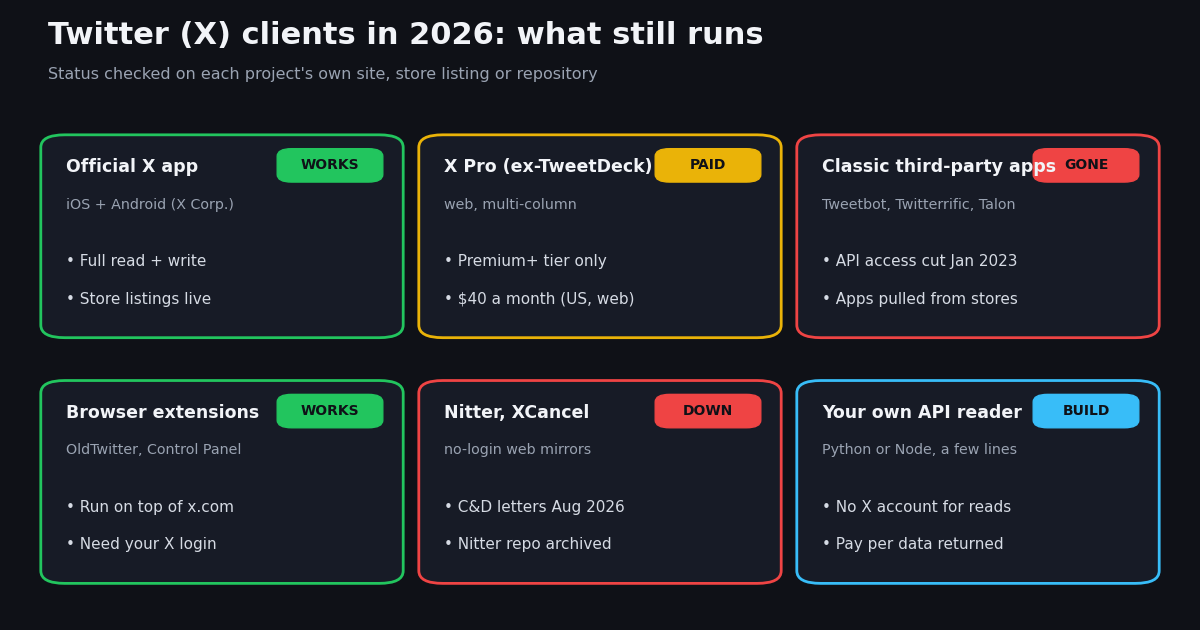
Which Twitter clients still work in 2026? The status table
Here is every option people search for, with what we found when we checked it at its source. Works means it loads timelines and posts as of our check; it says nothing about how long that will last.
How to read the table. Only the first three rows are X's own software. Everything else either runs inside your logged-in x.com session (so X sees ordinary use of its own site) or talks to X's internal web endpoints with your login cookies, which is the setup X's automation rules cover. That difference matters more than any feature list, and the sections below take each group in turn.
What happened to third-party Twitter apps in January 2023
On January 12, 2023, by the account on Tapbots' own memorial page for Tweetbot (tapbots.com/tweetbot), Twitter suspended access for third-party clients "without warning", which "instantly locked out hundreds of thousands of users". Tapbots retired Tweetbot and moved its team to Ivory, a client for Mastodon rather than X.
The Iconfactory's farewell post of January 19, 2023 (blog.iconfactory.com/2023/01/twitterrific-end-of-an-era/) describes Twitterrific's "sudden and undignified demise" after an "unannounced and undocumented policy change": the iOS and macOS apps were removed from both App Stores and active subscriptions were cancelled. The @Twitterrific account itself dates from 2007.
The policy change was written down afterward. The current X Developer Agreement (docs.x.com/developer-terms/agreement), section III.A, says you shall not "use or access the Licensed Material to create or attempt to create a substitute or similar service or product to the X Applications". That one clause is why no new full-featured client built on the official X API has appeared since: an app that does what the X app does is, by definition, a substitute for it.
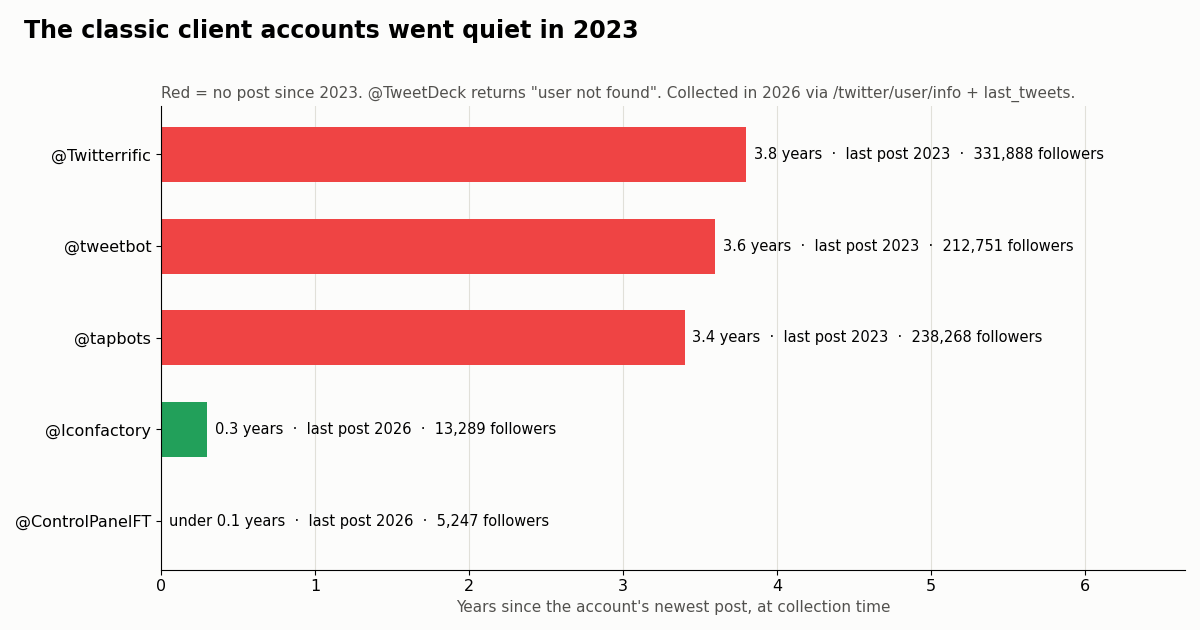
What the accounts look like now. We pulled the official accounts of the old client makers through /twitter/user/info and their latest posts through /twitter/user/last_tweets. The accounts still exist and still hold large followings, but the classic client accounts stopped in 2023.
The @tapbots account's newest post announces Ivory for macOS on the Mac App Store; @tweetbot's last item is a repost about Ivory. The handle @TweetDeck now returns "user not found" from /twitter/user/info, and The Iconfactory, the company behind Twitterrific, still posts as a studio (its newest post is from 2026).
The official route: the X app, x.com and X Pro (the old TweetDeck)
The X app. X Corp. publishes the X app on Google Play ("X - Apps on Google Play") and on the App Store ("X App", seller X Corp.); both listings were live when we checked. It is the only mobile client X itself maintains, and the only one with X's full feature set.
x.com in a browser. On a desktop, x.com is the client. There is no separate native X program for Windows that we could confirm in the Microsoft Store, so "Twitter for Windows" and "Twitter for PC" in practice mean x.com in a browser. Chromium browsers such as Chrome and Edge offer to install a site as an app window, which gives x.com its own taskbar icon without any third-party code. On Apple-silicon Macs, the X listing's App Store page shows the iPad build in its Mac view, which is how iPad apps run on those Macs.
X Pro, the old TweetDeck. X Pro keeps TweetDeck's multi-column layout: several timelines, searches and lists side by side, refreshing in real time. X's help center page "About X Premium" (help.x.com/en/using-x/x-premium) lists "Access to X Pro" under "Only for Premium+ Tier", and its US price table shows Premium+ at 40.00 USD a month or 395.00 USD a year on the web (Premium is 8.00 USD, Basic 3.00 USD). So the multi-column client that was free until 2023 now costs the top subscription tier.
If what you want from a client is chronological order, X's own Following tab already gives that. If you want columns without Premium+, our TweetDeck alternatives guide compares the options by job: reading columns, monitoring keywords, scheduling.
Twitter clients for Android, iPhone and Mac beyond the official app
Android had the richest third-party scene, and it is the platform people still ask about most ("twitter client android" alone is searched about 140 times a month, by our keyword data). Here is what we found at the source.
Talon. Its Google Play listing (package com.klinker.android.twitter_l) returns "not found". The app is gone from the store.
Fritter. The privacy-focused Fritter's Google Play listing (com.jonjomckay.fritter) also returns "not found". Its GitHub repository (github.com/jonjomckay/fritter) is not archived, but the newest commits on the default branch are translation merges from January 2025.
Squawker. Squawker describes itself in its README (github.com/j-fbriere/squawker) as "a free, open-source, privacy-focused client for X (formerly Twitter)", forked from Quacker and Fritter. It is distributed from GitHub releases, F-Droid and Obtainium, not Google Play, and its newest commits in 2026 include a fix for "the x.com login blank page on some devices", which tells you how it works: you log in to X inside the app, and it reads with your session. Features listed in the README include a chronological feed of subscriptions, groups, search, local bookmarks and trends.
What that means for your account. A client that logs in with your X username and password and then calls X's internal endpoints is acting as you, from an app X did not write. X's rules on automation and on third-party access apply to the account, not to the app's author, so the risk (a lock, a re-verification prompt or a suspension) lands on you. That is not a reason never to use one; it is a reason to use a secondary account if you try one, and to install only from the project's own repository.
Modded official apps. Patched builds of the official X app circulate on Android. We do not list them: they are redistributed copies of X's app, and we could not verify any of them at a primary source.
iPhone, iPad and Mac. On Apple platforms the picture is simpler and bleaker. Tweetbot and Twitterrific were the two best-known Twitter clients on iOS and macOS, and both makers moved on in January 2023: Tapbots to Ivory for Mastodon, The Iconfactory to its other apps. Neither came back to X.
Squawker ships for Android only, so on an iPhone or iPad the practical choices are the X app, x.com in Safari (which can be added to the Home Screen), and X Pro in a browser if you pay for Premium+. On a Mac, the same three apply, plus browser extensions in Chrome, Edge or Firefox.
If what you actually miss is a quiet, chronological reading list of a few dozen accounts, the build-your-own route at the end of this page does exactly that on any device with Python.
Browser extensions: a better client on top of x.com
The healthiest part of the third-party scene in 2026 is browser extensions. They do not replace X's servers or your login; they change what x.com shows you. Because they run in your own logged-in browser session, X sees ordinary use of its own site.
OldTwitter. Its README (github.com/dimdenGD/OldTwitter) calls it a browser extension "to return old Twitter layout from 2015" with an option for the 2018 design, and says it is a "fully original client that replaces Twitter" rather than CSS on top. It is listed on the Chrome Web Store for Chrome, Edge, Opera and Brave; the README notes the Firefox add-on "was removed" and points Firefox users to a manual install from GitHub. The repository had commits in 2026.
Control Panel for Twitter. Its README (github.com/insin/control-panel-for-twitter) describes a "browser extension for desktop and mobile browsers, which gives you more control over Twitter and adds missing features and UI improvements". Its X account @ControlPanelFT posts release news; in our sample it had posted within the last day of collection, and the repository had 2026 commits.
Downloader extensions. Many "Twitter extension" searches are really about saving videos. You do not need an extension with access to your whole x.com session for that: our free Twitter video downloader takes a post URL and returns the video files.
Before you install any extension. Read the permissions it asks for. An extension that can "read and change all your data on x.com" can see your DMs and act as you; prefer open-source ones with a public repository and recent commits, as both above have.
Study: which Twitter clients people still talk about on X
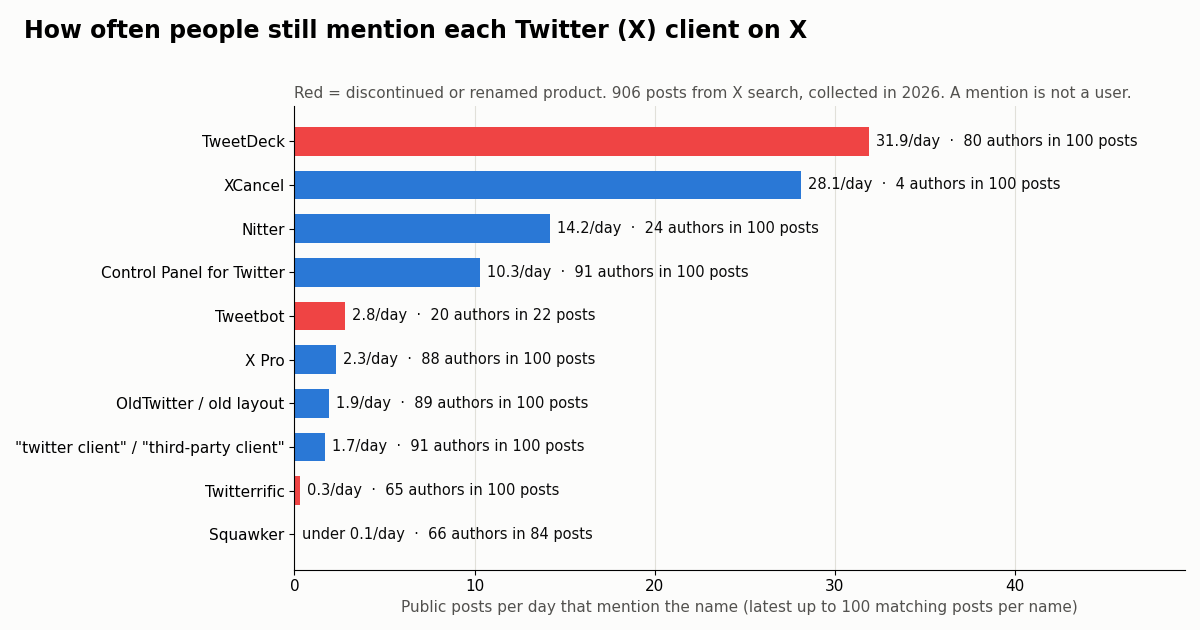
Search volume tells you what people look for on Google. To see what they say on X itself, we searched X for each client's name with /twitter/tweet/advanced_search (Latest, reposts excluded, up to 100 posts per name) and measured how many posts a day mention it, how many different accounts wrote them, and how many were replies. In total 906 posts, collected in 2026.
TweetDeck outlives its own name. TweetDeck is mentioned about 31.9 times a day by 80 different accounts in 100 posts, against 2.3 a day for "X Pro" in a TweetDeck, columns or Premium context. People still call the product by the name it lost; 53% of those posts are replies.
Dead clients are remembered, not used. Tweetbot still draws 2.8 mentions a day and Twitterrific 0.3; the most recent 100 Twitterrific mentions stretch back 393 days. Squawker, an Android client that does work, is barely mentioned at all: 84 posts match the name in any app context over about 14 years of search history, many of them unrelated to the app.
Mirror chatter is concentrated. XCancel's 28.1 posts a day came from only 4 accounts in our 100-post sample, mostly French-language replies, and Nitter's from 24; 87% of Nitter mentions were replies. A few heavy users, not a broad audience, account for most mirror talk.
Extensions have real word of mouth. Control Panel for Twitter draws 10.3 posts a day from 91 different accounts per 100 posts, the broadest spread of any name we searched, with Japanese (40 of 100) ahead of English.
Mirrors and no-login viewers: Nitter and XCancel in 2026
Nitter was a widely used alternative front end for X: a server that fetched public posts and served them as plain, fast, no-JavaScript pages, with RSS. Its README on GitHub (github.com/zedeus/nitter) now opens with a note: "On 24 August 2026, cease and desist letters were sent by X Corp. demanding a permanent takedown of Nitter instances and the project's repository." The repository is archived, and nitter.net shows only a statement that a second letter followed on 8 September 2026 and that the developer is "seeking funding and legal help".
XCancel, the best-known public Nitter instance, answers with a page titled "XCancel service is suspended.", saying that "due to a new development in the ongoing legal proceedings, we are required to suspend this service again until further notice", with a button back to X.
So the no-login route that many people used as their Twitter client is closed for now. Our Nitter alternatives guide and the Nitter instances page track which instances still answer and what replaced them for each job (reading a profile, RSS, embeds), and the Twitter web viewer guide covers what x.com itself shows logged-out visitors.
For developers: build your own Twitter client on an API
Every reader above, from Nitter to a terminal script, is a thin layer over three reads: a profile, a timeline and a search. You can run those reads yourself without an X account and without logging in to anything, through a third-party data API. The script in the code section below is a complete terminal client: a profile card for each handle and one merged, newest-first timeline built from a single from:a OR from:b search.
The calls. /twitter/user/info with userName returns data with name, userName, followers, statusesCount and createdAt; an unknown handle returns HTTP 200 with status: "error" and msg: "user not found". /twitter/tweet/advanced_search with query and queryType=Latest returns a top-level tweets[] (each with text, createdAt, likeCount, retweetCount, viewCount, author.userName, extendedEntities.media[]) plus has_next_page and next_cursor. /twitter/user/last_tweets gives one account's timeline 20 posts a page.
What it costs, against X's own rate card. Tweet endpoints bill 15 credits per tweet returned, $0.15 per 1,000 tweets, with a 15-credit minimum per request, so a check that finds nothing costs $0.00015. Profiles are 18 credits each, $0.18 per 1,000. X's pay-per-usage pricing (docs.x.com/x-api/getting-started/pricing) charges $0.005 per post read and $0.010 per user read. Per 1,000 posts that is $5 against $0.15, about 33 times more on X's rate card.
For a sense of scale, this page's whole study (62 requests, 906 search posts plus six account checks) cost about $0.15. New accounts that pass the automatic bot check get up to $1 of free credits (at most 100,000 credits, no card, one per person or network, expiring after 31 days); purchased credits never expire. Before the first payment the rate limit is 0.2 requests a second, 20 once paid. See the pricing page for plans.
Posting from your own client. Writes are a separate product. One /twitter/user_login_v2 login ($0.10, with a proxy you supply) returns login_cookies; each post, like, repost or follow through /twitter/create_tweet_v2 and its siblings then costs 60 credits ($0.0006). Every such call acts as that X account, so X can rate-limit, lock or suspend it; keep a human pace, expect the session to need a fresh login now and then, and note that calls are billed per HTTP 200 response.
A note on X's terms. X's developer agreement bars building a substitute for X's apps on X's own API. A personal reader for a handful of accounts is a different thing from a public app competing with X, but if you plan to ship a client to other people, read the terms that apply to you before you build it.
How we collected this
Question. Which Twitter (X) clients do people still talk about on X, and are the old client makers still posting?
Part A, mentions. Ten searches on /twitter/tweet/advanced_search (queryType Latest, reposts excluded): TweetDeck, "X Pro" with TweetDeck/columns/Premium, Nitter, XCancel, Tweetbot, Twitterrific, Squawker with an app context, OldTwitter or "old twitter layout", "control panel for twitter", and generic "twitter client" / "third-party client" phrases. Up to 5 pages (100 posts) each, newest first. Posts per day = posts divided by the span between the newest and oldest post in each sample.
Part B, accounts. /twitter/user/info and one page of /twitter/user/last_tweets for six organization accounts: @tweetbot, @tapbots, @Twitterrific, @Iconfactory, @TweetDeck and @ControlPanelFT.
Window and size. The most recent matching posts for each name at collection time, collected in 2026: 906 search posts and six accounts, 62 requests in total.
What the sample cannot show. A mention is not a user: names match jokes, homonyms and nostalgia, and search counts say nothing about how many people run each client. Latest search may not return every matching post, and a 100-post sample of a busy name covers only a few days. Store and repository checks show whether an app is listed and maintained, not whether it works on every device.
Privacy. Aggregates only. No post text, IDs, URLs or handles from the searches are stored or shown; only organization accounts are named.
"""x_reader.py - a tiny terminal Twitter (X) client: a merged, newest-first timeline
for a list of public accounts, plus a profile card. Reads need no X account.

    pip install requests
    export TWITTERAPI_IO_API_KEY=...   # from twitterapi.io/dashboard
    python x_reader.py NASA github vercel
"""
import os
import sys

import requests

BASE = "https://api.twitterapi.io"
HEADERS = {"X-API-Key": os.environ["TWITTERAPI_IO_API_KEY"]}


def profile(user_name):
    """One profile card from /twitter/user/info (18 credits per user)."""
    r = requests.get(f"{BASE}/twitter/user/info", headers=HEADERS,
                     params={"userName": user_name}, timeout=30)
    r.raise_for_status()
    body = r.json()
    if body.get("status") == "error" or not body.get("data"):
        # an unknown handle comes back as HTTP 200 with status "error" and msg "user not found"
        return None
    return body["data"]


def merged_timeline(handles, max_pages=2):
    """Newest-first posts from several accounts in one search: from:a OR from:b ...

    Billed per tweet returned (15 credits each); an empty page costs the 15-credit minimum.
    """
    query = " OR ".join(f"from:{h}" for h in handles) + " -filter:replies"
    tweets, cursor = [], ""
    for _ in range(max_pages):
        params = {"query": query, "queryType": "Latest"}
        if cursor:
            params["cursor"] = cursor
        r = requests.get(f"{BASE}/twitter/tweet/advanced_search", headers=HEADERS,
                         params=params, timeout=30)
        r.raise_for_status()
        body = r.json()
        tweets.extend(body.get("tweets") or [])
        if not body.get("has_next_page") or not body.get("next_cursor"):
            break
        cursor = body["next_cursor"]
    return tweets


def show(tweet):
    author = tweet.get("author") or {}
    media = (tweet.get("extendedEntities") or {}).get("media") or []
    kinds = ",".join(sorted({m.get("type", "") for m in media}))
    print(f"@{author.get('userName')}  {tweet.get('createdAt')}")
    print("  " + (tweet.get("text") or "").replace("\n", "\n  "))
    print(f"  likes {tweet.get('likeCount', 0)}  reposts {tweet.get('retweetCount', 0)}  "
          f"replies {tweet.get('replyCount', 0)}  views {tweet.get('viewCount', 0)}"
          + (f"  [{kinds}]" if kinds else ""))
    print(f"  {tweet.get('url')}\n")


if __name__ == "__main__":
    handles = sys.argv[1:] or ["NASA", "github"]
    for h in handles:
        p = profile(h)
        if p is None:
            print(f"@{h}: user not found\n")
            continue
        print(f"{p['name']} (@{p['userName']})  {p['followers']:,} followers  "
              f"{p['statusesCount']:,} posts  joined {p['createdAt']}")
    print("-" * 60)
    for t in merged_timeline(handles):
        show(t)
Questions readers ask
Do third-party Twitter apps still work in 2026?
Not the classic ones. Tweetbot, Twitterrific, Talon and similar apps stopped working in January 2023 when Twitter cut their API access, and X's developer agreement bars using its API to build a substitute for X's apps. What still works is X's own software (the X app, x.com and X Pro), browser extensions that run on x.com in your logged-in session (OldTwitter, Control Panel for Twitter) and a few open-source Android clients such as Squawker that log in through an x.com web view.
Why did Tweetbot and Twitterrific stop working?
Tapbots says Twitter suspended third-party client access on January 12, 2023 without warning, and The Iconfactory's January 19, 2023 post calls it an unannounced, undocumented policy change. Both apps were pulled; Tapbots moved to Ivory for Mastodon. The official @tweetbot and @Twitterrific accounts have not posted since 2023.
What is the best Twitter client for Android now?
The official X app is the only one with every feature and a live Google Play listing. Talon's and Fritter's Play listings return not found. Squawker is an actively maintained open-source fork installed from GitHub, F-Droid or Obtainium; it logs in with your X account inside the app, so the account risk of an unofficial client applies. If you try it, use a secondary account.
Is TweetDeck still free?
No. TweetDeck is now X Pro, and X's help center lists access to X Pro under "Only for Premium+ Tier". In the US, Premium+ costs $40 a month or $395 a year on the web.
Is there a Twitter desktop app for Windows or Mac?
We could not confirm a native X program in the Microsoft Store, so on Windows the client is x.com in a browser, which Chrome or Edge can install as an app window. On Apple-silicon Macs, the X App Store listing shows its iPad build in the Mac view. X Pro also runs in any desktop browser for Premium+ subscribers.
Is it safe to log in to a third-party Twitter client?
It carries account risk. A client that uses your X login and calls X's internal endpoints acts as you from software X did not write, and X's automation rules apply to your account. Browser extensions that restyle x.com are lower risk because they run inside X's own site, but check their permissions and install only open-source ones with recent commits.
Can I read Twitter without an account now that Nitter is down?
x.com shows logged-out visitors some public profiles and single posts. Nitter's repository is archived after X's cease-and-desist letters of 24 August 2026 and XCancel is suspended. For regular reading of public accounts without logging in, a data API returns profiles and timelines with no X account needed.
Can I build my own Twitter client?
For reading public data, yes: the Python script on this page builds a merged timeline for a list of accounts with /twitter/tweet/advanced_search and profile cards with /twitter/user/info, at $0.15 per 1,000 tweets. Posting needs an authenticated session and acts as your account, so keep a human pace. If you plan to publish a client for other people, read X's developer terms first.
Continue
- X Developer Agreement, section III.A(c): no substitute or similar service to the X Applications
- Tapbots: In Memory Of Tweetbot (third-party access suspended January 12, 2023)
- The Iconfactory: Twitterrific, end of an era
- Nitter repository README (cease-and-desist note, archived)
- X API pricing (pay-per-usage rate card)
- TwitterAPI.io API reference
- X (Twitter) API hub: reads, writes and pricing
- Nitter alternatives that still work
- Which Nitter instances still answer
- TweetDeck (X Pro) alternatives by job
- View Twitter without logging in
- Twillot Twitter viewer extension, tested
- Free Twitter video downloader (no extension)
- Complete Python guide to the Twitter API
- TwitterAPI.io pricing and plans
- 01How to Mass Block on Twitter (X): Tools, Block Lists and Safer Options
- 02Does Twitter (X) Delete Inactive Accounts? The Policy, the Purge, and What Actually Survives
- 03How to View a Suspended Twitter (X) Account, and What Still Survives
- 04Twitter (X) Temporary Label: What "May Impact Its Reach" Means and What to Do
- 05"Please Use the Official X App" When Signing In to Twitter (X): Why It Happens and How to Get Back In
- 06Twitter (X) Tweet Metadata — API Fields Reference
- 07What Was Twitter (X) Circle, and What Can You Use Instead?
- 08Twitter (X) Geolocation: What Location Data X Still Exposes, and How to Read It
Stop reading. Start building.
Starter credits cover real testing on real data. Google sign-in, no card, no application queue.
Get an API keyAlready building with TwitterAPI.io? Publish an honest tutorial or build log about it and earn up to $200 a month in API credits.