Hermes Agent vs OpenClaw: Which Agent Fits Twitter (X) Work?
This page compares the two agents against each other for X (Twitter) work. If you have already picked one, the setup guides go deeper: Hermes Agent + Twitter (X) Data walks through Hermes skills and MCP config step by step, and the OpenClaw Twitter (X) skill and MCP setup guide does the same for OpenClaw. Here the question is which one to run, and what each one actually does when the job touches X.
Most Hermes vs OpenClaw comparisons stop at architecture: a self-improving agent against a multi-channel control plane, GitHub stars, a security note. That matters, but if your agent is supposed to watch a topic, summarize mentions or post a reply, the deciding questions are narrower. Which X skills ship in the box? Does it speak MCP? Does it reach X through X's paid API, through xAI, or through a browser logged in as you? And what does a month of that cost?
Every fact below comes from each project's own repository and documentation, read this session: the two READMEs, the bundled xurl skills, OpenClaw's X channel, browser and MCP docs, and Hermes's tools, browser, skills and MCP docs. To see how each project and its users behave on X, we also pulled 1,159 posts in 2026: the latest 200 from each official account and three searches for the agents' names.
What Hermes Agent and OpenClaw are, and how each installs
Hermes Agent is "the self-improving AI agent built by Nous Research", in its README's words. It "creates skills from experience, improves them during use" and searches its own past sessions. It runs as a terminal UI (hermes), a desktop app, or a gateway that answers on Telegram, Discord, Slack, WhatsApp, Signal and email. It is written in Python and works with any model provider: Nous Portal, OpenRouter, OpenAI or your own endpoint, switched with hermes model.
OpenClaw describes itself as "an open-source AI assistant that runs on your own computer and meets you in the channels you already use: Discord, iMessage, Slack, Teams, Telegram, WhatsApp, and 20+ more". Its center is the Gateway, "the local control plane for sessions, tools, events, and channel connections", which can serve one person on a laptop or a shared team deployment. It is written in TypeScript, runs on Node.js, and is maintained under the OpenClaw Foundation.
Star counts and versions come from the GitHub API for NousResearch/hermes-agent and openclaw/openclaw and move every day; treat them as a snapshot. The point of the table is the last row. Hermes is built so that one agent gets better at your tasks; OpenClaw is built so that one install can serve many chats, people and agents. For X work, that difference shows up in which X features each project chose to build, covered below.
The two projects also know about each other. Hermes's README has a section titled "Migrating from OpenClaw": hermes import-agent openclaw (from the agent-importers plugin) brings over the OpenClaw persona file, memories, user-created skills, command allowlist, messaging settings and, with --migrate-secrets, allowlisted API keys.
Both projects install with one command on macOS, Linux and WSL2, and both have a native Windows path. The commands below are copied from each README.
Hermes Agent. curl -fsSL https://hermes-agent.nousresearch.com/install.sh | bash, then hermes to start chatting and hermes setup for the full wizard. On Windows: iex (irm https://hermes-agent.nousresearch.com/install.ps1). The installer brings Python 3.14, Node.js, npm, ripgrep and FFmpeg. There is also a signed APT repository for Android under Termux. The README pitches it as able to run "on a $5 VPS, a GPU cluster, or serverless infrastructure", with six built-in terminal backends: local, Docker, SSH, Modal, Daytona and Vercel Sandbox.
OpenClaw. curl -fsSL https://openclaw.ai/install.sh | bash, or on Windows iwr -useb https://openclaw.ai/install.ps1 | iex. If you already manage Node.js, npm install -g openclaw@latest --allow-scripts=openclaw (the npm package declares Node >=24.22.1 <25 || >=26.12.1), then openclaw onboard --install-daemon. Onboarding checks model access, creates the workspace and configures the Gateway; the Control UI and the TUI both connect to that Gateway.
For an X workflow, the runtime matters less than where the agent lives. A digest or a mention watcher has to run while your laptop sleeps, so both projects point you to a small server: Hermes through its terminal backends and gateway, OpenClaw through a daemonized Gateway. The model bill is the same in both cases: you bring the provider key, and every post the agent reads is input tokens.
Skills and plugins: a learning loop vs a registry
Both agents use the same skill format: a folder with a SKILL.md file whose YAML frontmatter tells the model when to load it. Hermes says its skills are "compatible with the agentskills.io open standard"; OpenClaw's skills are "markdown instruction files that teach the agent how and when to use tools". A twitterapi.io skill written for one loads in the other with, at most, a frontmatter tweak.
Hermes Agent. All skills live in ~/.hermes/skills/, "the primary directory and source of truth". Project skills in <project>/.agents/skills/ take precedence, and skills.external_dirs in ~/.hermes/config.yaml can add shared folders such as ~/.agents/skills. The distinctive part is that the agent writes its own: after a complex task it can create a skill with the skill_manage tool and patch it in later runs, behind an optional write-approval gate. Community skills come from the Skills Hub via hermes skills install.
OpenClaw. Skills load from a ranked list of sources, highest precedence first: workspace <workspace>/skills, project .agents/skills, personal ~/.agents/skills, managed skills in the state folder, Workshop skills, bundled skills, then extra directories and plugin skills. ClawHub is "the public skills registry": openclaw skills install @owner/<slug>, openclaw skills update --all, and openclaw skills verify to check a skill's trust envelope. OpenClaw has its own learning feature as well, the Skill Workshop: "skills your agent learns on its own, with change history and undo".
The overlap matters for X work: the shared ~/.agents/skills convention means one twitterapi.io skill folder can serve both agents on the same machine. The public twitterapi.io SKILL.md at twitterapi.io/skills/twitterapi-io/SKILL.md is written for exactly that, with the endpoints, field names and per-call cost an agent needs.
How each agent reads and posts on X: every route, from the docs
This is the section the comparison posts skip. Here is every route each project documents for X, with what it needs and who the agent acts as.
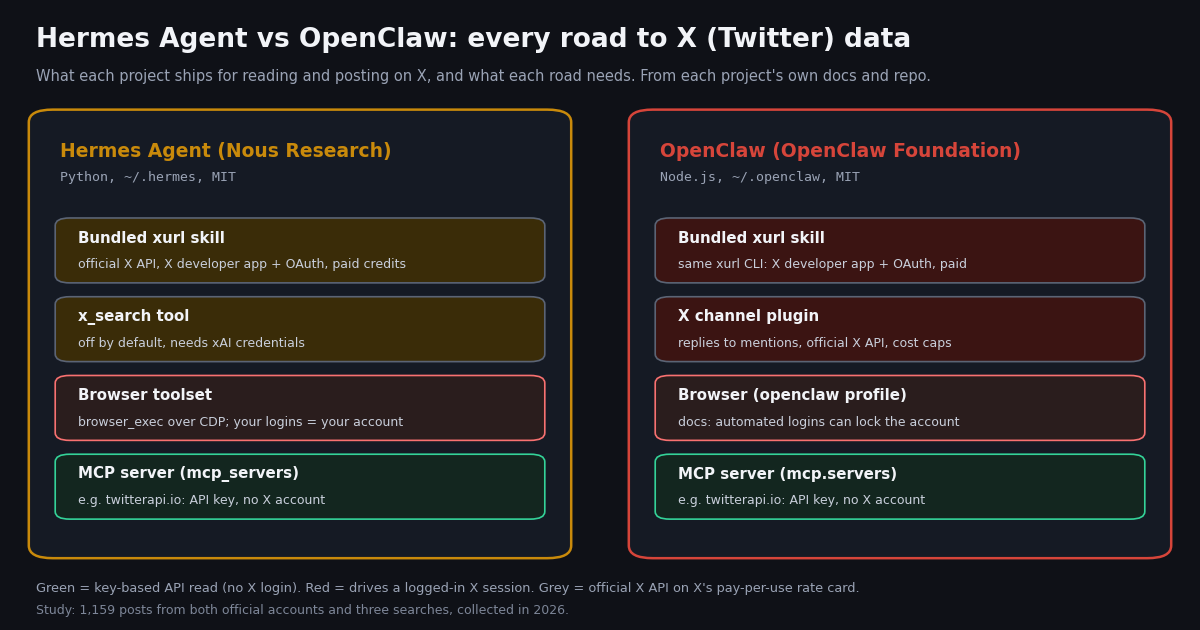
The bundled xurl skill (both). Each project ships a skills/xurl/SKILL.md. It drives xurl, which the skill calls "the X developer platform's official CLI for the X API": post, reply, quote, search, timeline, mentions, like, repost, follow, DM, media upload and raw v2 calls. Hermes's copy (version 1.1.3) lists upstream_skill: https://github.com/openclaw/openclaw/blob/main/skills/xurl/SKILL.md and its author line reads "xdevplatform + openclaw + Hermes Agent", so the two are literally the same skill lineage. Setup means an app at developer.x.com, an OAuth 2.0 PKCE login stored in ~/.xurl, and credits: the Hermes skill notes that CreditsDepleted means a $0 balance and you "buy credits (min $5)", and that "X API access is typically paid for meaningful usage".
OpenClaw's X channel plugin. Bundled in builds that include extensions/x, it "turns mentions of your bot account into agent conversations and posts the agent's answer as a public reply". It needs a confidential OAuth2 app with tweet.read tweet.write users.read offline.access media.write, and only allowlisted authors trigger a reply by default. "DMs, original posts, likes, and follows are not supported." Its cost guard is the useful part: it estimates spend at X's published rates and stops at $100 per UTC day and $1,000 per billing cycle by default (costLimits), with model tokens on top.
Hermes Agent's x_search tool. The tools page lists "X Search": "Search X (Twitter) posts and threads via xAI's built-in x_search Responses tool, gated on xAI credentials (SuperGrok OAuth or XAI_API_KEY); off by default, opt in via hermes tools". It searches; it does not post, and it is billed by xAI, not X.
Browser automation (both). Hermes's browser toolset drives Chromium over CDP with browser_exec, and can attach to your own Chrome or a managed copy of your everyday profile "logins included". OpenClaw runs an isolated openclaw browser profile, can attach to your signed-in Chrome, and has a Chrome extension for signed-in tabs. Its Browser login page covers "X/Twitter posting" directly (next section).
Any MCP server (both). Hermes reads mcp_servers from ~/.hermes/config.yaml; OpenClaw reads mcp.servers from ~/.openclaw/openclaw.json or openclaw mcp add. Point either at an X data server and the agent gets X tools without an X account.
MCP in detail: the same twitterapi.io server in both agents. Both agents are full MCP clients over stdio and HTTP. Hermes's MCP page shows remote servers as url plus headers under mcp_servers, resolves ${VAR} placeholders at connect time, names the tools mcp_<server>_<tool>, and reloads with /reload-mcp. OpenClaw's MCP page offers Settings, the CLI (openclaw mcp add, openclaw mcp doctor <name> --probe) or config under mcp.servers with url, transport: "streamable-http" and headers; its schema marks header values as sensitive and redacts them in logs.
The twitterapi.io hosted MCP server answers initialize at https://mcp.twitterapi.io/mcp (server name twitterapi-mcp, 12 read tools), and its instructions say to send your twitterapi.io API key as the Bearer token. The local alternative is the npm package @twitterapi_io/mcp-server (version 0.2.0 when checked) with TWITTERAPI_IO_API_KEY in its environment. Below, the same server in both config files.
The code block below shows the same server in both files. For Hermes Agent, add the entry to ~/.hermes/config.yaml and put TWITTERAPI_IO_API_KEY in ~/.hermes/.env, which Hermes reads when it resolves ${VAR} placeholders. For OpenClaw, the commented JSON5 goes under mcp in ~/.openclaw/openclaw.json (OpenClaw also substitutes ${VAR} in config values); then run openclaw mcp doctor twitterapi --probe to confirm the server answers.
Two differences are worth knowing. OpenClaw keeps at most the first 2,000 characters of a server's instructions in the prompt, so short tool descriptions matter there. Hermes can filter a server's tools with tools.include / tools.exclude; OpenClaw does the same with toolFilter.include. Either way, read tools that return trimmed JSON keep the token bill down: a raw search page is mostly fields the model never needs.
So for X specifically: pick OpenClaw if you want a bot account that answers mentions with spending caps out of the box; pick Hermes if you want X search through an xAI key you already pay for, or an agent that will turn a repeated X task into its own skill. For plain reading (search, timelines, mentions, profiles), the routes converge on MCP or a small skill, and the agent choice stops mattering.
# Hermes Agent: ~/.hermes/config.yaml
mcp_servers:
  twitterapi:
    url: "https://mcp.twitterapi.io/mcp"
    headers:
      Authorization: "Bearer ${TWITTERAPI_IO_API_KEY}"

# OpenClaw: ~/.openclaw/openclaw.json (JSON5), same server
# {
#   mcp: {
#     servers: {
#       twitterapi: {
#         url: "https://mcp.twitterapi.io/mcp",
#         transport: "streamable-http",
#         headers: { Authorization: "Bearer ${TWITTERAPI_IO_API_KEY}" },
#       },
#     },
#   },
# }
Browser relay vs an API: the account risk on X
Driving x.com through a browser is tempting because it needs no developer app and no API bill. Both agents can do it. The cost shows up elsewhere: the agent is your logged-in account, so anything X reads as signs of automation lands on that account.
OpenClaw's own Browser login page is blunt. It recommends signing in by hand in the host browser's openclaw profile because "automated logins" can "lock the account", tells you to use that manually signed-in host browser "for both reading (search/threads) and posting on X/Twitter and other bot-sensitive sites", and notes that sandboxed browser sessions are more likely to be flagged. Hermes's browser docs make the same trade explicit from the other side: real-profile browsing uses "a managed copy of your everyday browser profile, logins included", which means the agent acts with your cookies.
The practical rule both docs point toward: keep reads off your account. Reads are the bulk of any X workflow (searching, watching mentions, pulling a timeline), and an API key route does them without a session at all. Keep the logged-in path for the few actions that must come from you, at a human pace, ideally with a human approving each post. OpenClaw's X channel already does that: work sessions started by verified X mentions "require manual approval before replying to X".
If you do need writes outside X's official API, twitterapi.io offers them as a separate authenticated session: one /twitter/user_login_v2 login ($0.10, with a proxy you supply) returns login_cookies, and each post, reply, like, retweet or follow through endpoints such as /twitter/create_tweet_v2 is then 60 credits ($0.0006), billed per HTTP 200 call. The call acts as that account, so X can rate-limit, lock or suspend it; keep a human pace, and expect the session to need a re-login now and then.
What X work costs on each route
Neither agent charges for itself; both are MIT-licensed. The bill is the model provider plus whatever reaches X. Take a modest job: an agent that reads 200 posts a day for a digest, about 6,000 posts a month.
X's pay-per-usage card at docs.x.com/x-api/getting-started/pricing lists $0.005 per post read, $0.010 per user read, $0.015 per post created and $0.20 per post created with a URL, capped at 3 million post reads a month before Enterprise. At $5 per 1,000 posts against $0.15 per 1,000, the official card is about 33x the twitterapi.io rate for reads. OpenClaw's X channel docs quote the same X rates in their cost table, which is why its default $100-a-day cap exists.
On twitterapi.io, tweet endpoints bill 15 credits per tweet returned, with a 15-credit minimum per request: a search that finds nothing costs $0.00015, a full 20-post page $0.003. Profiles are 18 credits each ($0.18 per 1,000). $1 buys 100,000 credits, and new accounts that pass the automatic bot check get up to $1 of free credits (at most 100,000 credits, no card, one per person or network, expiring after 31 days). Purchased credits never expire; plans and rate limits are on the pricing page.
Polling has a floor too. An agent that checks a topic every 60 seconds and finds nothing still makes 43,200 calls a month, $6.48 at the minimum; every 5 minutes is $1.30. A daily digest skill that runs once is far cheaper than a watcher, which is one more reason both agents' cron features are useful for X work.
What X says about each agent: 1,159 posts measured
To see how the two communities talk on X, we pulled three Latest searches in 2026, retweets excluded: 300 posts matching "hermes agent", 299 matching openclaw, and 160 matching both names. Each post was tagged by keyword family (regexes in the study's analyze.py).
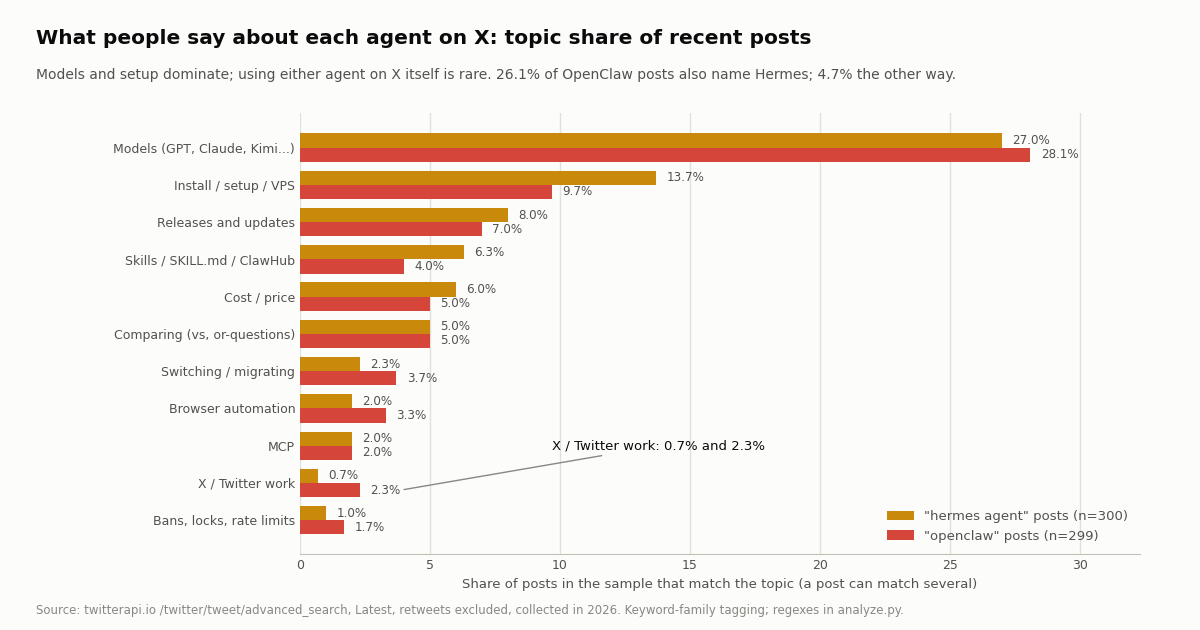
OpenClaw is talked about more, and its talk names Hermes. OpenClaw posts arrived at 27.6 an hour against 16.7 for Hermes Agent, from 254 and 187 distinct authors. 26.1% of OpenClaw posts also said "hermes"; only 4.7% of Hermes Agent posts named OpenClaw. The OpenClaw conversation references Hermes far more often than the reverse. ("hermes" can also mean Nous's Hermes models, so part of that share is model talk, not the agent.)
Models dominate; X work barely registers. About 27% of each conversation is about which model to run, and 43.8% of posts naming both agents. Posts about using either agent on X itself were 0.7% (Hermes Agent) and 2.3% (OpenClaw). That is the gap this page fills: few builders are writing about it, and the docs are where the answers are.
Switching talk is real but rare. Of 146 posts that named both agents, 11.6% used comparison words and 2.7% talked about switching or migrating. Only 1 stated a direction outright (1 toward Hermes, 0 toward OpenClaw), so treat any "everyone is switching" claim with care.
How @NousResearch and @openclaw post on X
We also pulled the latest 200 posts from each project's official account, both confirmed from the projects' own sites (nousresearch.com links x.com/NousResearch; the OpenClaw README links x.com/openclaw).
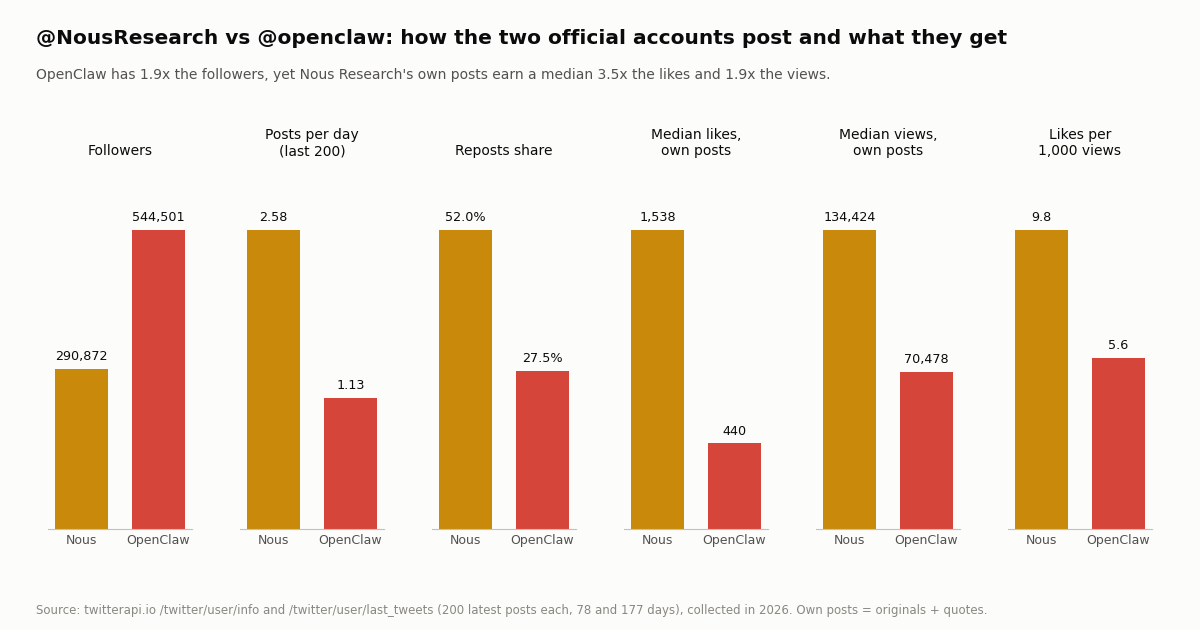
Two different playbooks. @openclaw has 1.9x the followers but posts less often and mostly its own words: 29.7% of its own posts match release words (version numbers, patch, update, now available) against 8.3% for Nous. @NousResearch posts 2.3x as often and reposts more than half the time, yet its own posts earn a median 3.5x the likes and 1.9x the views. Media helps Nous (1,793 median likes with media vs 1,038 without); for OpenClaw text-only posts did as well (444 vs 363).
Neither account mentioned the other in any of its own posts in the sample. Keep in mind that @NousResearch is a lab account: 60.4% of its own posts named Hermes, and the rest cover models and events. If you want to watch either project for releases from an agent, the last_tweets call in the script below does it for $0.003 per 20-post page.
Which one to pick for X work
Pick OpenClaw if the agent should be a public bot that answers mentions on X: the X channel plugin handles OAuth token refresh, allowlists, thread context and spending caps, and it is the only one of the two with that built in. Also pick it if the same agent has to live in many chat apps or serve a team from one Gateway.
Pick Hermes Agent if one agent should get better at a repeated X task (a weekly competitor digest, a mention triage) by writing and refining its own skill, or if you already pay xAI and want x_search without a developer app. Its import command also makes it the easier direction to try if you already run OpenClaw.
For reading X, it does not matter much. Both are MCP clients and both load SKILL.md folders, so the same twitterapi.io MCP entry or skill gives either agent search, timelines, mentions and profiles with one API key and no X account, at $0.15 per 1,000 posts. Decide on the agent for everything else, then add X data the same way.
Avoid the browser for routine X work in either agent. It is the one route both projects' docs surround with warnings about logins, and it puts your own account behind every read.
How we collected this
Question. How do the two projects' official X accounts post and what engagement do they get, and what does the public conversation about each agent cover (the other agent, X work, skills, MCP, browser, setup, cost, bans, switching)?
Accounts and queries. /twitter/user/info and /twitter/user/last_tweets for @NousResearch and @openclaw (200 posts each); /twitter/tweet/advanced_search with queryType Latest for "hermes agent" -filter:retweets (15 pages), openclaw -filter:retweets (15 pages) and openclaw hermes -filter:retweets (8 pages). 50 requests, 1,159 posts, about $0.17 at the published rate. Collected in 2026.
Window. The latest posts at collection time: the timelines spanned 78 days (Nous) and 177 days (OpenClaw); the searches spanned 17.9 hours, 10.8 hours and 22.6 hours.
What it cannot show. A Latest search is a snapshot of hours, not a trend, and its volume depends on the news of that day. Keyword tagging misses posts that discuss a topic without its words and counts a post in several families. "hermes" also matches Nous's Hermes models. Likes and views reflect audience size as much as content. None of this measures how well either agent works.
Privacy. Aggregates only. The two organization accounts are named; search results come from individuals, so their raw pages were not kept in the repository and the published sample holds de-identified rows only (no ids, links, text or handles).
"""compare_agents_on_x.py - measure what X (Twitter) says about Hermes Agent and OpenClaw.

Works as a standalone script, as the tool behind a Hermes skill (~/.hermes/skills/<name>/)
or an OpenClaw workspace skill (<workspace>/skills/<name>/). Read-only: no X account needed.

    pip install requests
    export TWITTERAPI_IO_API_KEY=...      # from twitterapi.io/dashboard
    python3 compare_agents_on_x.py
"""
import os
import re
from collections import Counter

import requests

BASE = "https://api.twitterapi.io"
HEADERS = {"X-API-Key": os.environ["TWITTERAPI_IO_API_KEY"]}
TOPICS = {
    "x_twitter": r"\btwitter\b|\btweet|\bx api\b|\bxurl\b",
    "skills": r"\bskills?\b|skill\.md|clawhub",
    "mcp": r"\bmcp\b",
    "browser": r"\bbrowser\b|\bchrome\b",
    "install": r"\binstall|\bsetup\b|\bvps\b|\bdocker\b",
}


def search(query, pages=5):
    """Latest posts for a query; 15 credits per post returned ($0.15 per 1,000)."""
    posts, cursor = [], ""
    for _ in range(pages):
        r = requests.get(f"{BASE}/twitter/tweet/advanced_search", headers=HEADERS,
                         params={"query": query, "queryType": "Latest", "cursor": cursor}, timeout=30)
        r.raise_for_status()
        body = r.json()
        posts += body.get("tweets", [])
        if not body.get("has_next_page"):
            break
        cursor = body.get("next_cursor", "")
    return posts


def timeline(user, pages=3):
    """An account's latest posts, 20 per page, newest first."""
    posts, cursor = [], ""
    for _ in range(pages):
        r = requests.get(f"{BASE}/twitter/user/last_tweets", headers=HEADERS,
                         params={"userName": user, "cursor": cursor}, timeout=30)
        r.raise_for_status()
        body = r.json()
        posts += (body.get("data") or {}).get("tweets", [])
        if not body.get("has_next_page"):
            break
        cursor = body.get("next_cursor", "")
    return posts


def topic_share(posts):
    counts = Counter()
    for p in posts:
        for name, rx in TOPICS.items():
            if re.search(rx, p.get("text") or "", re.I):
                counts[name] += 1
    return {k: round(100 * counts[k] / max(len(posts), 1), 1) for k in TOPICS}


for label, query in [("Hermes Agent", '"hermes agent" -filter:retweets'),
                     ("OpenClaw", "openclaw -filter:retweets")]:
    posts = search(query)
    print(f"{label}: {len(posts)} posts, topic share %:", topic_share(posts))

for user in ["NousResearch", "openclaw"]:
    own = [t for t in timeline(user) if not t.get("retweeted_tweet")]
    likes = sorted(t.get("likeCount") or 0 for t in own)
    median = likes[len(likes) // 2] if likes else 0
    print(f"@{user}: {len(own)} own posts, median likes {median}")
Questions readers ask
What is Hermes Agent?
Hermes Agent is an open-source, MIT-licensed AI agent from Nous Research, written in Python. Its README calls it "the self-improving AI agent": it creates skills from experience, improves them during use, keeps memory across sessions, and runs in a terminal, a desktop app or a messaging gateway (Telegram, Discord, Slack, WhatsApp, Signal). It works with any model provider and installs with curl -fsSL https://hermes-agent.nousresearch.com/install.sh | bash.
Is Hermes Agent better than OpenClaw?
Neither is better across the board. Hermes Agent is built around one agent that learns and writes its own skills; OpenClaw is built around a Gateway that serves 20+ chat channels, many agents and team deployments. For X work, OpenClaw has a built-in X channel for mention replies with cost caps, while Hermes has an opt-in x_search tool through xAI. For reading X data, both use the same MCP servers and skills.
Can Hermes Agent or OpenClaw post on X (Twitter)?
Yes. Both bundle the xurl skill, which posts, replies, likes, follows and sends DMs through X's official API; it needs an X developer app, an OAuth 2.0 login and paid X credits ($0.015 per post created, $0.20 with a URL). OpenClaw's X channel plugin can also post public replies to allowlisted mentions, but not original posts, likes, follows or DMs.
Can I move from OpenClaw to Hermes Agent?
Yes. Hermes's README documents hermes plugins install agent-importers and then hermes import-agent openclaw (with --dry-run to preview). It imports the persona file, memories, user-created skills, command allowlist, messaging settings, workspace instructions and, only with --migrate-secrets, allowlisted API keys.
Is it safe to let an AI agent use my X account in a browser?
It carries real account risk. OpenClaw's Browser login docs recommend signing in by hand because automated logins can lock the account, and any agent driving a logged-in browser acts as you. Keep reads on an API key route and reserve your logged-in session for the few posts that must come from you, at a human pace and with approval.
Do Hermes Agent and OpenClaw support MCP?
Both do, over stdio and HTTP. Hermes reads mcp_servers in ~/.hermes/config.yaml and names tools mcp_<server>_<tool>; OpenClaw reads mcp.servers in ~/.openclaw/openclaw.json and adds servers with openclaw mcp add. The twitterapi.io MCP server at https://mcp.twitterapi.io/mcp works in both with your API key as a Bearer token.
How much does it cost to give either agent X data?
The agents are free; X data is not. Through X's official API (the xurl skill or OpenClaw's X channel) post reads cost $0.005 each, $5 per 1,000. Through twitterapi.io they cost 15 credits per post returned, $0.15 per 1,000, with no X account. Model tokens are extra on every route.
Are Hermes Agent and OpenClaw free and open source?
Yes, both repositories are MIT-licensed: NousResearch/hermes-agent and openclaw/openclaw on GitHub. You pay for the model provider you connect and for any paid APIs the agent calls; Nous Research also sells an optional Nous Portal subscription that bundles models and tools for Hermes.
Continue
- NousResearch/hermes-agent on GitHub: README (install, features, OpenClaw migration), bundled skills/social-media/xurl, MIT license
- openclaw/openclaw on GitHub: README (install, Gateway, channels), bundled skills/xurl, MIT license
- OpenClaw docs: X / Twitter channel plugin (OAuth2 scopes, allowlisted replies, cost limits at X pay-per-use rates)
- OpenClaw docs: Browser login (manual sign-in recommended for X/Twitter, automated logins can lock the account)
- Hermes Agent docs: MCP integration (mcp_servers, HTTP url + headers, ${VAR} substitution)
- X API pay-per-usage pricing: $0.005 per post read, $0.015 per post created, 3M post reads a month cap
- X (Twitter) API for developers: endpoints, pricing and limits
- Hermes Agent + Twitter (X) data: skill and MCP setup guide
- OpenClaw Twitter (X) skill and MCP server setup
- OpenClaw vs Claude Code for X (Twitter) work
- Build a personal AI agent that reads X (Twitter)
- SKILL.md explained: writing agent skills that call APIs
- The twitterapi.io MCP server for Twitter (X) data
- twitterapi.io pricing: credits, plans and rate limits
- 01How to Build an MCP Server in Python for Twitter (X) Data
- 02OpenClaw vs Claude Code: which agent should run your Twitter (X) jobs?
- 03Claude Code Channels: Telegram, Discord and Twitter (X) Alerts in Your Session
- 04Codex MCP: How to Add Any MCP Server to OpenAI Codex (CLI, IDE and App)
- 05MCP Server Workflow Automation: the 14 Best MCP Servers for Claude Code, Codex and Cursor, Twitter (X) Data Included
- 06OpenClaw Twitter (X) Skill: Connect Your Agent to X Data
- 07Hermes Agent and Twitter (X): the Bundled xurl Skill, and a One-Key Skill That Reads X Data Through TwitterAPI.io
- 08Tracking Twitter (X) Account Views via API — A Developer Guide
Stop reading. Start building.
Starter credits cover real testing on real data. Google sign-in, no card, no application queue.
Get an API keyAlready building with TwitterAPI.io? Publish an honest tutorial or build log about it and earn up to $200 a month in API credits.