Power Automate Twitter (X) Connector: Limits, Setup and a Custom Connector
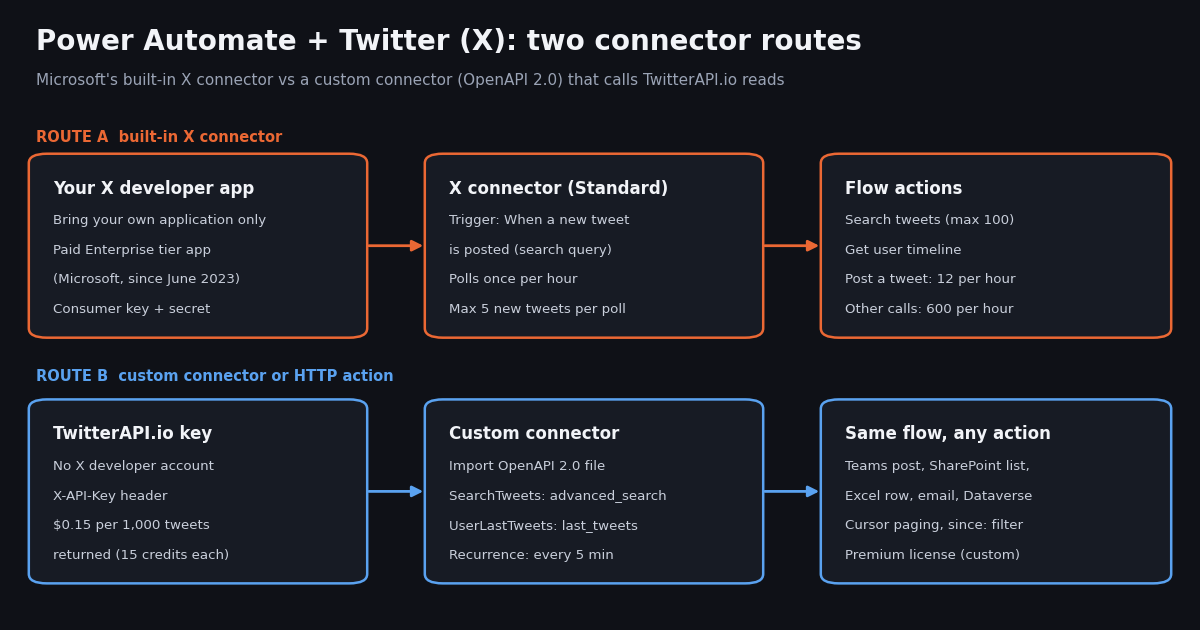
This page is about Microsoft Power Automate specifically: what its built-in X (Twitter) connector requires and allows today, and how to replace it with a custom connector. If you are comparing automation platforms in general, the sibling guide on Twitter automation in 2026 covers schedulers, bots and workflow tools side by side; this one stays inside the Power Platform and gives you a file you can import.
Every connector fact below comes from Microsoft Learn pages read for this guide (the X connector reference, the custom connector OpenAPI tutorial and the Power Automate licensing pages). Every traffic number comes from our own measurement: 1,380 real posts pulled through TwitterAPI.io, collected in 2026, to test how the connector's documented trigger limits hold up against real keyword traffic. We describe how to build the flow from Microsoft's documentation; we did not run a Power Automate tenant for this page, so nothing here claims a flow ran.
What Microsoft's X (Twitter) connector is today
Microsoft now lists the connector as X ("X, formerly known as Twitter") at learn.microsoft.com/en-us/connectors/twitter. It is published by Microsoft and is classed as a Standard connector in Power Automate, Power Apps, Copilot Studio and Logic Apps, in all regions except the China cloud (and, for Logic Apps, the US Department of Defense regions).
Authentication is the catch. The reference page carries an Important note: the default shared application (the Twitter client app Microsoft maintained) is no longer available, the connector supports only one authentication type, Bring your own application, and "as of June 2023, it requires a paid Enterprise tier application." Microsoft adds that X's pricing policy might continue to change. In practice you create an app in the X developer portal, enable read and write permissions and third-party authentication, add https://global.consent.azure-apim.net/redirect as the callback URL, and paste the app's API key and API key secret into the connection as Consumer Key and Consumer Secret.
The old Default connection is deprecated. The connection table still shows a Default option, marked DEPRECATED and kept only for older connections created before authentication types existed. Neither connection type is shareable: if you share a Power App that uses it, each user is prompted to create their own connection.
What that means for most teams. The connector itself costs nothing extra in Power Automate (it is Standard, not Premium), but the X side is gated behind whatever X app tier Microsoft's note refers to. If you already run an approved X app at that level, the native connector is the shortest path. If you do not, the sections below show the alternative that needs no X developer account at all.
Triggers, actions and documented limits
The connector has one trigger, When a new tweet is posted (operation OnNewTweet), which fires when a new tweet matching a search query is posted. It has ten actions: Get followers, Get following, Get home timeline, Get my followers, Get my following, Get user, Get user timeline, Post a tweet, Retweet and Search tweets. Search tweets takes a search text, an optional maximum result count and an optional sinceId.
Microsoft documents these limits on the same page:
Two more restrictions are listed under X's API. Search runs against a sampling of recent tweets from the past 7 days, and the standard search API "is focused on relevance and not completeness," so some tweets and users may be missing. Under POST operations, mentioning a user is not supported: the @ characters are stripped when the tweet is posted.
Why the trigger limits matter. A trigger that wakes once an hour and tracks at most 5 new tweets is fine for a quiet brand account. For a keyword that people actually discuss, it means a delay of up to an hour and, in busy hours, more tweets than the trigger is documented to track. The next section measures how often that happens.
We measured real keyword traffic against the 5-per-poll cap
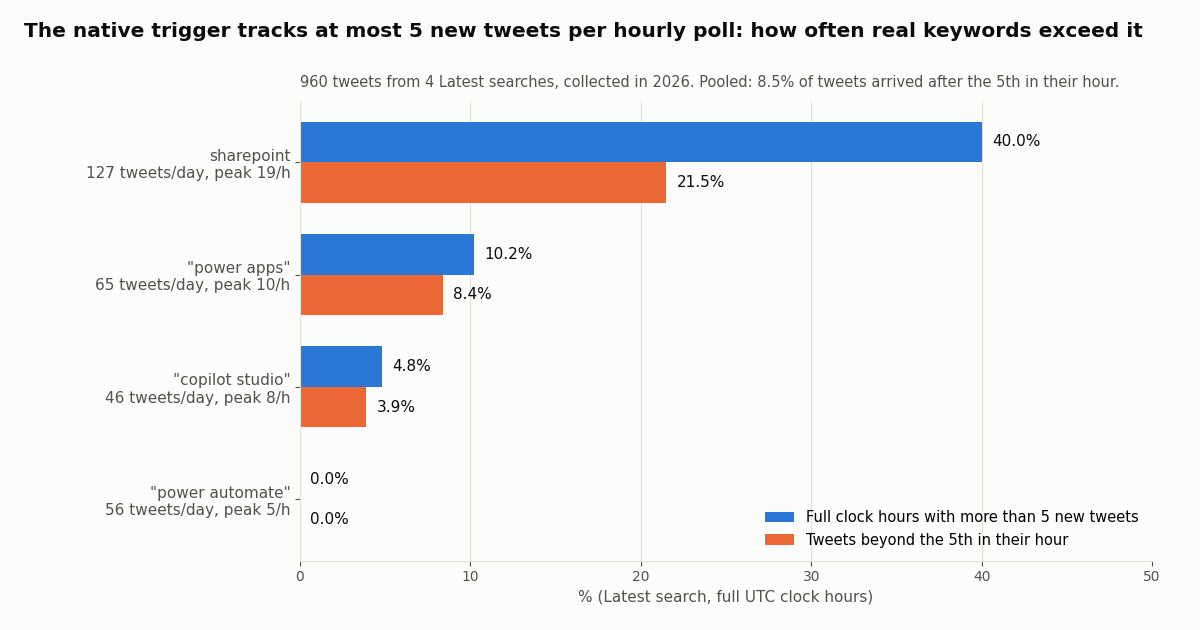
We pulled the latest posts for four Microsoft-related searches ("power automate", "power apps", "copilot studio" and sharepoint) and counted posts per full UTC clock hour. Any hour with more than 5 posts is an hour in which the native trigger, by Microsoft's documented limit, would not track every new tweet in a single poll. The table shows posts per day, the peak hour, the share of hours above 5 and the share of posts that arrived after the 5th in their hour.
Reading it. Even topics as niche as Power Platform products sit near the cap: "power automate" itself never passed 5 posts in an hour in our window (peak exactly 5), while sharepoint at about 127 posts a day passed it in 40.0% of hours and put 21.5% of its posts beyond the 5th. Pooled across the four searches, 8.5% of posts arrived after the 5th in their hour. None of the four ever passed 100 posts in an hour, so the 100-result search cap was not the binding limit here; the 5-per-poll trigger cap was.
What the sample cannot show. We did not run the X connector, so we cannot say whether it catches up on missed tweets at the next poll or drops them; we only measure how often real traffic exceeds the documented per-poll figure. The connector also searches X's relevance-focused sample, which may return fewer posts than our Latest search did.
How long a tweet waits: hourly trigger vs a 5-minute schedule
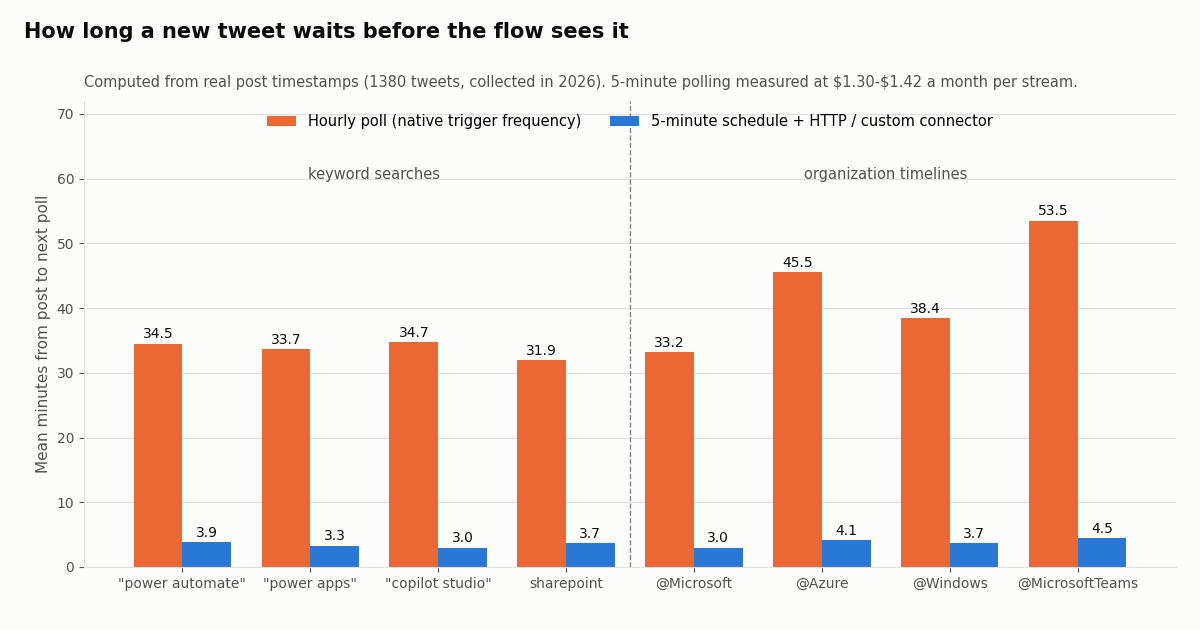
Freshness is the other cost of an hourly poll. For every post in the sample we computed how long it would wait for the next poll on a clock-aligned schedule: every 60 minutes (the native trigger's documented frequency) and every 5 minutes (a Recurrence trigger driving a custom connector or HTTP action).
The hourly wait is long and the 5-minute bill is small. Keyword posts waited 32 to 35 minutes on average under hourly polling and 3 to 4 minutes under 5-minute polling. Organization accounts post rarely (@Microsoft about 0.66 posts a day, @Azure 0.76, @MicrosoftTeams 0.19), so over 99% of their 5-minute windows were empty, and their average hourly-poll wait ranged from 33 to 54 minutes.
Where the monthly figure comes from. A 5-minute schedule is 8,640 checks a month. A search that finds nothing costs the 15-credit minimum ($0.00015); a search that returns tweets costs 15 credits per tweet ($0.15 per 1,000). So the bill for a quiet stream is the polling floor, about $1.30 a month, and a busier keyword adds a few cents for the tweets it actually returns. That assumes you poll /twitter/tweet/advanced_search with a since_time: filter (only new posts come back); polling /twitter/user/last_tweets returns a full 20-tweet page ($0.003) every time, so for accounts use a from:handle since_time: search instead.
The importable custom connector (OpenAPI 2.0 definition)
Power Automate builds custom connectors from an OpenAPI definition or a Postman collection. Microsoft's tutorial is explicit about the format: the definition must be OpenAPI 2.0 (formerly Swagger), OpenAPI 3.0 is not supported, and the file must be under 1 MB. The definition below describes two TwitterAPI.io read endpoints and API key authentication in the X-API-Key header, the same pattern Microsoft's own sample uses for its Cognitive Services key.
SearchTweets maps to GET /twitter/tweet/advanced_search with query (X search syntax, including from:, -is:retweet, lang: and since_time:<unix seconds>), queryType (Latest or Top) and an optional cursor. The response is a top-level tweets array plus has_next_page and next_cursor, up to 20 tweets per page.
UserLastTweets maps to GET /twitter/user/last_tweets with userName, optional includeReplies and cursor. Its tweets sit under data.tweets, newest first, 20 per page. Both operations return the same tweet fields (id, url, text, createdAt, likeCount, author.userName and so on), which the definitions block exposes as dynamic content in the flow designer through x-ms-summary labels.
Save the block as twitterapi-io.swagger.json. It is about 4 KB, far below the 1 MB limit.
{
  "swagger": "2.0",
  "info": {
    "title": "TwitterAPI.io X Reads",
    "description": "Search X (Twitter) posts and read a user's latest posts through TwitterAPI.io. Billed per tweet returned.",
    "version": "1.0.0"
  },
  "host": "api.twitterapi.io",
  "basePath": "/",
  "schemes": ["https"],
  "produces": ["application/json"],
  "securityDefinitions": {
    "api_key": { "type": "apiKey", "in": "header", "name": "X-API-Key" }
  },
  "security": [{ "api_key": [] }],
  "paths": {
    "/twitter/tweet/advanced_search": {
      "get": {
        "operationId": "SearchTweets",
        "summary": "Search tweets",
        "description": "Advanced search, up to 20 tweets per page. Supports from:, -is:retweet, lang:, since_time:<unix>.",
        "parameters": [
          { "name": "query", "in": "query", "required": true, "type": "string",
            "x-ms-summary": "Search query",
            "description": "e.g. \"power automate\" -is:retweet since_time:1767225600" },
          { "name": "queryType", "in": "query", "required": true, "type": "string",
            "enum": ["Latest", "Top"], "default": "Latest", "x-ms-summary": "Sort order" },
          { "name": "cursor", "in": "query", "required": false, "type": "string",
            "x-ms-summary": "Cursor", "description": "next_cursor from the previous page" }
        ],
        "responses": {
          "200": { "description": "OK", "schema": { "$ref": "#/definitions/SearchPage" } }
        }
      }
    },
    "/twitter/user/last_tweets": {
      "get": {
        "operationId": "UserLastTweets",
        "summary": "Get a user's latest tweets",
        "description": "Newest first, up to 20 tweets per page.",
        "parameters": [
          { "name": "userName", "in": "query", "required": true, "type": "string",
            "x-ms-summary": "Handle", "description": "Without the @" },
          { "name": "includeReplies", "in": "query", "required": false, "type": "boolean",
            "default": false, "x-ms-summary": "Include replies" },
          { "name": "cursor", "in": "query", "required": false, "type": "string",
            "x-ms-summary": "Cursor" }
        ],
        "responses": {
          "200": { "description": "OK", "schema": { "$ref": "#/definitions/TimelinePage" } }
        }
      }
    }
  },
  "definitions": {
    "Tweet": {
      "type": "object",
      "properties": {
        "id": { "type": "string", "x-ms-summary": "Tweet ID" },
        "url": { "type": "string", "x-ms-summary": "Tweet URL" },
        "text": { "type": "string", "x-ms-summary": "Text" },
        "createdAt": { "type": "string", "x-ms-summary": "Created at" },
        "lang": { "type": "string", "x-ms-summary": "Language" },
        "isReply": { "type": "boolean", "x-ms-summary": "Is reply" },
        "likeCount": { "type": "integer", "x-ms-summary": "Likes" },
        "retweetCount": { "type": "integer", "x-ms-summary": "Retweets" },
        "replyCount": { "type": "integer", "x-ms-summary": "Replies" },
        "viewCount": { "type": "integer", "x-ms-summary": "Views" },
        "author": {
          "type": "object",
          "properties": {
            "userName": { "type": "string", "x-ms-summary": "Author handle" },
            "name": { "type": "string", "x-ms-summary": "Author name" },
            "followers": { "type": "integer", "x-ms-summary": "Author followers" }
          }
        }
      }
    },
    "SearchPage": {
      "type": "object",
      "properties": {
        "tweets": { "type": "array", "items": { "$ref": "#/definitions/Tweet" } },
        "has_next_page": { "type": "boolean", "x-ms-summary": "Has next page" },
        "next_cursor": { "type": "string", "x-ms-summary": "Next cursor" }
      }
    },
    "TimelinePage": {
      "type": "object",
      "properties": {
        "status": { "type": "string" },
        "msg": { "type": "string" },
        "data": {
          "type": "object",
          "properties": {
            "tweets": { "type": "array", "items": { "$ref": "#/definitions/Tweet" } }
          }
        },
        "has_next_page": { "type": "boolean", "x-ms-summary": "Has next page" },
        "next_cursor": { "type": "string", "x-ms-summary": "Next cursor" }
      }
    }
  }
}Importing it and building the flow, step by step
1. Import. Microsoft's tutorial: sign in to Power Automate, open Solutions, open or create a solution, select New, then Automation, then Custom connector, choose Import an OpenAPI file, name the connector and select the JSON file. On the General page check that the host reads api.twitterapi.io and the base URL /.
2. Security. The Security page picks up the API key definition: parameter label of your choice, parameter name X-API-Key, location Header. Select Create connector. Microsoft recommends waiting a few minutes after creating an API key connector before testing it.
3. Connection and test. Create a connection and paste your TwitterAPI.io key (from the dashboard). On the Test page run SearchTweets with a query such as "power automate" -is:retweet and queryType Latest, and confirm the response shows tweets, has_next_page and next_cursor.
4. Flow. Create a scheduled cloud flow with a Recurrence trigger (for example every 5 minutes). Add the SearchTweets action with a query that ends in since_time: followed by the Unix time of the previous run, so each run returns only new posts. Add Apply to each over tweets and send each one wherever it belongs: a Teams channel message, a SharePoint list item, an Excel table row, an email or a Dataverse record. Store the newest id or time in a variable or list if you want a strict no-duplicates guarantee.
5. Paging. If a run can return more than 20 posts, wrap the action in a Do until loop that passes next_cursor back as cursor until has_next_page is false. Each page is billed for the tweets it returns, so paging adds no surcharge.
Licensing. Microsoft's licensing pages list custom connectors with premium features: the Free license covers cloud flows with standard connectors, while custom connectors need Power Automate Premium, a Process license on the flow, or another license that includes them. Check this before you design around a custom connector.
No custom connector? Use the HTTP action instead
If you do not want to maintain a connector, a single HTTP action does the same call. Its inputs follow the workflow definition language used by Power Automate and Logic Apps: method, uri, headers and queries. The expression in the query computes the Unix time five minutes ago, so a 5-minute Recurrence gets each post once.
Then add Parse JSON. Feed the HTTP body into a Parse JSON action with the schema in the second block below, and the tweet fields become dynamic content for the rest of the flow. Keep the key out of the flow definition where you can (an environment variable or a secure input) so it does not show in run history.
Licensing caveat. Microsoft's licensing pages we read do not list the built-in HTTP action by name; community answers on Microsoft Q&A describe it as a premium capability. Check the Premium label on the action in your own designer before relying on it under a Free or Microsoft 365 license.
When the HTTP action is the better choice. One flow, one query, one owner: HTTP plus Parse JSON is quicker. Several flows or makers sharing the same X calls: the custom connector is better, because the key lives in a connection, the actions have names and typed outputs, and you change the definition in one place.
{
  "type": "Http",
  "inputs": {
    "method": "GET",
    "uri": "https://api.twitterapi.io/twitter/tweet/advanced_search",
    "headers": {
      "X-API-Key": "<your TwitterAPI.io API key>"
    },
    "queries": {
      "query": "\"power automate\" -is:retweet since_time:@{div(sub(ticks(addMinutes(utcNow(), -5)), ticks('1970-01-01T00:00:00Z')), 10000000)}",
      "queryType": "Latest"
    }
  }
}

// Parse JSON schema for the HTTP body
{
  "type": "object",
  "properties": {
    "tweets": {
      "type": "array",
      "items": {
        "type": "object",
        "properties": {
          "id": { "type": "string" },
          "url": { "type": "string" },
          "text": { "type": "string" },
          "createdAt": { "type": "string" },
          "likeCount": { "type": "integer" },
          "author": {
            "type": "object",
            "properties": {
              "userName": { "type": "string" },
              "followers": { "type": "integer" }
            }
          }
        }
      }
    },
    "has_next_page": { "type": "boolean" },
    "next_cursor": { "type": "string" }
  }
}Cost: native connector, official X API and TwitterAPI.io
Native X connector. No Power Automate surcharge (Standard class), but it runs on your own X developer app, and Microsoft's documentation says that app must be on a paid Enterprise tier. X now publishes a pay-per-usage rate card at docs.x.com/x-api/getting-started/pricing, so check which access level your app actually needs with X before you rely on Microsoft's June 2023 note.
Official X API pay-per-usage rate card. $0.005 per post read, $0.010 per user read, $0.010 per follower or following read, $0.015 per post created ($0.20 when the post contains a URL). Pay-per-usage is capped at 3 million post reads a billing cycle, with Enterprise above that. New paying accounts get $20 of credits on a first card and credit purchase, plus a match of the first auto-recharge up to $50.
TwitterAPI.io. Tweet endpoints, including both connector operations above, cost 15 credits per tweet returned, $0.15 per 1,000 tweets, with a 15-credit minimum per request (an empty search is $0.00015; a full 20-tweet page is $0.003). Profiles are $0.18 per 1,000. $1 buys 100,000 credits, purchased credits never expire, and new accounts that pass the automatic bot check get up to $1 of free credits (at most 100,000 credits, no card, one per person or network, expiring after 31 days). Reads need no X account.
Per 1,000 tweets that is $5.00 against $0.15, about 33x. Rate limits on TwitterAPI.io are 0.2 requests a second before the first payment and 20 once paid (50 on Scale, 500 on Business), far above what a 5-minute flow uses. Subscriptions start at $29 a month; see the pricing page for plan details.
How we collected this, and what to build next
Question. How much real X traffic fits inside the X connector's documented trigger limits (one poll an hour, at most 5 new tweets per poll, 100 search results), and what would a 5-minute poll cost instead?
Data. Four /twitter/tweet/advanced_search queries with queryType=Latest ("power automate", "power apps", "copilot studio", sharepoint), 12 pages each, 240 posts per query; and the /twitter/user/last_tweets timelines of five Microsoft organization accounts (@Microsoft, @Azure, @Windows and @MicrosoftTeams at 100 posts each, @msPowerPlat at 20, the account's full returned history). @Office returned no posts and is excluded. Total 1380 posts, 71 requests, about $0.21 in API credits, collected in 2026.
Method. Hourly metrics count only full UTC clock hours inside each stream's window (the partial first and last hours are dropped). Wait times assume clock-aligned polls. Monthly cost multiplies the measured mean cost per 5-minute window (15 credits minimum, 15 per tweet) by 8,640 windows.
Limits. Each search window covers the most recent two to five days only, so seasonal peaks and incidents are not represented. We did not run the native connector, so we cannot say how it handles tweets beyond its per-poll limit, and its relevance-sampled search may see fewer posts than a Latest search. Organization timelines exclude replies by default.
Privacy. Aggregates only. Organization accounts are named; no author of a search result is identified, and the de-identified sample stores only hour, language, reply flag, like count and text length.
Next step. Create a key in the dashboard, import the definition above, and run SearchTweets on the connector's Test page with your own keyword. Endpoint parameters and response fields are in the TwitterAPI.io docs.
import time
import requests

API_KEY = "YOUR_TWITTERAPI_IO_KEY"   # dashboard: https://twitterapi.io/dashboard
BASE = "https://api.twitterapi.io"
HEADERS = {"X-API-Key": API_KEY}


def search_new(query, since_unix, max_pages=5):
    """What the custom connector's SearchTweets action does each run:
    Latest search limited to posts newer than since_unix, following next_cursor."""
    q = f"{query} -is:retweet since_time:{since_unix}"
    params = {"query": q, "queryType": "Latest"}
    rows = []
    for _ in range(max_pages):
        r = requests.get(f"{BASE}/twitter/tweet/advanced_search",
                         headers=HEADERS, params=params, timeout=30)
        r.raise_for_status()
        body = r.json()
        for t in body.get("tweets", []):
            rows.append({
                "id": t["id"],
                "url": t["url"],
                "created": t["createdAt"],
                "author": t["author"]["userName"],
                "likes": t.get("likeCount", 0),
                "text": t["text"],
            })
        if not body.get("has_next_page"):
            break
        params["cursor"] = body["next_cursor"]
    return rows


def latest_from(user_name, pages=1):
    """What UserLastTweets does: newest-first timeline, 20 per page."""
    params = {"userName": user_name}
    out = []
    for _ in range(pages):
        r = requests.get(f"{BASE}/twitter/user/last_tweets",
                         headers=HEADERS, params=params, timeout=30)
        r.raise_for_status()
        body = r.json()
        out.extend((body.get("data") or {}).get("tweets", []))
        if not body.get("has_next_page"):
            break
        params["cursor"] = body["next_cursor"]
    return out


if __name__ == "__main__":
    since = int(time.time()) - 300          # same 5-minute window as the flow
    for row in search_new('"power automate"', since):
        print(row["created"], row["author"], row["likes"], row["url"])
    tl = latest_from("msPowerPlat")
    print(len(tl), "latest posts from @msPowerPlat; newest:", tl[0]["createdAt"] if tl else None)
Questions readers ask
Is there still a Twitter connector in Power Automate?
Yes. Microsoft lists it as the X connector (formerly Twitter), a Standard connector in Power Automate, Power Apps, Copilot Studio and Logic Apps. It has one trigger, When a new tweet is posted, and ten actions such as Search tweets, Get user timeline, Post a tweet and Retweet.
Why does the Power Automate Twitter connector ask for a consumer key and secret?
Because Microsoft's shared Twitter app is no longer available. The only supported authentication type is Bring your own application, so you create an app in the X developer portal, add https://global.consent.azure-apim.net/redirect as the callback URL, and paste the app's API key and API key secret. Microsoft's page says that since June 2023 this requires a paid Enterprise tier X application.
How often does the When a new tweet is posted trigger run?
Microsoft documents a trigger poll frequency of 1 hour and a maximum of 5 new tweets tracked within one polling interval. In our 2026 sample, a 60-minute poll left keyword posts waiting about 32 to 35 minutes on average, and 8.5% of posts across four searches arrived after the 5th in their hour.
Can I use Power Automate with Twitter without an X developer account?
For reading, yes: import a custom connector or use an HTTP action that calls a third-party X data API with an API key. The OpenAPI 2.0 file on this page wires TwitterAPI.io's tweet search and user timeline endpoints into Power Automate with an X-API-Key header, and no X account is needed for reads.
Does a custom connector need a Premium license?
Microsoft's Power Automate licensing pages list custom connectors among premium features: the Free license covers cloud flows with standard connectors, while custom connectors need Power Automate Premium, a Process license on the flow, or another license that includes them.
Does Power Automate support OpenAPI 3.0 for custom connectors?
No. Microsoft's custom connector tutorial states the definition must be in OpenAPI 2.0 (formerly Swagger) format, that OpenAPI 3.0 definitions are not supported, and that the file must be smaller than 1 MB.
Can a flow post tweets without the X connector?
Through TwitterAPI.io, write actions run through an authenticated session: one /twitter/user_login_v2 login ($0.10, with a proxy you supply) returns login_cookies, and each post through /twitter/create_tweet_v2 is then 60 credits ($0.0006), billed per HTTP 200 call. The call acts as that account, so X can rate-limit, lock or suspend it; keep a human pace, and expect the session to need re-login from time to time.
What does the X connector's Search tweets action actually search?
Microsoft notes that it searches a sampling of recent tweets published in the past 7 days, that X's standard search focuses on relevance rather than completeness, and that results are capped at 100. Some tweets and users may be missing.
Continue
- Microsoft Learn: X (Twitter) connector reference (authentication, limits, actions, trigger)
- Microsoft Learn: Create a custom connector from an OpenAPI definition (OpenAPI 2.0 only, under 1 MB, import steps)
- Microsoft Learn: Power Automate license types (standard, premium and custom connector entitlements)
- Microsoft Learn: Workflow definition language triggers and actions (HTTP action inputs)
- X developer docs: X API pricing (pay-per-usage rate card)
- TwitterAPI.io docs: Advanced Search endpoint (query, queryType, cursor, since_time)
- X (Twitter) API hub: endpoints, pricing and guides
- Twitter automation in 2026: schedulers, bots and API workflows compared
- Make.com Twitter integration with an HTTP module
- n8n workflow that posts new tweets to Slack
- Keyword alerts on X: a developer guide to polling and push
- Zapier alternatives with working X integrations
- Create a TwitterAPI.io API key for the custom connector
- TwitterAPI.io API reference for advanced_search and last_tweets
- 01Google AI Studio Free Tier Limits: What the Gemini API Allows in 2026
- 02Best Claude Model for Coding in 2026: Opus vs Sonnet vs Haiku vs Fable, Priced on Real Twitter (X) Data
- 03Zapier Alternatives in 2026: Prices, Self-Hosting and Which Ones Still Connect to Twitter (X)
- 04Antigravity vs Cursor: Plans, Models and a Twitter (X) MCP Setup in Both
- 05Claude Code Alternatives: Seven Coding Agents Checked for License, Free Use and MCP (Twitter/X Data Included)
- 06How to Search Twitter (X) Videos via API
- 07Kalshi Bot: Read the Kalshi API and Track the Twitter (X) Post Markets It Settles
- 08Is X.com (Twitter) Down Right Now, or Is It Just You?
Stop reading. Start building.
Starter credits cover real testing on real data. Google sign-in, no card, no application queue.
Get an API keyAlready building with TwitterAPI.io? Publish an honest tutorial or build log about it and earn up to $200 a month in API credits.