Make.com Twitter (X) Integration After the X App Was Removed
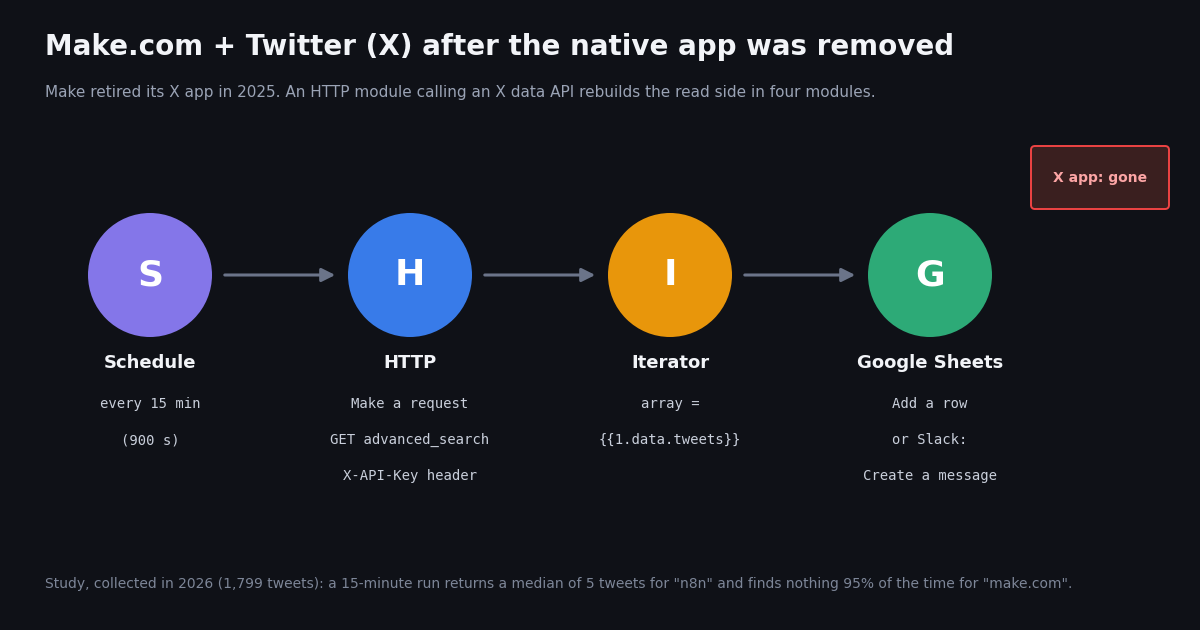
This guide is about Make.com specifically. If you run n8n, the sibling guide on an n8n Twitter API workflow covers the same tweets-to-Slack job with n8n nodes, and the Twitter automation guide surveys every way to automate X with code. Here the question is narrower: Make's own X (Twitter) app was retired, so what does a working Make scenario look like now, what does it cost per month, and what can you still do on the posting side?
Everything below was checked against primary sources this session: Make's help center article on the discontinued X app, Make's HTTP, Google Sheets and Slack app documentation, Make's blueprint help page and Make's own make-typescript-sdk and make-skills repositories for the blueprint format, X's pricing and Create Post pages on docs.x.com, and the advanced_search reference on docs.twitterapi.io. The blueprint is a template we constructed from that documented format; we did not import it into a Make account, so treat the first run as a test. The traffic numbers come from our own search sample, collected in 2026.
What happened to Make's X (Twitter) app
Make published a help-center notice titled "X (formerly Twitter) app integration discontinued" (help.make.com/x-formerly-twitter-app-integration-discontinued). It gives a two-step timeline. From April 3, 2025 the X app disappeared from the app search and no new scenarios could use it. On May 30, 2025 existing scenarios that used X modules stopped working; Make says you can still open them, but they fail with an error when they run.
Why. Make's stated reason is that X's API policy requirements and pricing prevent it from providing a reasonable integration to its customers. The FAQ answers "Why can't Make pay for X's API access like other platforms?" with the same sentence. It does not give numbers.
What Make recommends instead. Social media management apps such as Buffer and Hootsuite, or other networks such as Bluesky and Mastodon. That covers scheduling posts; it does not cover reading X data (search, mentions, timelines, followers) into your own scenarios, which is what most Make users built with the old Search and Watch modules.
What still exists. Make's notice says the xAI app is not affected, because X and xAI have separate API policies. That is Grok's model API, not an X data source. We also checked the old URLs this session: www.make.com/en/integrations/twitter renders Make's 404 page, and apps.make.com/twitter returns 404 while sibling pages such as apps.make.com/linkedin and apps.make.com/http load. So the "Make com X modules gone" searches are right: there is no first-party X module to configure, and any tutorial that tells you to add an X connection in Make predates 2025.
The X API side changed too. X now sells API access as pay-per-usage credits with no subscription tiers (docs.x.com/x-api/getting-started/pricing): $0.005 per post read, $0.010 per user read, $0.015 per post created and $0.200 per post created with a URL, capped at 3 million post reads a month before an Enterprise plan. Whatever replaces the Make app has to work on those terms or on a third-party API.
Your options for a Make.com Twitter integration today
There are three realistic paths. They differ in who holds the X credentials, what you pay per tweet, and whether they read, write or both.
When the official API is the right call. If your scenario only posts a few times a day from your own brand account, X's own API is the cleanest: you own the app, the token and the audit trail. Make's HTTP module has an OAuth 2.0 authentication type, and X's Create Post reference lists the OAuth2UserToken scheme with tweet.write, tweet.read and users.read scopes for POST /2/tweets. You pay X $0.015 per post, or $0.200 if the text contains a URL.
When a data API is the right call. If the scenario reads (brand mentions, keyword alerts, competitor timelines, lead lists into a sheet), the per-tweet price dominates. At the official $0.005 per post read, 1,000 tweets cost $5.00; on TwitterAPI.io the same 1,000 tweets cost $0.15, about 33 times less on the rate cards as published. Reads also need no X account or developer app, only an API key, so there is no OAuth flow to maintain inside Make.
The rest of this guide builds the read path in Make with TwitterAPI.io, then returns to posting at the end.
Build the scenario: HTTP > Make a request to advanced_search
Create a new scenario in Make and add the HTTP app, module Make a request. Make's HTTP documentation (apps.make.com/http) describes the fields; these are the values for a keyword feed.
The query string. The query parameter accepts X search operators. For a brand feed use something like "make.com" -filter:retweets; for several handles, from:account1 OR from:account2. Then append a time filter so a run only sees tweets posted since the previous run: since_time:{{formatDate(addMinutes(now; -15); "X")}}. In Make's IML, addMinutes(now; -15) is 15 minutes ago, and the X token formats a date as Unix seconds (Make's date-function docs show parseDate(1482940986; X)). TwitterAPI.io's advanced_search reference asks for since_time:<unix seconds>; it says the older since:YYYY-MM-DD_HH:mm:ss_UTC form is not supported, so do not copy that from older tutorials.
Credentials. Make's documentation says the HTTP module's Headers field is for metadata and that credentials belong in the module's Credentials field (it offers API key, Basic Auth and OAuth 2.0 types). Either works for an X-API-Key header. The header is fine for a first test; move the key into an API-key credential before you share or export the scenario, because exported blueprints include mapped values.
Run it once. Click Run once. With Parse response on, the output bundle shows Data > tweets[], has_next_page and next_cursor. Each tweet carries id, url, text, createdAt, lang, likeCount, retweetCount, replyCount, viewCount and an author object with userName, name and followers. Make needs this first run so the following modules can show those fields in the mapping panel; Make's Iterator documentation describes the same "run once so modules learn the structure" step.
The request below is exactly what the module sends. We ran it this session with a 15-minute lookback on n8n: it returned 2 tweets with the top-level keys tweets, has_next_page and next_cursor, and has_next_page was true even though the page was short, so do not treat that flag alone as "more results are waiting".
# The exact request the HTTP module sends on each run (15-minute lookback).
SINCE=$(( $(date +%s) - 900 ))
curl -sS -G "https://api.twitterapi.io/twitter/tweet/advanced_search" \
  -H "X-API-Key: $TWITTERAPI_IO_KEY" \
  --data-urlencode "query=n8n -filter:retweets since_time:${SINCE}" \
  --data-urlencode "queryType=Latest"
# Response (top level): {"tweets": [...], "has_next_page": true|false, "next_cursor": "..."}Iterator, Google Sheets and Slack modules, plus the importable blueprint
Iterator. Add Flow Control > Iterator and set Array to {{1.data.tweets}}. Make's Iterator turns that array into one bundle per tweet, so the next module runs once per tweet. If the window was empty, the iterator emits nothing and the scenario ends there.
Google Sheets > Add a row. Connect your Google account, pick the spreadsheet and a sheet named Tweets with headers in row 1 (Created, Author, Text, Likes, URL). Map {{2.createdAt}}, {{2.author.userName}}, {{2.text}}, {{2.likeCount}} and {{2.url}} to columns A to E. Make's own scenario-building guidance (the make-skills repository) flags two settings that save cleanly and only fail at run time: set Value input option to USER_ENTERED and Insert data option to INSERT_ROWS, or rows can overwrite the same line.
Slack > Create a message. For a channel feed, add Slack's Create a message module after the Sheets module (or instead of it). A useful text template is New post from @{{2.author.userName}}: {{2.text}} followed by {{2.url}} on its own line so Slack unfurls the post. Long posts exist: in our sample, 25.7% of zapier-matching tweets and 9.3% of "make.com" tweets had more than 500 characters of text, so trim with {{substring(2.text; 0; 500)}} if you want compact messages.
Schedule. Set the scenario schedule to run at regular intervals of 15 minutes, matching the -15 in the query. If you change one, change the other. A slightly longer lookback than the interval (say 16 minutes on a 15-minute schedule) closes gaps from scheduling jitter at the cost of an occasional duplicate; if duplicates matter, add a Search Rows step or a Make data store keyed on the tweet id before writing.
Filtering inside Make. You can drop low-signal tweets between the Iterator and the Sheets module with a filter, for example {{2.likeCount}} greater than 0 or {{2.lang}} equal to en. Filters do not reduce the X data cost (the tweets were already returned), but they reduce Make credits, because a filtered-out bundle does not run the next module.
Below is the whole scenario as a Make blueprint: HTTP > Iterator > Google Sheets > Slack. To use it, create a new empty scenario, open the three-dots menu in the Scenario Builder and choose Import blueprint (Make's blueprint help page; the file must be under 2 MB), then paste your API key, spreadsheet ID and Slack channel ID, and create the Google Sheets and Slack connections. Make's help page warns that blueprints carry modules, settings and mapped values but not connections, which is why __IMTCONN__ is null here.
How we built it, plainly. We constructed this JSON from Make's documented blueprint shape: the name, flow and metadata keys and the id, module, version, parameters, mapper and metadata node fields from the Blueprint type in Make's official make-typescript-sdk; the http:ActionSendData version 3 module from that SDK's public-template example; and builtin:BasicFeeder v1, google-sheets:addRow v2 and slack:CreateMessage v4 with their mapper keys from Make's make-skills examples. We did not import it into a Make account. If Make reports an unknown field on import, delete that module and rebuild it with the field table above; the mappings are the same.
Delete what you do not need. Remove module 4 for a Sheets-only log, or module 3 for a Slack-only feed. Swap the query value for your own keyword, handle list or operator set; the since_time expression stays.
{
  "name": "X (Twitter) keyword search to Google Sheets and Slack via TwitterAPI.io",
  "flow": [
    {
      "id": 1,
      "module": "http:ActionSendData",
      "version": 3,
      "parameters": {
        "handleErrors": false
      },
      "mapper": {
        "url": "https://api.twitterapi.io/twitter/tweet/advanced_search",
        "method": "get",
        "headers": [
          {
            "name": "X-API-Key",
            "value": "PASTE_YOUR_TWITTERAPI_IO_KEY"
          }
        ],
        "qs": [
          {
            "name": "query",
            "value": "\"make.com\" -filter:retweets since_time:{{formatDate(addMinutes(now; -15); \"X\")}}"
          },
          {
            "name": "queryType",
            "value": "Latest"
          }
        ],
        "bodyType": "",
        "parseResponse": true
      },
      "metadata": {
        "designer": {
          "x": 0,
          "y": 0
        }
      }
    },
    {
      "id": 2,
      "module": "builtin:BasicFeeder",
      "version": 1,
      "parameters": {},
      "mapper": {
        "array": "{{1.data.tweets}}"
      },
      "metadata": {
        "designer": {
          "x": 300,
          "y": 0
        }
      }
    },
    {
      "id": 3,
      "module": "google-sheets:addRow",
      "version": 2,
      "parameters": {
        "__IMTCONN__": null
      },
      "mapper": {
        "from": "drive",
        "mode": "select",
        "spreadsheetId": "PASTE_YOUR_SPREADSHEET_ID",
        "sheetId": "Tweets",
        "includesHeaders": true,
        "insertDataOption": "INSERT_ROWS",
        "valueInputOption": "USER_ENTERED",
        "values": {
          "0": "{{2.createdAt}}",
          "1": "{{2.author.userName}}",
          "2": "{{2.text}}",
          "3": "{{2.likeCount}}",
          "4": "{{2.url}}"
        }
      },
      "metadata": {
        "designer": {
          "x": 600,
          "y": 0
        }
      }
    },
    {
      "id": 4,
      "module": "slack:CreateMessage",
      "version": 4,
      "parameters": {
        "__IMTCONN__": null
      },
      "mapper": {
        "channel": "PASTE_YOUR_CHANNEL_ID",
        "text": "New post from @{{2.author.userName}}: {{2.text}}\n{{2.url}}"
      },
      "metadata": {
        "designer": {
          "x": 900,
          "y": 0
        }
      }
    }
  ],
  "metadata": {
    "instant": false,
    "version": 1,
    "scenario": {
      "roundtrips": 1,
      "maxErrors": 3,
      "autoCommit": true,
      "autoCommitTriggerLast": true,
      "sequential": false,
      "confidential": false,
      "dataloss": false,
      "dlq": false,
      "freshVariables": false
    },
    "designer": {
      "orphans": []
    }
  }
}What a 15-minute run actually returns: the study
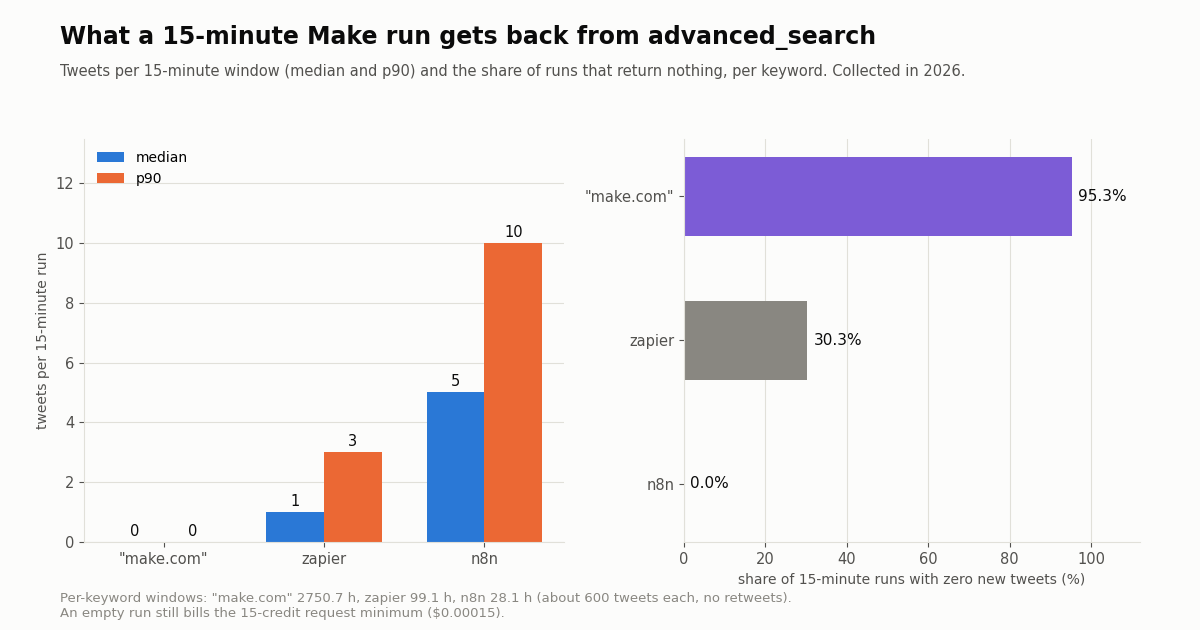
Before deciding on a schedule, we measured it. We pulled the most recent tweets matching three automation-tool keywords of very different volume through /twitter/tweet/advanced_search (Latest, retweets excluded), about 600 per keyword, 1,799 in total, collected in 2026, and bucketed them into the 15-minute windows a Make schedule would see.
One page is enough for most keywords. advanced_search returns up to 20 tweets per page. The busiest keyword here, n8n at about 21.4 tweets an hour, peaked at 15 tweets in a 15-minute window, so a single request per run never missed a tweet in this sample. That is why the blueprint has no pagination loop. If your keyword is busier, see the pagination section below.
Quiet keywords mean mostly empty runs. The exact phrase "make.com" appeared about 5 times a day; 95.3% of 15-minute runs would find nothing, and even hourly runs would come back empty 83.7% of the time. Each empty run still bills TwitterAPI.io's 15-credit request minimum ($0.00015), and it still uses Make credits for the HTTP and Iterator modules.
What the tweets look like. For the n8n query, 53.0% of matches were replies and the median tweet had 0 likes (p90 4); English was 64.3% of tweets, Japanese 10.3%. For "make.com", 75.7% carried a link and 51.2% had media. If you route these into Slack, a lang or likeCount filter will cut a lot of noise.
What it costs per month: X data and Make credits
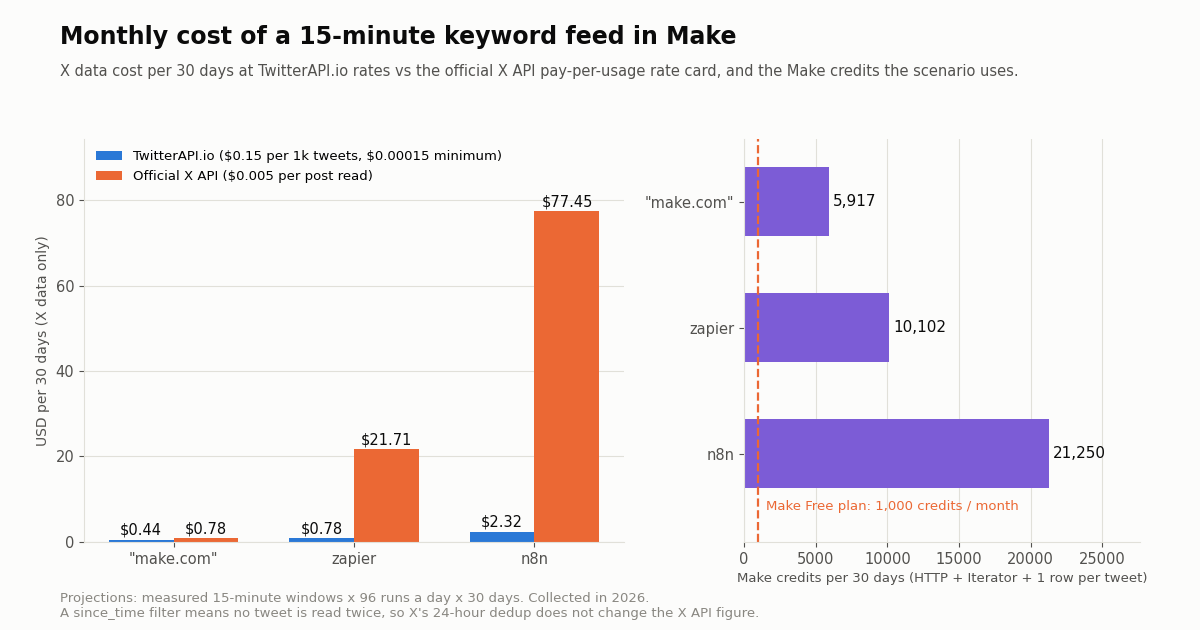
Two bills apply to this scenario: the X data provider and Make itself. We projected both from the measured windows at 96 runs a day for 30 days.
How the X data columns are computed. TwitterAPI.io charges 15 credits per tweet returned ($0.15 per 1,000 tweets), with a minimum of 15 credits per request, so an empty run costs $0.00015 and a full 20-tweet page $0.003. The official column uses X's pay-per-usage Posts: Read rate of $0.005 per post from docs.x.com/x-api/getting-started/pricing. X also deduplicates resources within a 24-hour UTC window, but with a since_time filter the scenario never reads the same tweet twice, so that does not change the figure. On the quietest keyword the two are close because empty runs dominate; on a busy keyword the per-tweet rate dominates and the gap approaches the 33x rate-card ratio.
Make credits are usually the bigger number. Make's credits page says non-AI modules use 1 credit per operation, and its operations page says a module runs once per bundle it processes. In this scenario that is 1 credit for HTTP, 1 for the Iterator and 1 per tweet for the Sheets row: about 5,917 credits a month even for the near-silent "make.com" feed, because 2,880 runs times 2 modules adds up before a single tweet arrives. Adding the Slack module adds 1 credit per tweet (n8n: about 1,225 credits a day with both). Make's pricing page lists 1,000 credits a month on the Free plan, so a 15-minute schedule needs a paid Make plan; an hourly schedule cuts the fixed part by four.
Rate limits are not a constraint here. TwitterAPI.io allows 0.2 requests per second before the first payment and 20 once paid. A Make scenario that fires one request every 15 minutes is far below either. New accounts that pass the automatic bot check get up to $1 of free credits (at most 100,000 credits, no card, one per person or network, expiring after 31 days), which covers a month of X data for the zapier or the "make.com" feed above (the n8n feed needs about $2.32); purchased credits never expire. Monthly plans (Starter $29 to Business $1,499) are on the pricing page.
Busier keywords: pagination, schedule and errors
Use the HTTP module's built-in pagination. Make's current HTTP > Make a request module documents a Pagination type setting with a Token or cursor-based option. For advanced_search set Items path to tweets, Next page token/cursor path to next_cursor, Page token/cursor parameter name to cursor, and a Limit (the module accepts 1 to 10,000 items). Each extra page is another request billed by TwitterAPI.io at 15 credits per tweet returned. If your Make version only offers the older module from the blueprint, the alternative is a Repeater plus a data store holding the cursor, which costs more Make credits.
Or shorten the schedule. For a keyword in the n8n range, a 15-minute window stays under one 20-tweet page. If a window regularly exceeds 20, a 5-minute schedule keeps each run to one page, at the cost of more fixed Make credits per day. In our sample the n8n query never put more than 9 tweets in a 5-minute window.
Stop on an empty page. As our test call showed, has_next_page can be true on a short last page. When paginating, also stop when tweets is empty.
Errors. If the key is missing or wrong the API answers with an error and the message text in msg; a missing or invalid parameter returns HTTP 400 with the text in detail. Add an error handler route on the HTTP module (Make's Ignore or Break directives) so one failed run does not disable the scenario after Make's consecutive-error limit; the blueprint's maxErrors is 3, Make's default in its own examples.
Account lists instead of keywords. To follow specific accounts rather than a phrase, keep the same module and change the query to from:account1 OR from:account2, or call /twitter/user/last_tweets with userName (tweets sit under data.tweets there, so the Iterator array becomes {{1.data.data.tweets}}). For many accounts in near real time, TwitterAPI.io's filter-rule webhooks can push matches to a Make Custom webhook trigger instead of polling.
Posting to X from Make (make com twitter post)
Posting is where the removal of Make's X app hurts most, because a post must come from an authenticated X account.
Official X API. Create an app in X's developer console, buy credits, and use Make's HTTP module with the OAuth 2.0 authentication type against POST https://api.x.com/2/tweets with a JSON body such as {"text": "..."}. X's Create Post reference lists the OAuth 2.0 user-token scopes tweet.write, tweet.read and users.read (OAuth 1.0a user tokens also work). X's rate card charges $0.015 per post and $0.200 per post containing a URL, so a daily link post costs about $6 a month in X fees alone. X also offers $20 of credits on a first card purchase and a match of the first auto-recharge up to $50.
TwitterAPI.io write endpoints. Writes are available as a product, through an authenticated session rather than OAuth: one /twitter/user_login_v2 call (about $0.10, with a proxy you supply) returns login_cookies, and each /twitter/create_tweet_v2 call (fields login_cookies, tweet_text, proxy) costs 60 credits ($0.0006), billed per HTTP 200 call. In Make that is an HTTP POST with a JSON body. Understand what this means before you schedule it: the call acts as that account, X can rate-limit, lock or suspend it, sessions can need a fresh login, and you should keep a human pace, not a burst of posts from a scenario loop.
Buffer or Hootsuite. This is Make's own recommendation in the discontinuation notice: connect a social media management tool that already holds an X connection and let Make hand it the content. You give up per-call control and pay that tool's plan, but there is no X developer app or session to maintain.
For most Make users the practical split is to read through the HTTP module and a data API, and post through whichever of the three fits your volume and who owns the account.
How we collected this
Question. If a Make scenario polls advanced_search every 15 minutes for a keyword, how many tweets does each run return, how often is a run empty, and what does that cost per month in X data and Make credits?
Queries and sample. "make.com" -filter:retweets, zapier -filter:retweets and n8n -filter:retweets, queryType Latest, 30 pages each through our rate-limited read client: 1,799 tweets in 91 requests (90 for the sample, 1 for the module request check), roughly $0.27 of credits. Collected in 2026.
Window. For each keyword, the span from the oldest to the newest tweet returned: about 2,751 hours for "make.com", 99.1 hours for zapier and 28.1 hours for n8n. Partial first and last windows were dropped.
What it cannot show. Three keywords are not every keyword; volume swings with launches, outages and time of day, and a short n8n window means its numbers describe roughly one day. Monthly figures are projections (mean per run x 96 x 30), not a month of observed runs. Make credit counts follow Make's published rule of one credit per module operation and ignore filters, error handlers and any extra modules you add. We did not run the scenario inside Make.
Privacy. Search results are written by private individuals, so the raw pages stay off the repository; the study keeps only aggregates and de-identified rows (hour, language, reply flag, like count, media and link flags, text length), with no tweet IDs, URLs, text or handles.
"""Dry-run the Make scenario locally: same request, same column mapping.

Run this before importing the blueprint to confirm your query returns what you
expect and to see the five columns the Google Sheets module will write.
Requires: pip install requests ; export TWITTERAPI_IO_KEY=...
"""
import os
import time

import requests

API_KEY = os.environ["TWITTERAPI_IO_KEY"]
BASE = "https://api.twitterapi.io"
QUERY = '"make.com" -filter:retweets'   # same query string as the blueprint
LOOKBACK_SECONDS = 15 * 60              # match the Make schedule (900 s)
MAX_PAGES = 5                           # safety cap; a 15-minute window rarely needs 2


def fetch_window(query: str, lookback: int) -> list[dict]:
    since = int(time.time()) - lookback
    params = {"query": f"{query} since_time:{since}", "queryType": "Latest"}
    rows, cursor = [], ""
    for _ in range(MAX_PAGES):
        if cursor:
            params["cursor"] = cursor
        r = requests.get(
            f"{BASE}/twitter/tweet/advanced_search",
            headers={"X-API-Key": API_KEY},
            params=params,
            timeout=30,
        )
        r.raise_for_status()
        body = r.json()
        tweets = body.get("tweets") or []
        for t in tweets:
            author = t.get("author") or {}
            # Columns A..E, the same order as the Sheets module values 0..4
            rows.append([
                t.get("createdAt"),
                author.get("userName"),
                t.get("text"),
                t.get("likeCount", 0),
                t.get("url"),
            ])
        # Stop on an empty page as well as on has_next_page=false.
        if not tweets or not body.get("has_next_page") or not body.get("next_cursor"):
            break
        cursor = body["next_cursor"]
    return rows


if __name__ == "__main__":
    rows = fetch_window(QUERY, LOOKBACK_SECONDS)
    print(f"{len(rows)} new tweets in the last {LOOKBACK_SECONDS // 60} minutes")
    for row in rows[:5]:
        created, user, text, likes, url = row
        print(f"{created} | @{user} | {likes} likes | {(text or '')[:80]!r} | {url}")
Questions readers ask
Does Make.com still have a Twitter (X) integration?
Not a native one. Make's help center says the X (formerly Twitter) app was removed from app search on April 3, 2025 and existing X scenarios stopped working on May 30, 2025, because of X's API policy requirements and pricing. You can still reach X from Make through the generic HTTP > Make a request module, calling either the official X API or a third-party X data API.
Why were the X modules removed from Make?
Make's stated reason is that X's API policy requirements and pricing prevent it from offering a reasonable integration. X now sells API access as pay-per-usage credits ($0.005 per post read, $0.015 per post created, $0.200 with a URL, per docs.x.com), which is costly for a platform serving many small scenarios.
Do I need an X developer account to read tweets in Make?
Not if you use a data API. With TwitterAPI.io the HTTP module sends an X-API-Key header and no X account or developer app is needed for reads. With the official X API you need your own developer app, credits and a bearer or user token.
How do I avoid duplicate tweets on every Make run?
Add a time filter to the search query that matches your schedule: since_time:{{formatDate(addMinutes(now; -15); "X")}} for a 15-minute schedule. The X format token outputs Unix seconds. For strict de-duplication, also check the tweet id against a Make data store or a Search Rows step before writing.
How many Make credits does a Twitter-to-Google-Sheets scenario use?
About 2 credits per run (HTTP and Iterator) plus 1 per tweet written. On a 15-minute schedule that is about 5,917 credits a month even for a quiet keyword, and about 21,250 for a busy one like n8n in our study. Make's Free plan includes 1,000 credits a month.
Can I post tweets from Make.com without the X app?
Yes, three ways: the HTTP module with OAuth 2.0 against X's POST /2/tweets (your own developer app; $0.015 per post, $0.200 with a URL), TwitterAPI.io's session-based write endpoints (60 credits per call, acting as the logged-in account, which X can rate-limit or suspend), or a social media tool such as Buffer or Hootsuite, which Make itself recommends.
Is the blueprint on this page tested in Make?
We built it from Make's documented blueprint format and module IDs from Make's own SDK and skills repositories, and we ran the exact HTTP request it sends against the API. We did not import it into a Make account. If an import error names a field, rebuild that module by hand from the field table; the mappings are unchanged.
What about Make's xAI app, is that an X integration?
No. Make says the xAI app is unaffected by the X removal because X and xAI have separate API policies. It gives access to xAI's Grok models, not to X posts, users or search.
Continue
- Make help center: X (formerly Twitter) app integration discontinued (April 3 and May 30, 2025 timeline, reason, alternatives)
- Make apps documentation: HTTP > Make a request (fields, credentials, cursor pagination)
- Make help center: Scenario blueprints (export, import, connections not included)
- Make's official TypeScript SDK on GitHub: Blueprint type and http:ActionSendData template example
- X API pay-per-usage pricing (post read $0.005, post create $0.015 / $0.200 with URL, 3M read cap)
- TwitterAPI.io docs: advanced_search (query, queryType, cursor, since_time)
- Twitter (X) API hub: endpoints, pricing and guides
- n8n Twitter (X) API workflow: new tweets to Slack
- Twitter (X) automation guide for API-driven workflows
- Twitter (X) data into Google Sheets with Apps Script
- Twitter (X) webhooks and filter rules for push delivery
- Twitter (X) keyword alerts: a developer guide
- MCP servers people use to automate work
- TwitterAPI.io pricing: pay only for the data returned
- 01How to Build an MCP Server in Python for Twitter (X) Data
- 02OpenClaw vs Claude Code: which agent should run your Twitter (X) jobs?
- 03Hermes Agent vs OpenClaw: Which Agent Fits Twitter (X) Work?
- 04Claude Code Channels: Telegram, Discord and Twitter (X) Alerts in Your Session
- 05Codex MCP: How to Add Any MCP Server to OpenAI Codex (CLI, IDE and App)
- 06Twitter (X) Scheduling Tool — A Developer's API Integration Guide
- 07How to Make a Twitter (X) Thread via API — Developer Tutorial
- 08What Is xcancel (X Cancel)? The Twitter (X) Nitter Front End, Explained
Stop reading. Start building.
Starter credits cover real testing on real data. Google sign-in, no card, no application queue.
Get an API keyAlready building with TwitterAPI.io? Publish an honest tutorial or build log about it and earn up to $200 a month in API credits.