RAG vs MCP: Retrieval vs Live Tools, Measured on Twitter (X) Data
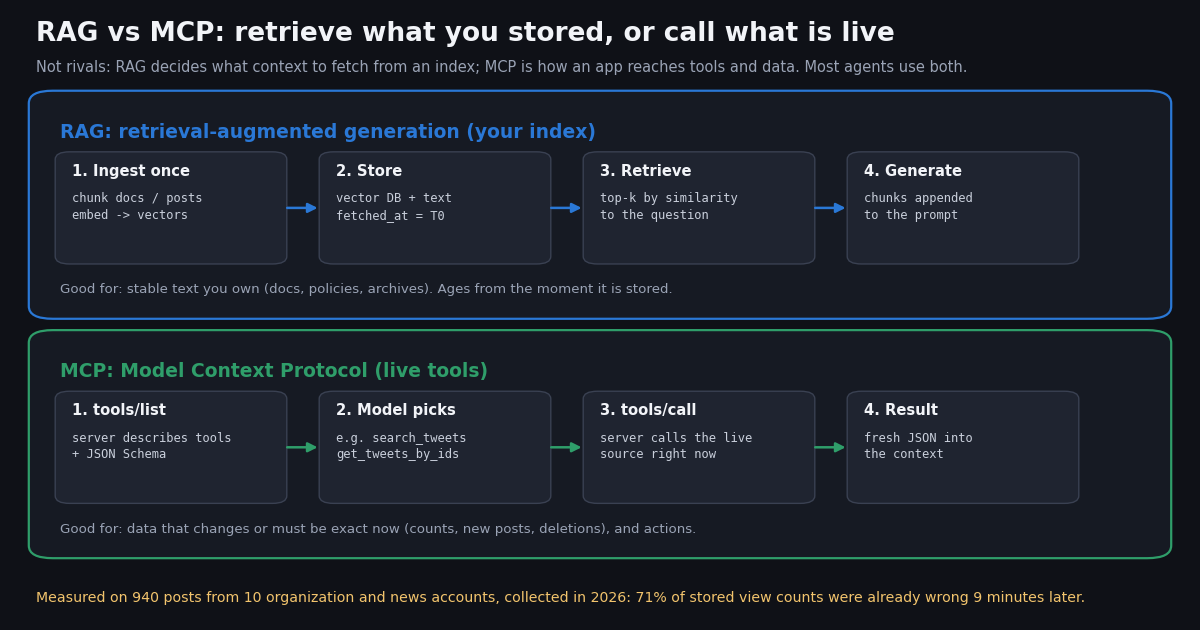
- Different layers: RAG is a retrieval technique (index, retrieve, append to the prompt); MCP is a protocol for calling tools and reading resources on servers. Comparing them is like comparing a search index with HTTP.
- Retrieve when the knowledge is large, stable and yours: product docs, contracts, support history, an archive of posts you analyze as of a date.
- Call a live tool when the answer depends on now: counts, new posts, whether something still exists, or an action. MCP's
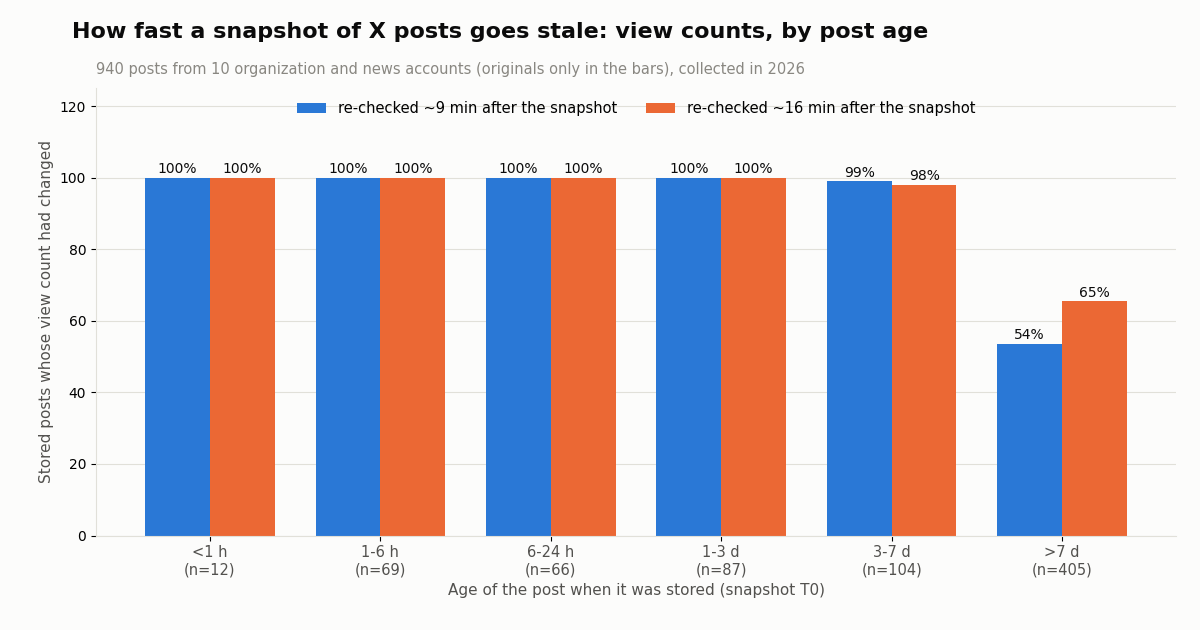
tools/callis how the model asks for that. - Measured staleness: of 940 X posts stored in a snapshot, 71.2% had a different view count 9 minutes later and 79.4% had at least one changed counter after about 16 minutes.
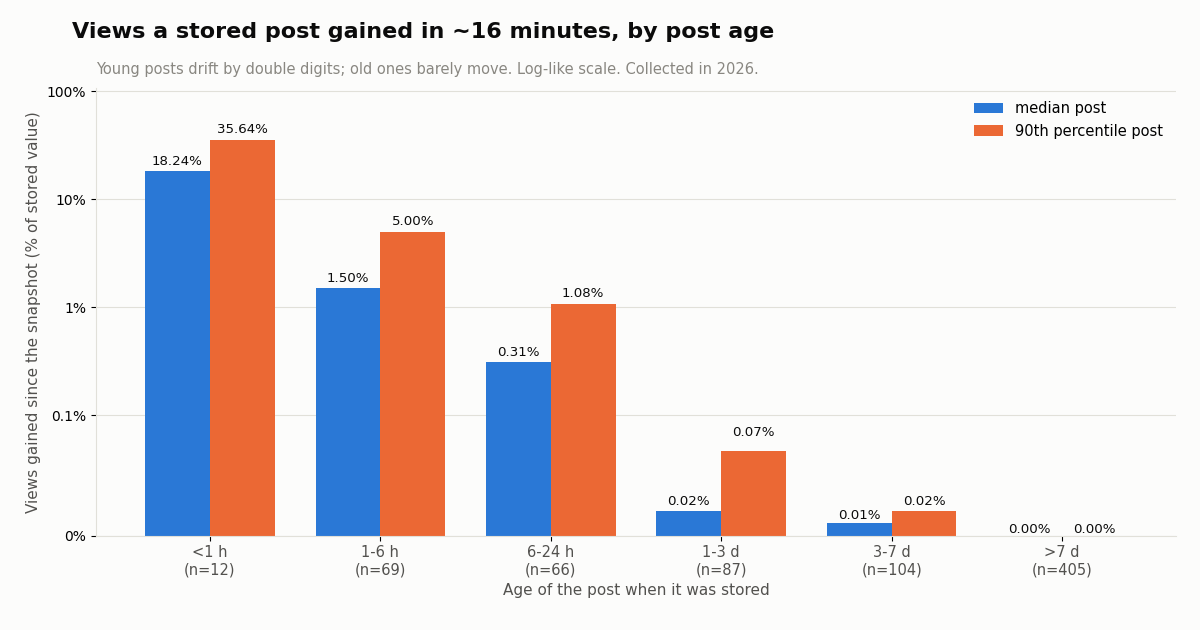
- Age decides the drift: posts under an hour old gained a median 18.2% more views in about 16 minutes; posts older than a week a median 0.00%. Text ages slowly, counters fast.
- Hybrid pattern: keep text and embeddings in the index, re-check the retrieved hits by id before answering, and ask a live search for anything newer than the index. The code on this page does all three with plain HTTP.
Search for "RAG vs MCP" and most answers say the same true thing: the two are complementary. What they rarely tell you is where the line falls in practice, how quickly an index becomes wrong, and what the hybrid looks like in code. This page answers those three questions. It is not an introduction to MCP servers (that is our explainer on what an MCP server is), not a comparison of MCP with command-line tools (that is MCP vs CLI), and not an agent tutorial (that is how to build an AI agent); those pages are linked below and we do not repeat them.
We start with precise definitions from the primary sources: the original RAG paper and the MCP specification. Then a decision table, the cost arithmetic of re-indexing vs calling a live tool, and the hybrid pattern most production agents end up with.
The part you will not find elsewhere is a measurement. X is a good stress test for any index because its data has two halves that age at very different speeds: the text of a post barely changes (X allows edits only within 30 minutes of posting, and each edit creates a new post ID), while its counters move every minute. We took a snapshot of the latest posts of 10 organization and news accounts, the way an ingest job would, and re-checked every post by ID twice within the hour. 940 posts, 96 requests, $0.45 in API reads, collected in 2026.
71.2% of 940 posts from 10 organization and news accounts had a different view count 9 minutes after the snapshot (collected in 2026); posts under an hour old gained a median 18.2% more views in about 16 minutes.
RAG and MCP, defined from the primary sources
RAG. The term comes from the 2020 paper "Retrieval-Augmented Generation for Knowledge-Intensive NLP Tasks" by Patrick Lewis and colleagues (NeurIPS 2020). It combines a model's parametric memory (what it learned in training) with a non-parametric memory: in the paper, a dense vector index of Wikipedia read by a neural retriever. Anthropic's engineering write-up on contextual retrieval gives the working definition most teams use today: RAG "retrieves relevant information from a knowledge base and appends it to the user's prompt."
The RAG pipeline in four steps. Ingest: split documents into chunks and compute an embedding for each. Store: keep chunks, vectors and metadata in a vector store or a search index. Retrieve: at question time embed the query and fetch the top-k most similar chunks (often combined with keyword search such as BM25 and a reranker). Generate: put those chunks into the prompt and let the model answer from them.
MCP. The Model Context Protocol is an open standard, built on JSON-RPC 2.0, for connecting AI applications to external systems. A host application (Claude Code, Cursor, ChatGPT and others) runs one client per server; each server offers tools, resources and prompts. The specification says tools are "model-controlled, meaning that the language model can discover and invoke tools automatically based on its contextual understanding and the user's prompts", while resources are "application-driven, with host applications determining how to incorporate context." The current revision is 2026-07-28.
The MCP loop in four steps. tools/list: the server describes each tool with a name, a description and a JSON Schema for its input. The model picks a tool and arguments. tools/call: the client sends the call and the server runs it against the live system. The result (text and, optionally, structuredContent matching an outputSchema) goes back into the model's context. The spec adds that there SHOULD always be a human in the loop able to deny a tool invocation.
So the comparison is category-crossing. RAG says nothing about transport; MCP says nothing about how a server finds its data. An MCP server can run a vector search inside a tool, and a RAG pipeline can call MCP tools to refresh itself. The useful question is not "RAG or MCP?" but "for this piece of context, do I read my stored copy or ask the source now?"
RAG vs MCP in one table
Retrieve when the corpus is too large for the prompt, changes slowly, and the question is semantic ("what did they say about pricing?"). Anthropic's own guidance is a useful floor: if the whole knowledge base is under about 200,000 tokens, it suggests skipping retrieval and putting it all in the prompt.
Call a live tool when the question contains "now", "latest", "how many", "still" or a filter the index cannot express (date ranges, author, minimum engagement), or when the model must act. These are the questions where a stored copy is wrong in a way that retrieval quality cannot fix.
Do both when you need semantic recall and current truth: retrieve candidates from the index, then verify or refresh them with a live call before the model answers. The rest of this page measures why that second step matters for a fast-moving source.
How fast a snapshot of X posts goes stale: 940 posts re-checked
To see what an index of X posts gets wrong, we did what an ingest job does. We fetched the latest posts of 10 organization and news accounts (@OpenAI, @AnthropicAI, @GoogleDeepMind, @nvidia, @github, @NASA, @Reuters, @BBCBreaking, @verge, @nytimes) with /twitter/user/last_tweets: 940 posts, 197 of them reposts. That snapshot is the "index". Then we re-fetched every one of those post IDs with /twitter/tweets, 50 IDs per request, about 9 minutes later and again about 16 minutes later, and compared six counters: views, likes, reposts, replies, quotes and bookmarks.
Most stored counters were already wrong. After about 9 minutes, 71.2% of the 940 posts had a different view count and 72.2% had at least one changed counter. After about 16 minutes, 79.4% had changed. Likes moved less often (10.3% of posts at the first re-check, 15.3% at the second), because likes come in far smaller numbers than views.
Post age decides how far it drifts. Posts under an hour old when stored had gained a median 18.2% more views by the second re-check (90th percentile 35.6%), and 67% of them had new likes. Posts 1 to 6 hours old gained a median 1.50%. Posts older than a week had a median change of 0.00%: 65% of them still showed some view change, but the median gain was 1 view.
Reposts are excluded from the age rows because their counters belong to the original post. Percentages are shares of stored posts in each age bucket; "views gained" is relative to the stored value.
Counters also go down. 71 posts had at least one counter lower at the second re-check than in the snapshot (unlikes, removed reposts, recounts). An index that only ever increments, or that treats a stored count as a floor, will be wrong in both directions.
What an index of posts misses entirely: deletions and new posts
Counters are the soft failure: the post is still there, its numbers are off. The hard failures are posts that should not be in the index any more and posts that are not in it yet.
Deletions. None of the 940 stored posts had disappeared at either re-check (0 missing at about 16 minutes). Organization and news accounts rarely delete, so this is a floor, not a typical rate for individuals. It still matters for compliance: if you build on the official X API, X's Developer Policy says "you must delete or modify any content you have if it is deleted or modified on X", and X offers batch compliance jobs that take stored post and user IDs and return an action and a reason (deleted, protected, suspended, edited). A RAG index of posts therefore needs a delete path, not only an insert path.
New posts. At about 19 minutes after the snapshot we asked each account's timeline again. 3 posts had been published that the snapshot could not contain, all of them from @Reuters; the other nine accounts had posted nothing new. Quiet accounts make an index look fresh; a wire service does not. An index answers "what did @Reuters say about X?" with whatever was there at ingest; a live search answers it with what is there now.
Edits. We could not measure edits from these fields. Per X's documentation a post can be edited within 30 minutes of posting, up to 5 times, and each edit gets a new post ID, so an index keyed by the original ID can hold the pre-edit text. For posts more than 30 minutes old, the text you indexed is the text that exists, which is why the text half of a post is the part RAG handles well.
Re-index or call live? The cost arithmetic
Freshness has a price on both routes, so it helps to put numbers on it. TwitterAPI.io bills tweet endpoints per tweet returned: 15 credits per tweet, $0.15 per 1,000 tweets, with a 15-credit minimum per request ($0.00015 for an empty result). The official X API pay-per-usage rate card is $0.005 per post read (docs.x.com/x-api/getting-started/pricing), $5 per 1,000, about 33x more.
Re-checking an index. Refreshing the counters of our 940-post snapshot means reading 940 posts again: about $0.14 per refresh on TwitterAPI.io, about $4.70 at the X rate card. Doing that every 15 minutes is 96 refreshes a day, about $13.54 vs $451.20 a day. Most of that spend re-reads week-old posts that, by our numbers, barely move.
Calling live at question time. An agent that answers a question with one search returning 20 posts spends $0.003 on TwitterAPI.io (20 x $0.00015) or $0.10 at the X rate card. Unless the agent is asked the same question thousands of times a day, reading at question time is cheaper than keeping a big index fresh, and it is never stale.
Refresh by age, not on a fixed clock. The age table suggests a tiered rule: re-check posts under a day old every few minutes, posts under a week old a few times a day, and older posts only when they are retrieved. In our snapshot, posts under a day old were {young_day} of {N} ({p(young_day / N)}), so this keeps nearly all of the freshness for about a fifth of the reads.
Where MCP adds cost. Tool definitions travel in the prompt. Our MCP vs CLI comparison measured the 12-tool list of TwitterAPI.io's MCP server at 2,025 tokens. That is paid on every model turn that carries the tools, so it is the MCP-side counterpart of RAG's embedding bill; it is small next to a long retrieved context, but it is not zero.
Subscriptions with bonus credits and the full rate card are on the pricing page. New accounts that pass the automatic bot check get up to $1 of free credits (at most 100,000 credits, no card, one per person or network, expiring after 31 days).
The hybrid pattern: retrieve, verify, then fill the gap
Production agents that work over a fast-moving source usually end up with the same three steps, whatever framework they use.
1. Retrieve from the index for recall. Embeddings find the posts or documents that are about the question, including ones that use different words. This is where RAG earns its keep: a live keyword search would miss the paraphrases.
2. Verify the hits live. Before the model sees them, re-fetch the retrieved items by ID if their stored copy is older than a threshold. Items that come back missing leave the index; items that come back changed get their counters updated. On X that is /twitter/tweets with up to 50 IDs per request (in our run, 100 IDs in one request returned HTTP 400, 50 worked), or the get_tweets_by_ids tool on the MCP server.
3. Fill the gap with a live search. Ask for anything newer than the index: /twitter/tweet/advanced_search with from: operators and since_time:<unix> returns only posts after that time, so an idle check returns an empty list and costs the $0.00015 minimum. Through MCP the same call is the search_tweets tool.
Where MCP fits in the hybrid. You can wire steps 2 and 3 as plain HTTP in your own code (the script below does), or hand them to the model as MCP tools and let it decide when to verify. A third option is to expose your RAG retriever itself as an MCP tool (search_my_index), so one host sees both the index and the live source through the same protocol. The MCP resources feature, with resources/subscribe and notifications/resources/updated, is the protocol's own answer to "tell me when this stored thing changes", for servers that implement it.
A rule of thumb from the data. Store and embed text; treat every number as a cache with a short lifetime; never answer "latest" or "how many" from the index alone.
{
  "mcpServers": {
    "twitterapi-io": {
      "url": "https://mcp.twitterapi.io/mcp",
      "headers": { "Authorization": "Bearer your_key_here" }
    },
    "my-index": {
      "command": "python",
      "args": ["my_rag_mcp_server.py"]
    }
  }
}Live X data through MCP: the tools a RAG index cannot replace
TwitterAPI.io's hosted MCP server at https://mcp.twitterapi.io/mcp exposes 12 read tools: search_tweets, get_user_info, get_user_about, get_user_followers, get_user_followings, get_user_last_tweets, get_user_mentions, get_tweets_by_ids, get_tweet_replies, get_tweet_quotes, get_tweet_retweeters and get_trends. Connect it with your API key sent as Authorization: Bearer <key>; reads need no X account and no X developer approval.
Which ones are "live only". get_trends, get_user_mentions and search_tweets with a recent since_time: describe the present and are pointless to index. get_tweets_by_ids is the verify step of the hybrid. get_user_info returns follower counts that drift like the post counters we measured. get_user_last_tweets is the ingest call if you do want an index.
What is reasonable to index. The text of posts older than 30 minutes (past X's edit window), long-form articles, and your own notes about accounts. Keep id, createdAt and a fetched_at time on every chunk so the verify step knows what to re-check.
Writes are a separate product. If an agent must post or reply, TwitterAPI.io runs write actions through an authenticated session: one /twitter/user_login_v2 login ($0.10, with a proxy you supply) returns login_cookies, and each action such as /twitter/create_tweet_v2 is 60 credits ($0.0006), billed per HTTP 200 call. The call acts as that account, so X can rate-limit, lock or suspend it; keep a human pace and expect the session to need a fresh login. No RAG index helps with this half: actions are tools by definition.
Common mistakes when mixing RAG and MCP
Answering "latest" from the index. The index only knows what existed at ingest. In our run @Reuters published {NEWT} new posts within about {m(NEWMIN)} minutes of the snapshot. Route recency questions to a live search.
Quoting stored counts as facts. A view count in an index is a timestamped observation. Show it with its time ("12,400 views when indexed") or re-check before quoting it.
No delete path. If the source deletes, your index should too. On X, missing IDs on a by-ID re-check are the signal; X's batch compliance jobs cover this for official-API customers.
Too many tools, too little retrieval. Loading dozens of tool schemas into every turn costs tokens and confuses tool choice. Keep the live tool set small and specific, and let retrieval narrow the context first.
Indexing what you could filter live. Date ranges, authors, languages and engagement thresholds are search operators on X (from:, since_time:, lang:, min_faves:). A live query with filters often beats retrieving from a huge index and filtering afterwards.
Letting a tool result become instructions. Retrieved chunks and tool results are untrusted text. The MCP spec tells clients to validate tool results before passing them to the model and to show tool inputs to the user; apply the same rule to retrieved chunks.
How we collected this
Question: how fast does X data go stale once copied into an index: how many stored counters change within the hour, how that depends on the post's age, how many stored posts disappear, and how many new posts the index misses.
Accounts: 10 public organization and news accounts: @OpenAI, @AnthropicAI, @GoogleDeepMind, @nvidia, @github, @NASA, @Reuters, @BBCBreaking, @verge and @nytimes.
Method: snapshot with /twitter/user/last_tweets (default, replies excluded), 5 pages per account (940 posts; @nvidia returned 40). Two re-checks of every snapshot ID with /twitter/tweets, 50 IDs per request, about 9 and 16 minutes after the snapshot (median per post), then one more last_tweets page per account to count new posts. 96 requests, 3,020 tweets returned, about $0.45 at 15 credits per tweet, collected in 2026 through a rate-limited, read-only client.
What the sample cannot show: one short window within one hour, so long-run decay and deletion rates are not measured; organization and news accounts, which delete rarely and post on schedules, not individuals; edits are not visible in these fields; the age buckets mix accounts with very different audiences (news accounts dominate the youngest buckets). The cost arithmetic assumes the published rate cards named above.
Aggregates only. The accounts named are organizations and news outlets; no individual's posts were analyzed. The analysis script, results and the gzip-compressed raw pages of the single-author accounts are kept with the study.
"""fresh_rag.py - a tweet index (the RAG half) that re-checks itself against the live API
(the tool half) before it answers. Pure Python + requests; swap the toy scorer for real
embeddings and a vector store when the corpus grows.

    pip install requests
    export TWITTERAPI_IO_API_KEY=...
    python fresh_rag.py "what did they announce about agents"

What it does:
  1. index():   pull recent posts from a few accounts once, store text + counters + fetched_at
  2. retrieve(): score stored posts against the question (bag-of-words cosine, top k)
  3. refresh():  re-fetch the hits by id (/twitter/tweets, 50 ids per call) if they are older
                 than MAX_AGE; ids that come back missing are dropped from the index
  4. delta():    ask /twitter/tweet/advanced_search for posts newer than the index
Cost: tweet endpoints bill 15 credits per tweet returned ($0.15 per 1,000 tweets).
"""
import json
import math
import os
import re
import sys
import time
from collections import Counter
from datetime import datetime

import requests

API = "https://api.twitterapi.io"
H = {"X-API-Key": os.environ["TWITTERAPI_IO_API_KEY"]}
ACCOUNTS = ["OpenAI", "AnthropicAI", "GoogleDeepMind"]
INDEX_FILE = "tweet_index.json"
MAX_AGE = 15 * 60     # seconds before a stored hit is re-checked against the live API
TOP_K = 5


def get(path_url, params):
    r = requests.get(path_url, headers=H, params=params, timeout=30)
    r.raise_for_status()
    return r.json()


def ts(created_at):
    # createdAt looks like "Fri Nov 13 19:00:13 +0000 2026", not ISO 8601
    return datetime.strptime(created_at, "%a %b %d %H:%M:%S %z %Y").timestamp()


def record(t, now):
    return {"id": t["id"], "account": (t.get("author") or {}).get("userName", ""),
            "text": t.get("text") or "", "created": ts(t["createdAt"]), "fetched_at": now,
            "likes": t.get("likeCount", 0), "views": t.get("viewCount", 0), "url": t.get("url", "")}


def index(pages_per_account=2):
    docs, now = {}, time.time()
    for acct in ACCOUNTS:
        cursor = None
        for _ in range(pages_per_account):
            params = {"userName": acct}
            if cursor:
                params["cursor"] = cursor
            body = get(f"{API}/twitter/user/last_tweets", params)
            data = body.get("data") or {}
            for t in data.get("tweets") or []:
                docs[t["id"]] = record(t, now)
            if not body.get("has_next_page") or not body.get("next_cursor"):
                break
            cursor = body["next_cursor"]
    json.dump(docs, open(INDEX_FILE, "w"))
    return docs


def words(s):
    return Counter(re.findall(r"[a-z0-9]+", s.lower()))


def retrieve(docs, question, k=TOP_K):
    q = words(question)
    def score(d):
        w = words(d["text"])
        dot = sum(q[x] * w[x] for x in q)
        return dot / (math.sqrt(sum(v * v for v in q.values())) * math.sqrt(sum(v * v for v in w.values())) or 1)
    return sorted(docs.values(), key=score, reverse=True)[:k]


def refresh(docs, hits):
    """Re-check stale hits by id. Missing ids (deleted, protected, unavailable) leave the index."""
    now = time.time()
    stale = [h["id"] for h in hits if now - h["fetched_at"] > MAX_AGE]
    for i in range(0, len(stale), 50):                     # 50 ids per call worked; 100 returned HTTP 400
        batch = stale[i:i + 50]
        live = {t["id"]: t for t in get(f"{API}/twitter/tweets", {"tweet_ids": ",".join(batch)}).get("tweets") or []}
        for tid in batch:
            if tid in live:
                docs[tid] = record(live[tid], now)
            else:
                docs.pop(tid, None)
    json.dump(docs, open(INDEX_FILE, "w"))
    return [docs[h["id"]] for h in hits if h["id"] in docs]


def delta(docs):
    """Posts published after the newest one in the index: the part an index cannot know."""
    newest = int(max((d["created"] for d in docs.values()), default=time.time() - 3600))
    query = "(" + " OR ".join(f"from:{a}" for a in ACCOUNTS) + f") since_time:{newest}"
    body = get(f"{API}/twitter/tweet/advanced_search", {"query": query, "queryType": "Latest"})
    now = time.time()
    fresh = [record(t, now) for t in body.get("tweets") or [] if t["id"] not in docs]
    for d in fresh:
        docs[d["id"]] = d
    json.dump(docs, open(INDEX_FILE, "w"))
    return fresh


if __name__ == "__main__":
    question = " ".join(sys.argv[1:]) or "new model release"
    docs = json.load(open(INDEX_FILE)) if os.path.exists(INDEX_FILE) else index()
    new = delta(docs)
    hits = refresh(docs, retrieve(docs, question))
    print(f"{len(docs)} posts indexed, {len(new)} new since the index was built")
    for h in hits:
        age_min = (time.time() - h["fetched_at"]) / 60
        print(f"@{h['account']}  likes={h['likes']}  views={h['views']}  checked {age_min:.0f} min ago")
        print("   ", h["text"][:160].replace("\n", " "), h["url"])
    # Pass `hits` (plus `new`) to the model as context; the counters are minutes old, not days.
Researching this?Free starter credits cover end-to-end testing — Google sign-in, no card. Get a key.
Questions readers ask
Is MCP replacing RAG?
No. MCP standardizes how an AI application calls tools and reads resources on servers; RAG is a way to pick relevant stored context. Many MCP servers run retrieval inside a tool, and many RAG systems call live tools to refresh. What MCP replaces is the custom glue code each app used to write per integration.
When should I use RAG instead of an MCP tool?
When the knowledge is large, changes slowly and is yours: documentation, policies, contracts, support history, an archive studied as of a date. If the whole corpus fits in the prompt (Anthropic suggests about 200,000 tokens as the threshold), you may not need retrieval at all.
When is a live MCP tool the better choice?
When the answer depends on current state: counts, the latest posts, whether something still exists, or an action. In our study 71.2% of stored X view counts were wrong 9 minutes later, which no retriever can fix.
Can I use RAG and MCP together?
Yes, and most agents should. Retrieve candidates from the index, re-check them by ID through a live tool before answering, and run a live search for anything newer than the index. You can also expose your retriever as an MCP tool so the host sees both through one protocol.
Is MCP just a form of RAG?
Loosely, both put external information into the context window, which is why the terms get mixed up. But RAG chooses context by similarity from a store you built, while MCP is a protocol in which the model chooses a tool and the server answers from whatever system it fronts, live or not.
How often should I refresh an index of tweets?
By age. Posts under an hour old gained a median 18.2% more views in about 16 minutes in our sample, while posts older than a week moved a median 0.00%. Re-check young posts every few minutes, older ones when they are retrieved, and keep text but treat counters as short-lived.
What does it cost to keep X data fresh?
On TwitterAPI.io tweet reads cost $0.15 per 1,000 tweets returned, so re-reading a 940-post index is about $0.14; the official X API rate card is $0.005 per post read, about $4.70 for the same refresh. A live search at question time that returns 20 posts is $0.003.
Do I need an X developer account to give an agent live X data?
Not for reads through TwitterAPI.io: an API key in the X-API-Key header, or as a Bearer token for the MCP server, is enough. The official X API requires a developer account and bills per post read.
Continue
- Lewis et al., Retrieval-Augmented Generation for Knowledge-Intensive NLP Tasks (NeurIPS 2020)
- MCP specification: Tools (model-controlled, tools/list, tools/call, structuredContent)
- MCP specification: Resources (application-driven, resources/read, subscribe)
- Anthropic engineering: Contextual Retrieval (RAG definition, 200,000-token guidance)
- X API docs: Edit posts (30-minute window, 5 edits, new ID per edit)
- X Developer Policy: delete or modify stored content deleted or modified on X
- X (Twitter) API hub: endpoints, pricing and guides
- What an MCP server is, with a live X example
- MCP vs CLI for AI agents, measured
- How to build an AI agent in Python
- llms.txt for API docs: when an agent reads files instead of calling tools
- Build your own MCP server
- TwitterAPI.io MCP server quickstart
- Pay-per-use pricing per tweet returned
- 01Free LLM API options in 2026: what is still free, the real limits, and how to feed it Twitter (X) data
- 02Clay Pricing in 2026: Plans, Data Credits, Actions and the Cost of a Twitter (X) Column
- 03MCP Inspector: How to Test and Debug an MCP Server, Tested on a Live X Data Server
- 04What Is an API Key? Meaning, a Real Request, and How to Keep One Safe
- 05Twitter (X) Error 400: What "Bad Request" Means and How to Fix It
- 06MCP Server Workflow Automation: the 14 Best MCP Servers for Claude Code, Codex and Cursor, Twitter (X) Data Included
- 07MCP vs CLI for AI agents: token cost, auth and reliability, measured on Twitter (X) data
- 08What Is an MCP Server? How AI Clients Talk to It, With a Live Twitter (X) Example
Writing about something you built with TwitterAPI.io? Our community rewards program pays API credits for honest tutorials, build logs and videos.
Stop reading. Start building.
Starter credits cover real testing on real data. Google sign-in, no card, no application queue.
Get an API keyAlready building with TwitterAPI.io? Publish an honest tutorial or build log about it and earn up to $200 a month in API credits.