Twitter (X) Error 400: What "Bad Request" Means and How to Fix It
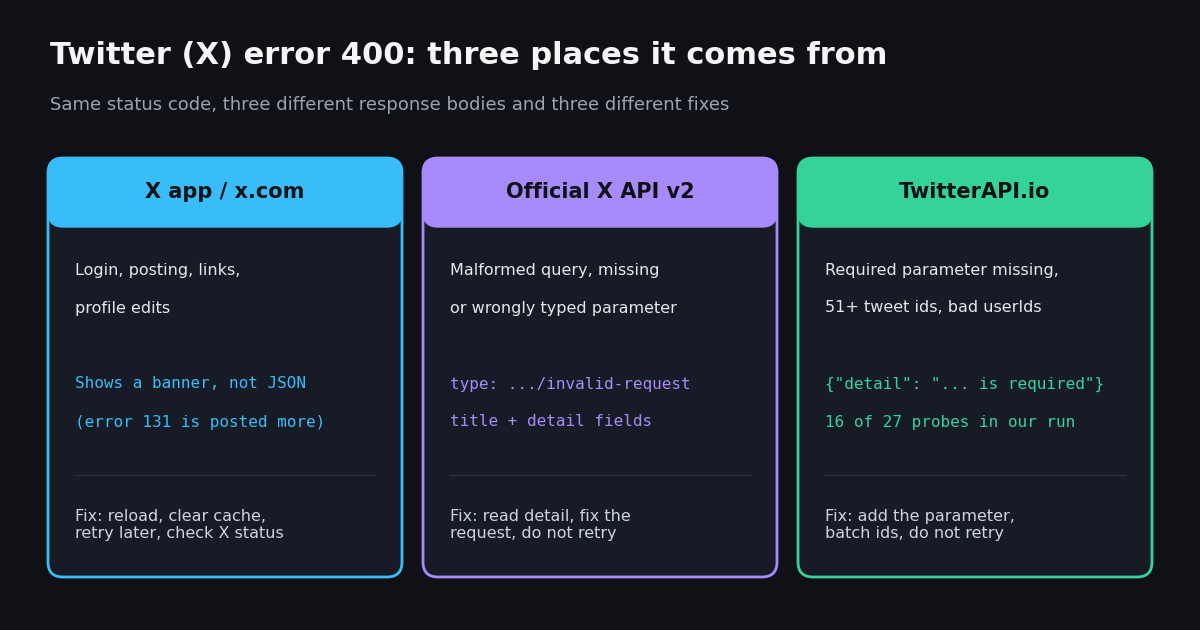
- 400 = your request is wrong, not X's servers. Retrying it unchanged never helps; read the error text, fix the parameter, send again.
- X API v2 400 body:
type=https://api.x.com/2/problems/invalid-request, plustitleanddetailnaming the problem (per the response-codes page on docs.x.com). - TwitterAPI.io 400 body: one field,
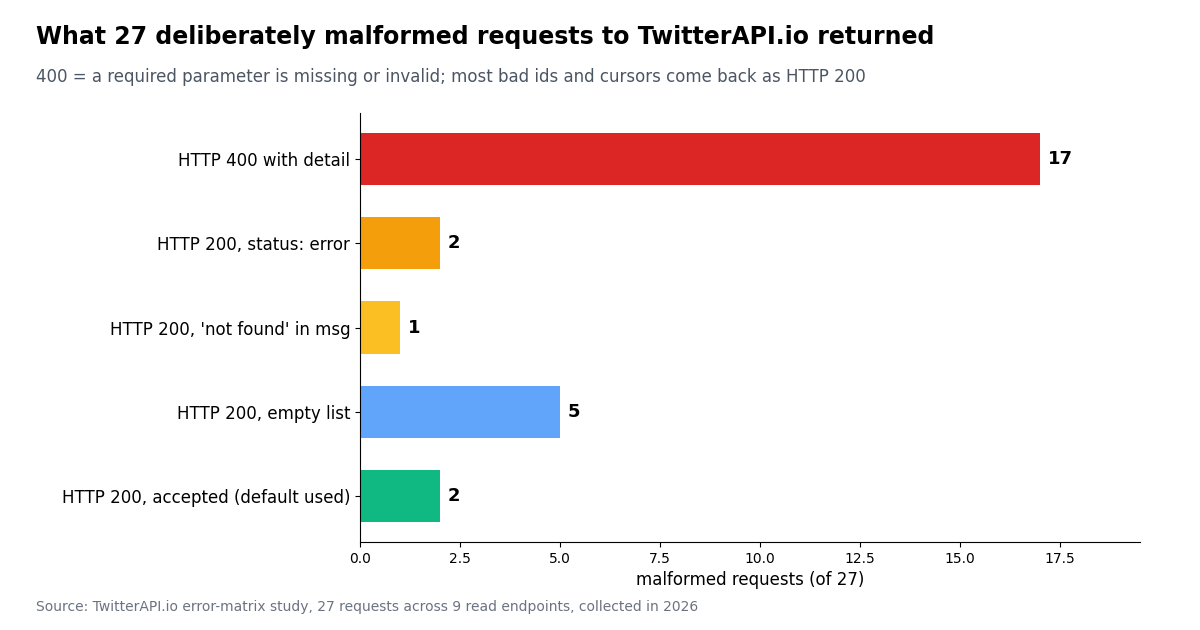
detail. 17 of our 27 malformed probes returned it, e.g.userName is required,userIds must be numbers,max 50 tweet_ids per request. - Not every bad input is a 400: 10 of 27 probes came back HTTP 200: an unknown handle gives
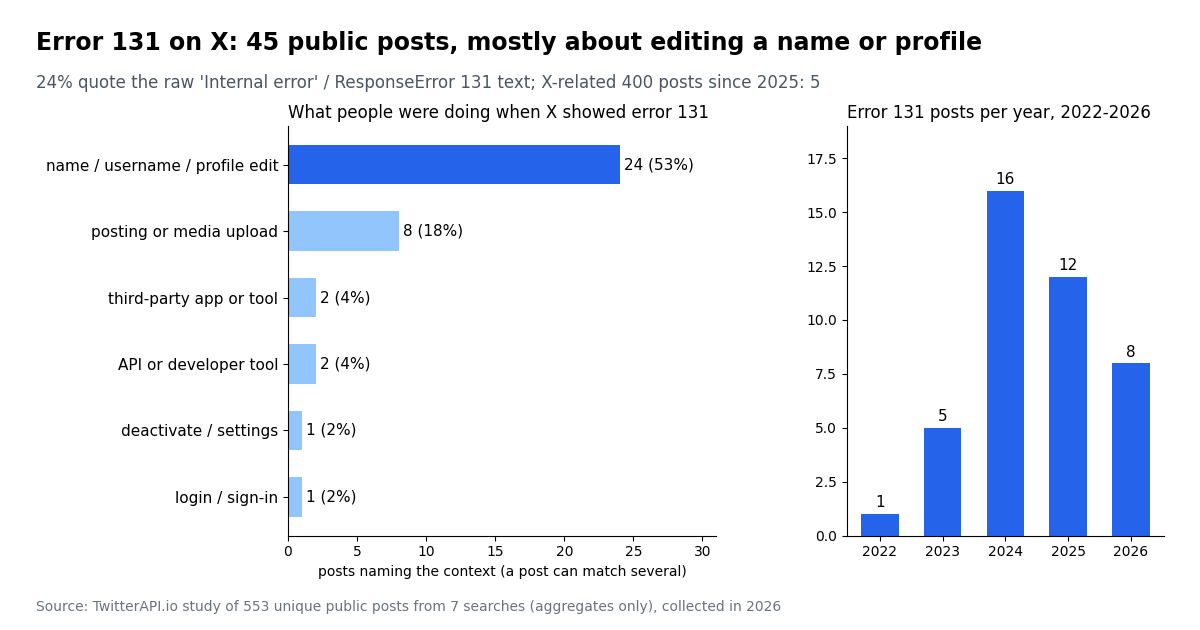
status: "error", a fake tweet id or garbage cursor gives an empty list. Checkstatusand empty lists, not only the status code. - Error 131 is not a 400: it is X's internal error code, seen with HTTP 500. In 45 public posts about it, 24 (53%) were about saving a name or profile edit.
- App or x.com users: sign out and in, clear cache or app data, update the app, remove odd characters from what you are posting, then wait and retry if X itself is having trouble.
A 400 is the most generic "no" a web server can give, which is why the same three digits show up in such different places on X: a login screen that will not go through, a post with a link that refuses to send, a Python script that stops with tweepy.errors.BadRequest, or a scraper that suddenly gets {"detail": "query is required"}. The cause is always on the sending side, but what counts as "wrong" differs by surface.
This page is the 400 deep dive. For the general retry and error-handling pattern across every status code, see the TwitterAPI.io error-handling guide; for 429, 403 and error 226, see the dedicated pages linked below. What this page adds is first-hand evidence: the exact 400 bodies we captured from 27 deliberately malformed requests to TwitterAPI.io, the documented X API v2 format next to them, and what 553 public posts say about error 400 and error 131 on X.
17 of 27 deliberately malformed requests to TwitterAPI.io returned HTTP 400 with a single detail field; the other 10 came back as HTTP 200 (unknown handle, fake id, garbage cursor), collected in 2026.
What HTTP 400 Bad Request means on Twitter (X), and its neighbors
RFC 9110, the HTTP semantics standard, defines 400 as the status a server sends when it "cannot or will not process the request due to something that is perceived to be a client error (e.g., malformed request syntax, invalid request message framing, or deceptive request routing)". The key word is client: the server is up and answered you, it just refuses this particular request.
X's own developer documentation (the response codes and errors page on docs.x.com) lists the common causes of a 400 on the X API as "Invalid JSON, malformed query, missing required parameters", and its fix list is short: validate JSON syntax, check for missing required parameters, verify parameter types (strings vs. numbers), and escape special characters in queries.
That gives one rule that holds on every surface: a 400 is deterministic. Unlike a 429 (too many requests) or a 503 (service unavailable), sending the identical request again a minute later will fail in exactly the same way. Something in the request has to change first.
People searching for one error code often have the one next to it. This table shows what each means on TwitterAPI.io (from the errors page on docs.twitterapi.io) and on the X API (from docs.x.com).
A 405 Method Not Allowed is the generic HTTP answer when the path exists but the method does not, for example a POST to a read endpoint; check the method in the API reference. The 403 and 429 cases have their own pages, linked below.
Error 400 in the X app or on x.com (login, posting, links)
Regular users rarely see a raw "400". The X app and x.com often turn failed requests into a banner such as "Something went wrong". When a 400 does surface, it tends to be in three places: during login (often a stale session or cookie the server no longer accepts), when posting (a link, attachment or text the server rejects), and inside third-party apps connected to X, which show the raw code because they talk to the API directly.
It is also less common than you might expect. Across 553 unique public posts from seven searches for "error 400", "400 bad request" and "error 131", only 5 posts since 2025 matched our pattern for a 400 tied to X or Twitter, against 20 about error 131 in the same period. If you are an app user staring at a code, it is more likely 131 than 400.
Step 1: sign out and back in. A 400 at login or right after it can be a session problem; signing out clears the old session cookie.
Step 2: clear the cache (web) or app data (mobile), then update the app. An outdated app or stale cached request can keep resending a request the server no longer accepts.
Step 3: simplify what you are posting. Remove the link, the media or unusual characters and try again; if the plain text goes through, the attachment was the problem.
Step 4: try another network or device. A VPN, proxy, or browser extension that rewrites requests can produce malformed requests. Switching networks rules that out.
Step 5: if a third-party app shows the 400, disconnect and reconnect its X authorization. The app's stored token or request format is the likely culprit, not your X account.
If the message is "Something went wrong, try reloading" rather than a numbered 400, the separate guide on that error walks through the X app and browser variants in detail.
Error 400 on the official X API v2: the invalid-request format
On the X API v2, a 400 arrives as a JSON problem object. The response codes page on docs.x.com shows the shape: a title ("Invalid Request"), a detail that names the specific problem ("The 'query' parameter is required."), and a type URI ending in /2/problems/invalid-request. The same page lists the other problem types you may meet, such as resource-not-found, not-authorized-for-resource, client-forbidden, usage-capped and rate-limit-exceeded.
Two details trip people up. First, a 200 response can still carry an errors array: when you request several posts and some are deleted, X returns the ones it found in data and a resource-not-found entry per missing id. Second, the older v1.1 endpoints used a different shape, {"errors":[{"message":"...","code":N}]} with numeric codes; libraries that still parse v1.1 errors map those numbers to names.
In Python, Tweepy (version 4.17.0 is the latest release on GitHub) raises tweepy.errors.BadRequest for a 400 and tweepy.errors.TooManyRequests for a 429, so a common search for "tweepy toomanyrequests" is a rate-limit question, not a 400. The exception object keeps the response, the API error list and the messages, which is where the detail text lives.
We did not call X's API for this page (it needs a paid developer account); the X bodies here are quoted from X's documentation. The TwitterAPI.io bodies in the next section are first-hand.
import tweepy

client = tweepy.Client(bearer_token="YOUR_X_BEARER_TOKEN")
try:
    client.search_recent_tweets(query="")          # empty query -> HTTP 400
except tweepy.BadRequest as e:                     # Tweepy raises BadRequest for 400
    print(e.response.status_code, e.api_errors, e.api_messages)
except tweepy.TooManyRequests as e:                # 429: wait for x-rate-limit-reset
print("rate limited, reset at", e.response.headers.get("x-rate-limit-reset"))Error 400 on TwitterAPI.io: 27 malformed requests, the exact bodies
To see what a malformed request really returns, we sent 27 deliberately broken GET requests to nine TwitterAPI.io read endpoints: missing parameters, empty values, wrong-case parameter names, non-numeric ids, 51 ids in a 50-id endpoint, garbage cursors, and broken search syntax. The only real account used was NASA. Every 400 carried exactly one field, detail, and no status field.
Two practical points follow. Parameter names are case-sensitive: username=NASA is treated as no userName at all and returns the same 400 as leaving it out. And the error text is written to be acted on: the 51-id answer tells you to batch, the query answers say which rule you broke and link the errors page on docs.twitterapi.io.
# Official X API v2: a 400 uses the problem format (docs.x.com response codes page)
{
  "title": "Invalid Request",
  "detail": "The 'query' parameter is required.",
  "type": "https://api.x.com/2/problems/invalid-request"
}

# TwitterAPI.io: a 400 carries one field, detail (captured live, collected in 2026)
{"detail": "query is required"}
{"detail": "userName is required"}
{"detail": "max 50 tweet_ids per request, please batch into multiple calls"}
{"detail": "userIds must be numbers"}
{"detail": "Invalid query: its parentheses are unbalanced (every \"(\" needs a matching \")\"). Parentheses inside a quoted phrase are fine. See https://docs.twitterapi.io/errors"}When a bad request is not a 400: the HTTP 200 cases
The most useful finding of the probe run is what did NOT return 400. 10 of the 27 malformed requests came back with HTTP 200, so code that only checks status_code == 400 would treat them as success.
Unknown users are an answer, not an error. A handle that does not exist is a valid question with a negative answer, so it is HTTP 200 with status: "error". Cache that result instead of retrying it.
A garbage cursor looks like the end of the feed. It returns an empty page with has_next_page: false, so a paginator with a corrupted cursor silently stops early. Only ever send a next_cursor the API gave you, unmodified and URL-encoded by your HTTP library.
Bad tweet ids vanish quietly. /twitter/tweets leaves out ids it cannot return, so match results back to your input by id rather than by position.
Cost note. An HTTP 200 that returns no tweets is billed the 15-credit minimum, $0.00015. The errors page on docs.twitterapi.io states that invalid search queries answered with 400 are not charged, so validating a query before sending it saves a request rather than costing one.
Twitter error 131: what it means and why it is not a 400
Error 131 is a numeric code from X's older v1.1 error format. The open-source node-twitter-api-v2 library, which maps X's v1.1 numeric codes to names, lists 131 as InternalError (next to 130, OverCapacity). In the raw form people post, it arrives inside a server error: {"errors":[{"message":"Internal error","code":131}]}. So 131 is a 5xx-class problem on X's side, the opposite of a 400.
In our sample of public posts, 45 matched error 131 on X. 24 of them (53%) were about changing a display name, username or profile, 8 (18%) about posting or uploading media, and 24% quoted the raw Internal error body or the iOS form com.twitter.HTTPRequestActionResponseError error 131. The current response codes page on docs.x.com no longer lists numeric v1.1 codes, so the library mapping and those raw bodies are the evidence for its meaning.
If you see 131 when editing a name or profile: save once, then wait. Repeatedly pressing save does not help. Try again later, from another device or from x.com instead of the app, and check X's status page for an incident. X's help center article on saving account settings is at help.x.com (it could not be fetched for this page).
If you see 131 when uploading media: retry later, or re-export the image or video in a standard format and size.
If your code sees 131 through an API: treat it like any 5xx: retry with exponential backoff and a cap, and log the request so you can tell a lasting failure from a blip.
A request that cannot 400: validation checklist for developers
Every 400 we produced traces to one of five mistakes, and each can be caught in your own code before the request leaves.
Required parameters present and spelled exactly. userName, tweet_ids, tweetId, userIds, query: the case matters. Build the parameter dict in one place and reuse it.
Batch sizes inside the documented limit. /twitter/tweets takes at most 50 ids per request; chunk larger lists. Profile batches go through /twitter/user/batch_info_by_ids with numeric ids only.
Ids are numeric strings. Strip @, URLs and whitespace before sending an id; a tweet URL is not a tweet id. Keep ids as strings so large numbers do not lose precision in JavaScript.
Search syntax is balanced. Every " needs a partner and every ( a ). The search endpoint rejects unbalanced queries with a 400 that names the rule; a three-line check (in the code below) catches both locally.
Cursors are opaque. Pass back next_cursor exactly as received, stop when has_next_page is false, and never build or edit a cursor by hand. The pagination guide covers the full loop.
Retry policy follows directly: retry 429, 500, 502, 503 and timeouts with backoff; never retry 400, 401, 402, 403 or 404 without changing something first. That matches the retry rules on the errors page of docs.twitterapi.io and X's own advice on its response codes page.
What a 400-proof read costs, and how it compares with the official X API
On TwitterAPI.io you pay only for the data returned: tweet endpoints (search, timelines, tweets by id, replies, mentions) cost 15 credits per tweet, which is $0.15 per 1,000 tweets, with a 15-credit minimum per request, so a search that returns nothing costs $0.00015 and a full 20-tweet page costs $0.003. Profiles cost 18 credits per user, $0.18 per 1,000. Reads need no X account and no X developer approval.
The official X API pay-per-usage rate card on docs.x.com charges $0.005 per post read and $0.010 per user read, capped at 3M post reads a month with Enterprise above that. Per 1,000 tweets that is $5 on X against $0.15 on TwitterAPI.io, about 33x.
New accounts that pass the automatic bot check get up to $1 of free credits (at most 100,000 credits, no card, one per person or network, expiring after 31 days). Purchased credits never expire. Rate limits are 0.2 requests per second before the first payment and 20 once paid; subscriptions for higher limits are on the pricing page.
How we collected this
Question. What does TwitterAPI.io return for malformed requests, and what do public posts say about error 400 and error 131 on X? Error matrix. 27 deliberately malformed GET requests to nine read endpoints (/twitter/user/info, /twitter/tweets, /twitter/tweet/advanced_search, /twitter/user/last_tweets, /twitter/user/followers, /twitter/user/batch_info_by_ids, /twitter/tweet/replies, /twitter/user/mentions, /twitter/user/search), one pass, sent through our rate-limited study client; the only real handle used was NASA.
Public posts. Seven searches on /twitter/tweet/advanced_search (Latest) for "error 400", "400 bad request", "bad request" and "error 131" combined with Twitter, X, the X API or Tweepy; 39 result pages, 553 unique posts after removing duplicates. Posts were classified with case-insensitive patterns (published with the study data); a post can match several contexts. Collected in 2026.
What the sample cannot show. Search returns posts people chose to write, so it over-represents frustrated and English-speaking users and says nothing about how often the errors happen overall. Our pattern-based classification is approximate. The probe run is one pass at one time; error texts can change when the API is updated.
Privacy. Aggregates only. Raw search pages were kept out of the repository; the published sample has no ids, links, text, author ids or handles.
"""safe_search.py - call TwitterAPI.io without tripping HTTP 400, and read every
error shape it can return (400 detail, 200 + status error, empty 200, 5xx).
pip install requests ; export TWITTERAPI_IO_KEY=...
"""
import os
import time
import requests

BASE = "https://api.twitterapi.io"
HEADERS = {"X-API-Key": os.environ["TWITTERAPI_IO_KEY"]}


class BadRequest(Exception):
    """HTTP 400: the request itself is wrong. Fix it; never retry it."""


def error_text(body):
    if not isinstance(body, dict):
        return ""
    return str(body.get("detail") or body.get("msg") or body.get("message") or "")


def check_query(query):
    """Catch the two query mistakes the API answers with 400 before sending."""
    if not query.strip():
        raise BadRequest("query is required")
    if query.count('"') % 2:
        raise BadRequest("unclosed double quote in query")
    depth = 0
    for ch in query:
        depth += ch == "("
        depth -= ch == ")"
        if depth < 0:
            break
    if depth != 0:
        raise BadRequest("unbalanced parentheses in query")


def get(url, params, attempts=5):
    for i in range(attempts):
        r = requests.get(url, params=params, headers=HEADERS, timeout=30)
        if r.status_code in (429, 500, 502, 503, 504):
            time.sleep(2 ** i)              # transient: back off and retry
            continue
        body = r.json() if r.headers.get("content-type", "").startswith("application/json") else {}
        if r.status_code == 400:
            raise BadRequest(error_text(body))  # e.g. "query is required"
        if r.status_code == 402:
            raise RuntimeError("out of credits: top up, do not retry")
        r.raise_for_status()                # 401 / 403 / 404: key or path problem
        if body.get("status") == "error":   # HTTP 200, lookup failed (billed)
            raise LookupError(error_text(body))
        return body
    raise RuntimeError("gave up after retries")


def search(query, query_type="Latest", max_pages=5):
    check_query(query)
    params = {"query": query, "queryType": query_type}
    for _ in range(max_pages):
        page = get(f"{BASE}/twitter/tweet/advanced_search", params)
        for t in page.get("tweets", []):
            yield t
        if not page.get("has_next_page") or not page.get("next_cursor"):
            break
        params["cursor"] = page["next_cursor"]   # only ever a cursor the API gave you


def tweets_by_id(ids):
    """GET /twitter/tweets takes at most 50 ids; more returns HTTP 400."""
    ids = [i for i in ids if str(i).isdigit()]
    for k in range(0, len(ids), 50):
        page = get(f"{BASE}/twitter/tweets", {"tweet_ids": ",".join(ids[k:k + 50])})
        for t in page.get("tweets", []):
            if t.get("id"):                  # deleted / private ids are simply missing
                yield t


if __name__ == "__main__":
    try:
        for t in search('from:NASA "artemis"', max_pages=2):
            print(t["createdAt"], t["likeCount"], t["url"])
    except BadRequest as e:
        print("fix the request:", e)
Researching this?Free starter credits cover end-to-end testing — Google sign-in, no card. Get a key.
Questions readers ask
What does error 400 mean on Twitter (X)?
It means Bad Request: X received the request but refused it because something in the request is wrong, such as a missing or invalid parameter, malformed data, or a stale session. It is a client-side error, so the same request will keep failing until something changes.
How do I fix error 400 when logging in to X?
Sign out completely, clear the browser cache or the app's data, update the app, and sign in again. Turn off VPNs, proxies or extensions that rewrite requests, and try another network or device. If it persists across devices, wait and try later in case X itself is having trouble.
What is Twitter error 131?
Error 131 is X's internal error code from its older v1.1 error format (mapped to InternalError by the node-twitter-api-v2 library), returned with a server error such as HTTP 500. In public posts it shows up most often when saving a display name, username or profile edit, and sometimes on media upload. It is a problem on X's side: wait and retry rather than resubmitting repeatedly.
What does a 400 look like on the X API v2?
A JSON problem object with a title such as Invalid Request, a detail string naming the bad or missing parameter, and a type URI ending in /2/problems/invalid-request, as shown on the response codes page of docs.x.com. Tweepy raises tweepy.errors.BadRequest for it.
What does a 400 look like on TwitterAPI.io?
A JSON body with one field, detail, for example {"detail": "query is required"} or {"detail": "max 50 tweet_ids per request, please batch into multiple calls"}. In our run, 17 of 27 malformed requests returned it. Unknown users, fake tweet ids and garbage cursors are not 400s: they come back as HTTP 200 with status error or an empty list.
Should I retry a 400 error?
No. A 400 is deterministic, so retrying the identical request fails the same way. Retry only 429, 500, 502, 503 and timeouts, with exponential backoff. Fix the parameter named in the error text, then send the corrected request.
Why does my Twitter API pagination stop early without an error?
A corrupted or hand-built cursor does not return 400 on TwitterAPI.io: in our test it returned HTTP 200 with an empty list and has_next_page false, which looks like the end of the feed. Pass next_cursor back exactly as received and stop only when has_next_page is false.
Is tweepy TooManyRequests the same as a 400?
No. Tweepy raises TooManyRequests for HTTP 429, a rate limit, which you fix by waiting until the x-rate-limit-reset time. BadRequest is the 400 exception and needs a change to the request.
Continue
- X developer docs: Response codes and errors (400 causes, invalid-request problem format, error types)
- RFC 9110 HTTP Semantics, section 15.5.1: 400 Bad Request
- TwitterAPI.io docs: Errors (status codes, invalid search queries, retry rules)
- Tweepy source: BadRequest (400) and TooManyRequests (429) exceptions
- node-twitter-api-v2 source: v1.1 error code map (131 = InternalError)
- X developer docs: X API pay-per-usage pricing
- X API hub: endpoints, pricing and guides
- Twitter (X) API error handling: retries, backoff and every status code
- Twitter rate limit exceeded (429): causes and fixes
- X API 403 Forbidden: what each cause means
- Twitter "Something went wrong" error: app and browser fixes
- Twitter error 226: request looks automated
- Twitter API pagination with next_cursor
- TwitterAPI.io API reference and errors page
- TwitterAPI.io pricing per 1,000 tweets
- 01Free LLM API options in 2026: what is still free, the real limits, and how to feed it Twitter (X) data
- 02RAG vs MCP: Retrieval vs Live Tools, Measured on Twitter (X) Data
- 03Clay Pricing in 2026: Plans, Data Credits, Actions and the Cost of a Twitter (X) Column
- 04MCP Inspector: How to Test and Debug an MCP Server, Tested on a Live X Data Server
- 05What Is an API Key? Meaning, a Real Request, and How to Keep One Safe
- 06Twitter "This Request Looks Like It Might Be Automated" — Error 226, and How to Fix It
- 07Twitter (X) API Error Handling — Production Best Practices
- 08Zapier Pricing in 2026: Plans, Tasks per Month, Overage and a Worked Twitter (X) Zap Bill
Writing about something you built with TwitterAPI.io? Our community rewards program pays API credits for honest tutorials, build logs and videos.
Stop reading. Start building.
Starter credits cover real testing on real data. Google sign-in, no card, no application queue.
Get an API keyAlready building with TwitterAPI.io? Publish an honest tutorial or build log about it and earn up to $200 a month in API credits.