Clay Pricing in 2026: Plans, Data Credits, Actions and the Cost of a Twitter (X) Column
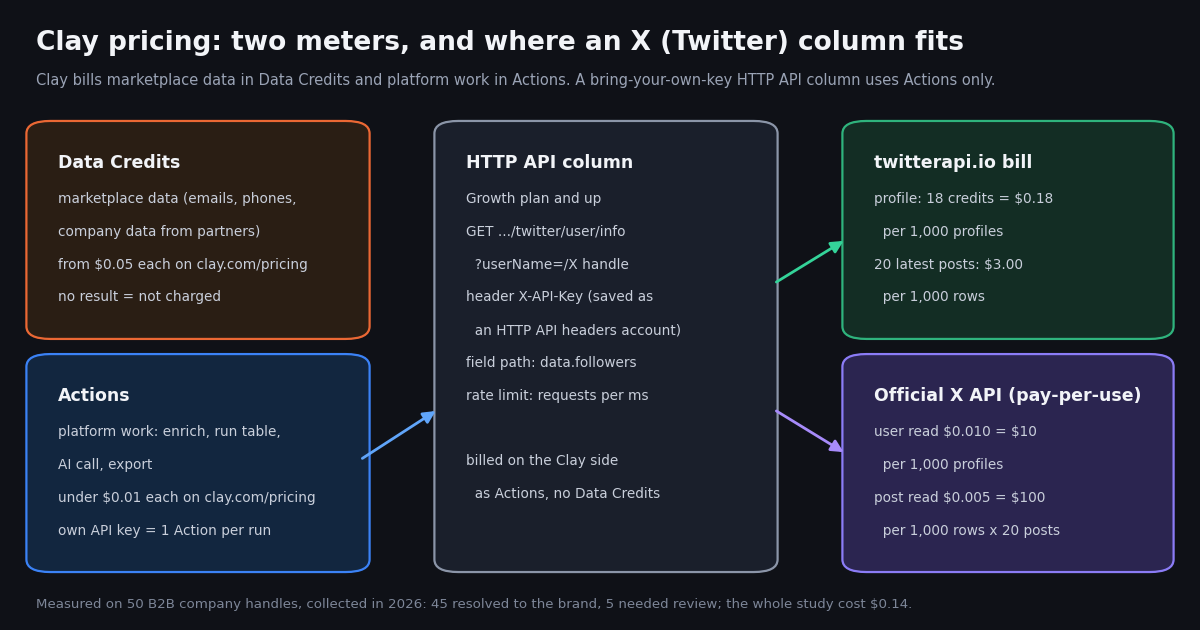
- Four plans: Free, Launch ($167/mo annual, $185/mo monthly), Growth ($446/mo annual, $495/mo monthly) and custom Enterprise, as shown on
clay.com/pricing. - Two meters since March 11, 2026: Data Credits (marketplace data, from $0.05 each) and Actions (platform work, under $0.01 each). You size each one separately.
- Failed lookups are free on both meters; a bring-your-own-key enrichment costs one Action and no Data Credits.
- HTTP API columns need Growth or Enterprise. That is the column you use to call any outside API, including an X (Twitter) data API.
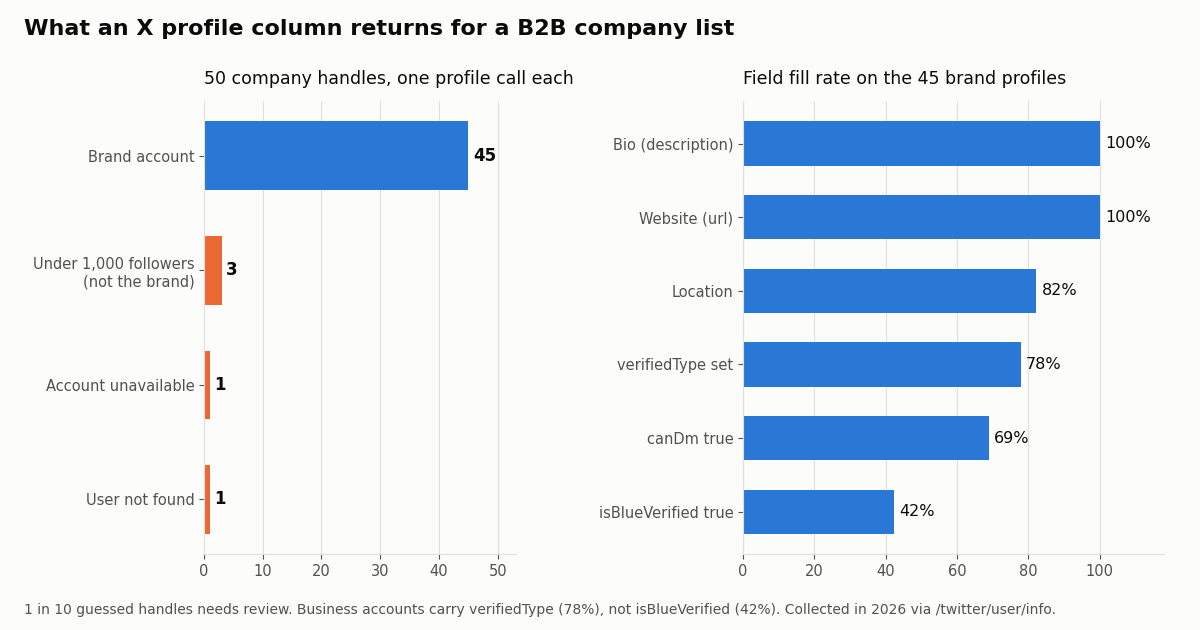
- Measured on 50 B2B company handles: 45 resolved to the real brand account, 5 needed review; 78% of brand profiles carry a
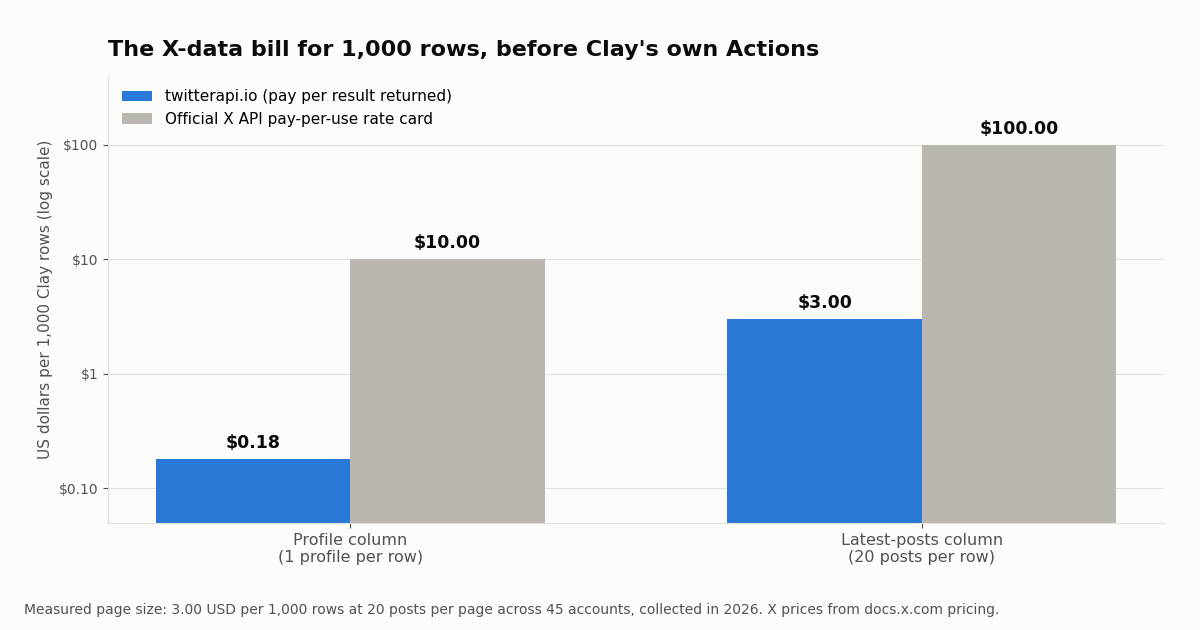
verifiedType, only 42% haveisBlueVerifiedtrue. - X data bill per 1,000 rows: $0.18 for profiles and $3.00 for 20 latest posts each on TwitterAPI.io, against $10 and $100 on X's pay-per-use rate card, plus Clay's Actions either way.
Clay is a spreadsheet-shaped data enrichment tool used by sales, growth and RevOps teams: every row is a company or a person, and every column can call a data provider, an AI model or an outside API to fill in a field. That design makes its price hard to read at a glance, because you are not buying seats. You are buying two separate pools of usage, and the size of each pool sets the monthly figure on the pricing page.
This page reads Clay's pricing as clay.com/pricing and Clay's own pricing announcement show it this year, explains what consumes each meter, and then prices one concrete job end to end: adding X (Twitter) data to a list of company accounts. For that we made the same API calls a Clay HTTP API column makes, on 50 B2B company handles, and kept the bill.
Our angle is the Clay bill plus the X column inside it. If you are comparing workflow tools rather than enrichment tables, the Zapier and n8n pricing pages below cover those bills, and the Apify and PhantomBuster pages cover scraping-style vendors; we link them rather than repeat them.
45 of 50
Clay pricing at a glance: every plan, side by side
Clay's pricing page shows a monthly or annual toggle (annual is labeled "Save 10%") and four plans. The headline price on each paid plan is simply the smallest Actions tier plus the smallest Data Credits tier, so the real number depends on how much of each you buy.
The arithmetic behind the headline. Launch on annual billing is $54 for Actions plus $113 for Data Credits, which is the $167 headline; on monthly billing it is $60 plus $125, the $185 "starting at" figure Clay's FAQ and pricing announcement use. Growth works the same way: $185 plus $261 is $446 annual, and $205 plus $290 is $495 monthly. When you see two different Clay prices quoted for the same plan, this is why.
Bigger tiers. Each meter scales independently. On monthly billing, Launch Actions go 15K ($60/mo), 40K ($150/mo), 60K ($200 monthly), 100K ($290/mo) and 200K ($540/mo); Launch Data Credits go 2.5K ($125/mo), 6K ($290/mo), 10K ($460/mo), 20K ($880/mo) and 50K ($2,125/mo). Growth Actions go 40K ($205/mo), 60K ($290/mo), 100K ($450/mo) and 200K ($850/mo), with the same Data Credits ladder from 6K upward.
What the plans unlock. Free covers unlimited seats and tables, up to 200 rows per table, waterfalls, Claygent and your own API keys, but not scheduled enrichment, CRM integrations or the HTTP API. Launch adds phone enrichment, signals such as job changes, reusable functions, email sending and scheduled enrichment. Growth adds CRM sync, HTTP API integrations, webhook-based and web-intent signals, Clay Sequencer and priority support. Enterprise adds SSO and SCIM, IP allowlists, credit budgeting, role-based access, data warehouse connections and a dedicated strategist.
Seats are not the price. Every plan lists unlimited seats, so adding teammates does not move the bill; usage does.
Data Credits vs Actions: what each meter pays for
Clay split its billing into two meters with the pricing change that took effect on March 11, 2026. Before that, older plans (Starter, Explorer and Pro, where Pro was $800/mo) used a single credit pool. Existing customers on those legacy plans can stay on them; the window to switch between legacy plans closed on April 10, 2026, and Enterprise customers move at renewal.
Data Credits pay for data you buy through Clay's marketplace: work emails, phone numbers, company firmographics and similar fields from Clay's partner providers. Clay's pricing page says they start at $0.05 each and get cheaper at larger tiers. A provider lookup that returns a value spends Data Credits; one that finds nothing does not.
Actions pay for the platform doing work: running an enrichment, running a table, calling an AI model, sending data to another tool and exporting. Clay's pricing page says Actions start at under $0.01 each. Clay's announcement adds that an Action counts only when the platform returns new information, and that enrichments returning nothing or hitting an API error consume neither meter.
Your own API key. If you connect your own account for a provider, Clay does not charge Data Credits for it, but each run still uses one Action. Clay notes that it does not break this spend down per key, so the provider's own console is where you see what each key cost.
AI columns. Per the pricing FAQ, about 80% of AI models cost a fixed number of Data Credits per task, while token-heavy models are billed on actual token use, shown as an estimate marked with a tilde.
Rollover and top-ups. Actions reset every billing cycle. For Data Credits the comparison table says Launch and Growth roll over up to one month's credits or 15% of annual credits, while the FAQ says they can accumulate up to twice the monthly amount; the two statements on the same page do not match, so confirm with Clay before you count on rollover. Top-ups cost a 30% premium on Launch and Growth (down from 50% under the old pricing).
What one Clay enrichment costs, worked out
Clay does not publish a flat price per enrichment, because it depends on which meter the column spends and which tier you bought. You can still bound it from the tier prices on the pricing page.
Per Action, derived. Growth's entry Actions tier is 40,000 a month for $205, which works out to about $0.0051 per Action on monthly billing; on annual billing it is 480,000 a year for $185 a month, about $0.0046 per Action. Launch's entry monthly tier is 15,000 for $60, which is $0.004 per Action. These are our divisions of Clay's published tier prices, not prices Clay quotes per Action.
Per Data Credit, derived. Launch's entry monthly tier is 2,500 Data Credits for $125, which is $0.05 each, matching the "from $0.05" on the page; larger tiers bring it down (50,000 for $2,125 a month is $0.0425 each).
Read the table as a floor, not a quote. A real table chains columns (find the domain, find the person, verify the email, write to CRM), and each step spends its own meter. The useful habit is to price a 50-row test table, read the usage panel, and multiply.
Does Clay have a native X (Twitter) data provider?
We checked rather than assumed. Clay's public integrations directory lists 165 data providers this year, and none of them is an X or Twitter provider page. Older Clay University and integration pages for an "X.com integration" (an "Enrich profile details" action that took a handle and returned profile details and recent posts) return HTTP 404 when we fetched them this year, so we do not treat that action as available.
What Clay does show for X. Clay's data point catalog has an "X Profile URL" field (listed with Crunchbase as a source) and a "Twitter ID" field, which give you the address of an account, not live data from it. The Mixrank provider card says it can find emails from Twitter profiles. Neither returns follower counts, recent posts or engagement.
The two routes people use instead. One is a scraper actor run through Clay's Apify provider (apify.com), which bills on the scraper vendor's side. The other is Clay's HTTP API column pointed at an X data API with your own key. The second route is the one we priced below, because the bill is per result and you can see every field it maps.
If a native X action reappears in your workspace, price it on a small test table and read the usage before running the full list.
Adding an X (Twitter) column with Clay's HTTP API
Clay's HTTP API column calls any REST endpoint once per row. Clay University documents the setup: pick the method, paste the endpoint URL, add query parameters that reference other columns with a slash and the column name, add headers, and list the dot-separated field paths you want back as new columns. The HTTP API is listed for Growth and Enterprise only on the pricing comparison.
Keep the key out of the column. Clay warns that header values typed into a column are visible to anyone who can open it. Save X-API-Key in an HTTP API (Headers) account under Settings, Connections, and pick that account in the column.
Set the rate limit to your API tier. Clay lets you set a request limit and a duration in milliseconds. On TwitterAPI.io the limit is 0.2 requests per second before the first payment and 20 once paid (50 on Scale, 500 on Business), so a free-trial table should use 1 request per 5,000 ms and a paid one 20 per 1,000 ms.
Handle the two empty cases. An unknown handle comes back as HTTP 200 with status set to error and msg set to user not found; a suspended or withheld account comes back with status success and data.unavailable true. Map status and msg into columns and use a run condition so later columns skip those rows.
Add posts only where they will be read. A second HTTP API column on /twitter/user/last_tweets returns the 20 latest posts. Gate it on the profile column so look-alike handles never trigger it.
Column type:   Add enrichment -> HTTP API -> Configure
Method:        GET
Endpoint:      https://api.twitterapi.io/twitter/user/info
Query params:  userName = /X Handle          (column reference; strip the @ in a formula column first)
Headers:       pick an "HTTP API (Headers)" account that holds  X-API-Key: <your key>
Field paths:   data.followers, data.description, data.url, data.location,
               data.verifiedType, data.createdAt, status, msg
Rate limit:    1 request per 5000 ms before your first payment (0.2 requests/s),
               20 requests per 1000 ms once paid
Run condition: only when /X Handle is not empty
Test:          run one row, then the table

# second column, latest posts
Endpoint:      https://api.twitterapi.io/twitter/user/last_tweets
Query params:  userName = /X Handle
Field paths:   data.tweets.0.createdAt, data.tweets.0.text, data.tweets.0.likeCount,
               data.tweets.0.viewCount
Run condition: /X Followers is at least 1000 and /X Status is "success"What the X column returned for 50 B2B company handles
To see what a real Clay table would get, we took 50 well-known B2B software companies (the kind of account list a GTM team enriches), guessed each one's X handle from the brand name the way a formula column would, and ran the two columns: one profile lookup per handle, then one page of latest posts for every handle that resolved to the brand.
45 of 50 handles (90%) resolved to the brand. The other 5 need a human or a rule: 3 resolved to accounts with under 1,000 followers that are not the company (two near-empty look-alike accounts and one personal account), 1 came back unavailable, and 1 did not exist. A follower floor of 1,000 caught all three look-alikes in this sample.
Use verifiedType, not isBlueVerified, to spot company accounts. Most organization accounts carry the Business type with isBlueVerified false, so a filter on the blue flag alone would drop more than half of the real brands in this list.
Audience size. Followers ranged from 2,981 to 3,262,147, with a median of 97,278; 19 accounts sit between 10K and 100K and 19 between 100K and 1M. The median account is 14.7 years old with 13,686 posts.
Activity. On the latest-posts column, the median account had posted 0.7 days before collection; 76% had posted within 7 days and 84% within 30 days, while 6 had been silent for more than 90 days. That last group is the signal a sales team usually wants: a company that has gone quiet on X. The median of each account's median likes per own post was 11, at a median of 2,276 views.
The full bill: Clay Actions plus X data per 1,000 rows
An X column costs money in two places: Clay counts one Action per row run on your own key, and the X data API bills for what it returns. On TwitterAPI.io the price is per result: 18 credits per profile ($0.18 per 1,000 profiles) and 15 credits per tweet returned ($0.15 per 1,000 tweets), where $1 is 100,000 credits.
Where the official numbers come from. X's pay-per-use rate card at docs.x.com/x-api/getting-started/pricing lists $0.005 per post read and $0.010 per user read, capped at 3 million post reads a month, with Enterprise above that. Per 1,000 tweets that is $5 against $0.15 on TwitterAPI.io, about 33 times apart. X also gives $20 of credits on a first card purchase and matches the first auto-recharge up to $50.
What our study actually cost. The 97 requests returned 48 profiles and 900 posts, 14,364 credits in all, or $0.14. Every one of the 45 timelines came back full at 20 posts, which is why the measured posts column matches the $3.00 full-page figure. We did not separately measure how the five not-found or unavailable lookups were billed, so budget them at the profile price.
The empty-result floor. A lookup that returns no tweets is billed at the 15-credit minimum, $0.00015. That only matters if you schedule the posts column to re-run on thousands of rows, which is where Clay's own scheduled enrichment (Launch and up) and our price meet: re-running a 20-post column on 1,000 rows every week is about $13 a month in X data at full pages, before Actions.
Trying it first. New TwitterAPI.io accounts that pass the automatic bot check get up to $1 of free credits (at most 100,000 credits, no card, one per person or network, expiring after 31 days), enough for this whole 50-row study several times over. Purchased credits never expire. Monthly plans run from Starter at $29 to Business at $1,499; see the pricing page for what each tier includes.
Which Clay plan fits an X enrichment workflow
Free. Good for testing Clay itself, but the 200-row table limit and the missing HTTP API mean you cannot run an X column on it. You can still paste in X handles you collected elsewhere.
Launch. Adds scheduled enrichment and signals, but the pricing comparison lists HTTP API integrations as not included, so an X column through the HTTP API is still out of reach. On Launch, one workable route is to enrich X data outside Clay (a script such as the one below) and import the CSV.
Growth. The first plan with the HTTP API column and CRM sync. If X data is a column in your table, this is the plan the workflow needs. At the entry tier you get 40,000 Actions a month, enough for both X columns on about 20,000 rows if nothing else in the table spends Actions.
Enterprise. Adds credit budgeting and data warehouse connections; worth it when several teams share one Clay account and you need spend caps per team.
The alternative path. If the only reason to upgrade is the HTTP API column, compare the plan difference with running the enrichment in a short script and importing the result. The script below does exactly what the two Clay columns do, writes a CSV and prints the X data bill.
How we collected this
Question. If a Clay table holds a list of B2B company X handles and an HTTP API column calls TwitterAPI.io for each row, what comes back and what does it cost?
Accounts. 50 public organization accounts of well-known B2B software companies, with handles guessed from the brand name, plus two control handles that should not exist.
Method. One /twitter/user/info lookup per handle, then one page (20 posts, replies excluded) of /twitter/user/last_tweets for each of the 45 handles that resolved to an account with at least 1,000 followers. 97 requests in total through our rate-limited study client, collected in 2026.
Clay pricing facts. Read from clay.com/pricing, Clay's pricing announcement and Clay University's HTTP API documentation this year; derived per-Action and per-credit figures are our own division of Clay's tier prices.
What the sample cannot show. It is one list of well-known software brands, so fill rates and activity will be lower on long-tail or person-level lists. It does not measure Clay's own billing of an HTTP API column in a live workspace; that figure comes from Clay's published rule (one Action per own-key run).
Privacy. Aggregates only. Organization accounts only; the three look-alike handles (including one personal account) were counted but not analyzed, and no reposted or mentioned authors were studied. The de-identified per-account rows are in the study folder.
import csv
import requests

API_KEY = "YOUR_TWITTERAPI_IO_KEY"          # keep it in an env var or a secrets store in real use
BASE = "https://api.twitterapi.io"
HEADERS = {"X-API-Key": API_KEY}


def profile(handle):
    """The Clay 'profile' column: one profile = 18 credits = $0.18 per 1,000 profiles."""
    r = requests.get(f"{BASE}/twitter/user/info", headers=HEADERS,
                     params={"userName": handle}, timeout=30)
    r.raise_for_status()
    body = r.json()
    if body.get("status") == "error":            # unknown handle: HTTP 200, msg "user not found"
        return {"x_status": body.get("msg")}
    u = body.get("data") or {}
    if u.get("unavailable"):                     # suspended or withheld: status success, no profile
        return {"x_status": "unavailable"}
    return {
        "x_status": "ok",
        "x_name": u.get("name"),
        "x_bio": u.get("description"),
        "x_website": u.get("url"),
        "x_location": u.get("location"),
        "x_followers": u.get("followers"),
        "x_verified_type": u.get("verifiedType"),   # "Business" on most company accounts
        "x_blue": u.get("isBlueVerified"),
        "x_created_at": u.get("createdAt"),
        "x_posts_total": u.get("statusesCount"),
    }


def latest_posts(handle, max_pages=1):
    """The Clay 'latest posts' column: 15 credits per post returned, 20 posts per page."""
    posts, cursor = [], ""
    for _ in range(max_pages):
        params = {"userName": handle}
        if cursor:
            params["cursor"] = cursor
        r = requests.get(f"{BASE}/twitter/user/last_tweets", headers=HEADERS,
                         params=params, timeout=30)
        r.raise_for_status()
        body = r.json()
        posts += (body.get("data") or {}).get("tweets") or []   # tweets sit under data
        if not body.get("has_next_page"):                        # paging keys are top-level
            break
        cursor = body.get("next_cursor") or ""
        if not cursor:
            break
    own = [t for t in posts if not t.get("retweeted_tweet")]
    return {
        "x_latest_post_at": posts[0]["createdAt"] if posts else None,
        "x_latest_post_text": own[0]["text"][:280] if own else None,
        "x_latest_post_likes": own[0].get("likeCount") if own else None,
        "x_posts_returned": len(posts),
    }


with open("companies.csv") as f:                    # one column: x_handle
    rows = list(csv.DictReader(f))

profiles = posts = 0
for row in rows:
    p = profile(row["x_handle"].lstrip("@"))
    row.update(p)
    if p["x_status"] == "ok":
        profiles += 1
        if (p["x_followers"] or 0) >= 1000:          # skip look-alike handles before paying for posts
            lp = latest_posts(row["x_handle"].lstrip("@"))
            row.update(lp)
            posts += lp["x_posts_returned"]

with open("companies_enriched.csv", "w", newline="") as f:
    w = csv.DictWriter(f, fieldnames=sorted({k for r in rows for k in r}))
    w.writeheader()
    w.writerows(rows)

credits = profiles * 18 + posts * 15
print(f"{profiles} profiles, {posts} posts -> {credits} credits = ${credits / 100_000:.4f}")
Researching this?Free starter credits cover end-to-end testing — Google sign-in, no card. Get a key.
Questions readers ask
How much does Clay cost per month?
Clay has a Free plan, Launch from $167/mo on annual billing ($185/mo on monthly billing), Growth from $446/mo annual ($495/mo monthly) and a custom Enterprise plan. Those are entry prices; each paid plan is the sum of an Actions tier and a Data Credits tier, and both can be sized up.
What is the difference between Clay Data Credits and Actions?
Data Credits pay for data bought from Clay's marketplace providers and start at $0.05 each. Actions pay for platform work such as enriching a row, running a table, calling an AI model and exporting, and start at under $0.01 each. Enrichments that return nothing cost neither.
Does Clay charge for failed enrichments?
No. Clay's pricing announcement says enrichments that return no result or hit an API error consume neither Data Credits nor Actions.
Which Clay plan includes the HTTP API?
The pricing comparison lists HTTP API and CRM integrations on Growth and Enterprise only. Free and Launch do not include it.
Does Clay have a Twitter (X) integration?
We found no X or Twitter data provider in Clay's integrations directory this year, and older X.com integration pages return 404. Clay has X profile URL and Twitter ID data points, and Mixrank can find emails from Twitter profiles. For follower counts, bios and recent posts, teams use an HTTP API column pointed at an X data API.
How much does an X (Twitter) enrichment cost in Clay?
With an HTTP API column on your own key, Clay counts one Action per row (about $5 per 1,000 rows at Growth's entry monthly tier, by our division), and TwitterAPI.io bills $0.18 per 1,000 profiles or $3.00 per 1,000 rows for 20 latest posts each.
Do Clay credits roll over?
Actions reset every billing cycle. Data Credits on Launch and Growth roll over in part, but the pricing page states the limit two ways (up to one month's or 15% of annual credits in the table, up to twice the monthly amount in the FAQ), so confirm with Clay.
Are Clay's old Starter, Explorer and Pro plans still available?
Existing customers can stay on them. New pricing took effect on March 11, 2026, the window to switch between legacy plans closed on April 10, 2026, and anyone can move to Launch or Growth.
Continue
- Clay: pricing page (plans, Actions and Data Credits tiers, plan features, FAQ)
- Clay: Introducing Clay's new pricing (two meters, failed-run rule, legacy plans)
- Clay University: HTTP API integration overview (column setup, headers accounts, rate limits)
- X developer docs: pay-per-use pricing (post read, user read, monthly cap)
- TwitterAPI.io docs: get user info by screen name
- TwitterAPI.io docs: get user last tweets
- X (Twitter) API guide: endpoints, pricing and access
- Zapier pricing: tasks, plans and the cost of an X workflow
- n8n pricing: cloud vs self-hosted executions
- Apify pricing: compute units and Twitter scraper costs
- PhantomBuster alternatives for X (Twitter) data
- Twitter profile analytics with an API
- TwitterAPI.io pricing: pay per result returned
- 01Free LLM API options in 2026: what is still free, the real limits, and how to feed it Twitter (X) data
- 02RAG vs MCP: Retrieval vs Live Tools, Measured on Twitter (X) Data
- 03MCP Inspector: How to Test and Debug an MCP Server, Tested on a Live X Data Server
- 04What Is an API Key? Meaning, a Real Request, and How to Keep One Safe
- 05Twitter (X) Error 400: What "Bad Request" Means and How to Fix It
- 06Exa Pricing: What Exa's Search API Costs per Endpoint, With Worked Examples
- 07Composio Pricing in 2026: Plans, Tool Calls and the Twitter (X) Data Bill
- 08Qwen API Pricing in 2026: Every Tier, Kimi, GLM and MiniMax Compared
Writing about something you built with TwitterAPI.io? Our community rewards program pays API credits for honest tutorials, build logs and videos.
Stop reading. Start building.
Starter credits cover real testing on real data. Google sign-in, no card, no application queue.
Get an API keyAlready building with TwitterAPI.io? Publish an honest tutorial or build log about it and earn up to $200 a month in API credits.