MCP Inspector: How to Test and Debug an MCP Server, Tested on a Live X Data Server
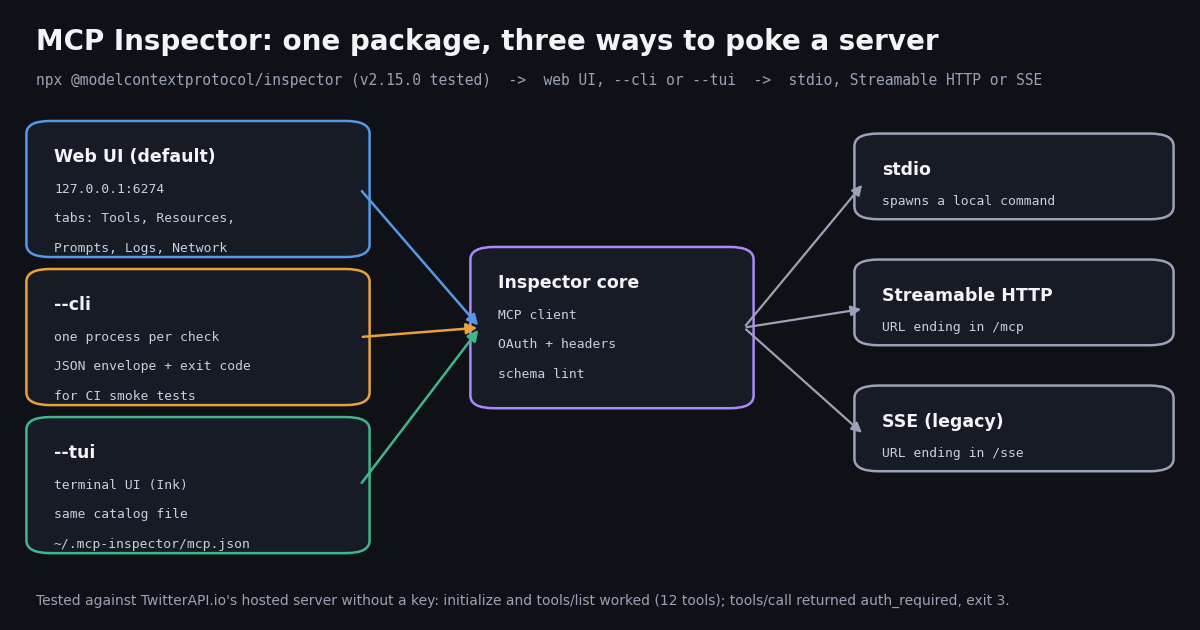
- Launch:
npx @modelcontextprotocol/inspector(web UI on port 6274), add--clifor scripts and CI or--tuifor a terminal UI. Pin an exact version in CI. - v2 changed the basics: one web server instead of the v1 client on 6274 plus proxy on 6277,
MCP_INSPECTOR_API_TOKENreplacesMCP_PROXY_AUTH_TOKEN, and the Node floor is^22.23.4 || ^24.22.1 || >=26.12.1. - Transports: a command means stdio, a URL ending in
/mcpmeans Streamable HTTP,/ssemeans SSE; override with--transport. Send API keys with--header "Authorization: Bearer ...". - CLI exit codes are meaningful: 0 success, 1 usage error, 3 auth required, 4 unreachable, 5 tool error. Our unauthenticated
tools/callexited 3, an unknown tool exited 5. - First-hand test: against
mcp.twitterapi.io/mcpwith no key,tools/listreturned 12 tools in a median 3.43 s per CLI run; the server speaks the legacy2025-06-18protocol, so--protocol-era modernfailed andautofell back. - Patch it: the repository lists 18 security advisories; 34.6% of the 2026 X posts we sampled about the Inspector mention security. Version 2.15.0 fixes four advisories published in November 2026.
If you build or connect MCP servers, the Inspector is the first tool to reach for when something does not work: it shows you exactly what a server advertises and returns, without a model in the loop guessing on your behalf. Most guides that rank for it still describe version 1, with two processes, a proxy on port 6277 and a MCP_PROXY_AUTH_TOKEN. Version 2 replaced all of that, and copying a v1 recipe into a v2 install is the most common way to end up confused.
This page is the hands-on guide to the Inspector itself: launching it, the three modes, transports and auth headers, what each tab shows, the CLI's exit codes, the errors you will meet, and its security history. For what an MCP server is and how the protocol works, read our MCP server explainer; to write your own server, see the FastMCP build guide; for when a CLI beats MCP tools entirely, see MCP vs CLI. Here we stay on the debugging tool.
Everything below was checked against the Inspector's own repository and npm package in this session, and the behavior sections come from 22 runs of version 2.15.0 we made against a real hosted server, plus 504 X posts about the Inspector collected in 2026.
12 tools listed, tools/call exit 3, 3.43 s per CLI run
What the MCP Inspector is, and what changed in version 2
The Inspector lives at github.com/modelcontextprotocol/inspector and ships on npm as @modelcontextprotocol/inspector. Its README calls it a set of deterministic testing tools for MCP servers. In practice it is an MCP client with no model attached: it connects to a server, completes the handshake, and lets you call every method by hand, so you can tell a server bug from a client or model bug.
Version 2 is a rewrite. The repository's migration guide says the package name and the npx @modelcontextprotocol/inspector entry point are unchanged, but the architecture, the CLI surface and the way you point the Inspector at a server all changed. Version 1 is deprecated, receives security fixes only, and stays available under the v1-latest dist-tag. The npm latest tag was 2.15.0 when we checked.
Three changes bite most often, according to the migration guide. --config now means a read-only session file, while the writable server list is --catalog. A failing tool call now exits 5 where v1 exited 0, so CI scripts that chained past failed calls start failing, correctly. And SERVER_PORT, which used to move the proxy, now only acts as a fallback for the Apps sandbox port, so setting it no longer changes the address you browse.
The license is in transition too: the README says the repository is moving from MIT to Apache-2.0, with documentation under CC-BY-4.0 and older MIT contributions staying MIT where their authors did not consent to relicensing. npm shows the license field as "SEE LICENSE IN LICENSE".
Install and launch: npx, Node versions, the three modes and the web UI tabs
There is nothing to install globally. npx downloads the package on first use and runs the mcp-inspector launcher, which dispatches to one of three front ends. The mode flag (--web, --cli, --tui) must come before the app options; everything after it is forwarded unchanged.
Node version first. Version 2 requires Node ^22.23.4 || ^24.22.1 || >=26.12.1. The migration guide explains that since v2.14 the floor is the patched release on each supported line from the October 2026 Node.js security releases, because the Inspector ships no CA certificates of its own and every HTTPS connection, OAuth included, is only as safe as the Node it runs on. npm only warns about an engine mismatch (EBADENGINE); our test machine ran Node 25.9.0, which is outside the range, and npm printed the warning on every run while the runs themselves worked. Do not rely on that: the guide says an older Node fails later, obscurely. Check node -v before you start.
Web UI (default). npx @modelcontextprotocol/inspector starts one server on 127.0.0.1:6274 and prints a launch banner with a per-launch API token. The browser calls the backend's /api/* routes with x-mcp-remote-auth: Bearer <token>. Set MCP_INSPECTOR_API_TOKEN to use a known token; a custom token under 32 characters triggers a warning.
CLI. npx @modelcontextprotocol/inspector --cli <target> --method tools/list connects, runs one method, prints the result and exits. It is built for scripts, CI and agent feedback loops.
TUI. npx @modelcontextprotocol/inspector --tui <target> opens an interactive terminal UI built with Ink. It reads the same catalog file as the web UI.
Pin a version in CI. The repository's smoke-testing guide warns that a bare npx @modelcontextprotocol/inspector resolves the latest release every time, and that a range like @2 is not a pin. Use an exact version plus --yes so the first-run install prompt cannot hang an unattended job.
The web client is a React single-page app backed by a small Node server that holds the MCP connections. Its tab identifiers in the source are Servers, Apps, Tools, Prompts, Resources, Skills, Tasks, Logs, Protocol and Network. Which tabs have content depends on what the server advertises in its capabilities.
Schema portability. The Tools tab flags tools whose inputSchema or outputSchema is valid JSON Schema but uses constructs some clients cannot handle. The same check backs the CLI's --strict flag and the TUI, so the three front ends agree. On TwitterAPI.io's server, tools/list --strict exited 0 with no findings.
Remote and Docker setups. Port 6274 is not the only listener: the Apps sandbox runs on 6275 by default, and the browser reaches it directly. The migration guide says that when the Inspector is not served from the browser's own machine (Docker, a dev container, a remote host, an SSH tunnel) you must forward 6275 too, or the Apps tab will not load. Nothing needs 6277 any more.
Deep links. A URL like http://127.0.0.1:6274/?serverUrl=<url>&transport=http&autoConnect=<token> opens a connected Inspector. The autoConnect value must equal the per-launch token, which is what stops a third-party link from driving your Inspector.
# Web UI (default): opens http://127.0.0.1:6274 with a per-launch token in the banner
npx @modelcontextprotocol/inspector

# Web UI pointed at a local stdio server
npx @modelcontextprotocol/inspector node build/index.js

# CLI: one method, then exit (pin the version in CI)
npx --yes @modelcontextprotocol/inspector@2.15.0 --cli \
  https://mcp.twitterapi.io/mcp --method tools/list --format json

# Terminal UI against a remote server with an auth header
npx @modelcontextprotocol/inspector --tui https://example.com/mcp \
  --header "Authorization: Bearer $MY_SERVER_KEY"

# Still need version 1 for an old script?
npx @modelcontextprotocol/inspector@v1-latestCLI mode: scripted checks, JSON output and exit codes
The CLI runs one method per process, which makes it a natural smoke test for a server on every commit or deploy. The supported methods listed by version 2.15.0 are initialize, tools/list, tools/call, resources/list, resources/read, resources/templates/list, prompts/list, prompts/get, logging/setLevel, skills/list, skills/get, resources/directory/read, plus catalog commands (servers/list, servers/show, servers/add, servers/edit, servers/remove). There is no ping: asking for it exits 1 with that list in the error.
--method initialize is the lightest liveness check: it completes the handshake, prints serverInfo, protocolVersion, capabilities and instructions, and disconnects without calling anything. --format json prints one JSON object with no banners, -q suppresses everything but the payload, and --output <path> writes the result to a file. Tool arguments go in as --tool-arg key=value pairs or a single --tool-args-json object passed verbatim.
The exit code carries the verdict. These are the codes from the CLI README; the right column is what we got from TwitterAPI.io's server.
Higher codes cover newer features: 6 for an error-severity schema finding under --strict, 7 to 9 for skills verification, 10 for a --load run that breached a threshold, 11 for HTTP 429 rate limiting, 12 when the OAuth destination guard refused a URL, and 130 for an interrupted load run. A failure also prints a JSON envelope on stderr with a stable code such as auth_required or tool_not_found, so scripts can branch without parsing prose.
Load testing. --load calls one tool repeatedly and concurrently and prints a latency and error summary, with thresholds (--load-max-p95, --load-max-error-rate) that turn it into a CI gate. Do not point it at a server that bills per call or per result unless you mean to pay for every request: a load test against a paid data API is a bill, not a smoke test.
#!/usr/bin/env bash
# Minimal smoke test for an MCP server in CI. Exits non-zero on the first failure.
set -euo pipefail
I="npx --yes @modelcontextprotocol/inspector@2.15.0 --cli"
URL="https://mcp.twitterapi.io/mcp"

# 1. Alive and speaking MCP?
$I "$URL" --method initialize --format json -q > /dev/null

# 2. The tools we depend on are still advertised, with portable schemas
$I "$URL" --method tools/list --strict --format json -q \
  | jq -e '.result.tools | map(.name) | index("search_tweets")' > /dev/null

# 3. One real call, key from the CI secret store (never echo it)
$I "$URL" --method tools/call --tool-name get_user_info \
  --tool-arg userName=XDevelopers \
  --header "Authorization: Bearer ${TWITTERAPI_IO_API_KEY}" \
  --stored-auth-only --format json -q > /dev/null
echo "smoke ok"Transports, auth headers and OAuth
Choosing the transport. For an ad-hoc target the CLI auto-detects: a command means stdio, a URL ending in /mcp means Streamable HTTP, /sse means SSE. Override with --transport stdio|http|sse. Our forced --transport sse against an HTTP-only server exited 1 with SSE error: Non-200 status code (405), and a URL without the /mcp path exited 1 with Error POSTing to endpoint: Not found and status 404.
stdio servers. Anything after the command is passed to the server, except flags the Inspector also defines. The smoke-testing guide's rule: when the line starts with the target, everything before -- is the server command and everything after it is the Inspector's own options. Without the separator, a server flag like --config is eaten by the Inspector. Pass environment variables to a stdio server with -e KEY=VALUE and a working directory with --cwd.
API keys as headers. Remote servers that take a static key get it through --header "Name: Value", repeatable. TwitterAPI.io's hosted server, for example, takes Authorization: Bearer <key> (it also accepts X-API-Key). Read the key from an environment variable rather than typing it on the command line, where it lands in shell history.
OAuth. When a server answers 401, the Inspector assumes OAuth and starts discovery. On a server that uses static keys this is a red herring: our call without a key first came back as Interactive OAuth requires a TTY on stdin or stderr ... use --stored-auth-only, which hides the server's real message. Adding --stored-auth-only surfaced the server's own error text (shown in the next section). For servers that really use OAuth, --client-id, --client-secret and --client-metadata-url configure the client, the callback listens on 127.0.0.1:6276 by default, --oauth-debug prints each step with secrets redacted, and --relogin clears stored tokens.
Where secrets go. The README says OAuth tokens, client secrets and stdio env values go to the OS keychain when one is available; otherwise to ~/.mcp-inspector/secrets.json, which is unencrypted unless you supply a key. On a shared or CI machine, plan for that file.
Protocol era. The MCP specification's 2026-07-28 revision drops the initialize handshake for stateless requests and a mandatory server/discover. The Inspector's --protocol-era takes legacy (the default for ad-hoc targets), auto or modern. Against a legacy server, modern fails with Version negotiation failed: the server did not offer pinned protocol version 2026-07-28 via server/discover (no fallback in pin mode), while auto falls back and works. If a server you control fails under modern, that is the message to expect, not a network fault.
Timeouts. --connect-timeout defaults to 15,000 ms for ad-hoc targets; 0 disables it. The smoke-testing guide warns that a CI job should never run with a disabled timeout, because a black-holed host would hang the runner.
First-hand: the Inspector against TwitterAPI.io's hosted MCP server
To see real output rather than documentation, we pointed Inspector 2.15.0 at https://mcp.twitterapi.io/mcp, the hosted server that exposes public X (Twitter) data as MCP tools. We did not use an API key; one run sent an obviously fake bearer token. Every row below is our own run.
Five timed tools/list runs took 3.35, 3.32, 3.48, 3.48, 3.43 seconds, a median of 3.43 s. That is the whole process: npx resolving the cached package, Node starting, the handshake and one request, from one machine. It is a fair number for budgeting a CI step, and it says nothing about the server's own latency or capacity.
What the run teaches about debugging in general: listing tools does not prove a server works. Here tools/list succeeded with no key at all, because the server lets clients discover its tools before authenticating; only a real tools/call exercises the key, the upstream API and the billing. A smoke test should always include one cheap real call. The heaviest tool definition is search_tweets at 1,924 bytes, because its description teaches the model X's search operators; every one of the 12 definitions carries readOnlyHint annotations the Inspector shows in the Tools tab.
Calling a tool with a key. We did not run a keyed call for this page, so the following comes from the server's documentation, not our output. With your own key in --header, a call such as --tool-name search_tweets --tool-arg "query=mcp inspector" --tool-arg queryType=Latest returns posts as tool content. Each tool maps to a TwitterAPI.io REST endpoint and is billed the same way: tweet endpoints are 15 credits per tweet returned, $0.15 per 1,000 tweets, with a 15-credit minimum per request, so one full 20-tweet page costs $0.003; profiles are 18 credits per user, $0.18 per 1,000. For comparison, X's official pay-per-usage rate card on docs.x.com/x-api/getting-started/pricing charges $0.005 per post read, $5 per 1,000 posts, about 33 times more. No X account or developer approval is needed for reads, and new accounts that pass the automatic bot check get up to $1 of free credits (at most 100,000 credits, no card, one per person or network, expiring after 31 days).
The code_snippet at the end of this page wraps the same checks in Python: it runs the Inspector CLI for initialize and tools/list, then cross-checks one search against the REST endpoint the tool wraps.
Common MCP Inspector errors and what they mean
These are the messages you are most likely to see, with the cause and the fix. The first six are exact strings from our runs of version 2.15.0; the rest come from the repository's documentation.
Connection refused on a local server. For stdio, the Inspector spawns the command itself: a relative path resolves against the current directory or --cwd, and a server that prints anything other than JSON-RPC to stdout breaks the stream. Log to stderr.
A v1 command that no longer works. If a tutorial tells you to open port 6277, set MCP_PROXY_AUTH_TOKEN or MCP_PROXY_FULL_ADDRESS, it is written for version 1. The v2 equivalents are covered in the first section; MCP_PROXY_FULL_ADDRESS has no v2 equivalent and is ignored.
The tool list looks right but the model never calls the tool. That is a client or prompt problem, not a server one. The Inspector proves the server side; compare the tool's description and required parameters with what your host shows.
Security: patch often, never expose it, and what X posts talk about
The Inspector can spawn local processes and holds OAuth tokens, so its bugs are serious. The GitHub security advisories API for the repository listed 18 advisories when we checked. Two have CVE IDs: CVE-2025-49596 (critical, published June 13, 2025, proxy server vulnerabilities, fixed in 0.14.1) and CVE-2025-58444 (high, September 2025, command execution via XSS when connecting to an untrusted server, fixed in 0.16.6). In October and November 2026 alone, ten advisories were published, including one rated high (8.8) where a remote server could run code through the OAuth authorization URL on Windows and WSL, fixed in 2.12.0, and four fixed in 2.15.0, the version we tested.
Practical rules. Run the newest release, or pin one and update it on a schedule. Keep the web UI on loopback; the server applies a Host header allow-list and the per-launch token for a reason. Never set DANGEROUSLY_OMIT_AUTH, which disables the API token entirely when set to true or 1. Treat an untrusted MCP server like untrusted code: the advisories include crashes and stalls caused by malicious server responses.
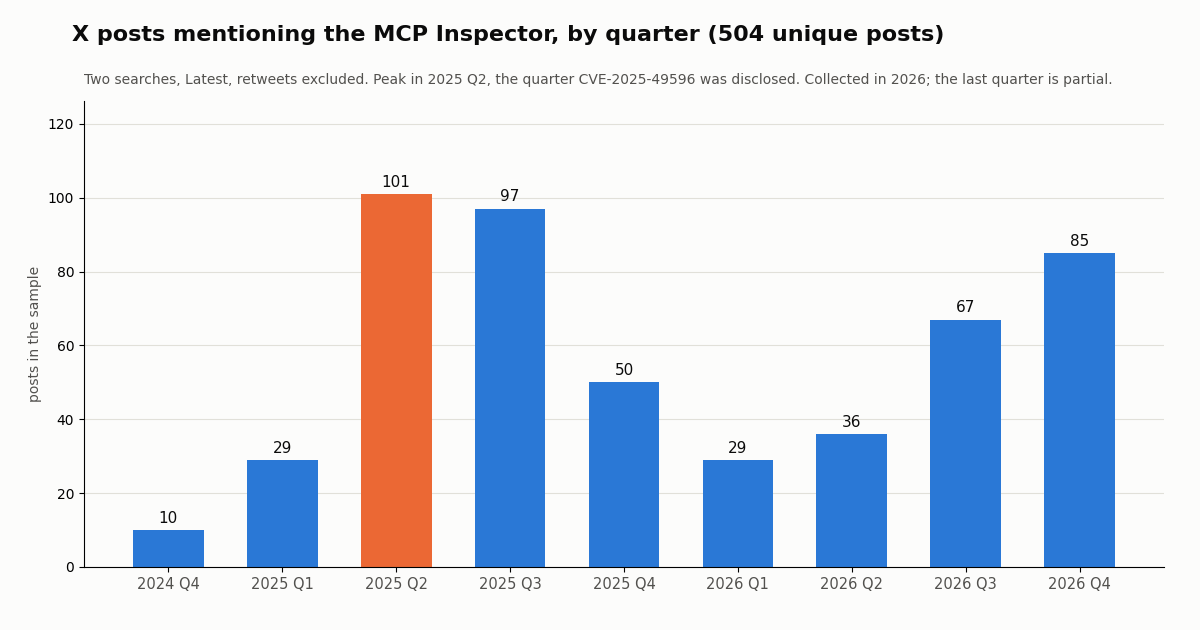
Developers notice. We collected 504 unique X posts that mention the Inspector, spanning its whole public history from 2024 to 2026. Volume peaked at 101 posts in 2025 Q2, the quarter CVE-2025-49596 was disclosed, fell to 29 in 2026 Q1, and has climbed again since, with 85 posts in the partial last quarter.
What developers say about the Inspector on X
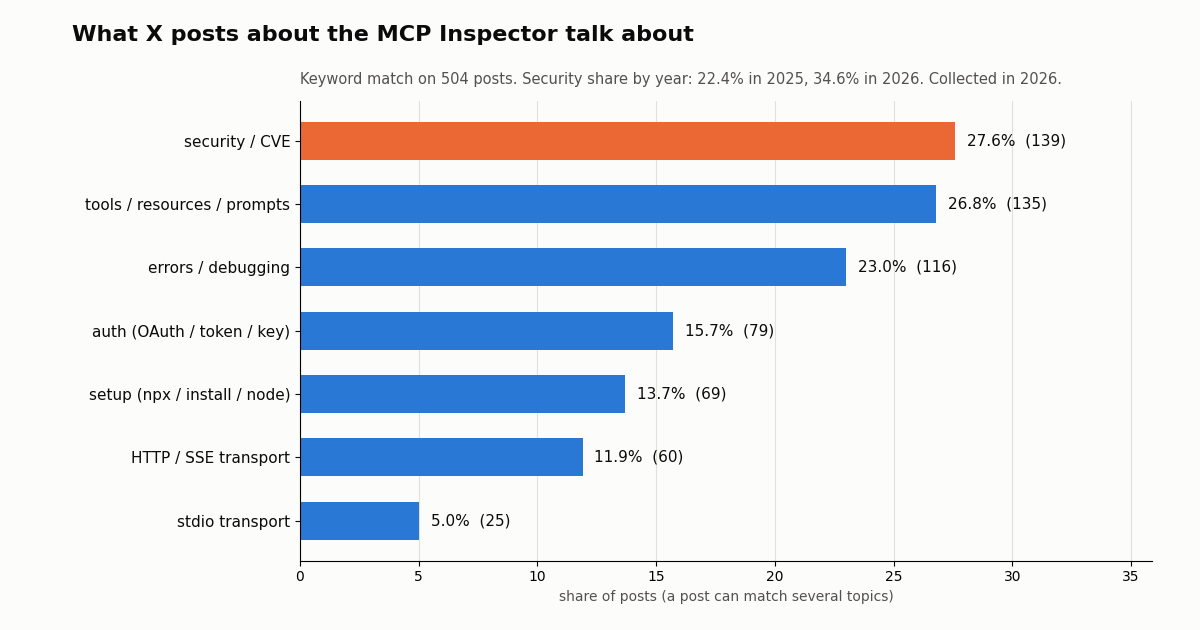
A keyword match over the same 504 posts shows where attention goes. Security tops the list at 27.6% of posts, and its share rose from 22.4% of 2025 posts to 34.6% of 2026 posts. Tools, resources and prompts come next at 26.8%, then errors and debugging at 23.0%, auth at 15.7%, and setup at 13.7%.
Among clients, Claude is named in 15.5% of posts, ChatGPT or OpenAI in 6.7%, VS Code or Copilot in 6.0% and Cursor in 5.8%. Python is the most named language at 13.1%, ahead of TypeScript or JavaScript at 6.2%. 14.1% of posts link to the modelcontextprotocol GitHub organization, and 17.9% are in Japanese, the second language after English. The median post had 4 likes and 466 views: this is a working developer's tool, discussed by builders rather than promoted.
How we collected this
Question. What does the official Inspector report when pointed at a real hosted MCP server without a key, and what do developers talk about when they post about it on X?
Inspector runs. 22 local runs of npx -y @modelcontextprotocol/inspector@2.15.0 --cli against https://mcp.twitterapi.io/mcp, on Node 25.9.0 (outside the package's engines range; npm warned, runs completed): initialize, tools/list plain, --strict, with --protocol-era auto and modern, resources/list, prompts/list, ping, tools/call without a key, with a fake key, with an unknown tool, each auth case also with --stored-auth-only, forced SSE, a wrong path, and five timed tools/list runs. No API key was read or sent.
X sample. 30 requests to /twitter/tweet/advanced_search with queryType=Latest: "mcp inspector" -filter:retweets (453 posts, all pages until the search ran out) and "modelcontextprotocol/inspector" -filter:retweets (85 posts), 504 unique posts from 392 accounts after de-duplication, collected in 2026. Topics, clients and languages were matched with fixed keyword lists on lower-cased text (the lists are in the study's analyze.py).
What it cannot show. Keyword matching is coarse: "security" and "tools" are broad words, and posts that discuss the Inspector only in an image or a linked article are missed. Search coverage of older posts may be incomplete, so the quarterly counts are a lower bound. The timings are from one machine and include npx and Node startup; they say nothing about the server's capacity. We made no keyed tool call, so the tool-call output on this page is described from documentation.
Privacy. The authors of the sampled posts are private individuals. We publish aggregates only; raw search pages were not kept with the study, and the de-identified rows hold no IDs, URLs, post text or handles. The probed server is TwitterAPI.io's own public endpoint.
"""Smoke-test a hosted MCP server with the MCP Inspector CLI, then cross-check one tool
against the REST endpoint it wraps. Needs Node (^22.23.4 || ^24.22.1 || >=26.12.1),
Python 3.9+, `pip install requests`, and TWITTERAPI_IO_API_KEY in the environment."""
import json
import os
import subprocess
import sys

import requests

BASE = "https://api.twitterapi.io"
MCP_URL = "https://mcp.twitterapi.io/mcp"
INSPECTOR = ["npx", "--yes", "@modelcontextprotocol/inspector@2.15.0", "--cli"]
KEY = os.environ["TWITTERAPI_IO_API_KEY"]  # never print it


def inspect(*args, auth=False):
    """Run one Inspector CLI method; return (exit code, parsed stdout or stderr envelope)."""
    cmd = INSPECTOR + [MCP_URL, *args, "--format", "json", "-q", "--stored-auth-only"]
    if auth:
        cmd += ["--header", f"Authorization: Bearer {KEY}"]
    p = subprocess.run(cmd, capture_output=True, text=True, timeout=120)
    raw = p.stdout if p.returncode == 0 else p.stderr
    try:
        return p.returncode, json.loads(raw.strip().splitlines()[-1])
    except (ValueError, IndexError):
        return p.returncode, {"raw": raw[-500:]}


# 1. Handshake: is it alive, and which protocol revision does it speak?
rc, init = inspect("--method", "initialize")
if rc != 0:
    sys.exit(f"initialize failed (exit {rc}): {init}")
info = init.get("result", init)
print("server:", info["serverInfo"], "protocol:", info["protocolVersion"])

# 2. Tool list, with the schema portability lint
rc, listing = inspect("--method", "tools/list", "--strict")
tools = listing.get("result", listing)["tools"]
print(f"{len(tools)} tools:", ", ".join(t["name"] for t in tools))
if "schemaFindings" in listing:
    print("schema findings:", listing["schemaFindings"])

# 3. One real tool call (billed: 15 credits per tweet returned)
rc, call = inspect("--method", "tools/call", "--tool-name", "search_tweets",
                   "--tool-args-json", json.dumps({"query": "\"mcp inspector\"", "queryType": "Latest"}),
                   auth=True)
print("tools/call exit code:", rc)  # 3 = auth problem, 5 = tool error

# 4. Cross-check against the REST endpoint the tool wraps, following the cursor
seen, cursor = [], ""
for _ in range(2):  # two pages, up to 40 tweets
    r = requests.get(
        f"{BASE}/twitter/tweet/advanced_search",
        headers={"X-API-Key": KEY},
        params={"query": '"mcp inspector" -filter:retweets', "queryType": "Latest", "cursor": cursor},
        timeout=30,
    )
    r.raise_for_status()
    data = r.json()
    for t in data.get("tweets", []):
        seen.append((t["createdAt"], t["likeCount"], t["author"]["userName"]))
    if not data.get("has_next_page"):
        break
    cursor = data.get("next_cursor", "")

print(f"REST returned {len(seen)} posts; newest: {seen[0][0] if seen else 'none'}")
Researching this?Free starter credits cover end-to-end testing — Google sign-in, no card. Get a key.
Questions readers ask
How do I run the MCP Inspector?
Run npx @modelcontextprotocol/inspector with Node ^22.23.4 || ^24.22.1 || >=26.12.1. With no flags it opens the web UI on 127.0.0.1:6274; add a server command (stdio) or URL after it to connect straight away. Use --cli for scripted one-shot checks and --tui for a terminal UI.
What port does the MCP Inspector use?
Version 2 serves the web UI and its API on 6274 and starts an MCP Apps sandbox on 6275; the OAuth callback listens on 6276 when needed. Version 1 used 6274 for the client plus a separate proxy on 6277, which version 2 no longer has.
How do I pass an API key or bearer token to the Inspector?
Use --header "Authorization: Bearer <key>" (repeatable for more headers) in the CLI or TUI, or add the header to the server entry in the web UI. Read the key from an environment variable so it does not end up in shell history. For OAuth servers the Inspector runs the OAuth flow itself.
Why does the Inspector say "Interactive OAuth requires a TTY"?
The server answered 401, so the CLI tried to start OAuth, but it is running without a terminal. If the server uses a static API key, send it with --header. Adding --stored-auth-only makes the CLI fail with the server's own error message instead, which is usually more useful.
What is the difference between MCP Inspector v1 and v2?
Version 2 is a rewrite: one web server instead of client plus proxy, one npm package instead of four, a TUI mode, a catalog file at ~/.mcp-inspector/mcp.json, MCP_INSPECTOR_API_TOKEN instead of MCP_PROXY_AUTH_TOKEN, and CLI exit codes beyond 0 and 1. Version 1 gets security fixes only, under the v1-latest dist-tag.
Can I use the MCP Inspector in CI?
Yes, that is what --cli is for: one method per process, --format json output and stable exit codes (3 for auth, 4 unreachable, 5 tool error). Pin an exact version with npx --yes @modelcontextprotocol/inspector@<version>, set --connect-timeout, and use --stored-auth-only so no interactive OAuth prompt can hang the job.
Is the MCP Inspector safe to run?
It is safe when it is current and stays on loopback. The repository has published 18 security advisories, including CVE-2025-49596 (critical, fixed in 0.14.1) and several fixed in 2.12.0 to 2.15.0. Never set DANGEROUSLY_OMIT_AUTH, keep the per-launch token private, and treat unknown MCP servers like untrusted code.
Does testing a paid MCP server with the Inspector cost money?
Listing tools usually does not, but tool calls are billed like any other client's. On TwitterAPI.io's server, tools/list works without a key, and a search tool call is billed at 15 credits per tweet returned ($0.15 per 1,000 tweets, 15-credit minimum per request). Avoid --load runs against paid servers unless you intend to pay for every call.
Continue
- MCP Inspector repository (README, docs, migration guide, CLI README)
- @modelcontextprotocol/inspector on npm
- Model Context Protocol docs: Inspector
- MCP Inspector security advisories
- X API pricing (pay-per-usage rate card)
- TwitterAPI.io API documentation
- X API overview: endpoints, pricing and access options
- What an MCP server is, with a captured handshake
- Build your own MCP server in Python with FastMCP
- MCP vs CLI: token cost of tool lists measured
- Connect MCP servers to OpenAI Codex
- TwitterAPI.io's X MCP server: 12 tools and setup per client
- TwitterAPI.io API documentation
- TwitterAPI.io pricing: pay only for the data returned
- 01Free LLM API options in 2026: what is still free, the real limits, and how to feed it Twitter (X) data
- 02RAG vs MCP: Retrieval vs Live Tools, Measured on Twitter (X) Data
- 03Clay Pricing in 2026: Plans, Data Credits, Actions and the Cost of a Twitter (X) Column
- 04What Is an API Key? Meaning, a Real Request, and How to Keep One Safe
- 05Twitter (X) Error 400: What "Bad Request" Means and How to Fix It
- 06How to Build an MCP Server in Python for Twitter (X) Data
- 07Codex MCP: How to Add Any MCP Server to OpenAI Codex (CLI, IDE and App)
- 08MCP Server Workflow Automation: the 14 Best MCP Servers for Claude Code, Codex and Cursor, Twitter (X) Data Included
Writing about something you built with TwitterAPI.io? Our community rewards program pays API credits for honest tutorials, build logs and videos.
Stop reading. Start building.
Starter credits cover real testing on real data. Google sign-in, no card, no application queue.
Get an API keyAlready building with TwitterAPI.io? Publish an honest tutorial or build log about it and earn up to $200 a month in API credits.