MCP Server Workflow Automation: the 14 Best MCP Servers for Claude Code, Codex and Cursor, Twitter (X) Data Included
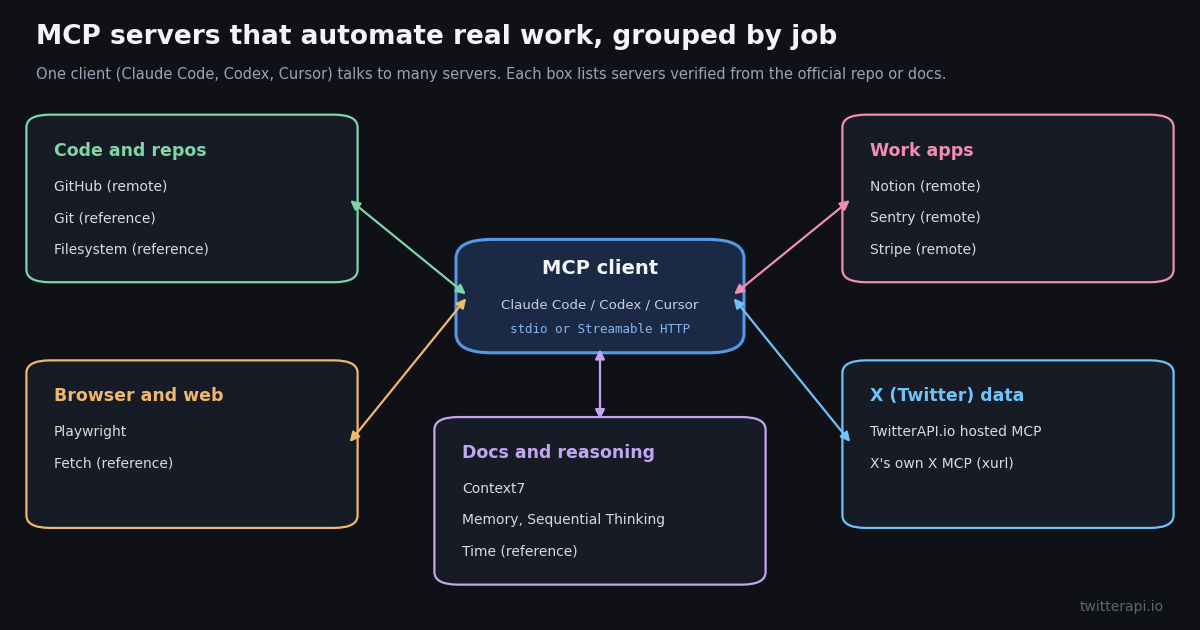
This page is the list, not the explainer. If you want to know what an MCP server is and how the protocol works, read our MCP server explainer (linked below); if you only want TwitterAPI.io's own server, its product page covers the 12 tools in depth. Here we answer a narrower question that builders keep asking on Reddit and dev.to threads: which MCP servers are worth installing to automate real work, and what is the exact line to add each one to Claude Code, OpenAI Codex or Cursor.
Every row below was read from the server's official repository or the vendor's own docs in 2026, and the install lines are quoted from those READMEs or built with the syntax the client's own documentation gives. Where we ran something, we say so: we started ten servers locally with their README launch commands and read the tools each one exposes. We did not sign in to the OAuth-only servers (GitHub remote, Notion, Sentry, Stripe), so for those we report what the docs say and what the endpoint returned without credentials. We also measured how often people on X post about each server, with a 967-post search sample.
The 14 best MCP servers for workflow automation at a glance
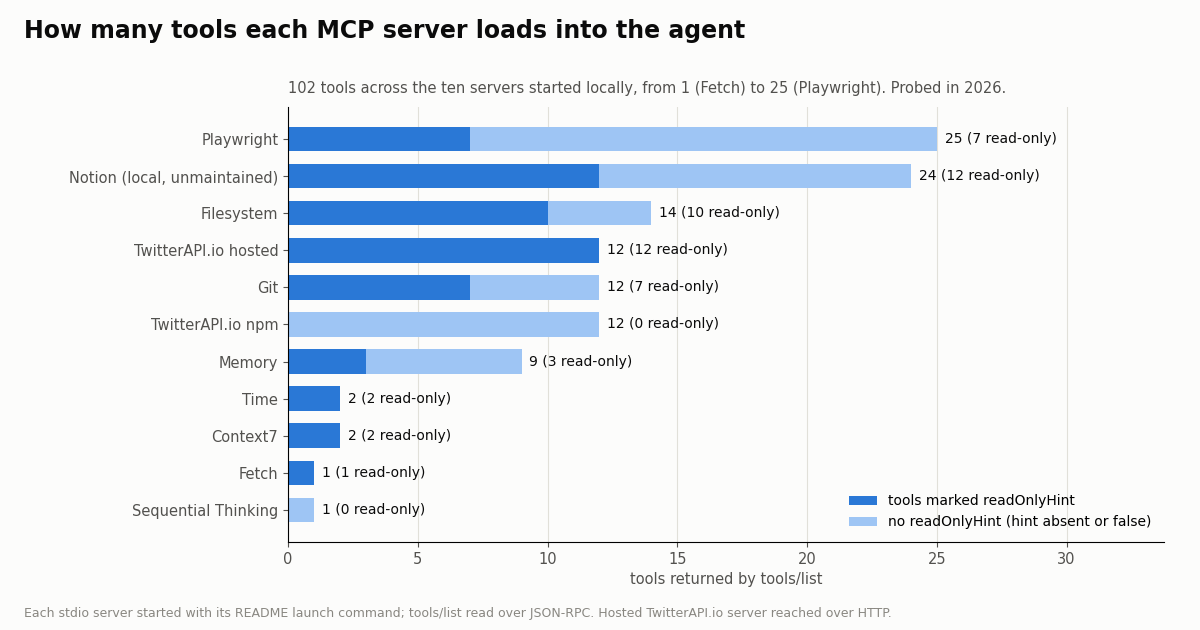
The table is grouped by the job each server automates. "Tools" is the number tools/list returned when we started the server in 2026, with the count marked readOnlyHint in brackets; a dash means the server needs a sign-in we did not do, so we did not count it. The hint is the server's own declaration that a tool does not change anything; a missing hint does not prove a tool writes.
Why tool counts matter. Each tool's name, description and input schema is sent to the model before it does any work, so a 25-tool server costs more context than a 2-tool one. Claude Code's MCP documentation says it now uses tool search by default, loading tools on demand, and it warns when a single MCP tool result passes 10,000 tokens and caps output at 25,000 tokens unless you raise MAX_MCP_OUTPUT_TOKENS. Codex lets you trim a server with enabled_tools and disabled_tools in config.toml. Pick the three or four servers your work needs and leave the rest off.
About the reference servers. Seven of the entries come from github.com/modelcontextprotocol/servers, and that README is blunt: they are "reference implementations to demonstrate MCP features and SDK usage" and "not production-ready solutions". They are fine on your own machine for your own files and repos. The same README lists the older GitHub, Slack, Sentry, Postgres and Puppeteer reference servers as archived; for GitHub, Notion, Sentry and Stripe the vendors now run their own servers, which is what this list uses.
Install lines for Claude Code, Codex and Cursor
Most READMEs give one format, usually a Claude Desktop mcpServers JSON block, and leave you to translate. The three clients agree on the idea (a launch command for a local stdio server, a URL for a remote one) but differ in syntax. The rules below come from each client's own MCP documentation.
Claude Code. Local server: claude mcp add <name> --env KEY=value -- <command> <args>. Claude Code's docs are explicit that -- separates Claude's own options (--transport, --env, --scope) from the server command, and that everything after -- is passed to the server untouched, so an --env or -e flag written after -- goes to npx, not to the server's environment. Remote server: claude mcp add --transport http <name> <url>, with --header "Authorization: Bearer ..." when the server takes a key. Servers are saved to local scope by default; add --scope user to use one in every project or --scope project to write a shared .mcp.json.
OpenAI Codex. Local server: codex mcp add <name> --env VAR=VALUE -- <command> (the Codex docs' own example is codex mcp add context7 -- npx -y @upstash/context7-mcp). Remote servers go in ~/.codex/config.toml as a [mcp_servers.<name>] table with url and, for a key, bearer_token_env_var naming the environment variable that holds it; OAuth servers sign in with codex mcp login <name>. Our Codex MCP guide covers the config file in depth.
Cursor. Cursor reads mcpServers from .cursor/mcp.json in a project or ~/.cursor/mcp.json for every project. A local server is a command plus args and env; a remote one is a url plus headers. Its docs list three transports: stdio, SSE and Streamable HTTP.
Lines marked README or docs are quoted; the others apply the client's documented syntax to the launch command in the server's README. Sentry and Stripe ship Claude Code plugins instead: their READMEs give claude plugin marketplace add getsentry/sentry-mcp and claude plugin install stripe@claude-plugins-official, and both remote servers sign in with OAuth.
Check it connected. After an add, Claude Code prints an Added ... line; claude mcp get <name> shows whether it connected, and /mcp inside a session lists live servers. In Codex, codex mcp list and /mcp in the TUI do the same.
// .cursor/mcp.json (project) or ~/.cursor/mcp.json (global)
{
  "mcpServers": {
    "playwright": {
      "command": "npx",
      "args": ["@playwright/mcp@latest"]
    },
    "filesystem": {
      "command": "npx",
      "args": ["-y", "@modelcontextprotocol/server-filesystem", "/path/to/dir"]
    },
    "twitterapi": {
      "url": "https://mcp.twitterapi.io/mcp",
      "headers": { "Authorization": "Bearer YOUR_API_KEY" }
    }
  }
}Code and repo work: GitHub, Git and Filesystem
GitHub (github/github-mcp-server). GitHub's own server is the one most roundups put first, and it is the most-named server in the X roundup posts we sampled (10.5%). Its README offers a remote server at https://api.githubcopilot.com/mcp/ that signs in with OAuth or a personal access token, and a local Docker image, ghcr.io/github/github-mcp-server. The README's Claude Code line is the Docker one shown in the install table; note that it puts -e after the server name and before --, which is exactly what Claude Code's docs require. Without credentials the remote endpoint answered our initialize with HTTP 401 and "missing required Authorization header", so we did not count its tools. The older server-github in the reference repo is archived.
Workflow it automates. Triage: list open issues with a label, read the linked pull request and its failing check, draft a fix in the repo, open a pull request. Pair it with the Git server or the client's own shell for the local half of the work.
Git (mcp-server-git, reference). A Python server you run with uvx mcp-server-git, optionally pinned to one repository with --repository. We started it against a scratch repository and it listed 12 tools, 7 of them marked read-only (status, diff, log, show and similar); the rest stage, commit, reset and create branches. Coding agents with shell access can already run git, so this server earns its place mainly in clients without a terminal, or when you want git actions to go through MCP approval prompts.
Filesystem (server-filesystem, reference). npx -y @modelcontextprotocol/server-filesystem <allowed dirs> gives an agent file tools confined to the folders you pass on the command line. Ours listed 14 tools, 10 marked read-only. The README says it needs Node.js 24 or later when run through npx, and that the older Roots mechanism for changing allowed folders at runtime is deprecated in the 2026-07-28 protocol version. Claude Code and Codex already read and edit files, so this one matters most in Claude Desktop and other chat clients.
Browser and web: Playwright and Fetch
Playwright (microsoft/playwright-mcp). The server people post about most on X in our sample (20.8 posts a day). It drives a real browser through Playwright's accessibility snapshots, so the model clicks and types by element reference rather than by screenshot coordinates. The README gives one-line installs for both agents: claude mcp add playwright npx @playwright/mcp@latest and codex mcp add playwright npx "@playwright/mcp@latest". When we started it, tools/list returned 25 tools, 7 of them marked read-only, which makes it the heaviest server on this page. Flags such as --headless and --caps (vision, pdf, devtools) change what it exposes. The README itself notes that coding agents increasingly prefer Microsoft's separate Playwright CLI with skills, because CLI calls avoid loading large tool schemas and accessibility trees into context; the MCP server suits agents that need a persistent browser session.
Workflow it automates. End-to-end checks after a code change (open the page, log in, submit a form, read the result), filling in internal web tools that have no API, and capturing a page's state for a bug report. It is also the tool most likely to need a human watching, because it acts in a live browser session.
Fetch (mcp-server-fetch, reference). One tool (1, read-only): fetch a URL and return it as Markdown, with a max_length and a start index for long pages. Run it with uvx mcp-server-fetch. The README documents that it honors robots.txt for model-initiated requests and blocks private addresses by default. Claude Code's MCP docs warn that servers which fetch external content can expose you to prompt injection, so treat fetched pages as untrusted input, especially when the same session can also write files or push code.
Docs, memory and reasoning: Context7, Memory, Sequential Thinking and Time
Context7 (upstash/context7). Context7 feeds the agent current documentation and code examples for a library, so it stops writing calls against an API that changed last year. Locally it listed 2 tools, both read-only: resolve-library-id and query-docs. The remote endpoint https://mcp.context7.com/mcp answered our unauthenticated initialize with HTTP 200; the README recommends a free API key sent as Authorization: Bearer for higher rate limits, and offers npx ctx7 setup to configure Claude Code, Cursor or OpenCode in one step. On X it is the second most-discussed server in our sample at 17.3 posts a day.
Memory (server-memory, reference). A knowledge graph of entities, relations and observations stored in a local file, so facts survive between sessions. 9 tools, 3 read-only. Claude Code and Codex both have their own memory files now (CLAUDE.md, AGENTS.md), so this server matters most where the client has none, or when several clients should share one memory file, which the README describes how to do.
Sequential Thinking (server-sequential-thinking, reference). A single tool, sequential_thinking, that lets the model write numbered, revisable thoughts and branch. It shows up in many "best MCP servers" lists; in our X roundup sample it was named in fewer posts than Supabase or Figma. Models with built-in extended thinking get less from it. The README is the one reference README that includes a Codex line: codex mcp add sequential-thinking npx -y @modelcontextprotocol/server-sequential-thinking.
Time (mcp-server-time, reference). 2 read-only tools: current time in a zone, and conversion between zones. Small, but it fixes a real failure in scheduling workflows, where a model guesses the date or the offset. Run it with uvx mcp-server-time; the README documents a --local-timezone override.
Work apps: Notion, Sentry and Stripe (hosted, OAuth)
Notion. The makenotion/notion-mcp-server repository now opens with a notice that it is "no longer actively maintained or supported" and asks users to move to Remote Notion MCP, Notion's hosted server. Claude Code's own MCP docs use that server as their example: claude mcp add --transport http notion https://mcp.notion.com/mcp. It signs in with OAuth and respects each user's Notion permissions. Without a sign-in the endpoint returned HTTP 401 to us. We did start the old local package for comparison: it listed 24 tools, a thin wrapper over Notion's REST API, which is one reason the hosted version is the one to use.
Sentry (getsentry/sentry-mcp). Sentry runs a remote server at https://mcp.sentry.dev/mcp; the README says it is "primarily designed for human-in-the-loop coding agents" and focused on debugging. It signs in with OAuth, or accepts a Sentry token in a Sentry-Bearer authorization header, and the tool set can be narrowed with a ?skills= query. For Claude Code the README's first option is a plugin: claude plugin marketplace add getsentry/sentry-mcp. The workflow: paste an issue link, let the agent pull the stack trace and breadcrumbs, then fix the code in the same session.
Stripe. The stripe/ai README says Stripe "hosts a remote MCP server at https://mcp.stripe.com" with OAuth access, and recommends Stripe's agent plugins: claude plugin install stripe@claude-plugins-official for Claude Code and codex plugin add stripe@openai-curated for Codex. Our unauthenticated request got HTTP 401 with missing_api_key. Use a restricted key or a test-mode account the first time; this server can create real objects in your Stripe account.
What we did not include. Slack, Linear, Figma and Supabase all appear in the X roundup posts we sampled and all have servers, but we did not read their official repositories this session, so they are not rows here. Third-party gateways that bundle hundreds of apps behind one server are also out: this list is limited to servers maintained by the protocol's steering group or by the product's own vendor.
X (Twitter) data: the TwitterAPI.io MCP server and X's own X MCP
TwitterAPI.io hosted MCP. https://mcp.twitterapi.io/mcp is a Streamable HTTP server. We sent it initialize and tools/list in 2026: it answered as twitterapi-mcp with protocol 2025-06-18, and its instructions read "Auth: paste your twitterapi.io API key as the Bearer token." It lists 12 tools, every one marked readOnlyHint: search_tweets, get_user_info, get_user_about, get_user_followers, get_user_followings, get_user_last_tweets, get_user_mentions, get_tweets_by_ids, get_tweet_replies, get_tweet_quotes, get_tweet_retweeters and get_trends. No X account or X developer app is needed for these reads. The same tools ship as a local stdio package, @twitterapi_io/mcp-server, which reads the key from TWITTERAPI_IO_API_KEY; we started it too and got the same 12 tool names, though the npm build does not set the read-only hint.
Workflow it automates. Brand and launch monitoring ("what are people saying about our release since this morning"), competitor and account research, pulling a reply thread into a summary, or feeding posts into a Notion page or a GitHub issue through the other servers on this list. An agent can chain search_tweets into get_tweet_replies without you writing integration code.
X MCP (X's own). X's developer docs describe a hosted server at https://api.x.com/mcp that calls X API endpoints: post search, user lookup, bookmarks, trends, news and Article drafts. X has no dynamic client registration for it, so you reach it through the open-source xurl mcp bridge (npx -y @xdevplatform/xurl mcp https://api.x.com/mcp) with your own X developer app's client ID and secret, or with an app-only Bearer token for read-only calls. It acts with your X account's permissions, which is what you want for bookmarks and drafts.
What X data costs through each. The two servers bill very differently, and an agent that searches in a loop can run up a large bill without anyone watching. Prices below are from each rate card.
That is about 33x less per 1,000 tweets ($0.15 against $5.00 on the X API pay-per-usage rate card at docs.x.com/x-api/getting-started/pricing). The X rate card also caps pay-per-usage at 3 million post reads a month, with Enterprise above that, and offers $20 in credits on a first card plus a match up to $50. On TwitterAPI.io a request that returns nothing still costs the 15-credit minimum ($0.00015), and new accounts that pass the automatic bot check get up to $1 of free credits (at most 100,000 credits, no card, one per person or network, expiring after 31 days). Before the first payment the limit is 0.2 requests a second, which an agent looping over many accounts will hit; it rises to 20 once paid.
Writes are separate. The 12 MCP tools are reads. TwitterAPI.io also sells write actions through its REST API: one /twitter/user_login_v2 login ($0.10, with a proxy you supply) returns login_cookies, then each post, like, retweet or follow (/twitter/create_tweet_v2, /twitter/follow_user_v2) is 60 credits, $0.0006. Each call acts as that X account, and X can rate-limit, lock or suspend it, so keep a human pace; the session can need a re-login, and calls are billed per HTTP 200 response.
# Claude Code: hosted TwitterAPI.io MCP server, available in every project
claude mcp add --transport http --scope user twitterapi-mcp https://mcp.twitterapi.io/mcp \
  --header "Authorization: Bearer YOUR_API_KEY"

# Claude Code: local stdio package instead (env flag before --, command after)
claude mcp add twitterapi-io --env TWITTERAPI_IO_API_KEY=YOUR_API_KEY -- npx -y @twitterapi_io/mcp-server

# Codex: ~/.codex/config.toml
# [mcp_servers.twitterapi]
# url = "https://mcp.twitterapi.io/mcp"
# bearer_token_env_var = "TWITTERAPI_IO_API_KEY"

# Check what the server exposes (no key needed to list tools)
curl -s https://mcp.twitterapi.io/mcp \
  -H 'content-type: application/json' \
  -H 'accept: application/json, text/event-stream' \
-d '{"jsonrpc":"2.0","id":2,"method":"tools/list"}'Which MCP servers people actually talk about on X
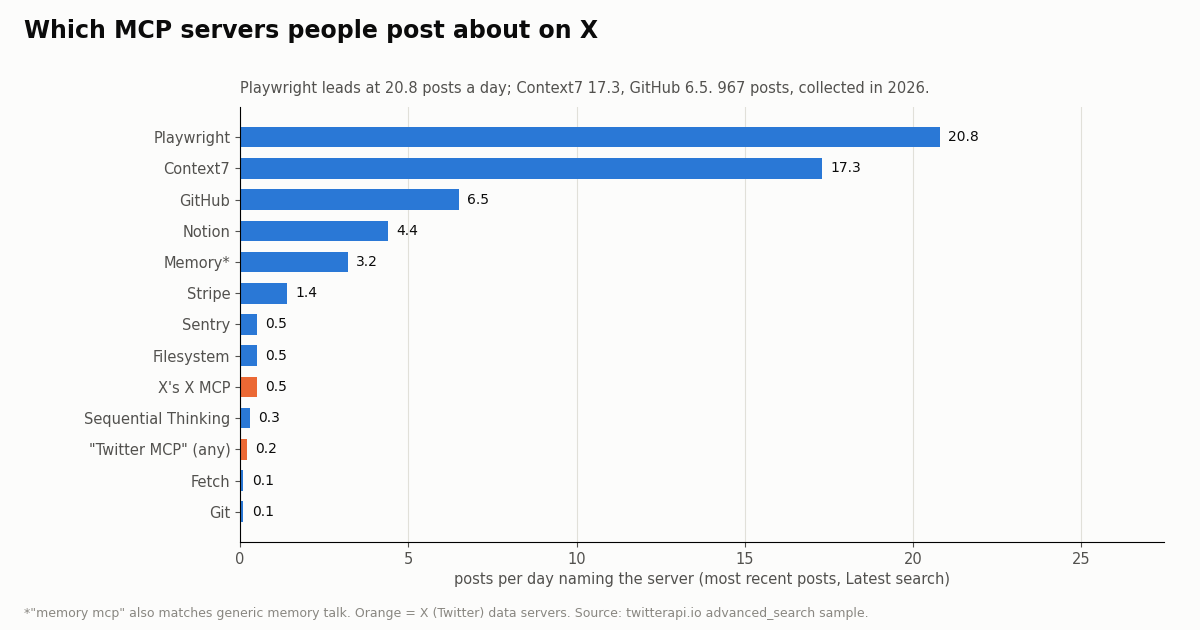
Roundups rank servers by the writer's taste. We wanted a second signal: how often people on X post about each server, and what kind of posts they are. We ran a Latest search for each server's name with "mcp" (three pages each) and one search for roundup phrases such as "best mcp servers" (ten pages), 967 posts in all, collected in 2026.
Read it this way. Playwright (20.8 a day) and Context7 (17.3) dominate everyday chatter, then GitHub (6.5) and Notion (4.4). The reference servers that fill older listicles, Fetch, Git and Sequential Thinking, now get a few posts a week or less, but those posts collect more views each (Sequential Thinking's median is 1616.5), because most of them are roundups and tutorials rather than day-to-day reports.
Friction shows up as questions. 38.3% of GitHub MCP posts and 33.3% of Playwright MCP posts carry a question mark or a word like error, broken or not working, and 31.7% and 28.3% mention an install or config term. These are the two servers where the install line and the auth step are worth getting right the first time, which is what the table above is for.
What roundup posts recommend. Of 200 posts using roundup phrases, only 35 name a specific server in the text (most link to a thread, an image or an article). Among all 200, GitHub is named in 10.5%, Playwright in 6.0%, Context7 in 5.0%, and Memory, Supabase and Figma in 3.5% each. The ranking matches the daily chatter: GitHub, Playwright and Context7 are the core set people actually use.
How we collected this
Question. Which of the MCP servers on this page do people post about on X, how often, and how much of it is questions or setup talk; and what does each server load into an agent, measured by tools/list.
X sample. /twitter/tweet/advanced_search with queryType=Latest, retweets excluded, on 13 server queries (for example "playwright mcp", context7, (xmcp OR "xurl mcp" OR "api.x.com/mcp")) at three pages each, and one roundup query at ten pages. 49 requests, 967 posts, collected in 2026. At 15 credits per tweet the study cost $0.145. Posts per day is the number of posts divided by the time between the oldest and newest post in each query's sample. The language mix was 66.3% English, 10.0% Japanese and 6.3% Chinese, with 13.3% having no detectable language (links or media only).
Server probe. Ten stdio servers (Filesystem, Memory, Sequential Thinking, Fetch, Git, Time, Playwright, Context7, the local Notion package and the TwitterAPI.io npm package) were started on a laptop with the launch command from each README, sent initialize and tools/list over JSON-RPC, and stopped. No credentials were sent anywhere; the remote GitHub, Notion, Sentry and Stripe endpoints were sent only an unauthenticated initialize to record their response (HTTP 401 for all four).
What it cannot show. A three-page Latest sample is a snapshot of the most recent posts, not a census; a burst on one day moves a server's rate. Queries are name matches: "memory mcp" also catches general talk about agent memory, and "github mcp" catches posts about other GitHub-hosted servers. Tool counts change with each release, and we did not measure how well any server performs a task. We did not count tools on servers that need a sign-in.
Privacy. Keyword searches return posts by private individuals, so raw pages were kept out of the repository; the published results hold aggregates only, and the de-identified sample rows carry no post ID, URL, text, author ID or handle. No account is profiled.
# Watch how often people on X post about each MCP server (the study above, in miniature).
import os
from datetime import datetime
import requests

BASE = "https://api.twitterapi.io"
H = {"X-API-Key": os.environ["TWITTERAPI_IO_API_KEY"]}
SERVERS = {
    "playwright": '"playwright mcp" -filter:retweets',
    "context7": "context7 -filter:retweets",
    "github": '"github mcp" -filter:retweets',
}

def latest(query, pages=3):
    tweets, cursor = [], None
    for _ in range(pages):  # each full page is up to 20 tweets = $0.003
        params = {"query": query, "queryType": "Latest"}
        if cursor:
            params["cursor"] = cursor
        r = requests.get(f"{BASE}/twitter/tweet/advanced_search", headers=H, params=params, timeout=30)
        r.raise_for_status()
        body = r.json()
        page = body.get("tweets") or []
        tweets.extend(page)
        if not body.get("has_next_page") or not body.get("next_cursor") or not page:
            break
        cursor = body["next_cursor"]
    return tweets

def ts(t):
    return datetime.strptime(t["createdAt"], "%a %b %d %H:%M:%S %z %Y")

for name, q in SERVERS.items():
    tw = latest(q)
    if len(tw) < 2:
        print(name, "too few posts")
        continue
    times = sorted(ts(t) for t in tw)
    hours = max((times[-1] - times[0]).total_seconds() / 3600, 0.01)
    views = sorted(t.get("viewCount") or 0 for t in tw)
    asks = sum(1 for t in tw if "?" in (t.get("text") or ""))
    print(f"{name:10s} {len(tw):3d} posts  {len(tw) / hours * 24:5.1f}/day  "
          f"median views {views[len(views) // 2]}  questions {100 * asks / len(tw):.0f}%  "
          f"cost ${len(tw) * 15 / 100000:.4f}")
Questions readers ask
What are the best MCP servers for Claude Code?
For coding work the core set is GitHub (issues, pull requests, CI), Playwright (a real browser for end-to-end checks) and Context7 (current library docs). They are also the three most-discussed on X in our sample: Playwright 20.8, Context7 17.3 and GitHub 6.5 posts a day. Add Sentry if you debug production errors, Notion if your specs live there, and an X data server such as TwitterAPI.io's if the agent needs to read X.
How do I add an MCP server to Claude Code?
For a local server run claude mcp add <name> -- <command>, putting any --env KEY=value flags after the name and before --; everything after -- goes to the server command untouched. For a remote server run claude mcp add --transport http <name> <url>, with --header "Authorization: Bearer ..." if it needs a key. Add --scope user to use it in every project. Check it with claude mcp get <name> or /mcp inside a session.
How many MCP servers should I install?
As few as your work needs, usually three to five. Every tool's name, description and schema is context the model has to carry; the ten servers we started expose 102 tools between them, and Playwright alone has 25. Claude Code now loads MCP tools through tool search by default, and Codex lets you trim a server with enabled_tools, but fewer servers still means fewer wrong tool choices.
Are the official MCP reference servers safe to use in production?
The modelcontextprotocol/servers README says they are reference implementations meant to demonstrate MCP features and are "not production-ready solutions". They are reasonable on your own machine with your own files and repos. For services like GitHub, Notion, Sentry and Stripe, use the vendor's own hosted server, which handles OAuth and permissions.
Is there an MCP server for Twitter (X)?
Yes, two kinds. TwitterAPI.io's hosted server at https://mcp.twitterapi.io/mcp gives an agent 12 read tools (search, profiles, followers, replies, quotes, trends) with an API key as the Bearer token and no X developer account; reads cost $0.15 per 1,000 tweets. X's own X MCP at https://api.x.com/mcp runs through the xurl mcp bridge with your X developer app and acts with your account's permissions; X API reads are $0.005 per post on X's pay-per-usage rate card.
Do the same MCP servers work in Codex and Cursor?
Yes. MCP servers are client-independent: the same launch command or URL works in each. Codex adds them with codex mcp add <name> -- <command> or a [mcp_servers.<name>] table in ~/.codex/config.toml; Cursor reads mcpServers from .cursor/mcp.json in the project or ~/.cursor/mcp.json globally.
What is the difference between a local and a remote MCP server?
A local server is a process your client starts on your machine and talks to over stdio, launched with a command such as npx or uvx; it can reach your files. A remote server is a URL the client calls over Streamable HTTP, usually with OAuth or an API key; the vendor runs and updates it. GitHub, Notion, Sentry, Stripe, Context7 and TwitterAPI.io all offer remote servers.
Where can I find more MCP servers?
The modelcontextprotocol/servers README now points to the official MCP Registry at registry.modelcontextprotocol.io for published servers, and Claude Code's docs point to the Anthropic Directory of reviewed connectors. Community "awesome MCP servers" lists are larger but unreviewed, so read a server's repository before you install it.
Continue
- Model Context Protocol reference servers (GitHub)
- Claude Code docs: Connect Claude Code to tools via MCP
- OpenAI Codex docs: Model Context Protocol
- Playwright MCP (Microsoft, GitHub)
- X developer docs: MCP servers for the X API
- X API pricing (pay-per-usage rate card)
- Twitter (X) API overview: endpoints, pricing and access
- What an MCP server is and how the protocol works
- Build your own MCP server in Python with FastMCP
- Add any MCP server to OpenAI Codex with config.toml
- Use Claude with the Twitter (X) API through MCP
- Connect an MCP server to ChatGPT
- TwitterAPI.io MCP server: the 12 X data tools
- TwitterAPI.io pricing and plans
- 01How to Build an MCP Server in Python for Twitter (X) Data
- 02OpenClaw vs Claude Code: which agent should run your Twitter (X) jobs?
- 03Hermes Agent vs OpenClaw: Which Agent Fits Twitter (X) Work?
- 04Claude Code Channels: Telegram, Discord and Twitter (X) Alerts in Your Session
- 05Codex MCP: How to Add Any MCP Server to OpenAI Codex (CLI, IDE and App)
- 06What Is an MCP Server? How AI Clients Talk to It, With a Live Twitter (X) Example
- 07n8n Twitter (X) API Workflow: Post New Tweets to Slack in 2026
- 08Twitter (X) Automation — Complete Guide to API-Driven Workflows
Stop reading. Start building.
Starter credits cover real testing on real data. Google sign-in, no card, no application queue.
Get an API keyAlready building with TwitterAPI.io? Publish an honest tutorial or build log about it and earn up to $200 a month in API credits.