How to Build an MCP Server in Python for Twitter (X) Data
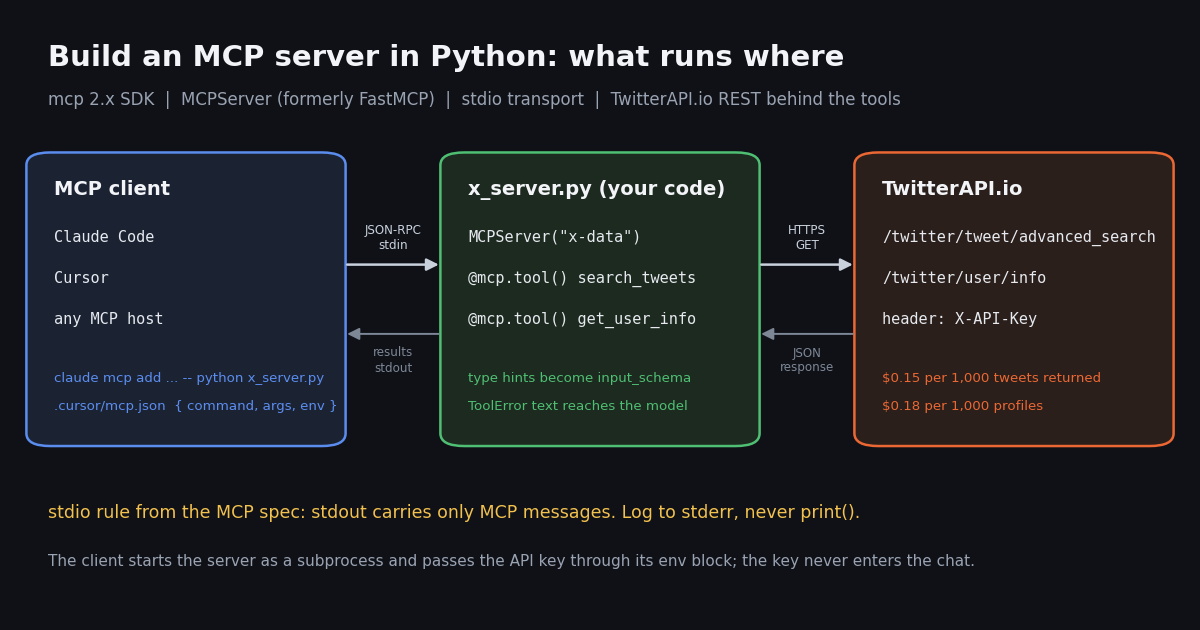
This is the hands-on tutorial: you write the server yourself, in Python, line by line. If you only want Claude to read X (Twitter) data and do not care how the plumbing works, the shorter path is our ready-made server, covered in the guide to using Claude with the Twitter API, which connects with one command. If you want to know what MCP is before writing any code, read the MCP server explainer first. This page is for the builder who wants their own tools, their own field selection and their own error messages, and who wants to understand every line that runs.
Everything below was run in this session, not paraphrased from docs: we created a Python 3.12 virtual environment, installed mcp 2.3.0 from PyPI, wrote the two-tool server, launched it over stdio with the SDK's own client, listed its tools and called one. The outputs quoted on this page are copied from that terminal. The Claude Code and Cursor configuration is quoted from each product's MCP documentation, read this session.
We also looked at how builders talk about this on X: 1,358 recent public posts from three searches ("mcp server" plus build words, fastmcp, and MCP plus python), collected in 2026 through our own search endpoint for about $0.21. The numbers show which client people build for, and how slowly the v2 rename has reached the conversation.
What you are building, and which package to install
An MCP server is a program that advertises tools (functions with a name, a description and a JSON input schema) to an MCP client such as Claude Code, Cursor or Codex, then runs those tools when the model asks. The client and server talk JSON-RPC. Over the stdio transport the client starts your server as a subprocess and exchanges newline-delimited messages through its stdin and stdout, which is why stdio servers need no port, no web framework and no hosting.
Our server exposes two tools that a coding assistant can actually use: search_tweets runs an X advanced search (operators such as from:, since_time: and lang: work), and get_user_info returns a public profile. Both call TwitterAPI.io, so you need an API key but no X developer account and no X login.
Which package. There are two Python packages with FastMCP in their story, and tutorials mix them up:
The standalone project's README says FastMCP 1.0 was incorporated into the official SDK in 2024, after which the two lines diverged. This page uses the official SDK because it is the reference implementation the protocol maintainers ship. The decorator API is close enough that the server code ports between them with a changed import.
Python version. The SDK README asks for Python 3.11+ (the PyPI metadata for 2.3.0 says >=3.10). We used 3.12. If your system Python is older, create the virtual environment from a newer interpreter; on an interpreter the current release does not support, pip either fails or falls back to an older release without MCPServer.
python3.12 -m venv .venv
source .venv/bin/activate
pip install "mcp[cli]" requests
pip show mcp | head -2
# Name: mcp
# Version: 2.3.0The v2 rename: FastMCP is now MCPServer
The SDK's own "What's new in v2" page puts it first: the high-level server class was renamed and its module with it, and "the old import path is gone rather than deprecated". In practice that means every pre-v2 tutorial that starts with from mcp.server.fastmcp import FastMCP fails with an import error on a fresh install. The fix is one line.
What did not change is the part you write most: @mcp.tool(), @mcp.resource() and @mcp.prompt() accept what they accepted in v1, and the input schema still comes from your type hints. The migration guide also notes that transport settings moved from the constructor to run(), that the default server name changed from FastMCP to mcp-server, and that MCP_* environment variables and .env files are no longer read by the server class.
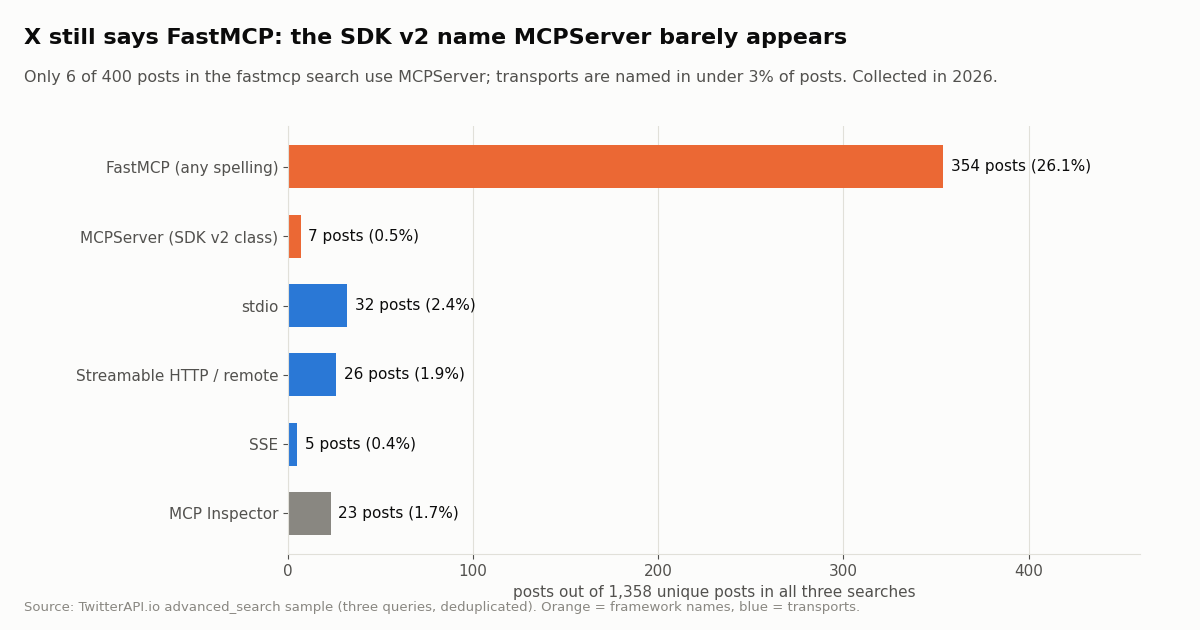
The conversation on X has not caught up. In our sample of 400 recent posts matching fastmcp, spanning about 188 days, only 6 (1.5%) used the class name MCPServer. Across all 1,358 posts the name FastMCP appeared 354 times and MCPServer 7 times. Expect copied snippets to use the old import, and check the version you have installed before debugging anything else.
Step 1: write the server (two X tools in about 60 lines)
The full x_server.py is in the code block at the end of this page; this section explains the decisions that matter. The server reads its API key from the TWITTERAPI_IO_API_KEY environment variable, the same variable name our published npm server uses, so one key works for both.
The type hints are the schema. def search_tweets(query: str, query_type: str = "Latest", max_pages: int = 1) becomes a JSON schema with query required and the other two optional with defaults. You write no schema by hand. The first line of the docstring becomes the description the model reads when deciding whether to call the tool, so write it for the model: say what the tool returns and which query operators work.
Return small, flat data. The tool returns a list of dicts with only the fields an assistant needs: id, url, text, createdAt, author handle and the like, retweet, reply and view counts. The raw tweet object carries dozens of nested fields (entities, media, quoted posts, the full author profile). Claude Code's documentation says it warns when a tool's output exceeds 10,000 tokens and limits output to 25,000 tokens by default (MAX_MCP_OUTPUT_TOKENS changes it), so trimming in the tool keeps results usable and cheaper to reason over.
Cap the pages. Each search page holds up to 20 tweets and is billed at 15 credits per tweet returned. max_pages is clamped to 5 in code, so the worst case for one tool call is 100 tweets, $0.015. Without a cap, a model that decides to "get everything" can page through a busy query for a long time.
Read the response shapes exactly. The search endpoint returns a top-level tweets array with has_next_page and next_cursor; the profile endpoint returns the profile under data. An unknown handle does not produce an HTTP 404: the API answers HTTP 200 with status: "error" and msg: "user not found", which is why get_user_info checks status before reading data.
Sync functions are fine. The tools use requests, which blocks. The SDK runs a synchronous tool in a worker thread (visible in the SDK's own tracebacks as anyio.to_thread.run_sync), so a slow HTTP call does not freeze the protocol loop. Switch to httpx.AsyncClient and async def when you want concurrency inside one tool.
from mcp.server import MCPServer
from mcp.server.mcpserver.exceptions import ToolError

mcp = MCPServer("x-data", instructions="X (Twitter) search and profile lookup via TwitterAPI.io.")


@mcp.tool()
def get_user_info(username: str) -> dict:
    """Look up a public X profile by handle (without the @): bio, followers, post count, creation date."""
    ...  # full body in the code block at the end of the page


if __name__ == "__main__":
mcp.run() # stdio by defaultStep 2: test it without Claude, using the SDK's own client
You do not need an AI app to see what your server advertises. The SDK ships a Client that takes a StdioServerParameters (the command to launch), starts your server as a subprocess and speaks the protocol to it. This is the fastest loop while you iterate: no restart of Claude Code, no clicking through a settings page.
We ran the script below with TWITTERAPI_IO_API_KEY deliberately unset, so the tool call shows the error path a user sees when the config is missing the key. The output is copied verbatim from the terminal; the input_schema lines are exactly what Claude Code or Cursor receives for each tool.
"""client_check.py: launch x_server.py over stdio, list its tools, call one."""
import json
import sys

import anyio
from mcp import Client, StdioServerParameters


async def main() -> None:
    params = StdioServerParameters(command=sys.executable, args=["x_server.py"])
    async with Client(params) as client:
        print("server:", client.server_info.name if client.server_info else None)
        tools = await client.list_tools()
        for tool in tools.tools:
            print("-", tool.name, "|", tool.description.splitlines()[0])
            print("  input_schema:", json.dumps(tool.input_schema))
        result = await client.call_tool("get_user_info", {"username": "AnthropicAI"})
        print("is_error:", result.is_error)
        for block in result.content:
            print("content:", getattr(block, "text", block))


anyio.run(main)

# $ python client_check.py   (TWITTERAPI_IO_API_KEY unset; output copied from our run)
# server: x-data
# - search_tweets | Search recent X posts with advanced-search syntax (from:, since_time:, lang:, -filter:replies).
#   input_schema: {"type": "object", "properties": {"query": {"title": "Query", "type": "string"}, "query_type": {"default": "Latest", "title": "Query Type", "type": "string"}, "max_pages": {"default": 1, "title": "Max Pages", "type": "integer"}}, "required": ["query"], "title": "search_tweetsArguments"}
# - get_user_info | Look up a public X profile by handle (without the @): bio, followers, post count, creation date.
#   input_schema: {"type": "object", "properties": {"username": {"title": "Username", "type": "string"}}, "required": ["username"], "title": "get_user_infoArguments"}
# is_error: True
# content: Error executing tool get_user_info: TWITTERAPI_IO_API_KEY is not set; add it to the env block of your MCP client configTwo mistakes our test run caught: print() and plain exceptions
Mistake 1: raising a plain exception hides the message. Our first version raised RuntimeError("... is not set ...") when the key was missing. The client received is_error: True and the content Error executing tool get_user_info, with no reason. The SDK source explains why: a deliberate ToolError is passed to the model with its text, while any other exception is treated as a crash, logged on the server, and the text "stays on the server". Switching to raise ToolError(...) produced the message you see in the output above, which an assistant can relay to the user ("add the key to the env block").
Mistake 2: print() corrupts the stdio stream. The MCP specification's stdio transport says the server MUST NOT write anything to its stdout that is not a valid MCP message, and MAY write logs to stderr. We tested what happens when you forget: adding print("debug: looking up", username) inside get_user_info made the SDK client log Failed to parse JSONRPC message from server and Invalid JSON: expected value at line 1 column 1 [... input_value='debug: looking up AnthropicAI' ...]. This client tolerated it and finished the call; other clients may drop the connection. Use logging (the SDK's handler writes to stderr) or print(..., file=sys.stderr).
About the MCP Inspector. The SDK README suggests uv run mcp dev server.py to open the MCP Inspector, a browser UI for calling tools. It needs Node.js; we did not run it in this session, so we quote the command and stop there. The Client script above covers the same check from Python.
Step 3: connect the server to Claude Code
Claude Code registers a local stdio server with claude mcp add. Its documentation gives the syntax claude mcp add [options] <name> -- <command> [args...]: everything after the double dash is the command that starts your server, passed through untouched. Environment variables go in with --env KEY=value, and the docs warn that the server name must not come directly after --env, so put another option such as --transport stdio between them.
Use absolute paths for both the Python interpreter inside your virtual environment and the script. Claude Code starts the server itself, not from your activated shell, so python on its own may resolve to a system interpreter that has no mcp package installed.
Scopes. The command writes to local scope by default (private to you, stored in ~/.claude.json under the current project). --scope user makes the server available in all your projects; --scope project writes a .mcp.json file at the project root that you can commit. Claude Code expands ${VAR} and ${VAR:-default} inside .mcp.json, so a committed file can reference the key from each developer's environment instead of containing it. Claude Code asks for approval before using project-scoped servers in interactive sessions.
After adding, run claude mcp get x-data to check that it connected, then ask something that needs the tool, for example "what has @AnthropicAI posted about MCP this week?". Claude reads the tool descriptions, calls search_tweets with a query such as from:AnthropicAI MCP, and answers from the returned posts.
# Local scope (default): only you, only this project
claude mcp add --env TWITTERAPI_IO_API_KEY=your_key --transport stdio x-data \
  -- /absolute/path/.venv/bin/python /absolute/path/x_server.py

claude mcp get x-data

# Project scope: writes .mcp.json, safe to commit because the key is expanded at runtime
# {
#   "mcpServers": {
#     "x-data": {
#       "command": "/absolute/path/.venv/bin/python",
#       "args": ["/absolute/path/x_server.py"],
#       "env": { "TWITTERAPI_IO_API_KEY": "${TWITTERAPI_IO_API_KEY}" }
#     }
#   }
# }Step 4: connect Cursor, and when to move from stdio to Streamable HTTP
Cursor reads MCP servers from mcp.json: .cursor/mcp.json in a project for project-specific tools, or ~/.cursor/mcp.json in your home directory for tools available everywhere. Its documentation lists the fields for a stdio server: type ("stdio"), command (the executable, on your path or as a full path), args, env, and envFile, which only stdio servers support.
Cursor's config interpolation uses a different syntax from Claude Code: ${env:NAME} reads an environment variable, ${workspaceFolder} is the project root and ${userHome} is your home folder. That lets you keep the key out of the file and point at a script inside the repository without hard-coding your home path.
Codex, VS Code and other clients take the same three ingredients (command, args, env) in their own file format; our Codex MCP guide covers config.toml.
stdio is right while the server is yours: the client launches it per session, it inherits a key you control, and nothing listens on the network. Move to Streamable HTTP when several people or machines should share one server, or when a hosted client cannot launch local processes. In SDK v2 the transport is chosen at run time, not in the constructor: mcp run server.py --transport streamable-http serves on http://localhost:8000/mcp per the README, and the same Client connects when you pass it the URL instead of StdioServerParameters.
Once the server is on HTTP, the key question becomes authentication: each user should bring their own TwitterAPI.io key (for example as a header the client sends, which Claude Code's --header option and Cursor's headers field support) rather than one shared key on the server. Claude Code's documentation also notes that a JSON entry with a url but no type is read as a stdio server and skipped, so remote entries need "type": "http".
If you would rather not maintain a server at all, the TwitterAPI.io MCP server is open source (MIT, github.com/kaitoInfra/twitterapi-io-mcp-server), published on npm as @twitterapi_io/mcp-server, and exposes 12 tools. Building your own, as on this page, is worth it when you want a narrow tool set, your own field trimming, or tools that combine X data with your own database.
{
  "mcpServers": {
    "x-data": {
      "type": "stdio",
      "command": "${workspaceFolder}/.venv/bin/python",
      "args": ["${workspaceFolder}/x_server.py"],
      "env": { "TWITTERAPI_IO_API_KEY": "${env:TWITTERAPI_IO_API_KEY}" }
    }
  }
}What builders on X build for: the client and stack data
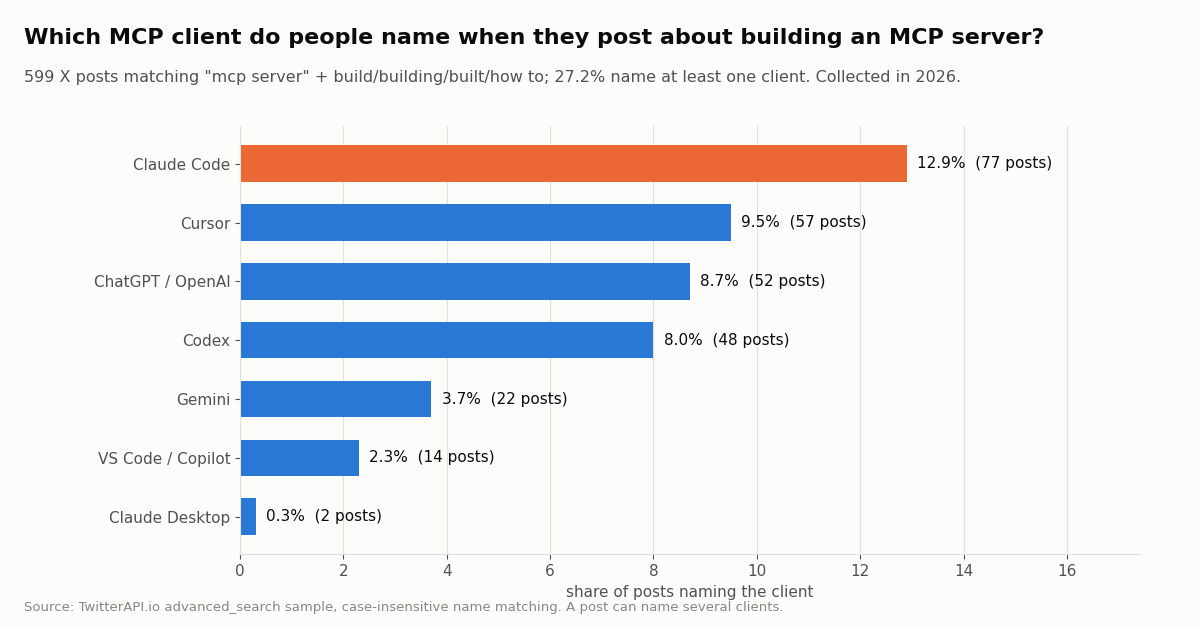
To ground the client choice in something other than our own preference, we pulled the most recent public X posts that mention building an MCP server and counted which clients, languages and transports they name. The cleanest sample is the first query, "mcp server" (build OR building OR built OR "how to"), because it contains no client or language word that could inflate a count: 599 posts from the last 3.0 days of activity, about 198 a day.
Claude Code leads, Cursor second. 27.2% of posts named at least one client, and Claude Code was named most often. That is why this tutorial gives the Claude Code command first. Claude Desktop appeared in only 2.
Few posts name a language or transport at all. Only 48 of the 599 posts named Python or a JavaScript/TypeScript term (npx, npm, node, typescript), and the JavaScript side (39 posts) outnumbered Python (13), largely because install commands for ready-made servers use npx. Across all 1,358 posts, stdio was named in 32 (2.4%) and Streamable HTTP or remote servers in 26 (1.9%). People post about what their server does, not how it is wired.
Engagement is modest and long-tailed. The median post got 3 likes and 209 views; 22.2% got none, while the top tenth reached 44 likes or more. 40.6% carried an image or video (usually a screenshot of the tool in action), and those posts had a median of 4 likes against 3 for text-only posts.
What the tools cost to run, against the official X API
Your MCP server costs nothing to run locally; the cost is the data behind the tools. TwitterAPI.io bills per item returned: 15 credits per tweet ($0.15 per 1,000 tweets) with a 15-credit minimum per request, and 18 credits per profile ($0.18 per 1,000 profiles). $1 buys 100,000 credits, and purchased credits never expire. New accounts that pass the automatic bot check get up to $1 of free credits (at most 100,000 credits, no card, one per person or network, expiring after 31 days).
X's own pay-per-usage rate card on docs.x.com/x-api/getting-started/pricing charges $0.005 per post read and $0.010 per user read, with pay-per-usage plans capped at 3 million post reads per monthly billing cycle (Enterprise above that). Per 1,000 tweets that is $5 against $0.15, about 33 times more.
A conversational session where the assistant runs ten searches and looks up ten profiles costs about $0.03 here. Before the first payment the API allows 0.2 requests per second, enough for a single developer driving an assistant; paid accounts get 20 per second. See the pricing page for plans.
Adding write tools. The same pattern extends to posting: a tool that calls /twitter/create_tweet_v2 after a one-time /twitter/user_login_v2 login ($0.10, with a proxy you supply) costs 60 credits ($0.0006) per post, billed per HTTP 200 call. Unlike the read tools, it acts as that X account: X can rate-limit, lock or suspend the account, the session can need a re-login, and an assistant should keep a human pace. Make any write tool ask for confirmation before it runs.
"""x_server.py: an MCP server exposing X (Twitter) read tools backed by TwitterAPI.io."""
import os

import requests
from mcp.server import MCPServer
from mcp.server.mcpserver.exceptions import ToolError

BASE = "https://api.twitterapi.io"
mcp = MCPServer("x-data", instructions="X (Twitter) search and profile lookup via TwitterAPI.io.")


def _headers() -> dict:
    key = os.environ.get("TWITTERAPI_IO_API_KEY")
    if not key:
        raise ToolError("TWITTERAPI_IO_API_KEY is not set; add it to the env block of your MCP client config")
    return {"X-API-Key": key}


@mcp.tool()
def search_tweets(query: str, query_type: str = "Latest", max_pages: int = 1) -> list[dict]:
    """Search recent X posts with advanced-search syntax (from:, since_time:, lang:, -filter:replies).

    Returns up to 20 posts per page. Each page costs 15 credits per tweet returned.
    """
    out, cursor = [], ""
    for _ in range(max(1, min(max_pages, 5))):
        r = requests.get(
            f"{BASE}/twitter/tweet/advanced_search",
            headers=_headers(),
            params={"query": query, "queryType": query_type, "cursor": cursor},
            timeout=30,
        )
        r.raise_for_status()
        body = r.json()
        for t in body.get("tweets", []):
            out.append({
                "id": t["id"], "url": t["url"], "text": t["text"], "createdAt": t["createdAt"],
                "author": t["author"]["userName"], "likeCount": t["likeCount"],
                "retweetCount": t["retweetCount"], "replyCount": t["replyCount"],
                "viewCount": t.get("viewCount"),
            })
        if not body.get("has_next_page"):
            break
        cursor = body.get("next_cursor", "")
    return out


@mcp.tool()
def get_user_info(username: str) -> dict:
    """Look up a public X profile by handle (without the @): bio, followers, post count, creation date."""
    r = requests.get(f"{BASE}/twitter/user/info", headers=_headers(),
                     params={"userName": username.lstrip("@")}, timeout=30)
    r.raise_for_status()
    body = r.json()
    if body.get("status") == "error" or body.get("data") is None:
        return {"error": body.get("msg", "user not found")}
    d = body["data"]
    keys = ["userName", "name", "description", "location", "followers", "following",
            "statusesCount", "createdAt", "isBlueVerified", "protected"]
    return {k: d.get(k) for k in keys}


if __name__ == "__main__":
    mcp.run()  # stdio by default: the transport Claude Code and Cursor launch locally
Questions readers ask
Is FastMCP the same thing as the official MCP Python SDK?
Not anymore. FastMCP 1.0 was incorporated into the official SDK in 2024 (per the standalone project's README), and in the official SDK v2 that class is now called MCPServer, imported with from mcp.server import MCPServer. The standalone fastmcp package (PrefectHQ, 4.x on PyPI) continues separately with from fastmcp import FastMCP. Both use the same decorator style, so tool code ports with a changed import.
Why does from mcp.server.fastmcp import FastMCP fail?
You have SDK v2 installed. The v2 release notes say the old import path is gone rather than deprecated. Use from mcp.server import MCPServer and MCPServer("name"), or pin mcp<2 if you must run an old tutorial unchanged.
How do I test an MCP server without Claude or Cursor?
Use the SDK's Client with StdioServerParameters(command=sys.executable, args=["x_server.py"]), then call list_tools() and call_tool(). It launches your server exactly as an AI client would and prints the schemas the model will see. The MCP Inspector (uv run mcp dev server.py) is a browser alternative that needs Node.js.
Can I use print() for debugging in an MCP server?
Not over stdio. The MCP spec reserves stdout for protocol messages; in our test a single print() made the SDK client log Failed to parse JSONRPC message from server. Log to stderr instead, with the logging module or print(..., file=sys.stderr).
My server works in the terminal but Claude Code cannot start it. Why?
Usually the command. Claude Code launches the server itself, so use the absolute path to the Python inside your virtual environment and to the script, and pass the API key with --env (or the env block) because your shell's exported variables are not part of the server config. Run claude mcp get <name> to see the status.
How much does it cost to run an MCP server with Twitter (X) tools?
The server is free to run locally; the data costs $0.15 per 1,000 tweets and $0.18 per 1,000 profiles on TwitterAPI.io, with a $0.00015 minimum per request. A full 20-post search page is $0.003. On X's pay-per-usage rate card the same 20 posts are $0.10 ($0.005 per post read).
Do I need an X developer account to build this server?
No. The read tools call TwitterAPI.io with an X-API-Key header; no X account, developer app or OAuth flow is needed. You only need an X account if you add write tools such as posting, which act as that account.
Should my MCP server use stdio or Streamable HTTP?
stdio for a personal server that your client launches locally; Streamable HTTP when several users or machines share one deployed server. In SDK v2 you choose the transport when you run the server (mcp run server.py --transport streamable-http), not in the constructor.
Continue
- MCP Python SDK on GitHub: install line, MCPServer example, Client example, Python 3.11+
- MCP Python SDK docs: What's new in v2 (FastMCP renamed MCPServer, old import path removed)
- MCP specification: stdio transport (stdout carries only MCP messages, logs to stderr)
- Claude Code docs: claude mcp add, --env, scopes, .mcp.json expansion, output limits
- Cursor docs: mcp.json locations, stdio fields, ${env:NAME} interpolation
- X API pay-per-usage pricing: $0.005 per post read, $0.010 per user read, 3M cap
- X (Twitter) API hub: endpoints, pricing and guides
- Use Claude with the Twitter API through the ready-made MCP server
- What an MCP server is, explained
- Add an MCP server to OpenAI Codex
- Cursor with the Twitter API
- Advanced search operators for the search_tweets tool
- TwitterAPI.io MCP server: 12 tools, one npx command
- Pay-per-call API pricing
- 01OpenClaw vs Claude Code: which agent should run your Twitter (X) jobs?
- 02Hermes Agent vs OpenClaw: Which Agent Fits Twitter (X) Work?
- 03Claude Code Channels: Telegram, Discord and Twitter (X) Alerts in Your Session
- 04Codex MCP: How to Add Any MCP Server to OpenAI Codex (CLI, IDE and App)
- 05MCP Server Workflow Automation: the 14 Best MCP Servers for Claude Code, Codex and Cursor, Twitter (X) Data Included
- 06What Is an MCP Server? How AI Clients Talk to It, With a Live Twitter (X) Example
- 07Grok Build: Install, Pricing, MCP Setup and an X (Twitter) Data Tool Built With It
- 08ChatGPT MCP: how to add an MCP server to ChatGPT
Stop reading. Start building.
Starter credits cover real testing on real data. Google sign-in, no card, no application queue.
Get an API keyAlready building with TwitterAPI.io? Publish an honest tutorial or build log about it and earn up to $200 a month in API credits.