Sprout Social API in 2026: What It Returns, What It Costs, and Where Twitter (X) Data Runs Out
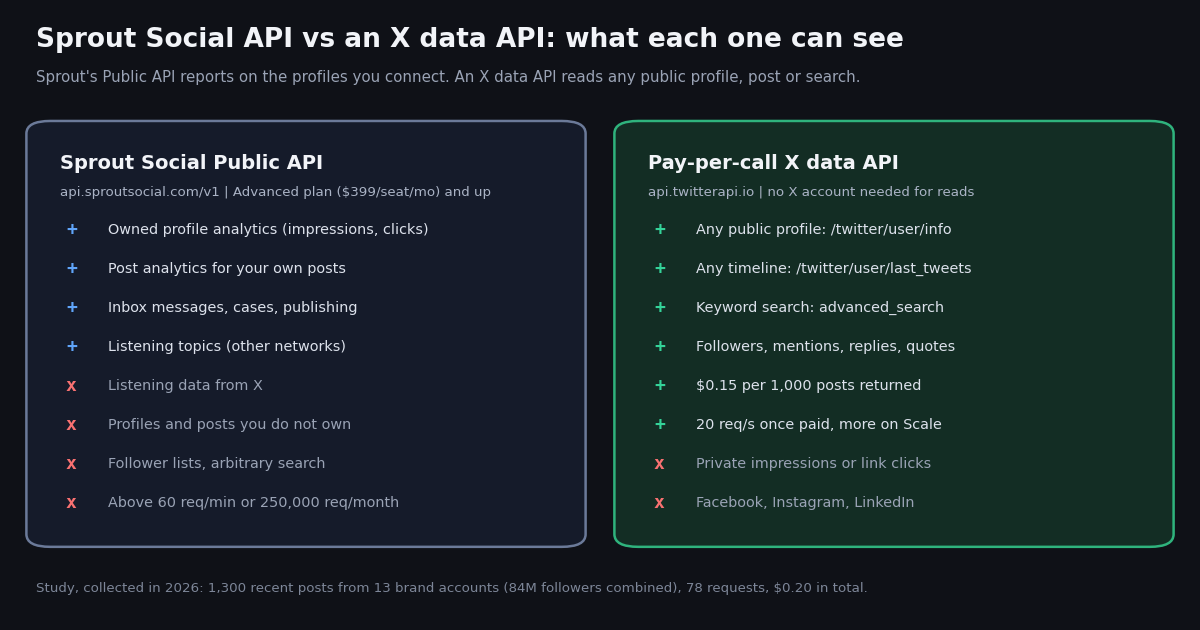
This page is about one product: the Sprout Social Public API, what it returns, which plan unlocks it, how it is rate-limited, and where it stops when what you actually need is raw Twitter (X) data. It is not a roundup of social listening suites (our guide to X API options for social listening covers that), and it is not a Brandwatch comparison (the Brandwatch alternative page does that). If you searched "sprout social api" because a stakeholder asked for numbers Sprout's reports do not show, or because you want competitor data in your own warehouse, the answer starts with the scope line in Sprout's own docs.
We read Sprout's developer documentation and pricing page this session, then ran a small study on live X data: profiles and 100 recent posts each for 13 public brand accounts, including Sprout Social's and Hootsuite's own. The study shows the half of the picture Sprout's API cannot return, because it only reports on profiles you have connected: posting cadence and public engagement for accounts you do not own. A short section at the end covers the Hootsuite API, which raises the same question.
What the Sprout Social Public API actually returns
Sprout's documentation (api.sproutsocial.com/docs) opens with the scope in one sentence: the API exists "to access your owned social profile data so you can use that data to power dashboards and automate your reporting." Everything below follows from that. Each request path carries your Sprout customer ID (/v1/<customer_id>/<endpoint>), and analytics requests filter on the customer_profile_id values of profiles connected to your account.
The "does not include" list. The same overview names three exclusions: paid (ad account) data, Listening data from X, and message-level Listening data from Reddit. The X metrics section repeats it: "X data is not available for Listening endpoints." So the Listening endpoints can return earned-media results for other networks, but not for X.
The X metrics you do get (owned profiles only). For an X profile you connect, the owned-profile metrics include followers (lifetime_snapshot.followers_count), net follower growth, impressions, video views, likes, @replies, reposts, post link clicks and posts sent. Several more (media views, media clicks, hashtag clicks, profile clicks, detail expands, app installs) are marked "Premium Analytics Required". Sprout computes engagements as likes + @replies + reposts + post link clicks + other post clicks + other engagements, and offers engagement rate per follower and per impression.
Shape limits worth knowing before you build. Analytics requests accept up to 100 profiles each, a reporting_period of at most one year, and responses are capped at 10,000 results with cursor pagination beyond that. Message lookups by ID accept up to 100 per request.
# What a Sprout Public API call looks like (from Sprout's own docs at api.sproutsocial.com/docs).
# Every call is scoped to YOUR customer ID and to profiles connected to your Sprout account.
POST https://api.sproutsocial.com/v1/<customer_id>/analytics/profiles
Authorization: Bearer <OAuth access token OR API token>
Content-Type: application/json

{
  "filters": [
    "customer_profile_id.eq(<your connected profile ids>)",
    "reporting_period.in(<start>...<end>)"
  ],
  "metrics": ["lifetime_snapshot.followers_count", "net_follower_growth",
              "impressions", "likes", "comments_count", "shares_count",
              "post_link_clicks"]
}

# Limits (Sprout docs): 60 requests per minute, 250,000 requests per month,
# up to 100 profiles per analytics request, reporting_period up to one year.Sprout Social API pricing: which plan unlocks it
Sprout does not sell API access on its own, and it does not publish a per-call price. The developer docs state the prerequisite without naming a tier: "Your account needs to be on the appropriate plan which enables API access. If you are unsure, please contact your sales representative or contact support." Sprout's pricing page (sproutsocial.com/pricing) is where the tier shows up.
Sprout's own blog post on its API (sproutsocial.com/insights/sprout-social-api) says the same in plainer words: the Public API "is available to all Advanced Plan customers." The pricing page shows prices under an "Annual billing" heading; only Essentials lists a separate month-to-month price.
Add-ons that change what the API returns. Premium Analytics and Listening "are each available as individual add-ons to the Standard plan and up", and neither add-on price is published (the page routes to "Schedule a demo"). Premium Analytics matters for the API because the X metrics marked "Premium Analytics Required" come back only with it, and Sprout's Tableau connector needs "Premium Analytics add-on along with the Sprout Advanced Plan".
What we could not verify. Sprout's support article on API access (support.sproutsocial.com/hc/en-us/articles/360045006152) returned a browser challenge to every automated fetch this session, so this page relies on the developer docs and the pricing page for the plan requirement. If your contract predates the current plan names, ask Sprout support which tier your seats map to.
Sprout Social API rate limits, auth and the X approval step
Rate limits. The docs list two numbers and no burst allowance: 60 requests per minute and 250,000 requests per month. Over the limit the API answers 429 Too Many Requests. For a reporting job that pulls 100 profiles per analytics call, 60 a minute is plenty; for anything shaped like data collection it is a ceiling.
Authentication. Two options, both sent as Authorization: Bearer <token>. OAuth 2.0 is the recommended path: Sprout issues short-lived JWT access tokens, with the client_credentials grant for machine-to-machine jobs and the authorization code flow for user-based integrations. The alternative is an API token that a user with the API Permissions permission generates under Settings > Global Features > API.
The X-specific gate. Before any X data comes through, a Sprout user with API permissions has to accept the "Sprout API X Content End User License Agreement", and the metrics section adds that "Customers are required to undergo a brief X review and approval process before being able to access their X data through the Sprout Analytics API." Plan the approval into your timeline; Sprout's docs mention the case where "X does not approve your specific use case".
The gap: Sprout's API is not a Twitter (X) data API
Teams usually hit the gap with one of three requests. Each needs data about X accounts that are not connected to your Sprout account, and none of them is answered by an owned-profile API.
"Benchmark us against three competitors, every week, in our own dashboard." Sprout's app has competitor reports (the pricing page lists "extensive competitor, tag and paid insights" on Professional), but the Public API's analytics endpoints filter on your own customer_profile_id values. A competitor's handle is not a profile you can connect, so its posts and engagement do not come back through the API.
"Track every post that mentions our product on X." That is Listening, and Sprout's docs list "Listening data from X" as not included in the API. So X mentions cannot be exported through the API.
"Pull the followers of an account, or search X for a keyword." No endpoint in the Sprout API returns follower lists or arbitrary search results. Those are X data operations, which is what X's own API and third-party X data APIs exist for.
When Sprout remains the right tool. If the job is publishing, inbox, care cases and reporting across Facebook, Instagram, LinkedIn, TikTok, Pinterest and YouTube as well as X, Sprout's multi-network suite remains a fit, and its API is how you get that owned data into a warehouse. Impressions and link clicks for your own posts also only exist in owner-side analytics; no public data source returns them.
When a pay-per-call X data API fits. Anything about accounts you do not own: competitor cadence and engagement, mention streams, keyword searches, follower lists, historical timelines. With TwitterAPI.io those are plain GET requests (/twitter/user/info, /twitter/user/last_tweets, /twitter/tweet/advanced_search, /twitter/user/followers, /twitter/user/mentions) billed per result, with no seat and no plan gate. The study below is exactly that kind of job.
Study: the numbers a Sprout report gives vs what you can compute for any brand
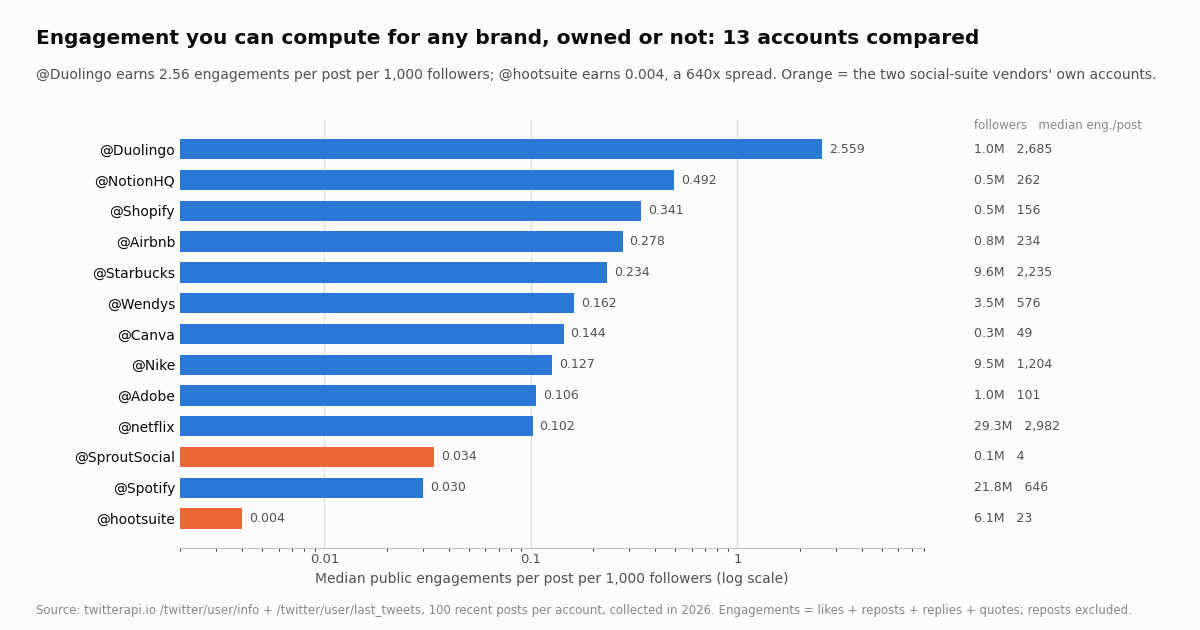
We pulled the public profile and the 100 most recent posts (replies excluded) of 13 brand accounts with 84M followers between them, then computed what a social team usually wants from a competitor benchmark: posting cadence, median public engagements per post (likes + reposts + replies + quotes, reposts excluded because their counters belong to the original post) and engagement per post per 1,000 followers. Sprout's and Hootsuite's own accounts are in the set.
The spread is the story. Median engagement per post per 1,000 followers ranges from 2.559 for @Duolingo to 0.004 for @hootsuite, a 640x gap. Raw follower count predicts little: @netflix has 29.3M followers and a median of 2,982 engagements per post, while @Duolingo, with 1.0M, gets 2,685.
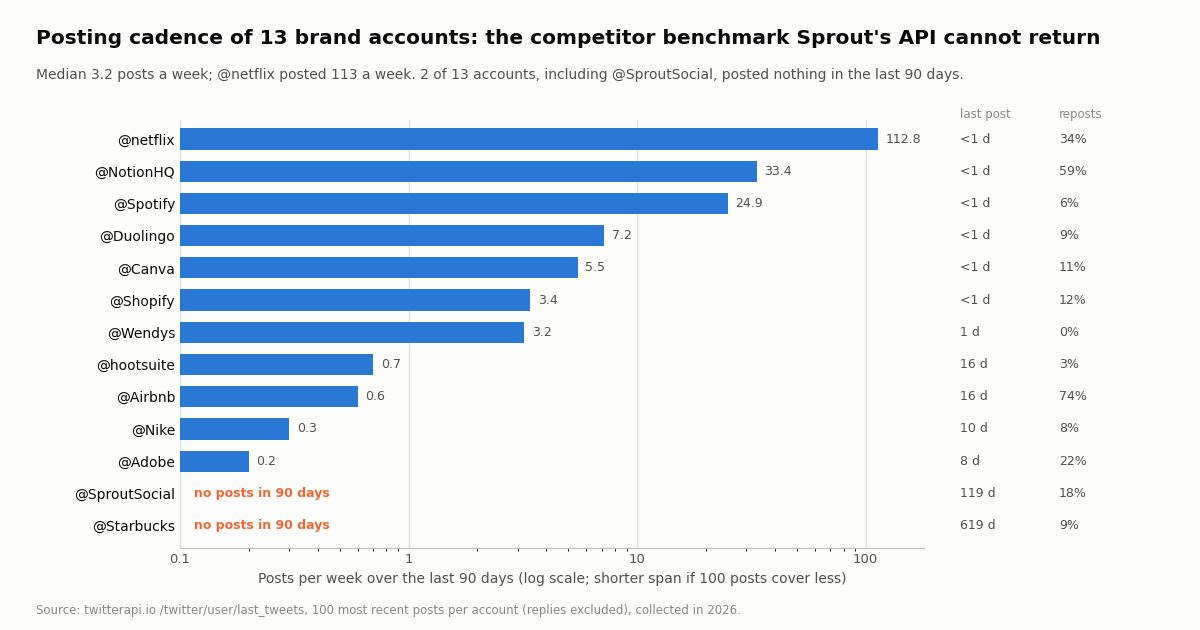
Cadence varies by two orders of magnitude. The median account posted 3.2 times a week over the last 90 days; @netflix posted 113 a week, @NotionHQ 33.4 (59% of its sample were reposts). Two of the 13, @Starbucks and @SproutSocial itself, posted nothing in the last 90 days: their latest posts were 619 and 119 days old at collection time.
Views tell a second story. The public viewCount lets you compute engagements per 1,000 views for any account, a rough public stand-in for Sprout's engagement rate per impression: @Duolingo's median was 15.43, @hootsuite's 2.05. It is not the same metric (Sprout's impressions come from X's owner-side analytics and its engagements include link clicks), so use it for comparing accounts, not for matching a Sprout report.
Owned metrics vs public metrics: what each source can give you
The fair comparison is not "Sprout vs raw data" but which metrics live where. Owner-side analytics see things the public never does; public data covers every account, not just yours.
Practical split. Keep Sprout (or any owned-analytics source) for impressions and clicks on your own posts, and pull the public layer for your own account and every competitor from an X data API, so the benchmark compares like with like. In our study, a full re-pull of one competitor (profile plus 100 posts) costs $0.01518.
A Sprout Social API alternative for X data: cost and code
A pay-per-call X data API is not a replacement for Sprout's publishing, inbox or multi-network reporting, and this page does not pretend it is. It replaces the part Sprout's API does not do: reading X itself. The costs below use TwitterAPI.io's published per-result prices and X's own pay-per-usage rate card (docs.x.com/x-api/getting-started/pricing).
Per 1,000 posts that is $5 on X's rate card against $0.15 here, about 33x. X's pay-per-usage plan is also capped at 3 million post reads per monthly billing cycle, with Enterprise above that; new X API customers get $20 in credits on a first eligible card and a match of the first auto-recharge up to $50.
How the monthly figure is built. One /twitter/user/last_tweets call and one /twitter/user/info call per account per day. A day with no new post still costs the 15-credit request minimum ($0.00015), and a full 20-post page costs $0.003. At the cadences we measured, timelines come to $0.16 a month and daily profile snapshots (which give you net follower growth) $0.07.
Getting started. New accounts that pass the automatic bot check get up to $1 of free credits (at most 100,000 credits, no card, one per person or network, expiring after 31 days). Purchased credits never expire; $1 = 100,000 credits. Subscriptions start at Starter $29 a month (then Builder $99, Pro $199, Scale $499, Business $1,499) for teams that want higher rate limits; see the pricing page for what each includes.
The script in the code block at the end of this page is the study above in about 80 lines: one /twitter/user/info call per handle (followers), up to five /twitter/user/last_tweets pages of 20 posts (cadence and engagement), then the same medians we report. It reads only the fields the API returns: followers, userName, createdAt, likeCount, retweetCount, replyCount, quoteCount, viewCount, plus has_next_page and next_cursor for paging.
Two details that bite. An unknown handle does not return 404: /twitter/user/info answers HTTP 200 with status: "error" and msg: "user not found", so check status before reading data. And skip reposts when measuring engagement: a repost's counters belong to the reposted post, which would credit a brand with someone else's reach.
Where to put it. Run it on a daily schedule and append rows to the same table your Sprout API export lands in, keyed by handle and date. Your own account then has both layers (owner-side impressions from Sprout, public engagement from X), and competitors have the public layer, which is the only one anyone outside those companies can see.
If you also publish. Posting to X through TwitterAPI.io is a separate, authenticated flow: one /twitter/user_login_v2 login ($0.10, with a proxy you supply) returns login_cookies, then each post via /twitter/create_tweet_v2 costs $0.002. Those calls act as that account, so X can rate-limit, lock or suspend it; keep a human pace, expect the session to need re-login occasionally, and note that billing is per HTTP 200 call.
Hootsuite API: the same owned-data shape
"Hootsuite API" searches land on the same question, and the answer has the same shape. Hootsuite's developer docs (developer.hootsuite.com) describe a REST API with OAuth 2.0 that "operates on the same data" as the Hootsuite dashboard. Access needs an active Hootsuite user and an approved Developer account.
What it covers. A Publishing API that schedules posts with media (TikTok, YouTube and Bluesky are listed as not supported), a User Management API using SCIM, an Ow.ly link API for Enterprise users only, the Amplify employee-advocacy API, Inbox 2.0 APIs, and an Analytics API marked "New for April 2026" that returns posts with lifetime metrics and daily profile metrics. Using the Analytics API requires the user to have purchased the Advanced Analytics add-on and the app to request the analytics:read scope; its list endpoints accept a lastModified at most 30 days in the past.
Rate limits. Hootsuite's REST APIs allow 20 requests per second up to 100,000 calls per day, reported in X-Account-Quota headers, with 429 on overflow.
The same gap. Like Sprout's, Hootsuite's API works on the social profiles connected to a Hootsuite account. It is a way to automate Hootsuite, not a way to read arbitrary X profiles, timelines, followers or search results. If the reason you looked up either API is X data about accounts you do not own, the X data path in this page applies to both.
How we collected this
Question. For a set of public brand accounts, what can anyone compute from raw X data (followers, posting cadence, public engagement per post and per 1,000 followers, views), and which owner-side numbers in a Sprout report can public data not reproduce?
Accounts. @Wendys, @Duolingo, @netflix, @Spotify, @Nike, @Starbucks, @Airbnb, @Adobe, @Canva, @NotionHQ, @Shopify, @SproutSocial and @hootsuite: 13 organization accounts chosen as recognizable brands with active social teams, plus the two social-suite vendors.
Window and sample. Collected in 2026. One /twitter/user/info call and five pages of /twitter/user/last_tweets (replies excluded, newest first) per account: 1,300 posts and 13 profiles in 78 requests, $0.20 at list prices. Each account's window is the span its 100 most recent posts cover, from 6.2 days (@netflix) to 903 days (@Adobe). Posts per week use the last 90 days, or the shorter span when 100 posts do not reach back that far.
What the sample cannot show. Impressions, link clicks and profile clicks are owner-only analytics, so we cannot reproduce Sprout's engagement rate per impression; viewCount is a public proxy, not the same number. Engagement counts are cumulative at collection time, so the newest posts are still accruing. 100 posts is a recent snapshot, not a year of history, and 13 brands are not a representative sample of all brands.
Privacy. Aggregates only, organization accounts only; no reposted, quoted or replying authors are analyzed. Raw pages are kept compressed for audit because every account is an organization account.
"""competitor_benchmark.py - the public X numbers Sprout's API cannot give you for
profiles you do not own: followers, posting cadence and engagement per post, for any
list of public brand accounts.

    pip install requests
    export TWITTERAPI_IO_API_KEY=...   # from the twitterapi.io dashboard
    python3 competitor_benchmark.py Wendys Duolingo Canva
"""
import os
import statistics
import sys
from datetime import datetime, timezone

import requests

BASE = "https://api.twitterapi.io"
HEADERS = {"X-API-Key": os.environ["TWITTERAPI_IO_API_KEY"]}
POSTS_PER_ACCOUNT = 100   # 5 pages of 20; $0.15 per 1,000 posts returned


def profile(handle):
    r = requests.get(f"{BASE}/twitter/user/info", headers=HEADERS,
                     params={"userName": handle}, timeout=30)
    r.raise_for_status()
    body = r.json()
    if body.get("status") != "success" or not body.get("data"):
        raise ValueError(f"@{handle}: {body.get('msg')}")   # unknown user -> 200 + status "error"
    return body["data"]


def recent_posts(handle, limit=POSTS_PER_ACCOUNT):
    posts, cursor = [], ""
    while len(posts) < limit:
        r = requests.get(f"{BASE}/twitter/user/last_tweets", headers=HEADERS,
                         params={"userName": handle, "cursor": cursor}, timeout=30)
        r.raise_for_status()
        body = r.json()
        posts += (body.get("data") or {}).get("tweets") or []
        if not body.get("has_next_page") or not body.get("next_cursor"):
            break
        cursor = body["next_cursor"]
    return posts[:limit]


def created(t):
    return datetime.strptime(t["createdAt"], "%a %b %d %H:%M:%S %z %Y")


def engagements(t):
    return sum(t.get(k) or 0 for k in ("likeCount", "retweetCount", "replyCount", "quoteCount"))


def benchmark(handle):
    user = profile(handle)
    posts = recent_posts(handle)
    own = [t for t in posts if not t.get("retweeted_tweet")]   # repost counters belong to the original
    times = sorted(created(t) for t in posts)
    now = datetime.now(timezone.utc)
    last_90 = [x for x in times if (now - x).days < 90]
    eng = [engagements(t) for t in own]
    followers = user.get("followers") or 0
    med = statistics.median(eng) if eng else 0
    return {
        "account": "@" + user["userName"],
        "followers": followers,
        "posts_per_week_90d": round(len(last_90) / (90 / 7), 1),
        "days_since_last_post": (now - times[-1]).days if times else None,
        "median_engagements": med,
        "per_1k_followers": round(med / followers * 1000, 3) if followers else None,
        "median_views": statistics.median([t.get("viewCount") or 0 for t in own]) if own else 0,
    }


if __name__ == "__main__":
    handles = sys.argv[1:] or ["Wendys", "Duolingo", "Canva"]
    rows = [benchmark(h) for h in handles]
    rows.sort(key=lambda r: -(r["per_1k_followers"] or 0))
    print(f"{'account':16} {'followers':>11} {'posts/wk':>9} {'last post':>10} {'med eng':>8} {'per 1k':>7}")
    for r in rows:
        print(f"{r['account']:16} {r['followers']:>11,} {r['posts_per_week_90d']:>9} "
              f"{str(r['days_since_last_post']) + ' d':>10} {r['median_engagements']:>8} {r['per_1k_followers']:>7}")
Questions readers ask
Does Sprout Social have an API?
Yes. The Sprout Public API at api.sproutsocial.com exposes your own Sprout data: owned profile analytics, post analytics, inbox messages, Listening topics, cases, publishing and media upload. Requests use /v1/<customer_id>/ paths and a Bearer token (OAuth 2.0 or an API token).
Which Sprout Social plan includes API access?
Sprout's pricing page lists "The Sprout API" under the Advanced plan ($399 per seat per month, annual billing), and Enterprise includes everything in Advanced. The developer docs say only that your account must be on a plan that enables API access and point to sales or support if unsure.
How much does the Sprout Social API cost?
Sprout does not publish a separate API price or a per-call rate. Access comes with the plan (Advanced or Enterprise). Premium Analytics, required for some X metrics, and Listening are add-ons whose prices are not published.
What are the Sprout Social API rate limits?
60 requests per minute and 250,000 requests per month, per Sprout's docs. Analytics requests take up to 100 profiles each with a reporting period of at most one year; over the limit the API returns 429 Too Many Requests.
Can I get competitor or Twitter (X) listening data from the Sprout API?
No. Analytics endpoints filter on profiles connected to your account, and Sprout's docs list "Listening data from X" as not included. For competitor posts, mentions, keyword search or follower lists on X, use an X data API; with TwitterAPI.io that is $0.15 per 1,000 posts returned.
Do I need X approval to get X data through Sprout?
Yes. A user with API permissions must accept the Sprout API X Content End User License Agreement, and Sprout's docs say customers undergo a brief X review and approval process before X data is available through the Sprout Analytics API.
Is there a Hootsuite API?
Yes. Hootsuite offers REST APIs with OAuth 2.0 for publishing, user management (SCIM), Ow.ly links (Enterprise only), Amplify, Inbox 2.0 and an Analytics API that requires the Advanced Analytics add-on. Limits are 20 requests per second and 100,000 calls per day. Like Sprout's, it works on profiles connected to your account.
What is a Sprout Social API alternative for X data?
A pay-per-call X data API. TwitterAPI.io reads any public X profile ($0.18 per 1,000), timeline or search ($0.15 per 1,000 posts returned) with an API key and no X account. It does not replace Sprout's publishing or multi-network reporting; it covers the X data Sprout's API does not return.
Continue
- X API pricing (official): pay-per-usage rates, 3 million post-read cap, first-purchase credits
- X API rate limits (official docs)
- TwitterAPI.io docs: user info endpoint (/twitter/user/info)
- TwitterAPI.io docs: user last tweets endpoint (/twitter/user/last_tweets)
- TwitterAPI.io docs: advanced search endpoint
- TwitterAPI.io docs: user followers endpoint
- Twitter (X) API overview: endpoints, pricing and limits
- X API options for social listening compared
- Brandwatch alternative for Twitter (X) data
- Twitter competitor analysis with an API
- Twitter profile analytics API guide
- Free Twitter engagement rate calculator
- Brandwatch API: what it returns and what it costs
- TwitterAPI.io pricing: pay per result
- 01TweetGrok Twitter (X) Viewer: What It Is, Whether It Works, and Safer Options
- 02Is X.com (Twitter) Down Right Now, or Is It Just You?
- 03Brandwatch API Explained: Consumer Research vs Engage, Access, and What You Get for Twitter (X)
- 04A Meltwater Alternative for Teams That Mainly Need X (Twitter) Mentions
- 05Upload-Post Alternative for Twitter (X): Post, Read and Search From One API
- 06Social Blade Twitter Stats: What Happened and How to Rebuild Them
- 07Social Listening via X (Twitter) API — Build vs Buy
- 08Nitter Is Archived: Which Nitter Alternatives Still Work in 2026?
Stop reading. Start building.
Starter credits cover real testing on real data. Google sign-in, no card, no application queue.
Get an API key