Brandwatch API Explained: Consumer Research vs Engage, Access, and What You Get for Twitter (X)
This page is the developer explainer for the Brandwatch API: which APIs exist, what each one returns, how you get access, the rate limits, and what you actually receive for X (Twitter) posts. If you are deciding whether to replace Brandwatch altogether, our separate Brandwatch alternative page covers that buyer decision (suite versus a pay-per-post data API, with brand volume and monthly cost). Here we stay on the API surface itself and on the Boolean queries that Consumer Research users write every day.
Every Brandwatch fact below was read this session from Brandwatch's developer documentation and its Social Media Management help center, and is quoted with the page it came from (URLs as plain text, since Brandwatch is a competitor and we do not link to it). Where Brandwatch does not publish something, such as API prices, we say so instead of guessing.
To show what a Consumer-Research-style query returns on X, we ran four brand and topic queries in two forms each, a broad Boolean form and a refined one, through /twitter/tweet/advanced_search: 1,120 posts, 56 requests, collected in 2026. The composition, language mix, engagement spread and cost numbers in this article all come from that study.
What "the Brandwatch API" means: two product families, two documentation sites
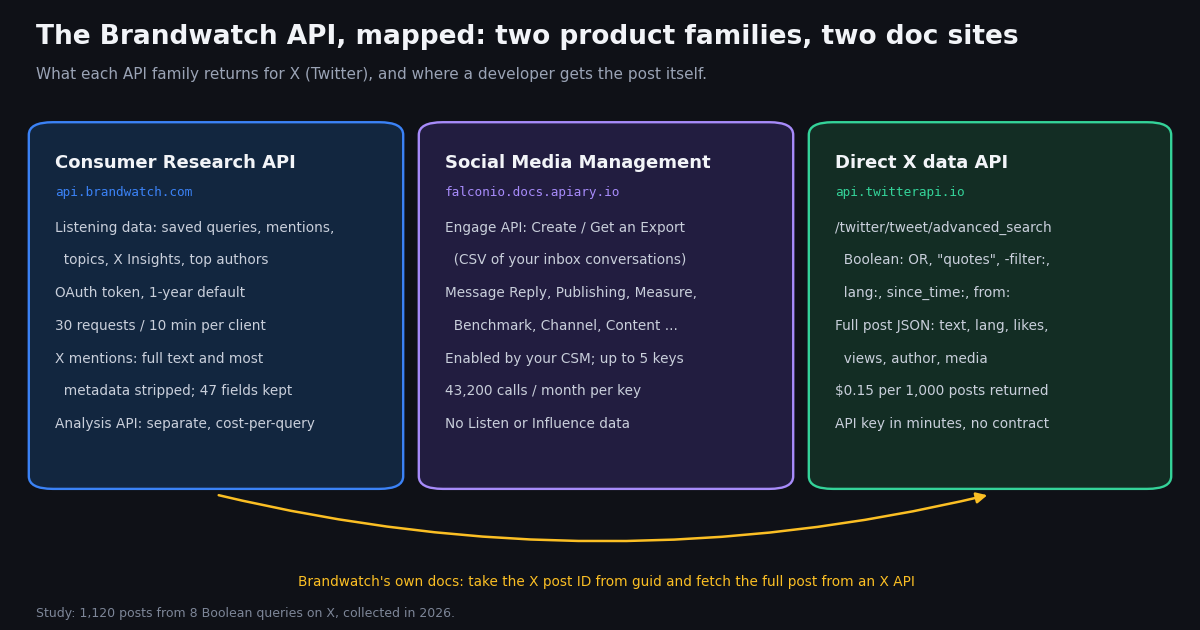
Brandwatch sells two product lines, and each has its own API family. Consumer Research, the listening product, has a REST API documented at developers.brandwatch.com. Social Media Management, the publishing, inbox and reporting suite, has a set of smaller APIs whose technical documentation still lives under the Falcon.io name on Apiary, at falconio.docs.apiary.io. The help center article "Where Can I Find Social Media Management API Documentation?" (social-media-management-help.brandwatch.com/en/articles/17449960) states that the official Social Media Management API documentation "is hosted by Apiary.io".
The split matters because the two families do not see each other's data. Brandwatch's Social Media Management API FAQ (social-media-management-help.brandwatch.com/en/articles/17506336) answers the question "Can I access Listen or Influence data using SMM APIs?" with: "Social Media Management APIs do not provide access to Listen or Influence data. To access this data: You need to use the Consumer Research API." So a search for "brandwatch api documentation" has two correct answers depending on which product your company bought.
The developer site also publishes a machine-readable index at developers.brandwatch.com/llms.txt, which is the fastest way to see every Consumer Research, Data Upload and Analysis API page in one list. The Engage API and the rest of the Social Media Management family do not appear in it.
The Brandwatch Consumer Research API: authentication, endpoints, rate limits and paging
Authentication. Brandwatch's Authentication page (developers.brandwatch.com/docs/authenticate) describes a single call: POST your username and password to https://api.brandwatch.com/oauth/token with grant_type=api-password and client_id=brandwatch-api-client. The response carries an access_token with expires_in: 31535999, and the page states that "the default for an API User is one year". You then send the token as Authorization: bearer <token> or as an access_token URL parameter. The same page warns: "Only \"Regular\" or \"Admin\" users will be able to access this API." This is the OAuth 2.0 resource-owner password pattern described in RFC 6749, which means the API acts as a named Brandwatch user, not as a separate app credential.
Data model. Everything hangs off a project. Inside a project you have saved queries (the Boolean searches built in the Consumer Research UI), query groups, tags, categories, rules and lists. Mentions are retrieved per query or query group with startDate and endDate, for example GET /projects/{projectId}/data/mentions?queryId=...&startDate=...&endDate=.... Aggregates live next to them: total mentions, topics, basic and multi-aggregate charts, top authors, and four X Insights endpoints (hashtags, emoticons, stories and mentioned authors) that power the X Insights component of the UI.
Rate limits. The Rate limiting page (developers.brandwatch.com/docs/rate-limiting) says: "The default rate limit is 30 API requests every 10 minutes", applied per client over a rolling window, with HTTP 429 Too Many Requests beyond it and two response headers, x-rate-limit (for example 30/10m) and x-rate-limit-used. The Best practices page adds that requests should be queued and run one after another rather than in parallel, and that a stream of mentions can reasonably be polled "once every 30 seconds". That is an average of one request every 20 seconds per client.
Paging. The Retrieving Mentions page sets pageSize from 1 to 5,000 and notes: "There is a limit of 10,000 mentions that can be retrieved using page and pageSize alone." Larger pulls use the cursor-style method in the tutorial Paging through historical Mentions, and continuous collection uses the Polling for Mentions tutorial, which orders by added and passes sinceAdded to fetch only what arrived since the last call.
Libraries. Brandwatch's Best practices page points to a Python utility library "developed and maintained by our Professional Services team": the BrandwatchLtd/bcr-api repository on GitHub, MIT-licensed, published on PyPI as bcr-api (version 1.5.1 at the time of writing). It wraps authentication, projects, queries and mention downloads.
The Analysis API is a separate purchase. The Analysis API, which runs on-demand queries against 24 hours of social data without creating a saved query, carries this note on its Getting Started page: "The Analysis API is not included in standard contracts, instead relying on a cost-per-query model."
# Brandwatch Consumer Research API, as documented at developers.brandwatch.com
# 1) exchange a Regular/Admin user's password for a 1-year bearer token
curl -X POST --data-urlencode 'password=YOUR_PASSWORD' \
  'https://api.brandwatch.com/oauth/token?username=you@company.com&grant_type=api-password&client_id=brandwatch-api-client'

# 2) read mentions for a saved query (30 requests per 10 minutes per client)
curl 'https://api.brandwatch.com/projects/PROJECT_ID/data/mentions?queryId=QUERY_ID&startDate=YYYY-MM-DD&endDate=YYYY-MM-DD&pageSize=100&page=0' \
-H 'Authorization: Bearer ACCESS_TOKEN'What the Consumer Research API returns for X (Twitter) posts, and how to get the rest
This is the part most Brandwatch API explainers skip. Brandwatch's Data Restrictions page (developers.brandwatch.com/docs/data-restrictions) opens with a warning that data packs on your account "may have restrictions on the Mention data that you can retrieve through the Consumer Research API", which "can cause discrepancies between the data seen in the UI of the Consumer Research application and the data retrieved via the API." The three affected sources are X, Online News and LinkedIn.
For X the wording is direct: "We are unable to provide the full metadata of Mentions from X due to data compliance. Any Mention that is a X post will have the full text and most of its metadata stripped out." The page then lists the 47 fields that survive. They are Brandwatch's own enrichments and routing fields (sentiment, categories, tags, classifications, gender, professions, interest, country, language, impact, impressions, reachEstimate, queryId, queryName and so on) plus guid, the post ID. The post text, author handle, like, repost and reply counts and media are not in that list.
Brandwatch's own recommendation is to rebuild the post yourself: "If you wish to include the full metadata in your own application, then we recommend registering a developer application within X portal. Get the Twitter ID from the guid field, and then using the X API to retrieve the full body of the post." The Social Media Management FAQ says the same for its Benchmark API: "For X (Twitter), only links are available instead of post text due to X (Twitter)'s data sharing restrictions."
In practice that means a Brandwatch-to-warehouse pipeline for X has two legs: Brandwatch for the query, classification and sentiment, and an X data source for the text, author and engagement. Any API that returns posts by ID works for the second leg. On the official X API, a post lookup is billed at $0.005 per post read on the pay-per-usage rate card (docs.x.com/x-api/getting-started/pricing). On TwitterAPI.io, /twitter/tweets takes a comma-separated tweet_ids list and costs 15 credits per post returned, which is $0.15 per 1,000 posts: hydrating 10,000 Brandwatch X mentions costs $1.50 here versus $50 on the X rate card, about 33 times less.
Online News and LinkedIn. The same page limits Online News mentions to "a snippet of 256 characters" and says LinkedIn post and comment downloads carry no snippet or full text "due to licensing restrictions". Plan for those gaps too if you export mixed-source queries.
import csv, os, requests

BASE = "https://api.twitterapi.io"
HEADERS = {"X-API-Key": os.environ["TWITTERAPI_IO_KEY"]}

def hydrate(guids):
    """Turn Brandwatch X mention guids (post IDs) back into full posts."""
    posts = {}
    for i in range(0, len(guids), 50):
        chunk = ",".join(str(g) for g in guids[i:i + 50])
        r = requests.get(f"{BASE}/twitter/tweets", headers=HEADERS,
                         params={"tweet_ids": chunk}, timeout=30)
        r.raise_for_status()
        for t in r.json().get("tweets", []):
            posts[t["id"]] = {
                "text": t["text"],
                "lang": t.get("lang"),
                "likes": t.get("likeCount", 0),
                "reposts": t.get("retweetCount", 0),
                "views": t.get("viewCount", 0),
                "author": t["author"]["userName"],
                "followers": t["author"].get("followers", 0),
            }
    return posts

# guids come from your Consumer Research mentions export (the guid column)
with open("brandwatch_x_mentions.csv") as f:
    guids = [row["guid"] for row in csv.DictReader(f)]
full = hydrate(guids)
print(len(full), "of", len(guids), "posts hydrated")The Brandwatch Engage API and the other Social Media Management APIs
The Engage API Introduction (social-media-management-help.brandwatch.com/en/articles/17449950) describes two endpoints. Create an Export takes a start and end date, the networks ("e.g. Facebook, Instagram, or X (Twitter)"), and the content types ("posts, comments, replies, and DMs"), optionally narrowed to specific channels by Channel UUID, and returns an export UUID. Get an Export takes that UUID and returns "a link to the CSV export of your specified Engage data." Channel UUIDs come from the Get Channels endpoint of the Channel API. LinkedIn data cannot be included "in order to remain compliant with LinkedIn's terms of service."
So the Engage API is an export of conversations that already reached your connected brand channels, aimed, in Brandwatch's words, at departments that collect customer service and sales inquiries across social media, web chat and email. It is not a search API: it does not find posts about your brand from accounts that never interacted with your channels. That is what the Consumer Research API (or a direct X search) is for. To answer messages programmatically, Brandwatch pairs it with the Message Reply API, which has one endpoint that replies with text to posts, comments and DMs on a conversation.
Access and limits. The SMM API FAQ states that "API access must be enabled by your Customer Success Manager (CSM) or Account Manager (AM)", after which "you can create up to five API keys in Settings > Integrations & APIs." Each key includes "Up to 43,200 API calls per month", so five keys give 216,000 calls a month. When a key reaches its limit, "you will not be able to make additional requests" until the next month. The FAQ also says more keys or higher limits are "not currently possible" by default, the Benchmark API "requires additional enablement", and Brandwatch does not provide technical support for building integrations, so you need your own developer.
Getting Engage data into Consumer Research. The FAQ describes the bridge: export Engage data with the API, transform it, and upload it into Consumer Research with the Data Upload API. That is a custom script you maintain.
Access, pricing and limits compared with a direct X data API
Brandwatch does not publish API prices in its developer documentation or in the help center articles we read for this page; access comes with a Consumer Research or Social Media Management contract, and the Analysis API is sold per query on top. Treat the Brandwatch API as part of a quote-only enterprise purchase, not as a metered developer product.
The pricing column for TwitterAPI.io is the pay-per-data rate: tweet endpoints cost 15 credits per post returned ($1 buys 100,000 credits), with a 15-credit minimum per request, so a search that finds nothing costs $0.00015. Purchased credits never expire, and new accounts that pass the automatic bot check get up to $1 of free credits (at most 100,000 credits, no card, one per person or network, expiring after 31 days). Monthly subscriptions start at Starter $29 and go up through Builder $99, Pro $199, Scale $499 and Business $1,499; see the pricing page for what each includes. Higher rate limits apply on Scale (50 requests/s) and Business (500), and up to 1,000 on request.
For comparison on the official side, X's pay-per-usage rate card (docs.x.com/x-api/getting-started/pricing) charges $0.005 per post read and $0.010 per user read, capped at 3 million post reads per monthly billing cycle, with Enterprise above that. Per 1,000 posts that is $5 on X versus $0.15 here, about 33 times more.
If your team already works inside Brandwatch's dashboards, classifiers and multi-network coverage, its APIs remain the way to get that enriched data out. The rest of this page is about the case where the job is X data itself.
What a Consumer-Research-style Boolean query returns on X: 1,120 posts measured
Consumer Research users write Boolean queries: OR lists of brand names and product lines, quoted phrases, exclusions and language filters. X search supports the same building blocks, so we ran four of them, each in two forms. The broad form is the OR core alone: (Duolingo OR "Duo the owl"), (LEGO OR #LEGO), (Adidas OR "Adidas Samba") and ("Formula 1" OR #F1). The refined form appends -filter:retweets -filter:replies lang:en. Each query pulled its newest 140 posts with queryType=Latest.
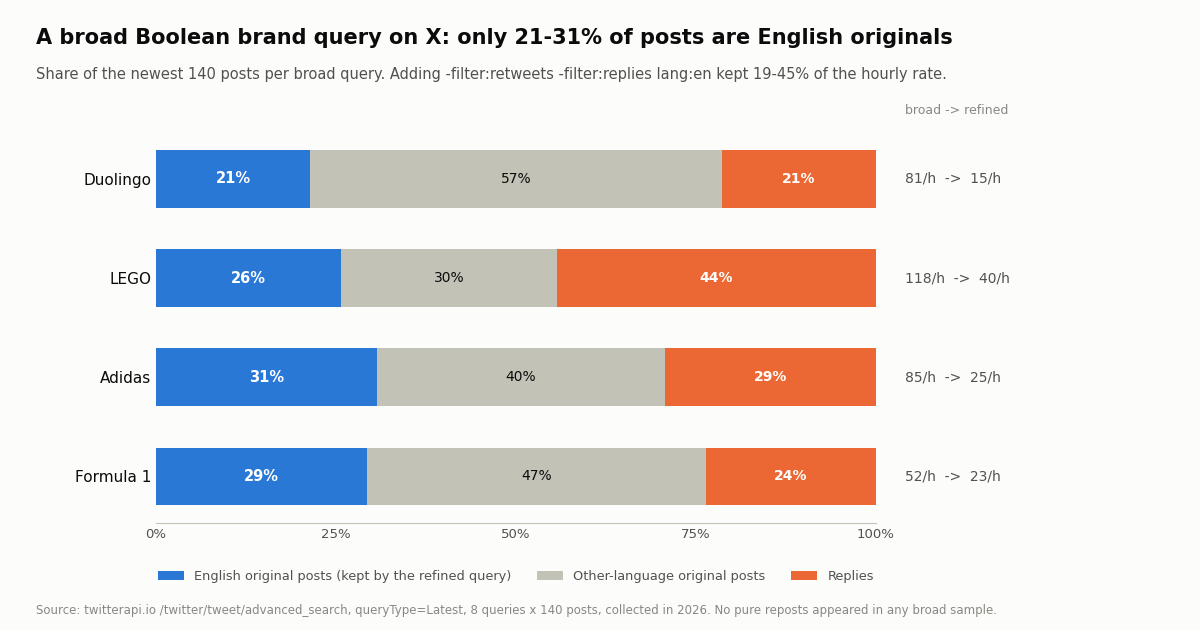
Most of a broad stream is not English original posts. Only 21.4% to 30.7% of each broad sample would survive all three refinements. Non-English posts were 44.3% to 67.9% of the samples, and replies were 21.4% (Duolingo) to 44.3% (LEGO). The Duolingo query was only 32.1% English, with Japanese at 25.7% and Portuguese at 17.1%; the Adidas sample spanned 13 language codes.
No pure reposts appeared. None of the 560 broad posts was a plain repost, so with queryType=Latest the -filter:retweets clause changed nothing in these samples; the language and reply filters did all the narrowing. Keep it in the query anyway if you want the intent to be explicit.
The refined stream is a fraction of the volume. The refined queries ran at 18.9% (Duolingo) to 44.7% (Formula 1) of the broad hourly rate. LEGO went from 118 posts an hour to 40.
For a developer this is the practical lesson from Brandwatch's own model: decide language and reply handling in the query, not afterward. A broad brand query pays for, stores and classifies two to four posts for every English original you keep.
Engagement on a brand stream: most posts get no likes, a few get most of them
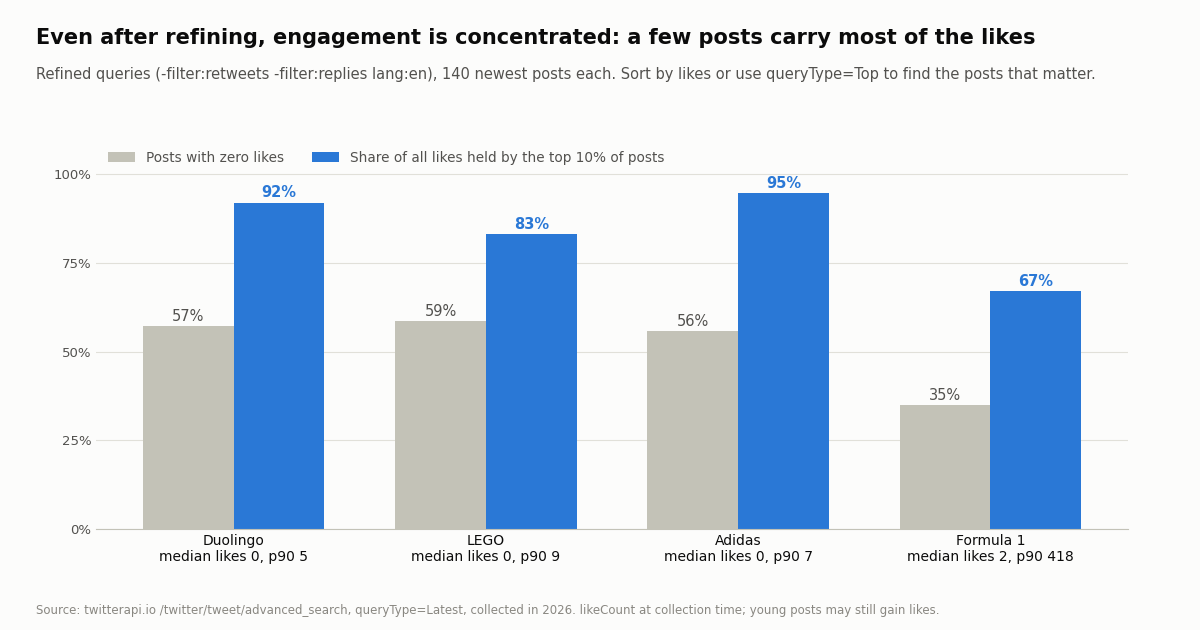
Listening dashboards sort by reach and engagement for a reason. In the refined samples, 35.0% (Formula 1) to 58.6% (LEGO) of posts had zero likes at collection time, and the top 10% of posts held 67.1% to 94.6% of all likes in their sample. The median refined post had 0 likes for Duolingo, LEGO and Adidas and 2 for Formula 1, while the 90th percentile ranged from 5 likes (Duolingo) to 418 (Formula 1).
Views follow the same shape. Median views per refined post were 63.5 for Duolingo, 30 for LEGO, 113 for Adidas and 129.5 for Formula 1. Because these are the newest posts, some will still gain engagement after collection; the numbers describe a live stream, not a settled archive.
Two ways to act on this when you query X directly. First, sort what you collect by likeCount or viewCount before a human looks at it, which is what a listening tool's "top mentions" panel does. Second, run the same query with queryType=Top when you only need the posts that are getting traction, and keep Latest for completeness and alerting. Both return the full post JSON, including author.followers, so you can rebuild a reach estimate yourself.
Running these queries yourself: cost per day, and when to use which API
At the measured hourly rates, collecting a full day of each query at 15 credits per post works out as follows. These are extrapolations from windows of about one to nine hours, so treat them as an order of magnitude; brand volume moves with news, launches and time of day.
The busiest query, broad LEGO, extrapolates to about 2,839 posts a day: $0.43 a day or $12.78 for 30 days at $0.15 per 1,000 posts, against $14.20 a day at X's $0.005 per post read. The refined form drops it to $0.14 a day. If you poll instead of paging a backlog, the floor for a check that finds nothing is $0.00015, so checking every 60 seconds for a month (43,200 checks) costs $6.48 even on a quiet query, and every 5 minutes costs $1.30.
Use the Brandwatch Consumer Research API when your analysts already build and maintain queries in Brandwatch, you need its classifiers, sentiment, demographics and multi-network sources in your warehouse, and 30 requests per 10 minutes is enough to move them. Plan the second leg for X text, since the API strips it.
Use the Engage API when the job is exporting your own inbox: conversations on the channels you manage, for a CRM, BI or quality-assurance tool.
Query X directly when the job is X posts themselves: full text, authors, engagement and media for a brand, topic or competitor query, at a per-call price and without a contract. The same Boolean building blocks work, as the study above shows, and the Python script on this page is the whole collector. For a broader build-versus-buy look at listening tools, see our social listening comparison; for the buyer decision on replacing Brandwatch, see the Brandwatch alternative page.
How we collected this
Question. What does a Consumer-Research-style Boolean query return on X, and how much does each refinement change it: volume per hour, the share of reposts, replies and non-English posts, the language mix, the engagement distribution and the cost of a day of collection.
Queries. Four brand and topic cores used as neutral demo terms: (Duolingo OR "Duo the owl"), (LEGO OR #LEGO), (Adidas OR "Adidas Samba") and ("Formula 1" OR #F1). Each was run broad (core only) and refined (core plus -filter:retweets -filter:replies lang:en) on /twitter/tweet/advanced_search with queryType=Latest.
Window and sample. The newest posts at collection time, in 2026: 7 pages of 20 per query, 1,120 posts in 56 requests, costing $0.168 in credits. The broad windows spanned 1.2 to 2.7 hours and the refined ones 3.5 to 9.2 hours. Posts per hour is posts collected divided by the hours between the oldest and newest post; per-day figures multiply that by 24.
What the sample cannot show. A few hours of the newest posts are a snapshot, not a daily or weekly average; volume swings with news and time zones. Engagement counts were read at collection time, so young posts are undercounted. We did not query Brandwatch itself (its API requires a contract), so every Brandwatch statement on this page comes from its published documentation rather than from a test call. Language codes are X's own lang field.
Privacy. Aggregates only. Raw search pages stayed on the collection machine and were deleted after analysis; the committed sample has one de-identified row per post (query, form, minutes before the newest post, kind, language, counts, media flag) with no IDs, URLs, text or handles. Brands are used as demo terms; nothing here describes who posts about them.
"""Run Brandwatch-style Boolean queries against X and measure what comes back."""
import os
from collections import Counter

import requests

BASE = "https://api.twitterapi.io"
HEADERS = {"X-API-Key": os.environ["TWITTERAPI_IO_KEY"]}
REFINE = " -filter:retweets -filter:replies lang:en"
QUERIES = {
    "duolingo": '(Duolingo OR "Duo the owl")',
    "f1": '("Formula 1" OR #F1)',
}


def search(query, max_pages=5, query_type="Latest"):
    """Page through /twitter/tweet/advanced_search, following next_cursor."""
    posts, cursor = [], ""
    for _ in range(max_pages):
        r = requests.get(f"{BASE}/twitter/tweet/advanced_search", headers=HEADERS,
                         params={"query": query, "queryType": query_type, "cursor": cursor},
                         timeout=30)
        r.raise_for_status()
        body = r.json()
        posts.extend(body.get("tweets", []))
        if not body.get("has_next_page"):
            break
        cursor = body.get("next_cursor", "")
    return posts


def profile(posts):
    n = len(posts) or 1
    likes = sorted((p.get("likeCount", 0) for p in posts), reverse=True)
    top = likes[: max(1, n // 10)]
    return {
        "posts": len(posts),
        "replies_pct": round(100 * sum(1 for p in posts if p.get("isReply")) / n, 1),
        "non_english_pct": round(100 * sum(1 for p in posts if p.get("lang") != "en") / n, 1),
        "languages": Counter(p.get("lang") for p in posts).most_common(3),
        "zero_like_pct": round(100 * sum(1 for x in likes if x == 0) / n, 1),
        "top10_like_share_pct": round(100 * sum(top) / (sum(likes) or 1), 1),
        "cost_usd": round(len(posts) * 15 / 100_000, 4),  # 15 credits per post returned
    }


for name, core in QUERIES.items():
    for form, q in (("broad", core), ("refined", core + REFINE)):
        stats = profile(search(q))
        print(name, form, stats)

# Top posts by likes for the refined Formula 1 query
best = sorted(search(QUERIES["f1"] + REFINE, max_pages=2),
              key=lambda p: p.get("likeCount", 0), reverse=True)[:5]
for p in best:
    print(p["likeCount"], p["author"]["userName"], p["text"][:80].replace("\n", " "))
Questions readers ask
Where is the Brandwatch API documentation?
There are two sites. The Consumer Research API, the Data Upload API and the Analysis API are documented at developers.brandwatch.com (with a full page index at developers.brandwatch.com/llms.txt). The Social Media Management APIs, including the Engage API, are documented on Apiary at falconio.docs.apiary.io, as Brandwatch's help center article "Where Can I Find Social Media Management API Documentation?" states.
What is the difference between the Brandwatch Consumer Research API and the Engage API?
The Consumer Research API reads listening data: mentions of your saved Boolean queries from across the web and social networks, plus topics, charts, X Insights and top authors. The Engage API exports conversations from your own connected channels (posts, comments, replies and DMs) as a CSV through two endpoints, Create an Export and Get an Export. Brandwatch's FAQ says Social Media Management APIs do not provide Listen or Influence data; for that you need the Consumer Research API.
How do I get access to the Brandwatch API?
Through a Brandwatch contract. For Consumer Research, the Authentication page says only Regular or Admin users can access the API; you exchange that user's password for a token at api.brandwatch.com/oauth/token. For Social Media Management, API access must be enabled by your Customer Success Manager or Account Manager, after which you can create up to five API keys in Settings > Integrations & APIs. There is no self-serve developer sign-up.
What are the Brandwatch API rate limits?
The Consumer Research API allows 30 requests every 10 minutes per client over a rolling window and returns HTTP 429 beyond that, with x-rate-limit and x-rate-limit-used headers. Social Media Management API keys include up to 43,200 calls a month each, or 216,000 a month across the maximum of five keys. Brandwatch says higher limits are not available by default; ask your account manager.
Does the Brandwatch API return the text of X (Twitter) posts?
No. Brandwatch's Data Restrictions page says any mention that is an X post "will have the full text and most of its metadata stripped out" in Consumer Research API responses, and lists the 47 fields that remain, including guid, the post ID. Brandwatch recommends fetching the full post by that ID from an X API. On TwitterAPI.io, /twitter/tweets with tweet_ids does that at $0.15 per 1,000 posts.
How much does the Brandwatch API cost?
Brandwatch does not publish API prices in its developer documentation or help center; API access is part of a quote-based Consumer Research or Social Media Management contract. The Analysis API is "not included in standard contracts" and is sold on a cost-per-query model. For X data alone, a pay-per-data API costs $0.15 per 1,000 posts returned, and X's own pay-per-usage rate card is $0.005 per post read.
Can I run Brandwatch-style Boolean queries on X without Brandwatch?
Yes for X. /twitter/tweet/advanced_search accepts X search operators: OR, quoted phrases, hashtags, exclusions with a minus sign, -filter:retweets, -filter:replies, lang:, from: and since_time:/until_time:. In our 2026 test of four broad brand queries, adding -filter:replies lang:en kept 19-45% of the hourly volume. You do not get Brandwatch's classifiers or other networks, so add your own sentiment step if you need it.
Is there a Python library for the Brandwatch API?
Brandwatch's Best practices page points to bcr-api, a Python utility library maintained by its Professional Services team (GitHub BrandwatchLtd/bcr-api, MIT license, on PyPI). It covers authentication, projects, queries and mention downloads for the Consumer Research API. The Social Media Management APIs are plain REST calls with an API key.
Continue
- X developer docs: pay-per-usage pricing ($0.005 per post read, 3M post-read monthly cap)
- X developer docs: building a search query (operators and Boolean logic)
- TwitterAPI.io docs: advanced search (query, queryType, cursor, up to 20 per page)
- GitHub: igorbrigadir/twitter-advanced-search, community reference of X search operators
- RFC 6749: OAuth 2.0, including the resource owner password credentials grant
- TwitterAPI.io docs: introduction and authentication with X-API-Key
- Twitter (X) API hub: endpoints, pricing and docs
- Brandwatch alternative for X-only listening: volume and cost
- Social listening on the X (Twitter) API: build vs buy
- Twitter (X) search operators reference for API queries
- Sentiment analysis on Twitter (X) posts
- Sprout Social API explained for X data
- Keyword alerts on Twitter (X): developer guide
- Pay-per-post pricing and subscriptions
- TwitterAPI.io API documentation
- 01TweetGrok Twitter (X) Viewer: What It Is, Whether It Works, and Safer Options
- 02Is X.com (Twitter) Down Right Now, or Is It Just You?
- 03A Meltwater Alternative for Teams That Mainly Need X (Twitter) Mentions
- 04Sprout Social API in 2026: What It Returns, What It Costs, and Where Twitter (X) Data Runs Out
- 05Upload-Post Alternative for Twitter (X): Post, Read and Search From One API
- 06A Brandwatch Alternative for Teams That Only Need X (Twitter) Data
- 07Zernio Alternative for Twitter (X) Data: Pricing, API Scope and Real Workload Costs
- 08Syften Alternative for Twitter (X) Keyword Alerts: The $40 Add-On vs Pay-Per-Tweet
Stop reading. Start building.
Starter credits cover real testing on real data. Google sign-in, no card, no application queue.
Get an API key