TweetGrok Twitter (X) Viewer: What It Is, Whether It Works, and Safer Options
First, the name: TweetGrok is not Grok. Grok is the AI assistant built by xAI and built into X; TweetGrok is an unrelated third-party site at tweetgrok.ai that borrowed the word. This page is the consumer check on that one brand: what TweetGrok is, whether its Twitter viewer works, and what to use when it does not. If you want a broader comparison of anonymous viewer sites, our Twitter web viewer roundup covers the category; if you are a developer who wants to build your own viewer, the Twitter (X) viewer API developer guide covers that end to end.
Search interest in "tweetgrok" has climbed every month this year (Google Ads keyword data), mostly from people who want to read X without an account. So instead of repeating the site's claims or the directory listings that copy them, we loaded the site, read the code its viewer page runs, probed its backend and logged-out x.com from our own network, and pulled recent posts, replies and pinned posts from 12 public organization and public-figure accounts to measure what a viewer page actually has to show.
What is TweetGrok (and is it related to xAI's Grok)?
TweetGrok is a Twitter tools site at tweetgrok.ai. Its homepage leads with an "AI Tweet Generator - Twitter ChatGPT Assistant" offered as Chrome and Edge extensions, and its menu lists about twenty tools: a Twitter viewer and a Bluesky viewer, video, image and GIF downloaders, AI, funny, fake-tweet and name generators, a font generator, a character counter, a shadowban checker, an advanced search page, a card validator, a follower tracker, a screenshot generator and a mass tweet deleter. The footer reads "Copyright 2026 TWEET GROK AI" and the contact page lists a Singapore street address.
It is not Grok. Grok is xAI's assistant; xAI's developer documentation at docs.x.ai now carries the SpaceXSI name. TweetGrok's own homepage FAQ explains xAI's Grok as a separate product and describes "Tweet Grok" as a project name chosen "after xAI debuts". The same FAQ also contains the phrase "As part of the xAI project", but the site shows no partnership, license or endorsement, and nothing we found connects it to xAI. Treat it as an independent tools site whose name rides on Grok's.
Where the viewer lives. The viewer page at tweetgrok.ai/twitter-viewer is a separate web app: its code and its data requests are served from easycomment.ai, whose homepage describes an AI social-media commenting product. Every handle or post link you enter in the TweetGrok viewer is sent to that host.
What else is on the site. The sitemap lists 104 pages, including AI tweet tools, a tweet deleter, dozens of how-to articles (23 of them with romanized-Japanese addresses) and a "5 Best Sites to Buy Twitter Followers" listicle. Directory sites describe paid TweetGrok plans; we found no prices on tweetgrok.ai itself, so we cannot confirm them.
Does the TweetGrok Twitter viewer work? Our first-hand check
We checked the site from our own network in 2026 with plain HTTP requests and no cookies, then read the JavaScript its viewer page loads. Here is what each step returned.
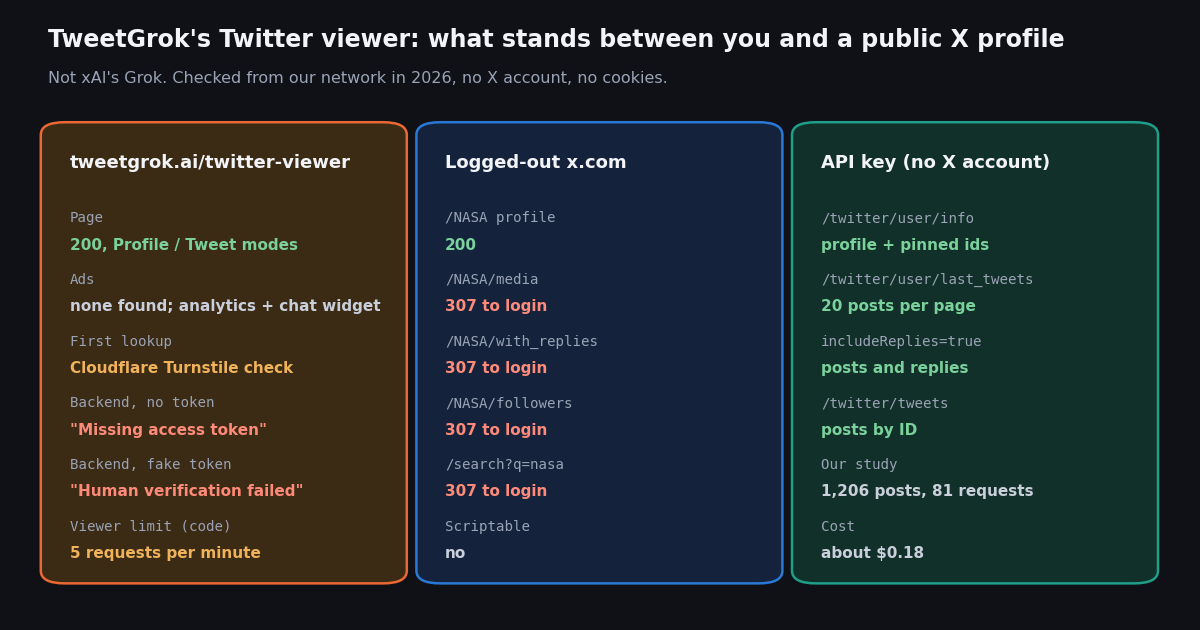
The human check is the gate. The viewer's code sends each lookup (profile, posts, single post) as a POST request to easycomment.ai with either a Cloudflare Turnstile token or a signature it saved after a previous check. Turnstile is Cloudflare's CAPTCHA-free check: it usually runs quietly in your browser and only sometimes shows a checkbox. Without a valid token the backend returns the error messages in the table above, so nothing loads.
There is a speed limit. The page code contains the message "Max 5 requests per minute. Please wait a moment before trying again." Opening a profile, loading older posts and opening a thread each count, so five lookups a minute goes quickly when you are browsing.
What the error messages mean for you. "Please complete the verification to continue" or "Verification failed" means the Turnstile check did not complete; reload the page, or try a private window. "Signature expired. Please verify again" means your saved check has timed out. Strict content blockers that stop Cloudflare's challenge script will keep the viewer from loading anything. "Max 5 requests per minute" is the site's own limit, not a problem with the account you looked up.
What we could not verify. Because the backend only answers browsers that pass the human check, we could not complete a lookup from a headless session, so we cannot vouch for how fresh or complete its results are on a given day. We describe what it offers from the page and the code it ships, not from a screenshot of a result.
What TweetGrok shows vs what logged-out x.com shows
Viewers exist because x.com shows less to people who are not signed in. We requested the main routes of a large public account (NASA) from the same network, with no cookies.
What the viewer promises. The page says you can browse a profile or a single post, read a complete thread on one page, and export posts, threads, images and videos to your device. Its FAQ says private (protected) accounts cannot be viewed, which is true of every third-party viewer: protected posts are visible only to approved followers.
What it does not do. There is no follower list, no Spaces, and no history beyond what the backend pages back through. It does not tell you who viewed a profile, and it does not notify the account owner that you looked. X does not publish profile visitors either; our page on whether X shows who viewed your profile covers what owners can see.
Handles move. In our check, the handle @xai answered with a protected profile, zero posts and the bio "Now at @SpaceXAI", and @SpaceXAI returned "user not found". A viewer can only show what the handle points to today; if a brand renames, the old handle can be empty or private.
What a viewer page actually has to show: 12 public accounts
A viewer's first screen is one page of recent posts. To measure what that page contains, we pulled the newest 40 posts (replies excluded, the default profile view), the newest 60 items with replies included (the tab logged-out x.com locks), the profile and any pinned post for 12 public organization and public-figure accounts: 1,206 posts in total, collected in 2026.
The newest post is fresh. The newest post was a median 6.2 hours old, and 11 of 12 accounts had posted within the past day, from 12 minutes on @Reuters to 5.5 days on @NASAWebb. A viewer that loads at all will usually show something recent.
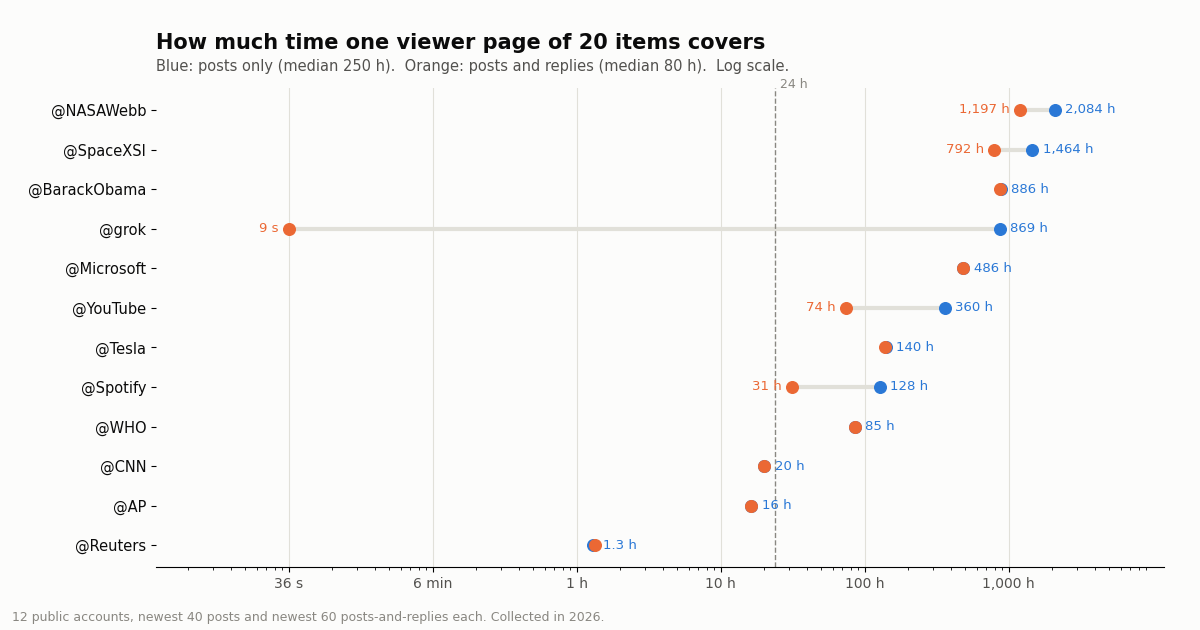
One page reaches back a long way, or almost not at all. The newest 20 posts spanned a median 250 hours (10.4 days): 1.3 hours on @Reuters, 86.8 days on @NASAWebb. Only 3 of 12 accounts filled a page in under a day, so on most accounts the first screen already covers several days.
Replies change the picture. With replies included, the median page span dropped to 80 hours. On @grok, xAI's assistant account, which answers people who tag it, every one of the 60 items was a reply, and 20 of them were posted within 9 seconds; its lifetime post count was 142,671,923. A viewer that shows replies would show a firehose on accounts like that, and one that hides them would show an account that looks quiet.
Media and reposts. 56.9% of the 480 posts carried a photo, video or GIF, and 22.5% carried video, which is why viewers bundle export buttons. 23.3% were reposts of another account (@Microsoft: 77.5%), and 21.9% carried a link card, mostly news accounts linking to articles (@Reuters: 87.5%).
Pinned posts are rare and can be old. Only 4 of 12 accounts had a pinned post. Its age ranged from 1.3 days (@WHO) to 82.4 days (@NASAWebb), so a viewer that puts the pinned post first can make an active account look stale.
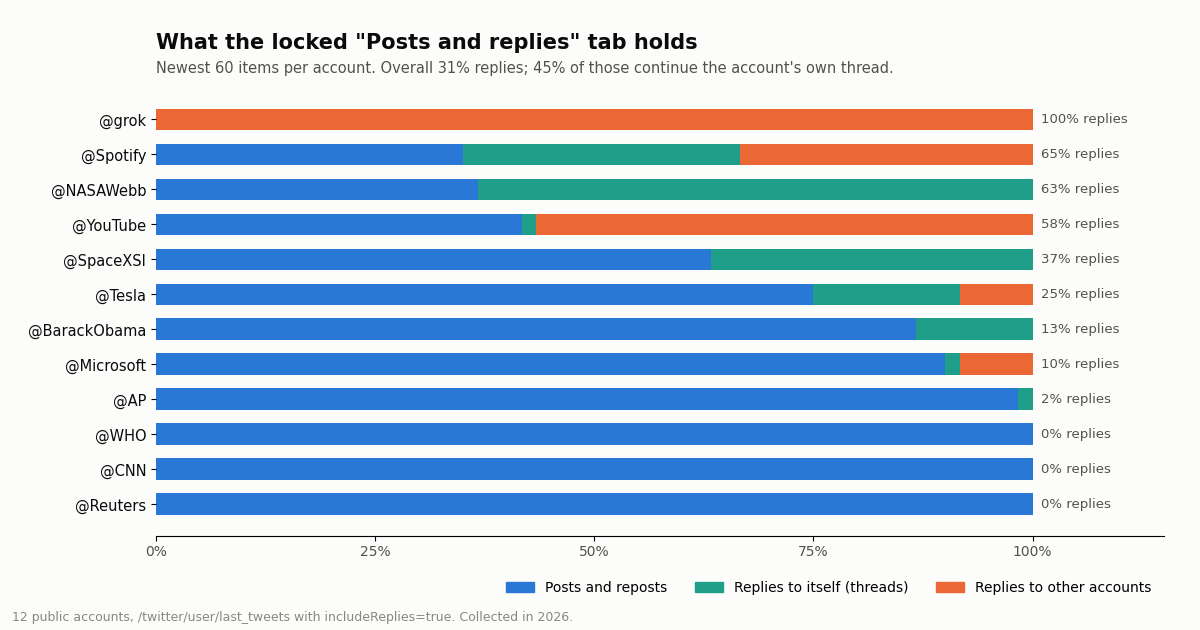
Threads fill much of the locked tab. TweetGrok markets thread unrolling, and the data shows why that matters. Across the 720 posts-and-replies items, 31.1% were replies, and 44.6% of those replies were the account replying to itself, which is how X threads are built.
Some accounts publish mostly in threads. On @NASAWebb, 63% of the feed was replies and all of them continued its own threads; @BarackObama and @SpaceXSI also replied only to themselves. On a logged-out profile page those follow-up posts are invisible, so you see the first post of a thread and miss the rest.
Brand accounts reply to people. On @YouTube, 58% of the feed was replies and almost all went to other accounts; @Spotify was 65% replies, split between its own threads and other accounts. News wires barely reply at all: @Reuters, @CNN and @WHO had 0%.
What this means for you. If you want to read a thread, open it by the post link (TweetGrok's Tweet mode, or the post's own x.com page, which loads without login). If you want an account's conversations, you need the replies feed, which logged-out x.com locks and which most viewers do not offer. Our guide to unrolling a Twitter thread covers the thread case in more detail.
Is TweetGrok safe to use?
Safe enough for casually reading public posts, with the usual caveats for any third-party site. Here is what we found on the page and in the site's own policies.
No X login. The viewer never asks for your X username or password, and you do not need a TweetGrok account to use it. Never type X credentials into any viewer or downloader site; a legitimate viewer has no reason to ask for them. Be more careful with browser extensions from any tools site: an extension that runs on x.com can see what you see while signed in.
Ads and trackers. We found no display ad code on the viewer page, which matches its "Completely Free & Ad-Free" claim. It does load Google Analytics, a Crisp live-chat widget, Cloudflare Turnstile, a device-identification script from the site's tool-platform provider and a third-party slider-captcha script.
Privacy claims vs privacy policy. The viewer's FAQ says your IP, location and browsing activity "remain private and are never shared or stored". The site's privacy policy, linked from the same footer, is a general analytics-company policy: it says server logs record IP address, date and time and browser type, and it describes cookie IDs and mobile advertising identifiers. Read the FAQ line generously and assume the handles you look up are logged with your IP address.
Ratings and testimonials. The page shows a 4.9 rating from 3,798 votes and three named testimonials. We could not verify either; treat them as marketing.
Accuracy and downloads. A viewer can lag, miss posts or fail silently when its data source is throttled. For anything that matters, open the post on x.com or fetch it from a source you can cite. Media you export is still someone else's work; download only what you own or have permission to use.
TweetGrok not working? Alternatives that work without logging in
Viewer and mirror sites come and go. Our xcancel alternatives check found xcancel.com suspended with HTTP 451, and our Snaplytics check found the same Cloudflare-gated pattern as TweetGrok. These are the options that held up.
X's own embed endpoint. X documents a public oEmbed endpoint at publish.x.com/oembed that needs no authentication. In our check it returned HTTP 200 and an embeddable blockquote for a public WHO post. It is the most official no-login way to show one post.
Our no-login tools. For specific jobs, our free tools need no X account: the Twitter video downloader saves a post's video, the account age checker and Twitter ID finder look up a profile, the shadowban check tests search visibility, and the follow checker tests whether one account follows another.
Other viewer brands. We also tested Snaplytics, Twillot and the general "Twitter web viewer" sites; see the sibling pages linked below. They share the same structural weakness: someone else's server, someone else's limits, and no guarantee of tomorrow.
If you came here for Grok. If you were actually looking for xAI's Grok, it lives inside X and at xAI's own site; for developers, our Grok API key guide covers access and pricing.
Read public X posts with an API key instead of a viewer site
If you keep returning to a viewer to check the same accounts, a short script is more reliable than any site. twitterapi.io reads public X data over a REST API: no X account, no human check per lookup, no 5-per-minute cap, and results in JSON you can save. The full example at the end of this page prints a TweetGrok-style profile card, the pinned post and the newest posts with media links.
The calls behind a viewer. /twitter/user/info returns the profile (bio, followers, statusesCount, mediaCount, protected, pinnedTweetIds). /twitter/user/last_tweets returns 20 posts per page, newest first, with has_next_page and next_cursor for older pages; add includeReplies=true for the posts-and-replies feed. /twitter/tweets fetches posts by ID, which is how the pinned post is loaded.
Fields a viewer can display. Every post carries viewCount, likeCount, retweetCount, replyCount, quoteCount and bookmarkCount; in our sample every original post had a view count. Media sits under extendedEntities.media with photo URLs and video variants.
Protected accounts stay protected. The API returns only public data. If protected is true, the script stops, because posts from protected accounts are visible only to approved followers.
import os
import requests

BASE = "https://api.twitterapi.io"
HEADERS = {"X-API-Key": os.environ["TWITTERAPI_IO_KEY"]}

# The "Posts and replies" tab that logged-out x.com sends to the login page.
r = requests.get(f"{BASE}/twitter/user/last_tweets", headers=HEADERS,
                 params={"userName": "NASAWebb", "includeReplies": "true"}, timeout=30)
r.raise_for_status()
body = r.json()
for t in body["data"]["tweets"]:
    kind = "reply" if t.get("isReply") else "post"
    print(kind, t["createdAt"], t.get("inReplyToUsername") or "", t["url"])
print("older page cursor:", body["next_cursor"] if body.get("has_next_page") else None)
What an API key costs compared with the official X API
A viewer site is free to you; an API costs money, but less than people expect for personal use. Here is one "viewer check", meaning one profile plus its 20 newest posts, at each provider's published per-unit price.
The ratio. Per 1,000 posts, X's pay-per-usage rate card (docs.x.com/x-api/getting-started/pricing) works out to $5.00 against $0.15 on twitterapi.io, roughly 33x. X's pay-per-usage tier is capped at 3 million post reads a month, with Enterprise above that.
What our study cost. The whole 12-account study returned 1,206 posts and 13 profiles over 81 requests, about $0.18 in total. A request that finds nothing still costs the 15-credit minimum ($0.00015).
Getting started. New accounts that pass the automatic bot check get up to $1 of free credits (at most 100,000 credits, no card, one per person or network, expiring after 31 days). Before the first payment the rate limit is 0.2 requests per second, which is enough for checking a handful of accounts; it rises to 20 once you have paid. Subscriptions start at Starter $29 a month; see the pricing page.
How we collected this
Question. When someone opens a public X account in a no-login viewer such as TweetGrok's, what data is there to show and how fresh is it: how old is the newest post, how much time does one page cover with and without replies, how much of the feed is replies and threads, how often is there a pinned post, and how much is media?
Accounts. 12 public organization and public-figure accounts: Reuters, AP, CNN, WHO, Microsoft, Tesla, grok, SpaceXSI, YouTube, Spotify, NASAWebb and BarackObama. We also checked the handles xai and SpaceXAI, which returned a protected empty profile and "user not found".
Method and sample. Per account: one /twitter/user/info call, two pages of /twitter/user/last_tweets (replies excluded, 40 posts) and three pages with includeReplies=true (60 items), plus one /twitter/tweets call for the 4 pinned posts. 1,206 posts and 81 requests in total, collected in 2026. Site checks on TweetGrok, its backend and x.com were plain HTTP requests from our network with no cookies.
What this cannot show. The study measures what the public data contains, not what TweetGrok rendered on a given day: its human check stopped us from completing a lookup headless. 12 large accounts are not a random sample; quieter accounts will show older newest posts and longer page spans.
Privacy. Aggregates only, organization and public-figure accounts only. Reply targets are not analyzed or named, and the raw replies feeds were not kept in our study folder because replies can be addressed to private individuals. The de-identified sample keeps post type, media type, age and counts, no text, IDs or handles of other accounts.
"""A no-login viewer for one public X account, built on an API key instead of a viewer site.

Prints the profile card, the pinned post, and the newest posts (optionally with replies),
the same things TweetGrok's Twitter viewer shows, with no human check per lookup.
No X account is needed. Cost: 18 credits per profile, 15 credits per post returned.
"""
import os
import sys
import requests

BASE = "https://api.twitterapi.io"
HEADERS = {"X-API-Key": os.environ["TWITTERAPI_IO_KEY"]}


def profile(user_name):
    r = requests.get(f"{BASE}/twitter/user/info", headers=HEADERS,
                     params={"userName": user_name}, timeout=30)
    r.raise_for_status()
    body = r.json()
    if body.get("status") == "error" or not body.get("data"):
        sys.exit(f"lookup failed: {body.get('msg')}")  # e.g. "user not found"
    return body["data"]


def pinned_posts(ids):
    if not ids:
        return []
    r = requests.get(f"{BASE}/twitter/tweets", headers=HEADERS,
                     params={"tweet_ids": ",".join(ids)}, timeout=30)
    r.raise_for_status()
    return r.json().get("tweets", [])


def timeline(user_name, pages=1, include_replies=False):
    cursor = ""
    for _ in range(pages):
        params = {"userName": user_name, "cursor": cursor}
        if include_replies:
            params["includeReplies"] = "true"
        r = requests.get(f"{BASE}/twitter/user/last_tweets", headers=HEADERS,
                         params=params, timeout=30)
        r.raise_for_status()
        body = r.json()
        for t in body["data"]["tweets"]:
            yield t
        if not body.get("has_next_page"):
            break
        cursor = body["next_cursor"]


def media_links(t):
    src = t.get("retweeted_tweet") or t
    out = []
    for m in (src.get("extendedEntities") or {}).get("media", []):
        if m.get("type") == "photo":
            out.append(m["media_url_https"])
        else:  # video or animated_gif: highest-bitrate mp4 variant
            mp4 = [v for v in m.get("video_info", {}).get("variants", [])
                   if v.get("content_type") == "video/mp4"]
            if mp4:
                out.append(max(mp4, key=lambda v: v.get("bitrate", 0))["url"])
    return out


def show(t):
    kind = "repost" if t.get("retweeted_tweet") else ("reply" if t.get("isReply") else "post")
    print(f"\n[{kind}] {t['createdAt']}  views={t.get('viewCount')}  "
          f"likes={t['likeCount']}  bookmarks={t.get('bookmarkCount')}")
    print(t["text"][:200])
    for link in media_links(t):
        print("  media:", link)
    print("  ", t["url"])


if __name__ == "__main__":
    name = sys.argv[1] if len(sys.argv) > 1 else "NASAWebb"
    with_replies = "--replies" in sys.argv
    p = profile(name)
    if p.get("protected"):
        sys.exit("protected account: posts are visible only to approved followers")
    print(f"{p['name']} (@{p['userName']})  followers={p['followers']:,}  "
          f"posts={p['statusesCount']:,}  media={p.get('mediaCount')}")
    print(p.get("description", ""))
    for t in pinned_posts(p.get("pinnedTweetIds") or []):
        print("\nPINNED:")
        show(t)
    for t in timeline(name, pages=1, include_replies=with_replies):
        show(t)
Questions readers ask
Is TweetGrok the same as Grok?
No. Grok is xAI's AI assistant, built into X. TweetGrok is an independent third-party site at tweetgrok.ai that sells AI tweet-writing extensions and hosts free Twitter tools, including a no-login viewer. Its own FAQ explains xAI's Grok as a separate product, and we found no evidence of any partnership with xAI.
What is TweetGrok AI?
TweetGrok AI is the name the site uses for its AI tweet generator, offered as Chrome and Edge extensions, plus web tools such as a Twitter viewer, a Bluesky viewer, media downloaders, fake and funny tweet generators, a shadowban checker and a mass tweet deleter.
Does the TweetGrok Twitter viewer still work?
When we checked it in 2026 the viewer page loaded, but its backend refuses every lookup that has not passed a Cloudflare Turnstile human check, and the page code limits lookups to 5 per minute. We could not complete a lookup from a headless session, so we cannot vouch for result freshness on a given day.
Why is TweetGrok not working?
The most common causes are the human check and the speed limit. "Verification failed" or "Please complete the verification" means the Cloudflare check did not complete: reload or use a private window, and allow Cloudflare's challenge script. "Max 5 requests per minute" means wait a minute. A protected or renamed account will also show nothing.
Is TweetGrok safe?
It does not ask for your X login, and we found no display ads on the viewer page. It does load Google Analytics, a live-chat widget and a device-identification script, and every handle you enter goes to the operator's server. Its privacy policy says server logs record IP address, time and browser type. Fine for casual reading of public posts; never enter X credentials into any viewer site.
Can TweetGrok see private (protected) X accounts?
No. Its own FAQ says private accounts cannot be accessed, and posts from protected accounts are visible only to approved followers. No third-party viewer can show them.
Does the account owner know I viewed their profile through TweetGrok?
X does not show anyone a list of profile visitors, and a third-party viewer does not notify the owner. That is not a license to monitor private individuals: X's rules on targeted harassment still apply to what you do with what you see.
What is the best TweetGrok alternative?
It depends on the job. For one post, X's own oEmbed endpoint works without authentication, and single post pages load on x.com without login. For single tasks, our free tools need no X account. For repeat checks, replies or search, an API key is the reliable option: twitterapi.io reads public data at $0.15 per 1,000 tweets with no X account.
Continue
- X API pay-per-usage pricing (docs.x.com): post and user read prices, 3M monthly cap
- X oEmbed API (docs.x.com): publish.x.com/oembed, no authentication
- Cloudflare Turnstile documentation: how the human check works
- xAI developer documentation for Grok (docs.x.ai), now branded SpaceXSI
- twitterapi.io docs: GET /twitter/user/last_tweets (includeReplies)
- twitterapi.io docs: GET /twitter/tweets (posts by ID)
- Twitter (X) API overview: the hub for reading X data
- Twitter web viewer sites tested
- Twitter (X) viewer API: build your own read-only viewer
- Snaplytics Twitter viewer: what it is and whether it works
- xcancel alternatives that still work
- How to unroll a Twitter thread
- How to get a Grok API key (xAI's Grok, not TweetGrok)
- Does X show who viewed your profile?
- Free Twitter (X) video downloader, no login
- All free no-login Twitter (X) tools
- twitterapi.io pay-per-result pricing
- 01Is X.com (Twitter) Down Right Now, or Is It Just You?
- 02Brandwatch API Explained: Consumer Research vs Engage, Access, and What You Get for Twitter (X)
- 03A Meltwater Alternative for Teams That Mainly Need X (Twitter) Mentions
- 04Sprout Social API in 2026: What It Returns, What It Costs, and Where Twitter (X) Data Runs Out
- 05Upload-Post Alternative for Twitter (X): Post, Read and Search From One API
- 06Twitter (X) Monitoring Tools — Developer-Focused Comparison
- 07OpenClaw Twitter (X) Skill: Connect Your Agent to X Data
- 08Twitter (X) Analytics Free — What's Actually $0 in 2026?
Stop reading. Start building.
Starter credits cover real testing on real data. Google sign-in, no card, no application queue.
Get an API key