A Brandwatch Alternative for Teams That Only Need X (Twitter) Data
Most "Brandwatch alternative" lists are nine more suites with the same shape: many networks, dashboards, a sales call, a quote. That is a fair answer if you need all of it. This page is for a narrower reader: the team whose listening question is really an X (Twitter) question (what is being said about our brand, our product or our competitor on X, right now, and is it spiking) and that has, or can borrow, a developer.
For that reader the honest alternative is not another suite. It is a data API plus about 150 lines of code that you own. The trade is explicit: you give up the cross-network coverage, the historical archive and the finished dashboards, and you get raw JSON at a published per-post price, a key in minutes instead of a sales cycle, and complete control over filtering, classification and alerting.
To make the comparison concrete rather than rhetorical, we ran the pipeline's core query for five well-known consumer brand terms in 2026, pulled the newest 300 posts each (1,500 posts, 75 requests, $0.225 in API reads), and measured how much volume a brand term actually produces, what kind of posts it returns, and what a day and a month of it cost to collect. Those numbers, not list prices, decide whether this route fits you.
What Brandwatch is, and who should still buy it
Brandwatch is an enterprise consumer-intelligence and social media management suite, now part of Cision. Its pricing page (brandwatch.com/pricing) is explicit about the model: "With standard to enterprise plans available for each of our solutions", three products (Consumer Intelligence "for researchers and analysts", Social Media Management "for social media managers", Influencer Marketing "for influencer marketers and agencies"), and a three-step "Schedule your free demo" form as the only call to action. We fetched the page while writing this and found no price in any currency, which is normal for suites sold to enterprises: the quote depends on seats, data volume, networks and term.
What you get for that quote, in the vendor's own words, is breadth and finish. The Consumer Research product page describes "over 100 million online sources", "496 million new posts at your disposal, every day" and an archive of "1.4+ trillion posts from today back to 2008". The pricing page lists Facebook, Instagram, YouTube, Twitter, Reddit and LinkedIn "and the list goes on", with "unlimited channels" for suite customers. Analysis runs through Iris, which Brandwatch describes as an AI assistant that "turns data into human-readable insights instantly", plus image analysis, AI-powered search, customizable dashboards and "proactive alerts to intelligent reporting" for stakeholders.
That is a different product from what this page describes, and the neutral note belongs up front: if your listening spans several networks, if non-technical teams need finished dashboards, if you need years of history on day one, or if procurement wants one vendor and one contract, a suite is the right buy. Nothing below replaces Iris, the archive or the social media management side. We do not claim feature parity, and you should discount any "alternative" page that does.
The case this page makes is narrower and, for the teams it fits, much cheaper to test: when the data you actually act on is X data, a developer can build the listening loop directly on an X data API, pay only for the posts returned, and own every row. The rest of the page is the evidence for that case: a dimension-by-dimension comparison, 1,500 measured posts, the cost math, and the code.
Suite vs. API you own: the comparison that matters for an X-only team
The table compares the two routes on the dimensions a buyer actually weighs, with the official X API as the expensive baseline for the build route. Brandwatch cells hold only what its public pages say; where they say nothing (the price), the cell says so.
Read the table from the top: the first row is where the suite wins outright, and the pricing and time-to-result rows are where the API wins outright. The two cost rows are measured, not list prices, and the next two sections show where they come from. The ratio between the two build routes is the published rate cards: $5 per 1,000 post reads on the official X API against $0.15 per 1,000 on twitterapi.io, about 33x.
One more difference does not fit in a cell. A suite's mention count includes whatever the vendor's X data feed includes; the API route returns what X search returns for your query, which, as the study below shows, does not include reposts. If reposts matter to your definition of "mentions", you add them per post (/twitter/tweet/retweeters) and pay for those too.
What a brand-listening query actually returns on X: 1,500 posts measured
A listening tool's first job is to answer "how much is there?" and its second is "what is it made of?", because the answers decide your filters, your storage and your bill. We ran the pipeline's core call, /twitter/tweet/advanced_search with queryType=Latest, for five consumer brand terms chosen as neutral demos (brands, never people): "Nintendo Switch", "Tesla Model Y", Netflix, Starbucks and Spotify. No from:, no lang:, no -filter: operators, so the sample shows what a plain brand term returns. Fifteen pages per term, newest first; every page held exactly 20 posts, no post appeared twice across pages, and the 75 requests cost $0.225.
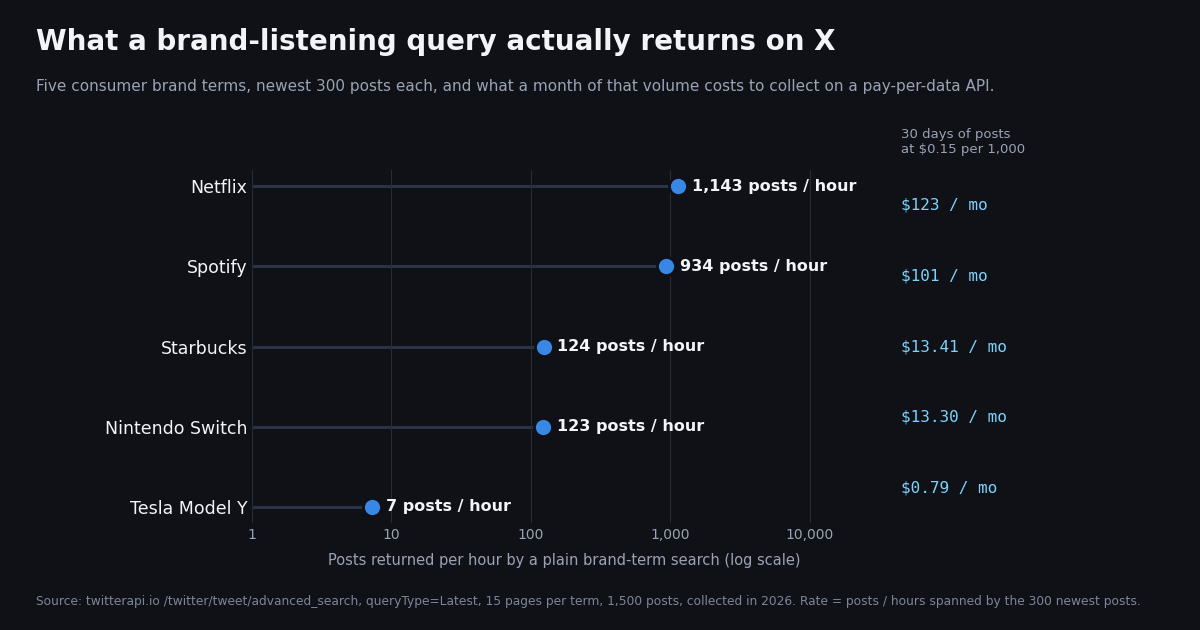
Volume spans two orders of magnitude. The 300 newest Netflix posts covered 15.8 minutes, which is 1,143 posts per hour; Spotify's covered 19.3 minutes (934 per hour). "Nintendo Switch" and Starbucks each took about 2.4 hours to produce 300 posts (123 and 124 per hour). "Tesla Model Y", a quoted product phrase, took 41 hours (7.3 per hour). A suite hides this spread behind a flat quote; on a per-post API it is the whole bill, so measure your own terms before you size anything.
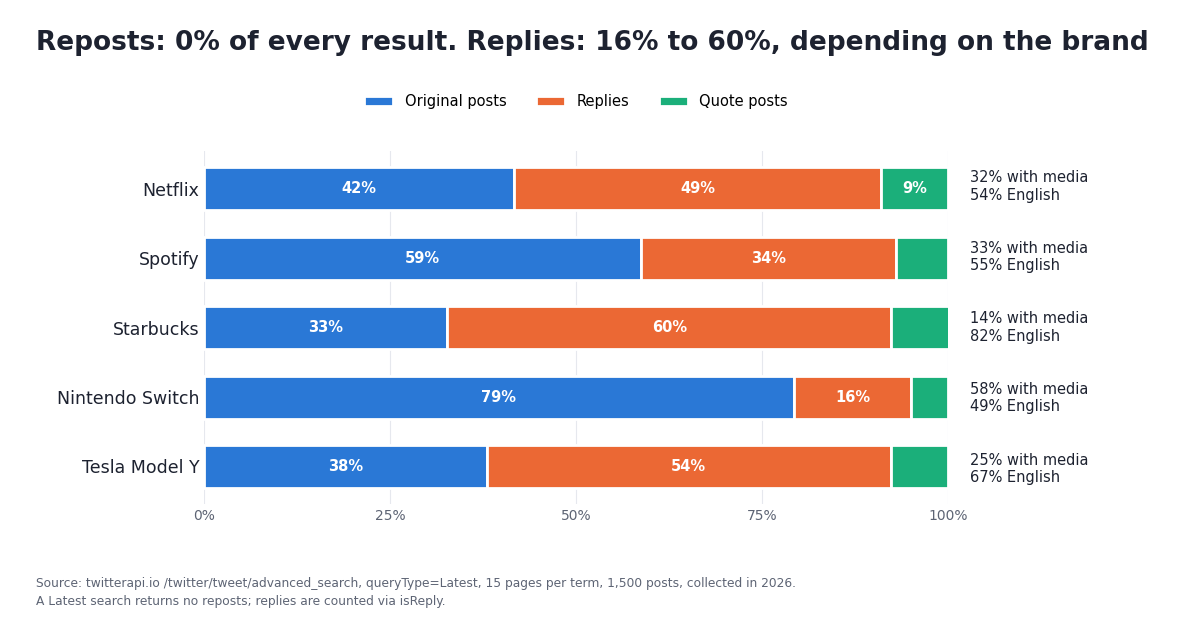
Reposts: zero. Not one of the 1,500 posts had retweeted_tweet set. A Latest search returns original posts, replies and quote posts, not reposts, which matches what we saw in an earlier study of from: searches. Two consequences: your volume numbers will be lower than a dashboard that counts reposts as mentions, and you never pay for a repost's duplicated text.
Replies are a large and variable share. 42.7% of all posts were replies (isReply true), from 15.7% for "Nintendo Switch" to 59.7% for Starbucks and 54.3% for "Tesla Model Y". Replies are where complaints and customer-service threads live, and they are also where a product phrase gets used inside someone else's conversation. Whether you keep them is a product decision; -filter:replies in the query drops them before you pay.
Quote posts are a steady 5% to 9%. Quotes carry the quoted post inside quoted_tweet, so a quote about a brand can be a reaction to a post that itself mentions the brand. The pipeline labels them so you can weight them separately.
Media and links vary by what the brand is. 58.0% of "Nintendo Switch" posts had media and 58.7% had a link (listings, clips, screenshots); Starbucks posts had media 13.7% of the time and a link 5.3% (people talking, not sharing). Overall 32.4% of posts carried media.
Most posts have no engagement yet, and a few have a lot. The median likeCount was 0 for every brand and 69.6% of all posts had zero likes; only 0.7% had 100 or more (6 Nintendo Switch posts, 4 Tesla Model Y posts, none for the three high-volume terms in their short windows). Newest-first means you see posts before they earn engagement, so "top-liked" has to be recomputed later from stored rows (the pipeline does this) rather than read once at fetch time.
Language mix is not English-only. The lang field was present on 100% of posts. English was 61.3% overall: 81.7% for Starbucks, 67.0% for "Tesla Model Y" (then German 8.0%, Turkish 4.7%), 55.0% for Spotify (Spanish 12.3%, Portuguese 11.0%), 54.0% for Netflix (Thai 15.0%, Spanish 8.7%) and 49.0% for "Nintendo Switch" (Portuguese 20.7%, Spanish 16.0%). An English-only classifier silently mislabels a third to a half of a global brand's feed; lang:en in the query, or per-language routing in classify(), fixes that.
One account can dominate a short window. The 300 Netflix posts came from 248 distinct authors, but one author posted 44 of them within 16 minutes; the other four brands' busiest author posted 4 to 9. A listening tool without an author cap reports that burst as a conversation. The pipeline stores author_id per row so you can cap or exclude repeat posters in your rollups.
Reposts were 0.0% in every row and are omitted from the table. "Posts/hour" is the 300 posts divided by the hours the window spanned; for Netflix and Spotify that window is a quarter of an hour, so treat their rate as a snapshot at collection time rather than a daily average.
What it costs to track a brand on X: a day and a month, computed
The build route has two cost components, and both are published. Posts returned: 15 credits each, $1 buys 100,000 credits, so $0.15 per 1,000 posts; a full 20-post page is $0.003. Polling floor: every request costs at least 15 credits even when it returns nothing, so a check every 5 minutes for a month (8,640 checks) is at most $1.30 in empty checks, and every 60 seconds (43,200 checks) is at most $6.48. When a check does return posts, you pay for the posts instead, so the floor only matters for quiet terms.
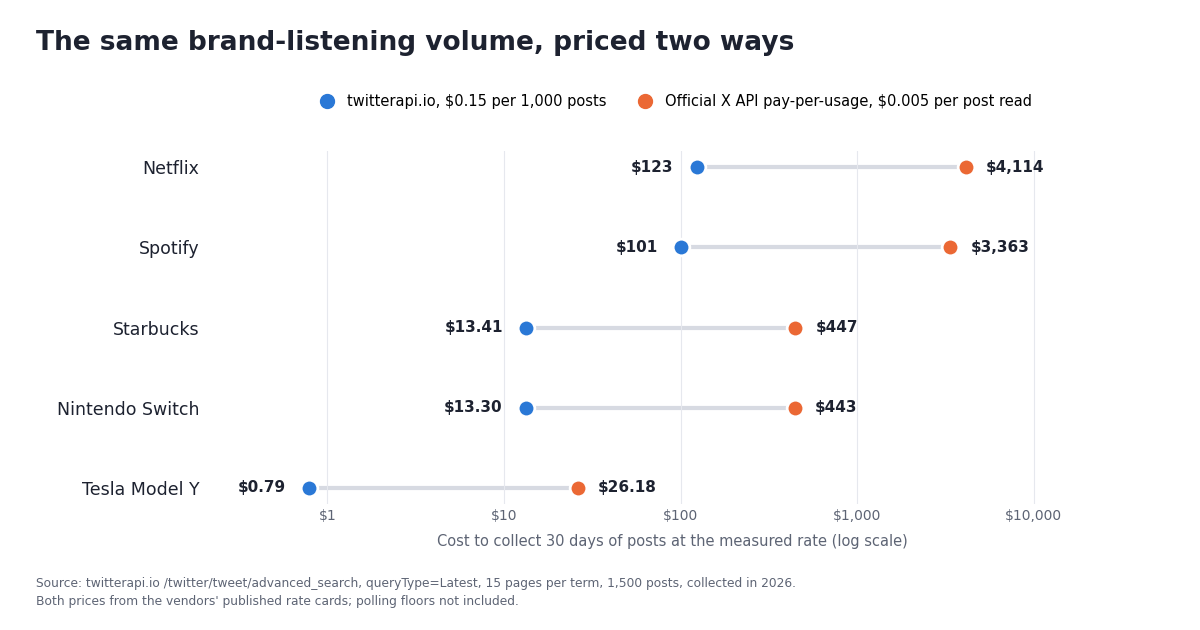
Multiplying the measured rates out gives the table below. "Per day" is posts per hour times 24 times $0.00015; "per month" is 30 days. The last two columns price the same volume at the official X API's published pay-per-usage rate of $0.005 per post read (docs.x.com/x-api/getting-started/pricing), which also caps pay-per-usage at 3 million post reads a month before an Enterprise plan is required; Netflix-scale volume alone would be about 823,000 reads a month.
Add the polling floor for your interval ($1.30 a month at 5 minutes, $6.48 at 60 seconds, per pipeline, not per term, if you batch terms into one loop; more if you poll each term separately) and you have the full data bill. Three things to take from the table.
A product phrase is nearly free to watch. "Tesla Model Y" at $0.79 a month is below the polling floor at a one-minute interval; the floor, not the posts, is the cost. Quoted product names and competitor model names are the lowest-cost kind of term to listen for, and often the most actionable.
A mid-size brand term is a coffee a month. Starbucks and "Nintendo Switch" at about 3,000 posts a day cost $13 to $14 a month each to collect in full. Five such terms would be about $67 of posts plus polling.
A very high-volume brand is where you filter before you pay. Netflix at $123 a month is still cheap next to the alternatives, but 84% of those posts had zero likes and 49% were replies. lang:en, -filter:replies, or min_faves:5 applied in the query cut the returned volume, and therefore the bill, before the posts leave the API. A suite charges for its quote regardless; here the query is the budget control.
If you prefer predictable spend over pay-as-you-go, subscriptions start at $29 a month (Starter), with Builder, Pro, Scale and Business tiers above; the credit amounts and bonuses are on /pricing. Purchased credits never expire. Rate limits are 0.2 requests per second before the first payment and 20 once paid, which is 400 posts per second on full pages, far above any term in this study.
Build it: a minimal X listening pipeline in Python
The full script is at the end of the page; this section walks through its seven stages so you can swap any of them. It needs requests, an API key in TWITTERAPI_IO_API_KEY, and optionally a webhook URL. Reads need no X developer account. Run it once with --minutes 60 to see what your terms return, then --follow --every 300 to poll.
1. Search with a time window, newest first. The core call is GET /twitter/tweet/advanced_search with query and queryType=Latest. The query carries the brand term plus since_time:<unix seconds>, which twitterapi.io documents as the supported way to bound a search in time (the since:2021-12-31_23:59:59_UTC style is explicitly unsupported; plain since:YYYY-MM-DD date operators work for day-level backfills). Each page returns up to 20 posts and a next_cursor; the loop follows the cursor until it meets a post older than the window, has_next_page is false, or it hits X_MAX_PAGES (25 by default, so a runaway term costs at most $0.075 per pull per term).
2. Dedupe on the post id. Polls overlap on purpose (a 60-minute window every 5 minutes), so the same post arrives repeatedly. SQLite with id TEXT PRIMARY KEY and INSERT OR IGNORE is the whole dedupe: the second time a post is seen, rowcount is 0. In our replay test the second pass over the same 300 posts stored zero new rows.
3. Store the fields you will query. Each row keeps the term, createdAt (parsed from the Www Mmm DD HH:MM:SS +0000 YYYY format the API uses, not ISO 8601), the hour bucket, the kind (original, reply, quote, repost), lang, the four counts, author.id, the label, text and URL. Everything else in the response (full author profile, entities, cards) is yours to add; this is the point of owning the data.
4. Hourly volume. GROUP BY hour over the stored rows. This is the chart every suite shows first, and it costs you one SQL statement.
5. Top-liked mentions. ORDER BY likes DESC over the window. Because posts arrive before they earn engagement (median likes at fetch time was 0 in the study), re-pull rows older than a few hours if you want settled counts, or refresh their counts in a nightly job via /twitter/tweets by id.
6. Classify. classify(text) returns a label from a closed set. The script ships a deliberately small lexicon so it runs with no model; replace the function body with your own model or any LLM call. Two rules from running this on real feeds: send the post text as data, never as instructions (a post can contain text written to steer a model), and route by lang first, because a third to a half of a global brand's posts were not in English in our sample.
7. Alert. Two rules that catch most of what people pay suites to catch: the current hour's volume is at least 3x the trailing hourly median and at least 20 posts, or a post labeled negative has reached 10,000 views. Alerts post a JSON payload to the webhook URL (Slack-style text; Discord takes content), or print to stderr if no URL is set. Add rules by writing another SQL query.
Operators you will reach for in the query string, all placed before since_time:: lang:en to restrict language, -filter:replies to drop replies, min_faves:5 to skip zero-engagement posts, "exact phrase" quotes for product names, OR to combine spellings, -term to exclude a word, from:brandhandle to separate the brand's own posts from mentions, and to:brandhandle for replies aimed at the brand. Searching tweets by date covers the since: / until: date forms and their UTC boundary behavior.
pip install requests
export TWITTERAPI_IO_API_KEY="paste-your-key"       # twitterapi.io dashboard; reads need no X account
export ALERT_WEBHOOK_URL="https://hooks.example.com/..."   # optional; prints to stderr if unset

# one pull: everything about two brands in the last hour, labeled and stored in x_listen.sqlite
python x_listen.py --terms '"Nintendo Switch"' Starbucks --minutes 60

# poll: a 60-minute window every 5 minutes, English only; overlapping posts are deduped by id
python x_listen.py --terms Starbucks --lang en --minutes 60 --follow --every 300

# the usage line on stderr after each pull, from the study's Starbucks replay:
# 15 requests, 300 posts billed, about $0.0450What a suite does that this pipeline does not, and how to close the gaps you care about
Be precise about what you are not getting, so the decision is yours and not a surprise later.
Cross-network coverage. The pipeline is X only, by design. If Reddit, Instagram or news coverage matter to the same question, you either run a second source alongside it or you buy the suite. This page does not claim otherwise.
History on day one. A suite's archive is a selling point; here, history is whatever X search returns for your since: / until: query, and depth varies by term. Start the pipeline the day you decide to care about a term, and backfill by date ranges where search allows.
Finished dashboards. You have rows in SQLite. A notebook, Metabase, Grafana or a spreadsheet export is an afternoon; a polished multi-user dashboard with permissions is not. Decide who will look at this and build for them.
A trained sentiment model. The lexicon in classify() is a placeholder. An LLM call per post is a real option at low volume (a mid-size term's 3,000 posts a day is 3,000 short calls), a fine-tuned small model is the option at Netflix scale, and lang routing is required either way. Measure your labels against a hand-labeled sample before trusting any alert built on them.
Influencer discovery, publishing, social CRM. Brandwatch's Social Media Management and Influencer Marketing products are separate jobs that this pipeline does not touch. /twitter/user/info ($0.18 per 1,000 profiles) and the follower endpoints give you the raw material for author analysis if you want to build that side too.
What you do get that a suite cannot sell you: the raw post objects at the moment you fetched them, a per-term bill you can read, filters applied before you pay, and code you can change in an afternoon when the question changes. For the X-only team, that is usually the trade worth making.
Decision: when to buy the suite, when to build on the API
Buy the suite when any of these is true: the listening spans several networks; analysts and marketers, not developers, run it day to day; you need years of history immediately; a sales, legal or procurement process wants one vendor contract covering listening, publishing and influencer work; or the budget is already an enterprise line item and the quote fits it.
Build on the API when: the data you act on is X data; a developer owns the pipeline (or already runs the data stack it feeds); you want the bill to follow volume (from under $1 a month for a product phrase to about $123 for a very high-volume brand in our measurements) rather than a quote; you need the raw JSON for your own models, warehouse or product; or you want a working prototype this week rather than after a demo cycle.
Do both when a suite is already in place for the cross-network view and one team needs X depth it does not provide: raw rows, custom classification, a competitor product phrase watched every five minutes. The API side costs a few dollars a month to run in parallel, and the comparison between the two feeds will tell you how much of the suite's X value you actually use.
If you are weighing other build-vs-buy options, build vs buy for X social listening covers the mid-market tools, Brand24 vs Mention from the X data angle prices two of them, and the Apify Twitter scraper comparison covers the scraper route. For the architecture around polling, the Twitter monitoring guide and the keyword alerts developer guide go deeper on intervals and alert design.
How we collected this
Question: how much X volume does a brand-listening query actually produce, what kind of posts make it up, and what would collecting a day and a month of it cost on a pay-per-post API versus the official X API rate.
Query: /twitter/tweet/advanced_search with queryType=Latest for five consumer brand or product terms used as neutral demos: "Nintendo Switch", "Tesla Model Y", Netflix, Starbucks, Spotify. No from:, lang: or filter: operators. Brands only, never people.
Window and sample: the newest 300 posts per term (15 pages of 20), 1,500 posts in total, 75 requests, through a rate-limited read-only client. The window per term is the span from the oldest to the newest post collected: 15.8 minutes for Netflix, 19.3 for Spotify, about 2.4 hours for Starbucks and "Nintendo Switch", 41 hours for "Tesla Model Y". Collected in 2026. The posts-per-hour rate is posts divided by that span; daily and monthly costs multiply it out at 15 credits per post and, for the baseline, $0.005 per post read.
Measures: post kind from retweeted_tweet, quoted_tweet and isReply; media from extendedEntities.media; links from entities.urls; likeCount median, 90th percentile and 100-plus count; lang shares; distinct author.id values and the maximum from one author; duplicate ids across pages (there were none).
The script on this page was run end to end against the recorded Starbucks pages with the network call replaced by a replay: 300 posts stored on the first pass, 0 on the second (dedupe), hourly buckets summing to the stored count, the classifier and alert rules executed. It was not run as a live poller for this page.
What the sample cannot show: five terms and 300 posts each are a snapshot, not a daily average; a 16-minute window for Netflix will not reflect its quiet hours or a release-day spike, and rates for your terms will differ. A Latest search excludes reposts and whatever X search filters out (the endpoint notes it drops ads and non-post items), so the volume is lower than a count that includes reposts. Engagement counts were read at fetch time, when most posts were minutes old. Brandwatch's pricing, coverage and feature statements are quoted from its public pages as fetched while writing; we did not trial the product and make no claim about its actual quotes.
Privacy: aggregates only. Raw search pages were kept outside the repository and discarded after analysis because keyword-search authors are private individuals; the study folder holds the protocol, the analysis script, the results and a de-identified row per post (brand, minute offset, kind, media, language, counts, text length) with no ids, text, URLs or handles. Nothing here describes any twitterapi.io customer or what they monitor.
"""x_listen.py - a minimal X (Twitter) brand-listening pipeline on twitterapi.io.

    pip install requests
    export TWITTERAPI_IO_API_KEY=...        # from the twitterapi.io dashboard (reads need no X account)
    export ALERT_WEBHOOK_URL=...            # optional: any webhook that accepts a JSON POST (Slack, Discord, your own)
    python x_listen.py --terms '"Nintendo Switch"' Starbucks --minutes 60        # one pull: the last hour
    python x_listen.py --terms Starbucks --lang en --follow --every 300          # poll every 5 minutes

Pipeline, in order: search (Latest, since_time:) -> dedupe (SQLite primary key) -> store ->
hourly volume -> top-liked mentions -> classify (swap in your model or any LLM) -> alert.
Billing: $0.15 per 1,000 posts returned, minimum $0.00015 per request; the page cap bounds spend.
"""
import argparse
import json
import os
import sqlite3
import statistics
import sys
import time
from datetime import datetime, timezone

import requests

API = "https://api.twitterapi.io"
KEY = os.environ.get("TWITTERAPI_IO_API_KEY")
WEBHOOK = os.environ.get("ALERT_WEBHOOK_URL")
DB_PATH = os.environ.get("X_LISTEN_DB", "x_listen.sqlite")
MAX_PAGES = int(os.environ.get("X_MAX_PAGES", "25"))   # per term per pull; 25 pages = 500 posts = $0.075
USAGE = {"requests": 0, "posts": 0}


# ----------------------------------------------------------------------------- 1. search
def call(params):
    """One GET on /twitter/tweet/advanced_search with 429 backoff. Returns the JSON body."""
    if not KEY:
        sys.exit("Set TWITTERAPI_IO_API_KEY first.")
    for attempt in range(4):
        r = requests.get(f"{API}/twitter/tweet/advanced_search", headers={"X-API-Key": KEY},
                         params=params, timeout=30)
        if r.status_code == 429:            # 0.2 req/s before the first payment, 20 after
            time.sleep(5 * (attempt + 1))
            continue
        r.raise_for_status()                # non-2xx responses carry the API's error text
        body = r.json()
        if "tweets" not in body:
            raise RuntimeError(f"unexpected response keys: {sorted(body)}")
        USAGE["requests"] += 1
        USAGE["posts"] += len(body.get("tweets") or [])
        return body
    raise RuntimeError("still rate-limited after 4 attempts")


def parse_time(s):
    # createdAt looks like "Thu Oct 15 17:15:00 +0000 2026", not ISO 8601
    return datetime.strptime(s, "%a %b %d %H:%M:%S %z %Y")


def search_since(term, since_unix, lang=None):
    """Newest-first pages for `term` posted after since_unix. Stops at the window edge or MAX_PAGES."""
    query = f"{term} since_time:{since_unix}"
    if lang:
        query += f" lang:{lang}"
    params = {"query": query, "queryType": "Latest"}
    for _ in range(MAX_PAGES):
        body = call(params)
        tweets = body.get("tweets") or []
        for t in tweets:
            if parse_time(t["createdAt"]).timestamp() < since_unix:
                return
            yield t
        if not tweets or not body.get("has_next_page") or not body.get("next_cursor"):
            return
        params = dict(params, cursor=body["next_cursor"])


# ----------------------------------------------------------------------------- 2-3. dedupe + store
def open_db():
    con = sqlite3.connect(DB_PATH)
    con.execute("""CREATE TABLE IF NOT EXISTS posts (
        id TEXT PRIMARY KEY, term TEXT, created_at TEXT, hour TEXT, kind TEXT, lang TEXT,
        likes INTEGER, reposts INTEGER, replies INTEGER, views INTEGER, author_id TEXT,
        label TEXT, text TEXT, url TEXT)""")
    return con


def kind(t):
    if t.get("retweeted_tweet"):
        return "repost"
    if t.get("quoted_tweet"):
        return "quote"
    return "reply" if t.get("isReply") else "original"


def store(con, term, t, label):
    created = parse_time(t["createdAt"])
    row = (t["id"], term, created.isoformat(), created.strftime("%Y-%m-%dT%H"), kind(t), t.get("lang"),
           t.get("likeCount") or 0, t.get("retweetCount") or 0, t.get("replyCount") or 0,
           t.get("viewCount") or 0, (t.get("author") or {}).get("id"), label, t.get("text") or "", t.get("url"))
    # INSERT OR IGNORE is the dedupe: the same post seen on two polls is stored once
    return con.execute("INSERT OR IGNORE INTO posts VALUES (?,?,?,?,?,?,?,?,?,?,?,?,?,?)", row).rowcount


# ----------------------------------------------------------------------------- 6. classify hook
NEG = ("broken", "refund", "scam", "worst", "cancel", "outage", "down again", "not working", "terrible")
POS = ("love", "great", "best", "amazing", "finally", "thank")


def classify(text):
    """Return 'negative', 'positive' or 'neutral'. This lexicon is a placeholder: replace the body with a
    call to your own model or any LLM (send the text as data, never as instructions, and keep the label
    set closed). Everything downstream only needs the label."""
    low = text.lower()
    if any(w in low for w in NEG):
        return "negative"
    if any(w in low for w in POS):
        return "positive"
    return "neutral"


# ----------------------------------------------------------------------------- 4-5. rollups
def hourly_volume(con, term, hours=48):
    rows = con.execute("SELECT hour, COUNT(*) FROM posts WHERE term=? GROUP BY hour ORDER BY hour DESC LIMIT ?",
                       (term, hours)).fetchall()
    return rows[::-1]                       # oldest -> newest


def top_liked(con, term, since_iso, n=5):
    return con.execute("SELECT likes, views, label, url FROM posts WHERE term=? AND created_at>=? "
                       "ORDER BY likes DESC LIMIT ?", (term, since_iso, n)).fetchall()


# ----------------------------------------------------------------------------- 7. alerting
def alerts_for(con, term, since_iso, new_rows):
    """Two rules: a volume spike vs the trailing hourly median, and a negative post with real reach."""
    out = []
    vol = hourly_volume(con, term)
    if len(vol) >= 6:
        *past, (_, latest) = vol
        base = statistics.median(c for _, c in past)
        if latest >= max(20, 3 * base):
            out.append(f"{term}: {latest} posts this hour vs a median of {base:.0f} (spike)")
    for likes, views, label, url in con.execute(
            "SELECT likes, views, label, url FROM posts WHERE term=? AND created_at>=? AND label='negative' "
            "AND views>=10000 ORDER BY views DESC LIMIT 3", (term, since_iso)):
        out.append(f"{term}: negative post with {views:,} views, {likes} likes: {url}")
    return out


def notify(lines):
    payload = {"text": "\n".join(lines)}       # Slack-style; Discord accepts {"content": ...}
    if WEBHOOK:
        requests.post(WEBHOOK, json=payload, timeout=10)
    else:
        print("ALERT " + json.dumps(payload), file=sys.stderr)


# ----------------------------------------------------------------------------- run
def pull(con, terms, minutes, lang):
    since_unix = int(time.time()) - minutes * 60
    since_iso = datetime.fromtimestamp(since_unix, timezone.utc).isoformat()
    for term in terms:
        new = 0
        for t in search_since(term, since_unix, lang):
            new += store(con, term, t, classify(t.get("text") or ""))
        con.commit()
        print(f"{term}: {new} new posts")
        for hour, count in hourly_volume(con, term, hours=6):
            print(f"  {hour}  {count}")
        for likes, views, label, url in top_liked(con, term, since_iso):
            print(f"  top  {likes:>6} likes  {views:>8} views  {label:<8} {url}")
        found = alerts_for(con, term, since_iso, new)
        if found:
            notify(found)
    cost = max(USAGE["posts"], USAGE["requests"]) * 0.00015
    print(f"# {USAGE['requests']} requests, {USAGE['posts']} posts billed, about ${cost:.4f}", file=sys.stderr)


def main():
    ap = argparse.ArgumentParser()
    ap.add_argument("--terms", nargs="+", required=True, help='brand terms; quote phrases: \'"Nintendo Switch"\'')
    ap.add_argument("--minutes", type=int, default=60, help="look-back window per pull")
    ap.add_argument("--lang", help="restrict with the lang: operator, e.g. en")
    ap.add_argument("--follow", action="store_true", help="keep polling")
    ap.add_argument("--every", type=int, default=300, help="seconds between polls when --follow")
    a = ap.parse_args()
    con = open_db()
    while True:
        pull(con, a.terms, a.minutes, a.lang)
        if not a.follow:
            break
        time.sleep(a.every)


if __name__ == "__main__":
    main()
Questions readers ask
How much does Brandwatch cost?
Brandwatch does not publish prices. Its pricing page (brandwatch.com/pricing) says "standard to enterprise plans" are available for each of its products and the only action is to schedule a demo, so the price is a quote based on your scope. This page therefore compares on model and on measured cost of the X data itself, not on a Brandwatch list price.
Is building on an X data API really a Brandwatch alternative?
Only for a specific team: one whose listening question is X-only and that has a developer. It does not replace cross-network coverage, the historical archive, Iris AI or the social media management and influencer products. For that scope it replaces the listening loop itself (search, dedupe, volume, top posts, classification, alerts) with code you own and a per-post bill.
What does it cost to track one brand on X with this pipeline?
It depends on volume, which is why we measured it. In 2026 a plain brand-term search returned about 7 posts per hour for "Tesla Model Y" ($0.79 a month to collect in full), about 123 for Starbucks or "Nintendo Switch" ($13 to $14 a month) and about 1,143 for Netflix ($123 a month), at $0.15 per 1,000 posts. Polling adds at most $1.30 a month at a 5-minute interval or $6.48 at 60 seconds.
Why not use the official X API instead?
You can; the pipeline logic is the same. The difference is price and setup: the official pay-per-usage rate is $0.005 per post read (docs.x.com/x-api/getting-started/pricing), about 33x twitterapi.io's $0.15 per 1,000, so the Netflix-scale month is $4,114 instead of $123, and pay-per-usage is capped at 3 million post reads a month before an Enterprise plan. It also requires a developer account and app before the first call.
Does the search include retweets?
No. In our 1,500-post sample a Latest search returned 0% reposts; it returns original posts, replies and quote posts. Your mention counts will be lower than a dashboard that counts reposts, and you never pay for duplicated repost text. If you need repost counts, each post carries retweetCount, and /twitter/tweet/retweeters lists the accounts.
How do I do sentiment analysis in this setup?
Through the classify() hook. The script ships a small keyword lexicon so it runs without a model; replace the function body with your own model or any LLM call that returns one label from a closed set. Route by the lang field first, because 39% of the posts in our sample were not in English, and treat post text as data, never as instructions.
How far back can I search?
Use since: and until: date operators (YYYY-MM-DD, UTC) or since_time: / until_time: in Unix seconds in the query. Depth depends on what X search returns for the term; a suite's multi-year archive is a different product. Start collecting the day you start caring about a term, and store every row so your own history grows from there.
Do I need an X developer account or any X login?
No. All reads on this page use a twitterapi.io API key sent in the X-API-Key header; no X account, app or OAuth. Up to $1 in free credits for new accounts that pass the bot check; expires after 31 days; see /pricing. Rate limits are 0.2 requests per second before the first payment and 20 once paid.
Continue
- Brandwatch pricing page: standard to enterprise plans by quote, demo form, networks covered (fetched while writing) (brandwatch.com/pricing)
- Brandwatch Consumer Research: sources, archive and Iris AI statements quoted on this page (brandwatch.com/products/consumer-research)
- X API pay-per-usage pricing ($0.005 per post read, 3M post-read cap), the official and pricier route
- twitterapi.io docs: advanced_search query operators (since_time:, until_time:), queryType, cursor and response fields
- twitterapi.io API reference: authentication and tweet response fields
- twitterapi.io pricing: 15 credits per post returned, minimum per request, subscriptions
- Twitter (X) API: endpoints, pricing and docs hub
- Social listening on the X (Twitter) API: build vs buy
- Brand24 vs Mention from the X data cost angle
- Apify Twitter (X) scraper alternatives compared
- Twitter (X) monitoring: accounts and keywords
- Twitter (X) keyword alerts: developer guide
- Search tweets by date with since: and until:
- Pay-per-post pricing and subscriptions
- 01Data365 Alternative: Pay-Per-Data X (Twitter) API Instead of a EUR 300 Subscription
- 02How to Get Twitter (X) Data into Google Sheets with Apps Script in 2026
- 03Twitter (X) Auto Reply: What the Rules Allow and How to Build One
- 04snscrape for Twitter (X): why it returns blocked (404) and how to migrate
- 05How to Build a Twitter (X) to Discord Bot in 2026
- 06Tweet Tunnel Alternative: How to See Old Tweets Now That TweetTunnel Is Gone
- 07Nitter Is Archived: Which Nitter Alternatives Still Work in 2026?
- 08Topsy Twitter Analytics Alternative — What Replaced It in 2026?
Stop reading. Start building.
Starter credits cover real testing on real data. Google sign-in, no card, no application queue.
Get an API key