Upload-Post Alternative for Twitter (X): Post, Read and Search From One API
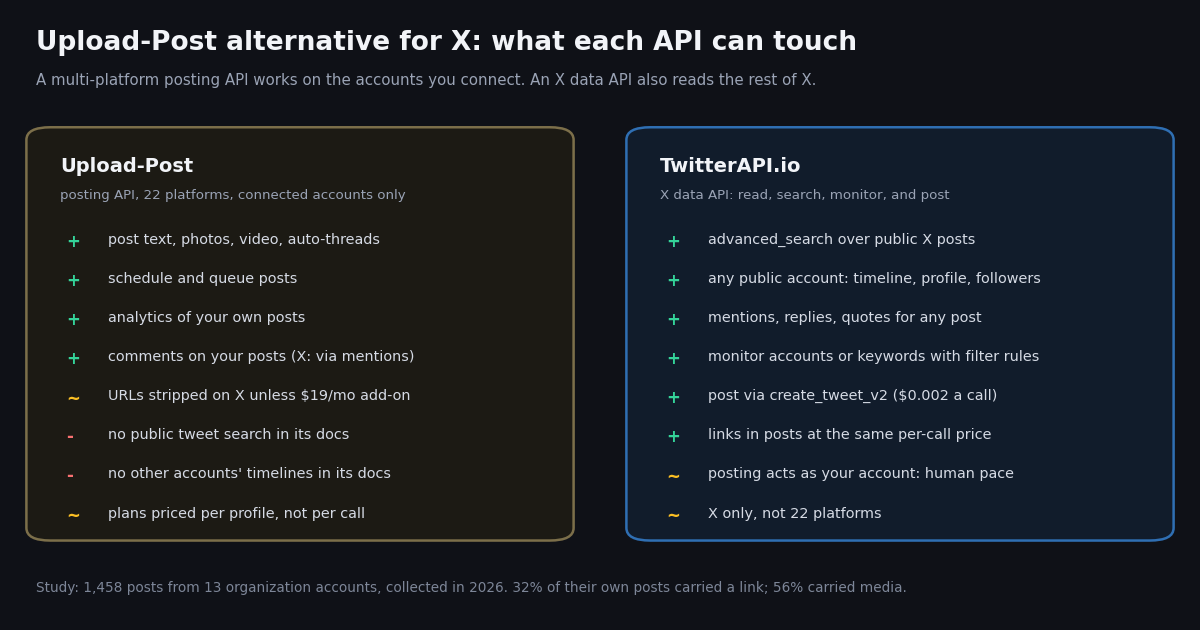
This page is for people comparing Upload-Post with other APIs for X specifically: what Upload-Post's plans and X coverage actually are, where a posting-only multi-platform API stops, and what an X data API that reads, searches, monitors and posts looks like instead. It is not a general how-to for scheduling posts (our Twitter auto post guide covers the three ways to do that) and not a read-only monitoring workflow (our n8n Twitter workflow page sends new tweets to Slack); here the question is which API to pay for when X is the platform that matters, with an n8n posting recipe at the end.
Upload-Post (upload-post.com) is a unified social media posting API founded in 2025, by its own account. One multipart request with platform[]=x (or tiktok, instagram, youtube and so on) publishes the same content to every network you name, and the company runs the platform apps so you do not register your own. Every price and limit below comes from Upload-Post's own pricing page and its documentation, read this session; nothing is from memory, and Upload-Post's site is named in plain text rather than linked.
To ground the comparison in real workloads rather than vendor claims, we read the recent timelines of 13 organization accounts (Netflix, Notion, Spotify, Duolingo, Canva, Zapier, GitHub, NASA, n8n, Figma, Shopify, Adobe and HubSpot) and measured what their X posting actually consists of: how many posts a day, how many are replies or thread continuations, how many carry media and links, and what it would cost to create those posts and read the engagement back on each rate card.
What Upload-Post is and what it does on X
Upload-Post describes itself as a unified social media API that posts to 22 platforms with one call: TikTok, Instagram, YouTube, Facebook, LinkedIn, X, Threads, Pinterest, Reddit, Bluesky, Discord, Telegram, Google Business Profile and a long tail that includes Mastodon, WordPress and Dev.to (upload-post.com/llms-full.txt). Its main endpoints are POST https://api.upload-post.com/api/upload for video, /api/upload_photos for images and carousels and /api/upload_text for text-only posts, authenticated with an Authorization: Apikey header. It offers Python and JavaScript SDKs, an n8n community node, a Make module, Zapier and an open-source MCP server for AI agents.
Posting on X. Its docs say it posts to X through its own X API access, so you connect the X account once in its dashboard and do not buy an X API tier. Text longer than 280 characters is split into a thread automatically unless you set x_long_text_as_post=true; video, photos, replies, Communities and scheduling are supported (docs.upload-post.com/llm.txt).
Reading on X. The read side is scoped to accounts you have connected. The Analytics API returns profile and post metrics for your profiles, the Media List endpoint returns recent posts from a connected account (up to 100 per page on X), and the Comments API lists comments on your posts, which on X it builds from mentions (source: "mentions"), with hide not available. We found no endpoint in its documentation for searching public X posts, reading another account's timeline, or listing someone else's followers.
Two X-specific caveats in its own docs. First, every URL is stripped from X posts by default, because X bills $0.200 for a post that contains a URL versus $0.015 without one; to keep links you add the X Links add-on. Second, its docs warn that a reply can return HTTP 403 on X's pay-per-use tier when the posting account has not engaged with the author, and that reconnecting does not fix it.
Where it fits. If the job is one asset published to TikTok, Instagram, YouTube and X at once, that is exactly what Upload-Post is built for, and it remains a fit for that part of the job. The rest of this page is about the X half: what the posts look like, what reading them back costs, and what you can do when you need X data beyond your own accounts.
Upload-Post pricing, verified from its pricing page
Upload-Post prices by profile, not by call. A profile connects one account per platform (five profiles means five X accounts, five TikTok accounts and so on), and every paid plan includes unlimited uploads. Annual billing lowers the monthly price (Basic drops from $24 to $16). These are the published USD prices (upload-post.com/pricing and upload-post.com/llms-full.txt):
Add-ons that touch X. The X Links add-on is $19 a month, monthly billing only, and includes 50 link-posts a month counted globally per account: the pool is shared across all of your X profiles, not per profile. When the 50 are used, URLs are stripped again until the next billing cycle (docs.upload-post.com/guides/x-links-addon). Extra-profile add-ons run from $15 a month for five more profiles on Basic.
What the plans do not include. None of the plans adds public X search or reading accounts you do not own; those features are absent from the pricing page and the API reference, so the plan you pick buys posting capacity and owned-account analytics, not X data.
What an organization's X posting workload actually looks like
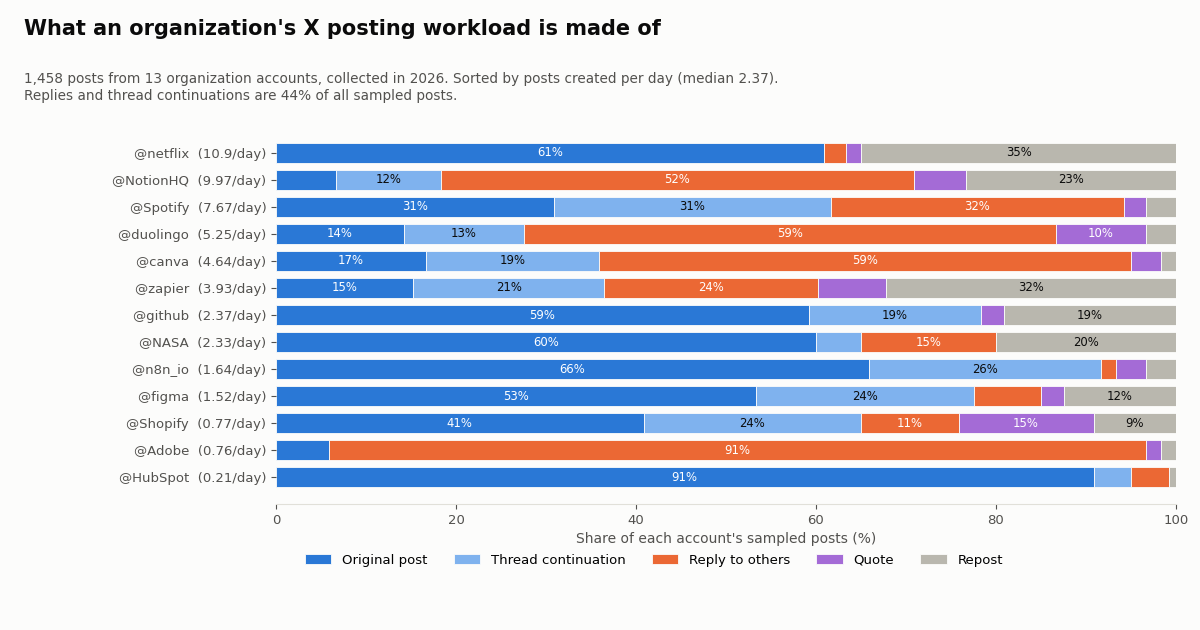
A posting API is priced and limited around an imagined workload of a few scheduled posts a day. Real organization accounts look different. We read the recent timelines of 13 organization accounts with replies included, 1,458 posts in all, and classified every post as an original, a thread continuation (a reply to the account's own post), a reply to someone else, a quote or a repost.
Only 39% of the sample were standalone originals. Replies to other people were 28%, thread continuations 16%, reposts 12% and quotes 5%. The accounts started 132 threads in the sample window. In other words, close to half of what these brands create on X (44%) is conversation: answering customers, continuing a thread, replying to a partner.
The spread between accounts is wide. Netflix created about 10.9 posts a day, almost all originals with media (100% of its own posts carried media, 72% video) and almost no links. Adobe's sampled posts were 91% replies to other people. GitHub and n8n linked out in 64% and 65% of their own posts; Netflix in 1%. A posting tool that treats every account as a calendar of originals misses most of this.
Why this matters for Upload-Post buyers. Two of the measured habits run into Upload-Post's documented X behavior. Links: a third of own posts carried one, and links are stripped unless you buy the add-on. Replies: more than a quarter of all posts were replies to others, and Upload-Post's docs warn those can be refused with HTTP 403 when the account has not engaged with the author on X's pay-per-use tier. Long posts: 16% of own posts ran past 280 characters (a count that includes shortened links), which Upload-Post turns into a thread by default.
The link problem: 50 link-posts a month vs what brands actually post
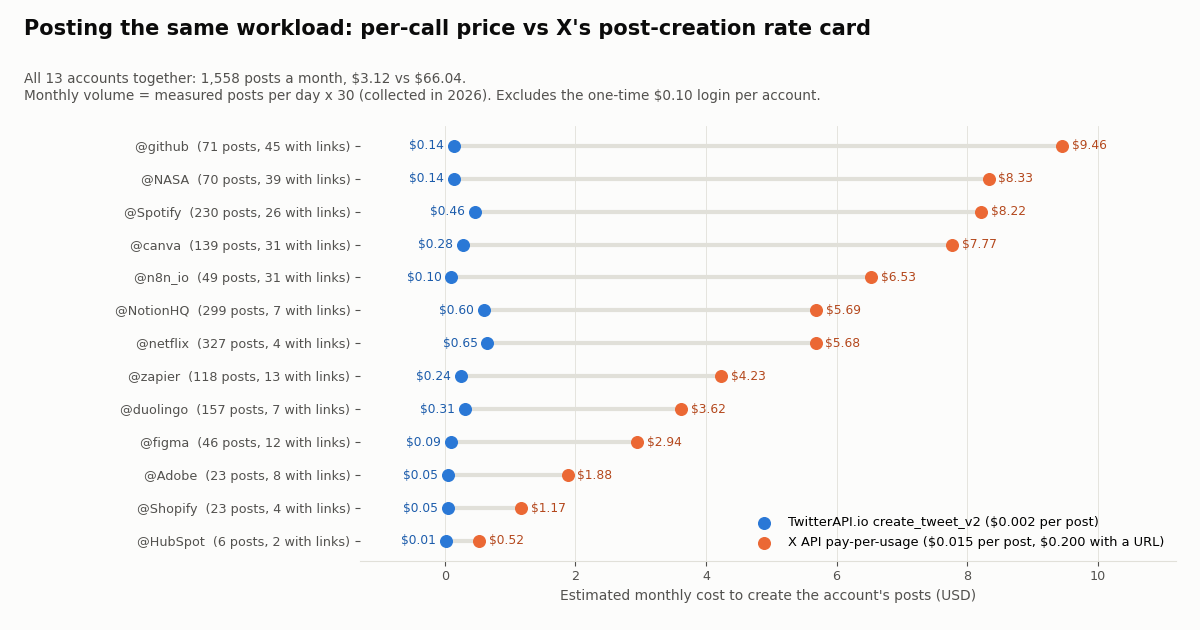
Scale each account's measured rate to a 30-day month and count the created posts (originals, quotes, thread continuations and replies) that carry a link. The 13 accounts together would publish about 1,558 posts a month, of which about 229 contain a URL.
Upload-Post's X Links add-on includes 50 link-posts a month for the whole subscription. GitHub alone would use about 45 of them and NASA about 39; the two together are already past the pool. A social team running five or six brand accounts like these would see URLs removed from its X posts for most of the month, then restored when the cycle resets. That is the documented behavior, not a bug: their docs state that after the 50, behavior reverts to stripping.
The reason Upload-Post strips links is X's own pricing: on the pay-per-usage card a post with a URL costs $0.200 against $0.015 without (docs.x.com/x-api/getting-started/pricing). A tool that posts through the official API carries that cost. TwitterAPI.io's create_tweet_v2 posts through an authenticated session of your account instead, so a post with a link is billed like any other call: $0.002.
Totals: 1,558 posts, $66.04 a month on X's post-creation card versus $3.12 at $0.002 per call, plus a one-time $0.10 login per account ($1.30 for all 13). Upload-Post's own plans are priced per profile rather than per post, so they are not in this table; for these 13 X accounts its profile count alone points to the Professional plan (25 profiles), before the links add-on.
Upload-Post vs TwitterAPI.io for X: the comparison matrix
Each row below is sourced: Upload-Post from its pricing page and API documentation, TwitterAPI.io from docs.twitterapi.io, X from docs.x.com. Where Upload-Post's docs are silent, the cell says so instead of guessing.
Reading compared with the official X API. For the read half, the reference price is X's own pay-per-usage card: $0.005 per post read, $0.010 per user read and $0.010 per follower or following read, capped at 3 million post reads a month before Enterprise, with $20 of credits on a first card purchase and an auto-recharge match up to $50. TwitterAPI.io charges 15 credits per tweet returned, $0.15 per 1,000 tweets, against X's $5.00 per 1,000 posts: about 33x less on that rate card. Profiles are $0.18 per 1,000. Reads need only an API key, no X account.
The one-line decision. If you publish the same assets to many networks and only need your own analytics, a multi-platform posting API like Upload-Post covers it. If X is where your customers talk, and you need to see the conversation (search, mentions, competitors' posts, keyword alerts) as well as post into it, an X data API is the better tool, and posting comes with it.
Reading engagement back: the half a posting API does not price in
After a post goes out, teams want three things back: its numbers (likes, reposts, replies, views), the replies and mentions it generated, and how it compares with peers. Upload-Post gives you the first for your own posts and a mentions-based comments list. TwitterAPI.io gives you all three for any public post.
What reading back costs. Re-reading every post the 13 accounts would create in a month once costs about $0.23 at $0.15 per 1,000 tweets, against about $7.81 at X's $0.005 per post read. Pull 100 IDs per /twitter/tweets call and you pay per tweet returned; an empty search is billed the 15-credit minimum, $0.00015, and a full 20-tweet timeline page is $0.003.
What the numbers look like. The median original post in our sample collected 121 likes, 14 reposts, 18 replies and 31,319 views. Those are brand accounts with large audiences; the point is that every field (likeCount, retweetCount, replyCount, quoteCount, viewCount, bookmarkCount) comes back on the same tweet object you get from search or a timeline, so a benchmark against a competitor's last 100 posts is five timeline pages, $0.015.
Replies and mentions. /twitter/user/mentions returns posts that mention an account (top-level tweets[], has_next_page, next_cursor), and the replies endpoints return the conversation under one post. That is the input to a support queue or a reply bot; the replies you then post go through create_tweet_v2 with reply_to_tweet_id.
import requests

API_KEY = "YOUR_TWITTERAPI_IO_KEY"
BASE = "https://api.twitterapi.io"
H = {"X-API-Key": API_KEY}


def engagement_for(tweet_ids):
    """Read likes, reposts, replies and views back for posts you created (any public posts work)."""
    out = {}
    for i in range(0, len(tweet_ids), 100):
        chunk = tweet_ids[i:i + 100]
        r = requests.get(f"{BASE}/twitter/tweets", headers=H,
                         params={"tweet_ids": ",".join(chunk)}, timeout=30)
        r.raise_for_status()
        for t in r.json().get("tweets", []):
            out[t["id"]] = {
                "likes": t.get("likeCount", 0),
                "reposts": t.get("retweetCount", 0),
                "replies": t.get("replyCount", 0),
                "quotes": t.get("quoteCount", 0),
                "views": t.get("viewCount"),
            }
    return out


def who_mentioned(account, max_pages=3):
    """Mentions of the account: the conversation a posting-only API does not show you in full."""
    cursor, rows = "", []
    for _ in range(max_pages):
        r = requests.get(f"{BASE}/twitter/user/mentions", headers=H,
                         params={"userName": account, "cursor": cursor}, timeout=30)
        r.raise_for_status()
        body = r.json()
        rows += body.get("tweets", [])
        if not body.get("has_next_page"):
            break
        cursor = body.get("next_cursor", "")
    return rows


# engagement_for(["<tweet id returned by create_tweet_v2>"])
# who_mentioned("yourbrand")n8n recipe: post to X with an HTTP Request node via TwitterAPI.io
Many Upload-Post users arrive from n8n, where its community node is the quick way to post. The same job on X takes two HTTP Request nodes against TwitterAPI.io: a one-time login and a create-post call. n8n's HTTP Request node supports a generic Header Auth credential, so the API key lives in one credential named X-API-Key rather than in each node (docs.n8n.io/integrations/builtin/core-nodes/n8n-nodes-base.httprequest/).
Step 1: log in once. POST /twitter/user_login_v2 with user_name, email, password, proxy and, strongly recommended, totp_secret (the base32 2FA seed, not a six-digit code). The docs say to use a high-quality residential proxy that you supply, formatted http://user:pass@ip:port, and that an account without 2FA may get cookies that are flagged and cannot post. The call costs $0.10 and returns login_cookies, which only the _v2 write endpoints accept. Run it from a manual-trigger workflow and store the cookies in an n8n environment variable or credential, never in the workflow JSON.
Step 2: post. A Schedule Trigger (or a Google Sheets or Airtable trigger) feeds one row per run into an HTTP Request node that POSTs to /twitter/create_tweet_v2 with login_cookies, tweet_text and proxy. Optional fields: reply_to_tweet_id for replies and threads, media_ids for media uploaded first with /twitter/upload_media_v2, community_id, and is_note_tweet for long posts. The response carries status and tweet_id; an If node routes status = success to a write-back step that marks the row posted and stores the ID.
Step 3: threads. Post the first part, take tweet_id from the response, and pass it as reply_to_tweet_id on the next part. In n8n that is a Loop Over Items node around the HTTP Request node with a Wait node between iterations.
Write-action caveats, all of them. Every write call acts as that X account, so X can rate-limit, lock or suspend it if it behaves like a bot: keep a human pace (no bursts, spaced posts, no identical text across accounts). The session can expire and need a fresh login; treat a failed post as a signal to re-run Step 1 rather than retrying in a loop. Write calls are $0.002 each and billed per HTTP 200 response, so a post that X refuses inside a 200 is still billed; check status and stop on repeated refusals. Reading never needs any of this: search, timelines and mentions use only the API key.
{
  "name": "Sheet row to X post (TwitterAPI.io)",
  "nodes": [
    {
      "name": "Every 15 minutes",
      "type": "n8n-nodes-base.scheduleTrigger",
      "typeVersion": 1.2,
      "position": [0, 0],
      "parameters": { "rule": { "interval": [ { "field": "minutes", "minutesInterval": 15 } ] } }
    },
    {
      "name": "Next queued post",
      "type": "n8n-nodes-base.code",
      "typeVersion": 2,
      "position": [220, 0],
      "parameters": {
        "jsCode": "// Replace with a Google Sheets / Airtable read. Return ONE item per run: {text}\nreturn [{ json: { text: 'Release notes for this week are live: three new endpoints and a faster search.' } }];"
      }
    },
    {
      "name": "Create post on X",
      "type": "n8n-nodes-base.httpRequest",
      "typeVersion": 4.2,
      "position": [440, 0],
      "parameters": {
        "method": "POST",
        "url": "https://api.twitterapi.io/twitter/create_tweet_v2",
        "authentication": "genericCredentialType",
        "genericAuthType": "httpHeaderAuth",
        "sendBody": true,
        "specifyBody": "json",
        "jsonBody": "={{ JSON.stringify({ login_cookies: $env.TWITTERAPI_LOGIN_COOKIES, proxy: $env.TWITTERAPI_PROXY, tweet_text: $json.text }) }}",
        "options": {}
      }
    },
    {
      "name": "Posted?",
      "type": "n8n-nodes-base.if",
      "typeVersion": 2,
      "position": [660, 0],
      "parameters": {
        "conditions": {
          "conditions": [
            { "leftValue": "={{ $json.status }}", "rightValue": "success", "operator": { "type": "string", "operation": "equals" } }
          ]
        }
      }
    }
  ],
  "connections": {
    "Every 15 minutes": { "main": [ [ { "node": "Next queued post", "type": "main", "index": 0 } ] ] },
    "Next queued post": { "main": [ [ { "node": "Create post on X", "type": "main", "index": 0 } ] ] },
    "Create post on X": { "main": [ [ { "node": "Posted?", "type": "main", "index": 0 } ] ] }
  }
}The login call, spelled out for the n8n HTTP Request node
Set the node to POST, Authentication to Generic Credential Type, Header Auth, Body Content Type JSON. The body is below; the expressions read secrets from n8n environment variables. The proxy value is an example address from the documentation range, replace it with your own.
Choosing the proxy. The same proxy should be used for the login and for later posts from that account, so the account's sessions look consistent. Free proxies are explicitly discouraged in the endpoint docs.
Keeping cookies fresh. The docs say cookies from an account in good standing used through residential proxies generally remain valid; in practice, a scheduled workflow should treat any non-success status on create_tweet_v2 as a reason to alert a human, not to log in again automatically every run.
POST https://api.twitterapi.io/twitter/user_login_v2
Header (n8n Header Auth credential):  X-API-Key: <your TwitterAPI.io key>
JSON body:
{
  "user_name": "yourbrand",
  "email": "social@yourbrand.example",
  "password": "{{ $env.X_PASSWORD }}",
  "totp_secret": "{{ $env.X_TOTP_SECRET }}",
  "proxy": "http://user:pass@203.0.113.10:8000"
}
Response: { "status": "success", "message": "...", "login_cookies": "...", "user_id": "..." }
Store login_cookies (an n8n environment variable or credential), not in the workflow JSON.How we collected this
Question. What does a real X posting workload look like for organization accounts, and what would it cost to post it and read the engagement back on each rate card?
Accounts. @Shopify, @canva, @NotionHQ, @figma, @Spotify, @netflix, @NASA, @duolingo, @Adobe, @HubSpot, @zapier, @n8n_io, @github: public organization accounts only, chosen as brands with active X teams across media, consumer apps, developer tools and automation.
Method and window. /twitter/user/last_tweets with includeReplies=true, newest first, up to six pages (about 120 posts) per account; the window per account runs from its oldest to newest sampled post, from about a week (Netflix, NASA) to many months for accounts that post rarely (HubSpot). 1,458 posts in all, 74 requests, about $0.22 of reads, collected in 2026. Monthly figures are each account's measured posts per day times 30.
Definitions. Thread continuation: a reply to the account's own post. Link: a URL whose host is not x.com, twitter.com or t.co. Text length counts characters in the returned text, including shortened links, so the over-280 share is an approximation.
What the sample cannot show. It reflects recent weeks for busy accounts and longer spans for quiet ones, so seasonal campaigns can skew a rate. NASA's timeline returned only 20 posts with replies included, so its rates rest on a small sample. The cost columns assume every created post is published through the API, which most brands do through a mix of tools. Engagement medians describe these large accounts, not a typical account.
Privacy. Aggregates only. Replied-to users are counted, never named or analyzed. Raw pages are kept only for the organization accounts; the study files are data/studies/upload-post-alternative/ in our repository.
"""post_and_measure.py - post a short thread to X through TwitterAPI.io, then read its engagement back.

Write actions act as YOUR X account: keep a human pace, expect X to rate-limit or lock an
account that behaves like a bot, and re-login when the session expires. Each create_tweet_v2
call is billed at $0.002 per HTTP 200 response; the login is $0.10.
"""
import os
import time

import requests

API_KEY = os.environ["TWITTERAPI_IO_KEY"]
BASE = "https://api.twitterapi.io"
H = {"X-API-Key": API_KEY, "Content-Type": "application/json"}
PROXY = os.environ["X_PROXY"]  # your own residential proxy, http://user:pass@host:port


def login():
    r = requests.post(f"{BASE}/twitter/user_login_v2", headers=H, timeout=90, json={
        "user_name": os.environ["X_USER"],
        "email": os.environ["X_EMAIL"],
        "password": os.environ["X_PASSWORD"],
        "totp_secret": os.environ.get("X_TOTP_SECRET", ""),
        "proxy": PROXY,
    })
    body = r.json()
    if body.get("status") != "success":
        raise SystemExit(f"login failed: {body.get('message')}")
    return body["login_cookies"]


def post(cookies, text, reply_to=None):
    payload = {"login_cookies": cookies, "tweet_text": text, "proxy": PROXY}
    if reply_to:
        payload["reply_to_tweet_id"] = reply_to
    r = requests.post(f"{BASE}/twitter/create_tweet_v2", headers=H, json=payload, timeout=60)
    body = r.json()
    if body.get("status") != "success":
        raise RuntimeError(f"post refused: {body.get('message')}")
    return body["tweet_id"]


def post_thread(cookies, parts, pause_s=45):
    ids, parent = [], None
    for text in parts:
        parent = post(cookies, text, reply_to=parent)
        ids.append(parent)
        time.sleep(pause_s)  # human pace between posts
    return ids


def read_back(ids):
    r = requests.get(f"{BASE}/twitter/tweets", headers={"X-API-Key": API_KEY},
                     params={"tweet_ids": ",".join(ids)}, timeout=30)
    r.raise_for_status()
    return {t["id"]: (t.get("likeCount", 0), t.get("retweetCount", 0),
                      t.get("replyCount", 0), t.get("viewCount"))
            for t in r.json().get("tweets", [])}


def recent_timeline(account, pages=2):
    cursor, tweets = "", []
    for _ in range(pages):
        r = requests.get(f"{BASE}/twitter/user/last_tweets", headers={"X-API-Key": API_KEY},
                         params={"userName": account, "cursor": cursor}, timeout=30)
        r.raise_for_status()
        body = r.json()
        tweets += body.get("data", {}).get("tweets", [])
        if not body.get("has_next_page"):
            break
        cursor = body.get("next_cursor", "")
    return tweets


if __name__ == "__main__":
    cookies = login()  # once; reuse the cookies until a call says the session is gone
    ids = post_thread(cookies, [
        "We shipped three things this week. A short thread:",
        "1. Faster search: results come back sooner on large queries.",
        "2. Webhook retries: failed deliveries now retry with backoff.",
    ])
    print("posted", ids)
    time.sleep(3600)  # read engagement back an hour later
    for tid, (likes, reposts, replies, views) in read_back(ids).items():
        print(tid, "likes", likes, "reposts", reposts, "replies", replies, "views", views)
    # Benchmark against a peer account's last 40 posts ($0.006 for two full pages)
    peer = recent_timeline("n8n_io")
print("peer posts read:", len(peer))Questions readers ask
What is Upload-Post?
Upload-Post (upload-post.com) is a unified social media posting API. One REST request publishes a video, photos or text to any combination of 22 platforms, including X, TikTok, Instagram, YouTube and LinkedIn, on accounts you connect in its dashboard. It adds scheduling, a queue, analytics for your own posts, comments and DMs, an n8n node and an MCP server.
How much does Upload-Post cost?
From its pricing page: Free ($0, 2 profiles, 10 uploads a month, no TikTok), Basic $24 a month ($16 billed annually, 5 profiles), Professional $50 ($33 annually, 25 profiles), Advanced $147 ($118, 75 profiles) and Business $438 ($350, 225 profiles). Paid plans include unlimited uploads. The X Links add-on is $19 a month for 50 link-posts.
Can Upload-Post post links on X?
Not by default. Its docs say it strips every URL from X posts because X bills $0.200 for a post with a URL versus $0.015 without. The X Links add-on ($19 a month) keeps links for 50 link-posts a month, one pool shared across all your X profiles; after that, URLs are stripped again until the cycle resets.
Can Upload-Post search tweets or read other accounts?
Its documentation describes reads only for accounts you connect: analytics of your posts, a recent-media list for a connected account and comments on your posts (built from mentions on X). We found no endpoint for searching public X posts or reading another account's timeline or followers. TwitterAPI.io does both at $0.15 per 1,000 tweets returned, with no X account needed.
What is the best Upload-Post alternative for X?
If X is the platform that matters and you need to read the conversation as well as post, an X data API like TwitterAPI.io covers search, timelines, mentions, followers and monitoring, and posts through create_tweet_v2 at $0.002 per call. If you need one call that publishes the same video to TikTok, Instagram and YouTube too, Upload-Post remains a fit for that part.
Does Upload-Post have an n8n node?
Yes. Its site lists an official n8n community node plus a manual HTTP setup guide. To post to X from n8n without it, use two HTTP Request nodes against TwitterAPI.io: /twitter/user_login_v2 once to get login_cookies, then /twitter/create_tweet_v2 per post, with the API key in a Header Auth credential.
Is posting through TwitterAPI.io safe for my X account?
Write calls act as your account, so X can rate-limit, lock or suspend it if the activity looks automated. Keep a human pace, use a residential proxy you control and the same one for every session, set up 2FA and pass totp_secret at login, and expect to log in again when the session expires. Each write is $0.002, billed per HTTP 200 response.
How do I start with TwitterAPI.io?
Sign up at the dashboard; new accounts that pass the automatic bot check get up to $1 of free credits (at most 100,000 credits, no card, one per person or network, expiring after 31 days). Reads start at 0.2 requests per second before the first payment and 20 once paid. Purchased credits never expire.
Continue
- X API pricing (docs.x.com): $0.005 per post read, $0.015 per post created, $0.200 with a URL, 3M post-read cap
- TwitterAPI.io docs: create_tweet_v2 parameters and price
- TwitterAPI.io docs: user_login_v2, login_cookies, proxy and totp_secret
- TwitterAPI.io docs: user last tweets endpoint used for the study
- TwitterAPI.io docs: advanced search
- n8n docs: HTTP Request node
- X API overview: every TwitterAPI.io read and write endpoint
- Twitter (X) auto post: scheduling, RSS to X and posting from code
- n8n Twitter (X) workflow: new tweets to Slack with the HTTP Request node
- Log in and post to X through the API: user_login_v2 and create_tweet_v2
- How to post a Twitter (X) thread through the API
- Zernio alternative: another multi-platform posting API compared for X
- TwitterAPI.io vs the official X API: prices and limits side by side
- TwitterAPI.io pricing: credits, subscriptions and rate limits
- 01TweetGrok Twitter (X) Viewer: What It Is, Whether It Works, and Safer Options
- 02Is X.com (Twitter) Down Right Now, or Is It Just You?
- 03Brandwatch API Explained: Consumer Research vs Engage, Access, and What You Get for Twitter (X)
- 04A Meltwater Alternative for Teams That Mainly Need X (Twitter) Mentions
- 05Sprout Social API in 2026: What It Returns, What It Costs, and Where Twitter (X) Data Runs Out
- 06Zernio Alternative for Twitter (X) Data: Pricing, API Scope and Real Workload Costs
- 07Syften Alternative for Twitter (X) Keyword Alerts: The $40 Add-On vs Pay-Per-Tweet
- 08Twitter (X) Templates — Bulk Post via API
Stop reading. Start building.
Starter credits cover real testing on real data. Google sign-in, no card, no application queue.
Get an API key