Grok Bot Marketplace: the templates, which ones read Twitter (X), and how to build on them
This page is about the Grok Bot Marketplace: the catalog of Bot templates you can add, what is actually listed on it, which templates read X, and how to customize, share or submit to it. It is not a guide to Grok Bot itself. If you want what Grok Bot is, how @bot on X works, and what its X reads cost per task, that is our Grok Bot guide; this page starts where that one stops, at the templates.
Grok Bot gained template sharing in late August 2026 and the marketplace in early September 2026, when the official @bot account posted "You can now add Bot templates from our marketplace" and shared Haggle Bot, its in-house procurement Bot. In mid-October 2026 links to a plugin submission form at x.ai/bot/marketplace/submit-a-plugin spread on X, and search interest followed: Google Ads data shows the exact phrase "grok bot marketplace" going from zero to 5,400 searches in its latest month. Most of what ranks for it is forum threads, videos and short news items, so we read the marketplace itself.
Everything below comes from two first-hand sources: every template page linked from x.ai/bot/marketplace (90 of them, parsed for categories, skills, routines and integrations), and 840 posts we pulled from X about the marketplace and from the official accounts. Facts about how templates work are quoted from xAI's own Grok Bot docs at docs.x.ai.
What the Grok Bot Marketplace is, from xAI's docs
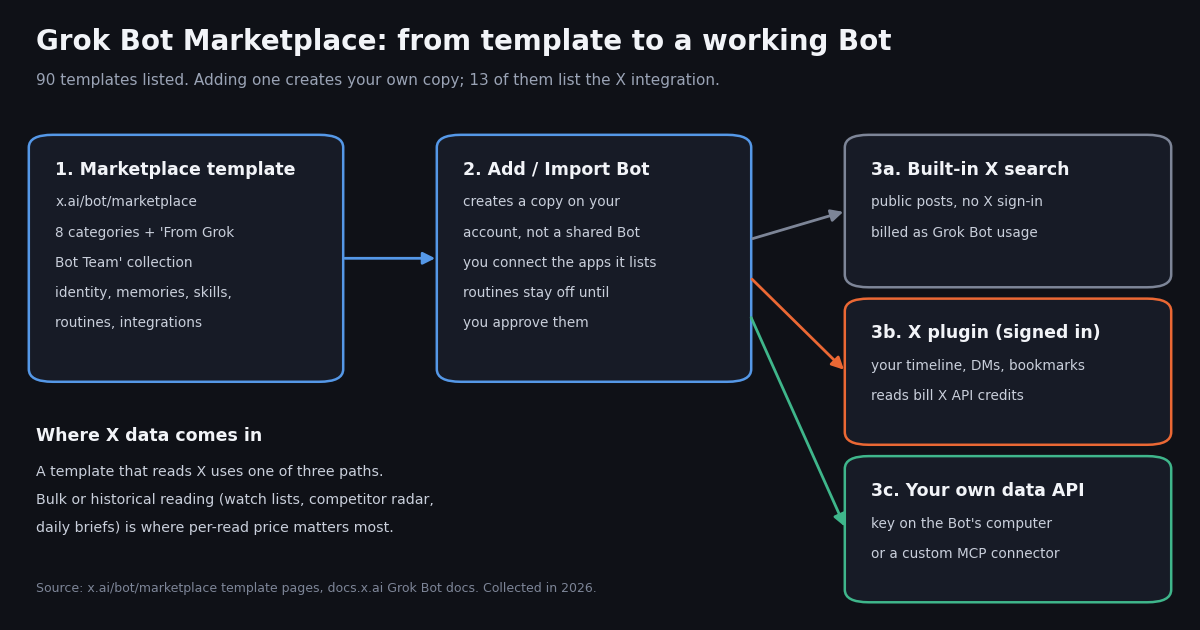
xAI's "Work with Grok Bot" page describes two ways one Bot becomes many. The first is a shared template: open a Bot's Share menu, choose Create template, then pick Public link or Team-only (Enterprise accounts default to Team-only, everyone else to a public link). The second is the marketplace: "Marketplace in the sidebar also lists Bots that you can add. Choose Add on a Bot, or open it and choose Import Bot, to create your own copy from its template."
A copy, not a subscription. The docs are explicit that adding a shared Bot "creates a copy on the recipient's account. It does not give them your computer, logins, or conversation history." Once added, the copy is yours to edit; changes the author makes later do not flow into it. If a whole team should talk to one Bot whose updates reach everyone, the docs point to a Team Bot instead.
Third-party terms. Shared and marketplace Bots are "created by other users, not by SpaceXSI" (the company name xAI's pages use), and adding one accepts the third-party bot terms at x.ai/legal/bot-sharing-terms. Treat a template's instructions the way you would treat a script from the internet: read them before you connect anything.
What a public template exposes. A public link "can be opened by anyone who has it and shows the Bot's shared configuration, including its identity, description, skills, and routines." That is why every marketplace page shows the Bot's full role text, and why the docs tell authors to remove API keys, internal URLs and customer data before sharing.
The table is condensed from the comparison on xAI's Team Bots page (docs.x.ai/grok-bot/team-bots).
What is listed: 90 templates by category
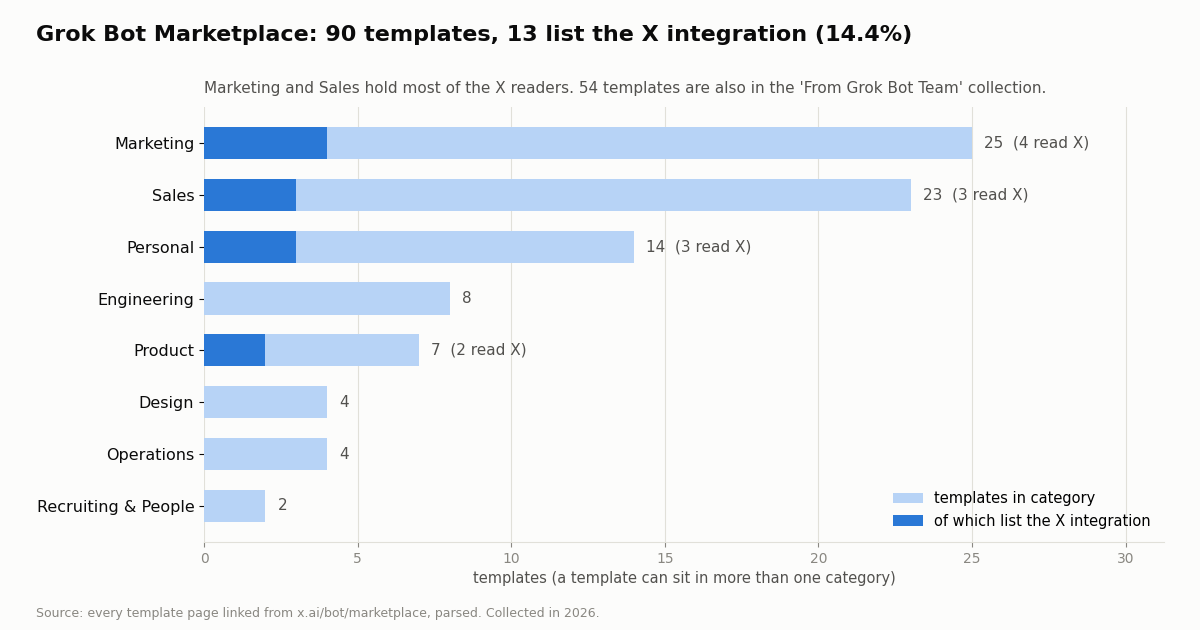
We opened x.ai/bot/marketplace, collected every template link on it, and read each template page. The marketplace listed 90 templates. Eight category tabs group them by team, plus a 'From Grok Bot Team' collection that holds 54 of the 90; a template can sit in two places, and 2 sat in no category at all.
Featured row. At the top of the page the marketplace features dr eggbot (a Bot that designs other Bots), Overheard, Tradbot and Projects Manager. Below that, each category shows a few cards with a View all link.
Names you will recognize from search. Pfp Bot turns an X profile photo, upload, selfie or pet picture into a small Grokbot-style icon. Clip Bot cuts the best moments of a long recording into captioned clips. Haggle Bot inventories SaaS spend and drafts vendor counter-offers. Credit Card Max picks which card to use through Grok Finance (Plaid). Tech Demos and Webby are the lightweight personal Bots that search X, read timelines and pull trends.
No popularity signal yet. Each template page carries an install-count field, and on all 90 pages it read 0, so the marketplace does not tell you what is popular. The X conversation further down is the better proxy.
Which templates read X: the 13 that list the X integration
Each template page lists the apps it wants connected, with a one-line reason for each. 13 of the 90 templates (14.4%) list X. How strongly they need it varies, and the wording comes straight from each page: one says X is needed, two say recommended, four say optional, and six list it without a qualifier.
Two templates name the bill. Distro Bot's X entry ends "reads bill your X API credits", and Sell Bot's says the same. That matches xAI's own description of the X plugin: when a Bot reads X through your connected account, the reads land on an X developer account and spend X API credits, not Grok Bot usage.
Read-only by instruction. Every X-reading template we read limits itself in writing: Market Researcher "never follows, likes, reposts, replies, posts, or sends a DM", Stalk Bot is "Read-only: posts, mentions, replies", and X Brief "never posts on your behalf." Pfp Bot reads only your own profile photo and handle.
Where the reading is heavy. Most of the 13 use X for a light touch, such as a dated hook for one prospect or one profile photo. Three are built around continuous reading: X Brief (a daily brief plus a weekly recap over a watch list of accounts, topics and searches), Stalk Bot (an X radar and complaint mining over competitor and founder handles) and Market Researcher (post volume, engagement and themes for competitor handles). Those are the templates whose X bill grows with every account you add.
What is inside a template
A template page shows five parts, the same five you get in your copy: the Bot's identity and description, its memories ("facts it already knows"), skills ("playbooks it can run"), routines (scheduled runs), and integrations ("apps it can use").
The apps templates ask for. Slack is the most requested integration (52 templates), then Gmail (33), Google Sheets (29), Linear (28), Notion (25 as the workspace plugin, 18 more as Notion), Google Calendar (18), Figma (16), Salesforce (15), Granola (13) and X (13). A template that lists an app does not get it automatically; you connect each one in your copy.
Routines start off. The X Brief template is typical: its role text says its "two routines stay off until you say yes, and they run in your timezone." Read the routine list before you add a template, because a routine is what turns a one-off reader into a daily one.
The role text is the real spec. Pfp Bot's page shows its full instruction block: one job ("turn a photo of the user into a minimal Grokbot-style icon"), explicit anti-jobs ("never post, never change a profile or avatar unasked"), a confidence gate that asks for more photos when the face, skin tone or hair is unclear, and a rule to use the X connector's get_users_me for the profile image when no handle is typed. If you plan to customize a template, that block is what you edit.
How to add, customize, share and publish a template
1. Get access. Grok Bot runs in its desktop and mobile apps. Under The X Subscription it is included on the Premium, Super and Ultra plans, not on Plus (docs.x.ai/x-subscription/grok-bot); existing SuperGrok and Cursor subscribers can still use the access they have. Templates themselves list a price of 0 USD; the Bot's work draws on your plan's shared weekly usage.
2. Add the template. In the app, open Marketplace and choose Add, or open a template page on x.ai and choose Import Bot. The copy appears with its skills, routines and memories in place.
3. Connect what it lists. Install each integration from Connect apps. For X you have two documented choices: the built-in X search, which reads what is public on X without an X account, or the X plugin, which signs in with X and can read your timeline, bookmarks and DMs.
4. Customize. Edit the Bot's description and skills to your scope, then try it on a real task and correct it. For a second variant, use Duplicate: the copy carries the profile, settings, enabled skills, routines and avatar, but not conversation history or learned memory.
5. Share your version. Share then Create template builds a template from your Bot, with Copy link, View template details and Update template once it is ready. Recipients open a preview on x.ai and choose Add to Grok Bot.
6. Publish to a team. If the whole team should use one Bot, choose Publish to Team. Team Bots launched on September 28, 2026 in public beta on Teams and Enterprise plans; each teammate gets a private chat, the Bot keeps team memory, and a plugin that needs a sign-in uses the account of whoever is asking.
7. Submit a plugin. The marketplace also takes plugins. x.ai/bot/marketplace/submit-a-plugin asks for an organization handle, a logo, where you want to be listed (Grok, marked coming soon, Grok Bot, or Cursor), an MCP server URL or public GitHub repository, a description and testing instructions, and confirmation that you tested the plugin locally and in-app. It is a review queue, not instant publishing.
What X is saying about the marketplace
We searched X for the exact phrase "grok bot marketplace", for "grok bot" with template or templates, and for posts linking x.ai/bot/marketplace, then read the official @bot, @SpaceXSI and @grok timelines. Across the three searches we kept 578 unique posts from 405 accounts.
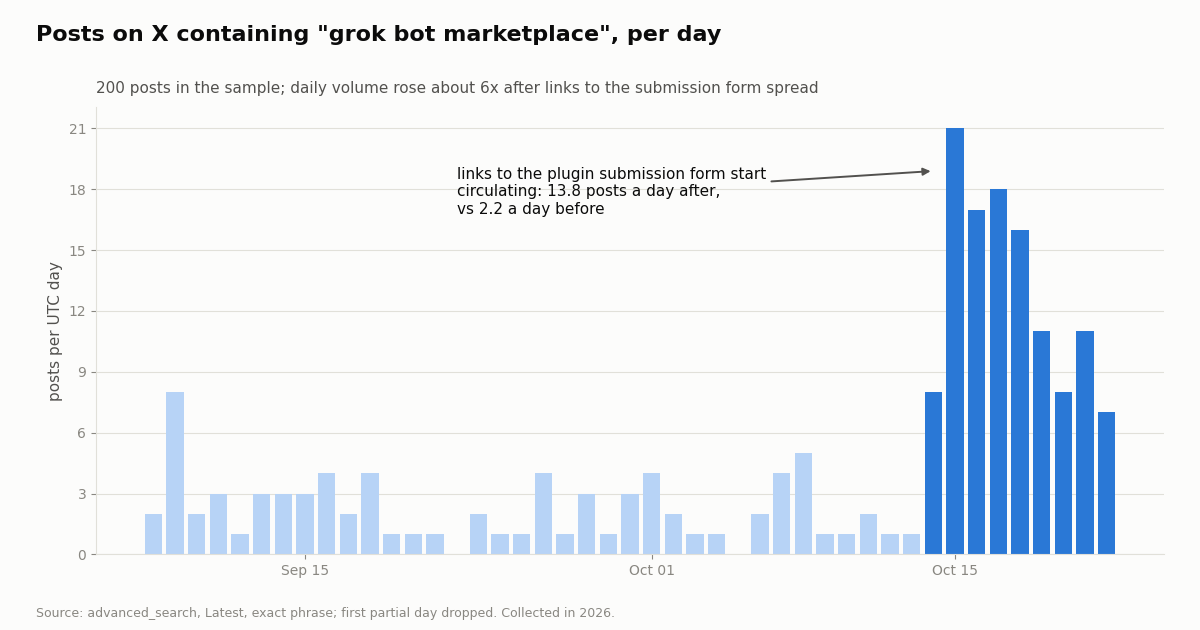
The exact phrase took off with plugin submissions. Over the 36 days before links to the plugin submission form spread (mid-October 2026), "grok bot marketplace" appeared in 2.2 posts a day (median 2). After that it averaged 13.8 a day over the next 8 days, peaking at 21. 12.5% of all the posts we kept mention connectors, plugins or MCP.
The broader template conversation is denser. The "grok bot" plus template search filled its 200-post sample in about 2 days, roughly 98 posts a day, so people talk about templates far more often than they type the word marketplace.
15.6% of posts name a template at all (90 of 578). Haggle Bot leads because it was the launch example; dr eggbot, the Bot that designs other Bots, is close behind, which says a lot about who is reading the marketplace: builders.
Official reach. The @bot post announcing the marketplace drew 31,274,609 views and 5,642 likes, about 4.8x the median views of the 40 recent @bot posts we read; the earlier template-sharing post drew 15,084,965 views. Community posts are small by comparison: a median of 2 likes and 200 views, with 25.3% getting no likes.
Where an X data API fits in a marketplace Bot
A template reads X one of three ways, and they differ in what they can see and who bills the read.
The X rate card. X's pay-per-usage page (docs.x.com/x-api/getting-started/pricing) lists Posts: Read at $0.005 per post, User: Read at $0.010 per user and Following/Followers: Read at $0.010 per user, with pay-per-usage capped at 3 million post reads a month and Enterprise above that. twitterapi.io charges 15 credits per tweet returned, $0.15 per 1,000 tweets, and $0.18 per 1,000 profiles. Per 1,000 posts that is $5 against $0.15, about 33x.
What that means for an X Brief-style Bot. Say the watch list covers 25 accounts averaging 8 posts a day each: about 200 posts a day, or 6,000 a month. On X's card the reads cost about $30 a month; at $0.15 per 1,000 tweets they cost about $0.90. X deduplicates a post read twice within one UTC day, which helps a Bot that rereads, but a weekly recap that re-reads seven days of posts pays again on each new day.
When to keep the X plugin. Your own timeline, bookmarks and DMs are private to your account and only the signed-in plugin can read them. Pfp Bot reading your own profile photo is the same case. Route those through the plugin and route public, bulk or historical reading (watch lists, competitor radar, topic counts, past posts) to a data API.
How to wire it. Two routes work without an X developer account. Put a script and a dedicated API key on the Bot's computer and save the run as a skill (xAI's docs warn that command-line credentials on that computer are shared by every Bot on your account, so use a key you are comfortable sharing between them). Or add a custom MCP connector: our MCP server is published on npm as @twitterapi_io/mcp-server, and the setup is in our Grok connectors guide. The same server is the kind of MCP plugin the submission form asks for.
"""x_watchlist_brief.py - the X data behind an "X Brief"-style Grok Bot template.
Reads the last N hours of posts from a watch list of accounts and topics, newest first,
and writes one JSON file a Bot (or you) can turn into a brief.

    pip install requests
    export TWITTERAPI_IO_API_KEY=...        # from twitterapi.io/dashboard
    python3 x_watchlist_brief.py --accounts SpaceXSI bot grok --topics "grok bot marketplace" --hours 24 > brief.json
"""
import argparse, json, os, sys, time
import requests

BASE = "https://api.twitterapi.io"
HEADERS = {"X-API-Key": os.environ["TWITTERAPI_IO_API_KEY"]}
PRICE_PER_TWEET = 0.00015   # 15 credits per tweet returned
X_PRICE_PER_POST = 0.005    # X pay-per-usage "Posts: Read"


def search(query, max_pages=10):
    """All posts for one advanced_search query, following next_cursor."""
    params = {"query": query, "queryType": "Latest"}
    tweets, pages = [], 0
    while pages < max_pages:
        r = requests.get(f"{BASE}/twitter/tweet/advanced_search", headers=HEADERS, params=params, timeout=30)
        if r.status_code == 429:          # rate limited: wait and retry the same page
            time.sleep(2)
            continue
        r.raise_for_status()
        body = r.json()
        tweets.extend(body.get("tweets") or [])
        pages += 1
        if not body.get("has_next_page") or not body.get("next_cursor"):
            break
        params["cursor"] = body["next_cursor"]
    return tweets


def row(t):
    a = t.get("author") or {}
    return {
        "url": t.get("url"),
        "createdAt": t.get("createdAt"),
        "author": a.get("userName"),
        "text": t.get("text"),
        "likes": t.get("likeCount", 0),
        "reposts": t.get("retweetCount", 0),
        "replies": t.get("replyCount", 0),
        "views": t.get("viewCount", 0),
        "is_reply": t.get("isReply", False),
    }


def main():
    ap = argparse.ArgumentParser()
    ap.add_argument("--accounts", nargs="*", default=[])
    ap.add_argument("--topics", nargs="*", default=[])
    ap.add_argument("--hours", type=int, default=24)
    args = ap.parse_args()
    since = int(time.time()) - args.hours * 3600

    seen, items = set(), []
    queries = [f"from:{a} since_time:{since}" for a in args.accounts]
    queries += [f'"{t}" since_time:{since}' for t in args.topics]
    for q in queries:
        for t in search(q):
            if t["id"] in seen:          # the same post can match an account and a topic
                continue
            seen.add(t["id"])
            items.append({"matched": q, **row(t)})

    items.sort(key=lambda x: x["likes"] + 2 * x["reposts"], reverse=True)
    n = len(items)
    print(json.dumps({
        "window_hours": args.hours,
        "posts": n,
        "est_cost_twitterapi_io_usd": round(n * PRICE_PER_TWEET, 4),
        "est_cost_x_pay_per_usage_usd": round(n * X_PRICE_PER_POST, 4),
        "items": items,
    }, indent=2, ensure_ascii=False))
    print(f"{n} posts, about ${n * PRICE_PER_TWEET:.4f} here vs ${n * X_PRICE_PER_POST:.2f} on X's card", file=sys.stderr)


if __name__ == "__main__":
    main()
Customizing an X-reading template step by step
Take X Brief as the example, since it is the template built most squarely on X reads. Its skills are Getting started, Build the X watch list, Daily X brief, Weekly X recap, Read a thread or post, and Draft a post or reply; its routines are a daily brief at the hour you pick and a Friday recap.
Keep the skills, swap the source. Leave the watch-list and brief skills as they are. Add one skill, for example "Fetch the watch list window", that runs the script above with the watch list's accounts and topics and the hours since the last run, then hands the JSON to the existing Daily X brief skill. Tell the Bot in its description to use that skill for public posts and the X plugin only for your own timeline and lists.
Keep its rules. X Brief's role text says it never invents a post, quote, handle or engagement number and reports when it cannot open a page. The script returns each post's url, createdAt, author.userName and counts, so every line of the brief can still carry a real link.
Check the cost before the routine. Run the skill once by hand: the script prints the post count and the cost both ways. A twitterapi.io account starts with up to $1 of free credits (at most 100,000 credits, no card, one per person or network, expiring after 31 days) for new accounts that pass the automatic bot check, which covers several thousand posts of testing. Purchased credits never expire. Before your first payment the API allows 0.2 requests a second, enough for a daily brief; paid accounts get 20.
Then share it. Once the copy works, Create template turns it into your own template link. Strip the API key from anything the template shares; the docs say a public template shows its identity, description, skills and routines to anyone with the link.
How we collected this
Question. What does the Grok Bot Marketplace list, how many templates read X, and how much public conversation does it generate? The protocol was written before collection.
Catalog. We downloaded x.ai/bot/marketplace and all 90 template pages it links, without logging in, and parsed the template data each page embeds: categories, skills, routines and integrations with their one-line reasons. Creator names were not stored.
Conversation. With twitterapi.io's /twitter/tweet/advanced_search (Latest) we ran three queries: the exact phrase "grok bot marketplace", "grok bot" with template or templates, and posts linking x.ai/bot/marketplace, up to 10 pages each. With /twitter/user/last_tweets we read the official @bot, @SpaceXSI and @grok timelines. That is 840 posts over 46 requests, about $0.13 at 15 credits per tweet. Collected in 2026.
What the sample cannot show. Each search stops at 200 posts, so the template search covers only its most recent days; template mentions use exact name matching, and eight names that read as ordinary words (such as Alfred and Overheard) plus job-title names (such as Video Editor) were excluded from the count. The catalog is a snapshot: templates are added often, and the install-count field showed 0 everywhere.
Privacy. Aggregates only. Search authors are private individuals: their posts were analyzed in memory and are not published; the de-identified sample keeps only day, post type, language, counts and a follower bucket. Official organization accounts are named.
"""x_watchlist_brief.py - the X data behind an "X Brief"-style Grok Bot template.
Reads the last N hours of posts from a watch list of accounts and topics, newest first,
and writes one JSON file a Bot (or you) can turn into a brief.

    pip install requests
    export TWITTERAPI_IO_API_KEY=...        # from twitterapi.io/dashboard
    python3 x_watchlist_brief.py --accounts SpaceXSI bot grok --topics "grok bot marketplace" --hours 24 > brief.json
"""
import argparse, json, os, sys, time
import requests

BASE = "https://api.twitterapi.io"
HEADERS = {"X-API-Key": os.environ["TWITTERAPI_IO_API_KEY"]}
PRICE_PER_TWEET = 0.00015   # 15 credits per tweet returned
X_PRICE_PER_POST = 0.005    # X pay-per-usage "Posts: Read"


def search(query, max_pages=10):
    """All posts for one advanced_search query, following next_cursor."""
    params = {"query": query, "queryType": "Latest"}
    tweets, pages = [], 0
    while pages < max_pages:
        r = requests.get(f"{BASE}/twitter/tweet/advanced_search", headers=HEADERS, params=params, timeout=30)
        if r.status_code == 429:          # rate limited: wait and retry the same page
            time.sleep(2)
            continue
        r.raise_for_status()
        body = r.json()
        tweets.extend(body.get("tweets") or [])
        pages += 1
        if not body.get("has_next_page") or not body.get("next_cursor"):
            break
        params["cursor"] = body["next_cursor"]
    return tweets


def row(t):
    a = t.get("author") or {}
    return {
        "url": t.get("url"),
        "createdAt": t.get("createdAt"),
        "author": a.get("userName"),
        "text": t.get("text"),
        "likes": t.get("likeCount", 0),
        "reposts": t.get("retweetCount", 0),
        "replies": t.get("replyCount", 0),
        "views": t.get("viewCount", 0),
        "is_reply": t.get("isReply", False),
    }


def main():
    ap = argparse.ArgumentParser()
    ap.add_argument("--accounts", nargs="*", default=[])
    ap.add_argument("--topics", nargs="*", default=[])
    ap.add_argument("--hours", type=int, default=24)
    args = ap.parse_args()
    since = int(time.time()) - args.hours * 3600

    seen, items = set(), []
    queries = [f"from:{a} since_time:{since}" for a in args.accounts]
    queries += [f'"{t}" since_time:{since}' for t in args.topics]
    for q in queries:
        for t in search(q):
            if t["id"] in seen:          # the same post can match an account and a topic
                continue
            seen.add(t["id"])
            items.append({"matched": q, **row(t)})

    items.sort(key=lambda x: x["likes"] + 2 * x["reposts"], reverse=True)
    n = len(items)
    print(json.dumps({
        "window_hours": args.hours,
        "posts": n,
        "est_cost_twitterapi_io_usd": round(n * PRICE_PER_TWEET, 4),
        "est_cost_x_pay_per_usage_usd": round(n * X_PRICE_PER_POST, 4),
        "items": items,
    }, indent=2, ensure_ascii=False))
    print(f"{n} posts, about ${n * PRICE_PER_TWEET:.4f} here vs ${n * X_PRICE_PER_POST:.2f} on X's card", file=sys.stderr)


if __name__ == "__main__":
    main()
Questions readers ask
What is the Grok Bot Marketplace?
It is xAI's catalog of ready-made Grok Bot templates at x.ai/bot/marketplace, also shown as Marketplace in the Grok Bot app. Adding a template creates your own editable copy of that Bot with its skills, routines, memories and listed integrations. We counted 90 templates when we read it.
Is the Grok Bot Marketplace free?
Templates list a price of 0 USD in their page data, and adding one costs nothing extra. Running the Bot needs a plan that includes Grok Bot: Premium, Super or Ultra under The X Subscription per xAI's docs (Plus does not include it). Apps a template connects, such as the X plugin, can bill separately; X reads through the plugin spend X API credits.
How do I publish my own Grok Bot template?
Open your Bot's Share menu and choose Create template, then choose a Public link or Team-only link and send it. Recipients open a preview on x.ai and choose Add to Grok Bot. To give a whole team one shared Bot, use Publish to Team instead. Plugins and MCP servers go through the separate submission form at x.ai/bot/marketplace/submit-a-plugin, which xAI reviews.
Which Grok Bot templates use X (Twitter) data?
13 of 90 list the X integration: X Brief, Stalk Bot, Distro Bot, Market Researcher, Sell Bot, Signal Prospector, Outbound Prospecting, Product Marketer, Proto Bot, Overheard, Tech Demos, Webby and Pfp Bot. Stalk Bot says X is needed for its X radar, Distro Bot and Market Researcher recommend it, and four call it optional.
What is the difference between a template and a Team Bot?
A template gives each person their own separate copy that they maintain. A Team Bot is one Bot the whole team talks to, each in a private chat, with team memory and updates from the owner reaching everyone. Team Bots launched in public beta on Teams and Enterprise plans.
Does adding a template give me the author's data or logins?
No. xAI's docs say adding a shared Bot creates a copy on your account and does not give you the author's computer, logins or conversation history. You connect your own apps. Shared Bots come from other users, and adding one accepts xAI's third-party bot terms.
How can a Grok Bot template read X more cheaply?
Use the X plugin only for your own private data (timeline, bookmarks, DMs) and send public or bulk reads to a data API. X's pay-per-usage card is $0.005 per post read; twitterapi.io is $0.15 per 1,000 tweets. Put a script and a dedicated key on the Bot's computer and save it as a skill, or add a custom MCP connector such as @twitterapi_io/mcp-server.
What are Pfp Bot and Clip Bot?
Both are marketplace templates. Pfp Bot turns your X profile photo, an upload, a selfie or a pet picture into a small Grokbot-style icon and never posts anything; the X integration is optional and only reads your own photo and handle. Clip Bot finds the best moments in a long recording and cuts them into short captioned clips with transcripts and timestamps.
Continue
- x.ai: Grok Bot Marketplace (template catalog and every linked template page)
- xAI docs: Work with Grok Bot (Share a Bot, Add a Bot from Marketplace, Duplicate)
- xAI docs: Team Bots (personal vs template vs Team Bot, Publish to Team)
- x.ai: Submit a plugin to the marketplace (Grok, Grok Bot, Cursor)
- xAI docs: Grok Bot on The X Subscription (plans that include Grok Bot)
- X developer docs: pay-per-usage pricing (Posts: Read $0.005, 3M cap)
- Twitter (X) API hub: endpoints, pricing and guides
- Grok Bot guide: what it reads on X and what those reads cost
- Grok connectors: add a custom MCP connector for X data
- Build a Grok agent on the xAI API with X data
- Grok Tasks: scheduled X monitoring in Grok
- twitterapi.io MCP server for Twitter (X) data
- twitterapi.io pricing: $0.15 per 1,000 tweets
- 01GetXBot: What the Twitter (X) Video Bot Is, Whether It Is Safe, and Alternatives
- 02The Best Twitter (X) Accounts to Follow, by Topic
- 03What Is xcancel (X Cancel)? The Twitter (X) Nitter Front End, Explained
- 04Twitter (X) Media Viewer: How to Browse an Account's Photos and Videos
- 05AllMyTweets: What It Did, Its Limits, and How to See Every Tweet on Twitter (X)
- 06Grok Bot and the Twitter (X) API: what it can read, what it costs, and how to give it cheaper X data
- 07Grok 4.7: API model id, pricing, context window, and feeding it Twitter (X) data
- 08How to Build a Twitter (X) to Discord Bot in 2026
Stop reading. Start building.
Starter credits cover real testing on real data. Google sign-in, no card, no application queue.
Get an API key