Tweet Tunnel Alternative: How to See Old Tweets Now That TweetTunnel Is Gone
TweetTunnel was a small web tool, with Internet Archive captures of its domain going back to 2009, that added features Twitter's own interface lacked. Its 2013 homepage listed Old Tweets ("view someone's earlier tweets. Go back as many as 3200 tweets"), Circle of Friends, Photo Gallery, Verified Users, First Follower and Message to All. By 2020 it had added a Message Box and Long Tweets. If you still have it bookmarked, you'll have noticed it stopped working.
This page does three things. It documents what happened to TweetTunnel using archived captures rather than guesses. It maps each TweetTunnel feature to a working replacement, free where possible. And for anyone who needs old tweets in bulk, such as researchers, journalists, or analysts building a dataset, it gives a runnable Python script and a side-by-side cost comparison.
Is TweetTunnel down? What the archive shows
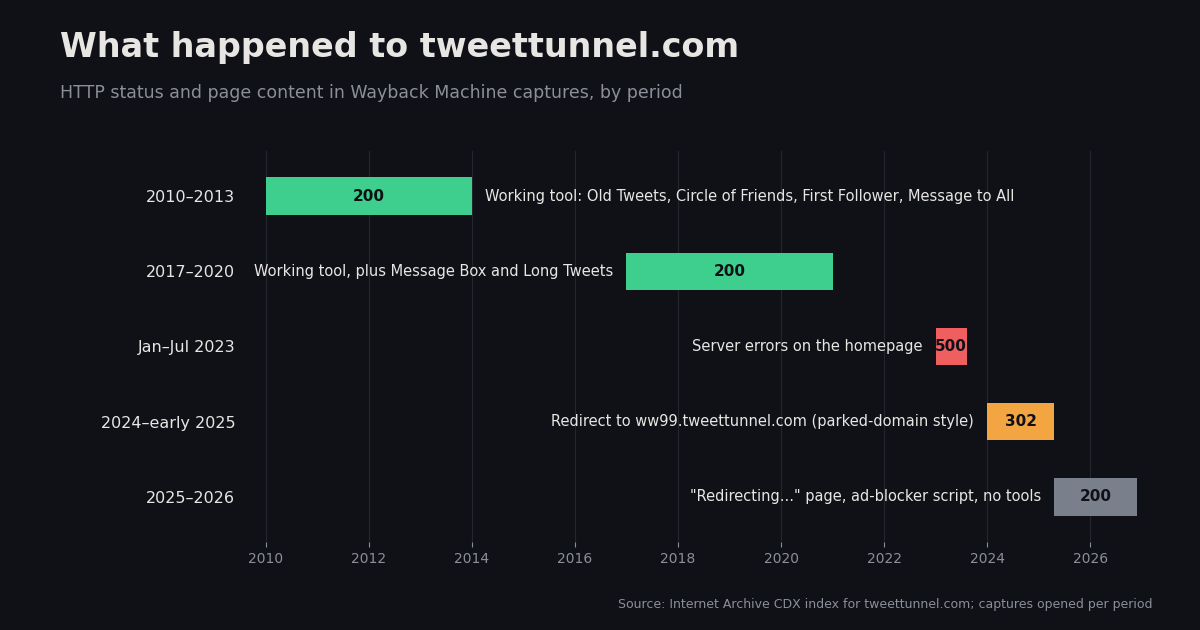
We pulled the Internet Archive's capture index (the Wayback Machine CDX API) for tweettunnel.com and opened captures from each period. The pattern is clear.
Twitter changed its API access model in 2023. We can't confirm from the outside whether that is why TweetTunnel broke, but the timing lines up with the first wave of 500 errors. Either way, the domain no longer hosts the tool, and none of its features are reachable. Be cautious with the current redirect page: it isn't the original service.
Every TweetTunnel feature and what replaces it
Not every feature needs a paid tool. Several are now built into X itself.
For a one-off lookup, such as finding what someone posted in a specific month, the free route is enough. The API route makes sense when you need hundreds or thousands of tweets, need them in a file, or need to repeat the lookup for many accounts.
Free method: find old tweets with X advanced search
X's search bar supports date operators. The community-maintained reference of X search operators (igorbrigadir/twitter-advanced-search on GitHub) documents since:YYYY-MM-DD as inclusive and until:YYYY-MM-DD as exclusive. To see what @nasa posted in June 2019, search from:nasa since:2019-06-01 until:2019-07-01 and open the Latest tab. Top results are ranked by engagement and will skip tweets.
Useful variations: add -filter:replies to hide replies, filter:media for tweets with photos or video, or a keyword to narrow further, as in from:nasa moon since:2019-06-01 until:2019-07-01. Narrow date windows work better than one huge range, because long result lists get slow to scroll.
Limits of the free method: you must be logged in, results are a scrolling feed rather than a file, and there's no count. You can't easily tell whether you've seen everything in the window. For your own account only, X's settings also offer a downloadable archive of your data, which is the most complete record of your own tweets.
API method: pull someone's old tweets into a file
TwitterAPI.io's advanced_search endpoint takes the same query language. One difference matters: per the TwitterAPI.io docs, date bounds should be written as unix timestamps with since_time: and until_time:, not the since:2021-12-31_23:59:59_UTC form. Results come back newest-first in pages, with has_next_page and next_cursor for pagination.
The snippet below fetches one month of a user's tweets and writes them to JSON Lines. The full script at the bottom of the page walks a longer date range month by month, which keeps each query small and makes reruns resumable.
# One month of a user's tweets -> tweets.jsonl
import os, json, requests
from datetime import datetime, timezone

HEADERS = {"X-API-Key": os.environ["TWITTERAPI_IO_KEY"]}

def unix(y, m, d):
    return int(datetime(y, m, d, tzinfo=timezone.utc).timestamp())

query = f"from:nasa since_time:{unix(2019, 6, 1)} until_time:{unix(2019, 7, 1)}"
cursor, n = "", 0
with open("tweets.jsonl", "w") as f:
    while True:
        r = requests.get(
            "https://api.twitterapi.io/twitter/tweet/advanced_search",
            headers=HEADERS,
            params={"query": query, "queryType": "Latest", "cursor": cursor},
            timeout=20,
        )
        r.raise_for_status()
        body = r.json()
        for t in body.get("tweets", []):
            f.write(json.dumps({"id": t["id"], "createdAt": t["createdAt"], "text": t["text"]}) + "\n")
            n += 1
        if not body.get("has_next_page"):
            break
        cursor = body["next_cursor"]
print(f"saved {n} tweets")Replacing "First Follower": find an account's earliest followers
TweetTunnel's First Follower showed who followed an account first. X's interface lists followers newest-first and offers no way to jump to the end. Per the TwitterAPI.io docs, the /twitter/user/followers endpoint returns followers in the same reverse-chronological order, up to 200 per page. Paging until has_next_page is false leaves the earliest followers on the final page.
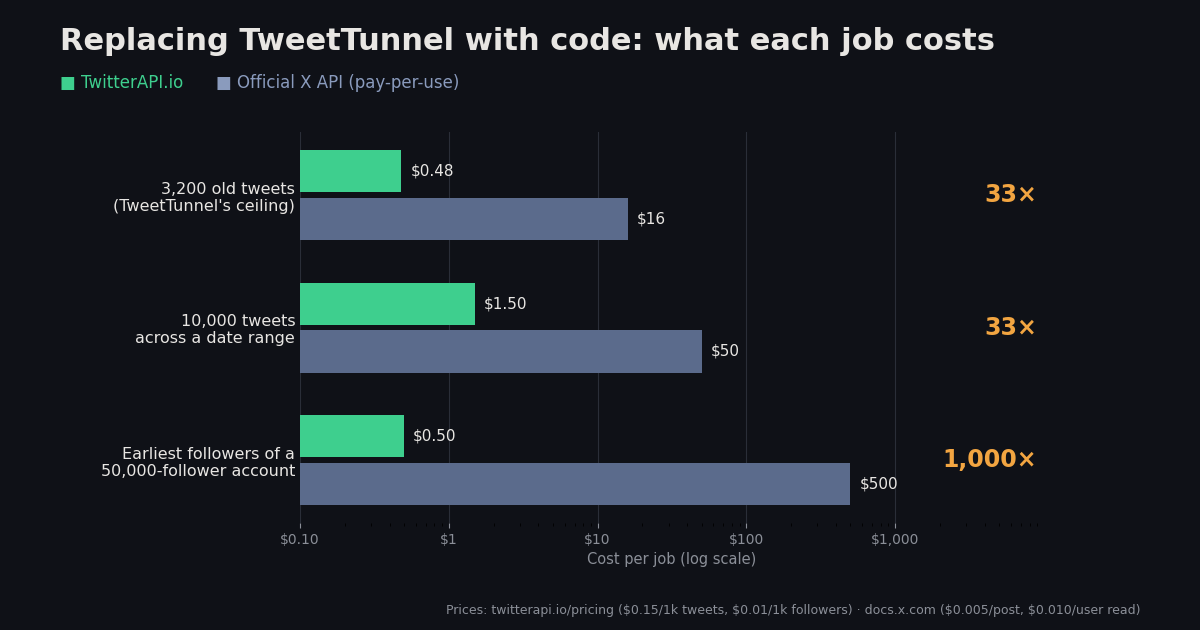
This is a full scan, so the cost scales with follower count. At the maximum page size of 200, TwitterAPI.io charges $0.01 per 1,000 followers returned. An account with 50,000 followers costs about $0.50 and 250 requests. For accounts with millions of followers, check the follower count first with /twitter/user/info and decide whether the scan is worth it.
One caveat: the list reflects current followers only. Someone who followed in 2009 and later unfollowed, or whose account was deleted, won't appear. So the result is the earliest follower who is still following, which is what most people actually want to know.
Cost comparison: TwitterAPI.io vs the official X API
If you're replacing TweetTunnel with code, the two realistic data sources are a third-party API like TwitterAPI.io or X's own developer API. Prices below come from twitterapi.io/pricing ($0.15 per 1,000 tweets; followers from $0.01 per 1,000 at 200 per page) and docs.x.com pay-per-use pricing ($0.005 per post read; $0.010 per follower or user read).
On tweets, the price ratio is about 33× ($0.005 ÷ $0.00015 per tweet). On follower scans it's about 1,000× ($0.010 ÷ $0.00001 per follower at full page size). The official X API's pay-per-use plan also caps post reads at 3 million per monthly billing cycle (docs.x.com pricing), which is plenty for TweetTunnel-style lookups but relevant if you scale up.
Which TweetTunnel alternative should you use?
If you collect tweets for research, also read X's developer terms and your institution's data policy before storing or publishing other people's posts.
# TweetTunnel "Old Tweets" replacement: export a user's tweets over a date range,
# one calendar month per query, resumable, into tweets_<handle>.jsonl
import os, json, requests
from datetime import datetime, timezone
from pathlib import Path

HEADERS = {"X-API-Key": os.environ["TWITTERAPI_IO_KEY"]}
HANDLE = "nasa"
START, END = (2018, 1), (2019, 12)  # inclusive (year, month)
OUT = Path(f"tweets_{HANDLE}.jsonl")
DONE = Path(f"tweets_{HANDLE}.done")  # months already exported

def month_bounds(y: int, m: int) -> tuple[int, int]:
    start = datetime(y, m, 1, tzinfo=timezone.utc)
    end = datetime(y + (m == 12), m % 12 + 1, 1, tzinfo=timezone.utc)
    return int(start.timestamp()), int(end.timestamp())

def months(start, end):
    y, m = start
    while (y, m) <= end:
        yield y, m
        y, m = (y + 1, 1) if m == 12 else (y, m + 1)

def export_month(y: int, m: int) -> int:
    lo, hi = month_bounds(y, m)
    query = f"from:{HANDLE} since_time:{lo} until_time:{hi}"
    cursor, n = "", 0
    with OUT.open("a") as f:
        while True:
            r = requests.get(
                "https://api.twitterapi.io/twitter/tweet/advanced_search",
                headers=HEADERS,
                params={"query": query, "queryType": "Latest", "cursor": cursor},
                timeout=20,
            )
            r.raise_for_status()
            body = r.json()
            for t in body.get("tweets", []):
                f.write(json.dumps({
                    "id": t["id"],
                    "createdAt": t["createdAt"],
                    "text": t["text"],
                    "likeCount": t.get("likeCount"),
                    "retweetCount": t.get("retweetCount"),
                    "url": t.get("url"),
                }) + "\n")
                n += 1
            if not body.get("has_next_page"):
                return n
            cursor = body["next_cursor"]

done = set(DONE.read_text().split()) if DONE.exists() else set()
total = 0
for y, m in months(START, END):
    key = f"{y}-{m:02d}"
    if key in done:
        continue
    n = export_month(y, m)
    total += n
    with DONE.open("a") as d:
        d.write(key + "\n")
    print(f"{key}: {n} tweets")

print(f"exported {total} tweets -> {OUT} (approx cost ${total * 0.00015:.2f} at $0.15/1K)")Questions readers ask
Is TweetTunnel still working?
No. Wayback Machine captures show tweettunnel.com returning HTTP 500 errors through 2023, redirecting to a parked subdomain from 2024, and serving only a "Redirecting..." script page with no tools in 2025-2026.
How can I see someone's old tweets for free?
Use X advanced search: type from:username since:YYYY-MM-DD until:YYYY-MM-DD into the search bar and open the Latest tab. Narrow date windows give the most complete results.
Is there still a 3,200-tweet limit on old tweets?
The 3,200 figure is what TweetTunnel's own homepage advertised for its Old Tweets feature. Search-based methods, both X advanced search and the advanced_search API, work by date window rather than by counting back from the newest tweet.
How do I find someone's first follower on Twitter now?
Page through the account's followers list to the end. Followers are returned newest-first, so the earliest remaining followers are on the last page. On TwitterAPI.io that costs about $0.01 per 1,000 followers at 200 per page.
How much does it cost to download 3,200 old tweets via API?
About $0.48 on TwitterAPI.io at $0.15 per 1,000 tweets, versus about $16 on the official X API at $0.005 per post read on its pay-per-use plan.
Can I send a DM to all my followers like TweetTunnel's DM All?
We don't recommend it and TwitterAPI.io doesn't offer DM sending. Bulk unsolicited direct messages are a common trigger for account restrictions.
Continue
- Internet Archive Wayback Machine — tweettunnel.com capture history
- igorbrigadir/twitter-advanced-search — reference for X search operators (since:, until:, since_time:)
- TwitterAPI.io docs — advanced_search query, queryType, cursor
- TwitterAPI.io docs — followers endpoint, newest-first order, page size
- X Developer Platform — pay-per-use pricing and monthly post-read cap
- X Developer Platform — user posts timeline (start_time on or after 2010-11-06)
- Twitter (X) API — endpoint hub
- Export a Twitter account's tweet history via API
- Twitter advanced search API guide
- Search tweets by date
- Find tweets in the Twitter archive
- Historical Twitter data via API
- TwitterAPI.io vs the official X API
- TweetStats alternative: graph your tweets
- TwitterAPI.io pay-per-call pricing
Stop reading. Start building.
Starter credits cover real testing on real data. Google sign-in, no card, no application queue.
Get an API key