How to Pin Someone Else's Tweet on Twitter (X): What Works in 2026
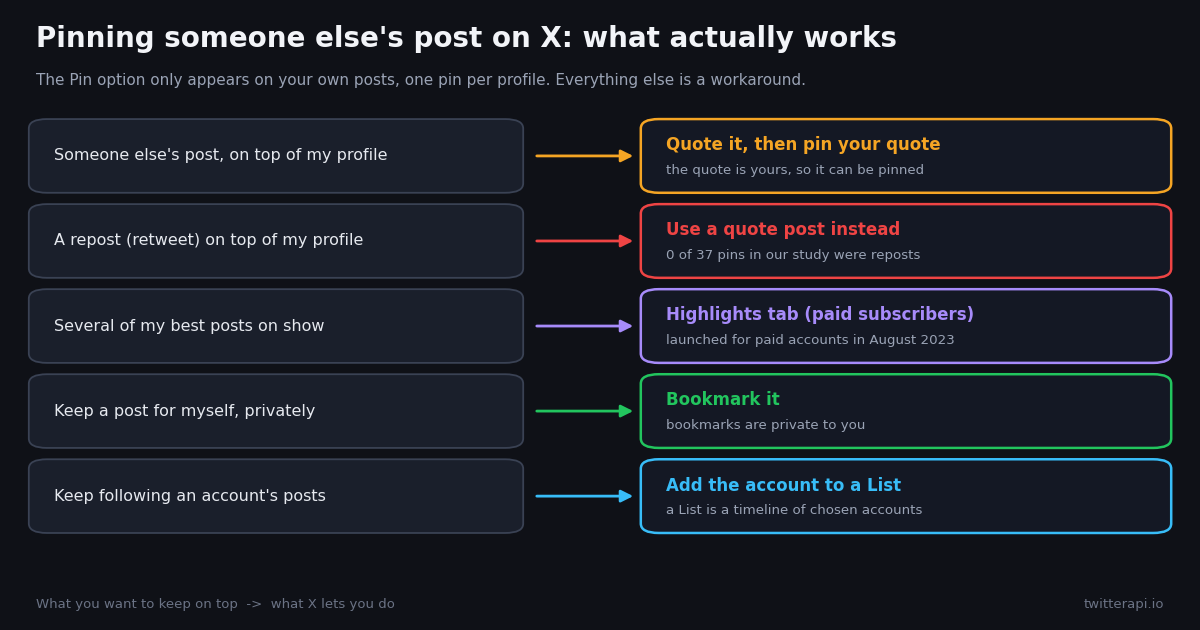
- Direct pinning is for your own posts only. X shows the pin option in the more menu of posts you wrote; one pin per profile.
- Quote, then pin is the working method: your quote post is yours, so it can be pinned, and it embeds the original.
- Reposts are not pinnable posts of yours: 0 of 37 pinned posts in our study were reposts; quote instead.
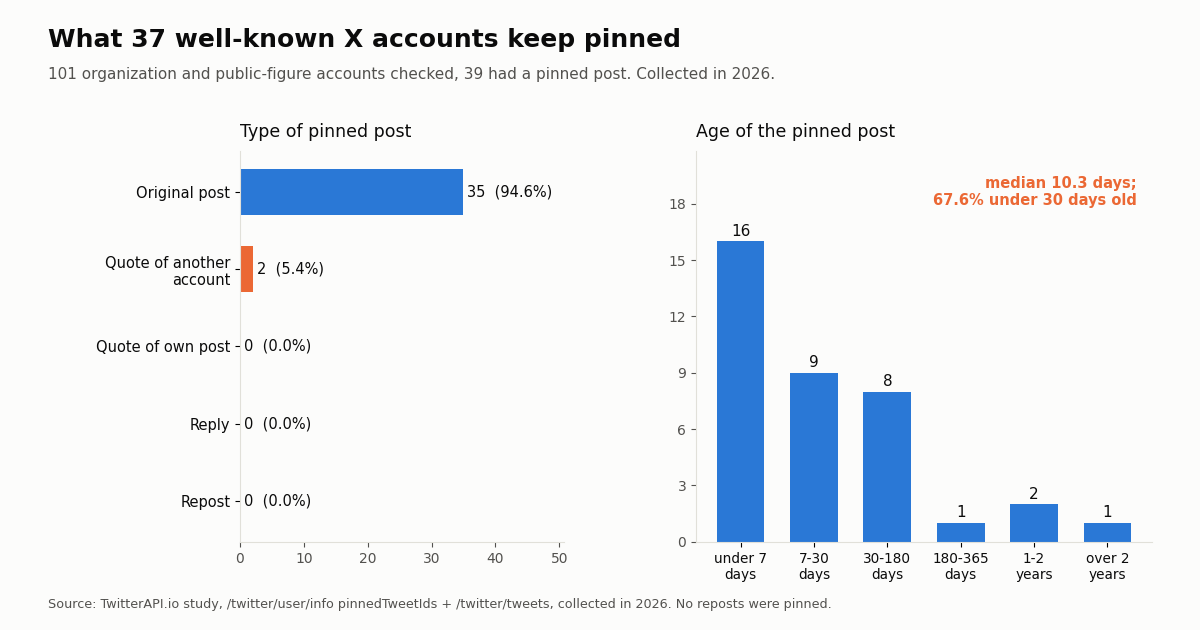
- Our study: 39 of 101 well-known accounts had a pin; 2 of those 37 pins (5.4%) were quotes of another account.
- Pins are fresh: the median pinned post was 10.3 days old, and 67.6% were under 30 days old.
- Developers:
/twitter/user/inforeturnspinnedTweetIds; fetch the post with/twitter/tweetsat $0.15 per 1,000 tweets.
The question comes up every time someone posts something you want everyone who visits your profile to see first: a glowing review of your work, a news story about your project, a friend's announcement, a viral post that mentions you. Twitter (X) lets you pin a post so it sits above everything else on your profile, but the option is only offered on your own posts. So the real question is which workaround gets the same result without breaking anything.
This guide gives the straight answer first, then the step-by-step method that works on the web and in the apps, what happens to a pinned quote when the original changes, and the alternatives (bookmarks, Lists, Highlights) for goals that pinning does not solve. It also includes something the other guides do not have: what 101 well-known organization and public-figure accounts actually keep pinned, read through the API, collected in 2026.
2 of 37 (5.4%)
Can you pin someone else's tweet? What X allows today
No, not directly. X's help center describes pinning as something you do to one of your own posts: you open the post on your profile, open its more menu, and choose to pin it to your profile. X's glossary says the same thing from the other side: you can pin one of your posts to the top of your profile page so it stays above the flow of time-ordered posts. Both pages are at help.x.com/en/managing-your-account/how-to-customize-your-profile and help.x.com/en/resources/glossary (X blocks automated fetching of its help center, so we confirmed the wording through search snapshots of those pages and through X's own posts).
One pin at a time. A profile has a single pinned slot. Pinning a new post replaces the old one; it does not stack. In our study, every account that had a pin returned exactly one pinned post ID.
The pin menu is on posts you wrote. On another account's post the more menu offers actions about that post or its account, and pinning is not among them. That is why the search results for this question are full of workarounds rather than a setting.
Pins get extra reach. In March 2024 the official @X account quoted an announcement that pinned posts would show up in the For You timeline for all users, with the line "draw attention to important posts, or just pin your bangers". That is one reason people want someone else's post pinned: a pin is not just a profile ornament, it is promoted.
What about third-party apps that promise to pin any tweet? Several older guides point to apps or sites that claim to pin another account's post directly. We could not find any X feature they could be using to do that, and every one of them asks for access to your account. Giving an unknown app the ability to act as you is a much bigger risk than the problem it claims to solve. The quote-then-pin method below needs nothing but X itself.
How to pin someone else's tweet: quote it, then pin your quote
The method works because a quote post is a new post that belongs to you, with the other account's post embedded underneath your words. Since it is yours, it gets the pin option. Menus move between app versions, so the labels below describe what each step does rather than promising an exact wording.
Step 1. Open the post you want on top. Find it on the other account's profile, in search, or in your timeline, and open it.
Step 2. Choose Quote. Tap or click the repost icon (two arrows). X offers Repost and Quote; pick Quote.
Step 3. Add your own line. Say why it matters: "Proud of this review of our launch", "Read this thread before you ask me about X". A quote with context reads better at the top of a profile than a bare embed, and it tells visitors why it is pinned.
Step 4. Post it. The quote now appears on your profile as your post.
Step 5. Pin the quote. Go to your profile, open the more menu (three dots) on the quote post you just made, choose the pin option and confirm. It moves to the top of your profile with a pinned label.
Step 6. Check it as a visitor. Open your profile in a private browser window or ask a friend: the pinned quote should be the first post, with the original embedded inside.
To change it later, pin a different post (it replaces the current pin) or use the more menu on the pinned post to unpin it. Unpinning does not delete the quote; it just drops back into your timeline at its original date.
What you want to keep on top, and what actually works
Most people asking how to pin someone else's tweet want one of five different things. Each one has a different answer, and only the first is solved by a pin.
Bookmarks. X's developer documentation states that "Bookmarks are private and only visible to the user who created them" (docs.x.com/x-api/posts/bookmarks/introduction). If your goal is to save a post, not to show it off, a bookmark is the right tool and nobody is told you saved it.
Lists. A List is a separate timeline of accounts you choose. It does not put a post on your profile, but it means you never lose track of the account whose posts you keep wanting to pin.
Highlights. X added a Highlights tab for paid subscribers in August 2023, reported at the time with the instruction to add a post through its more menu. It shows a collection of your own posts, so the same rule applies: quote someone else's post first, then highlight your quote. Eligibility and naming of X's paid plans have changed several times since launch, so check the menu on your own account rather than relying on any guide, this one included.
Why you cannot pin a retweet (repost)
A repost is not a post you wrote. It is the original author's post shown on your timeline with a reposted-by label, and X's pin option sits on posts you authored. Older guides suggest reposting and then pinning; the menu on a repost does not give you that option in the way it does on your own post, and the old trick some developers described years ago (pinning by the repost's own ID) is not something we could confirm still works.
Our data points the same way. Across the 37 pinned posts we could read from well-known accounts, the API returned zero reposts (no pinned post carried a retweeted_tweet object). Big brand and media teams who want another account's post at the top of their profile used quote posts instead: 2 of the 37 pins were quotes of another account.
The fix takes ten seconds. Undo the repost if you like (optional), then quote the same post with a line of your own and pin the quote. You keep the endorsement and gain your own words above it.
What happens to a pinned quote when the original changes
Pinning a quote ties the top of your profile to a post you do not control. It is worth knowing what can change underneath you.
The original is deleted or its account goes private. Your quote post stays, because it is yours, but the embedded original can stop displaying, leaving visitors with your words and an empty frame. If the post matters to you, keep a screenshot or the key quote in your own text.
The original is edited. X lets paid subscribers edit a post for a short window after publishing, and edited posts carry an edit label with a version history. A quote embeds the post that exists, so a quick edit by the author can change what sits under your pinned words.
Your own post is the stable option. If the content must not change (a press quote, a testimonial), write it as your own post with credit and a screenshot, then pin that. It is fully yours, it cannot vanish when another account deletes something, and it still reads clearly in a year.
Refresh the pin. In our study the median pinned post from well-known accounts was 10.3 days old. Organizations treat the pin as a rotating front window, not a permanent sign. If you pin a quote, revisit it when it stops being current.
What well-known accounts actually pin: a study of 101 profiles
Advice about pinning is easy to find; data about what people actually pin is not. So we checked. For 101 well-known organization and public-figure accounts (tech companies, developer tools, media, sports leagues, consumer brands, space agencies, international organizations and a handful of public figures), we read the pinned post ID from each profile and then fetched that post, collected in 2026.
Most big accounts do not pin at all. Only 39 of the 101 accounts (38.6%) returned a pinned post. Many large brands and news organizations leave the slot empty and let their newest post lead.
Pinning someone else's post is rare but real. 2 of the 37 pinned posts we could read (5.4%) were quote posts of another account, which is exactly the workaround this guide describes. One was a public figure quoting a company account; the other was a support account quoting a partner's post. None quoted their own older post, none pinned a reply, and none pinned a repost.
Pins are short-lived. The median pinned post was 10.3 days old (middle half between 4.3 and 53.2 days); 25 of 37 (67.6%) were under 30 days old and only 3 were more than a year old.
Video leads. 17 of the 37 pinned posts (45.9%) carried a video and 7 (18.9%) photos; 13 (35.1%) had no attached media. The median pinned post had 4,169 likes and 747,922 views, but these are very large accounts; treat those as their numbers, not a target.
Takeaway for your own profile. If someone else's post says something you want every visitor to see right now, quote it, pin it, and plan to replace it. That is how the big accounts in our sample use the slot.
How we collected this
Question. What do well-known accounts keep pinned, and how often is it someone else's post?
Accounts. 102 public organization and public-figure accounts across technology, developer tools, AI, media, sports, consumer brands, space and international organizations; 101 returned a profile (one handle did not resolve).
Method. For each account we called /twitter/user/info and read pinnedTweetIds. We then fetched every pinned ID with /twitter/tweets (37 of 39 came back; 2 did not) and classified each from the returned fields: a retweeted_tweet object means repost, a quoted_tweet object means quote (own or another account by the quoted author), isReply means reply, otherwise original. Media type comes from extendedEntities.media[].type, age from createdAt at collection time.
Window and size. The pinned post at collection time, whatever its age; 114 requests in total, collected in 2026.
What the sample cannot show. These are large, professionally run accounts chosen by us, not a random sample of X users; everyday users may pin very differently. An empty pinnedTweetIds is read as no pin returned at collection time. Self-threads (a pinned post the account continued in replies) were not measured. Two pinned IDs did not return a post, possibly because the post was no longer available.
Privacy. Aggregates only. Only organization and public-figure accounts were read; quoted authors were not profiled beyond same account or another account. The de-identified rows are in the study folder (data/studies/how-to-pin-someone-elses-tweet/).
For developers: reading pinned posts through an API
If you need pins at scale (monitoring which post a set of brands keeps on top, archiving campaign pins, checking whether partners pinned your announcement), the profile tells you what is pinned. On TwitterAPI.io, /twitter/user/info returns pinnedTweetIds (an array; one ID in every case we saw), and /twitter/tweets with tweet_ids returns the full post. In our checks, /twitter/user/last_tweets returned data.pin_tweet as null even for an account that had a pin, so read the pin from the profile, not from the timeline.
Cost. Profiles are 18 credits each ($0.18 per 1,000 profiles) and posts are 15 credits per tweet returned ($0.15 per 1,000 tweets), with no X account needed for reads. Checking the pins of 1,000 accounts is about $0.18 for the profiles plus up to $0.15 for the pinned posts. On the official X API rate card (docs.x.com/x-api/getting-started/pricing) the same job is $0.010 per user read and $0.005 per post read: $10 plus $5. Per 1,000 posts, that is $5 against $0.15, about 33 times more.
Pinning by API. X's own developer documentation exposes pinned_tweet_id as a user field and expansion for reading. On our side, /twitter/pin_tweet_v2 pins one of your own posts and /twitter/create_tweet_v2 accepts quote_tweet_id, so the quote-then-pin method can be scripted. Both are write actions that run through an authenticated session from /twitter/user_login_v2 ($0.10 per login, with a proxy you supply); creating the quote costs 60 credits ($0.0006), billed for every HTTP 200 response. The call acts as that account, so X can rate-limit, lock or suspend it: keep a human pace, and expect the session to need a fresh login now and then.
New accounts that pass the automatic bot check get up to $1 of free credits (at most 100,000 credits, no card, one per person or network, expiring after 31 days); see the pricing page for plans.
import requests

BASE = "https://api.twitterapi.io"
HEADERS = {"X-API-Key": "YOUR_API_KEY"}

# Which post does an account keep pinned?
r = requests.get(f"{BASE}/twitter/user/info", headers=HEADERS,
                 params={"userName": "github"}, timeout=30)
r.raise_for_status()
body = r.json()
if body.get("status") != "success" or not body.get("data"):
    raise SystemExit(body.get("msg"))
pinned = body["data"].get("pinnedTweetIds") or []
print("pinned ids:", pinned)"""Read the pinned post of several accounts and classify it.
Uses /twitter/user/info (pinnedTweetIds) and /twitter/tweets (tweet_ids).
Cost: 18 credits per profile + 15 credits per tweet returned.
"""
import requests
from datetime import datetime, timezone
BASE = "https://api.twitterapi.io"
HEADERS = {"X-API-Key": "YOUR_API_KEY"}
ACCOUNTS = ["github", "OpenAI", "NBA", "NatGeo", "elonmusk"]
def pinned_ids(user_name):
r = requests.get(f"{BASE}/twitter/user/info", headers=HEADERS,
params={"userName": user_name}, timeout=30)
r.raise_for_status()
body = r.json()
if body.get("status") != "success" or not body.get("data"):
print(user_name, "->", body.get("msg")) # e.g. "user not found"
return []
return body["data"].get("pinnedTweetIds") or []
def fetch_tweets(ids):
if not ids:
return []
r = requests.get(f"{BASE}/twitter/tweets", headers=HEADERS,
params={"tweet_ids": ",".join(ids)}, timeout=30)
r.raise_for_status()
return r.json().get("tweets", [])
def classify(t):
if t.get("retweeted_tweet"):
return "repost"
if t.get("quoted_tweet"):
quoted = (t["quoted_tweet"].get("author") or {}).get("userName", "")
same = quoted.lower() == t["author"]["userName"].lower()
return "quote of own post" if same else f"quote of @{quoted}"
if t.get("isReply"):
return "reply"
return "original"
wanted = {}
for name in ACCOUNTS:
ids = pinned_ids(name)
if ids:
wanted[ids[0]] = name
else:
print(f"@{name}: no pinned post")
now = datetime.now(timezone.utc)
for t in fetch_tweets(list(wanted)):
created = datetime.strptime(t["createdAt"], "%a %b %d %H:%M:%S %z %Y")
media = [m["type"] for m in (t.get("extendedEntities") or {}).get("media", [])]
print(f"@{t['author']['userName']}: {classify(t)}, "
f"{(now - created).days} days old, media={media or 'none'}, "
f"likes={t.get('likeCount', 0)}, url={t['url']}")
Researching this?Free starter credits cover end-to-end testing — Google sign-in, no card. Get a key.
Questions readers ask
Can you pin someone else's tweet on Twitter?
Not directly. X only offers the pin option on your own posts. Quote the other account's post, then pin your quote: it sits at the top of your profile with the original embedded.
Can you pin a retweet (repost)?
A repost is the other author's post shown on your timeline, not a post you wrote, so it is not pinnable the way your own posts are. Quote the post instead and pin the quote. In our study of 37 pinned posts from well-known accounts, none was a repost.
Does the original author get notified when I pin my quote of their post?
Pinning is an action on your own post, and we found no X documentation saying the quoted author is told about the pin. The quote itself is a public post, so the author can see it like any other quote of their post.
How many tweets can I pin?
One. Pinning a new post replaces the current pin. For several posts on show at once, paid X accounts have a Highlights tab for their own posts.
What happens to my pinned quote if the original tweet is deleted?
Your quote stays because it is your post, but the embedded original can stop displaying. If the content matters, write your own post with credit and a screenshot and pin that instead.
Are apps that pin any tweet safe?
We found no X feature that lets a third-party app pin another account's post to your profile, and such apps ask for access to your account. Quote-then-pin needs nothing but X itself.
Can other people see my bookmarks if I save a tweet instead of pinning it?
No. X's developer documentation states that bookmarks are private and only visible to the user who created them. Use a bookmark to keep a post, a pin to show one.
How can I see which post an account has pinned with an API?
On TwitterAPI.io, /twitter/user/info returns pinnedTweetIds; pass the ID to /twitter/tweets to get the post. Profiles cost $0.18 per 1,000 and tweets $0.15 per 1,000 returned.
Continue
- X Help Center: How to customize your profile (pin a post to your profile; cited, fetch blocked)
- X Help Center glossary: pinned post (pin one of your posts above the time-ordered flow; cited, fetch blocked)
- X API data dictionary: pinned_tweet_id user field and expansion
- X API docs: Bookmarks are private and only visible to the user who created them
- X API pricing: $0.005 per post read, $0.010 per user read
- TwitterAPI.io docs: user info (pinnedTweetIds)
- Twitter (X) API overview: the hub for reading X data
- How to quote a tweet on Twitter (X), step by step
- How to edit a tweet: the edit window and its limits
- Can people see your Twitter bookmarks?
- Twitter (X) Lists: how to make and use them
- Twitter ID finder: get the ID of any account
- TwitterAPI.io pricing: pay only for the data returned
- 01PhantomBuster Pricing: Plans, Execution Hours and What X (Twitter) Data Really Costs
- 02Sprinklr Pricing: What It Costs Now That Self-Serve Has Ended
- 03Goose MCP: How to Add MCP Servers (Extensions) to goose, Desktop and CLI
- 04ChatGPT Apps SDK Tutorial: Build a ChatGPT App That Answers With Live Twitter (X) Data
- 05LM Studio MCP: Connect MCP Servers (and Live Twitter (X) Data) to a Local Model
- 06Tweet Tunnel Alternative: How to See Old Tweets Now That TweetTunnel Is Gone
- 07Blank Tweet Template — Generator + API Workflow
- 08Twitter (X) Tweet Metadata — API Fields Reference
Writing about something you built with TwitterAPI.io? Our community rewards program pays API credits for honest tutorials, build logs and videos.
Stop reading. Start building.
Starter credits cover real testing on real data. Google sign-in, no card, no application queue.
Get an API keyAlready building with TwitterAPI.io? Publish an honest tutorial or build log about it and earn up to $200 a month in API credits.