How to Make Your Twitter (X) Account Private, and Public Again
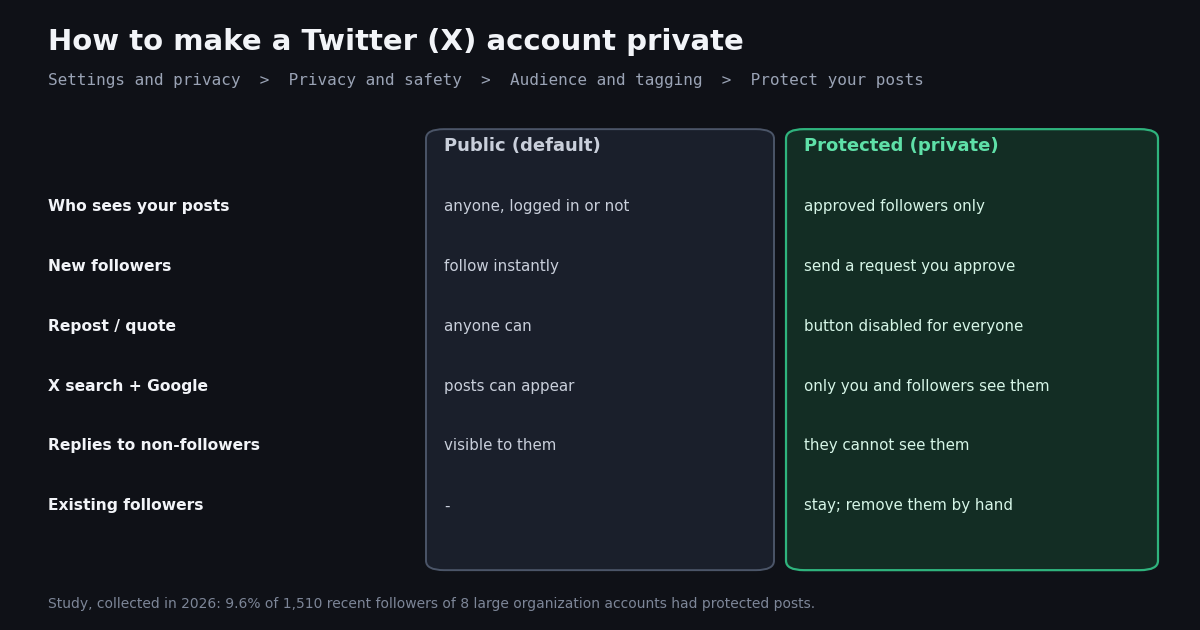
- The setting is Protect your posts: Settings and privacy > Privacy and safety > Audience and tagging, on web, iPhone and Android alike.
- Protected means approved followers only: new followers send requests, reposts and quotes are disabled, posts leave Google and public X search.
- Existing followers stay. Protecting the account does not remove anyone; use Remove this follower or block before you rely on it.
- To go public again, switch the same setting off. Old protected posts become public and pending follow requests are not carried over.
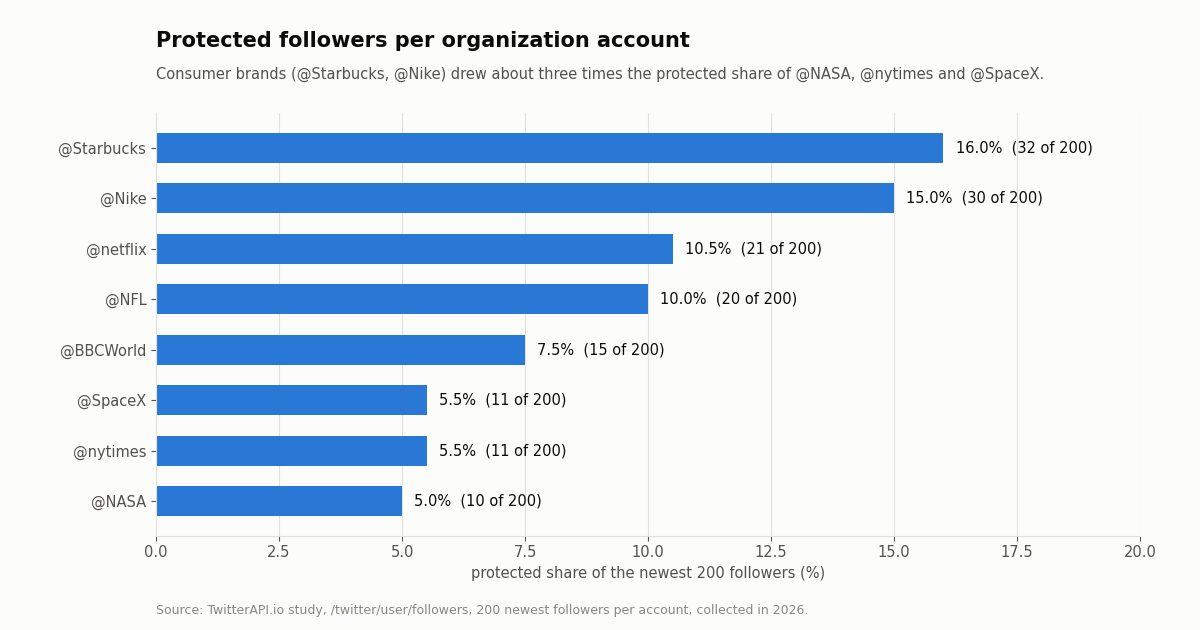
- Our study, collected in 2026: 9.6% of 1,510 recent followers of 8 large organization accounts were protected, from 5.0% (@NASA) to 16.0% (@Starbucks).
- Developers see the state as a boolean:
protectedon/twitter/user/infoand on every record from/twitter/user/followers.
Searches for how to make a Twitter account private come in two flavors: people who want the switch right now, and people who flipped it and want to know what they just did, or how to undo it. This guide covers both. The first section is the click path on each platform, the second is exactly what protection changes and what it does not, and the fourth is the reverse trip back to a public account, which has two side effects most guides skip.
X still calls the feature by its older name inside the settings screen: there is no switch labeled private account. The control is Protect your posts, and an account with it turned on is called a protected account, shown with a small lock next to the name. We use private and protected interchangeably below, the way most people search for it.
We also measured how common private accounts actually are. Using our own read API we pulled the newest 200 followers of eight large organization accounts (@NASA, @nytimes, @NFL, @Starbucks, @Nike, @netflix, @BBCWorld and @SpaceX) and counted how many had protected posts, split by account age and audience size. The numbers are aggregates only, and the method is at the end of the page.
9.6%
How to make your Twitter (X) account private on web, iPhone and Android
The setting lives in the same place on all three platforms, which X's own help article on protecting and unprotecting posts describes as Settings and privacy, then Privacy and safety, then Audience and tagging. Menu labels on X change from time to time, so if a label below does not match your screen, look for the Audience and tagging group inside Privacy and safety.
On the web (x.com in a desktop browser). Open the main menu in the left sidebar and choose Settings and privacy. Click Privacy and safety, then Audience and tagging. Tick the checkbox next to Protect your posts. If X asks you to confirm, confirm.
On iPhone or iPad (X app). Tap your profile photo to open the side menu, tap Settings and privacy, then Privacy and safety. Under Audience and tagging, slide the toggle next to Protect your posts to on. A small lock icon appears next to your name on your profile once the change has applied.
On Android (X app). The path is the same as on iPhone: profile photo, Settings and privacy, Privacy and safety, Audience and tagging, then switch Protect your posts on.
On the mobile website (x.com in a phone browser). It behaves like the desktop site with a collapsed menu: tap your profile photo or the menu icon, go to Settings and privacy, and follow the same three steps.
The setting belongs to the account, not to the device. Turn it on in one place and it applies everywhere you are signed in, including other apps you have authorized. If you manage several accounts in one app, check which account is active before you flip the switch: protection is per account, and it is easy to protect a secondary account by mistake.
One thing you will not find is a way to make only some posts private. Protect your posts is all or nothing for the account. If you want a smaller audience for specific posts, the practical options are a separate protected account or the per-post reply controls in the composer, which limit who can reply but not who can read.
What changes the moment you protect your posts
X's help page About public and protected posts lists the consequences, and every one of them applies at once. The table summarizes them; the notes after it explain the rows that surprise people.
Your old posts are protected too. The switch applies to every post on the account, not only to new ones. Posts that were public before stop appearing in public search on X. Copies that already left your control (screenshots, quotes of the text, search-engine caches that have not refreshed yet) are not pulled back.
Links to your posts stop working for strangers. A post's permanent URL shows its content only to you and to approved followers. Anyone else who opens the link sees that the posts are protected, which also breaks embeds of your posts on other websites.
Replies become one-way. If you reply to an account that does not follow you, that account does not see the reply. In practice a protected account cannot take part in public threads with strangers; it can only talk to its followers.
Follow requests become a queue. New people who want to follow you send a request. You see pending requests from the follower requests entry in your notifications or menu, and you approve or deny each one. Until you approve, they see your profile header but no posts.
What a private account does not hide
Protection is narrower than the word private suggests. It controls who can read your posts, and a handful of things around them. These stay visible or possible:
Your profile header. Your display name, handle, profile photo, banner, bio, location, website and the follower and following counts remain visible to everyone, as rendered by the X web client. If any of those reveal more than you want, edit them; protection does not cover them.
Your followers and following lists, to followers. Non-followers lose access to both lists, but every approved follower can still browse them. Our guide on hiding who you follow covers that limitation in depth.
Anything your followers choose to copy. X's help page notes that followers can take screenshots of protected posts and share them, and media they download can travel. Protection limits distribution through X's own buttons; it does not make a post secret.
Apps you have authorized. A third-party app you have connected to your own account can see what your account can see, including your protected posts. Review the connected apps listed in your account settings and revoke anything you no longer use.
People who already follow you. This is the most common mistake. Protecting the account changes nothing for current followers. If the reason you are going private is a specific person, remove them as a follower or block them first; removing a follower is quieter, since X does not notify them.
Viewing someone else's private account is a different question with a short answer: there is no setting, site or tool that shows protected posts to someone who is not an approved follower. Our separate guide on private profile viewers explains why the services that claim otherwise do not work.
How to make your Twitter (X) account public again
Unprotecting uses the same switch. Go to Settings and privacy, Privacy and safety, Audience and tagging, and turn Protect your posts off (untick the checkbox on the web, slide the toggle off in the apps). Confirm if asked.
Everything becomes public, including the private-era posts. X's help page on protecting and unprotecting is explicit that posts written while the account was protected become public when you unprotect. If some of them were written for followers only, delete those first. There is no per-post way to keep them protected on a public account.
Pending follow requests are not carried over. Requests that were still waiting when you went public are not accepted automatically. Those people will have to follow you again, and they are not told that your account is now public. If you want them, approve the queue before you switch.
Search and reposts come back gradually. Your posts become repostable, quotable and searchable on X again. Search engines pick public posts up on their own schedule, so expect a delay before old posts appear in Google results again.
If you flip back and forth, each switch applies to the whole account history. Protecting for a weekend and unprotecting on Monday leaves you exactly where you started, with the exception of follow requests that went unanswered in between.
If the switch seems stuck. Sign out and back in, update the app, and try the web version; the setting is stored on the account, so a change made on the web shows up in the apps on their next refresh. If your account is locked or restricted by X for another reason, settings changes can be unavailable until that is resolved.
How common are private accounts? 9.6% in our 2026 sample
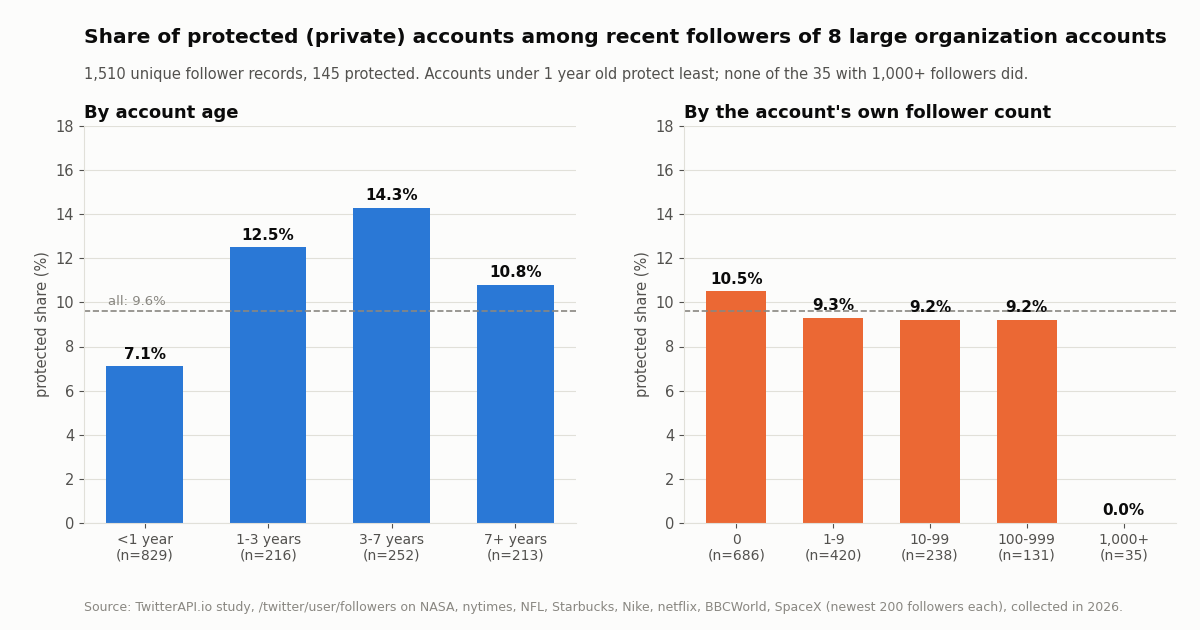
Most guides stop at the click path. We wanted a sense of how many people actually use the setting, so we looked at the newest followers of eight large organization accounts across science, news, sports, consumer brands and entertainment. Of 1,510 unique follower records, 145 (9.6%) were protected. Every one of the eight organization accounts itself was public (protected: false on their profiles).
The split by account age is the more interesting result. Accounts created within the last year protect least, and accounts between three and seven years old protect most. A plausible reading is that new accounts start public by default and the people who end up wanting privacy switch later; the sample cannot prove the reason, only the pattern.
By audience size the share is flat at about 9 to 10% for accounts with fewer than 1,000 followers, and zero among the 35 accounts in the sample that had 1,000 or more. That last group is small, so treat it as a hint rather than a measurement: accounts that gather an audience tend to be public, which is consistent with protection limiting reach.
Protected and public accounts in the sample look different in other ways. The median protected account follows 66 accounts against 36 for public ones, has posted 3 times against 1, and is 1.9 years old against 0.4. 37.2% of protected accounts had never posted, against 45.9% of public ones. Both groups are dominated by quiet, recent accounts, which is what the newest followers of any very large account look like.
Which audiences go private most: brand followers versus news and science
The protected share varies about threefold between the eight accounts, from 5.0% to 16.0% of the newest 200 followers. Consumer brands drew the most private followers; science, news and space drew the fewest.
One reasonable interpretation: people who follow a coffee chain or a sportswear brand are following for offers, support or personal interest and have little reason to be public, while people who follow newsrooms and space agencies are more likely to post and share publicly about those topics. A single page of 200 followers per account is a snapshot of who followed recently, so the order between neighbors such as @NFL and @netflix could swap in another sample. The gap between the top pair and the bottom three is large enough to be worth noting.
There was some overlap: 90 of the 1,600 records were the same account appearing in more than one list, which is why the overall share uses 1,510 unique accounts while the per-account table counts each list separately.
If you run a brand account, the practical takeaway is that a tenth or more of your newest followers may be people whose replies and mentions you can see only when they follow you and you can read their posts, and whose posts no social-listening search will ever surface. That is by design, and it is a reason to treat public mention counts as a lower bound.
Should you go private? Trade-offs and lighter alternatives
Protecting your posts is the right tool when the problem is who can read you: a personal account you want to keep to friends, a period of unwanted attention, or posts you only want a known group to see. It is the wrong tool if you want reach, because every growth mechanism on X (reposts, quotes, search, recommendations to non-followers) stops working for your posts.
If the problem is replies from strangers. Per-post reply controls let you limit who can reply to a public post, and muting or blocking handles individual accounts. You keep your reach and lose the noise.
If the problem is being found. The discoverability options in Privacy and safety control whether people who have your email address or phone number can find your account. Changing your handle and display name also cuts the link between an old identity and the account. These do not hide your posts, but they make the account harder to connect to you.
If the problem is old posts. Protecting hides the whole history at once, which is a quick emergency step. If you plan to stay public long term, deleting the posts you regret and then staying public may serve you better than a permanent lock.
If the problem is one specific person. Block them. Protection does not affect existing followers, and a blocked account cannot follow you or see your posts while signed in.
If you want to leave entirely. Deactivation is a separate process with a waiting period before the account is deleted; it is covered in our guide to deactivating a Twitter account. Protection is reversible at any time and keeps your handle, followers and history intact.
A common pattern among people who want both is two accounts: a public one for professional or hobby posting and a protected one for friends. X supports several accounts in its apps, and the protection setting is per account.
What a protected account looks like through an API
For developers, protection is a single boolean. X's own data dictionary describes the protected user field as indicating whether the user has chosen to protect their posts. Our read API returns the same flag in two places: protected inside the data object of /twitter/user/info, and protected on every follower or following record from /twitter/user/followers and /twitter/user/followings. All eight organization profiles we fetched returned protected: false; 145 of the follower records returned true.
The flag is all the study above needed. We never requested any protected account's posts: protected posts are meant for approved followers, and a read API that is not signed in as one of those followers should not be expected to return them. When you build anything that reads timelines, check protected first and skip those accounts, rather than treating an empty result as an error.
The records below show the shape, with identifying values replaced. Followers come back in snake_case (screen_name, followers_count); the single-profile endpoint uses camelCase (userName, followers).
What the study cost. Reads need no X account. Followers and followings are billed at 1 to 3 credits per user returned (per-page tiers), profiles at 18 credits per user, which is $0.18 per 1,000 profiles. The 1,600 follower records and 8 profiles behind this page came to at most about $0.05 with TwitterAPI.io (1,600 records at up to 3 credits each, plus 8 profiles at 18 credits). On X's official pay-per-usage rate card (docs.x.com) a follower read is $0.010 and a user read is $0.010, so the same 1,608 records would be about $16.08 there. New TwitterAPI.io accounts that pass the automatic bot check get up to $1 of free credits (at most 100,000 credits, no card, one per person or network, expiring after 31 days), which covers a study of this size many times over.
# One follower record from /twitter/user/followers (snake_case), values replaced
{
  "id": "<numeric id>",
  "screen_name": "<handle>",
  "protected": true,
  "followers_count": 1,
  "following_count": 66,
  "statuses_count": 3,
  "created_at": "<Ddd Mon DD HH:MM:SS +0000 YYYY>"
}

# The same flag on /twitter/user/info (camelCase data object)
{"status": "success", "data": {"userName": "NASA", "protected": false, "followers": 92225404, ...}}How we collected this
Question. How common are protected accounts among the people who follow large public organization accounts on X, and does the share differ by account age and by audience size?
Accounts. @NASA, @nytimes, @NFL, @Starbucks, @Nike, @netflix, @BBCWorld and @SpaceX, chosen to span science, news, sports, consumer brands and entertainment. All are public organization accounts.
Method and window. One request per account to /twitter/user/followers with pageSize=200, which returns followers newest first, so each list is the account's most recent 200 followers at collection time. Plus one /twitter/user/info call per organization account. 16 requests in total, collected in 2026. We counted protected and banded followers_count and created_at.
Sample size. 1,600 follower records, 1,510 unique accounts after removing duplicates, 145 protected.
What the sample cannot show. It describes recent followers of very large accounts, who skew toward new and quiet accounts; it is not a sample of all X users, and the overall private share on X may be higher or lower. It cannot show why anyone protected their account, or how many accounts switched and switched back. The 1,000+ follower band has only 35 records.
Privacy. Follower records belong to private individuals, so the raw pages were never stored with the study. We keep only aggregates and de-identified rows (counts and booleans, no IDs, handles, names, bios or images). Only the eight organization accounts are named, and no protected account's posts were requested.
import requests

API_KEY = "YOUR_TWITTERAPI_IO_KEY"  # from https://twitterapi.io/dashboard
BASE = "https://api.twitterapi.io"
HEADERS = {"X-API-Key": API_KEY}


def is_protected(user_name):
    """Return True / False for one account, or None if X has no such user."""
    r = requests.get(f"{BASE}/twitter/user/info", headers=HEADERS,
                     params={"userName": user_name}, timeout=30)
    r.raise_for_status()
    body = r.json()
    if body.get("status") != "success" or body.get("data") is None:
        return None  # unknown handle: HTTP 200 with status "error", msg "user not found"
    return bool(body["data"].get("protected"))


def protected_share_of_followers(user_name, max_pages=1):
    """Share of an account's newest followers whose posts are protected."""
    total, protected, cursor = 0, 0, ""
    for _ in range(max_pages):
        params = {"userName": user_name, "pageSize": 200}
        if cursor:
            params["cursor"] = cursor
        r = requests.get(f"{BASE}/twitter/user/followers", headers=HEADERS,
                         params=params, timeout=30)
        r.raise_for_status()
        page = r.json()
        for f in page.get("followers", []):
            total += 1
            protected += 1 if f.get("protected") else 0
        if not page.get("has_next_page"):
            break
        cursor = page.get("next_cursor", "")
    return protected, total


if __name__ == "__main__":
    for handle in ["NASA", "Starbucks"]:
        print(handle, "protected:", is_protected(handle))
        p, n = protected_share_of_followers(handle)
        if n:
            print(f"  {p} of {n} newest followers protected ({100 * p / n:.1f}%)")
Researching this?Free starter credits cover end-to-end testing — Google sign-in, no card. Get a key.
Questions readers ask
How do I make my Twitter account private?
Open Settings and privacy, go to Privacy and safety, then Audience and tagging, and turn on Protect your posts. The path is the same on the web, iPhone and Android; it is a checkbox on the web and a toggle in the apps. It applies to the whole account at once.
Can my existing followers still see my posts after I go private?
Yes. Protecting your posts does not remove anyone. Everyone who followed you before keeps access until you remove them as a follower or block them, so do that first if a specific person is the reason you are going private.
How do I make my Twitter account public again?
Turn Protect your posts off in the same place: Settings and privacy, Privacy and safety, Audience and tagging. All posts become public, including those written while protected, and pending follow requests are not accepted automatically, so approve them first if you want them.
Can people repost or quote a private account?
No. On a protected account the repost button is disabled, also for your approved followers, so nobody can repost or quote your posts through X. Followers can still take screenshots, which protection cannot prevent.
Do private Twitter posts show up on Google or in X search?
Protected posts are kept out of third-party search engines such as Google. In X search they appear only for you and your approved followers. Posts that were public before you protected the account stop appearing in public X search.
Can I make only some of my posts private?
Not with Protect your posts; it covers every post on the account. The usual workaround is a second, protected account for the posts you want to keep to a small group, while the main account stays public.
Can someone see my private account without following me?
Not through X. Protected posts are visible only to approved followers. Sites and apps that claim to show private profiles do not have access to protected posts, and some ask for your login, which you should never give them.
How many people use private accounts on X?
X does not publish a figure. In our 2026 sample of 1,510 recent followers of eight large organization accounts, 9.6% were protected, ranging from 5.0% for @NASA to 16.0% for @Starbucks. That sample skews toward new accounts and is not a census of all X users.
Continue
- X Help Center: How to protect and unprotect your posts (Settings and privacy > Privacy and safety > Audience and tagging)
- X Help Center: About public and protected posts (followers only, no reposts, kept out of third-party search)
- X developer docs, data dictionary: the protected user field
- X API pay-per-usage pricing (docs.x.com): $0.010 per user read and per follower read
- TwitterAPI.io docs: /twitter/user/followers (pageSize 20 to 200, protected on each record)
- Twitter (X) API overview: endpoints, prices and access
- Can you hide who you follow on Twitter (X)?
- Twitter private profile viewers: can you see protected posts?
- Does X show who viewed your profile?
- How deactivating a Twitter (X) account works
- Twitter follow checker tool
- TwitterAPI.io pricing per profile and per tweet
- 01How to change your Twitter (X) font: text size, Chirp, and Unicode "fancy fonts"
- 02Twitter (X) API 1.1 in 2026: What Still Works and Where Each Endpoint Went
- 03Twitter (X) Enterprise API: What It Includes, Who Needs It, and What It Costs
- 04Twitter (X) Account Activity API: What It Was, Its End of Life, and What Replaces It
- 05Sensitive Content Warning on Twitter (X): How to See, Turn Off, or Keep It
- 06How to Use Twitter (X) Without an Account — A Developer's API Guide
- 07Twitter (X) Private Profile Viewer: Can You See Protected Tweets?
- 08Make.com Twitter (X) Integration After the X App Was Removed
Writing about something you built with TwitterAPI.io? Our community rewards program pays API credits for honest tutorials, build logs and videos.
Stop reading. Start building.
Starter credits cover real testing on real data. Google sign-in, no card, no application queue.
Get an API keyAlready building with TwitterAPI.io? Publish an honest tutorial or build log about it and earn up to $200 a month in API credits.