How to Search Twitter (X) for Images: Operators, What They Return, and the API Route
![Cheat-sheet diagram of Twitter (X) image search operators with measured results. Four cards: filter:images returned 100% photo-only posts, 0% videos and GIFs, the same set as has:images, and -filter:images returned nothing; filter:media returned photos plus native video, 64% video on NatGeo, 0% link-card-only posts, and filter:twimg returned the same set; filter:native_video returned 100% video posts whose media_url_https is the thumbnail with MP4s in video_info.variants, same set as filter:videos; no filter on NASA returned 45% photo posts, 12.5% video, 22.5% link card only and 20% text only. Below, a four-step flow: the query from:NASA filter:images since:YYYY-MM-DD, the endpoint /twitter/tweet/advanced_search with queryType Latest and cursor, the JSON field extendedEntities.media[] with type photo, and the URL pbs.twimg.com/media/ID.jpg rewritten to ID?format=jpg&name=orig. Footer: measured on 1,045 search results from 59 requests (@NASA, @NatGeo and one topic query) collected in 2026; name=orig served 12.3x the bytes of the URL as returned for an 8192-pixel photo.](/blog/twitter-images-search/hero.png)
This page is about finding images on X by text: a query made of words and operators (filter:images, from:, since:, min_faves:) that returns the posts carrying photos, whether you type it into the search box on x.com or send it to an API and get JSON back. It is not about pulling the media out of posts you already have (that is our guide to extracting media URLs from tweets) and it is not about searching by image, uploading a picture to find where it was posted (that is the reverse image search guide). The video twin of this page is the video search guide.
Most pages on this query list the operators and stop. The gap is that nobody says what the operators actually return. Does filter:images exclude videos? Does filter:media include posts whose only picture is a link preview card? Is filter:twimg different from filter:images? Does the API accept has:images, which is the operator X's own v2 documentation lists? Does negation work? And once you have the JSON, is the URL in it the original file or a downscaled copy? We answered each of those by running the operators through /twitter/tweet/advanced_search in 2026: 59 requests, 1,045 posts, scoped to @NASA and @NatGeo so the raw pages can be published, plus one topic query. Every number on this page comes from that run.
The order below follows the job: the operators and what they return, how to use them on x.com itself, the same query through the API with pagination, reading the image URLs and asking for full resolution, the measurements in detail, and the cost.
The image search operators and what each one returns
X's search understands a handful of media operators that date back to the old Twitter advanced search and are still accepted, both on x.com and through the twitterapi.io search endpoint. The community-maintained operator list that the twitterapi.io documentation links to (github.com/igorbrigadir/twitter-advanced-search) describes them in a few words each; the table adds what we measured when we ran them.
The operators that narrow the set are the usual ones and they combine freely with the media filters. from:handle restricts to one account (from:NASA filter:images). A quoted phrase matches the text ("james webb" filter:images). since:YYYY-MM-DD is inclusive and until:YYYY-MM-DD is exclusive, so a calendar month runs from the first of that month to the first of the next (since:YYYY-01-01 until:YYYY-02-01 is January). min_faves:100 keeps only posts with at least that many likes, min_retweets: likewise. -filter:replies drops replies, which matters more than it sounds: 65.0% of the @NASA posts returned by filter:native_video were replies, because the account posts follow-up videos inside its own threads. lang:en restricts language. On the twitterapi.io endpoint since_time: and until_time: take Unix timestamps for second precision, which is how a polling script asks for "image posts newer than my last run".
Two practical readings of the table. First, if you want pictures and only pictures, filter:images is the right operator and you do not need to subtract videos afterwards. Second, filter:media and filter:twimg are the operator to use when you want photos and videos in one list, and in that list the video posts carry a thumbnail at the same field where photos carry the image, so your code must look at type before treating a URL as a picture.
Searching for images on x.com itself
On the website or the app, type the query with its operators into the search box exactly as above; the operators are part of the query text, not separate controls. After the results load, the Media tab shows the matches as a grid of thumbnails; the Latest tab shows them newest first; Top applies X's ranking. The desktop Advanced Search form (reachable from the filters menu next to the results) builds the same string for you: fields for words, accounts, dates and engagement minimums, and it writes since:, until:, from: and min_faves: into the box. There is no checkbox for filter:images in that form, so type it yourself.
What the website will not do. It will not give you a list: there is no export, no count, and the URL of the image is hidden behind the viewer. Scrolling loads results in batches and the ranked views are built for browsing, not for completeness; the how-to pages that rank for this query (TweetDelete's and Circleboom's among them) describe older image posts thinning out in the web results, and Circleboom's answer is its own paid historical search. We did not measure the website's depth, so we make no claim about where it stops. What we can report is the API side: from:NASA filter:images paged back 191 days in 8 requests with has_next_page still true, and from:NatGeo filter:images reached 410 days in the same 8 requests, because the account posts fewer images.
When the website is enough. You want to look at a few pictures from one account or one event, you do not need the files, and you do not need to repeat the search tomorrow. Everything past that, a list of URLs, a download, a daily check, a dataset, is the API's job, and the query string is identical.
The same query through the API: /twitter/tweet/advanced_search
twitterapi.io exposes the search as GET https://api.twitterapi.io/twitter/tweet/advanced_search with three parameters: query (the same string you would type on x.com), queryType (Latest or Top, default Latest) and cursor (empty for the first page, then the next_cursor from the previous response). Authentication is one header, X-API-Key, with the key from the dashboard; no X developer account, no OAuth, no X account of your own is involved in a read. The response is a JSON object with tweets[], has_next_page and next_cursor. Each tweet carries id, url, text, createdAt (in the form Thu Oct 16 12:34:56 +0000 2026), the counts (likeCount, retweetCount, replyCount, viewCount), author{userName, name, followers}, entities (hashtags, urls, user_mentions) and, when the post has media, extendedEntities.media[].
Pagination. Pages hold up to 20 posts. Loop while has_next_page is true and next_cursor is non-empty, passing the cursor back. Use queryType=Latest for a complete, newest-first walk; Top is X's ranking and is the right choice only when you want the most engaged image posts rather than all of them. One caution from our run: pagination on filter:media was not stable, the first walk of from:NASA filter:media stopped after 20 posts with has_next_page false, while a retry a few minutes later paged on normally, so treat an early has_next_page: false on a media query as something to retry once before believing it.
Cost. Tweet endpoints bill 15 credits per post returned ($0.15 per 1,000 posts; $1 = 100,000 credits), with a minimum of 15 credits per request, so a full 20-post page is $0.003 and an empty page is $0.00015. The 59 requests of this study returned 1,045 posts and cost about $0.16. Rate limits are 0.2 requests per second before the first payment and 20 per second once paid.
The script below walks a query, keeps only photo items, builds the full-resolution URL and writes one line per image to a CSV. It is the complete program; the next section explains the fields it reads.
"""list_images.py - list every image a Twitter (X) search matches, as full-resolution pbs.twimg.com URLs.

    pip install requests
    export TWITTERAPI_IO_API_KEY=...          # twitterapi.io dashboard
    python list_images.py 'from:NASA filter:images -filter:replies' --pages 5 > nasa_images.csv

Each page of up to 20 posts costs $0.003 (15 credits per post returned, 15-credit minimum per request).
"""
import argparse
import csv
import os
import sys

import requests

BASE = "https://api.twitterapi.io"
HEADERS = {"X-API-Key": os.environ["TWITTERAPI_IO_API_KEY"]}


def search_pages(query, pages, query_type="Latest"):
    """Yield tweet objects; follows next_cursor while has_next_page is true."""
    cursor = ""
    for _ in range(pages):
        r = requests.get(f"{BASE}/twitter/tweet/advanced_search", headers=HEADERS,
                         params={"query": query, "queryType": query_type, "cursor": cursor}, timeout=30)
        r.raise_for_status()
        body = r.json()
        for t in body.get("tweets") or []:
            yield t
        if not body.get("has_next_page") or not body.get("next_cursor"):
            break
        cursor = body["next_cursor"]


def orig_url(media_url_https):
    """https://pbs.twimg.com/media/ABC.jpg -> https://pbs.twimg.com/media/ABC?format=jpg&name=orig
    The URL as returned serves the 2,048-px rendition; name=orig serves the uploaded original."""
    base, _, ext = media_url_https.rpartition(".")
    return f"{base}?format={ext}&name=orig"


def main():
    ap = argparse.ArgumentParser()
    ap.add_argument("query")
    ap.add_argument("--pages", type=int, default=5)
    ap.add_argument("--type", default="Latest", choices=["Latest", "Top"])
    a = ap.parse_args()
    if "filter:images" not in a.query and "filter:media" not in a.query:
        print("hint: add filter:images to the query so every post returned carries a photo", file=sys.stderr)

    w = csv.writer(sys.stdout)
    w.writerow(["tweet_id", "created_at", "author", "likes", "media_type", "width", "height", "alt_text", "url_as_returned", "url_orig"])
    posts = images = 0
    for t in search_pages(a.query, a.pages, a.type):
        posts += 1
        for m in (t.get("extendedEntities") or {}).get("media") or []:
            if m.get("type") != "photo":        # video and animated_gif carry a thumbnail here, not a picture
                continue
            url = m.get("media_url_https") or ""
            info = m.get("original_info") or {}
            w.writerow([t["id"], t.get("createdAt"), (t.get("author") or {}).get("userName"), t.get("likeCount"),
                        m["type"], info.get("width"), info.get("height"), (m.get("ext_alt_text") or "")[:200], url, orig_url(url)])
            images += 1
    print(f"{posts} posts, {images} photos", file=sys.stderr)


if __name__ == "__main__":
    main()
Reading the image URLs: extendedEntities.media, sizes, and ?name=orig
A post with pictures has an extendedEntities.media array with one item per attachment, up to four. Each item has type (photo, video or animated_gif), media_url_https (the image, always on pbs.twimg.com in our 1,045 posts), url (the shortened t.co link that appears in the text), expanded_url (the post's /photo/1 page), sizes (the pixel dimensions of the small, medium, large renditions), original_info (the width and height of the file that was uploaded), and ext_alt_text when the author wrote a description. On a video or animated_gif item media_url_https is the poster frame, and the playable files sit in video_info.variants[] with content_type (video/mp4 or application/x-mpegURL) and bitrate; the video search guide covers that path.
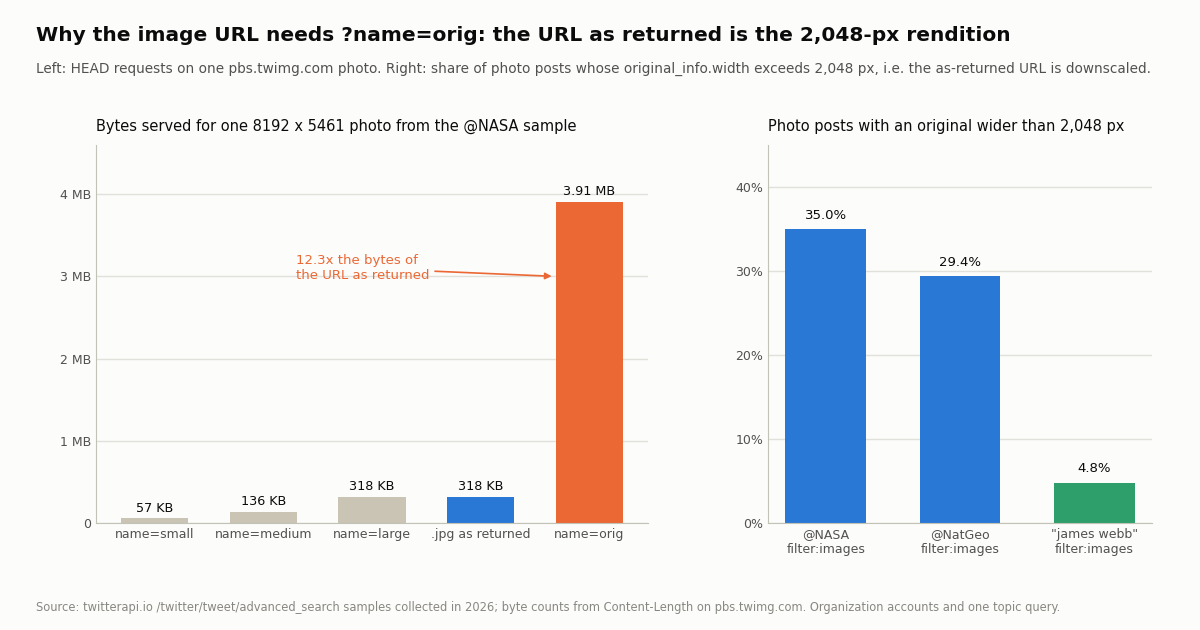
The URL you get is not the original file. We took a photo from the @NASA sample whose original_info was 8192 x 5461 pixels and whose sizes.large was 2048 x 1365, and sent HEAD requests to the CDN. The URL exactly as returned (.../media/ID.jpg) answered with 317,983 bytes, the same as ?format=jpg&name=large. ?format=jpg&name=orig answered with 3,907,436 bytes, 12.3 times more. name=medium was 135,959 bytes and name=small 56,742. The older .jpg:orig suffix still returned the same 3.9 MB. A second photo whose original was already within 2,048 pixels served identical bytes for orig and large, which is the expected behavior: orig is the uploaded file, large is capped at 2,048 pixels on the long side.
How often it matters. The share of photo posts whose original was wider than 2,048 pixels was 35.0% on @NASA and 29.4% on @NatGeo, both accounts that publish camera-grade images, and 4.8% on the topic query, where most pictures are phone screenshots and reposted images. If you are building a dataset or an archive, always request name=orig; if you are building thumbnails, name=small is a fifth of the bytes of large.
Formats and alt text. The returned URLs ended in .jpg for 158 of the 160 @NASA photo posts and .png for 3 (a post can carry both), all 160 @NatGeo posts were .jpg, and the topic query had 19 posts with a .png. Swapping format=png into a JPEG's URL also answered 200 with a PNG re-encode, so the format parameter is a conversion, not a lookup. Alt text is an author habit, not a platform guarantee: 97.4% of @NASA's photos carried ext_alt_text, 0% of @NatGeo's, and 1.3% of the topic query's.
Multiple images per post. On @NASA filter:images, 143 posts had one photo, 7 had two, 3 had three and 7 had four, so 10.6% of posts carried more than one and 160 posts yielded 194 photos; on the topic query 200 posts yielded 226. Iterate the whole media array, do not read [0].
What we measured: operator by operator
We scoped the operator tests to two organization accounts, @NASA and @NatGeo, so that the raw pages can be published with the study, and added one topic query to see how the operator behaves on a mixed crowd of authors. Every variant ran through /twitter/tweet/advanced_search with queryType=Latest, following next_cursor.
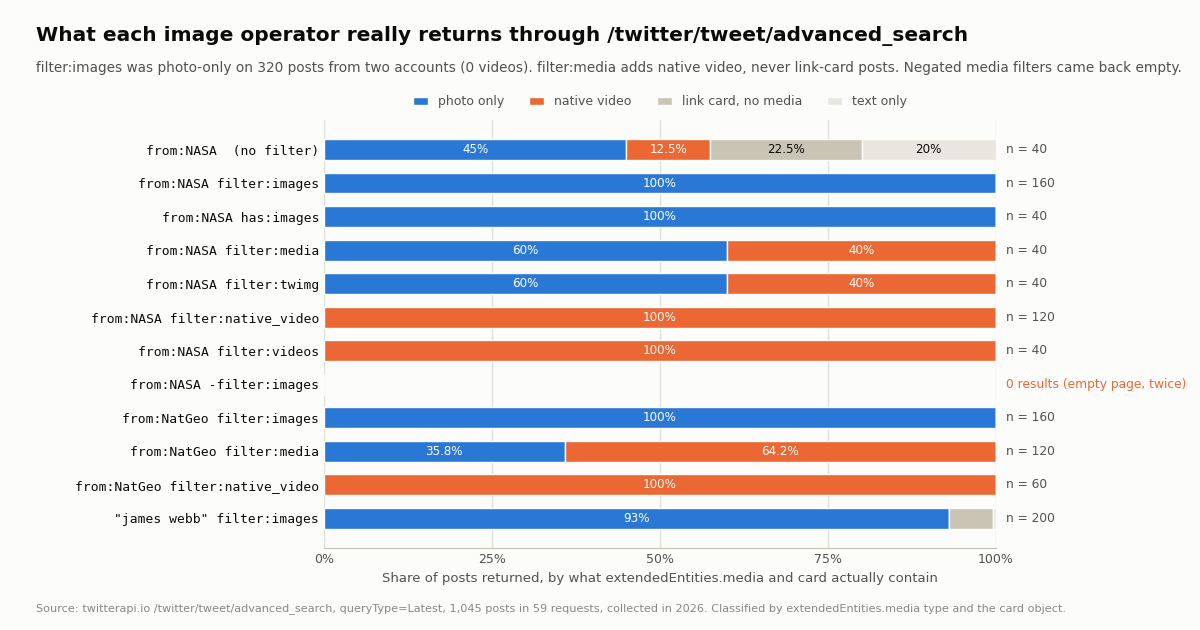
"Photo only" means the post has at least one photo item and no video or animated_gif item; no post in the sample mixed the two. "Link card, no media" means extendedEntities.media is absent and the post carries a card object, which is what a link preview looks like in the JSON. The -filter:images row is two separate attempts a few minutes apart, both empty.
Does filter:images exclude videos? Yes, in this sample without exception: 320 posts across the two accounts, 0 videos, 0 GIFs. The overlap test says the same thing from the other side: in the 169 days where the @NASA filter:images and filter:native_video samples overlap, the two sets (133 and 119 posts) shared 0 post IDs.
Does filter:media include posts whose only picture is a link card? No. Across 160 filter:media posts on the two accounts, 0 had a card without native media, even though 22.5% of unfiltered @NASA posts are card-only. Within the 179-day common window on @NatGeo, every one of the 43 filter:images posts was also in the filter:media set, and the 75 posts filter:media added were all native video.
Is filter:twimg different? Not in effect. The documented meaning is native images with a pic.twitter.com link, but native videos carry the same kind of link, and on @NASA the operator returned the identical 40 posts as filter:media, 16 of them video. Use filter:images if you mean pictures.
Does the topic query behave the same? Mostly. On "james webb" filter:images (200 posts from 134 authors over 6 days), 93.0% of posts carried a photo, 6.5% had no native media but a link card, and 0.5% had neither. So on a broad query a small share of filter:images matches are link previews whose image lives on the linked site, not on X; the script above skips them because they have no photo item, and that is the correct behavior if you want X-hosted pictures.
has:images, negation, and the other things that surprised us
has:images works, and it is the same thing. X's API v2 documentation (docs.x.com/x-api/posts/search/integrate/operators) lists has:images ("Matches Posts with images"), has:media ("photo, GIF, video") and has:video_link, and says nothing about the filter: family. The twitterapi.io endpoint speaks the x.com dialect, but we tried the v2 form anyway: from:NASA has:images returned 40 posts, 100% photo, and in the 34.7-day window the two samples share, the has:images set and the filter:images set were the same 40 post IDs. If your queries were written for the v2 API you can send them unchanged for this operator. We did not test has:media or has:video_link.
Negated media filters returned nothing. from:NASA -filter:images came back as {"tweets": [], "has_next_page": false} on two attempts a few minutes apart, and from:NASA -filter:media did the same. This is not a general problem with the minus sign: from:NASA -filter:links returned a page of posts, 80% of them with neither media nor card, which is what the negation should produce. The operator reference on GitHub says most filters can be negated, and that may be true on x.com; through the endpoint, as of this run, the two media negations produced empty pages. If you need "posts without pictures", fetch the unfiltered set and drop the posts whose extendedEntities.media contains a photo item, which costs you the media posts you then discard (on @NASA that is about 45% of the posts) but gives the right answer.
filter:videos and filter:native_video were the same set. In a 49-day window on @NASA the two operators returned the identical 40 posts. The documented difference is that filter:videos also matches posts that link to external video sites; the account in our sample evidently had none in that window, so we cannot say whether the difference exists in practice, only that it did not show up here.
Replies are included. 65.0% of the @NASA filter:native_video posts and 4.4% of its filter:images posts were replies, mostly the account continuing its own threads. Add -filter:replies when you want top-level posts only; that negation is not a media filter and we have used it on other studies without trouble.
Pagination on media queries can end early. The first walk of from:NASA filter:media returned 20 posts in 2 requests and then has_next_page: false; a retry minutes later returned 40 posts in 2 requests with has_next_page: true and would have continued. Nothing else in the run did this. Build the walker so that an early stop on a query you expect to be deep is retried once before you trust it.
Narrowing the search, and what each job costs: dates, engagement, a polling cursor, the bill
The media filter decides what kind of post comes back; the rest of the query decides which ones. A few combinations cover almost every real request.
Dates. since: and until: take YYYY-MM-DD; until: is exclusive, so the month above ends at the start of February. The twitterapi.io documentation warns that the timestamped form since:2021-12-31_23:59:59_UTC is not supported; use since_time: and until_time: with Unix seconds instead when you need precision. A polling script that stores the Unix time of its last run and sends since_time: gets only the new image posts, and an idle run returns an empty page at the $0.00015 minimum, which is what makes a daily or hourly image watch cheap.
Engagement. min_faves: and min_retweets: are the x.com names and they are the names this endpoint accepts. (X's v2 API rejects those names with a 400 and uses different operators; that is one of the differences between the two dialects, and it is why a v2 query cannot always be pasted here unchanged.)
Keep the query under 512 characters and prefer several specific queries to one enormous OR chain. Latest for completeness, Top for a shortlist.
What each of those jobs costs. twitterapi.io prices tweet endpoints at 15 credits per post returned, $0.15 per 1,000 posts, with a 15-credit minimum per request and $1 = 100,000 credits. The official X API pay-per-usage rate card (docs.x.com/x-api/getting-started/pricing) is $0.005 per post read, so 1,000 image posts are $5 there and $0.15 here, about 33x; the official route also needs a developer account and the v2 operator dialect.
Downloading the files is free of API charges: pbs.twimg.com answers a plain GET with no key. For bulk downloads, concurrency and disk layout, see the bulk media download guide. Plans with bonus credits are on the pricing page.
Common mistakes and how to avoid them
Treating media_url_https as a picture on every item. On video and animated_gif items it is the poster frame. Check type == "photo" first, or you will save thumbnails thinking they are photos; on filter:media queries 40% to 64% of items were video in our samples.
Saving the URL as returned. It is the 2,048-pixel rendition. Append ?format=jpg&name=orig (or build it from the extension) for the original; 35.0% of @NASA photo posts were wider than that.
Reading media[0] only. 10.6% of @NASA image posts and 9.5% of the topic query's carried two to four photos.
Expecting -filter:images to work. It returned empty pages in this run. Filter client-side instead.
Expecting filter:media to catch link previews. It did not match a single card-only post. A preview image belongs to the linked site; if you want it, read card and fetch the page's Open Graph image yourself.
Forgetting replies. Add -filter:replies unless you want thread follow-ups; on video queries they were the majority for @NASA.
Trusting an early has_next_page: false on a media query. Retry once; our filter:media walk stopped early on the first try and not on the second.
Mixing dialects. has:images was accepted here, but min_faves: is the x.com name and the v2 API rejects it; write your queries for one dialect and test them on the endpoint you will actually call. The full operator list with examples is in our search operators reference and the advanced search API guide.
How we collected this
Question: what do the image search operators actually return through /twitter/tweet/advanced_search: does filter:images exclude videos and GIFs, does filter:media include link-card posts, is filter:twimg different, is has:images accepted, do negations work, how many pictures does a post carry, are the URLs all on pbs.twimg.com, and is the URL as returned the original file.
Queries: from:NASA with filter:images, filter:media (twice), filter:twimg, filter:native_video, filter:videos, has:images, -filter:images (twice), -filter:media, -filter:links and no operator; from:NatGeo with filter:images, filter:media and filter:native_video; and "james webb" filter:images. All with queryType=Latest, following next_cursor for 1 to 10 pages.
Window and size: the most recent matches at collection time, collected in 2026; 59 requests, 1,045 posts, about $0.16. Per-variant spans ranged from 5 days (-filter:links, one page) to 410 days (from:NatGeo filter:images, 160 posts). Overlap comparisons were made only inside the window two samples share.
Method: for every post we recorded the type of each extendedEntities.media item, the host and extension of media_url_https, original_info width, the presence of ext_alt_text, whether a card object exists, and whether the post is a reply or quote. The byte counts for the size names come from HEAD requests to pbs.twimg.com on two photos from the @NASA sample, read from Content-Length.
What the sample cannot show: two organization accounts and one topic are not X; a consumer account with GIFs would exercise the animated_gif branch, which never appeared here. We did not measure the x.com website's search depth. has:media and has:video_link were not tested. The filter:videos versus filter:native_video difference (external video links) did not occur in the window and is therefore unmeasured. The empty result for -filter:images and -filter:media is what the endpoint returned on the day; it may change.
Aggregates only. @NASA and @NatGeo are organization accounts and their raw pages are kept gzip-compressed with the study; the topic query's authors are private individuals, so its raw pages were not kept and only de-identified rows (media types and counts, host, card presence) are in the sample file. No individual was profiled. The analysis and chart scripts read the results file only.
"""image_watch.py - download every new picture a Twitter (X) image search matches, full resolution, on each run.

    pip install requests
    export TWITTERAPI_IO_API_KEY=...
    python image_watch.py 'from:NASA filter:images -filter:replies' ./nasa_images

State (last run time + seen media ids) is kept next to the images, so run it from cron hourly or daily.
An idle run returns an empty page and costs the $0.00015 minimum; each post returned costs $0.00015.
"""
import json
import os
import sys
import time

import requests

BASE = "https://api.twitterapi.io"
HEADERS = {"X-API-Key": os.environ["TWITTERAPI_IO_API_KEY"]}
OVERLAP = 300          # re-read 5 minutes before the last run; the seen set drops duplicates
MAX_PAGES = 25         # 500 posts per run at most ($0.075 if every page is full)


def search(query, pages):
    cursor = ""
    for _ in range(pages):
        r = requests.get(f"{BASE}/twitter/tweet/advanced_search", headers=HEADERS,
                         params={"query": query, "queryType": "Latest", "cursor": cursor}, timeout=30)
        r.raise_for_status()
        body = r.json()
        yield from (body.get("tweets") or [])
        if not body.get("has_next_page") or not body.get("next_cursor"):
            break
        cursor = body["next_cursor"]


def orig_url(u):
    base, _, ext = u.rpartition(".")
    return f"{base}?format={ext}&name=orig", ext


def main(query, out_dir):
    os.makedirs(out_dir, exist_ok=True)
    state_path = os.path.join(out_dir, "state.json")
    state = json.load(open(state_path)) if os.path.exists(state_path) else {"since_time": int(time.time()) - 86400, "seen": []}
    seen = set(state["seen"])
    started = int(time.time())
    q = f"{query} since_time:{state['since_time'] - OVERLAP}"

    saved = 0
    for t in search(q, MAX_PAGES):
        for m in (t.get("extendedEntities") or {}).get("media") or []:
            if m.get("type") != "photo" or not m.get("media_url_https"):
                continue                      # video / animated_gif: media_url_https is only the poster frame
            media_id = m.get("id_str") or m["media_url_https"].rsplit("/", 1)[-1].split(".")[0]
            if media_id in seen:
                continue
            url, ext = orig_url(m["media_url_https"])
            r = requests.get(url, timeout=60)      # pbs.twimg.com: no API key, no charge
            if r.status_code != 200:
                continue
            with open(os.path.join(out_dir, f"{t['id']}_{media_id}.{ext}"), "wb") as f:
                f.write(r.content)
            with open(os.path.join(out_dir, f"{t['id']}_{media_id}.json"), "w") as f:
                json.dump({"tweet_id": t["id"], "url": t.get("url"), "created_at": t.get("createdAt"),
                           "author": (t.get("author") or {}).get("userName"), "likes": t.get("likeCount"),
                           "width": (m.get("original_info") or {}).get("width"), "height": (m.get("original_info") or {}).get("height"),
                           "alt_text": m.get("ext_alt_text"), "bytes": len(r.content)}, f)
            seen.add(media_id)
            saved += 1
            time.sleep(0.5)                       # be gentle with the CDN

    state["since_time"] = started
    state["seen"] = sorted(seen)[-5000:]
    json.dump(state, open(state_path, "w"))
    print(f"saved {saved} new image(s) to {out_dir}", file=sys.stderr)


if __name__ == "__main__":
    if len(sys.argv) != 3:
        sys.exit("usage: python image_watch.py '<query with filter:images>' <output dir>")
    main(sys.argv[1], sys.argv[2])
Questions readers ask
How do I search Twitter (X) for images only?
Add filter:images to the query, on x.com or in the API: from:NASA filter:images, or "james webb" filter:images. In our run of 320 posts from two accounts, every post returned by filter:images carried a photo and none carried a video or GIF. On a broad topic query 93.0% carried a photo and the rest were link-preview posts with no native media.
What is the difference between filter:images, filter:media and filter:twimg?
filter:images returns photo posts only. filter:media returns photos and native videos (60% / 40% on @NASA, 35.8% / 64.2% on @NatGeo) and did not return a single post whose only picture was a link card. filter:twimg is documented as native images with a pic.twitter.com link, but it returned exactly the same 40 posts as filter:media on @NASA, videos included, so use filter:images when you mean pictures.
Does has:images work on the twitterapi.io search endpoint?
Yes. has:images is X API v2 syntax, but /twitter/tweet/advanced_search accepted from:NASA has:images and returned the identical 40 posts as from:NASA filter:images in the same 34.7-day window. We did not test has:media or has:video_link. Note that min_faves: is the x.com name and is rejected by the v2 API, so the two dialects are not interchangeable in general.
Why does -filter:images return nothing?
In our run, from:NASA -filter:images and from:NASA -filter:media returned an empty page on every attempt, while -filter:links worked normally. We can only report the behavior, not the cause. The workaround is to fetch the unfiltered posts and drop those whose extendedEntities.media contains a photo item; you pay for the media posts you discard (about 45% of @NASA's posts) but get the correct set.
How do I get the full-size image, not the 2,048-pixel version?
Take media_url_https (https://pbs.twimg.com/media/ID.jpg) and request https://pbs.twimg.com/media/ID?format=jpg&name=orig. For an 8192x5461 NASA photo the URL as returned served 317,983 bytes, the same as name=large, and name=orig served 3,907,436 bytes. The legacy .jpg:orig suffix also still worked. 35.0% of @NASA and 29.4% of @NatGeo photo posts had an original wider than 2,048 pixels, so the difference is common for photography accounts and rare (4.8%) on a general topic query.
Can I search for images by date on Twitter (X)?
Yes: since:YYYY-MM-DD (inclusive) and until:YYYY-MM-DD (exclusive) combine with filter:images, so from:NASA filter:images since:YYYY-01-01 until:YYYY-02-01 is that year's January. For second precision on the twitterapi.io endpoint use since_time: and until_time: with Unix timestamps; the timestamped since:..._UTC form is documented as unsupported there.
How much does an image search cost through the API?
15 credits per post returned, $0.15 per 1,000 posts, with a 15-credit minimum per request, so a full 20-post page is $0.003 and an empty page is $0.00015. Downloading the files from pbs.twimg.com costs nothing. The official X API pay-per-usage rate card is $0.005 per post read, about 33x more per 1,000. New accounts that pass the automatic bot check get up to $1 of free credits (at most 100,000 credits, no card, one per person or network, expiring after 31 days); purchased credits never expire.
Does the search return posts with multiple photos, and GIFs?
Multiple photos yes: a post can carry up to four, and 10.6% of @NASA image posts and 9.5% of the topic query's did, so iterate the whole extendedEntities.media array. GIFs appear as type animated_gif with the playable file in video_info.variants; filter:images returned none in our sample and filter:media is the operator that includes them, but no GIF appeared on the two organization accounts, so we could not measure that branch.
Continue
- twitterapi.io API reference: advanced search (query, queryType, cursor; since_time/until_time; unsupported timestamped since: form)
- Community reference of x.com search operators (filter:images, filter:media, filter:twimg, filter:native_video, negation), linked from the twitterapi.io docs
- X API v2 search operators (has:images, has:media, has:video_link; min_faves rejected by v2)
- X API v2: building a search query (conjunction-required operators such as has:images)
- X API pay-per-usage pricing ($0.005 per post read)
- twitterapi.io introduction: authentication header, credits and per-tweet pricing
- X (Twitter) API hub: every endpoint and guide
- Extracting image and video URLs from tweets you already have
- Reverse image search on Twitter (X): finding posts by image
- Searching Twitter (X) for videos via the API
- Bulk-downloading Twitter (X) media: photos and video streams
- Twitter (X) search operators: the full reference
- Twitter (X) advanced search through the API
- Free Twitter (X) video downloader tool
- Pay-per-call pricing and plans
- twimg: pbs.twimg.com media URLs explained
- 01Twitter (X) Statistics 2026: Attributed Figures and First-Hand Data on the Biggest Accounts
- 02Twitter (X) to SMS: Get a Text Message When an Account Posts
- 03Tweet Hunter (TweetHunter) Review: What It Automates, What It Costs, and the API Route for the Data Half
- 04SOCMINT on Twitter (X): What Social Media Intelligence Is, and a Worked Method
- 05Twitter (X) Bookmarklets: 6 Working Scripts for x.com in 2026
- 06Searching for a Tweet — Operators, Filters, and API
- 07How to Search Tweets by Date via API — A Developer's Guide
- 08Twitter (X) Advanced Search API — Operators, Code, Cost
Stop reading. Start building.
Starter credits cover real testing on real data. Google sign-in, no card, no application queue.
Get an API key