Twitter (X) Bookmarklets: 6 Working Scripts for x.com in 2026
![Diagram of what a Twitter (X) bookmarklet can see and do on x.com. Box 1, the URL: location.pathname /NASA/status/2111180963... gives the handle NASA and the tweet ID. Box 2, the DOM, marked verify in browser: article[data-testid=tweet], [data-testid=tweetText], [data-testid=User-Name], and the sidebar column that focus mode hides. Box 3, pure math with no network: BigInt(id) >> 22n plus 1288834974657n equals the creation time in milliseconds; (id >> 17) & 31 is the datacenter, (id >> 12) & 31 the worker, id & 4095 the sequence. Box 4, show or copy: alert(timestamp) and navigator.clipboard.writeText. Box 5, open a tab: x.com/search?q=from:NASA&f=live or the twitterapi.io timestamp and ID finder tools. A strip quotes x.com's Content-Security-Policy: script-src with unsafe-inline so inline code runs while script tags from elsewhere are blocked; connect-src limited to X hosts so fetch to any other API host is blocked; window.open to another site is navigation and allowed. Footer: timestamp math checked on 960 posts from 6 organization accounts collected in 2026, 100% matched createdAt to the second, every ID is above 2^53 so use BigInt.](/blog/twitter-bookmarklet/hero.png)
Most pages that rank for "twitter bookmarklet" are about the 2010-era share button: a bookmark that opened a compose window with the current page's URL in it, back when the character limit was 140 and the site was twitter.com. That bookmarklet still works in spirit (the compose intent is now x.com/intent/tweet), but it is not what a developer looking at a tweet in 2026 usually wants. What we wanted, and could not find in one place, were small scripts that act on the tweet or profile already open: tell me exactly when this was posted, copy it in a form I can paste into a document, take me to this account's ID or to its live search, and get the sidebars out of the way.
So this page gives you six bookmarklets, each as a one-line javascript: URL you paste into a bookmark and as the same code laid out so you can read it. Nothing is minified or loaded from a server, because x.com's Content-Security-Policy would block an external script anyway, and because you should never install a bookmark whose code you cannot read. We explain how to add them in Chrome, Firefox and Safari, what the CSP header on x.com actually says, and where each script depends on x.com's markup rather than on something stable.
The first bookmarklet rests on the fact that a tweet ID is a Snowflake: its top 41 bits are a millisecond timestamp. Rather than assert that, we measured it. We pulled 960 recent posts from six organization accounts (@NASA, @esa, @firefox, @github, @googlechrome, @mozilla) through the twitterapi.io timeline endpoint in 2026, decoded every ID with the same arithmetic the bookmarklet uses, and compared the result with the createdAt field the API returned. The agreement, the leftover milliseconds, and what the other 22 bits of the ID contain are all in the second half of the page.
What a bookmarklet can do on x.com, and what its Content-Security-Policy blocks
A bookmarklet is an ordinary bookmark whose address begins with javascript:. When you click it, the browser evaluates the code in the context of the page you are on, as if you had typed it into the developer console. That gives the code everything the page's own scripts have: location, document, navigator.clipboard, window.open. It is the oldest form of user script, and for one-off actions on a page it is still the simplest: no extension, no permissions dialog, no store.
Sites can restrict scripts with a Content-Security-Policy header, so we read x.com's. Fetching https://x.com/ with a plain HTTP client this session returned a long policy; the parts that matter for a bookmarklet are these.
Whether CSP applies to bookmarklets at all is a question the specification answers in the user's favor: the CSP Level 2 processing model (W3C, section 5) says user agents may let users modify or set aside policy enforcement through user preferences, bookmarklets and browser add-ons. In practice Chrome, Firefox and Safari run a javascript: bookmark on a CSP-protected page, and the policy then applies to whatever the bookmarklet tries to load or connect to. That is exactly the split you see above: your code runs, outside resources are filtered.
Two more design rules follow. First, keep everything self-contained: no import(), no script tags, no CDN. Second, when a bookmarklet needs a service, send the user to it in a new tab with the value on the clipboard or in the URL, rather than trying to call it from x.com. Bookmarklets 3 and 4 below do exactly that.
On precision. Tweet IDs are 64-bit integers; X's own documentation on IDs warns that JavaScript integers are limited to 53 bits, which "causes precision loss with large IDs". All 960 IDs in our sample were 19 digits long and above 2^53 - 1, and we confirmed the failure under Node: Number("2111180963661435219") evaluates to 2111180963661435100. Every bookmarklet here that touches the ID keeps it as a string or a BigInt.
Installing a bookmarklet in Chrome, Firefox and Safari
The procedure is the same everywhere: create a bookmark, then replace its address with the one-line javascript: code. Browsers strip the javascript: prefix when you paste code into the address bar, which is a safety feature, so always install through the bookmark editor, never by pasting into the URL bar.
Chrome. Show the bookmarks bar (the Chrome menu, then Bookmarks and lists, then Show bookmarks bar; Chrome's own help page "Create, find and edit bookmarks in Chrome" documents the path). Bookmark any page with the star to the right of the address bar, then open the Bookmark Manager, choose More, then Edit on that bookmark, and paste the one-liner into the URL field. Give it a short name; that name is what you click.
Firefox. Right-click the bookmarks toolbar, choose Add Bookmark, and paste the one-liner into the URL field with a name of your choice. If the toolbar is hidden, the View menu's Toolbars submenu shows it. Firefox also lets you edit an existing bookmark's URL from Manage Bookmarks. We could not load Mozilla's support page for this during this session, so check the current menu names in your version.
Safari (Mac). Apple's guide "Bookmark websites that you want to revisit in Safari on Mac" describes adding a bookmark from the Share button (Add Bookmark) and editing one by Control-clicking it and choosing Edit Address. Paste the one-liner as the address. The Favorites bar is the convenient place for it.
Mobile browsers. Bookmarklets work in Safari on iOS and in Chrome on Android with the same trick: bookmark a page, then edit the bookmark's URL to the javascript: code. On Chrome for Android you run it by typing the bookmark's name in the address bar and tapping it, not from a bookmarks bar.
Three habits that keep bookmarklets working. Wrap the code in (() => { ... })(); so your variables do not leak into the page and the bookmark's return value is undefined (a bare expression that returns a string would replace the page with that string). Test on both a tweet page (/handle/status/<id>) and a profile page (/handle), because the two have different URLs and markup. And re-read the one-liner before pasting: anything you did not write yourself, including from this page, deserves a look.
Bookmarklet 1: show the exact time a tweet was posted, from its ID alone
X shows post times rounded to the minute, and relative ("3h") in timelines. The ID carries the millisecond. A tweet ID is a Snowflake, the ID scheme Twitter published in 2010 and whose archived reference implementation (github.com/twitter-archive/snowflake, branch snowflake-2010) describes as "time - 41 bits (millisecond precision w/ a custom epoch gives us 69 years) - configured machine id - 10 bits - gives us up to 1024 machines - sequence number - 12 bits", with the custom epoch 1288834974657. Shift the ID right by 22 bits, add the epoch, and you have the Unix time in milliseconds.
The bookmarklet reads the ID from location.pathname (a tweet URL is /<handle>/status/<id>), does the shift with BigInt, and shows the result in UTC, in your local time, and as raw milliseconds. No request leaves the browser. It works on any /status/ page, including quoted or embedded tweets you open directly.
What we verified. The regex, the BigInt arithmetic and the date formatting were run under Node on a real ID from the study: 2111180963661435219 decodes to a UTC time with a .239 millisecond part, and the API's createdAt for that post is the same second. Across the full sample of 960 posts, the ID-derived time matched createdAt to the second for every one (see the study below). The alert text and the DOM-free design mean there is nothing on this one to "verify in your browser" beyond the bookmark itself.
For many IDs at once, paste them into our Twitter timestamp tool instead; it does the same math for a whole list and accepts full URLs.
javascript:(()=>{const m=location.pathname.match(/\/status\/(\d+)/);if(!m){alert('Open a tweet first');return;}const ms=Number((BigInt(m[1])>>22n)+1288834974657n);const d=new Date(ms);alert('Tweet '+m[1]+'\n'+d.toISOString()+'\n'+d.toLocaleString()+'\nUnix ms: '+ms);})();

// The same code, readable. Install the one-liner above; keep this to understand it.
(() => {
  const m = location.pathname.match(/\/status\/(\d+)/);   // /NASA/status/2111180963661435219
  if (!m) { alert('Open a tweet first'); return; }
  const id = BigInt(m[1]);                                  // 19 digits: above 2^53, so BigInt, never Number
  const ms = Number((id >> 22n) + 1288834974657n);          // top 41 bits + Twitter's Snowflake epoch
  const d = new Date(ms);
  alert('Tweet ' + m[1] + '\n' + d.toISOString() + '\n' + d.toLocaleString() + '\nUnix ms: ' + ms);
})();Bookmarklet 2: copy the open tweet as a markdown link with its text
Pasting a tweet into notes, an issue tracker or a document usually means copying the URL, then the handle, then the text. This bookmarklet builds [@handle](https://x.com/handle/status/id) - text and puts it on the clipboard. The URL is rebuilt from the path, so tracking parameters such as ?s=20 are dropped and the host is always x.com.
The DOM part, verify in your browser. The tweet's text is read from the first element matching article[data-testid="tweet"] [data-testid="tweetText"], which is x.com's current markup for the main post on a status page; those data-testid attributes are a convention of the X web app, not a documented contract, and may change without notice. If the selector finds nothing (for example on a post that is only media), the bookmarklet still copies the link and handle. The URL and markdown assembly were run under Node; the selector was not exercised in a browser during this build.
Clipboard permission. navigator.clipboard.writeText needs a user gesture; clicking a bookmark normally counts, but if your browser rejects the write the bookmarklet falls back to a prompt() showing the text so you can copy it by hand. For plain text instead of markdown, change the md line to '@' + m[1] + ': ' + text + ' ' + url.
javascript:(()=>{const m=location.pathname.match(/^\/([A-Za-z0-9_]{1,15})\/status\/(\d+)/);if(!m){alert('Open a tweet first');return;}const url='https://x.com/'+m[1]+'/status/'+m[2];const el=document.querySelector('article[data-testid="tweet"] [data-testid="tweetText"]');const text=el?el.innerText.replace(/\s+/g,' ').trim():'';const md='[@'+m[1]+']('+url+')'+(text?' - '+text:'');navigator.clipboard.writeText(md).then(()=>alert('Copied:\n'+md),()=>prompt('Copy manually:',md));})();

// Readable version
(() => {
  const m = location.pathname.match(/^\/([A-Za-z0-9_]{1,15})\/status\/(\d+)/);  // handle, id
  if (!m) { alert('Open a tweet first'); return; }
  const url = 'https://x.com/' + m[1] + '/status/' + m[2];                      // clean URL, no ?s=20
  // x.com markup convention, verify in your browser: the main post's text node
  const el = document.querySelector('article[data-testid="tweet"] [data-testid="tweetText"]');
  const text = el ? el.innerText.replace(/\s+/g, ' ').trim() : '';
  const md = '[@' + m[1] + '](' + url + ')' + (text ? ' - ' + text : '');
  navigator.clipboard.writeText(md).then(
    () => alert('Copied:\n' + md),
    () => prompt('Copy manually:', md)      // clipboard refused: show it instead
  );
})();Bookmarklets 3 and 4: open the profile in the ID finder, or in a live from: search
Both of these read the handle from the first path segment, which is the profile's handle on /handle, /handle/with_replies, /handle/media and on a tweet page /handle/status/<id>. A short list of reserved first segments (home, explore, search, notifications, messages, i, settings, compose) is rejected so the bookmarklet does not treat the home timeline as a user called "home". The list is ours, not X's; if you hit a reserved path we missed, add it.
Bookmarklet 3 copies the handle to the clipboard and opens our Twitter ID finder in a new tab. The tool takes the username in its form rather than from the URL, so paste it and press Enter; the numeric ID is what you need for API calls, for follower exports, and for telling two accounts with the same display name apart. The bookmarklet cannot fill the form for you, and it cannot call the lookup from x.com itself, because of the connect-src rule above; opening the tool page is a navigation, which is allowed.
Bookmarklet 4 opens https://x.com/search?q=from:<handle>&f=live in a new tab: the account's own posts, newest first, including replies, which is the fastest way to see what an account has said recently without scrolling its pinned post and reposts. Add -filter:replies inside the query if you want original posts only, or filter:links for posts with links; our advanced search guide lists the operators. The URL construction was run under Node (from:NASA becomes from%3ANASA, which x.com accepts).
// 3. Copy the handle and open the Twitter ID finder
javascript:(()=>{const h=location.pathname.split('/')[1];const skip=['home','explore','search','notifications','messages','i','settings','compose'];if(!h||skip.includes(h)){alert('Open a profile or a tweet first');return;}if(navigator.clipboard){navigator.clipboard.writeText(h).catch(()=>{});}window.open('https://twitterapi.io/tools/twitter-id-finder','_blank');})();

// 4. Live from: search for the current profile
javascript:(()=>{const h=location.pathname.split('/')[1];if(!h){return;}window.open('https://x.com/search?q='+encodeURIComponent('from:'+h)+'&f=live','_blank');})();

// Readable version of 3 (4 is the last two lines of it with a different URL)
(() => {
  const h = location.pathname.split('/')[1];                      // 'NASA' on /NASA, /NASA/media, /NASA/status/...
  const skip = ['home', 'explore', 'search', 'notifications', 'messages', 'i', 'settings', 'compose'];
  if (!h || skip.includes(h)) { alert('Open a profile or a tweet first'); return; }
  if (navigator.clipboard) { navigator.clipboard.writeText(h).catch(() => {}); }   // best effort
  window.open('https://twitterapi.io/tools/twitter-id-finder', '_blank');          // paste the handle there
  // for bookmarklet 4 instead:
  // window.open('https://x.com/search?q=' + encodeURIComponent('from:' + h) + '&f=live', '_blank');
})();Bookmarklets 5 and 6: everything the account posted that day, and a focus mode
Bookmarklet 5 combines the Snowflake math with search. It decodes the open tweet's ID to a date, then opens from:<handle> since:<day> until:<next day> as a live search, so you see the post in the context of everything the same account said that day: the thread it belongs to, the follow-ups, the corrections. The day is computed in UTC; if the post was made near midnight, the neighboring day is one click away in the search box. The URL that the code builds was checked under Node: for the @NASA post above it is from:NASA since:<day> until:<day+1> with both days as YYYY-MM-DD, which is the form X's since: and until: operators take.
Bookmarklet 6 is a toggle. The first click injects a <style> element that hides the right-hand sidebar column and the top banner and lets the main column use the space; the second click removes it. It changes nothing in your account and nothing persists after reload, which is the point: a reading mode for a long thread, gone when you want the trends back. The selectors ([data-testid="sidebarColumn"], header[role="banner"], main[role="main"], [data-testid="primaryColumn"]) are x.com markup conventions. Verify in your browser; if the sidebar is still visible after a click, open the inspector, find its container's data-testid, and edit the one line. Injecting a style element is permitted by x.com's style-src 'unsafe-inline', so CSP is not the reason if it fails.
A note on scope: none of the six bookmarklets logs in, posts, likes or follows. They read the page you are on and open pages you could open by hand. If what you want is to act on an account programmatically (post, delete, follow), that is a different tool with different consequences, which we cover in the FAQ.
// 5. Open a search for everything this account posted on the tweet's day (UTC)
javascript:(()=>{const m=location.pathname.match(/^\/([A-Za-z0-9_]{1,15})\/status\/(\d+)/);if(!m){alert('Open a tweet first');return;}const ms=Number((BigInt(m[2])>>22n)+1288834974657n);const day=new Date(ms).toISOString().slice(0,10);const next=new Date(ms+86400000).toISOString().slice(0,10);window.open('https://x.com/search?q='+encodeURIComponent('from:'+m[1]+' since:'+day+' until:'+next)+'&f=live','_blank');})();

// 6. Focus mode toggle: hide the sidebar and banner, widen the main column (selectors: verify in your browser)
javascript:(()=>{const id='x-focus-mode';const old=document.getElementById(id);if(old){old.remove();return;}const s=document.createElement('style');s.id=id;s.textContent='[data-testid="sidebarColumn"],header[role="banner"]{display:none!important}main[role="main"]{justify-content:center!important}[data-testid="primaryColumn"]{max-width:760px!important;border:0!important}';document.head.appendChild(s);})();

// Readable version of 5
(() => {
  const m = location.pathname.match(/^\/([A-Za-z0-9_]{1,15})\/status\/(\d+)/);
  if (!m) { alert('Open a tweet first'); return; }
  const ms = Number((BigInt(m[2]) >> 22n) + 1288834974657n);   // same Snowflake math as bookmarklet 1
  const day = new Date(ms).toISOString().slice(0, 10);          // YYYY-MM-DD in UTC
  const next = new Date(ms + 86400000).toISOString().slice(0, 10);
  const q = 'from:' + m[1] + ' since:' + day + ' until:' + next;
  window.open('https://x.com/search?q=' + encodeURIComponent(q) + '&f=live', '_blank');
})();

// Readable version of 6
(() => {
  const id = 'x-focus-mode';
  const old = document.getElementById(id);
  if (old) { old.remove(); return; }                            // second click: restore
  const s = document.createElement('style');
  s.id = id;
  s.textContent =
    '[data-testid="sidebarColumn"], header[role="banner"] { display: none !important }' +
    'main[role="main"] { justify-content: center !important }' +
    '[data-testid="primaryColumn"] { max-width: 760px !important; border: 0 !important }';
  document.head.appendChild(s);                                 // allowed: style-src has unsafe-inline
})();How accurate is the Snowflake timestamp? 960 posts, checked against the API
Bookmarklet 1 claims that 22 bits of shifting and one addition give you a post's creation time. To check, we fetched the most recent posts of six organization accounts through /twitter/user/last_tweets (replies excluded by default, newest first, up to 10 pages of 20): 200 each from @NASA, @github, @googlechrome and @mozilla, 120 from @esa, and all 40 that @firefox has posted. 49 requests, 960 posts, about $0.14 in API reads. For every post we decoded the ID exactly as the bookmarklet does and compared it with createdAt, which the API returns at second precision in the form %a %b %d %H:%M:%S %z %Y (weekday, month, day, time, offset, year).
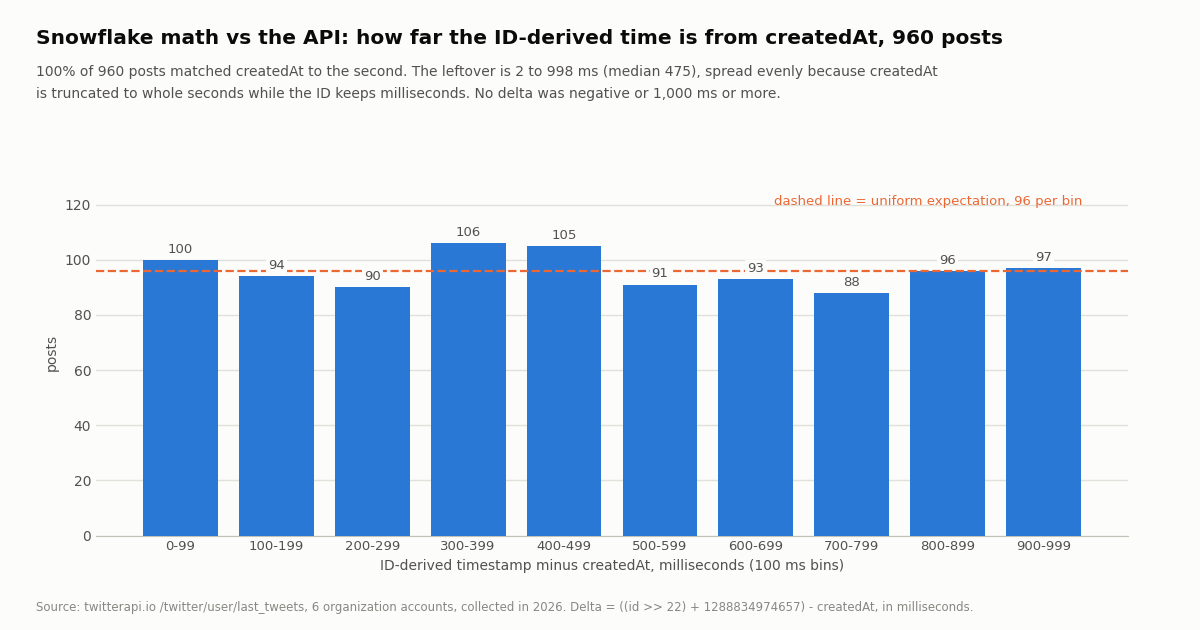
They agree, every time. For 960 of 960 posts the ID-derived time, truncated to the second, equals createdAt. The difference between the millisecond value from the ID and createdAt was never negative and never reached 1,000 ms: minimum 2 ms, median 475 ms, mean 493 ms, maximum 998 ms. That is the signature of a field that was simply rounded down: the ID keeps the millisecond, createdAt drops it. The histogram below shows the leftover spread almost flat across the ten 100 ms bins (88 to 106 posts per bin, against 96 expected if uniform), which is what you get when the sub-second part is effectively random.
So the bookmarklet is not just as good as the API's timestamp; it is more precise. If you need to order two posts made within the same second, the ID decides and createdAt cannot. Reposts are a case to know about: 28.8% of the sample were reposts (@NASA 45.0%, @esa 41.7%), and for those the ID and createdAt both describe the repost itself, not the original post; the original's time is in retweeted_tweet.id, decoded the same way.
"Leftover" is the ID-derived millisecond time minus createdAt in milliseconds. Days spanned is oldest to newest post in each sample; the two-year spans belong to accounts that post rarely.
The other 22 bits, and when a bookmarklet is the wrong tool
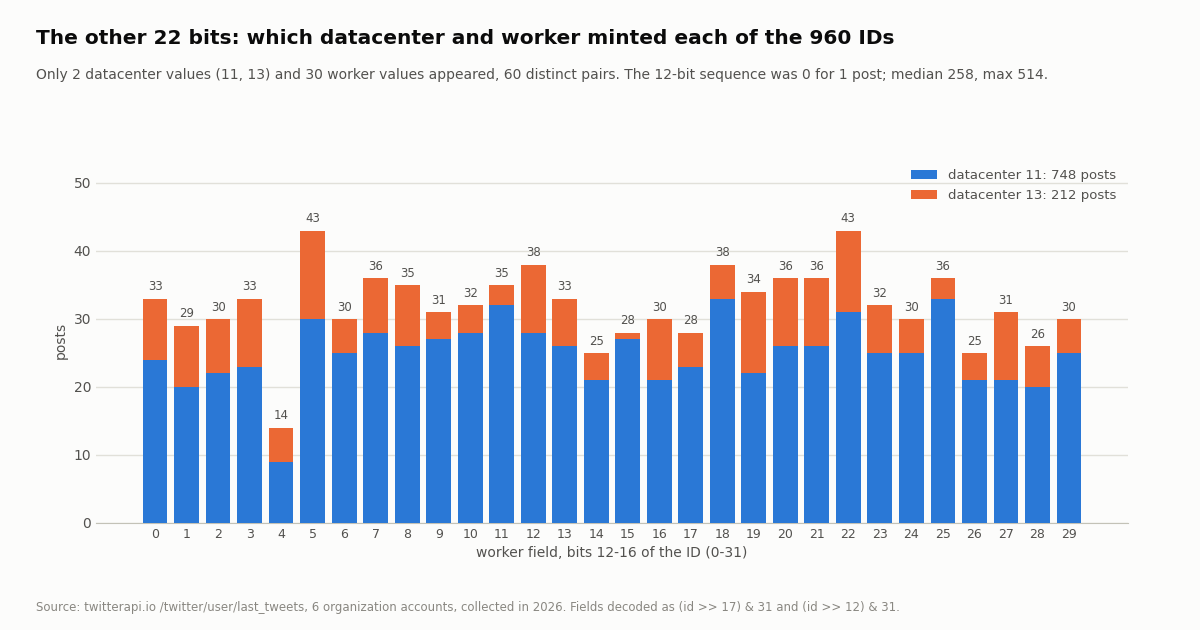
The low 22 bits of a Snowflake are the machine and sequence fields. The archived Twitter implementation splits the 10 machine bits into a 5-bit datacenter ID and a 5-bit worker ID, and the 12-bit sequence counts IDs minted in the same millisecond on the same worker. Decoding them is one line each ((id >> 17) & 31, (id >> 12) & 31, id & 4095), and it is a harmless curiosity: nothing about a user is in there. We decoded them for the 960 posts to see what the field values look like in 2026.
The sequence field is the surprise if you expect it to start at 0 for every millisecond: only 1 of 960 IDs had a zero sequence, and the median was 258. That is consistent with a generator that does not reset the counter per millisecond (the archived code starts from a random or rolling value depending on the version), and it is a reminder not to read more into those bits than "which generator, roughly in what order". The timestamp bits are the ones with a documented meaning; the rest are an implementation detail that has evidently changed since 2010.
Where bookmarklets stop. A bookmarklet sees one page. The moment the question is "when were these 500 tweets posted", "what is the ID for each of these 200 handles", or "give me this account's posts with timestamps as a CSV", you want the data as JSON, and x.com's connect-src means the bookmarklet cannot fetch it for you. The Python at the end of this page is the same comparison we ran, against the twitterapi.io endpoints: /twitter/tweets with tweet_ids returns id and createdAt for a list of IDs, and /twitter/user/last_tweets pages through an account's timeline with has_next_page and next_cursor. No X account or developer app is needed for reads; the key goes in an X-API-Key header.
Cost, with the rate cards named. Tweet endpoints on twitterapi.io bill 15 credits per tweet returned, $0.15 per 1,000 tweets ($1 = 100,000 credits), with a 15-credit minimum per request; a full 20-tweet page is $0.003, and this study's 960 posts cost about $0.14. The official X API pay-per-usage rate card (docs.x.com/x-api/getting-started/pricing) lists $0.005 per post read, $5 per 1,000, about 33x more, capped at 3 million post reads a month before Enterprise. Profiles are 18 credits each on twitterapi.io ($0.18 per 1,000) against $0.010 per user read on X's card. New twitterapi.io accounts that pass the automatic bot check get up to $1 of free credits (at most 100,000 credits, no card, one per person or network, expiring after 31 days), which covers roughly seven studies of this size; purchased credits never expire. Rate limits are 0.2 requests per second before the first payment and 20 once paid; see the pricing page for plans.
How we collected this
Question: does the Snowflake arithmetic a bookmarklet can run in the browser, (id >> 22) + 1288834974657 milliseconds, reproduce the creation time the API reports in createdAt; how large is the difference; and what do the remaining 22 bits of the ID contain in practice.
Accounts and endpoint: six public organization accounts, @NASA, @esa, @firefox, @github, @googlechrome and @mozilla, through /twitter/user/last_tweets with the default includeReplies (replies excluded), newest first, up to 10 pages of 20 per account. @esa was limited to 6 pages to stay within the request budget and @firefox has only 40 posts. 49 requests, 960 posts, collected in 2026 through a rate-limited, read-only client.
Method: for each post, the ID string was parsed as a 64-bit integer; timestamp = (id >> 22) + 1288834974657 ms, datacenter = (id >> 17) & 31, worker = (id >> 12) & 31, sequence = id & 4095. createdAt (format %a %b %d %H:%M:%S %z %Y) was parsed to epoch seconds. We report the delta in milliseconds, the share matching at second precision, the share with the same UTC date, the histogram in 100 ms bins, and the distribution of the three low fields. Reposts and quotes were counted from the presence of retweeted_tweet and quoted_tweet.
What the sample cannot show: the timeline endpoint returns createdAt at second precision, so we can confirm agreement to the second and characterize the sub-second leftover, but not verify the millisecond itself against an independent clock. Six organization accounts over the last two years say nothing about IDs from 2010 to 2015, when the generator's machine and sequence fields may have behaved differently; the timestamp field's meaning has not changed. The DOM selectors used by bookmarklets 2 and 6 were not exercised here; this study is about the arithmetic.
Aggregates only. The accounts named are organizations; no individual's posts were analyzed and no post text was used. The analysis script, results and the gzip-compressed raw pages for these organization accounts are kept with the study.
"""snowflake_check.py - decode tweet IDs the way the bookmarklet does and compare with the API's createdAt.

    pip install requests
    export TWITTERAPI_IO_API_KEY=...          # twitterapi.io dashboard
    python snowflake_check.py NASA           # an account's latest posts (2 pages = 40 posts = $0.006)
    python snowflake_check.py --ids 2111180963661435219,2111515160766550057

Tweet endpoints bill 15 credits per tweet returned ($0.15 per 1,000), minimum 15 credits per request.
"""
import argparse
import os
from datetime import datetime, timezone

import requests

BASE = "https://api.twitterapi.io"
HEADERS = {"X-API-Key": os.environ["TWITTERAPI_IO_API_KEY"]}
EPOCH_MS = 1288834974657      # Twitter's custom Snowflake epoch


def decode(tweet_id: str) -> dict:
    """Same arithmetic as the bookmarklet, with Python's unbounded int instead of BigInt."""
    i = int(tweet_id)
    return {
        "ts_ms": (i >> 22) + EPOCH_MS,
        "datacenter": (i >> 17) & 0x1F,
        "worker": (i >> 12) & 0x1F,
        "sequence": i & 0xFFF,
    }


def parse_created_at(s: str) -> datetime:
    # createdAt is "<weekday> <month> <day> <HH:MM:SS> +0000 <year>", not ISO 8601
    return datetime.strptime(s, "%a %b %d %H:%M:%S %z %Y")


def tweets_by_ids(ids: list[str]) -> list[dict]:
    r = requests.get(f"{BASE}/twitter/tweets", headers=HEADERS,
                     params={"tweet_ids": ",".join(ids)}, timeout=30)
    r.raise_for_status()
    return r.json().get("tweets") or []          # top-level tweets[]


def last_tweets(user_name: str, pages: int = 2) -> list[dict]:
    out, cursor = [], None
    for _ in range(pages):
        params = {"userName": user_name}
        if cursor:
            params["cursor"] = cursor
        r = requests.get(f"{BASE}/twitter/user/last_tweets", headers=HEADERS, params=params, timeout=30)
        r.raise_for_status()
        body = r.json()
        out.extend((body.get("data") or {}).get("tweets") or [])   # data.tweets[] on this endpoint
        if not body.get("has_next_page") or not body.get("next_cursor"):
            break
        cursor = body["next_cursor"]
    return out


def report(tweets: list[dict]) -> None:
    exact = 0
    for t in tweets:
        d = decode(t["id"])
        created = parse_created_at(t["createdAt"])
        delta_ms = d["ts_ms"] - int(created.timestamp()) * 1000
        exact += d["ts_ms"] // 1000 == int(created.timestamp())
        when = datetime.fromtimestamp(d["ts_ms"] / 1000, timezone.utc).isoformat(timespec="milliseconds")
        print(f"{t['id']}  id->{when}  createdAt={t['createdAt']}  delta={delta_ms:+d} ms  "
              f"dc={d['datacenter']} worker={d['worker']} seq={d['sequence']}")
    print(f"{exact}/{len(tweets)} match createdAt to the second")


if __name__ == "__main__":
    ap = argparse.ArgumentParser()
    ap.add_argument("user_name", nargs="?", help="account whose latest posts to check")
    ap.add_argument("--ids", help="comma-separated tweet IDs instead")
    ap.add_argument("--pages", type=int, default=2)
    a = ap.parse_args()
    report(tweets_by_ids(a.ids.split(",")) if a.ids else last_tweets(a.user_name, a.pages))
Questions readers ask
Do bookmarklets still work on x.com?
Yes. x.com's Content-Security-Policy, read from its live response header, allows inline script ('unsafe-inline' in script-src), and browsers treat a javascript: bookmark as the user's own script. What the policy does block is loading a script from another host and fetch() calls to hosts outside the X list in connect-src. Keep the whole bookmarklet in the bookmark and open other sites in a new tab instead of calling them.
How do I get the exact timestamp of a tweet from its ID?
Shift the ID right by 22 bits and add 1288834974657: the result is Unix time in milliseconds. In JavaScript do it with BigInt (Number((BigInt(id) >> 22n) + 1288834974657n)) because tweet IDs are above 2^53. On 960 posts we checked, this matched the API's createdAt to the second for every one, and carries the milliseconds createdAt does not.
Why does the bookmarklet use BigInt instead of Number?
Tweet IDs are 64-bit integers, 19 digits long today, and JavaScript's Number is exact only up to 2^53 - 1 (about 9.0 x 10^15). X's own documentation on IDs warns about this precision loss. Under Node, Number("2111180963661435219") becomes 2111180963661435100; the low bits, including part of the timestamp, are gone. BigInt keeps every digit.
Can a bookmarklet call the twitterapi.io API from x.com?
No. x.com's connect-src directive lists only X hosts, so a fetch() from the page to api.twitterapi.io is blocked by the browser. Bookmarklets 3 and 4 work around that honestly: they put the value on the clipboard or in the URL and open the tool or search in a new tab. For bulk lookups, run the Python at the end of this page from your own machine.
Will these bookmarklets break when X changes its markup?
The ones that read only the URL and do math (1, 3, 4, 5) depend on the /handle/status/id URL shape, which has not changed in years. The two that touch the DOM (2 reads the tweet text, 6 hides the sidebar) depend on data-testid attributes that X does not document and can rename; that is why they are labeled verify in your browser, and why each is short enough to fix in a minute with the inspector.
Is there a bookmarklet to share the current page on X?
That is the original 2010 share bookmarklet, and the intent URL still exists: open https://x.com/intent/tweet?url=<page URL>&text=<text> (X's web intents documentation also lists /intent/follow?screen_name=, /intent/like?tweet_id= and /intent/retweet?tweet_id=). A one-liner is javascript:window.open('https://x.com/intent/tweet?url='+encodeURIComponent(location.href)+'&text='+encodeURIComponent(document.title)). It opens the compose window; it does not post for you.
Can a bookmarklet post, like or follow for me automatically?
Not without you clicking through X's own interface, and that is the right boundary for a bookmarklet. Programmatic actions are a different product: on twitterapi.io a /twitter/user_login_v2 login ($0.10, with a proxy you supply) returns login_cookies, and each post, like, follow or delete is then $0.002 per HTTP 200 call. Every such call acts as that account, so X can rate-limit, lock or suspend it; keep a human pace, and expect the session to need re-login. Reads, by contrast, need no X account at all.
Continue
- X developer docs: X IDs (Snowflake timestamp, worker and sequence components; 53-bit JavaScript precision warning)
- twitter-archive/snowflake, branch snowflake-2010: 41-bit time, 10-bit machine, 12-bit sequence, custom epoch 1288834974657 (archived)
- W3C Content Security Policy Level 2, section 5 Processing Model (user preferences, bookmarklets and add-ons)
- MDN: CSP script-src-attr (inline event handlers; 'none')
- X developer docs: Web Intents (x.com/intent/tweet, follow, like, retweet)
- twitterapi.io API reference: tweets by ID, user last_tweets, response fields
- X API pay-per-usage pricing ($0.005 per post read), the official and pricier route
- X (Twitter) API overview: endpoints, pricing, limits
- Twitter timestamp tool: decode a list of tweet IDs or URLs
- Twitter ID finder: username to numeric ID
- Twitter account age checker
- Twitter (X) advanced search: operators in the UI and the API
- Twitter OSINT: timestamps, IDs and account history
- Pay-per-call pricing
- 01Twitter (X) Statistics 2026: Attributed Figures and First-Hand Data on the Biggest Accounts
- 02Twitter (X) to SMS: Get a Text Message When an Account Posts
- 03Tweet Hunter (TweetHunter) Review: What It Automates, What It Costs, and the API Route for the Data Half
- 04How to Search Twitter (X) for Images: Operators, What They Return, and the API Route
- 05SOCMINT on Twitter (X): What Social Media Intelligence Is, and a Worked Method
- 06Getting Real Political Data From Twitter (X)
- 07Data365 Alternative: Pay-Per-Data X (Twitter) API Instead of a EUR 300 Subscription
- 08How to Get Twitter (X) Data into Google Sheets with Apps Script in 2026
Stop reading. Start building.
Starter credits cover real testing on real data. Google sign-in, no card, no application queue.
Get an API key