Tweet Hunter (TweetHunter) Review: What It Automates, What It Costs, and the API Route for the Data Half
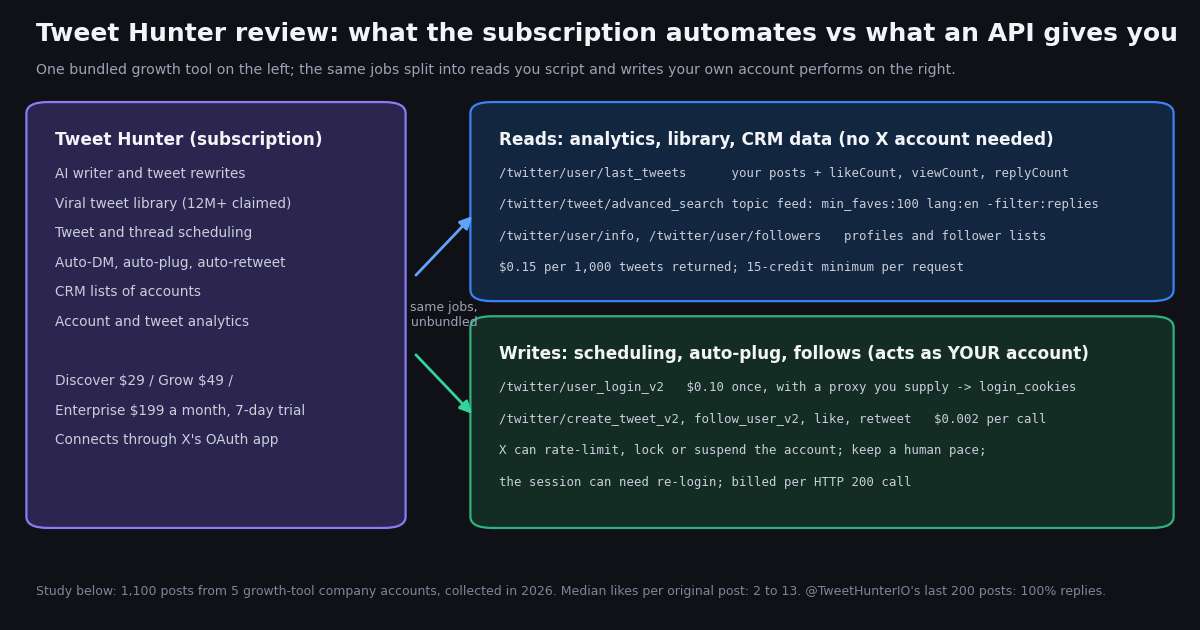
This is a review of Tweet Hunter written by people who sell something adjacent but not the same thing. Tweet Hunter is a writing, scheduling and automation tool for growing an X (Twitter) audience; we sell raw X data by the request. That makes us a fair reviewer of the data and analytics half of the product and an interested one of the rest, so the review separates the two. Every fact about Tweet Hunter below was fetched from its own pricing page, homepage and terms of use this session, with the inconsistencies left in rather than smoothed over, and every number about engagement comes from a sample we pulled ourselves.
The question most people typing "tweethunter" into a search box actually have is a buying question: is $29 to $199 a month worth it, what does it automate, and what can go wrong with the account. The review answers those in order. It then asks a question no review we found asks: do the companies selling X growth tools show that growth on their own X accounts? We pulled the 200 most recent posts of @TweetHunterIO, @hypefury, @typefully, @buffer and @blackmagic_so, measured posts per week, the mix of original posts, thread continuations, replies and reposts, median likes and views per post, engagement rate and posting hours, and present the result as it is, without ranking anyone.
The last part is practical. The library, analytics and CRM features of Tweet Hunter are searches and profile reads that any developer can reproduce in an afternoon, and the scheduling and auto-plug features are write calls that an authenticated session can make. We show both routes with real endpoints and real prices, including what the posting route does to your account's risk, so you can decide which half of the subscription you are really paying for.
What Tweet Hunter is, and who runs it
Tweet Hunter's homepage headline is "Build & Monetize your X audience FAST" and it describes itself as "the all-in-one, AI-powered X tool to grow your audience and your brand on X". The feature list on the same page, quoted as fetched this session: a viral tweets library ("3M+" on the homepage, "Over 12M" on the pricing page), AI-powered writing, scheduling of tweets and threads, Auto DM, key metrics and top tweets, daily follower growth, detailed tweet analytics, lists of people (the CRM), an engage view that tracks conversations, Auto Plug ("reply to your best performing tweets") and Evergreen Tweets ("randomly RT your best tweets"). It claims to be "Trusted by 5644+ X creators"; we have no way to check that figure and repeat it only as the vendor's claim.
Ownership. The terms of use at tweethunter.io/terms-of-use open with "Welcome to lempire" and state that the web pages at tweethunter.io are "operated by lempire". lempire is the French company behind lemlist, the cold-outreach product, and also runs Taplio, the LinkedIn equivalent of Tweet Hunter built by the same founders. A case study published by AI21 Labs in February 2023 describes Tweet Hunter scaling to $1M ARR "and an 8-figure exit in under a year" and refers to "lempire's acquisition of Tweet Hunter". Indie Hackers carried the founders' own account of the deal; that page returned HTTP 403 to our fetch, so we do not quote its figures.
How it connects to X. The "Get started" button on the homepage is a link to x.com/i/oauth2/authorize with a redirect_uri on app.tweethunter.io and a scope list that includes tweet.read, tweet.write, tweet.moderate.write, users.read, follows.read, follows.write, like.read, like.write, list.read, list.write, block.write, bookmark.write, media.write, dm.read, dm.write and offline.access. In plain terms: Tweet Hunter is an X API application, you authorize it against your own account, and everything it posts, likes, follows or DMs is done by you, through X's official endpoints, under X's rules for automated behavior (help.x.com/en/rules-and-policies/x-automation). That is the normal and legitimate way for such a tool to work; it also means the vendor pays X's pay-per-usage rates for your writes ($0.015 per post created and $0.200 for a post containing a URL on the current rate card at docs.x.com/x-api/getting-started/pricing). The pricing page we fetched has no line item passing that cost on, so we treat the plan price as all-inclusive until the vendor says otherwise.
Positioning. The pricing page's navigation lists two use cases by name, "Crypto promotion" ("Launch your token and build a powerful X community") and "OnlyFans Promotion". That is a factual description of who the vendor is selling to, and it is useful context for the auto-DM quotas in the next section.
Plans and prices, as fetched this session
The pricing page at tweethunter.io/pricing showed three plans with a monthly and a yearly toggle (the yearly toggle advertised "-53%" and a "SAVE UP TO 25%" badge, and a countdown banner offered "the PRO plan for 50% off"; none of those discounts are reflected in the plan cards, so we quote the monthly card prices only). Every plan button reads "Start 7-day free trial".
The homepage disagrees with the pricing page. The homepage FAQ, fetched in the same session, says "The plans start at $49/mo. That includes every single feature we have except for those involving AI-writing. These can be found at the superior plan that costs $99/mo", and the pricing page's own HTML title reads "Plans from $49/mo" while its first card says $29. The FAQ also promises "a free 7-day trial as well as a 30-day refund policy, no questions asked". We cannot tell you which numbers the checkout will show; the only safe reading is that the entry price is somewhere between $29 and $49 and the full AI tier between $49 and $199, and that you should screenshot the plan card before entering a card.
What the quotas mean. The one number that scales across tiers is automated DMs: 3,000, 7,500 and 15,000 a month. Nothing else on the cards is metered. Read that as the vendor telling you what the tiers are for.
Trial terms. The terms of use state that if you enter billing information for the free trial you "will be automatically charged the applicable Subscription fees" on the last day of the trial unless you cancel, and that the fee can be changed with "reasonable prior notice". Standard, but worth knowing with a 7-day clock.
Who Tweet Hunter suits, and the limits that come with write automation
It suits a solo creator, a founder doing their own marketing, or a ghostwriter running several client accounts (the Grow plan's five accounts and the Enterprise plan's ghostwriting mode are built for exactly that) who wants writing help, a queue, and a single screen with the account's numbers, and who is comfortable with a third-party app holding write access to the account. If you post daily, cannot face a blank composer, and would otherwise pay a human to draft, $49 a month buys a lot of drafts.
It does not suit three groups. First, anyone whose main need is data: the analytics it shows are your own account's metrics, which X's own analytics page also shows for free, and the viral library is a search over other people's past tweets that you can run yourself (next sections). Second, anyone running an account that cannot afford a lock: a brand account, a customer-support account, an account with a verification badge you rely on. The automation features act as that account, and X's automation rules, not the vendor's dashboard, decide what is tolerated. Third, developers. There is no API for Tweet Hunter's features and no export of its library; a developer who wants a top-tweets feed in their own tool needs a data source, not a dashboard.
A fair word on the AI writer. We did not test output quality in this session and will not pretend to score it. The AI21 case study says the product was built on AI21's language models with fine-tuning; what model it runs today is not stated on the site. Judge the writer on the trial, with your own drafts, not on a review.
The limits that come with the automation. The features that make Tweet Hunter different from a plain scheduler are the automated ones: auto-DM to new followers or to people who engage, auto-plug (an automatic reply under a post once it passes a threshold), auto-retweet of your own past posts, and bulk engagement from CRM lists. Each is an action that X records as taken by your account, through the scopes you granted on sign-up. Three consequences follow.
X decides, not the vendor. X's automation rules (help.x.com/en/rules-and-policies/x-automation) and its platform-manipulation policy (help.x.com/en/rules-and-policies/platform-manipulation) are the documents that govern automated DMs, bulk following and repetitive posting. We cite the URLs without quoting them because help.x.com blocks automated fetches; read them before turning on auto-DM. An account that trips them is rate-limited, locked or suspended as that account, and the subscription does not insulate it.
Auto-DM is a quota, not a feature. The plan tiers are differentiated almost entirely by the number of automated DMs. Unsolicited DMs at that volume are the behavior most directly addressed by X's rules, and the vendor's own use-case pages (crypto promotion, adult-creator promotion) describe audiences where that is the point. If your account matters more to you than the funnel, leave the DM quota at zero. We do not show a DIY equivalent of bulk auto-DM on this page for the same reason.
The library is other people's work. The viral library is a search over high-engagement tweets by topic, offered as inspiration and as raw material for the rewriter. Rewritten tweets are your responsibility; the terms of use say users "will be responsible that this content does not violate the privacy rights, publicity rights, copyrights" of others and that lempire "will not be held legally responsible" for inappropriate AI output.
Operational limits we could verify: one X account on the entry plan; the 7-day trial converts automatically if a card was entered; the vendor can change fees with notice; and the public pricing and homepage disagree on the entry price. What we could not verify: whether any X API cost is passed through (no such line exists on the pricing page), the "5644+ creators" figure, and the "12M" library size.
Do growth-tool brand accounts show the growth they sell? 1,100 posts from 5 company accounts
A growth tool's own X account is the one account where the vendor has every reason and every feature to perform. So we measured five of them. We confirmed each handle with /twitter/user/info (the @Taplio handle belongs to an unrelated account; Taplio's real account, @TaplioHQ, is a LinkedIn-tool account with about 2,000 followers and was left out), then pulled 10 pages of /twitter/user/last_tweets with includeReplies=true for @TweetHunterIO, @hypefury, @typefully, @buffer and @blackmagic_so: 200 posts each, 1,000 posts, plus a separate 100-post pull of @TweetHunterIO without replies, explained below. 66 requests, $0.17 in API reads, collected in 2026.
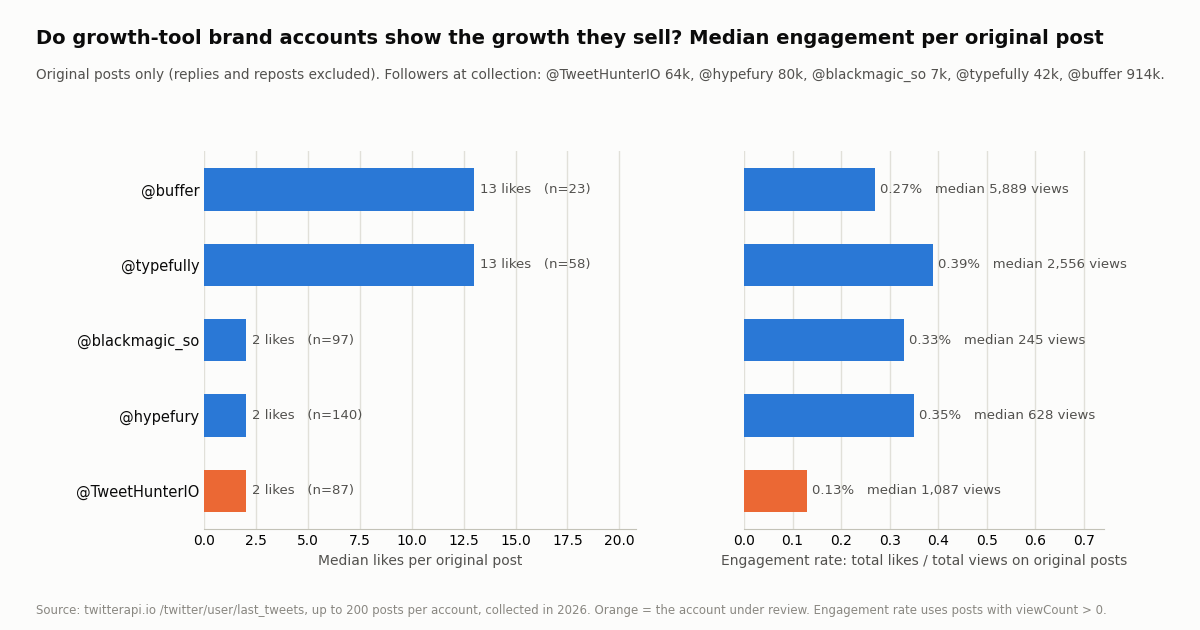
The headline is the spread, not a winner. Median likes per original post (replies and reposts excluded) were 2 for @TweetHunterIO (87 original posts), @hypefury (140) and @blackmagic_so (97), and 13 for @typefully (58) and @buffer (23). Median views per original post ran from 245 (@blackmagic_so) to 5,889 (@buffer). Engagement rate, defined as total likes divided by total views over original posts with a view count, sat in a narrow band: 0.13% for @TweetHunterIO, 0.27% for @buffer, 0.33% for @blackmagic_so, 0.35% for @hypefury and 0.39% for @typefully. Across all 405 original posts in the sample the median was 2 likes, the 75th percentile 5 and the 90th percentile 13.
Under 10 likes is the norm. The share of original posts with fewer than 10 likes was 97.7% for @TweetHunterIO, 98.6% for @hypefury, 100% for @blackmagic_so, 24.1% for @typefully and 26.1% for @buffer. The single largest post in the sample was a @buffer post with 2,238 likes and 817,513 views; the next-largest maximum was 65 likes (@typefully). Nothing in the @TweetHunterIO sample exceeded 23 likes.
Reading it fairly. These are company accounts, which routinely under-perform the personal accounts of their founders, and a 200-post window is a snapshot. The numbers do not say the tools fail; they say that the brand accounts, with every feature available to them, post at ordinary cadences and earn ordinary engagement for their follower counts. If a vendor's sales page implies that its automation turns a company account into a reach machine, this is the evidence to weigh it against. We also note that @TweetHunterIO's follower count (64,247) and lifetime status count (641,304 at collection) describe an account that has posted a very large number of times, which is consistent with the next section.
What the accounts actually post: replies, threads, media and hours
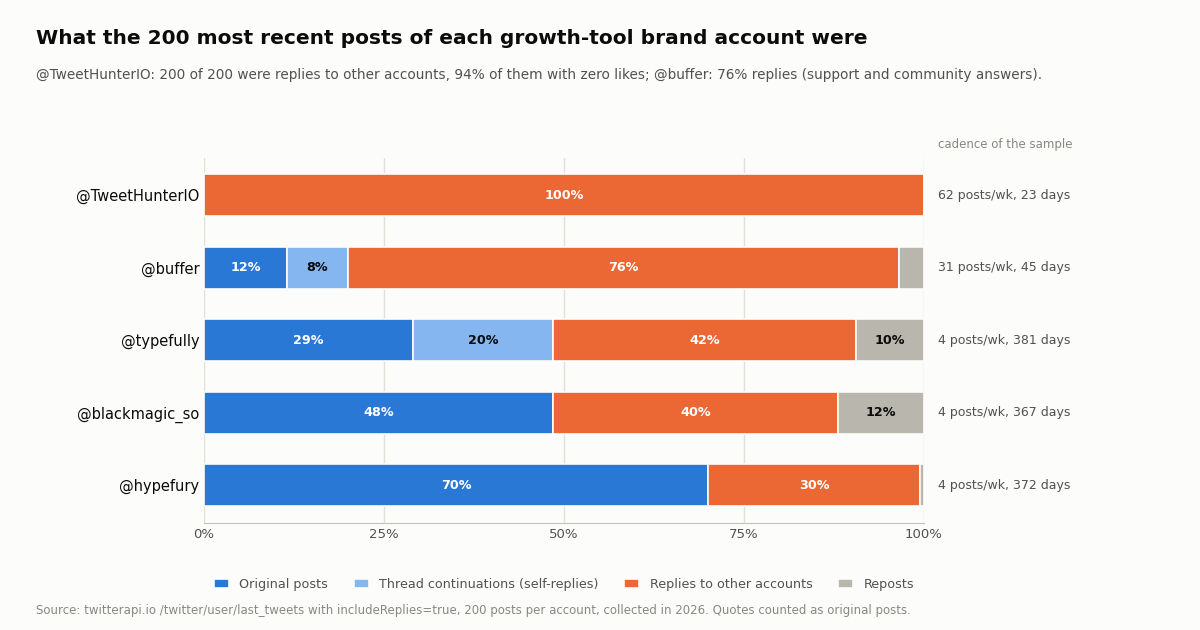
@TweetHunterIO's 200 most recent posts were all replies to other accounts. With includeReplies=true, the newest 200 posts of the account spanned 22.7 days, about 62 posts a week, and every one of them was a reply to another account: 0 original posts, 0 thread continuations, 0 reposts. 94.5% of those replies had zero likes and their median view count was 58. To measure the account's original posts at all we made a second pull with the default includeReplies=false: 100 posts, 13 of them reposts, the newest original post from June 2026, 87 originals over 235 days, about 2.6 a week. Whether the reply stream is a human community manager or the product's own engage feature is not something a timeline can show; what it shows is that the account's output is almost entirely replies.
The others mix differently. @buffer's recent 200 posts were 85% replies (76.5% to other accounts, 8.5% thread continuations) at about 31 posts a week, which reads as a support and community account; its 23 original posts in 45 days are the only ones in the sample with a median above 5,000 views. @typefully was 61.5% replies, but 19.5% of its posts were self-replies continuing a thread and 9.5% were reposts; its original posts were the most often multi-part. @hypefury (29.5% replies) and @blackmagic_so (39.5% replies, 12% reposts) post about 4 times a week in total.
Media. Among original posts, four of the five accounts attached an image or video to most of them: 82.1% for @hypefury, 78.3% for @buffer, 67.2% for @typefully, 18.4% for @TweetHunterIO and 2.1% for @blackmagic_so. Video was a quarter of @typefully's and @buffer's original posts and 4.3% of @hypefury's.
Hours. Pooled across the five accounts, 40.1% of all 1,000 posts were created between 13:00 and 17:59 UTC, and the single busiest clock hour was 13:00 UTC with 137 posts. @hypefury, @typefully and @blackmagic_so all peak at 13:00 UTC; @TweetHunterIO's replies peak at 21:00 UTC; @buffer's busiest hours were 02:00, 08:00 and 12:00 UTC, consistent with a support rota across time zones. Weekend posting was 40% of @TweetHunterIO's replies and 6% to 22% for the others. None of this is advice on when to post; it is what these accounts do, and a scheduler that offers a "best time to tweet" feature is making a guess from the same kind of data.
Tweet Hunter alternatives, by the job you are hiring it for
"Tweet Hunter alternative" is really four different searches, because the product bundles four jobs. We name tools in plain text and do not link them; prices and features change, so verify on their own sites.
If you only write and schedule, Typefully and Hypefury are the closest like-for-like, and Buffer if X is one of several networks. We did not price them this session and will not quote numbers from memory. If you only want the data, the DIY route below is cheaper by a wide margin and needs no X account. If you want the automation (auto-DM, auto-plug, auto-follow), understand that every alternative, hosted or DIY, carries the same account risk, because the action is always taken by your account; the difference is only whether you or a vendor chooses the pace.
For a broader map of the analytics side see the Twitter (X) analytics walkthrough and the analytics tools comparison; for scheduling from code, the auto-post guide and the scheduling tool API integration guide.
The DIY route for the data half: reads, and what they cost against the subscription
Three of Tweet Hunter's features are reads. Your analytics are your own timeline with its counts; the viral library is a search; the CRM is profiles and follower lists. On twitterapi.io those are four endpoints, called with an API key in the X-API-Key header, no X account, no OAuth and no developer application.
Your analytics: /twitter/user/last_tweets with userName=<you> returns 20 posts a page, newest first, each with likeCount, retweetCount, replyCount, quoteCount, viewCount, bookmarkCount, createdAt, isReply and extendedEntities.media. Ten pages cover your last 200 posts. The script at the end of the page computes median likes, engagement rate, media share and best hours exactly as the study above did.
The viral library: /twitter/tweet/advanced_search with query="<topic>" min_faves:200 lang:en -filter:replies and queryType=Top returns the highest-engagement recent posts on a topic, which is what a "viral tweets by topic" library is. Change min_faves: to set the bar, add since: and until: for a window, from: for a set of authors. Each page is 20 tweets.
The CRM: /twitter/user/info for a profile (followers, following, statusesCount, isBlueVerified, canDm, isAutomated), /twitter/user/followers and /twitter/user/followings for lists (about 200 a page, screen_name, followers_count, created_at), /twitter/user/mentions for who talks to you.
Cost, with the published prices. Tweet endpoints bill 15 credits per tweet returned ($0.15 per 1,000 tweets), with a 15-credit minimum per request, so a full 20-tweet page is $0.003 and an empty result $0.00015; profiles are 18 credits each ($0.18 per 1,000); followers and followings 1 to 3 credits per user returned; $1 is 100,000 credits. The official X API pay-per-usage rate card at docs.x.com/x-api/getting-started/pricing is $0.005 per post read, $0.010 per user read and $0.010 per follower read, capped at 3 million post reads a month, so a 1,000-tweet pull is $5 there against $0.15 here, about 33x.
The comparison is only fair for the data. The subscription also includes the AI writer, the queue and the automation, which the reads do not replace; the point is that if the data is what you came for, it is a rounding error at API prices. New accounts that pass the automatic bot check receive up to $1 of free credits (at most 100,000 credits, no card, one per person or network, expiring after 31 days), which covers the entire monthly data column above once; purchased credits never expire. Plans with bonus credits are on the pricing page. Accounts that have not yet paid are limited to 0.2 requests a second, 20 once paid.
"""viral_feed.py - the 'top tweets by topic' library as one search call.

    pip install requests
    export TWITTERAPI_IO_API_KEY=...
    python viral_feed.py "x api" 200     # topic, minimum likes

Cost: 15 credits per tweet returned ($0.15 per 1,000); a 20-tweet page is $0.003.
"""
import os
import sys

import requests

BASE = "https://api.twitterapi.io"
H = {"X-API-Key": os.environ["TWITTERAPI_IO_API_KEY"]}


def top_tweets(topic, min_faves=200, pages=3):
    query = f'"{topic}" min_faves:{min_faves} lang:en -filter:replies'
    out, cursor = [], None
    for _ in range(pages):
        params = {"query": query, "queryType": "Top"}
        if cursor:
            params["cursor"] = cursor
        r = requests.get(f"{BASE}/twitter/tweet/advanced_search", headers=H, params=params, timeout=30)
        r.raise_for_status()
        body = r.json()
        out.extend(body.get("tweets") or [])
        if not body.get("has_next_page") or not body.get("next_cursor"):
            break
        cursor = body["next_cursor"]
    return out


if __name__ == "__main__":
    topic = sys.argv[1] if len(sys.argv) > 1 else "x api"
    floor = int(sys.argv[2]) if len(sys.argv) > 2 else 200
    for t in sorted(top_tweets(topic, floor), key=lambda t: -int(t.get("likeCount") or 0)):
        a = t.get("author") or {}
        views = int(t.get("viewCount") or 0)
        er = 100 * int(t.get("likeCount") or 0) / views if views else 0
print(f"{t.get('likeCount'):>6} likes {views:>9} views {er:4.2f}% @{a.get('userName')} {t.get('url')}")The DIY route for the posting half: a write session, and what it does to your account
Scheduling, auto-plug and auto-retweet are writes. twitterapi.io sells writes as a product: you log an X account in once with /twitter/user_login_v2 ($0.10 per login, with a proxy that you supply), which returns login_cookies; every subsequent /twitter/create_tweet_v2, /twitter/follow_user_v2, like, retweet or delete is $0.002 and is billed per HTTP 200 call. There is no OAuth scope screen because the call is the account: it acts as that account, X can rate-limit, lock or suspend it, keep a human pace, and the session can need re-login when X invalidates it.
What that replaces. A scheduler is a cron job that reads a queue and calls create_tweet_v2 at the planned time; an auto-plug is the same call with reply_to_tweet_id set once a post of yours passes a like threshold you read from last_tweets; an evergreen repost is a retweet call on an old post ID. Thirty scheduled posts a month cost $0.06 plus the $0.10 login; the account risk is the same as with any tool that posts for you, and it is yours to carry either way.
What we deliberately leave out. Bulk auto-DM. send_dm_to_user exists, and a DM to a reader who asked you a question is a reasonable use, but the 3,000-to-15,000-a-month quota that distinguishes Tweet Hunter's tiers is outreach at volume, and we will not show that pattern. The same goes for mass follow and unfollow loops. If you build the posting half yourself, build it to post less than a careful human would, not more.
The snippet below is the minimum: one login, one post, one reply-plug. Keep login_cookies in a secret store, never in a repository, and re-run the login when a write returns an authentication error.
"""post_and_plug.py - the posting half of a growth tool, as two write calls.

Acts AS the logged-in account: X can rate-limit, lock or suspend it. Keep a human pace.
Login $0.10 (proxy you supply) returns login_cookies; each write $0.002, billed per HTTP 200 call,
including a 200 whose body says status "error". The session can need re-login: re-run login()
when a post is refused.
"""
import os
import time

import requests

BASE = "https://api.twitterapi.io"
H = {"X-API-Key": os.environ["TWITTERAPI_IO_API_KEY"]}
PROXY = os.environ["X_PROXY"]            # http://user:pass@host:port, a residential proxy you supply


def login():
    body = {
        "user_name": os.environ["X_USER"], "email": os.environ["X_EMAIL"],
        "password": os.environ["X_PASSWORD"], "totp_secret": os.environ.get("X_TOTP_SECRET", ""),
        "proxy": PROXY,
    }
    r = requests.post(f"{BASE}/twitter/user_login_v2", headers=H, json=body, timeout=90)
    data = r.json() if r.headers.get("content-type", "").startswith("application/json") else {}
    if r.status_code != 200 or data.get("status") != "success":
        raise RuntimeError(f"login failed: {data.get('message') or r.text[:200]}")
    return data["login_cookies"]              # store in a secret store, never in a repository


def post(login_cookies, text, reply_to=None):
    """One create_tweet_v2 call ($0.002). Returns the new tweet_id, or None if X refused it."""
    body = {"login_cookies": login_cookies, "tweet_text": text, "proxy": PROXY}
    if reply_to:
        body["reply_to_tweet_id"] = reply_to
    r = requests.post(f"{BASE}/twitter/create_tweet_v2", headers=H, json=body, timeout=90)
    data = r.json() if r.headers.get("content-type", "").startswith("application/json") else {}
    if r.status_code != 200 or data.get("status") != "success":
        print("post refused:", data.get("message") or r.text[:200])   # a 200 with status error is still billed
        return None
    return data.get("tweet_id")


if __name__ == "__main__":
    cookies = os.environ.get("X_LOGIN_COOKIES") or login()
    first = post(cookies, "We measured 1,100 posts from five growth-tool brand accounts. Thread:")
    if first:
        time.sleep(90)                        # the 'auto-plug': one reply under your own post, at a human pace
post(cookies, "Full numbers and method here: https://twitterapi.io/blog/tweethunter-review", reply_to=first)How we collected this
Question: do the X growth-tool companies' own accounts show the output and engagement their products are sold on? Per account: posts per week, the share of posts that are original, thread continuations, replies to others, reposts and media, median likes and views per original post, engagement rate (likes divided by views), and posting hours in UTC.
Accounts: five public company accounts, each confirmed with /twitter/user/info: @TweetHunterIO, @hypefury, @typefully, @buffer and @blackmagic_so. @Taplio is an unrelated account; Taplio's own account (@TaplioHQ) markets a LinkedIn tool and was left out.
Method: /twitter/user/last_tweets with includeReplies=true, 10 pages of 20 per account, newest first (1,000 posts), through a rate-limited, read-only client, collected in 2026. Because every one of @TweetHunterIO's 200 most recent posts was a reply, we pulled a further 5 pages for that account with the default includeReplies=false (100 posts, 13 reposts excluded) to measure its original posts; its "original posts a week" figure uses that pull's 235-day span. 55 timeline requests and 11 profile lookups, 1,100 posts, $0.17. Engagement rate is total likes over total views on original posts with a non-zero viewCount; replies and reposts are excluded from all per-post engagement figures; quotes count as original posts.
What the sample cannot show: 200 posts is a snapshot, and for the three accounts that post about four times a week it reaches back a year, so a recent change in strategy is averaged away. Company accounts are not the founders' personal accounts, where these vendors do most of their marketing, and nothing here measures the results their customers get. We cannot tell whether a reply was written by a person or produced by a product feature. View counts are what X reported at collection time.
Aggregates only. The five accounts named are companies; the authors of the posts they replied to or quoted were not analyzed or named, and no individual's posts were profiled. The analysis script, results and gzip-compressed raw pages for these company accounts are kept with the study.
"""my_analytics.py - the analytics tab of a growth tool, from your own timeline.

Reproduces the study on this page for one account: posts per week, mix of originals / replies /
reposts / media, median likes and views per original post, engagement rate, busiest UTC hours.

    pip install requests
    export TWITTERAPI_IO_API_KEY=...        # twitterapi.io dashboard; no X account needed for reads
    python my_analytics.py <userName> [pages]

Cost: 15 credits per tweet returned ($0.15 per 1,000). 10 pages = up to 200 posts = $0.03.
"""
import os
import statistics
import sys
from collections import Counter
from datetime import datetime

import requests

BASE = "https://api.twitterapi.io"
H = {"X-API-Key": os.environ["TWITTERAPI_IO_API_KEY"]}
FMT = "%a %b %d %H:%M:%S %z %Y"          # createdAt looks like "Thu Oct 16 12:34:56 +0000 2026"


def last_tweets(user, pages=10, include_replies=True):
    """data.tweets[] newest first, 20 per page; follow next_cursor while has_next_page."""
    out, cursor = [], None
    for _ in range(pages):
        params = {"userName": user, "includeReplies": "true" if include_replies else "false"}
        if cursor:
            params["cursor"] = cursor
        r = requests.get(f"{BASE}/twitter/user/last_tweets", headers=H, params=params, timeout=30)
        r.raise_for_status()
        body = r.json()
        if body.get("status") == "error":
            raise RuntimeError(body.get("msg"))
        data = body.get("data") or {}
        out.extend(data.get("tweets") or [])
        if not body.get("has_next_page") or not body.get("next_cursor"):
            break
        cursor = body["next_cursor"]
    return out


def analyze(user, tweets):
    rows = []
    for t in tweets:
        rows.append({
            "ts": datetime.strptime(t["createdAt"], FMT),
            "reply": bool(t.get("isReply")),
            "thread": bool(t.get("isReply")) and (t.get("inReplyToUsername") or "").lower() == user.lower(),
            "repost": bool(t.get("retweeted_tweet")),
            "media": bool((t.get("extendedEntities") or {}).get("media")),
            "likes": int(t.get("likeCount") or 0),
            "views": int(t.get("viewCount") or 0),
        })
    rows.sort(key=lambda r: r["ts"])
    days = (rows[-1]["ts"] - rows[0]["ts"]).total_seconds() / 86400 or 1
    orig = [r for r in rows if not r["reply"] and not r["repost"]]
    with_views = [r for r in orig if r["views"] > 0]
    n = len(rows)
    hours = Counter(r["ts"].hour for r in rows)
    print(f"@{user}: {n} posts over {days:.0f} days = {n / days * 7:.1f} a week; {len(orig)} original")
    print(f"  replies to others {100 * sum(r['reply'] and not r['thread'] for r in rows) / n:.1f}%  "
          f"thread continuations {100 * sum(r['thread'] for r in rows) / n:.1f}%  reposts {100 * sum(r['repost'] for r in rows) / n:.1f}%")
    if orig:
        er = 100 * sum(r["likes"] for r in with_views) / max(1, sum(r["views"] for r in with_views))
        print(f"  original posts: median {statistics.median(r['likes'] for r in orig):.0f} likes, "
              f"median {statistics.median(r['views'] for r in with_views) if with_views else 0:,.0f} views, "
              f"engagement rate {er:.2f}%, media on {100 * sum(r['media'] for r in orig) / len(orig):.0f}%")
    print("  busiest UTC hours:", [f"{h:02d}:00 ({c})" for h, c in hours.most_common(3)])


if __name__ == "__main__":
    user = sys.argv[1] if len(sys.argv) > 1 else "TweetHunterIO"
    pages = int(sys.argv[2]) if len(sys.argv) > 2 else 10
    analyze(user, last_tweets(user, pages))
Questions readers ask
How much does Tweet Hunter cost?
The pricing page we fetched this session lists Discover at $29 a month (1 X account, 3,000 auto-DMs), Grow at $49 (5 accounts, AI writer, CRM, 7,500 auto-DMs) and Enterprise at $199 (unlimited accounts, 15,000 auto-DMs, ghostwriting mode), each with a 7-day free trial and a yearly toggle advertised at a discount. The homepage FAQ on the same day said plans start at $49 with an AI tier at $99, so confirm the number at checkout.
Who owns Tweet Hunter?
lempire, the French company behind lemlist. Tweet Hunter's terms of use state that tweethunter.io is operated by lempire, and a February 2023 AI21 Labs case study refers to lempire's acquisition of Tweet Hunter after it reached $1M ARR. The same founders built Taplio, the LinkedIn counterpart, which is also under lempire.
Is Tweet Hunter safe for my X account?
It connects through X's official OAuth 2.0 flow with write scopes (tweet.write, follows.write, like.write, dm.write and others), so it is a legitimate X API app. The risk is in what you switch on: auto-DM, auto-retweet, auto-plug and bulk engagement are actions taken by your account, and X's automation and platform-manipulation rules apply to your account, not to the vendor. Keep the automated DM quota at zero if the account matters more than the funnel.
Is Tweet Hunter worth it?
For a creator or ghostwriter who wants drafts, a queue and analytics in one screen, the Grow plan at $49 buys a lot of drafts and you can judge the writer on the trial. For anyone who mainly wants the data (your metrics, a top-tweets-by-topic feed, follower lists), no: those are reads that cost about $1.70 a month at API prices on twitterapi.io, and X's own analytics page shows your account's numbers for free.
What are the best Tweet Hunter alternatives?
It depends on the job. For writing and scheduling: Typefully, Hypefury, or Buffer if X is one of several networks. For analytics: X's own analytics, BlackMagic.so, or your own script over /twitter/user/last_tweets. For the viral library: /twitter/tweet/advanced_search with min_faves: and lang: operators. For the CRM: /twitter/user/info and /twitter/user/followers. We did not price the hosted tools this session and name them without links.
Do growth tools actually grow accounts?
We can only report what their own company accounts show. Across 1,100 posts from @TweetHunterIO, @hypefury, @typefully, @buffer and @blackmagic_so collected in 2026, median likes per original post were 2 to 13, engagement rate 0.13% to 0.39%, and most original posts from three of the five accounts had fewer than 10 likes. That is ordinary performance for company accounts of those sizes; it is not evidence about their customers' results either way.
Can I rebuild Tweet Hunter's viral tweet library with an API?
Yes, it is a search. /twitter/tweet/advanced_search with a query such as "x api" min_faves:200 lang:en -filter:replies and queryType=Top returns the most-liked recent posts on a topic, 20 per page, at 15 credits per tweet ($0.003 a page). The script on this page prints them sorted by likes with their engagement rate. The official X API charges $0.005 per post read for the same search, about 33x more per 1,000 posts.
Can I schedule posts through twitterapi.io instead?
Yes, through a write session: one /twitter/user_login_v2 login ($0.10, with a proxy you supply) returns login_cookies, and each /twitter/create_tweet_v2 call is $0.002, billed per HTTP 200 call. The call acts as that account, X can rate-limit, lock or suspend it, keep a human pace, and the session can need re-login. Thirty scheduled posts a month is about $0.16 including the login.
Continue
- X API pay-per-usage pricing: $0.005 per post read, $0.010 per user and follower read, $0.015 per post created ($0.200 with a URL), 3M post reads a month cap
- twitterapi.io API reference: /twitter/user/last_tweets (includeReplies, data.tweets, has_next_page, next_cursor)
- twitterapi.io API reference: /twitter/tweet/advanced_search (query operators, queryType Top or Latest)
- twitterapi.io API reference: /twitter/user_login_v2 (login with a proxy you supply, returns login_cookies)
- twitterapi.io API reference: /twitter/create_tweet_v2 (login_cookies, tweet_text, reply_to_tweet_id; $0.002 per call)
- AI21 Labs case study (February 2023): Tweet Hunter's $1M ARR, 8-figure exit and lempire's acquisition
- X (Twitter) API hub: endpoints, prices and guides
- Twitter (X) analytics: a practical walkthrough
- Twitter (X) analytics tools compared side by side
- Twitter (X) auto post: schedule in X, RSS to X, or post from code
- Building a Twitter (X) scheduling tool on the API
- How to calculate Twitter (X) engagement rate via API
- Free Twitter (X) engagement rate calculator
- Data-driven tactics to grow Twitter (X) followers
- Pay-per-call pricing and plans
- 01Twitter (X) Statistics 2026: Attributed Figures and First-Hand Data on the Biggest Accounts
- 02Twitter (X) to SMS: Get a Text Message When an Account Posts
- 03How to Search Twitter (X) for Images: Operators, What They Return, and the API Route
- 04SOCMINT on Twitter (X): What Social Media Intelligence Is, and a Worked Method
- 05Twitter (X) Bookmarklets: 6 Working Scripts for x.com in 2026
- 06Can You Hide Who You Follow on Twitter (X)?
- 07Twitter Monitoring — A Practical Guide
- 08Twitter (X) Tweet Metadata — API Fields Reference
Stop reading. Start building.
Starter credits cover real testing on real data. Google sign-in, no card, no application queue.
Get an API key