Twitter Search Engine Optimization: How X Search and Google Rank Your Posts
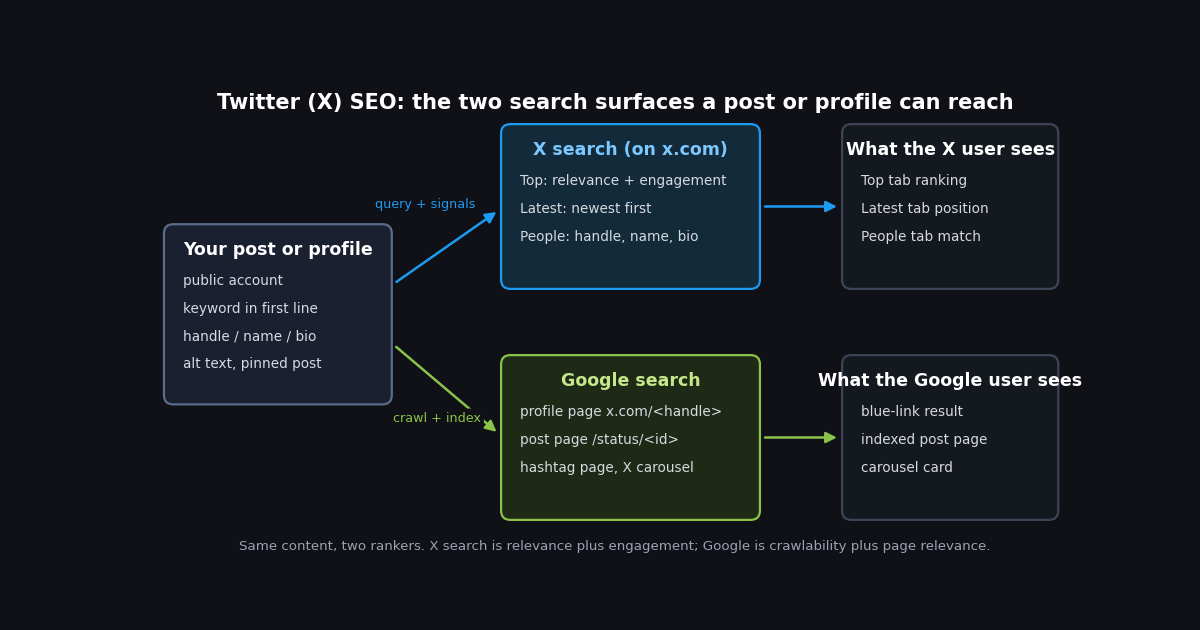
Most guides to "Twitter SEO" are a list of twelve tips with no evidence attached: use keywords, use hashtags, post at the right time, engage. Some of that advice is right, some of it is folklore from 2014, and none of it tells you which surface it applies to. Ranking in X's Top tab, appearing in the Latest tab, matching in the People tab, and showing up as a Google result are four different problems with four different inputs.
This page sorts those problems. It starts with how each surface works, using what X has actually documented (its search help page, its Google-visibility help page, the open-sourced recommendation code on GitHub, and the live x.com/robots.txt file) and labels everything else as practitioner observation. It then puts every signal you control into a single table showing where it applies and what the evidence is, walks through profile and post optimization in order of impact, and closes with a way to measure your own position for a target query rather than hoping.
Scope note: this page is about being found, not about running searches. If you want the search operators, the advanced search workflow, or people search as a tool, the sibling guides linked below cover those.
The two search surfaces, and why they rank differently
When someone types a query into the search box on x.com or in the app, X's help page says the results combine posts, photos, accounts, and more, and that you filter them with the Top, Latest, People, Photos, Videos, News, or Broadcasts tabs. A filter icon narrows to All people or People you follow, and Everywhere or Near you; safe-search settings can exclude sensitive content and muted or blocked accounts (help.x.com, verified 2026). That is the complete published description of X search. There is no ranking document for the Top tab.
Google is the second surface, and X's own help page on Google visibility is direct about it: the words you write in your profile or public posts may be indexed by Google and other search engines, X does not control third-party search results, and deleted posts can linger in a search engine's cache until it recrawls (help.x.com, verified 2026). From Google's side, an x.com page is a web page like any other, subject to the crawl rules in x.com/robots.txt and Google's normal relevance ranking.
The practical consequence is that the same post is judged by two systems with different inputs. X's Top tab has access to engagement counts, the author's follower graph, and the searcher's own behavior. Google has the rendered page text, the links pointing at it, and nothing about how many likes it got except what is printed on the page. A post can be first in Top and absent from Google, or the reverse.
One more distinction matters for the rest of this page: the Latest tab is a sort, not a ranking. Nothing you do to a post moves it up the Latest tab except posting it later. Every optimization that involves engagement, authority, or quality applies to Top and, in a different form, to Google.
How X ranks posts: what the open-sourced algorithm does and does not tell you
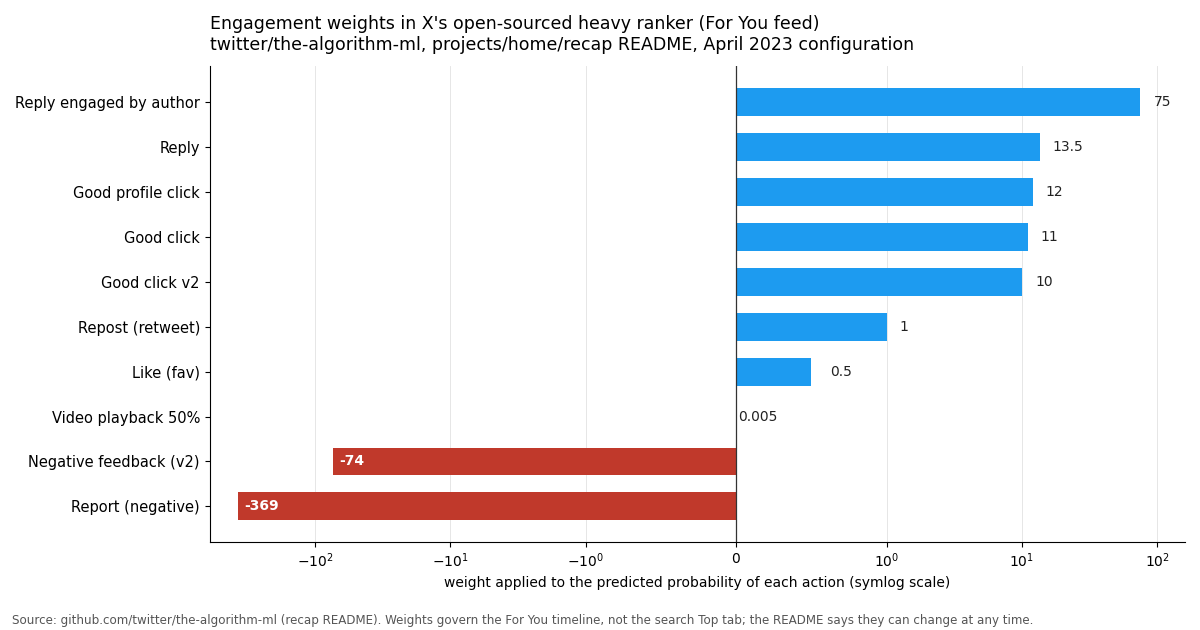
In 2023 X published the code behind its For You timeline in two GitHub repositories, the-algorithm and the-algorithm-ml, both under the twitter organization on GitHub. The pipeline described there pulls candidate posts from in-network and out-of-network sources, scores them with a light ranker, then runs the survivors through a heavy ranker: a parallel MaskNet neural network that outputs a probability for each kind of engagement. The final score multiplies each probability by a configured weight and sums them. The README states that the weights come from a configuration file and can be adjusted at any time, then lists the April 2023 values (the-algorithm-ml recap README on GitHub).
Three cautions before you build a strategy on that table. First, these weights score the For You feed, not the search Top tab; X has never said the search ranker shares them. Practitioners commonly treat them as the best available proxy for what X rewards, and that is the framing used here: calibrate against your own measured positions. Second, the weights are from a snapshot that the README itself says can change. Third, the weights multiply predicted probabilities, so a post that is likely to be liked by many people can still outscore one that might get a single reply.
What the table does show, reliably, is the shape of X's preferences in 2023: conversation outranks passive approval by an order of magnitude, a reply from the author is the single strongest positive action, and a report is roughly five times more damaging than the strongest positive action is helpful. That shape is consistent with what marketers widely observe in Top search results: posts with live reply threads from the author tend to sit above posts with more likes but no conversation. Treat the direction as well-supported and the exact ratios as unknown for search.
How X profiles and posts show up in Google
Google can only rank what it is allowed to fetch, and x.com publishes the rules in its robots.txt file. The version served in 2026 puts Googlebot and Bingbot in a shared group and allows profile pages, individual post pages under /status/, hashtag pages with a src parameter, and hashtag searches of the form /search?q=%23. It disallows /search/realtime, /search/users, and every account's /followers, /following, /likes, /media, and /analytics pages (x.com/robots.txt, fetched 2026). Google's own documentation explains what that means: a disallowed URL is not crawled, so its content cannot be indexed from the page itself (Google Search Central, robots.txt introduction).
The X carousel in Google results has a history worth knowing because older guides describe it as permanent. Google began showing a scrolling row of tweets in 2015 under a Google-Twitter data deal (Search Engine Land), removed the carousel in 2020 after a wave of high-profile account hijackings (Search Engine Land), and later restored it. In 2026 Semrush still documents the X carousel as a tracked SERP feature on desktop and mobile, with the advice that it favors accounts that post consistently and have an engaged following (Semrush knowledge base). It does not appear for every query, and Google has never published the trigger.
What this means for optimization is simple. Make sure the account is public, because a protected account's pages are not crawlable. Put the words you want to be found for in the profile bio and in the text of the post itself, because that text is what Google indexes. And accept that likes, follower lists, and media tabs do nothing for Google, since Googlebot cannot see them.
The signal table: where each lever applies and what the evidence is
This is the page's core. Each row is one thing you control, the surface it affects, and the strength of the evidence, so you can spend effort where it is documented to matter and treat the rest as experiments.
Read the table by column when you have a specific goal. If you want to be found when people search a brand or topic on X and tap People, only the three profile rows matter. If you want a post to surface in Top for a term, the post-text, reply, and velocity rows matter, and the profile rows barely do. If you want Google traffic, the public, text, and crawlability rows are everything, and engagement is irrelevant except as it attracts links.
The Evidence column uses three levels. Documented means X or Google has written it down. Proxy means the open-sourced For You weights point that way and marketers widely report the same for search, with the caveat that correlation strength varies by account size and topic. Practitioner observation means it is repeated in reputable marketing guides, such as the Neal Schaffer Twitter SEO guide, without a primary source; those rows are worth testing on your own account before relying on them.
Profile optimization: handle, display name, bio, and the pinned post
The People tab and Google's profile result are both driven by a handful of fields, so this is the highest-return work on the page and takes under ten minutes. Do it in this order.
1. Decide the one term you want the profile to be found for. A product category, a niche, or a name. The People tab matches text, so an account named "Dana" with a bio about sourdough will not appear for "sourdough baker" unless those words are in a name field or the bio. Pick the phrase people actually type, not the phrase you would like them to type.
2. Put it in the display name if the handle cannot carry it. The display name is editable at any time from Edit profile and is the most visible field in both the People tab and Google's result title. A pattern that practitioners widely use is "Name | what you do", which keeps the personal name findable while adding the category term. Handles are harder to change without losing recognition, so treat the handle as fixed and the display name as the lever.
3. Write the bio as one plain sentence containing the term. The bio is indexed by Google and matched by the People tab (help.x.com, verified 2026). Lead with the term and the specific thing you do; emoji and line breaks do not help matching. A link in the bio makes the profile page a more useful result but does not change where it ranks on X.
4. Pin the post you would want a stranger to see first. X allows one pinned post at a time, and it must be your own post or your own repost (2026 how-to guides). The pin does not change search ranking, but it sits at the top of the crawlable profile page, which is what a Google visitor and a People-tab visitor both land on. Pin the post that states the same term as your bio.
5. Keep the account public. Protected accounts are invisible to both surfaces for non-followers. If you need a private account, understand that search optimization does not apply to it.
After the changes, search your chosen term in the People tab from a logged-out browser window and note your position; the script at the end of this page does the same thing through the API so you can repeat the check without opening the app.
Post optimization: text, hashtags, alt text, replies, and threads
A post has to contain the query words to appear in Top or Latest at all, and it has to be crawled to appear in Google. Everything beyond that is about the Top tab's unpublished blend of relevance and engagement. These are the levers, in rough order of how well-supported they are.
Put the query words in the post, and preferably in the first line. Containing the words is a hard requirement for X search. Putting them in the opening line is the single most repeated piece of advice in marketing guides, including the Neal Schaffer Twitter SEO guide, which frames it as the first 100 characters; X has not documented any first-line effect, so treat it as low-cost and probably helpful rather than proven. For Google, the opening words also tend to become the snippet.
Earn replies, then answer them. This is the lever with the strongest evidence, by proxy. In the open-sourced heavy ranker a reply carries 27 times the weight of a like and a reply that the author engages with carries 150 times (the-algorithm-ml README, April 2023). Those weights are for the For You feed, not search, but practitioners widely report the same pattern in Top results. Ask a real question, answer the people who respond, and do it within the first hour, since engagement velocity is widely observed to matter even though no number has been published.
Use hashtags for matching, not ranking. A hashtag makes the post appear in that hashtag's search and on the crawlable hashtag page. Whether hashtags help or hurt Top ranking is disputed among practitioners and undocumented by X; one or two relevant tags is a reasonable default, and a wall of tags is not.
Add alt text to images. X's image description field accepts up to 1,000 characters, is added with Add description on the web or the +Alt button on iOS and Android, and cannot be added to videos (help.x.com, verified 2026). Its primary purpose is accessibility. Whether X search or Google indexes it is not confirmed, so write it for a screen-reader user, include the natural term if it fits, and do not stuff it.
Split long content into a thread, with the keyword in more than one post. Each post in a thread is its own searchable post and its own crawlable page. The first post is the one that collects replies; later posts can each carry a related term.
Avoid anything that draws reports. A report is weighted at -369.0 in the heavy ranker, about five times the magnitude of the strongest positive weight (the-algorithm-ml README). Even if search uses a different model, engagement bait that annoys readers is the one tactic with a documented penalty.
Measure your own search visibility with the API
Every tip above is a hypothesis until you check where your posts actually land. You can do that by hand in a logged-out browser, but it is slow, the results shift with the searcher's account, and you cannot track changes over weeks. The twitterapi.io search endpoints return the same result lists, so a short script can record your position for a set of target queries in both tabs and in profile search.
GET /twitter/tweet/advanced_search takes query (the same syntax as the X search box), queryType set to Top or Latest, and an optional cursor for the next page; each page returns up to 20 posts with has_next_page and next_cursor (docs.twitterapi.io, verified 2026). Each tweet object carries id, url, text, createdAt, likeCount, replyCount, retweetCount, viewCount, and an author object with userName, so matching posts to your handle is one comparison. GET /twitter/user/search takes query and cursor and returns a users array where each entry has userName, name, description, and followers, which is the People tab in API form.
The function below returns the 1-based position of your first post for a query in one tab, scanning up to three pages. The end-to-end script at the bottom of the page runs it for a list of queries in Top and Latest, adds your People-tab position, and prints one line per query, so you can run it daily and diff the output.
Cost: tweets are billed at $0.15 per 1,000 and user profiles at $0.18 per 1,000, with a $0.00015 minimum per call (twitterapi.io/pricing, verified 2026), so checking ten queries across both tabs and three pages each costs well under a cent. The official X API's pay-per-use plan lists $0.005 per post read and $0.010 per user read, capped at 3 million post reads per billing cycle (docs.x.com, verified 2026); the same ten-query check would cost roughly 33 times more per post read ($0.005 divided by $0.00015), plus the developer-app setup. Set TWITTERAPI_IO_KEY in your environment before running either script.
import os
import requests

BASE = "https://api.twitterapi.io"
HEADERS = {"X-API-Key": os.environ["TWITTERAPI_IO_KEY"]}  # key from twitterapi.io/dashboard


def rank_in_search(query, handle, query_type="Top", max_pages=3):
    """Return (position, url) of the first post by `handle` for `query` in one tab, or (None, None)."""
    cursor = ""
    position = 0
    for _ in range(max_pages):
        r = requests.get(
            f"{BASE}/twitter/tweet/advanced_search",
            params={"query": query, "queryType": query_type, "cursor": cursor},
            headers=HEADERS,
            timeout=30,
        )
        r.raise_for_status()
        body = r.json()
        for tweet in body.get("tweets") or []:
            position += 1
            author = tweet.get("author") or {}
            if (author.get("userName") or "").lower() == handle.lower():
                return position, tweet.get("url")
        if not body.get("has_next_page"):
            break
        cursor = body.get("next_cursor") or ""
    return None, None


if __name__ == "__main__":
    pos, url = rank_in_search("twitter api", "XDevelopers", "Top")
    print("Top position:", pos, url)
"""Where do my posts and my profile land in X search for a set of target queries?

For each query, scans the Top and Latest tabs (up to 3 pages each) for the first post
by HANDLE, then checks the People-tab position via user search. Prints one line per
query. Run it daily and diff the output to see what your changes did.
Needs TWITTERAPI_IO_KEY in the environment.
"""
import os
import sys
import requests

BASE = "https://api.twitterapi.io"
HEADERS = {"X-API-Key": os.environ["TWITTERAPI_IO_KEY"]}

HANDLE = sys.argv[1] if len(sys.argv) > 1 else "XDevelopers"
QUERIES = sys.argv[2:] or ["twitter api", "x api pricing"]
MAX_PAGES = 3


def post_position(query, handle, query_type):
    """1-based position of the first post by handle in a search tab, or None."""
    cursor = ""
    position = 0
    for _ in range(MAX_PAGES):
        r = requests.get(
            f"{BASE}/twitter/tweet/advanced_search",
            params={"query": query, "queryType": query_type, "cursor": cursor},
            headers=HEADERS,
            timeout=30,
        )
        r.raise_for_status()
        body = r.json()
        for tweet in body.get("tweets") or []:
            position += 1
            author = tweet.get("author") or {}
            if (author.get("userName") or "").lower() == handle.lower():
                return position, tweet.get("likeCount"), tweet.get("replyCount")
        if not body.get("has_next_page"):
            break
        cursor = body.get("next_cursor") or ""
    return None, None, None


def profile_position(query, handle):
    """1-based position of handle in People search, or None."""
    cursor = ""
    position = 0
    for _ in range(MAX_PAGES):
        r = requests.get(
            f"{BASE}/twitter/user/search",
            params={"query": query, "cursor": cursor},
            headers=HEADERS,
            timeout=30,
        )
        r.raise_for_status()
        body = r.json()
        for user in body.get("users") or []:
            position += 1
            if (user.get("userName") or "").lower() == handle.lower():
                return position
        if not body.get("has_next_page"):
            break
        cursor = body.get("next_cursor") or ""
    return None


def fmt(value):
    return "-" if value is None else str(value)


def main():
    print(f"{'query':<28} {'Top':>5} {'likes':>6} {'replies':>8} {'Latest':>7} {'People':>7}")
    for query in QUERIES:
        top, likes, replies = post_position(query, HANDLE, "Top")
        latest, _, _ = post_position(query, HANDLE, "Latest")
        people = profile_position(query, HANDLE)
        print(
            f"{query[:28]:<28} {fmt(top):>5} {fmt(likes):>6} {fmt(replies):>8} "
            f"{fmt(latest):>7} {fmt(people):>7}"
        )
    print(f"\n'-' means not found in the first {MAX_PAGES} pages (about {MAX_PAGES * 20} results).")


if __name__ == "__main__":
    main()
Questions readers ask
How does Twitter (X) search rank posts?
X has not published a ranking formula for search. Its help page documents the tabs (Top, Latest, People, Photos, Videos, News, Broadcasts) and the filters. The Latest tab is reverse-chronological. The Top tab blends relevance with engagement and account signals; the open-sourced For You ranker, which weights replies far above likes, is the closest published proxy, and practitioners widely report the same pattern in Top results.
Does Google index Twitter (X) posts and profiles?
Yes. X's help page on Google visibility says the words in your profile and public posts may be indexed by Google. The x.com robots.txt file allows Googlebot to crawl profile pages, post pages, and hashtag pages, while blocking followers, following, likes, media, and realtime search pages. Protected accounts are not crawlable.
Does the Twitter carousel still appear in Google search results?
In 2026 the X carousel is still a SERP feature that Semrush documents and tracks on desktop and mobile. It was introduced in 2015 under a Google-Twitter deal, removed in 2020 after a wave of account hijackings, and later restored. It does not appear for every query and Google has not published what triggers it.
Do hashtags help Twitter SEO?
They help matching: a post with a hashtag appears in that hashtag's search and on the hashtag page, which Googlebot is allowed to crawl. Whether hashtags raise a post in the Top tab is disputed among practitioners and undocumented by X. One or two relevant tags is a reasonable default.
Does alt text on images help you rank on X or Google?
Not in any documented way. X's image description field accepts up to 1,000 characters and exists for accessibility; neither X nor Google has confirmed that it is used for search ranking. Write it for a screen-reader user, include the natural term if it fits, and do not stuff it.
How do I rank in the People tab on X?
The People tab matches text in your handle, display name, and bio, so the term you want to be found for must be in one of those fields. The display name is the easiest lever: a pattern such as "Name | what you do" keeps your name findable while adding the category. Posts do not affect People search.
How can I check where my posts rank in X search?
Search the term in a logged-out browser window and count, or call the twitterapi.io endpoint GET /twitter/tweet/advanced_search with queryType set to Top or Latest and walk the results with the cursor until you find your handle. The script on this page does that for a list of queries and adds your People-tab position from GET /twitter/user/search.
Continue
- X Help Center: How to use X search (Top, Latest, People tabs and filters)
- X Help Center: Help with Google search visibility (what Google may index from X)
- the-algorithm-ml: heavy ranker README with the April 2023 engagement weights
- Google Search Central: Introduction to robots.txt (why disallowed x.com pages cannot be indexed from their content)
- Semrush knowledge base: the X carousel SERP feature in 2026
- twitterapi.io docs: Advanced Search endpoint (query, queryType, cursor)
- Twitter (X) API overview: the hub for reading X search and profile data
- Twitter (X) search operators reference
- How to run Twitter advanced search, in the app and through the API
- Twitter user search: finding accounts by keyword
- Twitter hashtag analytics through the API
- Free X shadowban checker: is your account hidden from search?
- twitterapi.io pay-per-call pricing
Stop reading. Start building.
Starter credits cover real testing on real data. Google sign-in, no card, no application queue.
Get an API key