What Is a Twitter (X) Handle? The @Username Explained
This page answers the consumer question: what a Twitter (X) handle is, how it differs from the display name and the user ID, the rules for a valid one, and what happens when you change it. If you need code to turn handles into user IDs at scale, the username lookup API reference on this site covers that developer workflow; if you want to obtain a short or premium handle from X itself, the X Handle Marketplace guide covers eligibility and prices; and if you are choosing a new handle, the username ideas page has naming frameworks. Here the focus is on the concept, backed by a look at 996 real handles collected in 2026.
The word handle predates Twitter. It is commonly traced to CB radio slang for an on-air nickname, later used on forums and chat rooms, and Twitter users adopted it for the @name that identifies an account. X's own help center calls it the username, and the X API data dictionary describes it as the screen name, handle, or alias that a user identifies themselves with. All of those words refer to the same string.
Below: a plain definition with examples, a table of what each identifier does on each surface, the rules X publishes, how to find your own handle, what a rename changes and what it does not, and our measurements of how long real handles are, how often they carry digits or underscores, and how many well-known accounts have renamed.
What a Twitter handle is, with examples
A Twitter handle is the unique username of an X account, written with an @ in front. NASA's handle is @NASA, Reuters' is @Reuters, the Associated Press uses @AP, and X's own corporate account is @X. The @ is not part of the name itself: it is the signal that tells X to treat the word as a mention and link it to the account. The name after it is what appears in the profile address, so @NASA lives at x.com/NASA.
Where you see it. On a profile, the handle sits in gray directly under the bold display name. On every post, it appears next to the display name at the top. When someone writes your @handle in a post, that is a mention, and it links to your profile.
What it is used for. A handle is how people find, mention and tag an account, how you share your profile (the URL), and how most tools ask you to identify an account. It is also what appears on business cards, websites and TV graphics, which is why brands care about getting a short, clean one.
Handle, username, screen name. These are synonyms. X's help center says username, the X API field is username, X's data dictionary also calls it the screen name, and most of the internet says handle. On our API, /twitter/user/info returns it as userName and the people search returns it as screen_name. An X handle and a Twitter handle are the same thing: the rename of the platform did not change how handles work.
Handle vs display name vs user ID: what each one does
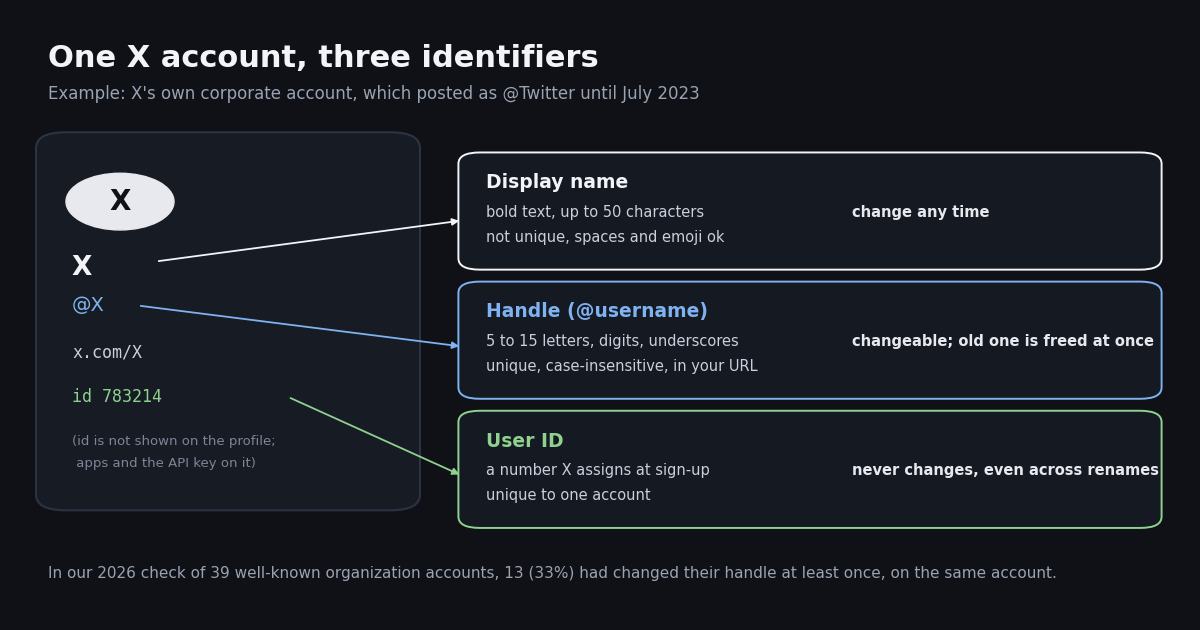
Every X account carries three identifiers, and most confusion about handles comes from mixing them up. The display name is the bold name, free text that you can change whenever you like and that thousands of accounts can share. The handle is the @username, unique at any moment but changeable. The user ID is a number X assigns when the account is created; it is never shown on the profile, and it never changes. The X API data dictionary describes the ID as the unique identifier of this user, the username as unique but subject to change, and the name as typically capped at 50 characters, but subject to change.
Why the ID matters. Because the handle can change and the ID cannot, anything that needs to follow an account over time should store the ID. X's own corporate account shows why: it posted as @Twitter for years, became @X in July 2023 (reported by TechCrunch at the time), and through the API it is still user ID 783214, an account created in 2007. A spreadsheet of handles from 2022 would have lost it; a list of IDs would not. Our free Twitter ID finder turns any handle into its ID and back if you want to check one yourself.
Display names are where the words go. In the 996-account sample described below, 94.1% of display names contained a space and 61.2% were longer than 15 characters, which a handle can never be. The median display name was 17 characters and the longest hit 50. 10.0% contained at least one non-ASCII character such as an accented letter, a symbol or an emoji, none of which a handle allows.
How often the display name matches the handle. Less often than you might expect. We normalized both names by lowercasing and removing spaces and punctuation, then compared them. Only 24.8% of accounts had a display name that matched the handle exactly, such as Reuters and @Reuters. Another 25.2% had one name contained in the other, typically a handle that abbreviates a longer display name or a display name that adds a word. For the remaining 50.0%, the two did not overlap at all once normalized, usually because the handle is an acronym or abbreviation of a multi-word name.
The match rate rose with audience size: 14.0% for accounts with 1,000 to 100,000 followers, 23.6% for 100,000 to 1 million, and 31.3% for accounts above 1 million. The biggest accounts are the ones most likely to have secured their exact name early, which fits the creation-year pattern above. For a consumer, the takeaway is simple: never assume you can guess someone's handle from their display name. Search for them, or ask for the @handle or the profile link.
The rules for a valid X handle
X publishes its username rules on a help-center page (help.x.com/en/managing-your-account/x-username-rules) and repeats the key points on its change-username page (help.x.com/en/managing-your-account/change-x-handle). help.x.com does not allow automated fetching, so the wording below comes from those pages as indexed by search this session; check them directly before relying on an edge case.
The developer docs agree. X's API reference for looking up a user by username validates the input against the pattern ^[A-Za-z0-9_]{1,15}$: letters, digits and underscores, one to fifteen of them. The 1 is there because old accounts with very short handles still exist. The data dictionary adds that some historical accounts may exist with longer names than 15, though none of the 996 accounts in our sample did.
Case is display only. We asked our API for nasa in lowercase and got back NASA, user ID 11348282, the same account as the capitalized request. You can style the capitals of your own handle (JaneDoeWrites instead of janedoewrites) to make it easier to read; 62.7% of handles in our sample used mixed case, 31.6% were all lowercase and 5.7% all capitals.
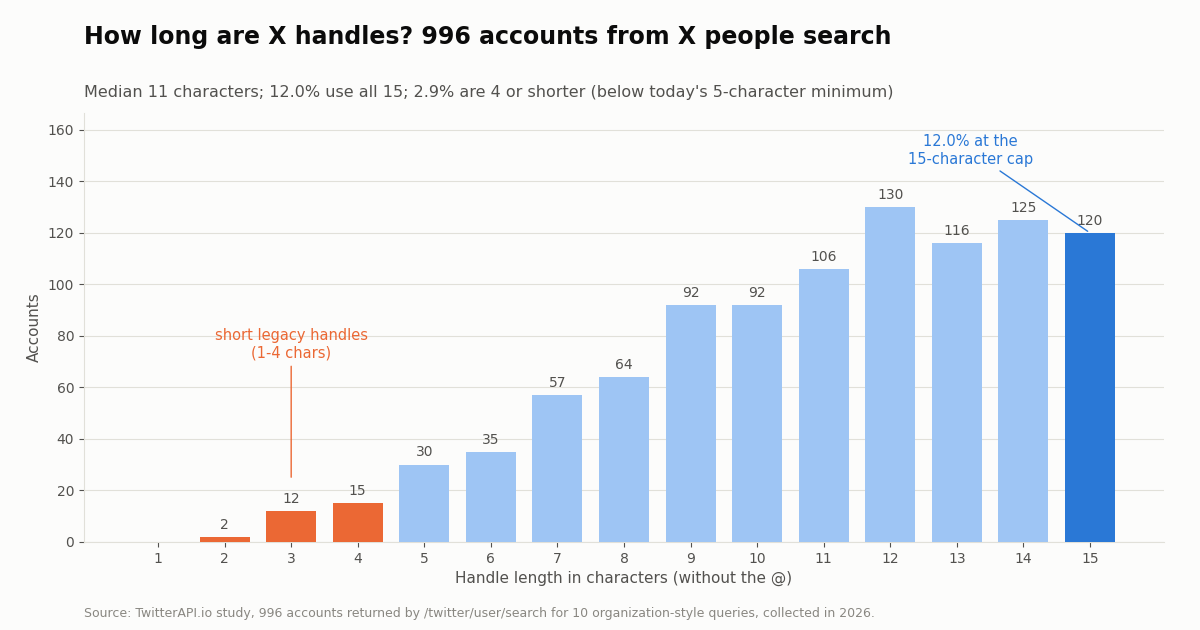
What about four characters? Some third-party guides say four characters is the minimum. X's help-center wording is more than 4, which means five. Handles of four characters or fewer do exist, 2.9% of our sample, but they belong to accounts that claimed them before the current rule. You cannot pick one that short in Settings today.
How to find your own Twitter handle
Your handle is on your profile, directly under your display name, starting with @. Three quick ways to see it, whichever device you are on.
On your profile. Open your own profile on X. The gray line beginning with @ under your bold name is your handle. Leave off the @ when a form asks for a username, or keep it when you are writing it for people to read.
In the address bar. On the web, open your profile and look at the URL. Whatever follows x.com/ is your handle, for example x.com/NASA means the handle is NASA.
In Settings. At the time of writing, X's help center describes the path as Settings and privacy, then Account (Your account on the web, then Account information), then Username. The Username field shows your current handle and is also where you change it.
Someone else's handle. Open their profile and read the line under their name, or copy the part of their profile URL after x.com/. If you only have an old handle and the profile no longer loads, the account may have renamed, been suspended or been deactivated; a lookup by user ID (not by handle) is the reliable way to find out, which the next section explains.
Changing your handle: what moves with you and what breaks
You can change your handle as often as you like as long as the new one meets the rules and is not taken, according to X's change-username page. The path is the same Settings route as above: edit the Username field and save. X does not publish a limit on how often you can change it, and we could not verify one from a second source this session.
The immediate release is the risk. X's help page states that your previous username will immediately be available for use by someone else, and suggests telling followers before you switch so they can send replies and DMs to the new handle. For a brand, that means updating the website, email signatures, printed material and ad creative first, and only then making the change. If the old handle has value, some organizations keep it by moving it to a second account at once rather than leaving it free.
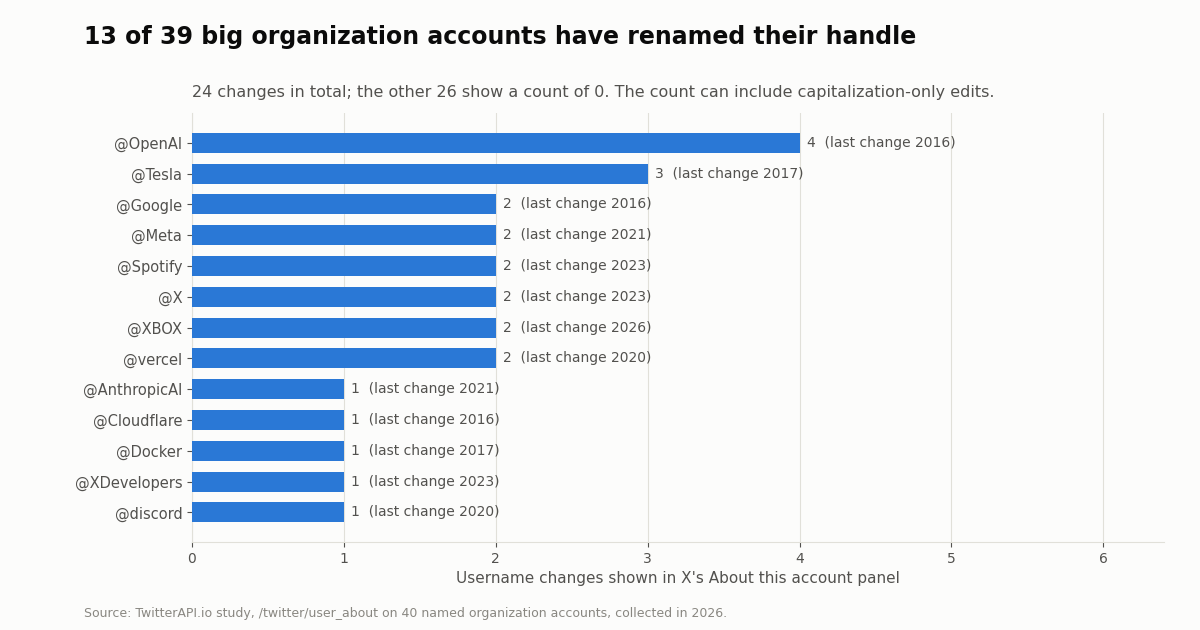
Big brands rename too. In our check of 39 well-known organization accounts, 13 showed at least one username change in X's About this account panel, 24 changes in total. The table in the study section below lists them. The count can include capitalization-only edits, so a change does not always mean a different name, but it shows that a handle is not a permanent identifier even for the largest accounts.
Handles can also move without a rename by you. X publishes an inactive account policy (help.x.com/en/rules-and-policies/inactive-x-accounts) and a username squatting policy (help.x.com/en/rules-and-policies/x-username-squatting); read both before assuming a dormant handle can be claimed. X has also reassigned a handle itself: when Twitter's corporate account became @X in July 2023, the short handle previously belonged to a photographer, Gene X Hwang, as TechCrunch reported at the time. For the official route to short handles today, see the X Handle Marketplace guide linked below.
How long are real X handles? 996 accounts, collected in 2026
To show what handles look like in practice, we pulled 996 accounts from X's people search through our /twitter/user/search endpoint, using ten organization-style queries such as news, university, museum and government. The search favors established accounts, so this is a picture of visible, mostly organizational handles, not of all X users.
The median handle was 11 characters and the average 10.9. 12.0% of accounts used all 15 characters, a sign of how often the obvious name is taken or too long and gets abbreviated to fit. At the other end, 2.9% had handles of four characters or fewer, below the current five-character minimum, which only older accounts hold. No account in the sample exceeded 15 characters.
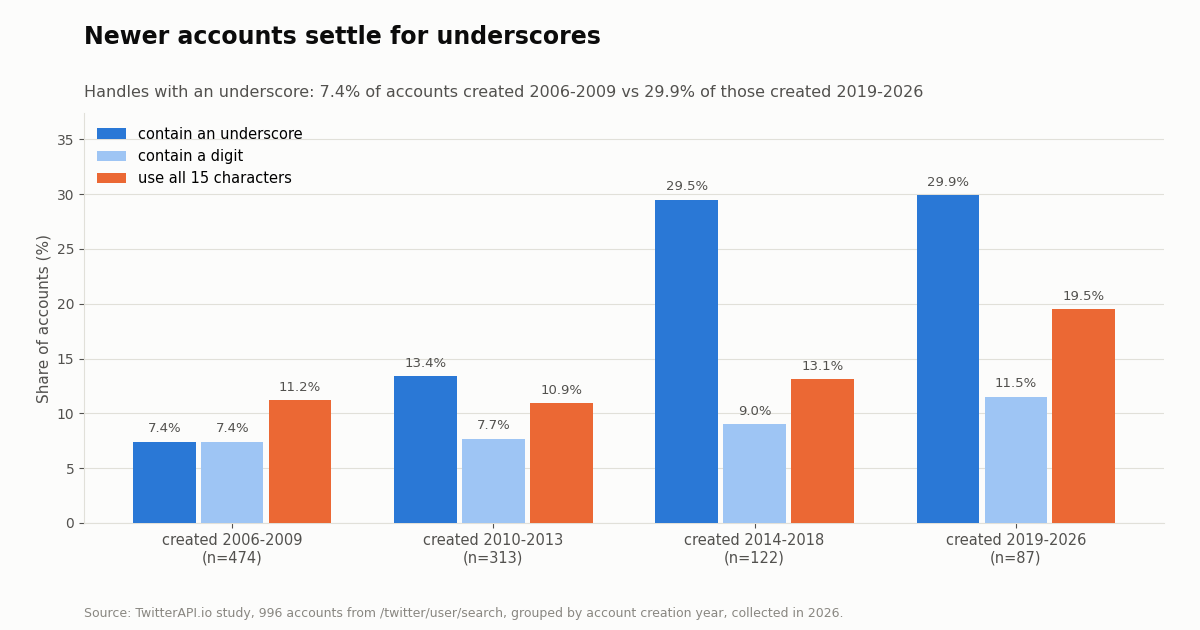
Characters. 78.9% of handles used letters only. 14.0% contained an underscore and 8.0% contained a digit. Underscores and digits are the usual fixes when the clean name is taken, and the next chart shows how much more common they are on newer accounts.
Newer accounts settle for underscores and longer names
Grouping the same 996 accounts by the year they were created shows the squeeze on good names. Among accounts created from 2006 to 2009, 7.4% of handles contained an underscore. Among those created from 2019 onward, 29.9% did. The share using all 15 characters rose from 11.2% to 19.5%, and the share with a digit from 7.4% to 11.5%.
The newer groups are small (87 and 122 accounts), so read the exact percentages loosely, but the direction is consistent: the earlier an organization joined, the more likely it got its plain name. For someone choosing a handle today, that is the practical lesson. Expect the obvious name to be gone, decide in advance whether you prefer an underscore, a suffix such as hq or app, or a shortened form, and keep it readable when spoken aloud.
Big brands that changed their handle, and how to check any account
X's About this account panel shows, for many accounts, how many times the username has changed. Our /twitter/user_about endpoint returns the same value as about_profile.username_changes.count. We read it for 40 well-known organization accounts; 39 returned a count (the @xai account returned none) and 13 of those, 33.3%, showed at least one change.
The other 26 accounts, including @NASA, @Reuters, @nytimes, @github and @Apple, showed a count of 0. The panel does not say what the previous handles were, and a capitalization-only edit may count as a change (the Xbox account now displays as @XBOX), so treat the count as how many times the name field was edited, not as proof of a different name. @Meta's change in 2021 and @X's in 2023 line up with the corporate renames of those companies.
How to check an account yourself. Open the profile on X and look at About this account where available. To check many accounts, or to keep watching them, use the API: /twitter/user/info turns a handle into the account's user ID and profile, and /twitter/user_about adds the username-change count and last change time. Store the ID, not the handle, and re-resolve the handle when you need to display it. The code at the end of this page does exactly that. Reads need no X account, only an API key. Profile lookups cost 18 credits each, $0.18 per 1,000 profiles; the official X API's pay-per-usage rate card on docs.x.com/x-api/getting-started/pricing lists $0.010 per user read, $10 per 1,000, about 55 times more for the same lookup. New accounts that pass the automatic bot check get up to $1 of free credits (at most 100,000 credits, no card, one per person or network, expiring after 31 days).
How we collected this
Question. What do real X handles look like (length, characters, case, how they relate to the display name), and how often do well-known accounts change them?
Accounts and queries. Part A: 996 unique accounts returned by /twitter/user/search for ten organization-style queries (news, official, university, museum, magazine, radio, city, foundation, sports, government), five pages of 20 per query, de-duplicated by account ID. Part B: 40 named organization accounts (technology, media, sports and consumer brands, plus NASA and the WHO) read once each through /twitter/user_about, plus /twitter/user/info for X and for nasa in lowercase to confirm the ID and case behavior.
Window and size. A single snapshot, collected in 2026: 92 read requests in total (50 searches, 40 About lookups, 2 profile lookups).
Method. Handle length counts characters without the @. Display-name matching lowercases both names and removes everything except letters and digits before comparing. Creation year comes from each account's created_at. Username-change counts and years come from about_profile.username_changes (count, last_changed_at_msec).
What the sample cannot show. People search ranks established, mostly organizational accounts first (58.3% of the sample had a blue check and only one account had fewer than 1,000 followers), so these numbers describe visible handles, not the typical personal account. The newest creation-year groups are small. The username-change count does not reveal earlier handles and can include capitalization edits.
Privacy. Aggregates only. Search results can include private individuals, so the raw search pages were kept out of the published study, and the per-account rows we publish carry no ID, handle, name or text. Only the named organization accounts in Part B are identified.
# Resolve X handles to permanent user IDs and read how often each handle changed.
# pip install requests ; export TWITTERAPI_IO_KEY=...
import os
import re
import requests

BASE = "https://api.twitterapi.io"
HEADERS = {"X-API-Key": os.environ["TWITTERAPI_IO_KEY"]}
HANDLE_RE = re.compile(r"^[A-Za-z0-9_]{1,15}$")  # same pattern as X's username lookup


def lookup(handle):
    handle = handle.strip().lstrip("@")
    if not HANDLE_RE.match(handle):
        return {"handle": handle, "error": "not a valid handle"}
    r = requests.get(f"{BASE}/twitter/user/info", headers=HEADERS,
                     params={"userName": handle}, timeout=30)
    r.raise_for_status()
    body = r.json()
    if body.get("status") != "success" or not body.get("data"):
        # renamed, deactivated or never existed: HTTP 200 with msg "user not found"
        return {"handle": handle, "error": body.get("msg")}
    user = body["data"]
    about = requests.get(f"{BASE}/twitter/user_about", headers=HEADERS,
                         params={"userName": handle}, timeout=30).json()
    changes = ((about.get("data") or {}).get("about_profile") or {}).get("username_changes") or {}
    return {
        "handle": user["userName"],          # canonical capitalization
        "id": user["id"],                    # store this, it never changes
        "display_name": user["name"],
        "created": user["createdAt"],
        "username_changes": changes.get("count"),
    }


for h in ["nasa", "@X", "Reuters", "not-a-handle"]:
    print(lookup(h))
Questions readers ask
What is a Twitter handle example?
@NASA, @Reuters, @AP and @X are all handles. The part after the @ is the username, and it is also the profile address: @NASA lives at x.com/NASA. A personal example might be @janedoewrites, while the display name shown above it could be Jane Doe | Writer.
Is a Twitter handle the same as a username?
Yes. Handle, username and screen name are the same thing on X: the unique @name in your profile URL. What differs is the display name, the bold name above the handle, which is free text, not unique, and can contain spaces and emoji.
How many characters can a Twitter handle have?
X's help center says a username must be more than 4 characters and no more than 15, so new handles are 5 to 15 characters of letters, numbers and underscores. Shorter handles exist from earlier years: 2.9% of the 996 accounts in our study had four characters or fewer, and 12.0% used all 15.
What is my Twitter handle?
Open your profile: the gray line starting with @ under your bold name is your handle. On the web, it is also the part of your profile URL after x.com/. At the time of writing, X's help center lists it under Settings and privacy, then Account, then Username.
Does changing my handle lose my followers?
No. X's help center says changing your username does not affect your existing followers, Direct Messages or replies. What you lose is the old handle itself: X releases it immediately, so old links and printed references to it stop reaching you and someone else can claim it.
Are Twitter handles case-sensitive?
No. nasa and NASA lead to the same account; when we looked up nasa in lowercase, the API returned NASA with the same user ID as the capitalized request. The capitals you choose only affect how the handle is displayed.
What is the difference between a handle and a user ID?
The handle is the @name people type, and it can change. The user ID is a number X assigns when the account is created, never shown on the profile and never changed. X's corporate account went from @Twitter to @X in 2023 but is still user ID 783214. Our free Twitter ID finder converts between the two.
Can two accounts have the same handle?
Not at the same time: a handle belongs to one account. Over time it can pass between accounts, because a handle freed by a rename or by deactivation can be claimed by someone else. Display names, by contrast, are not unique at all.
Continue
- X Help Center: help with username registration (more than 4 and up to 15 characters; letters, numbers, underscores; reserved words)
- X Help Center: how to change your X username (followers, DMs and replies unaffected; previous username immediately available to others)
- X developer docs: data dictionary, user object (id unique; username unique but subject to change, typically max 15; name typically capped at 50)
- X developer docs: pay-per-usage pricing ($0.010 per user read)
- twitterapi.io docs: GET /twitter/user_about (about_profile.username_changes)
- TechCrunch, July 2023: Twitter changes its official handle to @x
- X (Twitter) API hub: endpoints, pricing and guides
- Username lookup API reference: resolve handles to user IDs in code
- X Handle Marketplace: how X allocates short handles
- Username ideas for X and how to check availability
- Twitter Snowflake IDs explained
- Free Twitter ID finder: handle to user ID and back
- Free account age checker for any X handle
- Pay-per-call pricing for profile lookups
- 01How do you earn TwitterAPI.io credits by writing about the API?
- 02Twitter (X) Lists: What They Are, How to Make One, and How to Use Them
- 03Tweepcred: How Twitter (X) Scores Account Reputation, Read From the Code
- 04Tweet Failed to Send on Twitter (X)? What Each Error Means and How to Fix It
- 05How to Embed a Video on Twitter (X): In a Post or on Your Website
- 06X Handle Marketplace: How to Get Inactive X Handles on Twitter (X) in 2026
- 07The Best Third-Party Twitter (X) API in 2026
- 08Twitter (X) Reply API — A Programmatic Tutorial
Stop reading. Start building.
Starter credits cover real testing on real data. Google sign-in, no card, no application queue.
Get an API keyAlready building with TwitterAPI.io? Publish an honest tutorial or build log about it and earn up to $200 a month in API credits.