How to Embed a Video on Twitter (X): In a Post or on Your Website
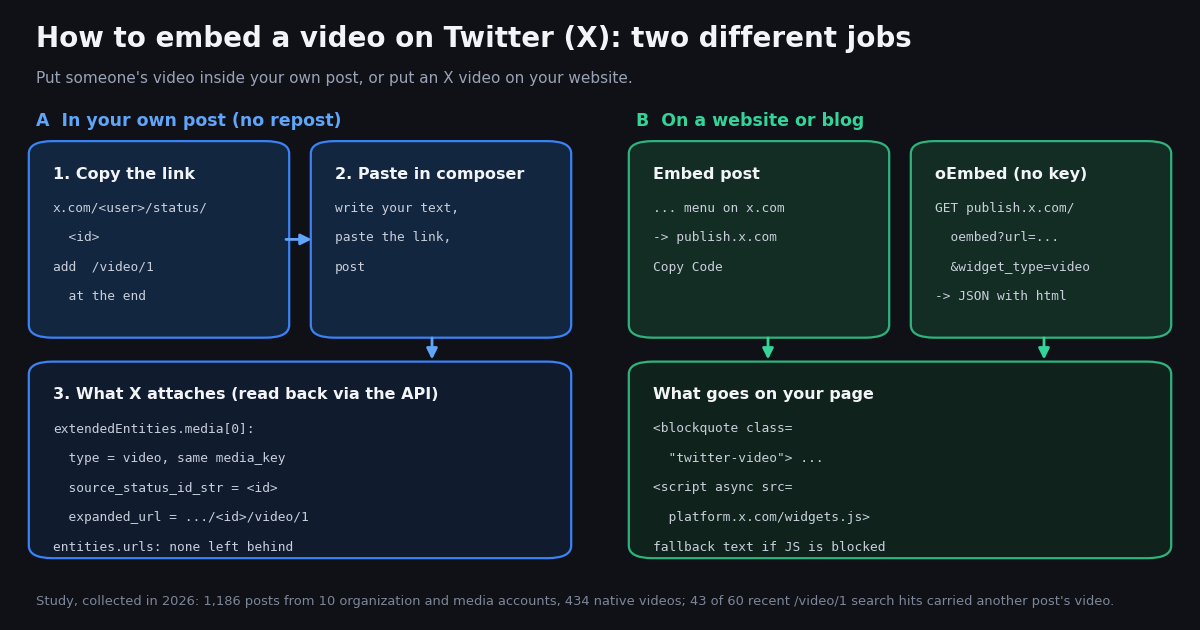
"Embed a video on Twitter" means two different things, and most guides answer only one. This page covers both: putting a video that already lives on X inside your own post (without a repost or a quote), and putting an X video on a website. It is not the full website-embedding manual, which is our guide to embedding tweets on a website (widgets.js cost, lazy loading, static cards), and it is not about finding video posts in bulk, which is the Twitter video search API guide. Here the job is one video and one destination.
Every claim below was checked in 2026. X's own help center pages were read for the menu names and upload limits. The /video/1 link method, which X does not document, was checked by reading real posts back through the API: what X attaches, which fields point at the original, and what we could not see. We also measured how ten organization and media accounts put video on X, how long those videos run, and which MP4 files X serves for each, because those files are what any embed or download ends up playing.
Method 1: put someone else's video in your own post with /video/1
This is the answer most people want when they search for how to embed a video on Twitter. You saw a clip in another post and you want it in your post, under your words, without a repost (which adds nothing of yours) or a quote post (which shows the whole original post, text and all, inside a frame).
Step 1. Open the post with the video. On x.com, click the post so it opens on its own page. On the phone app, tap the share icon and choose Copy link. Either way you get a link shaped like x.com/<username>/status/<post id>. Remove anything after a ?, such as ?s=20.
Step 2. Add /video/1 to the end. The link becomes x.com/<username>/status/<post id>/video/1. For a post whose first media item is the video, that is all.
Step 3. Paste it into a new post. Write your own text, paste the link at the end, and post. X turns the link into the attached video rather than showing it as a URL or a link card.
Step 4. Check the result. The posted video plays like a native upload. In the data X serves for your post, the video carries the original post's ID and the original author's account ID, so it stays tied to its source.
Why this works: X already labels every native video with that exact address. In our study, the expanded_url field of each video was the owning post's URL plus /video/1, and when you paste that address back in, X resolves it to the existing media item instead of a link. We could not find any X help center page that documents the method, so treat it as a working behavior that X can change, not a promise.
Use it on public posts only. A protected account's video cannot be shared this way, and if the original post is deleted or the account is suspended, expect the clip in your post to go with it; we did not test deletion, so check your post if the source disappears. Reusing a clip does not transfer any rights to it: credit the creator in your text, and ask before reusing someone's work commercially.
We checked: does the /video/1 link still work?
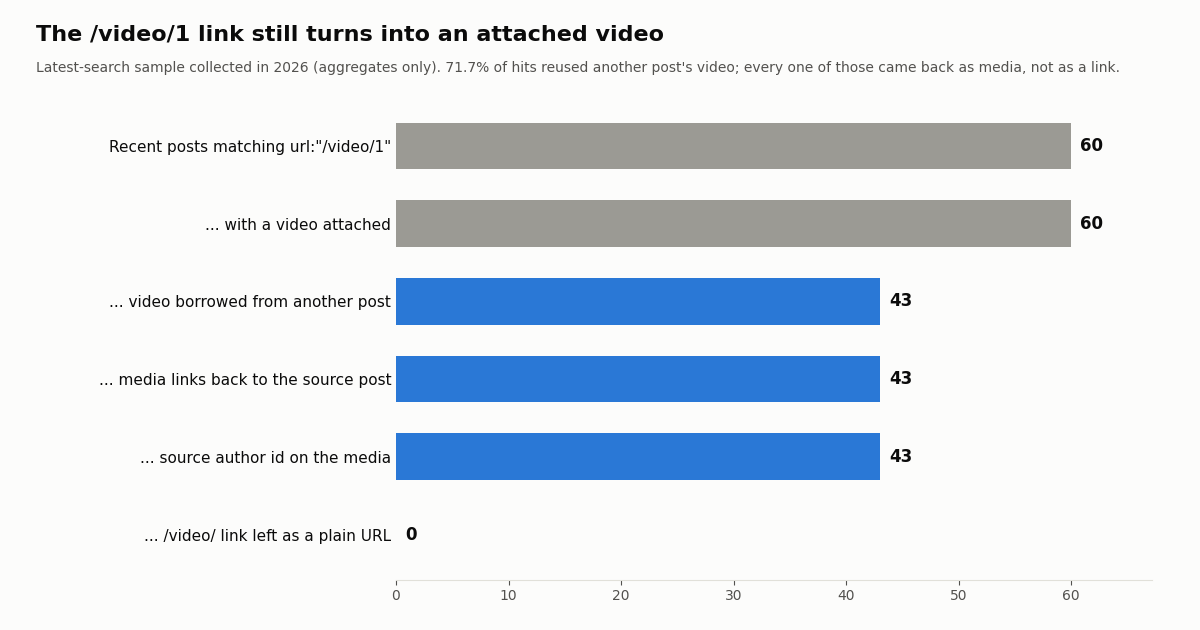
Yes, on the evidence we could collect. We ran a Latest search for posts containing /video/1 links and read back 60 recent results. All 60 had a video attached. 43 of them (71.7%) carried a video that belongs to a different post: their media object had source_status_id_str set to another post's ID, a source_user_id_str, and a source_user object naming the original account. The other 17 were ordinary uploads that matched the search because every native video carries a /video/1 address.
In none of the 43 borrowed cases did the /video/ link survive as a plain URL in entities.urls. The pasted link was consumed and replaced by the media item, which is exactly what the method promises. The source posts ranged widely in age: the median borrowed clip was 27 days older than the post that reused it, 20.9% were less than a day old, and 25.6% were more than a year old.
Organizations use the method too. @NBA reused its own clips this way 8 times in the 120 posts we read, posting a recap 9.2 to 15.9 hours after the original highlight with the same video attached. We fetched one such pair by ID: the recap and the original returned the same media_key, the recap's media pointed at the original through source_status_id_str, and the original's media had no source field because it was the upload.
What we could not verify: which button each author pressed (the data shows the result, not the gesture), what the X apps draw around a reused video (we read data, not screenshots), whether views on the reused copy count toward the original post, and what happens after the source post is deleted. If any of those matter to you, test with a post you control.
# GET https://api.twitterapi.io/twitter/tweets?tweet_ids=2114390277670764814,2114149692229517741
# (abridged; the first post reused the second post's clip with the /video/1 link)
{
  "tweets": [
    {
      "id": "2114390277670764814",
      "author": {"userName": "NBA"},
      "text": "TYRESE MAXEY FROM THE LOGO TO END THE 1Q LAST NIGHT ... https://t.co/hKgjl3ZHRG",
      "entities": {},                      # no urls entry: the link became media
      "extendedEntities": {"media": [{
        "type": "video",
        "media_key": "13_2114149257074688000",            # same key as the source
        "expanded_url": "https://x.com/NBA/status/2114149692229517741/video/1",
        "source_status_id_str": "2114149692229517741",    # the post that owns the clip
        "source_user_id_str": "19923144",
        "video_info": {"duration_millis": 14762, "variants": ["... 5 entries ..."]}
      }]}
    },
    {
      "id": "2114149692229517741",
      "extendedEntities": {"media": [{
        "type": "video",
        "media_key": "13_2114149257074688000",
        "expanded_url": "https://x.com/NBA/status/2114149692229517741/video/1"
        # no source_status_id_str: this is the original upload
      }]}
    }
  ]
}
The other ways to share a video on X, and when they beat /video/1
The /video/1 link is not the only option, and it is not always the right one. Each method shows the audience something different.
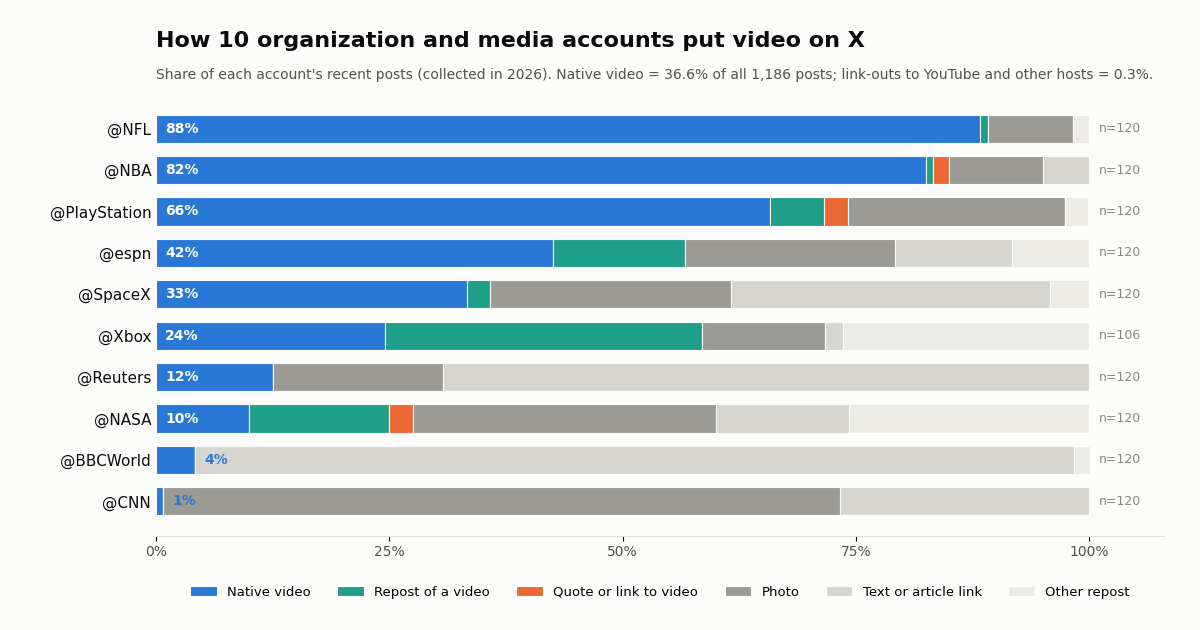
In our study of ten organization and media accounts, native video dominated: 36.6% of 1,186 recent posts carried a video uploaded to X (or reused with /video/1), 7.0% were reposts of someone else's video, 0.4% quoted a post with video, and only 0.3% linked out to YouTube, Twitch, Vimeo, TikTok, Instagram or Facebook video. Accounts that live on video, like @NFL and @NBA, post native clips in most of their posts; news wires like @BBCWorld and @CNN mostly post article links and photos.
Uploading your own video. In the composer, click the gallery (media) button and choose the file. At the time of writing, X's help center says accounts without a Premium plan can upload videos up to 140 seconds long and up to 512 MB, while X Premium and the Plus, Premium, Super and Ultra plans of The X Subscription can upload up to 4 hours at 1080p (videos over 2 hours at 720p) and up to 16 GB on x.com and iOS, and up to 10 minutes on Android (sources: help.x.com/en/using-x/x-videos and help.x.com/en/using-x/premium-longer-videos).
Posting a YouTube video on X. Paste the YouTube URL into a post. Followers see a link card that opens YouTube, not X's own player. If the video is yours, uploading a cut-down clip natively and linking the full version is what most of the accounts we measured do, judging by how rare link-outs were.
Method 2: embed an X video on a website or blog
To put an X video on a web page, you embed the post that contains it. X's help center describes the steps: open the post on x.com, click the menu icon on the post, select Embed post, adjust the look on publish.x.com with set customization options if you want, click Copy Code, and paste the code into your page's HTML. The help center notes that embedding is only available via x.com, so do it from a browser, not the phone app.
The code you get is a <blockquote class="twitter-tweet"> holding the post's text and link, followed by a <script> tag that loads platform.x.com/widgets.js. The script swaps the blockquote for the interactive post, including the video player. If the script is blocked, readers see the plain blockquote: the text and a pic.twitter.com link, not the video.
Video-first embed. The oEmbed endpoint returns a different blockquote, class="twitter-video", when you add widget_type=video to the request (shown in the next section). This parameter is not listed in X's oEmbed reference, but the endpoint accepted it when we called it. It frames the post around the video player rather than the text.
WordPress, Medium and similar editors. Many site builders accept a bare post URL on its own line and fetch the embed through oEmbed for you. In raw-HTML editors, paste the full code instead. Either way, the video stays hosted by X: if the post is deleted or made protected, the embed stops showing it.
Performance, privacy settings, lazy loading and a zero-JavaScript static card are covered in depth in our website embedding guide (linked in the introduction); the short version is that one widgets.js include per page is enough, and dnt=true asks X not to use the embed for personalization.
The oEmbed endpoint for X videos: a real response
If you build a CMS, a newsletter tool or a link previewer, you want the embed code from code, not from a copy button. X's oEmbed API does that: a GET to publish.x.com/oembed with the post URL returns JSON. X's developer docs list it as requiring no authentication and not rate limited, and describe the markup as meant to be cached on your servers for up to the cache_age the response suggests.
We called it for a public @NBA video post. The old address publish.twitter.com/oembed answered with an HTTP 301 redirect to publish.x.com/oembed, so either works if your client follows redirects. The response, trimmed only inside the post text and date:
Parameters worth knowing. From X's oEmbed reference: maxwidth (220 to 550 pixels; there is no maxheight and height comes back null), hide_media (do not expand photos or video), hide_thread, omit_script (leave out the widgets.js tag so you include it once per page), align, lang, theme=dark and dnt=true. We added widget_type=video from our own test; with it the blockquote class switched from twitter-tweet to twitter-video.
The last row matters for code: check the status before parsing JSON. And because cache_age is a very long number, re-check embeds you have stored if the source posts can disappear.
GET https://publish.twitter.com/oembed?url=https://x.com/NBA/status/2114149692229517741&widget_type=video
-> HTTP 301 to https://publish.x.com/oembed?... then HTTP 200, no key needed
{
"url": "https://x.com/NBA/status/2114149692229517741",
"author_name": "NBA",
"author_url": "https://x.com/NBA",
"html": "<blockquote class=\"twitter-video\"><p lang=\"en\" dir=\"ltr\">TYRESE MAXEY.<br><br>FROM THE LOGO.<br><br>AT THE 1Q BUZZER ... <a href=\"https://t.co/JUoPwQxG1y\">pic.twitter.com/JUoPwQxG1y</a></p>— NBA (@NBA) <a href=\"https://x.com/NBA/status/2114149692229517741?ref_src=twsrc%5Etfw\">...</a></blockquote>\n<script async src=\"https://platform.x.com/widgets.js\" charset=\"utf-8\"></script>\n\n",
"width": 550,
"height": null,
"type": "rich",
"cache_age": "3153600000",
"provider_name": "X",
"provider_url": "https://x.com",
"version": "1.0"
}What X actually serves when a video plays: the MP4 files
An embed, the app and every downloader all play the same files. Each native video's media object has a video_info.variants list. Across the 434 native videos in our study, every one (100.0%) included an adaptive HLS playlist (application/x-mpegURL), plus a median of 4 MP4 files at fixed bitrates. The top MP4 had a median bitrate of 10,368 kbps (1080p), the largest reached 25,128 kbps at 2160p (4K), and the lowest rendition had a median of 288 kbps.
Shape matters for embeds because the player keeps the video's aspect ratio. 65.2% of the videos were 16:9 landscape, 13.6% square, 10.1% vertical 9:16 and 10.1% 4:5. A vertical clip in a 550-pixel-wide embed is tall; if your layout is tight, a landscape source embeds more cleanly.
If you need the file itself, for editing your own footage or archiving a post you have rights to, pick the highest-bitrate video/mp4 entry. Our free Twitter video downloader does that for a single post in the browser, and the script at the end of this page prints every rendition.
How long are the videos people embed? Our measurement
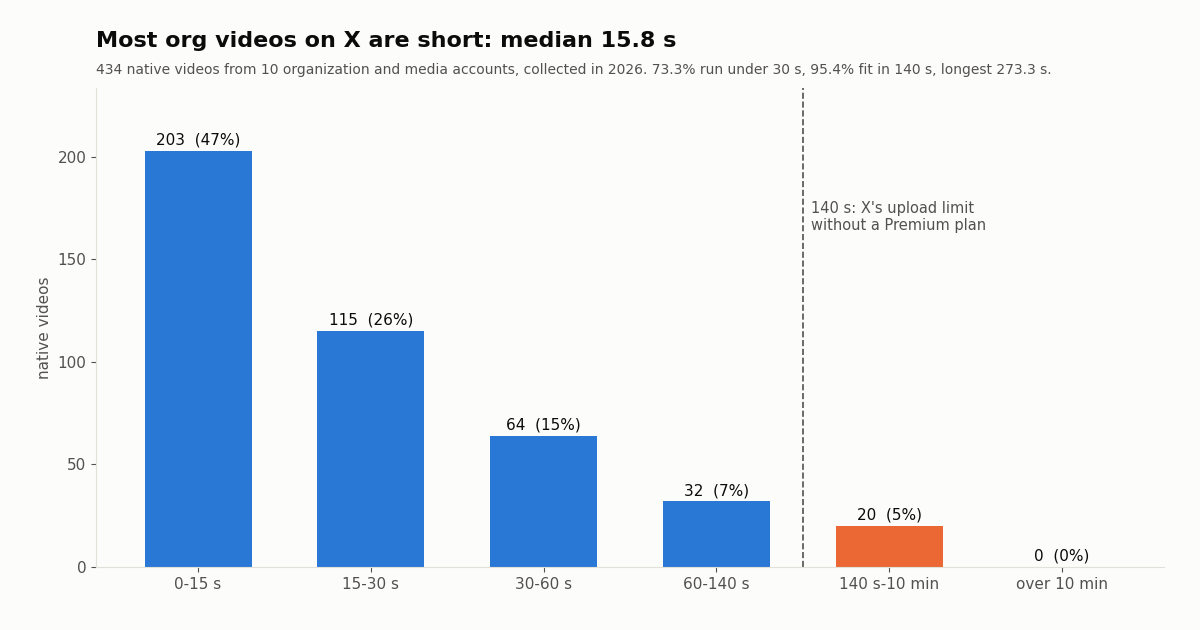
We read video_info.duration_millis for all 434 native videos. The median was 15.8 seconds, the middle half ran from 10.3 to 30.5 seconds, and nine in ten were under 67.4 seconds. 73.3% were shorter than 30 seconds, 88.0% shorter than a minute, and 95.4% fit inside the 140-second limit that applies to accounts without Premium. The longest was 273.3 seconds; none passed ten minutes.
So the clips that get shared and embedded are overwhelmingly short highlights. That fits the /video/1 method well: it reuses a short, already-processed clip with your framing on top. For long-form video, link to the host or upload a short cut.
On reach, our sample does not show a reliable lift for video: the per-account ratio of median views on native-video posts to other original posts ranged from 0.54x to 2.15x (table in the study section). Do not post video because a guide promised more views; post it when the clip carries the point.
For developers: read a post's video, reuse link and embed code by API
Everything above can be scripted. One call to GET /twitter/tweets with tweet_ids returns the post with its extendedEntities.media; the video's expanded_url is already the /video/1 reuse link of the post that owns the clip, source_status_id_str tells you whether the video was borrowed, and video_info.variants lists the files. Then X's oEmbed endpoint gives you the website code. GET /twitter/user/last_tweets pages through an account's recent posts (20 per page, follow next_cursor while has_next_page is true) so you can list its videos.
What it costs. On twitterapi.io, tweet endpoints are 15 credits per tweet returned, which is $0.15 per 1,000 tweets, and you pay only for the data returned; no X account is needed for reads. The official X API's pay-per-usage rate card (docs.x.com/x-api/getting-started/pricing) lists Posts: Read at $0.005 per resource, which is $5 per 1,000 posts, so about 33 times more for the same posts. This whole study read 1,248 posts and cost 18,750 credits, about $0.19. New accounts that pass the automatic bot check get up to $1 of free credits (at most 100,000 credits, no card, one per person or network, expiring after 31 days); purchased credits never expire. Plans and rate limits are on the pricing page.
Posting with a reused video from code. Write actions on twitterapi.io run through an authenticated session: one /twitter/user_login_v2 login ($0.10, with a proxy you supply) returns login_cookies, and each post is then 60 credits ($0.0006) through /twitter/create_tweet_v2. The call acts as that account, so X can rate-limit, lock or suspend it; keep a human pace, expect occasional re-login, and note that every HTTP 200 call is billed. We did not test whether a /video/1 link sent through the API is converted the same way as in the composer, so try it on a test account first. For uploading your own files, see the media upload guide.
How we collected this
Question. How do organization and media accounts put video on X, how long are those videos, which files does X serve for them, and does the /video/1 link still attach another post's video?
Accounts and queries. Recent timelines (replies excluded) of @NASA, @SpaceX, @NBA, @NFL, @espn, @Reuters, @BBCWorld, @CNN, @PlayStation and @Xbox through /twitter/user/last_tweets, up to 120 posts each. One Latest search for url:"/video/1" through /twitter/tweet/advanced_search (60 posts). One /twitter/tweets lookup of an @NBA reuse pair. All collected in 2026.
Sample. 1,186 timeline posts (434 native videos) and 60 search results; 66 requests in total, 18,750 credits. Each post was classified once: native video, repost of a video, quote of a video post, link out to a video host, photo, GIF, or text and article link.
Views ratio is the median views of native-video posts divided by the median views of other original posts from the same account; it is descriptive, not causal.
What the sample cannot show. Ten large accounts are not a typical user; their videos are professionally cut and their timelines are recent snapshots. The /video/1 search sample is small and only shows the result in the data, not the app's display, the gesture used, or what happens after deletion.
Privacy. Aggregates only. Organization and media accounts are named; the authors of the search results are private individuals, so their posts were never stored with the study and only de-identified counts were kept.
"""embed_video.py - for one X (Twitter) post URL: find its video, list the MP4
files X serves, print the /video/1 link you can paste into your own post, and
fetch website embed code from X's oEmbed endpoint.

    pip install requests
    export TWITTERAPI_IO_API_KEY=...      # from twitterapi.io/dashboard
    python embed_video.py https://x.com/NBA/status/2114149692229517741
    python embed_video.py --scan NASA     # list recent native videos of an account
"""
import os
import re
import sys

import requests

BASE = "https://api.twitterapi.io"
HEADERS = {"X-API-Key": os.environ["TWITTERAPI_IO_API_KEY"]}


def first_video(tweet):
    """Return the first video media object of a tweet, or None."""
    media = (tweet.get("extendedEntities") or {}).get("media") or []
    return next((m for m in media if m.get("type") == "video"), None)


def get_tweet(tweet_id):
    r = requests.get(f"{BASE}/twitter/tweets", params={"tweet_ids": tweet_id},
                     headers=HEADERS, timeout=30)
    r.raise_for_status()
    tweets = r.json().get("tweets") or []
    return tweets[0] if tweets else None


def oembed(post_url, video_only=True):
    """X's public oEmbed endpoint: no key, returns JSON with an html field."""
    query = dict(url=post_url, omit_script="true", dnt="true")
    if video_only:
        query["widget_type"] = "video"    # blockquote class="twitter-video"
    r = requests.get("https://publish.x.com/oembed", params=query, timeout=30)
    r.raise_for_status()
    return r.json()


def describe(post_url):
    m = re.search(r"/status/(\d+)", post_url)
    if not m:
        sys.exit("not an X post URL")
    tweet = get_tweet(m.group(1))
    if not tweet:
        sys.exit("post not found (deleted, protected or wrong ID)")
    video = first_video(tweet)
    if not video:
        sys.exit("this post has no native video (photo, GIF, link card or text)")

    info = video.get("video_info") or {}
    src = video.get("source_status_id_str")
    borrowed = bool(src and src != tweet["id"])
    print("author       :", tweet["author"]["userName"])
    print("duration (s) :", round((info.get("duration_millis") or 0) / 1000, 1))
    print("aspect ratio :", info.get("aspect_ratio"))
    print("borrowed     :", f"yes, from post {src}" if borrowed else "no, uploaded here")
    # expanded_url already points at the post that owns the video
    print("reuse link   :", video.get("expanded_url"))

    mp4 = [v for v in info.get("variants", []) if v.get("content_type") == "video/mp4"]
    for v in sorted(mp4, key=lambda v: v.get("bitrate", 0), reverse=True):
        size = re.search(r"/(\d+x\d+)/", v["url"])
        print(f"  mp4 {v.get('bitrate', 0) // 1000:>6} kbps  {size.group(1) if size else '?':>10}  {v['url']}")
    hls = [v for v in info.get("variants", []) if v.get("content_type") == "application/x-mpegURL"]
    if hls:
        print("  hls playlist:", hls[0]["url"])

    embed = oembed(f"https://x.com/{tweet['author']['userName']}/status/{tweet['id']}")
    print("\nembed html (add widgets.js once per page):\n", embed["html"])


def scan(user, pages=3):
    """Page through an account's recent posts and list the native videos."""
    cursor, seen = "", 0
    for _ in range(pages):
        params = {"userName": user}
        if cursor:
            params["cursor"] = cursor
        r = requests.get(f"{BASE}/twitter/user/last_tweets", params=params,
                         headers=HEADERS, timeout=30)
        r.raise_for_status()
        body = r.json()
        for t in (body.get("data") or {}).get("tweets") or []:
            seen += 1
            v = first_video(t)
            if v:
                secs = round(((v.get("video_info") or {}).get("duration_millis") or 0) / 1000, 1)
                print(f"{t['createdAt']}  {secs:>6} s  {t['url']}")
        if not body.get("has_next_page") or not body.get("next_cursor"):
            break
        cursor = body["next_cursor"]
    print(f"scanned {seen} posts")


if __name__ == "__main__":
    if len(sys.argv) == 3 and sys.argv[1] == "--scan":
        scan(sys.argv[2])
    elif len(sys.argv) == 2:
        describe(sys.argv[1])
    else:
        sys.exit(__doc__)
Questions readers ask
How do I post someone else's Twitter video without retweeting?
Copy the link of the post with the video, add /video/1 to the end (x.com/user/status/ID/video/1), paste it into a new post with your own text, and post. X attaches the original clip to your post as a video. We confirmed through the API in 2026 that posts made this way carry the clip as media that points back to the source post and author.
Does the /video/1 trick still work on X?
It did when we checked in 2026: 43 of 60 recent posts with such links carried another post's video as attached media, and none left the link behind as plain text. X does not document the method, so it can change; test it with one post before relying on it.
How do I get the embed code for a Twitter video?
Open the post on x.com in a browser, click the menu icon on the post, choose Embed post, then click Copy Code on publish.x.com and paste it into your page's HTML. Developers can call publish.x.com/oembed?url=<post URL> instead; it needs no key and returns the same code in JSON.
Can I embed just the video, without the tweet text?
Not as a bare player through X's tools. The closest is the oEmbed response with widget_type=video, which returns a twitter-video blockquote centered on the player. The post text still appears in the fallback markup. Hosting the file yourself is only appropriate for footage you own or are licensed to use.
Why is my embedded Twitter video not showing on my website?
Usually widgets.js did not load (blocked by a content blocker, a strict Content-Security-Policy, or removed by your editor), so readers see the plain blockquote with a pic.twitter.com link. It also disappears if the post is deleted, made protected, or the account is suspended.
How long can a video on Twitter be?
At the time of writing X's help center says 140 seconds and 512 MB without Premium; X Premium and the Plus, Premium, Super and Ultra plans of The X Subscription can upload up to 4 hours (1080p, 720p above 2 hours, 16 GB) on x.com and iOS and up to 10 minutes on Android. In our 2026 sample of organization videos the median was 15.8 seconds.
How do I embed a YouTube video on Twitter?
Paste the YouTube URL into a post. X shows a link card that opens YouTube rather than playing in X's player. Only 0.3% of the organization posts we measured linked out to video hosts this way; most uploaded clips natively.
Can I download a Twitter video to embed it myself?
Each X video ships several MP4 files plus an HLS playlist, readable from the post's video_info.variants. Our free video downloader picks them for a single post. Only re-host videos you own or have permission to use; for anyone else's clip, use the /video/1 link or the official embed.
Continue
- X Help Center: How to embed a post on your website or blog (Embed post, publish.x.com, Copy Code)
- X Help Center: Using X videos (upload steps, 140 seconds and 512MB without Premium)
- X Help Center: About longer videos for X Premium subscribers
- X developer docs: oEmbed API (publish.x.com/oembed, parameters, cache_age)
- X API pay-per-usage pricing (Posts: Read $0.005 per resource)
- twitterapi.io docs: Get tweets by IDs (/twitter/tweets)
- X (Twitter) API overview: endpoints, pricing and access
- How to embed tweets on a website: embed code, oEmbed and static cards
- Search Twitter (X) videos via API with filter:videos
- Twitter (X) video not playing: fixes in order
- Bulk-download Twitter (X) media with the API
- X API media upload v2: upload video from code
- Free Twitter (X) video downloader: MP4 for one post
- twitterapi.io pricing: credits, plans and rate limits
- 01How do you earn TwitterAPI.io credits by writing about the API?
- 02Twitter (X) Lists: What They Are, How to Make One, and How to Use Them
- 03Tweepcred: How Twitter (X) Scores Account Reputation, Read From the Code
- 04Tweet Failed to Send on Twitter (X)? What Each Error Means and How to Fix It
- 05Twitter (X) Direct Message Limit: the Daily DM Cap, Who Can Message You, and Why DMs Fail to Send
- 06Twitter (X) Video Not Playing? Here Is How to Fix It
- 07How to Embed Tweets on Your Website — 3 Methods, Measured
- 08Sam Altman on Twitter — A Tracking Guide for AI Developers & Researchers
Stop reading. Start building.
Starter credits cover real testing on real data. Google sign-in, no card, no application queue.
Get an API keyAlready building with TwitterAPI.io? Publish an honest tutorial or build log about it and earn up to $200 a month in API credits.